


Apple: iPhone News and Discussion Thread



To into your wifi settings and "forget" the network. Your certificate probably expired after the update

thanks for the tip. where did you read/hear about this? I went on the apple discussion boards but hadnt heard about this. i will try it on monday when i go back to work as my home wifi is working just fine. only my work wifi seems to have been affected.
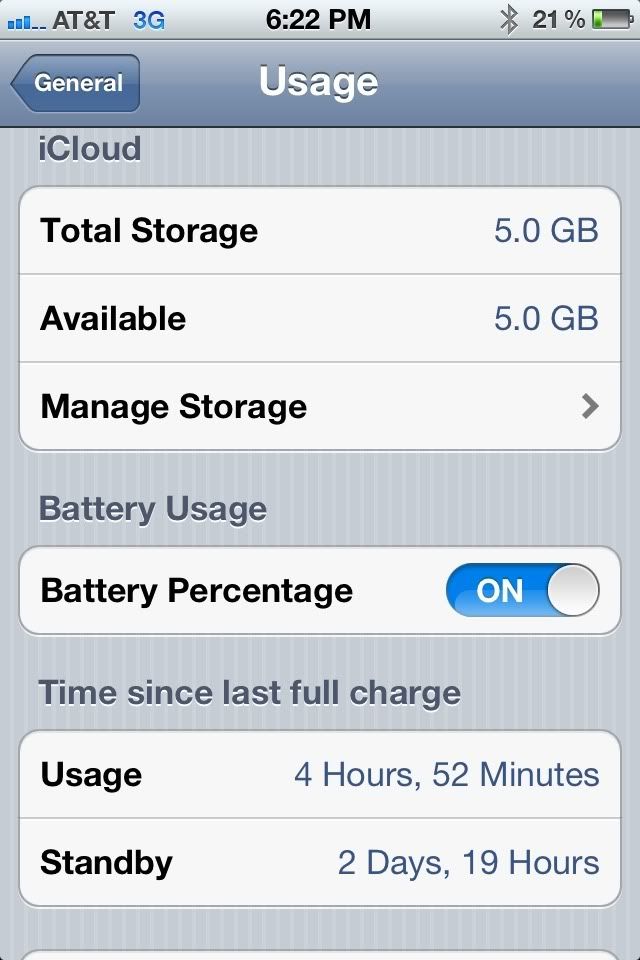
Got into work this morning and my wifi works without having to reset anything.
I'm guessing that whatever information was in the router for my previous connection must have been cached and I had no way of clearing that on the router. It must have released/cleared that connection information over the weekend.

I'm guessing that whatever information was in the router for my previous connection must have been cached and I had no way of clearing that on the router. It must have released/cleared that connection information over the weekend.



Moderator


Joined: Oct 2004
Posts: 64,122
Likes: 3,374
From: Not Las Vegas (SF Bay Area)
so i just did this.
http://iphoneza.co.za/2011/11/14/ico...roken-iphones/
<iframe width="640" height="360" src="http://www.youtube.com/embed/ZEw0cAI6X9Y?rel=0" frameborder="0" allowfullscreen></iframe>
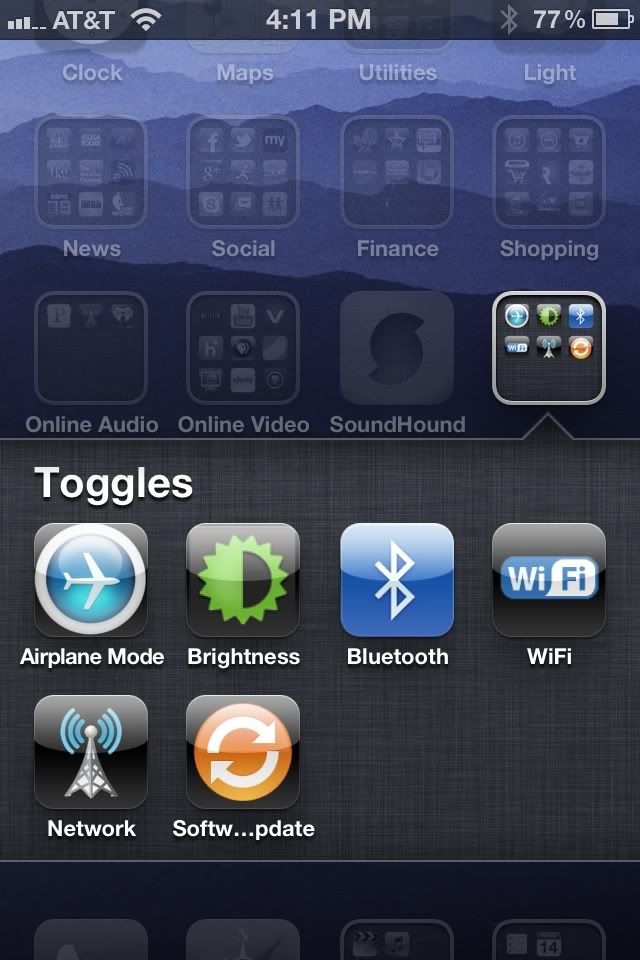
kind of nice since im not jailbroken, its like SBSsettings.
although one thing that is a pain is that it makes a new browser window everytime you click on a toggle. after fiddling with it i noticed i had 7! open
http://iphoneza.co.za/2011/11/14/ico...roken-iphones/
<iframe width="640" height="360" src="http://www.youtube.com/embed/ZEw0cAI6X9Y?rel=0" frameborder="0" allowfullscreen></iframe>
kind of nice since im not jailbroken, its like SBSsettings.
although one thing that is a pain is that it makes a new browser window everytime you click on a toggle. after fiddling with it i noticed i had 7! open



Moderator
Joined: Oct 2004
Posts: 64,122
Likes: 3,374
From: Not Las Vegas (SF Bay Area)



Alright guys, I wanted some opinions on something. Le Wife currently has a Droid Pro (Verizon) and she's pretty happy with it overall. She is saying she wants an iPOD shuffle for xmas now. However, she takes a TON of pics with her phone and most suck. I saw my sisters 4 vs her Pro and the 4 was much better. I was thinking I might be able to kill several birds with one stone if I got her the 4s. I have two points of contingency though. Reception and battery life.
I've yet to see anything beat Moto reception. Can anyone comment on reception vs moto phones?
She currently has the extended battery on her Pro. Will the 4s battery life be unbearable for her?
I've yet to see anything beat Moto reception. Can anyone comment on reception vs moto phones?
She currently has the extended battery on her Pro. Will the 4s battery life be unbearable for her?

nnInn
Joined: Mar 2006
Posts: 37,670
Likes: 1,084
Alright guys, I wanted some opinions on something. Le Wife currently has a Droid Pro (Verizon) and she's pretty happy with it overall. She is saying she wants an iPOD shuffle for xmas now. However, she takes a TON of pics with her phone and most suck. I saw my sisters 4 vs her Pro and the 4 was much better. I was thinking I might be able to kill several birds with one stone if I got her the 4s. I have two points of contingency though. Reception and battery life.
I've yet to see anything beat Moto reception. Can anyone comment on reception vs moto phones?
She currently has the extended battery on her Pro. Will the 4s battery life be unbearable for her?
I've yet to see anything beat Moto reception. Can anyone comment on reception vs moto phones?
She currently has the extended battery on her Pro. Will the 4s battery life be unbearable for her?
Reception, are you talking Verizon or ATT? I have Verizon, I have never lost/dropped a call with it. Now I will get in a bad spot once in a while and web connection suffers.
How much does she use it? If she's on it a lot surfing, then it's going to drain the battery. Just taken pictures and using it to upload them shouldn't be a problem. And if it is, then there's Mophie, http://www.mophie.com/ I have two of them, because I know when I going to be using the phone a lot, mainly for photos and processing, I use them. I keep one on my phone all of the time anyways.
Reception, are you talking Verizon or ATT? I have Verizon, I have never lost/dropped a call with it. Now I will get in a bad spot once in a while and web connection suffers.
Reception, are you talking Verizon or ATT? I have Verizon, I have never lost/dropped a call with it. Now I will get in a bad spot once in a while and web connection suffers.


Suzuka Master
Joined: Jan 2006
Posts: 6,771
Likes: 113
From: The 808
Alright guys, I wanted some opinions on something. Le Wife currently has a Droid Pro (Verizon) and she's pretty happy with it overall. She is saying she wants an iPOD shuffle for xmas now. However, she takes a TON of pics with her phone and most suck. I saw my sisters 4 vs her Pro and the 4 was much better. I was thinking I might be able to kill several birds with one stone if I got her the 4s. I have two points of contingency though. Reception and battery life.
I've yet to see anything beat Moto reception. Can anyone comment on reception vs moto phones?
She currently has the extended battery on her Pro. Will the 4s battery life be unbearable for her?
I've yet to see anything beat Moto reception. Can anyone comment on reception vs moto phones?
She currently has the extended battery on her Pro. Will the 4s battery life be unbearable for her?
I went from Evo 4G to 4s, primarily because my Ipod Nano 5G's touchwheel didn't work anymore. I listen to a lot of music and have Ipod adaptors in my cars and 4 around the crib so I can stream Pandora or listen to iTunes and have the 4S recharging concurrently. It's nice having one device instead of two. Photos are superior to the Evo.
Suzuka Master
Joined: Jan 2006
Posts: 6,771
Likes: 113
From: The 808
Rza, I got the 64GB. I have a ton of apps and use my 4S as a dedicated web-surfing device. I take advantage of the unlimited data plan with Sprint and the phone is also a business expense. It made sense to spring an extra c-note for an additional 32GB.
One caveat I will point out is that in the past, I always paid $8 a month for the Total Equipment Protection plan. Unfortunately, this must be initiated when purchasing a new phone despite the manufacturer's 1 year OEM warranty. I find new and amazing ways to damage my phones and replaced my Palm Pre 4 times and my Evo twice despite owning each phone for less than 16 months.
Apple Care is a flat $99 fee that is good for 2 years and will provide 2 iPhone replacements at a small surcharge $49 IIRC if I destroy it. This also covers deteriorating battery which I found to be a major issue in my previous ipod ownership experience. So one looks at $8 x 24 months or $192 with Android vs. $99 for 24 months with Apple.
One caveat I will point out is that in the past, I always paid $8 a month for the Total Equipment Protection plan. Unfortunately, this must be initiated when purchasing a new phone despite the manufacturer's 1 year OEM warranty. I find new and amazing ways to damage my phones and replaced my Palm Pre 4 times and my Evo twice despite owning each phone for less than 16 months.
Apple Care is a flat $99 fee that is good for 2 years and will provide 2 iPhone replacements at a small surcharge $49 IIRC if I destroy it. This also covers deteriorating battery which I found to be a major issue in my previous ipod ownership experience. So one looks at $8 x 24 months or $192 with Android vs. $99 for 24 months with Apple.

Moderator
Joined: Oct 2004
Posts: 64,122
Likes: 3,374
From: Not Las Vegas (SF Bay Area)
does not need to be jailbroken.
what it does is a weblink on your home screen, it jumps into safari and then multi tasks into the settings location for what you want to toggle, ie wifi bluetooth cell network airplane mode etc etc.
what it does is a weblink on your home screen, it jumps into safari and then multi tasks into the settings location for what you want to toggle, ie wifi bluetooth cell network airplane mode etc etc.
^^^ the way they made it sound it was as though it was a toggle, but you are correct, it is simply a launcher to that specific area in the settings apps.
Still useful as I find many of the most used settings are buried deeper than they should.
It takes...
2 clicks to get to where you can enable wifi
3 clicks to turn on bluetooth
yet only 1 click to turn on VPN which is probably the least used setting of the three for most consumers.
Still useful as I find many of the most used settings are buried deeper than they should.
It takes...
2 clicks to get to where you can enable wifi
3 clicks to turn on bluetooth
yet only 1 click to turn on VPN which is probably the least used setting of the three for most consumers.
Moderator
Joined: Oct 2004
Posts: 64,122
Likes: 3,374
From: Not Las Vegas (SF Bay Area)
I'd anyone else having an issue with safari pulling up a very old cached version when they hit the back button?
When browsing say a news site, I'll read the article and then press the back button to go back to the main page and it'll pull up a cached version of the page from a prior visit.
Ex today while reading Engadget i read an article hit back and it took me to a cached page from Nov 11th.
Been like this since updating to ios 5.
It's like the same thing the touchpad does.
When browsing say a news site, I'll read the article and then press the back button to go back to the main page and it'll pull up a cached version of the page from a prior visit.
Ex today while reading Engadget i read an article hit back and it took me to a cached page from Nov 11th.
Been like this since updating to ios 5.
It's like the same thing the touchpad does.
I'd anyone else having an issue with safari pulling up a very old cached version when they hit the back button?
When browsing say a news site, I'll read the article and then press the back button to go back to the main page and it'll pull up a cached version of the page from a prior visit.
Ex today while reading Engadget i read an article hit back and it took me to a cached page from Nov 11th.
Been like this since updating to ios 5.
It's like the same thing the touchpad does.
When browsing say a news site, I'll read the article and then press the back button to go back to the main page and it'll pull up a cached version of the page from a prior visit.
Ex today while reading Engadget i read an article hit back and it took me to a cached page from Nov 11th.
Been like this since updating to ios 5.
It's like the same thing the touchpad does.
 Been having the same issue on my iPhone and iPad.
Suzuka Master
Joined: Jan 2006
Posts: 6,771
Likes: 113
From: The 808
I'd anyone else having an issue with safari pulling up a very old cached version when they hit the back button?
When browsing say a news site, I'll read the article and then press the back button to go back to the main page and it'll pull up a cached version of the page from a prior visit.
Ex today while reading Engadget i read an article hit back and it took me to a cached page from Nov 11th.
Been like this since updating to ios 5.
It's like the same thing the touchpad does.
When browsing say a news site, I'll read the article and then press the back button to go back to the main page and it'll pull up a cached version of the page from a prior visit.
Ex today while reading Engadget i read an article hit back and it took me to a cached page from Nov 11th.
Been like this since updating to ios 5.
It's like the same thing the touchpad does.

downloading now...
also, it looks like we'll have 5.0.2 by the end of the week to further fix the batter issues, and 5.1 is in the works to "supposedly feature several enhancements to Siri that will give the virtual assistant access to new functions such as capturing a photograph or video, or even enabling and disabling Wi-Fi or Bluetooth."
also, it looks like we'll have 5.0.2 by the end of the week to further fix the batter issues, and 5.1 is in the works to "supposedly feature several enhancements to Siri that will give the virtual assistant access to new functions such as capturing a photograph or video, or even enabling and disabling Wi-Fi or Bluetooth."

Moderator Alumnus


Joined: Mar 2002
Posts: 64,153
Likes: 14,305
I'm thinking about it and I don't see any reason to download the gmail app. The web-based version seems to be working rather nice lately. (Not giving me trouble it has in the past). If I can get by with the web-based, I'll do that.


Suzuka Master
Joined: Jan 2006
Posts: 6,771
Likes: 113
From: The 808
Is there any advantage to the gmail app?
Not that I can tell, its easier to delete, file, and download pics with the exchange than with the app.