


Microsoft: Windows 7 and Office 2010 Thread


Team Owner


Joined: Oct 2003
Posts: 37,707
Likes: 3,905
From: Chicago


Go Giants
Joined: Aug 2004
Posts: 70,003
Likes: 1,260
From: PA


Thread Starter
Sanest Florida Man


Joined: Aug 2007
Posts: 46,074
Likes: 11,827
From: Florida

Go Giants
Joined: Aug 2004
Posts: 70,003
Likes: 1,260
From: PA
For the Sony at least, didn't need to pay anything and got the disks today.
It comes with 2 disks, one is a disk with just Windows 7 Upgrade (no crapware or Sony drivers). The upgrade is just like any other Windows upgrade, went fine, computer is fast!! The other DVD is a companion DVD which has the Sony apps (some crapware) and the drivers, loading that one now. Assuming the HP will be the same.


My Garage not
iTrader: (2)
Joined: Jun 2006
Posts: 2,121
Likes: 4
From: Westsiiiiiiiiiiiiiiiiiiiiiiiiiiiiiiiiiiide
i've been using windows 7 for the past day. it's cool, it's like a non-annoying version of what vista is. i liked vista though, it's just that you need to tweak it to run fast and i don't think most people wanted to sit there or knew how to mess with it.
verdict: windows 7 is like vista service pack 3
verdict: windows 7 is like vista service pack 3
Thread Starter
Sanest Florida Man
Joined: Aug 2007
Posts: 46,074
Likes: 11,827
From: Florida
That's great that they're giving you an install disc without crapware on it. When you insert the other disc can you choose what to install? If you want to just install drivers is that easy for a regular person to figure out or do they make install a bunch of shit too?
Go Giants
Joined: Aug 2004
Posts: 70,003
Likes: 1,260
From: PA
No, there was no custom install of the second disk...Its crapware, but not bad crapware (IE, trialware). So its all or nothing. It basically brings the PC to the same point of a new Windows 7 PC with your programs and settings on it. Meh, that's what uninstall is for.
Thread Starter
Sanest Florida Man
Joined: Aug 2007
Posts: 46,074
Likes: 11,827
From: Florida
There's a good article on PC Pro comparing PCs performance with and without crapware. I'm not surprised at all, this shit is ridiculous.
http://www.pcpro.co.uk/features/352927/the-crapware-con
http://www.pcpro.co.uk/features/352927/the-crapware-con
Thread Starter
Sanest Florida Man
Joined: Aug 2007
Posts: 46,074
Likes: 11,827
From: Florida
I got a question. I'm running a hyper-v server 2008 R2 that I connect via Server manager and RSAT. Is there a way I can have Server Manager automatically connect to my hyper-v server everytime I open the program? So that I don't have to type in the server name everytime.

That brings us to Windows Vista, which is 6.0. So we see Windows 7 as our next logical significant release and 7<sup>th</sup> in the family of Windows releases.
We learned a lot about using 5.1 for XP and how that helped developers with version checking for API compatibility. We also had the lesson reinforced when we applied the version number in the Windows Vista code as Windows 6.0-- that changing basic version numbers can cause application compatibility issues.
So we decided to ship the Windows 7 code as Windows 6.1 - which is what you will see in the actual version of the product in cmd.exe or computer properties.
There's been some fodder about whether using 6.1 in the code is an indicator of the relevance of Windows 7. It is not.
We learned a lot about using 5.1 for XP and how that helped developers with version checking for API compatibility. We also had the lesson reinforced when we applied the version number in the Windows Vista code as Windows 6.0-- that changing basic version numbers can cause application compatibility issues.
So we decided to ship the Windows 7 code as Windows 6.1 - which is what you will see in the actual version of the product in cmd.exe or computer properties.
There's been some fodder about whether using 6.1 in the code is an indicator of the relevance of Windows 7. It is not.
http://windowsteamblog.com/blogs/win.../14/why-7.aspx

I'm the Firestarter
Joined: Mar 2004
Posts: 12,309
Likes: 1,042
Anyone getting the Family Pack?
My parents have two PCs at home that could use the upgrade, but the 3rd license I was thinking of splitting with them and I don't live in the same household. Is there anything in the Family Pack that ties the licenses together that might make this unworkable? I suspect not, but I want to make sure.
Does the family pack simply contain a DVD and three normal Home Premium Upgrade keys?
My parents have two PCs at home that could use the upgrade, but the 3rd license I was thinking of splitting with them and I don't live in the same household. Is there anything in the Family Pack that ties the licenses together that might make this unworkable? I suspect not, but I want to make sure.
Does the family pack simply contain a DVD and three normal Home Premium Upgrade keys?
Team Owner
Joined: Oct 2003
Posts: 37,707
Likes: 3,905
From: Chicago
Thread Starter
Sanest Florida Man
Joined: Aug 2007
Posts: 46,074
Likes: 11,827
From: Florida
Anyone getting the Family Pack?
My parents have two PCs at home that could use the upgrade, but the 3rd license I was thinking of splitting with them and I don't live in the same household. Is there anything in the Family Pack that ties the licenses together that might make this unworkable? I suspect not, but I want to make sure.
Does the family pack simply contain a DVD and three normal Home Premium Upgrade keys?
My parents have two PCs at home that could use the upgrade, but the 3rd license I was thinking of splitting with them and I don't live in the same household. Is there anything in the Family Pack that ties the licenses together that might make this unworkable? I suspect not, but I want to make sure.
Does the family pack simply contain a DVD and three normal Home Premium Upgrade keys?



Thread Starter
Sanest Florida Man
Joined: Aug 2007
Posts: 46,074
Likes: 11,827
From: Florida
I just ordered my niece's new laptop! I got the Acer Aspire Timline 1810TZ. It's got a dual core 1.3ghz pentium 3gb ddr2, 64 bit W7 Premium, 11.6 1366x768 screen, 320gb hdd, bluetooth 2.1, draft-n wifi, webcam, and 8+hrs battery life all for $550!! Plus I got 5% bing cashback too!
Her birthday is on next monday and hopefully it will be there by then. But either way it doesn't matter cause her mom says she can't use it until she gets her grades up. So I get to use it until then. This should be a real nice machine.
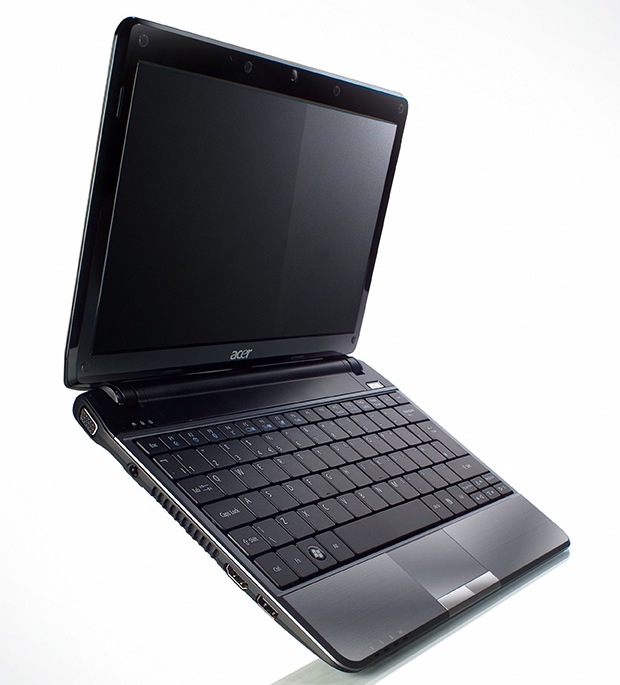
Her birthday is on next monday and hopefully it will be there by then. But either way it doesn't matter cause her mom says she can't use it until she gets her grades up. So I get to use it until then. This should be a real nice machine.

Hello Friend

Joined: Apr 2007
Posts: 10,953
Likes: 219
I'm the Firestarter
Joined: Mar 2004
Posts: 12,309
Likes: 1,042
My top pick right now is the 13" Acer Timeline. They're cheap and they have a great design, the problem is they come with really basic CPUs to make that price... I'll probably end up getting one of the higher-end one which will take the price from $699 to something like $1099.
Thread Starter
Sanest Florida Man
Joined: Aug 2007
Posts: 46,074
Likes: 11,827
From: Florida
I hope you guys didn't think the beta testing was over!?!? Because they're already working on Service Pack 1 and it is rumored to be released to Beta by the end of the year and should be out about this time next year.

Moderator Alumnus

Joined: Mar 2002
Posts: 64,171
Likes: 14,322
so I have a problem, whenever I start or reboot my computer, it gives me the yellow ! triangle over the networking icon and I have no internet connection. I have to go into the network window and there it shows my home network and one "Unknown" or unidentified network. To fix it, I have to disable the network adapter, and then re-enable it. Then it only sees my home network, and connects to the internet, and my day can begin. HELP!
Go Giants
Joined: Aug 2004
Posts: 70,003
Likes: 1,260
From: PA
so I have a problem, whenever I start or reboot my computer, it gives me the yellow ! triangle over the networking icon and I have no internet connection. I have to go into the network window and there it shows my home network and one "Unknown" or unidentified network. To fix it, I have to disable the network adapter, and then re-enable it. Then it only sees my home network, and connects to the internet, and my day can begin. HELP!
-Update Network Card Driver
-Disable Power Savings on NIC
-Disable another other 3rd party wireless config (eg. Sony Zerofree, etc)

The sizzle in the Steak
Joined: Nov 2001
Posts: 71,436
Likes: 1,877
From: Southern California
I just ordered my niece's new laptop! I got the Acer Aspire Timline 1810TZ. It's got a dual core 1.3ghz pentium 3gb ddr2, 64 bit W7 Premium, 11.6 1366x768 screen, 320gb hdd, bluetooth 2.1, draft-n wifi, webcam, and 8+hrs battery life all for $550!! Plus I got 5% bing cashback too!
Her birthday is on next monday and hopefully it will be there by then. But either way it doesn't matter cause her mom says she can't use it until she gets her grades up. So I get to use it until then. This should be a real nice machine.
Her birthday is on next monday and hopefully it will be there by then. But either way it doesn't matter cause her mom says she can't use it until she gets her grades up. So I get to use it until then. This should be a real nice machine.


Moderator
Joined: Oct 2007
Posts: 3,578
Likes: 322
From: Orange County, CA
Hey guys, I have a question. So if I was to buy a legit copy of WIndows 7. Install it, yada yada. Then later in the future, decides to format my computer. Do I have to call Microsoft, like what most people had to do with Vista, to get it reactivated?
Moderator Alumnus
Joined: Mar 2002
Posts: 64,171
Likes: 14,322

Go Giants
Joined: Aug 2004
Posts: 70,003
Likes: 1,260
From: PA

Thread Starter
Sanest Florida Man
Joined: Aug 2007
Posts: 46,074
Likes: 11,827
From: Florida
You shouldn't have a problem, it might do that in Vista if it was an OEM version only. If you get a 7 OEM version it should act the same way.
Thread Starter
Sanest Florida Man
Joined: Aug 2007
Posts: 46,074
Likes: 11,827
From: Florida
so I have a problem, whenever I start or reboot my computer, it gives me the yellow ! triangle over the networking icon and I have no internet connection. I have to go into the network window and there it shows my home network and one "Unknown" or unidentified network. To fix it, I have to disable the network adapter, and then re-enable it. Then it only sees my home network, and connects to the internet, and my day can begin. HELP!
Moderator
Joined: Oct 2007
Posts: 3,578
Likes: 322
From: Orange County, CA
Hmm, thanks for the info. I really want to pull the trigger on this because of the $30 price tag for students. I'm the IT kind of guy and would format my project laptop a lot because I do a lot of testing (I know, I know I can create a virtual). So I wouldn't want the hassle of calling Microsoft about every month.
Moderator Alumnus
Joined: Mar 2002
Posts: 64,171
Likes: 14,322
well, I was hoping to come in here and say "I love you". But, it didn't quite work. I downloaded the 7 64 specific driver from Dell for my exact machine and rebooted, and it did not have the yellow triangle, it said I was connected to internet, but I have no internet connection. That "Unknown network" is still showing up in addition to Home network, and when I disable and enable the card, it goes away and I have internet...
Thread Starter
Sanest Florida Man
Joined: Aug 2007
Posts: 46,074
Likes: 11,827
From: Florida
So it's saying that you're connected to multiple networks? Then it goes away after you cycle the NIC. I've had that a few times in Vista but it was rare. I'd do some research, check event viewer, etc. I'm sure whatever fixed this in Vista works in 7 too.