


Microsoft: Windows 7 and Office 2010 Thread


Thread Starter
Sanest Florida Man


Joined: Aug 2007
Posts: 45,974
Likes: 11,763
From: Florida
yes since you didn't reformat the drive before doing a clean install windows take all the windows, program files and user folders and puts them in a folder called windows.old that would have your drivers too. If you're sure that you have all the data that's in the windows.old folder in another place then you can delete it just be sure to get everything you may want out of it before you do

Suzuka Master
Joined: Jan 2009
Posts: 9,012
Likes: 439
From: SoCal
ohh damn, I knew I forgot to do something. Well I didnt reformat my drive as you said, but I left my computer on and it went to sleep all by itself!!! 
Now in my windows.old files, I already got all my document, movies, music pics everything I needed on my external. One question though, in the windows.old folder, there's a folder for drivers. In there are some of my drivers. Should I transfer that in, or just delete that, because my computer should have already found those drivers?
Now in my windows.old files, I already got all my document, movies, music pics everything I needed on my external. One question though, in the windows.old folder, there's a folder for drivers. In there are some of my drivers. Should I transfer that in, or just delete that, because my computer should have already found those drivers?

Windows Mobile Device Center (WMDC) synchronization WMDC does not synchronize with Microsoft Outlook 2010 if you use the 64-bit version of Outlook 2010. In such cases, an error message displays that states that there is no default mail client or the current mail client cannot fulfill the messaging. WMDC synchronizes correctly with the 32-bit version of Outlook 2010. To synchronize a Windows Phone with Outlook 2010 by using Windows Mobile Device Center, uninstall Outlook 2010 64-bit. Then use the original installer that you used to obtain Outlook 2010 64-bit to install Outlook 2010 32-bit. Outlook 2010 32-bit is the default option.

It's been like this since the Office 2k10 beta was out more than 6 months ago. Ridic that I have to use a 3rd party app to sync my Windows phone with a windows PC.
It's been like this since the Office 2k10 beta was out more than 6 months ago. Ridic that I have to use a 3rd party app to sync my Windows phone with a windows PC.

Three Wheelin'


Joined: Oct 2000
Posts: 1,670
Likes: 72
From: Northern VA
Windows Mobile Device Center (WMDC) synchronization WMDC does not synchronize with Microsoft Outlook 2010 if you use the 64-bit version of Outlook 2010. In such cases, an error message displays that states that there is no default mail client or the current mail client cannot fulfill the messaging. WMDC synchronizes correctly with the 32-bit version of Outlook 2010. To synchronize a Windows Phone with Outlook 2010 by using Windows Mobile Device Center, uninstall Outlook 2010 64-bit. Then use the original installer that you used to obtain Outlook 2010 64-bit to install Outlook 2010 32-bit. Outlook 2010 32-bit is the default option.
It's been like this since the Office 2k10 beta was out more than 6 months ago. Ridic that I have to use a 3rd party app to sync my Windows phone with a windows PC.
It's been like this since the Office 2k10 beta was out more than 6 months ago. Ridic that I have to use a 3rd party app to sync my Windows phone with a windows PC.
Thread Starter
Sanest Florida Man
Joined: Aug 2007
Posts: 45,974
Likes: 11,763
From: Florida
hmm surprised they dont have microsoft security essentials up there.
Hmm talking about the essentials, it got an update recently right? Suppose to be really good now?? How does it compare to google's Picasa, and Apple's photobooth/mobile me.
I'm comparing the photos part btw.
edit: all I really need from essentials is the mail, the photos I'm asking because of my dad, he currently uses picasa right now.
Hmm talking about the essentials, it got an update recently right? Suppose to be really good now?? How does it compare to google's Picasa, and Apple's photobooth/mobile me.
I'm comparing the photos part btw.
edit: all I really need from essentials is the mail, the photos I'm asking because of my dad, he currently uses picasa right now.
Thread Starter
Sanest Florida Man
Joined: Aug 2007
Posts: 45,974
Likes: 11,763
From: Florida
Windows Mobile Device Center (WMDC) synchronization WMDC does not synchronize with Microsoft Outlook 2010 if you use the 64-bit version of Outlook 2010. In such cases, an error message displays that states that there is no default mail client or the current mail client cannot fulfill the messaging. WMDC synchronizes correctly with the 32-bit version of Outlook 2010. To synchronize a Windows Phone with Outlook 2010 by using Windows Mobile Device Center, uninstall Outlook 2010 64-bit. Then use the original installer that you used to obtain Outlook 2010 64-bit to install Outlook 2010 32-bit. Outlook 2010 32-bit is the default option.
It's been like this since the Office 2k10 beta was out more than 6 months ago. Ridic that I have to use a 3rd party app to sync my Windows phone with a windows PC.
It's been like this since the Office 2k10 beta was out more than 6 months ago. Ridic that I have to use a 3rd party app to sync my Windows phone with a windows PC.
also an FYI you might want to skip 64-bit version since all 32bit macros and add-ins wont work with 64 bit soooooo......
http://msdn.microsoft.com/en-us/libr...ffice.14).aspx
http://msdn.microsoft.com/en-us/libr...ffice.14).aspx
Understood. But, I have a 64-bit machine and a 64-bit Win 7, and I CANNOT install the 32-bit version of WMDC.
So, the 32-bit Office works fine with the 64-bit WMDC, but the 64-bit Office does not work with the 64-bit WMDC. How much sense does that make?
And, like I said, this has been an issue since the beta release of O2k10.

ohh damn, I knew I forgot to do something. Well I didnt reformat my drive as you said, but I left my computer on and it went to sleep all by itself!!!
Now in my windows.old files, I already got all my document, movies, music pics everything I needed on my external. One question though, in the windows.old folder, there's a folder for drivers. In there are some of my drivers. Should I transfer that in, or just delete that, because my computer should have already found those drivers?
Now in my windows.old files, I already got all my document, movies, music pics everything I needed on my external. One question though, in the windows.old folder, there's a folder for drivers. In there are some of my drivers. Should I transfer that in, or just delete that, because my computer should have already found those drivers?
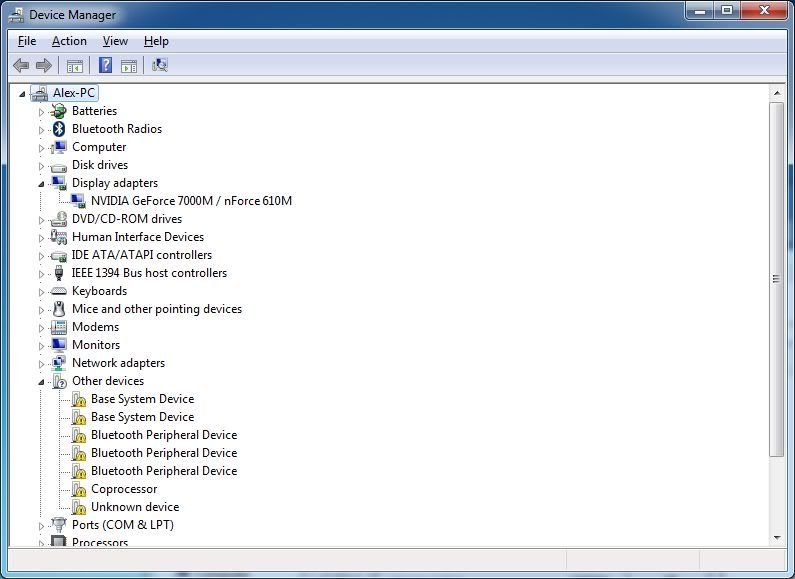
Start > "right click" on Computer > properties > click device manager on the upper left
If there are any devices with no drivers you should see them with a yellow triangle next to it like so.
I'm trying to think of a way to make the Windows computer name of our new work machines blatantly obvious to the end user. The idea being to help speed up support calls. Our end users have a wide variety of office and desk configurations so it's pretty likely that a simple physical label on the machine would be out of view or hard to get to. Hence my desire to do this "electronically" somehow.
I should clarify that by making the computer name "blatantly obvious" I'm talking about making it either always visible or no more than one click (or double click) away. Just curious if anyone has any ideas.
I should clarify that by making the computer name "blatantly obvious" I'm talking about making it either always visible or no more than one click (or double click) away. Just curious if anyone has any ideas.


Big Block go VROOOM!
Joined: Oct 2003
Posts: 8,578
Likes: 1
From: Chicago Burbs
^^I've used that bginfo utility on some of our servers in the past. Unfortunately for our end user computer, it would likely incite riots when people's precious wallpapers are "covered up by technical mumbo jumbo." Again though, this is a damn handy utility for servers.
Even though I don't know how to code VB for beans, I'm starting to think it shouldn't be too terribly difficult to create a script that pulls computer name and IP address and displays those items in a standard Windows information dialog box. I'll be off to the script repository on TechNet when I get around to that.
Even though I don't know how to code VB for beans, I'm starting to think it shouldn't be too terribly difficult to create a script that pulls computer name and IP address and displays those items in a standard Windows information dialog box. I'll be off to the script repository on TechNet when I get around to that.
Last edited by Billiam; Jun 17, 2010 at 11:40 AM.
^^I've used that bginfo utility on some of our servers in the past. Unfortunately for our end user computer, it would likely incite riots when people's precious wallpapers are "covered up by technical mumbo jumbo." Again though, this is a damn handy utility for servers.
Even though I don't know how to code VB for beans, I'm starting to think it shouldn't be too terribly difficult to create a script that pulls computer name and IP address and displays those items in a standard Windows information dialog box. I'll be off to the script repository on TechNet when I get around to that.
Even though I don't know how to code VB for beans, I'm starting to think it shouldn't be too terribly difficult to create a script that pulls computer name and IP address and displays those items in a standard Windows information dialog box. I'll be off to the script repository on TechNet when I get around to that.


Suzuka Master
Joined: Jan 2009
Posts: 9,012
Likes: 439
From: SoCal
They are probably the original drivers. I wouldn't worry about it. I'd check the manufacturer of your computer's website for the latest drivers. You can check to see if you have any devices that it did not load drivers for by clicking:
Start > "right click" on Computer > properties > click device manager on the upper left
If there are any devices with no drivers you should see them with a yellow triangle next to it like so.
Start > "right click" on Computer > properties > click device manager on the upper left
If there are any devices with no drivers you should see them with a yellow triangle next to it like so.
Chipset component possibly. The manufacturer's site may have the full "chipset driver package".
Last edited by rza49311; Jun 17, 2010 at 02:25 PM.
Thread Starter
Sanest Florida Man
Joined: Aug 2007
Posts: 45,974
Likes: 11,763
From: Florida
OK so I fucked up and I need some help. I have on my hyper-v 2008 r2 machine a 400GB VHD file that I deleted too soon and I want to recover it. the 400GB file was on a 500GB drive and I've run recuva on it with no luck (I guess it doesn't support the .VHD format) and now I'm running GetDataBack for NTFS and I'm having a little trouble with it. This is my first time using this program and I can't seem to find the VHD with this program either. I know it's there cause I'm pretty sure I haven't written anything to the drive since it got deleted and I saw GDB scanning within the .VHD file cause I recognized the names of files it was displaying.
It's not the end of the world but I'd like to have it back if possible.
It's not the end of the world but I'd like to have it back if possible.

Thread Starter
Sanest Florida Man
Joined: Aug 2007
Posts: 45,974
Likes: 11,763
From: Florida
No by default hyper-v puts the vhd files on the system drive so there was the hyper-v system files and another 20gb VHD on there. I was trying to move it off of there to a separate drive while converting it from a fixed size disk to a dynamic disk and somehow something went wrong.
It's possible it was fragmented but I'm not sure
It's possible it was fragmented but I'm not sure
Thread Starter
Sanest Florida Man
Joined: Aug 2007
Posts: 45,974
Likes: 11,763
From: Florida
Newegg is selling Office 2010 Home and Business for $220!! That's a $60 savings! I just payed $280 for it!
http://www.newegg.com/Product/Produc...82E16832116857
http://www.newegg.com/Product/Produc...82E16832116857

Suzuka Master
Joined: Jan 2009
Posts: 9,012
Likes: 439
From: SoCal
I got a question about windows live beta, dunno if this is the correct thread or not I'm still posting it here.
First off, can I sync my google calendar with the calendar in windows live? Second of all, how often does windows live keep checking for mail? And will it run in the background letting me know if I get an email or anything? Or does it have to be open to do that.
First off, can I sync my google calendar with the calendar in windows live? Second of all, how often does windows live keep checking for mail? And will it run in the background letting me know if I get an email or anything? Or does it have to be open to do that.
Thread Starter
Sanest Florida Man
Joined: Aug 2007
Posts: 45,974
Likes: 11,763
From: Florida
MS released the public beta of Windows 7/Server 2008 R2 Service Pack 1 today. You can download them here
http://technet.microsoft.com/hi-in/e.../ff183870.aspx
I'm not going to participate in this beta cause for Windows 7 there's no new features and it's pretty much a rollup of patches and a couple of new patches. Windows 7 has been rock solid since it was released so there isn't much to fix and not worth the hassle.
Actually the one new feature 7 SP1 is support for RemoteFX which is coming to Server 2008 R2.
But I'm not rolling SP1 on any my Servers (hyper-v R2, 2008 R2, or Vail) in beta form either, though I do look forward to the remoteFX and dynamic memory features for hyper-v VM management that are coming in SP1.
http://technet.microsoft.com/hi-in/e.../ff183870.aspx
I'm not going to participate in this beta cause for Windows 7 there's no new features and it's pretty much a rollup of patches and a couple of new patches. Windows 7 has been rock solid since it was released so there isn't much to fix and not worth the hassle.
Actually the one new feature 7 SP1 is support for RemoteFX which is coming to Server 2008 R2.
RemoteFX is a new enhancement to RDP's graphical remoting capabilities. The idea behind RemoteFX is to allow for a full remote experiences including multiple displays, Aero and multimedia streaming to all types of client devices including low cost thin clients. RemoteFX achieves this by using a technique known as host-based rendering. This technique allows for the final screen image to be rendered locally on the remote PC after being compressed and sent down to that remote host. The enhancements are expected to greatly improve video streaming across remote sessions which is currently one of the major drawbacks of virtualized computing.
Thread Starter
Sanest Florida Man
Joined: Aug 2007
Posts: 45,974
Likes: 11,763
From: Florida
I'll post this one in both of my threads I guess since it applies to both. MS announced SBS 2008 R2 and a new Server targeted at SMBs that incorporates SBS and Windows Home Server backup features all in one! It's code named Aurora and is much like Vail (the next version of WHS) in that it supports easy multi-machine backup along with server backup, provides remote access to all machines from one screen, and has health monitoring of your machines. It also provides support for Active Directory (Vail lacks this since it's targeted for home users) and you can install the hyper-v role on it and run one guest VM on it. WHile you can run exchange on it as well it's designed to use a hosted email solution like Exchange email that's hosted by MS or another provider.
As you may or may not know I have an IT job dealing with many SMB clients and this products seems to meet our needs pretty well. I think my boss is really going to like this one.
You can read more about it and SBS 7 here
http://www.winsupersite.com/server/sbs7_preview.asp
As you may or may not know I have an IT job dealing with many SMB clients and this products seems to meet our needs pretty well. I think my boss is really going to like this one.
You can read more about it and SBS 7 here
http://www.winsupersite.com/server/sbs7_preview.asp



Thread Starter
Sanest Florida Man
Joined: Aug 2007
Posts: 45,974
Likes: 11,763
From: Florida
go to event viewer and it will tell you what caused it to wake up. If it's a scheduled task like media center TV guide updating then you can turn it off or reschedule it or tell it not to run if the PC is sleeping. If it's caused by a USB device then try disabling the resume from sleep feature for the mouse and keyboard and see if that fixes it.
I had the same problem with my last PC, I think it was my mobo, it was on the fritz. I haven't had the problem since I rebuilt my PC.
Also check your BIOS mine lets me delegate who is in control of resuming from sleep the bios or the OS. If I set to bios then I can configure which devices can and can't wake my PC if I set it to OS then Windows handles it. If you're having a driver problem then set it to BIOS.
I had the same problem with my last PC, I think it was my mobo, it was on the fritz. I haven't had the problem since I rebuilt my PC.
Also check your BIOS mine lets me delegate who is in control of resuming from sleep the bios or the OS. If I set to bios then I can configure which devices can and can't wake my PC if I set it to OS then Windows handles it. If you're having a driver problem then set it to BIOS.

Banned
Joined: Mar 2009
Posts: 18,761
Likes: 960
From: Kennesaw, GA
Haven't tried this in awhile, so I was surprised it isn't working.
I had been using 7MC and my 360 as an extender, using Transcode 360, as the files are multi-part VOBs. It had worked fine, but for some reason doesn't anymore. I really enjoy using Media Browser.
However, T360 doesn't want to work anymore, and I think it's because it's not really compatible with 7 64. T360 needs NET 1.1 to work, and it asked me for it again when I tried to reinstall. It's there already, and 1.1 has known issues with 64-bit, which is why I think it's not working.
Sorry, that came out a bit jumbled. Stream of consciousness. I want to keep 7MC w/Media Browser. I'll eventually grab a nettop and network everything, but I need this to bridge the gap.
I had been using 7MC and my 360 as an extender, using Transcode 360, as the files are multi-part VOBs. It had worked fine, but for some reason doesn't anymore. I really enjoy using Media Browser.
However, T360 doesn't want to work anymore, and I think it's because it's not really compatible with 7 64. T360 needs NET 1.1 to work, and it asked me for it again when I tried to reinstall. It's there already, and 1.1 has known issues with 64-bit, which is why I think it's not working.
Sorry, that came out a bit jumbled. Stream of consciousness. I want to keep 7MC w/Media Browser. I'll eventually grab a nettop and network everything, but I need this to bridge the gap.
Thread Starter
Sanest Florida Man
Joined: Aug 2007
Posts: 45,974
Likes: 11,763
From: Florida
I know it's a little bit of work (I've done it over 300 times) but why not use handbrake to convert the VOBs to a single mp4 allowing you to stream and use 7's built-in transcoding feature and save on disk space at the same time.
Thread Starter
Sanest Florida Man
Joined: Aug 2007
Posts: 45,974
Likes: 11,763
From: Florida
Are these VOB files encrypted? I'll assume that all the VOB files for each movie are stored in their own respective folder. Are the Video_TS folders? I've successfully used handbrake to transcode a decrypted video_TS folder before, it's pretty easy.
Thread Starter
Sanest Florida Man
Joined: Aug 2007
Posts: 45,974
Likes: 11,763
From: Florida
You can just use the usual Movies option in MC instead. I never could get media browser working. I think we've already discussed this. I'm a pretty anti-3rd party guy I try to use the default programs when I can, unless they really suck.