


Microsoft: Windows 7 and Office 2010 Thread



Thread Starter
Sanest Florida Man


Joined: Aug 2007
Posts: 46,083
Likes: 11,834
From: Florida
Another cool tech coming in Windows 7, Virtual Wi-Fi
<p><img src="http://www.istartedsomething.com/wp-content/uploads/2009/05/wifi.jpg" alt="wifi" title="wifi" style="float:right;margin-left:15px;"/>WiFi is an incredible technology that has transformed how and where people used computers, however besides advancements in speed, range and security, very little has changed how we use wireless networks. Since 2002, <a href="http://research.microsoft.com/en-us/um/redmond/projects/virtualwifi/default.htm">Microsoft Research has been exploring a fascinating idea to virtualize the WiFi adapter</a>, turning a single piece of hardware and radio into virtually (pun) unlimited adapters. Years after the project was seemingly abandoned, it is now uncovered Virtual WiFi technology has been baked into the Windows 7 networking foundations.</p>
<p>In essence, <a href="http://research.microsoft.com/en-us/um/redmond/projects/virtualwifi/faq.htm">how Virtual WiFi works</a> is very similar to how <a href="http://en.wikipedia.org/wiki/Platform_virtualization">virtualization works for operating systems</a> which most people are familiar with - the transparent sharing of limited hardware resources to many operating systems. Virtual WiFi, abbreviated to VWiFi, is a software layer that abstracts the wireless LAN card hardware into multiple virtual adapters. The software handles the connections of each adapter to ensure every adapter has an opportunity to connect to their respective networks limited by time. The result is an operating system none-the-wiser and acts as if you have multiple WLAN hardware adapters working independently.</p>
<p>If you like to dabble in a little hardware jargon, here’s an obligatory architecture diagram which explains how Virtual WiFi works in Windows 7 in much more detail.</p>
<div style="text-align:center;"><img src="http://www.istartedsomething.com/wp-content/uploads/2009/05/vwifi_architecture.jpg" alt="vwifi_architecture" title="vwifi_architecture" /></div>
<p>If you got lost somewhere between the dotted lines, read on.</p>
<p>You might be wondering why anyone would ever need multiple WLAN adapters on the same PC, well to be honest, you don’t need but its sometimes good to have. In any case where you’re connected to an existing wireless access point and want to connect to another network whether that be a separate access point or even set up an ad-hoc connection, Virtual WiFi will allow you to do just that. But perhaps the scenario that is more appealing is the idea of a <a href="http://research.microsoft.com/en-us/projects/mesh/">mesh network</a>. In a mesh network, every client becomes a repeater, growing the network organically as more clients connect. Virtual WiFi enables this, since every client can become an access point too.</p>
<p>Now you might be asking, “I’ve looked at every nook and cranny of Windows 7 RC, how come I haven’t seen this feature?”. Surprisingly, the feature is in Windows 7 today and has been for quite some time apparently, but hasn’t been exposed due to a lack of driver support. WLAN hardware vendors are required to <a href="http://msdn.microsoft.com/en-us/library/dd445708.aspx">recompile their drivers with a couple new additions</a>. The good news is that Virtual WiFi functionality is going to be a requirement for WLAN drivers under the Windows 7 certification logo so expect to see it soon.</p>
<p>Assuming it all goes to plan, the <a href="http://msdn.microsoft.com/en-us/library/dd439506(VS.85).aspx">feature will be automatically exposed</a>.</p>
<blockquote><p>“On Windows 7 and later, the operating system installs a virtual device if a Hosted Network capable wireless adapter is present on the machine. This virtual device normally shows up in the “Network Connections Folder” as ‘Wireless Network Connection 2’ with a Device Name of ‘Microsoft Virtual WiFi Miniport adapter’ if the computer has a single wireless network adapter. This virtual device is used exclusively for performing software access point (SoftAP) connections [...]. The lifetime of this virtual device is tied to the physical wireless adapter. If the physical wireless adapter is disabled, this virtual device will be removed as well.”</p></blockquote>
<p>Unfortunately as it seems, the implementation of Virtual WiFi in Windows 7 is not as liberal as the research prototype. In Windows 7, you are limited to exactly one virtual adapter. However by looking at the impact of multiple virtual adapters on latency and performance from <a href="http://research.microsoft.com/research/pubs/view.aspx?tr_id=668">their original research report</a>, this is probably for good reasons.</p>
<p>More technical information aimed at hardware vendors and developers is available at the WinHEC 2008 session, “Wireless LAN Enhancements In Windows 7″, <a href="http://download.microsoft.com/download/5/E/6/5E66B27B-988B-4F50-AF3A-C2FF1E62180F/MBL-T604_WH08.pptx">PowerPoint downloadable here</a>. You can also learn more about their <a href="http://research.microsoft.com/en-us/um/redmond/projects/virtualwifi/documents.htm">original prototype and research paper here</a>.</p>
<p>Obviously this feature isn’t as <a href="http://blogs.msdn.com/e7/archive/2009/05/02/a-little-bit-of-personality.aspx">glamorous as the fancy new wallpapers</a> or as practical as Aero Snap in Windows 7, but I think it represents one of the many silent revolutions in Windows that probably won’t be <a href="http://www.istartedsomething.com/20080318/windows-me-deserve-more-respect/">recognized and taken for granted for releases to come</a>. I’d be interesting to see if Virtual WiFi catches on, and how new networking scenarios can be enabled by developers and hardware vendors.</p>
<p>In essence, <a href="http://research.microsoft.com/en-us/um/redmond/projects/virtualwifi/faq.htm">how Virtual WiFi works</a> is very similar to how <a href="http://en.wikipedia.org/wiki/Platform_virtualization">virtualization works for operating systems</a> which most people are familiar with - the transparent sharing of limited hardware resources to many operating systems. Virtual WiFi, abbreviated to VWiFi, is a software layer that abstracts the wireless LAN card hardware into multiple virtual adapters. The software handles the connections of each adapter to ensure every adapter has an opportunity to connect to their respective networks limited by time. The result is an operating system none-the-wiser and acts as if you have multiple WLAN hardware adapters working independently.</p>
<p>If you like to dabble in a little hardware jargon, here’s an obligatory architecture diagram which explains how Virtual WiFi works in Windows 7 in much more detail.</p>
<div style="text-align:center;"><img src="http://www.istartedsomething.com/wp-content/uploads/2009/05/vwifi_architecture.jpg" alt="vwifi_architecture" title="vwifi_architecture" /></div>
<p>If you got lost somewhere between the dotted lines, read on.</p>
<p>You might be wondering why anyone would ever need multiple WLAN adapters on the same PC, well to be honest, you don’t need but its sometimes good to have. In any case where you’re connected to an existing wireless access point and want to connect to another network whether that be a separate access point or even set up an ad-hoc connection, Virtual WiFi will allow you to do just that. But perhaps the scenario that is more appealing is the idea of a <a href="http://research.microsoft.com/en-us/projects/mesh/">mesh network</a>. In a mesh network, every client becomes a repeater, growing the network organically as more clients connect. Virtual WiFi enables this, since every client can become an access point too.</p>
<p>Now you might be asking, “I’ve looked at every nook and cranny of Windows 7 RC, how come I haven’t seen this feature?”. Surprisingly, the feature is in Windows 7 today and has been for quite some time apparently, but hasn’t been exposed due to a lack of driver support. WLAN hardware vendors are required to <a href="http://msdn.microsoft.com/en-us/library/dd445708.aspx">recompile their drivers with a couple new additions</a>. The good news is that Virtual WiFi functionality is going to be a requirement for WLAN drivers under the Windows 7 certification logo so expect to see it soon.</p>
<p>Assuming it all goes to plan, the <a href="http://msdn.microsoft.com/en-us/library/dd439506(VS.85).aspx">feature will be automatically exposed</a>.</p>
<blockquote><p>“On Windows 7 and later, the operating system installs a virtual device if a Hosted Network capable wireless adapter is present on the machine. This virtual device normally shows up in the “Network Connections Folder” as ‘Wireless Network Connection 2’ with a Device Name of ‘Microsoft Virtual WiFi Miniport adapter’ if the computer has a single wireless network adapter. This virtual device is used exclusively for performing software access point (SoftAP) connections [...]. The lifetime of this virtual device is tied to the physical wireless adapter. If the physical wireless adapter is disabled, this virtual device will be removed as well.”</p></blockquote>
<p>Unfortunately as it seems, the implementation of Virtual WiFi in Windows 7 is not as liberal as the research prototype. In Windows 7, you are limited to exactly one virtual adapter. However by looking at the impact of multiple virtual adapters on latency and performance from <a href="http://research.microsoft.com/research/pubs/view.aspx?tr_id=668">their original research report</a>, this is probably for good reasons.</p>
<p>More technical information aimed at hardware vendors and developers is available at the WinHEC 2008 session, “Wireless LAN Enhancements In Windows 7″, <a href="http://download.microsoft.com/download/5/E/6/5E66B27B-988B-4F50-AF3A-C2FF1E62180F/MBL-T604_WH08.pptx">PowerPoint downloadable here</a>. You can also learn more about their <a href="http://research.microsoft.com/en-us/um/redmond/projects/virtualwifi/documents.htm">original prototype and research paper here</a>.</p>
<p>Obviously this feature isn’t as <a href="http://blogs.msdn.com/e7/archive/2009/05/02/a-little-bit-of-personality.aspx">glamorous as the fancy new wallpapers</a> or as practical as Aero Snap in Windows 7, but I think it represents one of the many silent revolutions in Windows that probably won’t be <a href="http://www.istartedsomething.com/20080318/windows-me-deserve-more-respect/">recognized and taken for granted for releases to come</a>. I’d be interesting to see if Virtual WiFi catches on, and how new networking scenarios can be enabled by developers and hardware vendors.</p>

Needs more Lemon Pledge
Joined: Mar 2005
Posts: 52,768
Likes: 2,000
From: Phoenix, AZ
Anyone else frustrated by the UAC still?
For oprograms to have access there does not appear to be a "remember this choice" selection.
I use CCleaner. EVERY time I run it, the screen fades out and the "Do you want to allow the following program to make changes to your computer?" box appears. I know I can disable the safeguard wholesale, but is there a way to add programs to a "trusted" list on a program by program basis?
For oprograms to have access there does not appear to be a "remember this choice" selection.
I use CCleaner. EVERY time I run it, the screen fades out and the "Do you want to allow the following program to make changes to your computer?" box appears. I know I can disable the safeguard wholesale, but is there a way to add programs to a "trusted" list on a program by program basis?
Thread Starter
Sanest Florida Man
Joined: Aug 2007
Posts: 46,083
Likes: 11,834
From: Florida
no. It doesn't bother me. I hardly see UAC anymore, I only see it when installing a program or editing my bcd file. How often do you run CCleaner? Is it just to delete cookies or something?
Needs more Lemon Pledge
Joined: Mar 2005
Posts: 52,768
Likes: 2,000
From: Phoenix, AZ
I run it fairly often, but it seems like whenever I run almost any program (other than a browser or media player) I get UAC messages. How can they not have included a "Trust this application" option?
Thread Starter
Sanest Florida Man
Joined: Aug 2007
Posts: 46,083
Likes: 11,834
From: Florida
Apparently all the apps you're running require administrative privileges. I think the remember this application option is a security weakness, if you end up trusting an app then a hacker could exploit a weakness in a program that MS has no control over and would then grant it administrative access which would leave you fucked. I only have two apps installed that require a UAC prompt to run and that's my Vista boot pro (bcd file editing) and Recuva. I can see that the apps you may run in your business all require adminstrative privileges but most consumer apps nowadays do not.
Couldn't you just set FF to delete temp files when you close it down by checking the "always clear my private data when closing down firefox" box? All the other features of CCleaner don't seem like something you'd have to run that often. I have a feeling we've discussed this privacy setting of FF before.
Couldn't you just set FF to delete temp files when you close it down by checking the "always clear my private data when closing down firefox" box? All the other features of CCleaner don't seem like something you'd have to run that often. I have a feeling we've discussed this privacy setting of FF before.
Last edited by #1 STUNNA; May 26, 2009 at 01:39 PM.



Thread Starter
Sanest Florida Man
Joined: Aug 2007
Posts: 46,083
Likes: 11,834
From: Florida
yeah that's not new, we know that. It's just that he was able to install XP drivers and get them working on Windows 7 even though Vista/Win7 have a completely redone audio stack.
On this subject I dusted off my old Creative X-fi card today and I may pop it in to see how it runs. Back in the early Vista days Creative was worse than Nvidia at supporting Vista. So bad that I uninstalled my audio card and ran with the onboard audio on my mobo and never looked back. I believe they eventually got their act together but it took at least a year. So I'm curious to plug it back in and see how it goes since I never had it working in Vista. What sucks though is that all the audio is handled in software by the CPU in Vista and AFAIK can't be offloaded to another processor like the creative x-fi so IDK what the point of the x-fi processor is anymore. Anyone know? This was one of the few points that bothered me about Vista and it hasn't changed in W7
On this subject I dusted off my old Creative X-fi card today and I may pop it in to see how it runs. Back in the early Vista days Creative was worse than Nvidia at supporting Vista. So bad that I uninstalled my audio card and ran with the onboard audio on my mobo and never looked back. I believe they eventually got their act together but it took at least a year. So I'm curious to plug it back in and see how it goes since I never had it working in Vista. What sucks though is that all the audio is handled in software by the CPU in Vista and AFAIK can't be offloaded to another processor like the creative x-fi so IDK what the point of the x-fi processor is anymore. Anyone know? This was one of the few points that bothered me about Vista and it hasn't changed in W7

Thread Starter
Sanest Florida Man
Joined: Aug 2007
Posts: 46,083
Likes: 11,834
From: Florida
Yes you do. As an FYI Windows 7 Beta expires on Aug 1, 2009. On June 1, 2009 Windows 7 Beta will start shutting down every 2 hours so make sure you upgrade to the RC before then.
Thread Starter
Sanest Florida Man
Joined: Aug 2007
Posts: 46,083
Likes: 11,834
From: Florida
 well Vista SP2 was also released today and you can get it on Windows update or you can download it here
http://www.microsoft.com/downloads/d...DisplayLang=en
Needs more Lemon Pledge
Joined: Mar 2005
Posts: 52,768
Likes: 2,000
From: Phoenix, AZ
This thread has been awesome!
FYI, Objectdock runs great on Win7.
I have a licensing question...
I own Lightroom, PS, Office, etc., and have them installed on my XP partition. Is it legal to install them again on my Win7 partition (assuming they will work)? It's the same computer and only one OS can use it at a time. Thoughts?
FYI, Objectdock runs great on Win7.
I have a licensing question...
I own Lightroom, PS, Office, etc., and have them installed on my XP partition. Is it legal to install them again on my Win7 partition (assuming they will work)? It's the same computer and only one OS can use it at a time. Thoughts?

Big Block go VROOOM!
Joined: Oct 2003
Posts: 8,578
Likes: 1
From: Chicago Burbs
I'm quite confident in stating that single licenses of LR, PS, and Office all allow for legal installation on more than one physical OS. The intent of all three is actually for one desktop and one portable machine but I can't imagine how two OSs on the same physical computer could be considered anything except "even more compliant."
The only hitch I'm aware of is with Photoshop. Adobe does not cross-platform license it between Mac and Windows. I actually own two PS licenses because of this. Lightroom, on the other hand, is explicitly allowed on one Mac and one Windows machine under a single license.
The only hitch I'm aware of is with Photoshop. Adobe does not cross-platform license it between Mac and Windows. I actually own two PS licenses because of this. Lightroom, on the other hand, is explicitly allowed on one Mac and one Windows machine under a single license.
Thread Starter
Sanest Florida Man
Joined: Aug 2007
Posts: 46,083
Likes: 11,834
From: Florida
probably not. Actually Office 2007 should allow you to install it on two PCs. I've reinstalled it many times during the W7 beta phase and haven't had a problem. With Adobe you can either deactivate it on XP and install it on W7 OR you can when installing Adobe software disconnect from the internet ( by disabling the network adapter) then run the install process, after it installs choose not to register and then close the installer. but before you open the Adobe programs for the first time make sure you click start type in "notepad" right click notepad and choose run as admin. then from notepad open the HOSTS files in windows/sys32/drivers/etc (makes sure you change the open dialog from text files to all files) and add the line below sans quotes and save it.
"127.0.0.1 activate.adobe.com"
Then you should be good to go, that's how I get my PS to work
admit it, you know you love it
"127.0.0.1 activate.adobe.com"
Then you should be good to go, that's how I get my PS to work
admit it, you know you love it
Last edited by #1 STUNNA; May 27, 2009 at 10:42 PM.
Big Block go VROOOM!
Joined: Oct 2003
Posts: 8,578
Likes: 1
From: Chicago Burbs
Almost completely certain the answer is yes. If you eventually wipe your machine for the gold code of Win 7, it wouldn't surprise me if Microsoft made you call in for the third activiation (XP, 7 RC, 7 gold) but I doubt even that. I'm betting for Office you could probably do four or five activations before they'll make you call.
Thread Starter
Sanest Florida Man
Joined: Aug 2007
Posts: 46,083
Likes: 11,834
From: Florida
Mutitouch Win7 PC will come with the Touch Pack which is 6 apps buillt to demonstrate the capabilites of Multi-touch
<p>At Wall Street Journal's D: All Things Digital conference <a href="http://windowsteamblog.com/blogs/windowsvista/archive/2008/05/27/microsoft-demonstrates-multi-touch.aspx">about a year ago</a> today, Julie Larson-Green first introduced Walt Mossberg to Windows 7 and its multi-touch capabilities, which we call <b>Windows Touch</b>. While we’ve been working on bringing natural user interface to you in many Microsoft products, we first introduced multi-touch in <a href="http://www.microsoft.com/surface/">Microsoft Surface</a>. Since then, the Windows and Surface development teams have been collaborating closely on bringing multi-touch to Windows, and last year demoed a few applications they created to run on Windows 7. Today, we thought it would be fitting on this “anniversary” of first talking about Windows Touch to introduce the <b>Microsoft Touch Pack for Windows 7</b>.</p> <p>While touch is built into the “DNA” of Windows 7, something that was talked about in the <a href="http://blogs.msdn.com/e7/archive/2009/03/25/touching-windows-7.aspx">Touching Windows 7</a> blog post on the E7 Blog, we thought it would be fun to give you some applications that show what’s possible with this new way to interact with your PC. The Microsoft Touch Pack for Windows 7 is a set of six multi-touch optimized applications and games that are designed to truly showcase the capabilities of Windows Touch in Windows 7. It consists of 3 casual games, and 3 Microsoft Surface applications that have been created for Windows 7. </p> <p><b></b></p> <p>Let’s take a closer look at what’s in the Microsoft Touch Pack for Windows 7…</p> <p><a href="http://windowsteamblog.com/cfs-file.ashx/__key/CommunityServer.Blogs.Components.WeblogFiles/windows7/surface_5F00_globe_5F00_1DA06BA0.png"><img style="border-width: 0px; display: inline;" title="Microsoft Surface Globe" alt="Microsoft Surface Globe" src="http://windowsteamblog.com/cfs-file.ashx/__key/CommunityServer.Blogs.Components.WeblogFiles/windows7/surface_5F00_globe_5F00_thumb_5F00_1B1739E2.png" width="400" border="0" height="250"></a> </p> <p><b>Microsoft Surface Globe</b> pretty much puts the whole world in your hands (well, kind of!). It uses the Virtual Earth 3D engine to display a 3D version of the world. Using multi-touch, you can navigate to different regions, get local information, and “pin” your favorite locations. You can even “fly” around 3D models of buildings in some cities. The Microsoft Surface Globe was one of the apps Julie Larson-Green demoed at last year’s D: All Things Digital conference. To see the Microsoft Surface Globe app in action – take a look at <a href="http://video.msn.com/?mkt=en-US&playlist=videoByUuids:uuids:8f5ee5db-24f5-45fb-a3f6-d1a9660155a6&showPlaylist=true&from=soapbo xembed">this video</a>.</p> <p><a href="http://windowsteamblog.com/cfs-file.ashx/__key/CommunityServer.Blogs.Components.WeblogFiles/windows7/surface_5F00_collage_5F00_604F910B.png"><img style="border-width: 0px; display: inline;" title="Microsoft Surface Collage" alt="Microsoft Surface Collage" src="http://windowsteamblog.com/cfs-file.ashx/__key/CommunityServer.Blogs.Components.WeblogFiles/windows7/surface_5F00_collage_5F00_thumb_5F00_2E2840C1.png" width="400" border="0" height="250"></a></p> <p>Take your favorite digital photos and arrange and resize them using only your fingertips with <b>Microsoft Surface Collage!</b> Once you have your photos in an arrangement you like, it’s simple to save your collage and make it your desktop background. I’ve made a whole series of backgrounds and cycle through them with the desktop slideshow.<b><i> </i></b></p> <p><a href="http://windowsteamblog.com/cfs-file.ashx/__key/CommunityServer.Blogs.Components.WeblogFiles/windows7/surface_5F00_lagoon_5F00_130F71B3.png"><img style="border-width: 0px; display: inline;" title="Microsoft Surface Lagoon" alt="Microsoft Surface Lagoon" src="http://windowsteamblog.com/cfs-file.ashx/__key/CommunityServer.Blogs.Components.WeblogFiles/windows7/surface_5F00_lagoon_5F00_thumb_5F00_60E82168.png" width="400" border="0" height="250"></a> </p> <p><b>Microsoft Surface Lagoon</b> is a screensaver that you can interact with using multi-touch. It recreates the natural environment of water and schooling fish. It is really relaxing to run your fingers through the “water” and hold your finger down and watch the fish gather around.</p> <p><a href="http://windowsteamblog.com/cfs-file.ashx/__key/CommunityServer.Blogs.Components.WeblogFiles/windows7/MicrosoftBlackboard2009041713560927_5F00_53A19855. jpg"><img style="border-width: 0px; display: inline;" title="Microsoft Blackboard" alt="Microsoft Blackboard" src="http://windowsteamblog.com/cfs-file.ashx/__key/CommunityServer.Blogs.Components.WeblogFiles/windows7/MicrosoftBlackboard2009041713560927_5F00_thumb_5F0 0_39612F31.jpg" width="400" border="0" height="250"></a> </p> <p>Solve a puzzle game of physics, called <b>Microsoft Blackboard,</b> by creating a nifty machine on a virtual blackboard. Use gestures to rotate and resize gears, fans, seesaws and more to move balloons and balls toward the light bulbs - and victory.</p> <p><a href="http://windowsteamblog.com/cfs-file.ashx/__key/CommunityServer.Blogs.Components.WeblogFiles/windows7/MicrosoftRebound2009041713415190_5F00_5837A30F.jpg "><img style="border-width: 0px; display: inline;" title="Microsoft Rebound" alt="Microsoft Rebound" src="http://windowsteamblog.com/cfs-file.ashx/__key/CommunityServer.Blogs.Components.WeblogFiles/windows7/MicrosoftRebound2009041713415190_5F00_thumb_5F00_6 8CF9DFD.jpg" width="400" border="0" height="250"></a> </p> <p>Use your fingers to propel a ball and annihilate your opponent in <b>Microsoft Rebound</b>. Play against the computer or challenge a friend and battle it out in the electrified court to see who the champion is. </p> <p><a href="http://windowsteamblog.com/cfs-file.ashx/__key/CommunityServer.Blogs.Components.WeblogFiles/windows7/MicrosoftGardenPond2009041713401627_5F00_0086D564. jpg"><img style="border-width: 0px; display: inline;" title="Microsoft Garden Pond" alt="Microsoft Garden Pond" src="http://windowsteamblog.com/cfs-file.ashx/__key/CommunityServer.Blogs.Components.WeblogFiles/windows7/MicrosoftGardenPond2009041713401627_5F00_thumb_5F0 0_66466C3F.jpg" width="400" border="0" height="250"></a> </p> <p>Finally, with<b> Microsoft Garden Pond, </b>you can guide your origami creations to peaceful areas on the pond or direct them with gestures to complete goals that have been set for you. Gently move the origami by making ripples in the water.</p>
Thread Starter
Sanest Florida Man
Joined: Aug 2007
Posts: 46,083
Likes: 11,834
From: Florida
It seems browsers are running faster in Win7 than they did in Vista
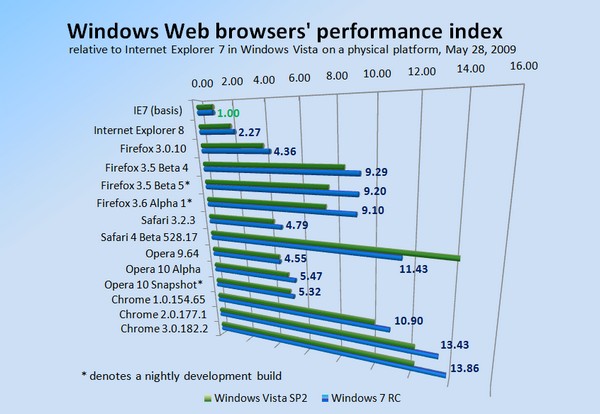
http://www.betanews.com/article/Chro...sta/1243540763
Also since they've spent time optimizing W7 for SSDs they're a good bit faster too

http://hothardware.com/Articles/Wind...alyzed/?page=9
http://www.betanews.com/article/Chro...sta/1243540763
Also since they've spent time optimizing W7 for SSDs they're a good bit faster too
http://hothardware.com/Articles/Wind...alyzed/?page=9
Thread Starter
Sanest Florida Man
Joined: Aug 2007
Posts: 46,083
Likes: 11,834
From: Florida
MS just announced that W7 will be publicly available on Oct 22 which is exactly what Asus said about a month ago.
http://online.wsj.com/article/BT-CO-...02-711873.html
SAN FRANCISCO (Dow Jones)--Microsoft Corp. (MSFT) on Tuesday announced the date the latest version of the Windows operating system, Windows 7, will be in general commercial availability: Oct. 22.
Thread Starter
Sanest Florida Man
Joined: Aug 2007
Posts: 46,083
Likes: 11,834
From: Florida
IDK? Didn't it become available on Technet and MSDN shortly after it went gold in early Nov? The business launch of vista was on Nov 30 with consumer PCs and general availability on Jan 30. Since it RTM'ed so late in the year OEMs didn't want rush and try to make it for the end of the holiday season so they waited a couple months. It should RTM a few weeks before Oct 22 but then they got to print the discs and give the market a little bit of time to prepare for the launch. It'll probably RTM in late Sept to early Oct.