


iPhone: OS 3.0


Moderator


Joined: Oct 2004
Posts: 64,132
Likes: 3,386
From: Not Las Vegas (SF Bay Area)
here's a feature alot of you guys have asked for, the ability to turn off the sms previews on the home screen! Also you can turn off repeat alerts for sms. Which I'd use cause I usually just read the preview and go back to what I'm doing and annoying to be alerted again to a message that I've already read.




here's a feature alot of you guys have asked for, the ability to turn off the sms previews on the home screen! Also you can turn off repeat alerts for sms. Which I'd use cause I usually just read the preview and go back to what I'm doing and annoying to be alerted again to a message that I've already read.
[img]https://gizmodo.com/assets/images/gallery/4/2009/03/medium_3364320472_8014b3d4f3_o.png[img]
[img]https://gizmodo.com/assets/images/gallery/4/2009/03/medium_3364320472_8014b3d4f3_o.png[img]

Moderator
Joined: Oct 2004
Posts: 64,132
Likes: 3,386
From: Not Las Vegas (SF Bay Area)


Sanest Florida Man


Joined: Aug 2007
Posts: 46,082
Likes: 11,834
From: Florida
Originally Posted by gizmodo
• Note syncing is pretty great, even if it is almost two years late
• You can sync notes through MobileMe as well as through iTunes
• Your call list now shows the location the call came from (was hidden inside each call screen before)
• Spotlight is great and speedy unless you have nine pages of apps, then it's SLOW
• MMS is currently broken (Could be because of AT&T plan, not because of the software - Thanks commenter!)
• There's a new MobileMe locator option to locate your phone from MobileMe. This is possibly so you can see where you left your phone, or maybe even where the thief who stole your phone is? Not sure.

• SMS has subjects now
• The call log is improved
• The new lock screen shows album art if a song is playing! As well as artist/track/album info. Sweet.
• Widescreen SMS works pretty well.
• Overall 3.0 is slightly more sluggish (because it's beta) than 2.2.1.
• You can search from almost any screen inside the iPod app
• Tapping the home button once from the home screen brings up the search screen
• When minimizing apps and going back to the home screen, the animation kinda fades out now instead of just disappearing into a speck
• Searching is fast, but it's not instantaneous
• You CANNOT select and copy text from Word documents
• You can sync notes through MobileMe as well as through iTunes
• Your call list now shows the location the call came from (was hidden inside each call screen before)
• Spotlight is great and speedy unless you have nine pages of apps, then it's SLOW
• MMS is currently broken (Could be because of AT&T plan, not because of the software - Thanks commenter!)
• There's a new MobileMe locator option to locate your phone from MobileMe. This is possibly so you can see where you left your phone, or maybe even where the thief who stole your phone is? Not sure.
• SMS has subjects now
• The call log is improved
• The new lock screen shows album art if a song is playing! As well as artist/track/album info. Sweet.
• Widescreen SMS works pretty well.
• Overall 3.0 is slightly more sluggish (because it's beta) than 2.2.1.
• You can search from almost any screen inside the iPod app
• Tapping the home button once from the home screen brings up the search screen
• When minimizing apps and going back to the home screen, the animation kinda fades out now instead of just disappearing into a speck
• Searching is fast, but it's not instantaneous
• You CANNOT select and copy text from Word documents
Sanest Florida Man
Joined: Aug 2007
Posts: 46,082
Likes: 11,834
From: Florida
It currently shows album art and the track name and nothing else. He probably just didn't know that and thought it was new even though the artist and album info is new but nothing to get excited about especially since the album art will usually have that info as well.


Sanest Florida Man
Joined: Aug 2007
Posts: 46,082
Likes: 11,834
From: Florida
Engadget walkthrough video
<object classid="clsid 27CDB6E-AE6D-11cf-96B8-444553540000" width="437" height="340" id="viddler"><param name="movie" value="http://www.viddler.com/simple_on_site/3c41a6e" /><param name="allowScriptAccess" value="always" /><param name="allowFullScreen" value="true" /><param name="wmode" value="transparent" /> <embed src="http://www.viddler.com/simple_on_site/3c41a6e" width="437" height="340" type="application/x-shockwave-flash" allowScriptAccess="always" allowFullScreen="true" wmode="transparent" name="viddler" ></embed></object>
<object classid="clsid
27CDB6E-AE6D-11cf-96B8-444553540000" width="437" height="340" id="viddler"><param name="movie" value="http://www.viddler.com/simple_on_site/3c41a6e" /><param name="allowScriptAccess" value="always" /><param name="allowFullScreen" value="true" /><param name="wmode" value="transparent" /> <embed src="http://www.viddler.com/simple_on_site/3c41a6e" width="437" height="340" type="application/x-shockwave-flash" allowScriptAccess="always" allowFullScreen="true" wmode="transparent" name="viddler" ></embed></object>
^ while using the "Messages" application I noticed an "Edit" button instead of a "Clear" button at the top of the SMS chat. Does that possibly mean we'll be able to pick and choose texts to delete instead of clearing the whole chat? 
Sanest Florida Man
Joined: Aug 2007
Posts: 46,082
Likes: 11,834
From: Florida
 you can even forward texts too!! I know, I know it'll be a real phone soon just wait!!
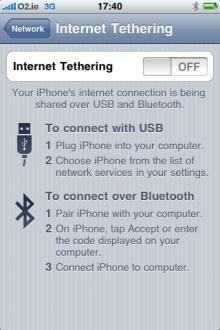
someone unlocked tethering in 3.0 beta and was able to get it working over usb!!


Sanest Florida Man
Joined: Aug 2007
Posts: 46,082
Likes: 11,834
From: Florida
yeah, I'd like that too. At least I was able to make my own ringtones without having to pay an additional price to use a song for a ringtone that I already own.



Moderator
Joined: Oct 2004
Posts: 64,132
Likes: 3,386
From: Not Las Vegas (SF Bay Area)
http://www.engadget.com/2009/03/26/a...ard-countdown/
Apple's just announced that its Worldwide Developers Conference will take place June 8-12 in San Francisco.
cmon next gen iphone
Apple's just announced that its Worldwide Developers Conference will take place June 8-12 in San Francisco.
cmon next gen iphone

3rd Gear
Joined: Jul 2007
Posts: 3
Likes: 0
Have any developers tested the iPhone 3.0 A2DP feature using the Acura's bluetooth?
Really looking forward to the ipod voice control feature of the 3GS ... if I can use that along with the A2DP to stream audio thru my TL's bluetooth, I will be a happy man.
Really looking forward to the ipod voice control feature of the 3GS ... if I can use that along with the A2DP to stream audio thru my TL's bluetooth, I will be a happy man.



Joined: Jan 2008
Posts: 36,545
Likes: 6,470
From: Kansas City, MO (Overland Park, KS)
Does anyone know what time or where the software will be available? I got up early this morning to upgrade before I left for work and I haven't seen the software update available yet.

Nom Nom Nom Nom
Joined: Aug 2003
Posts: 11,801
Likes: 76
From: Universal City
Joined: Jan 2008
Posts: 36,545
Likes: 6,470
From: Kansas City, MO (Overland Park, KS)

Sanest Florida Man
Joined: Aug 2007
Posts: 46,082
Likes: 11,834
From: Florida
yup, I tried to update my phone from the earlier released GM seed and it says it's the most current version. But if one of you guys can check the build # of the one they're releasing now that'd be great. I'm currently running build 3.0(7A341)


Sanest Florida Man
Joined: Aug 2007
Posts: 46,082
Likes: 11,834
From: Florida
yup! I've been rocking this build since wendesday!
Here's a good list of the new features
http://www.ismashphone.com/2009/06/h..._iphone_3.html
Here's a good list of the new features
<strong>1. Forward or Delete Individual Messages</strong></div><div><strong><br></strong></div><div>This feature allows you to manually select individual messages from a text message conversation, and forward them directly to another person via text message. </div><br><div>You can also selectively delete individual messages.</div><br><br><center><table valign="top" width="570" align="center" border="0" cellpadding="0" cellspacing="10"><tbody><tr><td><a href="http://ismashphone.typepad.com/.a/6a00e55225079e8834011571173918970b-popup" onclick="window.open( this.href, '_blank', 'width=640,height=480,scrollbars=no,resizable=no,t oolbar=no,directories=no,location=no,menubar=no,st atus=no,left=0,top=0' ); return false" style="color: blue; text-decoration: underline; cursor: pointer; display: inline;"><img alt="Forward_message2" class="at-xid-6a00e55225079e8834011571173918970b" src="http://ismashphone.typepad.com/.a/6a00e55225079e8834011571173918970b-200wi" style="border-style: none; cursor: pointer ! important; width: 165px;"></a></td><td><a href="http://ismashphone.typepad.com/.a/6a00e55225079e883401157117393b970b-popup" onclick="window.open( this.href, '_blank', 'width=640,height=480,scrollbars=no,resizable=no,t oolbar=no,directories=no,location=no,menubar=no,st atus=no,left=0,top=0' ); return false" style="color: blue; text-decoration: underline; cursor: pointer; display: inline;"><img alt="Forward_message3" class="at-xid-6a00e55225079e883401157117393b970b" src="http://ismashphone.typepad.com/.a/6a00e55225079e883401157117393b970b-200wi" style="border-style: none; cursor: pointer ! important; width: 165px;"></a></td><td><a href="http://ismashphone.typepad.com/.a/6a00e55225079e8834011570221dcc970c-popup" onclick="window.open( this.href, '_blank', 'width=640,height=480,scrollbars=no,resizable=no,t oolbar=no,directories=no,location=no,menubar=no,st atus=no,left=0,top=0' ); return false" style="color: blue; text-decoration: underline; cursor: pointer; display: inline;"><img alt="Forward_message1" class="at-xid-6a00e55225079e8834011570221dcc970c" src="http://ismashphone.typepad.com/.a/6a00e55225079e8834011570221dcc970c-200wi" style="border-style: none; cursor: pointer ! important; width: 165px;"></a></td></tr></tbody></table></center><p><br>How it works:</p><div><ul>
<li>Open a text message conversation.</li>
<li><span>Tap edit on the top right of the screen.</span> </li>
<li>Check off the messages that interest you. </li>
<li><span>Tap forward and select a recipient.</span> </li>
<li><span>OR tap delete to selectively get rid of messages.</span> </li>
</ul>
</div><div><strong><span style="font-weight: normal;"><div><strong>2. Email multiple photos at a time</strong></div><div><strong><br></strong></div><div>The previous iPhone operating systems did not allow you to send more than one picture at a time as an email attachment, not anymore.</div><br><center><table valign="top" width="570" align="center" border="0" cellpadding="0" cellspacing="10"><tbody><tr><td><a href="http://ismashphone.typepad.com/.a/6a00e55225079e88340115711b46e8970b-popup" onclick="window.open( this.href, '_blank', 'width=640,height=480,scrollbars=no,resizable=no,t oolbar=no,directories=no,location=no,menubar=no,st atus=no,left=0,top=0' ); return false" style="color: blue; text-decoration: underline; cursor: pointer; display: inline;"><img alt="Emailphotos1" class="at-xid-6a00e55225079e88340115711b46e8970b" src="http://ismashphone.typepad.com/.a/6a00e55225079e88340115711b46e8970b-200wi" style="border-style: none; cursor: pointer ! important; width: 165px;"></a></td><td><a href="http://ismashphone.typepad.com/.a/6a00e55225079e88340115711b4773970b-popup" onclick="window.open( this.href, '_blank', 'width=640,height=480,scrollbars=no,resizable=no,t oolbar=no,directories=no,location=no,menubar=no,st atus=no,left=0,top=0' ); return false" style="color: blue; text-decoration: underline; cursor: pointer; display: inline;"><img alt="Emailphotos2" class="at-xid-6a00e55225079e88340115711b4773970b" src="http://ismashphone.typepad.com/.a/6a00e55225079e88340115711b4773970b-200wi" style="border-style: none; cursor: pointer ! important; width: 165px;"></a></td><td><a href="http://ismashphone.typepad.com/.a/6a00e55225079e8834011570262cdc970c-popup" onclick="window.open( this.href, '_blank', 'width=640,height=480,scrollbars=no,resizable=no,t oolbar=no,directories=no,location=no,menubar=no,st atus=no,left=0,top=0' ); return false" style="color: blue; text-decoration: underline; cursor: pointer; display: inline;"><img alt="Emailphotos3" class="at-xid-6a00e55225079e8834011570262cdc970c" src="http://ismashphone.typepad.com/.a/6a00e55225079e8834011570262cdc970c-200wi" style="border-style: none; cursor: pointer ! important; width: 165px;"></a></td></tr></tbody></table></center><br><div>How it works:</div><div><ul>
<li>Go to photos</li>
<li><span>Tap the arrow on the bottom left</span> </li>
<li><span>Select the photos you want to share</span> </li>
<li><span>Press share</span> </li>
<li><span>Send the email with the automatically attached photos</span> </li>
</ul>
</div></span></strong></div><div><strong><br></strong></div><div><strong><span style="font-weight: normal;"><div><strong>3. Shake to undo and redo typing</strong></div><div><strong><br></strong></div><div>No matter what application you are using, you can undo typing by shaking your iPhone. If you want your text back, simply shake again. </div><br><div>If you had something else written <em>before</em> you started writing the sentence you chose to undo, it reverts back to that. If this was the first thing you wrote, it simply erases it. </div><br><center><table valign="top" width="570" align="center" border="0" cellpadding="0" cellspacing="10"><tbody><tr><td><a href="http://ismashphone.typepad.com/.a/6a00e55225079e8834011570260956970c-popup" onclick="window.open( this.href, '_blank', 'width=640,height=480,scrollbars=no,resizable=no,t oolbar=no,directories=no,location=no,menubar=no,st atus=no,left=0,top=0' ); return false" style="color: blue; text-decoration: underline; cursor: pointer; display: inline;"><img alt="Undo1" class="at-xid-6a00e55225079e8834011570260956970c" src="http://ismashphone.typepad.com/.a/6a00e55225079e8834011570260956970c-200wi" style="border-style: none; cursor: pointer ! important; width: 180px;"></a></td><td><a href="http://ismashphone.typepad.com/.a/6a00e55225079e8834011570260987970c-popup" onclick="window.open( this.href, '_blank', 'width=640,height=480,scrollbars=no,resizable=no,t oolbar=no,directories=no,location=no,menubar=no,st atus=no,left=0,top=0' ); return false" style="color: blue; text-decoration: underline; cursor: pointer; display: inline;"><img alt="Undo2" class="at-xid-6a00e55225079e8834011570260987970c" src="http://ismashphone.typepad.com/.a/6a00e55225079e8834011570260987970c-200wi" style="border-style: none; cursor: pointer ! important; width: 180px;"></a></td></tr></tbody></table></center></span></strong></div><div><strong><br></strong></div><div><strong><br></strong></div><div><strong><span style="font-weight: normal;"><div><strong>4. Shake to shuffle</strong></div><div><strong><br></strong></div><div style="text-align: center;"><strong><a href="http://ismashphone.typepad.com/.a/6a00e55225079e883401157025eaa8970c-popup" onclick="window.open( this.href, '_blank', 'width=640,height=480,scrollbars=no,resizable=no,t oolbar=no,directories=no,location=no,menubar=no,st atus=no,left=0,top=0' ); return false" style="color: blue; text-decoration: none; cursor: pointer; display: inline;"><img alt="Shake to shuffle" class="at-xid-6a00e55225079e883401157025eaa8970c" src="http://ismashphone.typepad.com/.a/6a00e55225079e883401157025eaa8970c-800wi" style="border-style: none; cursor: pointer ! important;" title="Shake to shuffle" border="0"></a></strong></div><div style="text-align: left;">This feature is pretty self-explanatory, but is really great - especially for working out. Imagine you're running or working out in the gym, and you're iPhone's iPod is in shuffle mode. Some mellow, non-workout-appropriate Coldplay song comes on. You have to get your iPhone out of your pocket and press next with your sweaty finger.</div><div style="text-align: left;"><br></div><div style="text-align: left;">With this update, you can keep your iPhone in your pocket (or strapped to your arm if you have an iPhone arm band) and just give it a quick jiggle. </div><div style="text-align: left;"><br></div><div style="text-align: left;">If you are in a specific album or playlist, it shuffles within that album or playlist. If not, it just picks a random song out of your whole library. </div></span></strong></div><div><strong><br></strong></div><div><strong>5. Copy/Cut/Paste</strong></div><br><div>The basic copy/cut/paste feature allows users to select, copy or cut, and paste text from and to anywhere on the iPhone. In other words, you can copy text from an app or a Safari web page, and paste it into Notes or Email - it works everywhere.</div><br>
<center>
<table valign="top" width="570" align="center" border="0" cellpadding="0" cellspacing="10">
<tbody><tr>
<td><a href="http://ismashphone.typepad.com/.a/6a00e55225079e883401157021edc2970c-popup" onclick="window.open( this.href, '_blank', 'width=640,height=480,scrollbars=no,resizable=no,t oolbar=no,directories=no,location=no,menubar=no,st atus=no,left=0,top=0' ); return false" style="display: inline;"><img alt="Copypaste1" class="at-xid-6a00e55225079e883401157021edc2970c" src="http://ismashphone.typepad.com/.a/6a00e55225079e883401157021edc2970c-200wi" style="width: 165px;"></a></td>
<td><a href="http://ismashphone.typepad.com/.a/6a00e55225079e8834011571170750970b-popup" onclick="window.open( this.href, '_blank', 'width=640,height=480,scrollbars=no,resizable=no,t oolbar=no,directories=no,location=no,menubar=no,st atus=no,left=0,top=0' ); return false" style="display: inline;"><img alt="Copypaste2" class="at-xid-6a00e55225079e8834011571170750970b" src="http://ismashphone.typepad.com/.a/6a00e55225079e8834011571170750970b-200wi" style="width: 165px;"></a></td>
<td><a href="http://ismashphone.typepad.com/.a/6a00e55225079e88340115711707aa970b-popup" onclick="window.open( this.href, '_blank', 'width=640,height=480,scrollbars=no,resizable=no,t oolbar=no,directories=no,location=no,menubar=no,st atus=no,left=0,top=0' ); return false" style="display: inline;"><img alt="Copypaste3" class="at-xid-6a00e55225079e88340115711707aa970b" src="http://ismashphone.typepad.com/.a/6a00e55225079e88340115711707aa970b-200wi" style="width: 165px;"></a></td>
</tr>
</tbody></table>
</center><div style="text-align: center;"><span style="text-align: center; font-size: 11px; font-family: Arial;">[click to enlarge]</span></div><div style="text-align: left;"><span style="line-height: 13px;">How it works:</span></div><div style="text-align: left;"><ul>
<li><span style="line-height: 13px;">Double tap a word</span></li>
<li><span>Drag the blue markers to highlight your desired text</span> </li>
<li><span>Choose cut/copy</span> </li>
<li><span>Double tap a typable area and press Paste</span></li>
</ul>
<span>Or:</span></div><div style="text-align: left;"><ul>
<li>Hold a word until the magnifying glass appears </li>
<li><span>Release</span> </li>
<li><span>Options "Select" and "Select All" appear</span> </li>
<li>Pressing select or select all brings up the blue markers...you know what to do </li>
</ul>
Deleting with select:</div><div style="text-align: left;"><ul>
<li>By selecting a fragment of text with the two blue markers, you can press backspace and delete the whole phrase/sentence/paragraph. (Before you had to hold down backspace.) </li>
</ul>
<span> </span> <br><span></span></div><br><div><strong>6. MMS</strong></div><div><strong><br></strong></div><div>MMS (picture/audio/video messaging) is not yet available for AT&T customers. AT&T is still working on preparing things on their end for iPhone users to MMS. AT&T also announced that MMS will not cost extra money, and will be treated as a regular SMS message financially. Anything video related is for iPhone 3G <strong>S</strong> only. </div><br><div style="text-align: center;"><a href="http://ismashphone.typepad.com/.a/6a00e55225079e8834011570220b4c970c-popup" onclick="window.open( this.href, '_blank', 'width=640,height=480,scrollbars=no,resizable=no,t oolbar=no,directories=no,location=no,menubar=no,st atus=no,left=0,top=0' ); return false" style="display: inline;"><img alt="Mms_1" class="at-xid-6a00e55225079e8834011570220b4c970c" src="http://ismashphone.typepad.com/.a/6a00e55225079e8834011570220b4c970c-800wi" title="Mms_1" border="0"></a> <br></div><div style="text-align: left;">How it works:</div><div style="text-align: left;"><ul>
<li>Tap the camera logo in "Messages" (formerly SMS)</li>
<li><span>Select "Take Photo" or "Choose Existing" (iPhone 3G S has "Take Photo or Video") </span> </li>
<li><span>File size limit is determined by carrier - some files may be compressed</span> </li>
</ul>
</div><div><em><span style="font-style: normal;"><br></span></em></div><br><div><strong>7. Landscape Keyboard</strong></div><div><strong><br></strong></div><div>The landscape keyboard was previously only available for Safari. With iPhone OS 3.0, you can use it in essentially all "typing" programs, including Notes, Mail, and Messages. The bigger keyboard is extremely convenient for typing and decreases typos exponentially. </div><p></p><ul>
<li>Notes:</li>
</ul>
<div style="text-align: center;"> <a href="http://ismashphone.typepad.com/.a/6a00e55225079e88340115702214f9970c-popup" onclick="window.open( this.href, '_blank', 'width=640,height=480,scrollbars=no,resizable=no,t oolbar=no,directories=no,location=no,menubar=no,st atus=no,left=0,top=0' ); return false" style="display: inline;"><img alt="Notes_landscape" class="at-xid-6a00e55225079e88340115702214f9970c" src="http://ismashphone.typepad.com/.a/6a00e55225079e88340115702214f9970c-800wi" title="Notes_landscape" border="0"></a><br></div><p></p><div><ul>
<li>Email</li>
</ul>
<div style="text-align: center;"><span style="color: rgb(0, 0, 0);"><span style="text-decoration: none;"><a href="http://ismashphone.typepad.com/.a/6a00e55225079e883401157022163f970c-popup" onclick="window.open( this.href, '_blank', 'width=640,height=480,scrollbars=no,resizable=no,t oolbar=no,directories=no,location=no,menubar=no,st atus=no,left=0,top=0' ); return false" style="text-decoration: none; display: inline;"><img alt="Email_landscape" class="at-xid-6a00e55225079e883401157022163f970c" src="http://ismashphone.typepad.com/.a/6a00e55225079e883401157022163f970c-800wi" title="Email_landscape" border="0"></a></span><a href="http://ismashphone.typepad.com/.a/6a00e55225079e883401157022163f970c-popup" onclick="window.open( this.href, '_blank', 'width=640,height=480,scrollbars=no,resizable=no,t oolbar=no,directories=no,location=no,menubar=no,st atus=no,left=0,top=0' ); return false" style="text-decoration: none; display: inline;"> </a></span></div></div><div><ul>
<li>Text messages</li>
</ul>
<span><div style="text-align: center;"><span> </span> <a href="http://ismashphone.typepad.com/.a/6a00e55225079e8834011571173321970b-popup" onclick="window.open( this.href, '_blank', 'width=640,height=480,scrollbars=no,resizable=no,t oolbar=no,directories=no,location=no,menubar=no,st atus=no,left=0,top=0' ); return false" style="display: inline;"><img alt="Messages_landscape" class="at-xid-6a00e55225079e8834011571173321970b" src="http://ismashphone.typepad.com/.a/6a00e55225079e8834011571173321970b-800wi" title="Messages_landscape" border="0"></a><br></div></span></div><br><div><strong><br></strong></div><div><ul>
</ul>
</div><div><div><strong>8. Double click home button</strong></div><div><strong><br></strong></div><div>In the previous iPhone operating systems, we had the option to double click the home button to access "Favorites", and to access iPod controls if music was already playing. Now you can access the Spotlight Search or the Camera by double clicking the home button.</div><br><div style="text-align: center;"><a href="http://ismashphone.typepad.com/.a/6a00e55225079e883401157022cf74970c-popup" onclick="window.open( this.href, '_blank', 'width=640,height=480,scrollbars=no,resizable=no,t oolbar=no,directories=no,location=no,menubar=no,st atus=no,left=0,top=0' ); return false" style="display: inline;"><img alt="Doubleclick_home" class="at-xid-6a00e55225079e883401157022cf74970c" src="http://ismashphone.typepad.com/.a/6a00e55225079e883401157022cf74970c-250wi" style="width: 220px;"></a> <br></div><div style="text-align: left;">How it works:</div><div style="text-align: left;"><ul>
<li>Go to Settings</li>
<li><span>Go to General</span> </li>
<li><span>Go to Home</span> </li>
<li><span>Select the option you desire</span> </li>
</ul>
</div><br><div><strong>9. Call history log</strong></div><div><strong><br></strong></div><div><ul>
<li>When you go to "Recents" or "Voicemail" under Phone, the type of phone is now listed directly under the name (mobile, home, work.)</li>
<li><span>When you click on the blue arrow next to a call, the actual duration of the call will be listed and organized by date. </span> </li>
</ul>
<div style="text-align: center;"><a href="http://ismashphone.typepad.com/.a/6a00e55225079e883401157117f17d970b-popup" onclick="window.open( this.href, '_blank', 'width=640,height=480,scrollbars=no,resizable=no,t oolbar=no,directories=no,location=no,menubar=no,st atus=no,left=0,top=0' ); return false" style="display: inline;"><span style="color: rgb(0, 0, 0);"></span></a><a href="http://ismashphone.typepad.com/.a/6a00e55225079e883401157117f17d970b-popup" onclick="window.open( this.href, '_blank', 'width=640,height=480,scrollbars=no,resizable=no,t oolbar=no,directories=no,location=no,menubar=no,st atus=no,left=0,top=0' ); return false" style="display: inline;"><img alt="Call duration" class="at-xid-6a00e55225079e883401157117f17d970b" src="http://ismashphone.typepad.com/.a/6a00e55225079e883401157117f17d970b-250wi" style="width: 220px;"></a> <br></div></div><br><br><div><strong>10. Hold link in safari to copy/open in new page</strong></div><div><strong><br></strong></div><div style="text-align: center;"><strong><a href="http://ismashphone.typepad.com/.a/6a00e55225079e883401157117f804970b-popup" onclick="window.open( this.href, '_blank', 'width=640,height=480,scrollbars=no,resizable=no,t oolbar=no,directories=no,location=no,menubar=no,st atus=no,left=0,top=0' ); return false" style="display: inline;"><img alt="Safari_hold" class="at-xid-6a00e55225079e883401157117f804970b" src="http://ismashphone.typepad.com/.a/6a00e55225079e883401157117f804970b-250wi" style="width: 220px;"></a> <br></strong></div><div style="text-align: left;">How it works:</div><div style="text-align: left;"><ul>
<li>Browse a page in Safari</li>
<li>Hold your finger on a URL link </li>
<li><span>The above menu allows you to either copy the URL or open it in a new page</span> </li>
</ul>
</div><br><div><strong>11. Auto Fill Usernames/Passwords</strong></div><br><br></div>
<center>
<table valign="top" width="570" align="center" border="0" cellpadding="0" cellspacing="10">
<tbody><tr>
<td><a href="http://ismashphone.typepad.com/.a/6a00e55225079e8834011571180ef7970b-popup" onclick="window.open( this.href, '_blank', 'width=640,height=480,scrollbars=no,resizable=no,t oolbar=no,directories=no,location=no,menubar=no,st atus=no,left=0,top=0' ); return false" style="display: inline;"><img alt="Autofill1" class="at-xid-6a00e55225079e8834011571180ef7970b" src="http://ismashphone.typepad.com/.a/6a00e55225079e8834011571180ef7970b-200wi" style="width: 200px;"></a></td>
<td><a href="http://ismashphone.typepad.com/.a/6a00e55225079e8834011571181072970b-popup" onclick="window.open( this.href, '_blank', 'width=640,height=480,scrollbars=no,resizable=no,t oolbar=no,directories=no,location=no,menubar=no,st atus=no,left=0,top=0' ); return false" style="display: inline;"><img alt="Autofill2" class="at-xid-6a00e55225079e8834011571181072970b" src="http://ismashphone.typepad.com/.a/6a00e55225079e8834011571181072970b-200wi" style="width: 200px;"></a></td>
</tr>
</tbody></table>
</center>
<div>By creating a contact for yourself, the iPhone can automatically fill out any registration form with the credentials you enter. It can also auto-fill username and passwords based on what you previously entered into that site. </div><br><div>How it works:</div><div><ul>
<li>Since there are some security issues that may concern you, this feature must be turned on manually.</li>
<li><span>Go to Settings</span> </li>
<li><span>Go to Safari</span> </li>
<li><span>Go to Autofill</span> </li>
<li><span>Choose the contact you created for yourself</span> </li>
</ul>
</div><div><br><br><div><strong>12. Type new message while previous is still sending</strong> </div><br><div>If you already have 3.0, you probably noticed that when you send a text message, the progress bar is now at the top. The reason for this relocation is so that you can start typing a message while the previous one is still sending. Notice the "Sending..." bar at the top.</div><br><div style="text-align: center;"><a href="http://ismashphone.typepad.com/.a/6a00e55225079e88340115702306f3970c-popup" onclick="window.open( this.href, '_blank', 'width=640,height=480,scrollbars=no,resizable=no,t oolbar=no,directories=no,location=no,menubar=no,st atus=no,left=0,top=0' ); return false" style="display: inline;"><img alt="While sending" class="at-xid-6a00e55225079e88340115702306f3970c" src="http://ismashphone.typepad.com/.a/6a00e55225079e88340115702306f3970c-200wi" style="width: 200px;"></a> <br></div><div><br><div><strong>13. Spotlight Search</strong></div><div><strong><br></strong></div><div>Spotlight is a search engine for your iPhone which works just like the search in iTunes - it searches through everything. Type in a word or just a letter, and see all the results from contacts, email, calendars, notes, apps, and everything in your iPod.</div><br><br>
<center>
<table valign="top" width="570" align="center" border="0" cellpadding="0" cellspacing="10">
<tbody><tr>
<td><a href="http://ismashphone.typepad.com/.a/6a00e55225079e8834011571183998970b-popup" onclick="window.open( this.href, '_blank', 'width=640,height=480,scrollbars=no,resizable=no,t oolbar=no,directories=no,location=no,menubar=no,st atus=no,left=0,top=0' ); return false" style="display: inline;"><img alt="Spotlight1" class="at-xid-6a00e55225079e8834011571183998970b" src="http://ismashphone.typepad.com/.a/6a00e55225079e8834011571183998970b-200wi" style="width: 165px;"></a></td>
<td><a href="http://ismashphone.typepad.com/.a/6a00e55225079e88340115711839f2970b-popup" onclick="window.open( this.href, '_blank', 'width=640,height=480,scrollbars=no,resizable=no,t oolbar=no,directories=no,location=no,menubar=no,st atus=no,left=0,top=0' ); return false" style="display: inline;"><img alt="Spotlight2" class="at-xid-6a00e55225079e88340115711839f2970b" src="http://ismashphone.typepad.com/.a/6a00e55225079e88340115711839f2970b-200wi" style="width: 165px;"></a></td>
<td><a href="http://ismashphone.typepad.com/.a/6a00e55225079e88340115702329c1970c-popup" onclick="window.open( this.href, '_blank', 'width=640,height=480,scrollbars=no,resizable=no,t oolbar=no,directories=no,location=no,menubar=no,st atus=no,left=0,top=0' ); return false" style="display: inline;"><img alt="Spotlight3" class="at-xid-6a00e55225079e88340115702329c1970c" src="http://ismashphone.typepad.com/.a/6a00e55225079e88340115702329c1970c-200wi" style="width: 165px;"></a></td>
</tr>
</tbody></table>
</center>
<div>How to access Spotlight: (there are a few different ways):</div><div><ul>
<li>Scroll left from the home page</li>
<li><span>Press the home button once while on the home page</span> </li>
<li><span>Press the home button twice from any page if you have it set up that way</span> </li>
</ul>
<span>Settings:</span> <br></div><div><ul>
<li>Go into Settings>>General>>Home>>Search Results</li>
<li>Choose which categories you want included by the Spotlight search </li>
</ul>
</div><br><div><strong>14. Voice Memos</strong></div><div><strong><br></strong></div><div><strong><br></strong></div>
<center>
<table valign="top" width="570" align="center" border="0" cellpadding="0" cellspacing="10">
<tbody><tr>
<td><a href="http://ismashphone.typepad.com/.a/6a00e55225079e883401157118587d970b-popup" onclick="window.open( this.href, '_blank', 'width=640,height=480,scrollbars=no,resizable=no,t oolbar=no,directories=no,location=no,menubar=no,st atus=no,left=0,top=0' ); return false" style="display: inline;"><img alt="Voice1" class="at-xid-6a00e55225079e883401157118587d970b" src="http://ismashphone.typepad.com/.a/6a00e55225079e883401157118587d970b-200wi" style="width: 165px;"></a></td>
<td><a href="http://ismashphone.typepad.com/.a/6a00e55225079e8834011571185894970b-popup" onclick="window.open( this.href, '_blank', 'width=640,height=480,scrollbars=no,resizable=no,t oolbar=no,directories=no,location=no,menubar=no,st atus=no,left=0,top=0' ); return false" style="display: inline;"><img alt="Voice2" class="at-xid-6a00e55225079e8834011571185894970b" src="http://ismashphone.typepad.com/.a/6a00e55225079e8834011571185894970b-200wi" style="width: 165px;"></a></td>
<td><a href="http://ismashphone.typepad.com/.a/6a00e55225079e8834011570233eef970c-popup" onclick="window.open( this.href, '_blank', 'width=640,height=480,scrollbars=no,resizable=no,t oolbar=no,directories=no,location=no,menubar=no,st atus=no,left=0,top=0' ); return false" style="display: inline;"><img alt="Voice3" class="at-xid-6a00e55225079e8834011570233eef970c" src="http://ismashphone.typepad.com/.a/6a00e55225079e8834011570233eef970c-200wi" style="width: 165px;"></a></td><td>
</td></tr>
</tbody></table>
</center>
<div>This new native application records audio and allows you to edit and share it. Once MMS becomes available, voice memos will be shareable via text message (which is kinda like leaving a voicemail without calling.)</div><br><div>How it works:</div><div><ul>
<li>Once audio is recorded, tap the button on the right to access previous recordings</li>
<li><span>Email (or MMS when available) by tapping share </span> </li>
<li><span>Tap the blue arrow to view more options</span> </li>
<li><span>Edit the audio by tapping "Trim"</span> </li>
</ul>
<div style="text-align: center;"><a href="http://ismashphone.typepad.com/.a/6a00e55225079e8834011571185d63970b-popup" onclick="window.open( this.href, '_blank', 'width=640,height=480,scrollbars=no,resizable=no,t oolbar=no,directories=no,location=no,menubar=no,st atus=no,left=0,top=0' ); return false" style="display: inline;"><span style="color: rgb(0, 0, 0);"></span></a><a href="http://ismashphone.typepad.com/.a/6a00e55225079e8834011571185d63970b-popup" onclick="window.open( this.href, '_blank', 'width=640,height=480,scrollbars=no,resizable=no,t oolbar=no,directories=no,location=no,menubar=no,st atus=no,left=0,top=0' ); return false" style="display: inline;"><img alt="Trim_voice" class="at-xid-6a00e55225079e8834011571185d63970b" src="http://ismashphone.typepad.com/.a/6a00e55225079e8834011571185d63970b-200wi" style="width: 165px;"></a> <br></div></div><br><div><strong>15. YouTube</strong></div><div><strong><br></strong></div><div>iPhone OS 3.0 brings a fully functional version of YouTube to your iPhone. You can now sign in, rate videos, read and make comments, access subscriptions, save and edit favorites, access "My Videos", and view your history. iPhone 3G S users will be able to directly upload videos to YouTube from their iPhone.</div><br><div><strong><span style="font-weight: normal;"><br></span></strong></div>
<center>
<table valign="top" width="570" align="center" border="0" cellpadding="0" cellspacing="10">
<tbody><tr>
<td><a href="http://ismashphone.typepad.com/.a/6a00e55225079e883401157118615b970b-popup" onclick="window.open( this.href, '_blank', 'width=640,height=480,scrollbars=no,resizable=no,t oolbar=no,directories=no,location=no,menubar=no,st atus=no,left=0,top=0' ); return false" style="display: inline;"><img alt="Youtube1" class="at-xid-6a00e55225079e883401157118615b970b" src="http://ismashphone.typepad.com/.a/6a00e55225079e883401157118615b970b-200wi" style="width: 165px;"></a></td>
<td><a href="http://ismashphone.typepad.com/.a/6a00e55225079e8834011571186184970b-popup" onclick="window.open( this.href, '_blank', 'width=640,height=480,scrollbars=no,resizable=no,t oolbar=no,directories=no,location=no,menubar=no,st atus=no,left=0,top=0' ); return false" style="display: inline;"><img alt="Youtube2" class="at-xid-6a00e55225079e8834011571186184970b" src="http://ismashphone.typepad.com/.a/6a00e55225079e8834011571186184970b-200wi" style="width: 165px;"></a></td>
<td><a href="http://ismashphone.typepad.com/.a/6a00e55225079e8834011570234610970c-popup" onclick="window.open( this.href, '_blank', 'width=640,height=480,scrollbars=no,resizable=no,t oolbar=no,directories=no,location=no,menubar=no,st atus=no,left=0,top=0' ); return false" style="display: inline;"><img alt="Youtube3" class="at-xid-6a00e55225079e8834011570234610970c" src="http://ismashphone.typepad.com/.a/6a00e55225079e8834011570234610970c-200wi" style="width: 165px;"></a></td>
</tr>
</tbody></table>
</center>
<br><br><br><div><strong>16. Safari</strong></div><div><strong><br></strong></div><div>There are no significant changes in the Safari browser that revolutionize the iPhone's web browsing experience, but there are some little changes. Most importantly, there are significantly fewer crashes. Everyone has experienced the painful and irritating process of waiting for large page to load only to have the screen go black for a second and have the home screen reappear. The stability of Safari has been greatly improved in 3.0. </div><br><div>Also, you can now close out of a "single page" in the "Tab View" of the Safari (the view where you can toggle between different open pages). Before, if you wanted to get rid of the last page you had opened, you had to go into "Tab View", press "New Page", go back into "Tab View" and then exit out of the first page. </div><br><div>Now you can immediately tap the red "X" on the left corner of the page and have a new fresh page appear. The purpose of this is for added convenience in deleting history. </div><br><div style="text-align: center;"><a href="http://ismashphone.typepad.com/.a/6a00e55225079e88340115711a6053970b-popup" onclick="window.open( this.href, '_blank', 'width=640,height=480,scrollbars=no,resizable=no,t oolbar=no,directories=no,location=no,menubar=no,st atus=no,left=0,top=0' ); return false" style="display: inline;"><img alt="Close safari" class="at-xid-6a00e55225079e88340115711a6053970b" src="http://ismashphone.typepad.com/.a/6a00e55225079e88340115711a6053970b-250wi" style="width: 220px;"></a> <br></div><div style="text-align: center;"><br></div><div style="text-align: left;">Other additions to Safari include auto-fill, and holding a link to copy/open in new page (both previously mentioned). </div><br><div><strong>17. Moving app across pages</strong></div><div><strong><br></strong></div><div>Apple has finally realized the small but irritating mistake they made about relocating applications. If you've ever tried to move an app across a few pages, you probably noticed that it messes up the order of apps on the pages you pass, leaving blank spaces and shifting things around.</div><br><div>With iPhone OS 3.0, simply drag the application to the right or left corner of the page, and hold it there. The pages will keep flipping. When you've arrived to the page you want to add the app to, just move the app away from the corner. Everything remains in tact, and no blank spaces are added. Way to go Apple!</div></div><div><br><div><strong>18. Parental Controls</strong></div><div><strong><br></strong></div><div>Since there are more <em>things</em> you can do on the iPhone 3.0, there are more parental control. Since movies, TV shows, podcasts, and audiobooks are now available for direct download, there are options to control the content of all of these. </div><br><div>What you can restrict:</div><br><div><ul>
<li>Safari</li>
<li><span>YouTube</span> </li>
<li>iTunes </li>
<li><span>Installing Apps</span> </li>
<li><span>Camera</span> </li>
<li><span>Location</span> </li>
<li><span>In-App Purchases</span> </li>
<li><span>Explicit lyrics in music and podcasts</span> </li>
<li><span>Movies by rating (R, PG-13, etc...)</span> or movies in general</li>
<li><span>TV</span> by rating (TV-MA, TV-14, etc...) or TV in general</li>
<li><span>Apps by rating (17+, 12+, etc...) or Apps in general</span> </li>
</ul>
<br></div>
<center>
<table valign="top" width="570" align="center" border="0" cellpadding="0" cellspacing="10">
<tbody><tr>
<td><a href="http://ismashphone.typepad.com/.a/6a00e55225079e8834011570254ab5970c-popup" onclick="window.open( this.href, '_blank', 'width=640,height=480,scrollbars=no,resizable=no,t oolbar=no,directories=no,location=no,menubar=no,st atus=no,left=0,top=0' ); return false" style="display: inline;"><img alt="Parentalcontrols1" class="at-xid-6a00e55225079e8834011570254ab5970c" src="http://ismashphone.typepad.com/.a/6a00e55225079e8834011570254ab5970c-200wi" style="width: 200px;"></a></td>
<td><a href="http://ismashphone.typepad.com/.a/6a00e55225079e88340115711a64f4970b-popup" onclick="window.open( this.href, '_blank', 'width=640,height=480,scrollbars=no,resizable=no,t oolbar=no,directories=no,location=no,menubar=no,st atus=no,left=0,top=0' ); return false" style="display: inline;"><img alt="Parentalcontrols2" class="at-xid-6a00e55225079e88340115711a64f4970b" src="http://ismashphone.typepad.com/.a/6a00e55225079e88340115711a64f4970b-200wi" style="width: 200px;"></a></td>
</tr>
</tbody></table>
</center>
<div>How it works:</div><br><div><ul>
<li>Go to Settings>>General>>Restrictions</li>
<li><span>Press Enable Restrictions</span> </li>
<li><span>Enter and Re-enter 4 Digit Passcode</span> </li>
<li><span>Select the things you would like to restrict from your children (or husband)</span> </li>
</ul>
</div><br><div><strong>19. Share Contacts</strong></div><div><strong><br></strong></div><div>You can email all the information (phone, email address, etc...) for any contact in your address book with one click. Once MMS becomes available, you will be able to share the contact's info via message.</div><br><br>
<center>
<table valign="top" width="570" align="center" border="0" cellpadding="0" cellspacing="10">
<tbody><tr>
<td><a href="http://ismashphone.typepad.com/.a/6a00e55225079e883401157025513a970c-popup" onclick="window.open( this.href, '_blank', 'width=640,height=480,scrollbars=no,resizable=no,t oolbar=no,directories=no,location=no,menubar=no,st atus=no,left=0,top=0' ); return false" style="display: inline;"><img alt="Sharecontact1" class="at-xid-6a00e55225079e883401157025513a970c" src="http://ismashphone.typepad.com/.a/6a00e55225079e883401157025513a970c-200wi" style="width: 200px;"></a></td>
<td><a href="http://ismashphone.typepad.com/.a/6a00e55225079e8834011570255169970c-popup" onclick="window.open( this.href, '_blank', 'width=640,height=480,scrollbars=no,resizable=no,t oolbar=no,directories=no,location=no,menubar=no,st atus=no,left=0,top=0' ); return false" style="display: inline;"><img alt="Sharecontact2" class="at-xid-6a00e55225079e8834011570255169970c" src="http://ismashphone.typepad.com/.a/6a00e55225079e8834011570255169970c-200wi" style="width: 200px;"></a></td>
</tr>
</tbody></table>
</center>
<br><div>How it works:</div><div><ul>
<li>Find a contact and press on their name</li>
<li><span>Press "Share Contact"</span> </li>
<li><span>The info is attached to the email as a ".vcf" file</span> </li>
</ul>
</div><br><div><strong>20. New App Store View</strong></div><div><strong><br></strong></div><div>The general structure of the App Store on the iPhone 3.0 is the same as before, but you can now flip through screenshots of the application right there on the page without having to open it separately and let it load. </div><br>
<center>
<table valign="top" width="570" align="center" border="0" cellpadding="0" cellspacing="10">
<tbody><tr>
<td><a href="http://ismashphone.typepad.com/.a/6a00e55225079e8834011570255abf970c-popup" onclick="window.open( this.href, '_blank', 'width=640,height=480,scrollbars=no,resizable=no,t oolbar=no,directories=no,location=no,menubar=no,st atus=no,left=0,top=0' ); return false" style="display: inline;"><img alt="Appstore1" class="at-xid-6a00e55225079e8834011570255abf970c" src="http://ismashphone.typepad.com/.a/6a00e55225079e8834011570255abf970c-200wi" style="width: 165px;"></a></td>
<td><a href="http://ismashphone.typepad.com/.a/6a00e55225079e88340115711a746f970b-popup" onclick="window.open( this.href, '_blank', 'width=640,height=480,scrollbars=no,resizable=no,t oolbar=no,directories=no,location=no,menubar=no,st atus=no,left=0,top=0' ); return false" style="display: inline;"><img alt="Appstore2" class="at-xid-6a00e55225079e88340115711a746f970b" src="http://ismashphone.typepad.com/.a/6a00e55225079e88340115711a746f970b-200wi" style="width: 165px;"></a>
</td><td><a href="http://ismashphone.typepad.com/.a/6a00e55225079e8834011570255b47970c-popup" onclick="window.open( this.href, '_blank', 'width=640,height=480,scrollbars=no,resizable=no,t oolbar=no,directories=no,location=no,menubar=no,st atus=no,left=0,top=0' ); return false" style="display: inline;"><img alt="Appstore3" class="at-xid-6a00e55225079e8834011570255b47970c" src="http://ismashphone.typepad.com/.a/6a00e55225079e8834011570255b47970c-200wi" style="width: 165px;"></a></td>
</tr>
</tbody></table>
</center>
<br><div><strong>21. Note Syncing With iTunes</strong></div><div><strong><br></strong></div><div>You can automatically sync your Notes with iTunes so they are transferred to your computer everytime you connect your iPhone with your computer.</div><br><div>Simply select the "Sync Notes" tab in iTunes.</div><br><div style="text-align: center;"><a href="http://ismashphone.typepad.com/.a/6a00e55225079e8834011570255f17970c-popup" onclick="window.open( this.href, '_blank', 'width=640,height=480,scrollbars=no,resizable=no,t oolbar=no,directories=no,location=no,menubar=no,st atus=no,left=0,top=0' ); return false" style="display: inline;"><img alt="Syncnotes" class="at-xid-6a00e55225079e8834011570255f17970c" src="http://ismashphone.typepad.com/.a/6a00e55225079e8834011570255f17970c-800wi" title="Syncnotes" border="0"></a> <br></div><br><div><strong>22. Encrypt iPhone Back Up</strong></div><div><strong><br></strong></div><div>Keep the data backed-up in iTunes from your iPhone safe and secure by encrypting it and password protecting it. </div><br><div>How it works:</div><div><ul>
<li>Select the option "Encrypt iPhone Backup"</li>
<li><span>Set a password</span> </li>
<li><span>Do not forget it!</span> </li>
</ul>
<div style="text-align: center;"><a href="http://ismashphone.typepad.com/.a/6a00e55225079e88340115711a7cd4970b-popup" onclick="window.open( this.href, '_blank', 'width=640,height=480,scrollbars=no,resizable=no,t oolbar=no,directories=no,location=no,menubar=no,st atus=no,left=0,top=0' ); return false" style="display: inline;"><span style="color: rgb(0, 0, 0);"></span></a><a href="http://ismashphone.typepad.com/.a/6a00e55225079e88340115711a7cd4970b-popup" onclick="window.open( this.href, '_blank', 'width=640,height=480,scrollbars=no,resizable=no,t oolbar=no,directories=no,location=no,menubar=no,st atus=no,left=0,top=0' ); return false" style="display: inline;"><img alt="Encrypt backup" class="at-xid-6a00e55225079e88340115711a7cd4970b" src="http://ismashphone.typepad.com/.a/6a00e55225079e88340115711a7cd4970b-800wi" title="Encrypt backup" border="0"></a> <br></div></div><br><div><strong>23. Mail Search</strong></div><div><strong><br></strong></div><div>While the Spotlight Search app filters through your email as well, you may want to be able to search <em>only</em> within your emails, and right from the "Mail" application. </div><br><div>How it works:</div><div><ul>
<li>Go to "Mail"</li>
<li><span>Go to Inbox, Drafts, Sent Mail, or Trash</span> </li>
<li><span>Scroll up to the top</span> </li>
<li>Select whether to search in "From", "To", "Subject", or "All" </li>
<li><span>Search away!</span> </li>
</ul>
<div style="text-align: center;"><a href="http://ismashphone.typepad.com/.a/6a00e55225079e88340115711a836a970b-popup" onclick="window.open( this.href, '_blank', 'width=640,height=480,scrollbars=no,resizable=no,t oolbar=no,directories=no,location=no,menubar=no,st atus=no,left=0,top=0' ); return false" style="display: inline;"><span style="color: rgb(0, 0, 0);"></span></a><a href="http://ismashphone.typepad.com/.a/6a00e55225079e88340115711a836a970b-popup" onclick="window.open( this.href, '_blank', 'width=640,height=480,scrollbars=no,resizable=no,t oolbar=no,directories=no,location=no,menubar=no,st atus=no,left=0,top=0' ); return false" style="display: inline;"><img alt="Mailsearch" class="at-xid-6a00e55225079e88340115711a836a970b" src="http://ismashphone.typepad.com/.a/6a00e55225079e88340115711a836a970b-200wi" style="width: 200px;"></a> <br></div></div><br><div><strong>24. Notes Search</strong></div><div><strong><br></strong></div><div>Just like with mail, while Notes are searchable through Spotlight Search, you can search exclusively within the Notes application. </div><br><div>How it works:</div><div><ul>
<li>Open Notes</li>
<li><span>The search bar does not appear until you scroll up</span> </li>
<li><span>Search away!</span> </li>
</ul>
<span><div style="text-align: center;"><span> </span> <a href="http://ismashphone.typepad.com/.a/6a00e55225079e88340115711a8f86970b-popup" onclick="window.open( this.href, '_blank', 'width=640,height=480,scrollbars=no,resizable=no,t oolbar=no,directories=no,location=no,menubar=no,st atus=no,left=0,top=0' ); return false" style="display: inline;"><img alt="Notes_search" class="at-xid-6a00e55225079e88340115711a8f86970b" src="http://ismashphone.typepad.com/.a/6a00e55225079e88340115711a8f86970b-200wi" style="width: 200px;"></a><br></div></span></div><br><div><strong>25. iPod Search</strong></div><br><div>You can also exclusively search through everything in your iPod: Artists, playlists, songs, albums, videos, podcasts, audiobooks, and everything.</div><br>
<center>
<table valign="top" width="570" align="center" border="0" cellpadding="0" cellspacing="10">
<tbody><tr>
<td><a href="http://ismashphone.typepad.com/.a/6a00e55225079e88340115702578c3970c-popup" onclick="window.open( this.href, '_blank', 'width=640,height=480,scrollbars=no,resizable=no,t oolbar=no,directories=no,location=no,menubar=no,st atus=no,left=0,top=0' ); return false" style="display: inline;"><img alt="Ipodsearch1" class="at-xid-6a00e55225079e88340115702578c3970c" src="http://ismashphone.typepad.com/.a/6a00e55225079e88340115702578c3970c-200wi" style="width: 165px;"></a></td>
<td><a href="http://ismashphone.typepad.com/.a/6a00e55225079e88340115711a93f5970b-popup" onclick="window.open( this.href, '_blank', 'width=640,height=480,scrollbars=no,resizable=no,t oolbar=no,directories=no,location=no,menubar=no,st atus=no,left=0,top=0' ); return false" style="display: inline;"><img alt="Ipodsearch2" class="at-xid-6a00e55225079e88340115711a93f5970b" src="http://ismashphone.typepad.com/.a/6a00e55225079e88340115711a93f5970b-200wi" style="width: 165px;"></a></td>
<td><a href="http://ismashphone.typepad.com/.a/6a00e55225079e88340115711a9548970b-popup" onclick="window.open( this.href, '_blank', 'width=640,height=480,scrollbars=no,resizable=no,t oolbar=no,directories=no,location=no,menubar=no,st atus=no,left=0,top=0' ); return false" style="display: inline;"><img alt="Ipodsearch3" class="at-xid-6a00e55225079e88340115711a9548970b" src="http://ismashphone.typepad.com/.a/6a00e55225079e88340115711a9548970b-200wi" style="width: 165px;"></a></td>
</tr>
</tbody></table>
</center>
<br><div>How it works:</div><div><ul>
<li>Open iPod</li>
<li><span>Tap the area under which you'd like to search (Playlists, artists, etc...)</span> </li>
<li><span>Scroll up to make the Search bar appear</span> </li>
<li><span>Search away!</span> </li>
</ul>
<span> </span> <br></div><br><div><strong>26. A2DP Bluetooth</strong></div><br><div>With the ability to support A2DP Stereo Bluetooth, the iPhone will now be functional with all sorts of bluetoothy peripherals, such as: headsets, speakers, headwear, sunglasses, jackets, car accessories, monitors, A2DP laptops, A2DP watches, and more. </div><br><div style="text-align: center;"><a href="http://ismashphone.typepad.com/.a/6a00e55225079e8834011570258d48970c-popup" onclick="window.open( this.href, '_blank', 'width=640,height=480,scrollbars=no,resizable=no,t oolbar=no,directories=no,location=no,menubar=no,st atus=no,left=0,top=0' ); return false" style="display: inline;"><img alt="A2dp accessory" class="at-xid-6a00e55225079e8834011570258d48970c" src="http://ismashphone.typepad.com/.a/6a00e55225079e8834011570258d48970c-800wi" title="A2dp accessory" border="0"></a> <br></div><br><div>Most importantly, this will allow third party game developers to integrate accessories into their games. For example, they could create some sort of controller or joystick. </div><br><div><strong>27. Turn By Turn Navigation</strong></div><div><strong><br></strong></div><div>Developers will now be able to implement full turn-by-turn navigation into their applications. While they should've been able to do this before, there was a strange legal clause written by able prohibitting them from creating turn-by-turn apps. Well, that clause is no more. </div><br><div>TomTom, the famous GPS company, presented their app at the WWDC, and it looks great. They even created a car attachment kit (that charges your iPhone too.) Check out the video they created:<br></div><br>
<center>
<object width="480" height="295"><param name="movie" value="http://www.youtube.com/v/YskygegTjAU&hl=en&fs=1&"><param name="allowFullScreen" value="true"><param name="allowscriptaccess" value="always"><embed allowfullscreen="true" allowscriptaccess="always" src="http://www.youtube.com/v/YskygegTjAU&hl=en&fs=1&" type="application/x-shockwave-flash" width="480" height="295"></object></center>
<br><div><strong>28. Tethering</strong></div><div><strong><br></strong></div><div>Internet tethering will allow you to access the iPhone's 3G internet connection on your laptop by using the iPhone as a "modem". It will work through bluetooth and USB. </div><br><div>The tethering feature is not yet ready in the US because AT&T is still working on getting things working. Apple said it should be ready to go by the end of summer. </div><br><div>Tethering will only work with the iPhone 3G and iPhone 3G S. No older models. </div><br><div style="text-align: center;"><a href="http://ismashphone.typepad.com/.a/6a00e55225079e883401157025c79f970c-popup" onclick="window.open( this.href, '_blank', 'width=640,height=480,scrollbars=no,resizable=no,t oolbar=no,directories=no,location=no,menubar=no,st atus=no,left=0,top=0' ); return false" style="display: inline;"><img alt="Tethering1" class="at-xid-6a00e55225079e883401157025c79f970c" src="http://ismashphone.typepad.com/.a/6a00e55225079e883401157025c79f970c-250wi" style="width: 220px;"></a> <br></div><div style="text-align: left;">How it works:</div><div style="text-align: left;"><ul>
<li>Go to Settings>>General>>Network>>Inte rnet Tethering</li>
<li><span>Switch Tethering On</span> </li>
<li><span>Connect iPhone to computer</span> with USB<ul>
<li><span><strong>On a Mac</strong></span></li>
<li><span><span>A pop-up stating "A new network interface has been detected." appears<span> </span> </span></span></li>
<li><span>Click Network Preferences</span> </li>
<li><span>Configure settings to iPhone</span> </li>
<li><span><strong>On a PC</strong></span><strong> </strong></li>
<li><span>Use Network Control Panel to select and configure the iPhone connection</span> </li>
</ul>
</li>
<li><span>Connect iPhone to computer via Bluetooth</span> <br><ul>
<li><span><span> </span>Turn on Bluetooth (Settings>>General>>Bluetooth)</span> </li>
</ul>
</li>
<li><span>A blue band (as seen above) appears. </span> <span> </span> </li>
</ul>
</div><br><div><strong>29. In App Purchasing</strong></div><div><strong><br></strong></div><div style="text-align: center;"><strong><a href="http://ismashphone.typepad.com/.a/6a00e55225079e883401157025e091970c-popup" onclick="window.open( this.href, '_blank', 'width=640,height=480,scrollbars=no,resizable=no,t oolbar=no,directories=no,location=no,menubar=no,st atus=no,left=0,top=0' ); return false" style="display: inline;"><img alt="App store logo" class="at-xid-6a00e55225079e883401157025e091970c" src="http://ismashphone.typepad.com/.a/6a00e55225079e883401157025e091970c-75wi" style="width: 60px;"></a> <br></strong></div><div>With "In-app Purchasing" developers can sell additional content from within applications. For example, an eBook application can have a bunch of books displayed, and allow you to purchase whichever one you'd like right from within the app. You would also be able to purchase additional levels and such for games. <br></div></div><div><strong><span style="font-weight: normal;"><br></span></strong><div><strong>30. Peer-to-Peer Connectivity</strong></div><div><strong><br></strong></div><div>You will be able to find other devices running the same app as you via Bonjour over Wi-Fi or Bluetooth. Imagine you are sitting in an airport, and you want to play chess. You open the chess game, find another user, and have a real-live chess game with some other iPhone user in the airport. Peer-to-Peer connectivity will also be used to allow some data sharing in applications.</div><br><br><div><strong>31. Find My iPhone and Remote Wipe (Mobile Me Users Only) </strong><em><span style="color: rgb(255, 0, 0); font-family: Arial;">(New)</span></em></div><div><em><span style="color: rgb(255, 0, 0); font-family: Arial;"> </span></em></div><div><strong><br></strong></div><div style="text-align: center;"><strong><a style="display: inline;" href="http://ismashphone.typepad.com/.a/6a00e55225079e88340115711cb564970b-popup" onclick="window.open( this.href, '_blank', 'width=640,height=480,scrollbars=no,resizable=no,t oolbar=no,directories=no,location=no,menubar=no,st atus=no,left=0,top=0' ); return false"><img class="at-xid-6a00e55225079e88340115711cb564970b" style="width: 100px;" alt="Mobile me" src="http://ismashphone.typepad.com/.a/6a00e55225079e88340115711cb564970b-100wi"></a> <br></strong></div><div style="text-align: left;">MobileMe users will never have to worry about losing their iPhone again (sorta), because they can now receive the exact coordinates of the location of their iPhone. You even get directions to your lost iPhone (half the time it will lead you to your couch). </div><div style="text-align: left;"><br></div><div style="text-align: center;"><a style="display: inline;" href="http://ismashphone.typepad.com/.a/6a00e55225079e88340115711cb655970b-popup" onclick="window.open( this.href, '_blank', 'width=640,height=480,scrollbars=no,resizable=no,t oolbar=no,directories=no,location=no,menubar=no,st atus=no,left=0,top=0' ); return false"><img class="at-xid-6a00e55225079e88340115711cb655970b" alt="Find my iphone" title="Find my iphone" src="http://ismashphone.typepad.com/.a/6a00e55225079e88340115711cb655970b-800wi" border="0"></a> <br></div><div style="text-align: left;">Remote Wipe allows you to erase all of the information on your iPhone with a click of a button in iTunes. If your iPhone is lost, and you're a Mobile Me user, you should immediately wipe your iPhone clear of data. Just think of all the usernames, passwords, emails, and other private info that an iPhone thief can access. </div><div><strong><span style="font-weight: normal;"><br></span></strong></div>
<br><div><strong>32. Force Quit An Application</strong></div><div><strong><br></strong></div><div style="text-align: center;"><strong><a href="http://ismashphone.typepad.com/.a/6a00e55225079e88340115702615a5970c-popup" onclick="window.open( this.href, '_blank', 'width=640,height=480,scrollbars=no,resizable=no,t oolbar=no,directories=no,location=no,menubar=no,st atus=no,left=0,top=0' ); return false" style="display: inline;"><img alt="Force quit" class="at-xid-6a00e55225079e88340115702615a5970c" src="http://ismashphone.typepad.com/.a/6a00e55225079e88340115702615a5970c-800wi" title="Force quit" border="0"></a> <br></strong></div><div style="text-align: left;">This process forces a frozen application (or just a frozen iPhone) to go back to the home screen. Most times the iPhone returns to the home screen automatically. If it doesn't, here what you can do:</div><div style="text-align: left;"><br></div><div style="text-align: left;"><ul>
<li>Hold down the power and home button until "Slide to Turn Off" appears</li>
<li><span>Let go of both buttons</span> </li>
<li><span>Press and hold ONLY the home button for 5-6 seconds </span> </li>
</ul>
</div><br><div><strong>33. Retry failed text message (exclamation point next to text)</strong></div><div><strong><br></strong></div><div>When a text message does not go through to the recipient, it is tagged with a red exclamation point and you now have the option to click retry. </div><br><div><strong><br></strong></div><div><strong>34. Movies, TV Shows, Podcasts, and Audiobooks downloadable over 3G (no size max)</strong></div><div><strong><br></strong></div><div>The iPhone's iTunes store can now access movies, TV shows, podcasts, and music videos. Any file can be purchased and downloaded directly through the iPhone even without a WiFi connection. </div><br>
<center>
<table valign="top" width="570" align="center" border="0" cellpadding="0" cellspacing="10">
<tbody><tr>
<td><a href="http://ismashphone.typepad.com/.a/6a00e55225079e88340115711b53ba970b-popup" onclick="window.open( this.href, '_blank', 'width=640,height=480,scrollbars=no,resizable=no,t oolbar=no,directories=no,location=no,menubar=no,st atus=no,left=0,top=0' ); return false" style="display: inline;"><img alt="Video1" class="at-xid-6a00e55225079e88340115711b53ba970b" src="http://ismashphone.typepad.com/.a/6a00e55225079e88340115711b53ba970b-200wi" style="width: 165px;"></a></td>
<td><a href="http://ismashphone.typepad.com/.a/6a00e55225079e88340115711b5458970b-popup" onclick="window.open( this.href, '_blank', 'width=640,height=480,scrollbars=no,resizable=no,t oolbar=no,directories=no,location=no,menubar=no,st atus=no,left=0,top=0' ); return false" style="display: inline;"><img alt="Video2" class="at-xid-6a00e55225079e88340115711b5458970b" src="http://ismashphone.typepad.com/.a/6a00e55225079e88340115711b5458970b-200wi" style="width: 165px;"></a></td>
<td><a href="http://ismashphone.typepad.com/.a/6a00e55225079e88340115702639c8970c-popup" onclick="window.open( this.href, '_blank', 'width=640,height=480,scrollbars=no,resizable=no,t oolbar=no,directories=no,location=no,menubar=no,st atus=no,left=0,top=0' ); return false" style="display: inline;"><img alt="Video3" class="at-xid-6a00e55225079e88340115702639c8970c" src="http://ismashphone.typepad.com/.a/6a00e55225079e88340115702639c8970c-200wi" style="width: 165px;"></a></td>
</tr>
</tbody></table>
</center>
Remember parents, new movies cost 15$ a pop so you better use parental controls if your kid has an iPhone or iPod Touch. <br><br><br><div><strong>35. Playback audiobooks in variable speeds</strong></div><div><strong><br></strong></div><div>For those of you who are speed-readers (or speed-listeners) you can now increase the speed at which an audiobook is played on your iPhone to get done with the book quicker. </div><br><div><strong>36. Calls from non-contacts include city and state of origin (or city and country)</strong></div><div><strong><br></strong></div><div>All phone calls from numbers that are not saved in your address book will show the city and state (or city and country) to give you a general idea where the call came from. This will be shown in "Recents" and in "Voicemail" directly under the phone number.</div><br><br><div><strong>37. Swipe to delete note in Notes</strong></div><div><strong><br></strong></div><div>It was probably carelessness that led to this feature being absent in the first place, because you can delete text messages and emails this way. Simply swipe across a note in "Notes" to delete it. </div><br><div style="text-align: center;"><a href="http://ismashphone.typepad.com/.a/6a00e55225079e88340115711b6064970b-popup" onclick="window.open( this.href, '_blank', 'width=640,height=480,scrollbars=no,resizable=no,t oolbar=no,directories=no,location=no,menubar=no,st atus=no,left=0,top=0' ); return false" style="display: inline;"><img alt="Note delete" class="at-xid-6a00e55225079e88340115711b6064970b" src="http://ismashphone.typepad.com/.a/6a00e55225079e88340115711b6064970b-250wi" style="width: 220px;"></a> <br></div><br><div><strong>38. Album Art Displayed While Charging (instead of battery logo)</strong></div><div><strong><br></strong></div><div>Part of the iPhone's appeal is it's attractive design, and when you're having a party, you want things to look good. If you have an iPod Dock that plays iPhone music and charges it at the same time, you might have noticed that the stylish album artwork disappears, and the green/red battery logo appears. </div><br><div>Now, with 3.0, even if the phone is charging, the display will continue to show the album artwork. </div><br><div><strong>39. App Counter</strong></div><div><strong><br></strong></div><div>If you've ever gotten into a competition with your friends about who has more apps (I'll challenge anybody), or if you're just curious, the iPhone now counts your applications.</div><br><div>How it works:</div><div><ul>
<li>Go to Settings</li>
<li><span>Go to General </span> </li>
<li><span>Go to About</span> </li>
<li><span>The 5th item down "Applications" tells you how many you've got</span> </li>
</ul>
<span><strong>40. Unlock and Jailbreak iPhone 3.0</strong></span></div><br><div><span></span>The famous iPhone Dev Team has figured out how to jailbreak and unlock the new operating system. Find out more <a href="http://www.ismashphone.com/2009/06/devteam-iphone-30-jailbreak-and-unlock-announcment.html" target="_blank">here</a>.
<li>Open a text message conversation.</li>
<li><span>Tap edit on the top right of the screen.</span> </li>
<li>Check off the messages that interest you. </li>
<li><span>Tap forward and select a recipient.</span> </li>
<li><span>OR tap delete to selectively get rid of messages.</span> </li>
</ul>
</div><div><strong><span style="font-weight: normal;"><div><strong>2. Email multiple photos at a time</strong></div><div><strong><br></strong></div><div>The previous iPhone operating systems did not allow you to send more than one picture at a time as an email attachment, not anymore.</div><br><center><table valign="top" width="570" align="center" border="0" cellpadding="0" cellspacing="10"><tbody><tr><td><a href="http://ismashphone.typepad.com/.a/6a00e55225079e88340115711b46e8970b-popup" onclick="window.open( this.href, '_blank', 'width=640,height=480,scrollbars=no,resizable=no,t oolbar=no,directories=no,location=no,menubar=no,st atus=no,left=0,top=0' ); return false" style="color: blue; text-decoration: underline; cursor: pointer; display: inline;"><img alt="Emailphotos1" class="at-xid-6a00e55225079e88340115711b46e8970b" src="http://ismashphone.typepad.com/.a/6a00e55225079e88340115711b46e8970b-200wi" style="border-style: none; cursor: pointer ! important; width: 165px;"></a></td><td><a href="http://ismashphone.typepad.com/.a/6a00e55225079e88340115711b4773970b-popup" onclick="window.open( this.href, '_blank', 'width=640,height=480,scrollbars=no,resizable=no,t oolbar=no,directories=no,location=no,menubar=no,st atus=no,left=0,top=0' ); return false" style="color: blue; text-decoration: underline; cursor: pointer; display: inline;"><img alt="Emailphotos2" class="at-xid-6a00e55225079e88340115711b4773970b" src="http://ismashphone.typepad.com/.a/6a00e55225079e88340115711b4773970b-200wi" style="border-style: none; cursor: pointer ! important; width: 165px;"></a></td><td><a href="http://ismashphone.typepad.com/.a/6a00e55225079e8834011570262cdc970c-popup" onclick="window.open( this.href, '_blank', 'width=640,height=480,scrollbars=no,resizable=no,t oolbar=no,directories=no,location=no,menubar=no,st atus=no,left=0,top=0' ); return false" style="color: blue; text-decoration: underline; cursor: pointer; display: inline;"><img alt="Emailphotos3" class="at-xid-6a00e55225079e8834011570262cdc970c" src="http://ismashphone.typepad.com/.a/6a00e55225079e8834011570262cdc970c-200wi" style="border-style: none; cursor: pointer ! important; width: 165px;"></a></td></tr></tbody></table></center><br><div>How it works:</div><div><ul>
<li>Go to photos</li>
<li><span>Tap the arrow on the bottom left</span> </li>
<li><span>Select the photos you want to share</span> </li>
<li><span>Press share</span> </li>
<li><span>Send the email with the automatically attached photos</span> </li>
</ul>
</div></span></strong></div><div><strong><br></strong></div><div><strong><span style="font-weight: normal;"><div><strong>3. Shake to undo and redo typing</strong></div><div><strong><br></strong></div><div>No matter what application you are using, you can undo typing by shaking your iPhone. If you want your text back, simply shake again. </div><br><div>If you had something else written <em>before</em> you started writing the sentence you chose to undo, it reverts back to that. If this was the first thing you wrote, it simply erases it. </div><br><center><table valign="top" width="570" align="center" border="0" cellpadding="0" cellspacing="10"><tbody><tr><td><a href="http://ismashphone.typepad.com/.a/6a00e55225079e8834011570260956970c-popup" onclick="window.open( this.href, '_blank', 'width=640,height=480,scrollbars=no,resizable=no,t oolbar=no,directories=no,location=no,menubar=no,st atus=no,left=0,top=0' ); return false" style="color: blue; text-decoration: underline; cursor: pointer; display: inline;"><img alt="Undo1" class="at-xid-6a00e55225079e8834011570260956970c" src="http://ismashphone.typepad.com/.a/6a00e55225079e8834011570260956970c-200wi" style="border-style: none; cursor: pointer ! important; width: 180px;"></a></td><td><a href="http://ismashphone.typepad.com/.a/6a00e55225079e8834011570260987970c-popup" onclick="window.open( this.href, '_blank', 'width=640,height=480,scrollbars=no,resizable=no,t oolbar=no,directories=no,location=no,menubar=no,st atus=no,left=0,top=0' ); return false" style="color: blue; text-decoration: underline; cursor: pointer; display: inline;"><img alt="Undo2" class="at-xid-6a00e55225079e8834011570260987970c" src="http://ismashphone.typepad.com/.a/6a00e55225079e8834011570260987970c-200wi" style="border-style: none; cursor: pointer ! important; width: 180px;"></a></td></tr></tbody></table></center></span></strong></div><div><strong><br></strong></div><div><strong><br></strong></div><div><strong><span style="font-weight: normal;"><div><strong>4. Shake to shuffle</strong></div><div><strong><br></strong></div><div style="text-align: center;"><strong><a href="http://ismashphone.typepad.com/.a/6a00e55225079e883401157025eaa8970c-popup" onclick="window.open( this.href, '_blank', 'width=640,height=480,scrollbars=no,resizable=no,t oolbar=no,directories=no,location=no,menubar=no,st atus=no,left=0,top=0' ); return false" style="color: blue; text-decoration: none; cursor: pointer; display: inline;"><img alt="Shake to shuffle" class="at-xid-6a00e55225079e883401157025eaa8970c" src="http://ismashphone.typepad.com/.a/6a00e55225079e883401157025eaa8970c-800wi" style="border-style: none; cursor: pointer ! important;" title="Shake to shuffle" border="0"></a></strong></div><div style="text-align: left;">This feature is pretty self-explanatory, but is really great - especially for working out. Imagine you're running or working out in the gym, and you're iPhone's iPod is in shuffle mode. Some mellow, non-workout-appropriate Coldplay song comes on. You have to get your iPhone out of your pocket and press next with your sweaty finger.</div><div style="text-align: left;"><br></div><div style="text-align: left;">With this update, you can keep your iPhone in your pocket (or strapped to your arm if you have an iPhone arm band) and just give it a quick jiggle. </div><div style="text-align: left;"><br></div><div style="text-align: left;">If you are in a specific album or playlist, it shuffles within that album or playlist. If not, it just picks a random song out of your whole library. </div></span></strong></div><div><strong><br></strong></div><div><strong>5. Copy/Cut/Paste</strong></div><br><div>The basic copy/cut/paste feature allows users to select, copy or cut, and paste text from and to anywhere on the iPhone. In other words, you can copy text from an app or a Safari web page, and paste it into Notes or Email - it works everywhere.</div><br>
<center>
<table valign="top" width="570" align="center" border="0" cellpadding="0" cellspacing="10">
<tbody><tr>
<td><a href="http://ismashphone.typepad.com/.a/6a00e55225079e883401157021edc2970c-popup" onclick="window.open( this.href, '_blank', 'width=640,height=480,scrollbars=no,resizable=no,t oolbar=no,directories=no,location=no,menubar=no,st atus=no,left=0,top=0' ); return false" style="display: inline;"><img alt="Copypaste1" class="at-xid-6a00e55225079e883401157021edc2970c" src="http://ismashphone.typepad.com/.a/6a00e55225079e883401157021edc2970c-200wi" style="width: 165px;"></a></td>
<td><a href="http://ismashphone.typepad.com/.a/6a00e55225079e8834011571170750970b-popup" onclick="window.open( this.href, '_blank', 'width=640,height=480,scrollbars=no,resizable=no,t oolbar=no,directories=no,location=no,menubar=no,st atus=no,left=0,top=0' ); return false" style="display: inline;"><img alt="Copypaste2" class="at-xid-6a00e55225079e8834011571170750970b" src="http://ismashphone.typepad.com/.a/6a00e55225079e8834011571170750970b-200wi" style="width: 165px;"></a></td>
<td><a href="http://ismashphone.typepad.com/.a/6a00e55225079e88340115711707aa970b-popup" onclick="window.open( this.href, '_blank', 'width=640,height=480,scrollbars=no,resizable=no,t oolbar=no,directories=no,location=no,menubar=no,st atus=no,left=0,top=0' ); return false" style="display: inline;"><img alt="Copypaste3" class="at-xid-6a00e55225079e88340115711707aa970b" src="http://ismashphone.typepad.com/.a/6a00e55225079e88340115711707aa970b-200wi" style="width: 165px;"></a></td>
</tr>
</tbody></table>
</center><div style="text-align: center;"><span style="text-align: center; font-size: 11px; font-family: Arial;">[click to enlarge]</span></div><div style="text-align: left;"><span style="line-height: 13px;">How it works:</span></div><div style="text-align: left;"><ul>
<li><span style="line-height: 13px;">Double tap a word</span></li>
<li><span>Drag the blue markers to highlight your desired text</span> </li>
<li><span>Choose cut/copy</span> </li>
<li><span>Double tap a typable area and press Paste</span></li>
</ul>
<span>Or:</span></div><div style="text-align: left;"><ul>
<li>Hold a word until the magnifying glass appears </li>
<li><span>Release</span> </li>
<li><span>Options "Select" and "Select All" appear</span> </li>
<li>Pressing select or select all brings up the blue markers...you know what to do </li>
</ul>
Deleting with select:</div><div style="text-align: left;"><ul>
<li>By selecting a fragment of text with the two blue markers, you can press backspace and delete the whole phrase/sentence/paragraph. (Before you had to hold down backspace.) </li>
</ul>
<span> </span> <br><span></span></div><br><div><strong>6. MMS</strong></div><div><strong><br></strong></div><div>MMS (picture/audio/video messaging) is not yet available for AT&T customers. AT&T is still working on preparing things on their end for iPhone users to MMS. AT&T also announced that MMS will not cost extra money, and will be treated as a regular SMS message financially. Anything video related is for iPhone 3G <strong>S</strong> only. </div><br><div style="text-align: center;"><a href="http://ismashphone.typepad.com/.a/6a00e55225079e8834011570220b4c970c-popup" onclick="window.open( this.href, '_blank', 'width=640,height=480,scrollbars=no,resizable=no,t oolbar=no,directories=no,location=no,menubar=no,st atus=no,left=0,top=0' ); return false" style="display: inline;"><img alt="Mms_1" class="at-xid-6a00e55225079e8834011570220b4c970c" src="http://ismashphone.typepad.com/.a/6a00e55225079e8834011570220b4c970c-800wi" title="Mms_1" border="0"></a> <br></div><div style="text-align: left;">How it works:</div><div style="text-align: left;"><ul>
<li>Tap the camera logo in "Messages" (formerly SMS)</li>
<li><span>Select "Take Photo" or "Choose Existing" (iPhone 3G S has "Take Photo or Video") </span> </li>
<li><span>File size limit is determined by carrier - some files may be compressed</span> </li>
</ul>
</div><div><em><span style="font-style: normal;"><br></span></em></div><br><div><strong>7. Landscape Keyboard</strong></div><div><strong><br></strong></div><div>The landscape keyboard was previously only available for Safari. With iPhone OS 3.0, you can use it in essentially all "typing" programs, including Notes, Mail, and Messages. The bigger keyboard is extremely convenient for typing and decreases typos exponentially. </div><p></p><ul>
<li>Notes:</li>
</ul>
<div style="text-align: center;"> <a href="http://ismashphone.typepad.com/.a/6a00e55225079e88340115702214f9970c-popup" onclick="window.open( this.href, '_blank', 'width=640,height=480,scrollbars=no,resizable=no,t oolbar=no,directories=no,location=no,menubar=no,st atus=no,left=0,top=0' ); return false" style="display: inline;"><img alt="Notes_landscape" class="at-xid-6a00e55225079e88340115702214f9970c" src="http://ismashphone.typepad.com/.a/6a00e55225079e88340115702214f9970c-800wi" title="Notes_landscape" border="0"></a><br></div><p></p><div><ul>
<li>Email</li>
</ul>
<div style="text-align: center;"><span style="color: rgb(0, 0, 0);"><span style="text-decoration: none;"><a href="http://ismashphone.typepad.com/.a/6a00e55225079e883401157022163f970c-popup" onclick="window.open( this.href, '_blank', 'width=640,height=480,scrollbars=no,resizable=no,t oolbar=no,directories=no,location=no,menubar=no,st atus=no,left=0,top=0' ); return false" style="text-decoration: none; display: inline;"><img alt="Email_landscape" class="at-xid-6a00e55225079e883401157022163f970c" src="http://ismashphone.typepad.com/.a/6a00e55225079e883401157022163f970c-800wi" title="Email_landscape" border="0"></a></span><a href="http://ismashphone.typepad.com/.a/6a00e55225079e883401157022163f970c-popup" onclick="window.open( this.href, '_blank', 'width=640,height=480,scrollbars=no,resizable=no,t oolbar=no,directories=no,location=no,menubar=no,st atus=no,left=0,top=0' ); return false" style="text-decoration: none; display: inline;"> </a></span></div></div><div><ul>
<li>Text messages</li>
</ul>
<span><div style="text-align: center;"><span> </span> <a href="http://ismashphone.typepad.com/.a/6a00e55225079e8834011571173321970b-popup" onclick="window.open( this.href, '_blank', 'width=640,height=480,scrollbars=no,resizable=no,t oolbar=no,directories=no,location=no,menubar=no,st atus=no,left=0,top=0' ); return false" style="display: inline;"><img alt="Messages_landscape" class="at-xid-6a00e55225079e8834011571173321970b" src="http://ismashphone.typepad.com/.a/6a00e55225079e8834011571173321970b-800wi" title="Messages_landscape" border="0"></a><br></div></span></div><br><div><strong><br></strong></div><div><ul>
</ul>
</div><div><div><strong>8. Double click home button</strong></div><div><strong><br></strong></div><div>In the previous iPhone operating systems, we had the option to double click the home button to access "Favorites", and to access iPod controls if music was already playing. Now you can access the Spotlight Search or the Camera by double clicking the home button.</div><br><div style="text-align: center;"><a href="http://ismashphone.typepad.com/.a/6a00e55225079e883401157022cf74970c-popup" onclick="window.open( this.href, '_blank', 'width=640,height=480,scrollbars=no,resizable=no,t oolbar=no,directories=no,location=no,menubar=no,st atus=no,left=0,top=0' ); return false" style="display: inline;"><img alt="Doubleclick_home" class="at-xid-6a00e55225079e883401157022cf74970c" src="http://ismashphone.typepad.com/.a/6a00e55225079e883401157022cf74970c-250wi" style="width: 220px;"></a> <br></div><div style="text-align: left;">How it works:</div><div style="text-align: left;"><ul>
<li>Go to Settings</li>
<li><span>Go to General</span> </li>
<li><span>Go to Home</span> </li>
<li><span>Select the option you desire</span> </li>
</ul>
</div><br><div><strong>9. Call history log</strong></div><div><strong><br></strong></div><div><ul>
<li>When you go to "Recents" or "Voicemail" under Phone, the type of phone is now listed directly under the name (mobile, home, work.)</li>
<li><span>When you click on the blue arrow next to a call, the actual duration of the call will be listed and organized by date. </span> </li>
</ul>
<div style="text-align: center;"><a href="http://ismashphone.typepad.com/.a/6a00e55225079e883401157117f17d970b-popup" onclick="window.open( this.href, '_blank', 'width=640,height=480,scrollbars=no,resizable=no,t oolbar=no,directories=no,location=no,menubar=no,st atus=no,left=0,top=0' ); return false" style="display: inline;"><span style="color: rgb(0, 0, 0);"></span></a><a href="http://ismashphone.typepad.com/.a/6a00e55225079e883401157117f17d970b-popup" onclick="window.open( this.href, '_blank', 'width=640,height=480,scrollbars=no,resizable=no,t oolbar=no,directories=no,location=no,menubar=no,st atus=no,left=0,top=0' ); return false" style="display: inline;"><img alt="Call duration" class="at-xid-6a00e55225079e883401157117f17d970b" src="http://ismashphone.typepad.com/.a/6a00e55225079e883401157117f17d970b-250wi" style="width: 220px;"></a> <br></div></div><br><br><div><strong>10. Hold link in safari to copy/open in new page</strong></div><div><strong><br></strong></div><div style="text-align: center;"><strong><a href="http://ismashphone.typepad.com/.a/6a00e55225079e883401157117f804970b-popup" onclick="window.open( this.href, '_blank', 'width=640,height=480,scrollbars=no,resizable=no,t oolbar=no,directories=no,location=no,menubar=no,st atus=no,left=0,top=0' ); return false" style="display: inline;"><img alt="Safari_hold" class="at-xid-6a00e55225079e883401157117f804970b" src="http://ismashphone.typepad.com/.a/6a00e55225079e883401157117f804970b-250wi" style="width: 220px;"></a> <br></strong></div><div style="text-align: left;">How it works:</div><div style="text-align: left;"><ul>
<li>Browse a page in Safari</li>
<li>Hold your finger on a URL link </li>
<li><span>The above menu allows you to either copy the URL or open it in a new page</span> </li>
</ul>
</div><br><div><strong>11. Auto Fill Usernames/Passwords</strong></div><br><br></div>
<center>
<table valign="top" width="570" align="center" border="0" cellpadding="0" cellspacing="10">
<tbody><tr>
<td><a href="http://ismashphone.typepad.com/.a/6a00e55225079e8834011571180ef7970b-popup" onclick="window.open( this.href, '_blank', 'width=640,height=480,scrollbars=no,resizable=no,t oolbar=no,directories=no,location=no,menubar=no,st atus=no,left=0,top=0' ); return false" style="display: inline;"><img alt="Autofill1" class="at-xid-6a00e55225079e8834011571180ef7970b" src="http://ismashphone.typepad.com/.a/6a00e55225079e8834011571180ef7970b-200wi" style="width: 200px;"></a></td>
<td><a href="http://ismashphone.typepad.com/.a/6a00e55225079e8834011571181072970b-popup" onclick="window.open( this.href, '_blank', 'width=640,height=480,scrollbars=no,resizable=no,t oolbar=no,directories=no,location=no,menubar=no,st atus=no,left=0,top=0' ); return false" style="display: inline;"><img alt="Autofill2" class="at-xid-6a00e55225079e8834011571181072970b" src="http://ismashphone.typepad.com/.a/6a00e55225079e8834011571181072970b-200wi" style="width: 200px;"></a></td>
</tr>
</tbody></table>
</center>
<div>By creating a contact for yourself, the iPhone can automatically fill out any registration form with the credentials you enter. It can also auto-fill username and passwords based on what you previously entered into that site. </div><br><div>How it works:</div><div><ul>
<li>Since there are some security issues that may concern you, this feature must be turned on manually.</li>
<li><span>Go to Settings</span> </li>
<li><span>Go to Safari</span> </li>
<li><span>Go to Autofill</span> </li>
<li><span>Choose the contact you created for yourself</span> </li>
</ul>
</div><div><br><br><div><strong>12. Type new message while previous is still sending</strong> </div><br><div>If you already have 3.0, you probably noticed that when you send a text message, the progress bar is now at the top. The reason for this relocation is so that you can start typing a message while the previous one is still sending. Notice the "Sending..." bar at the top.</div><br><div style="text-align: center;"><a href="http://ismashphone.typepad.com/.a/6a00e55225079e88340115702306f3970c-popup" onclick="window.open( this.href, '_blank', 'width=640,height=480,scrollbars=no,resizable=no,t oolbar=no,directories=no,location=no,menubar=no,st atus=no,left=0,top=0' ); return false" style="display: inline;"><img alt="While sending" class="at-xid-6a00e55225079e88340115702306f3970c" src="http://ismashphone.typepad.com/.a/6a00e55225079e88340115702306f3970c-200wi" style="width: 200px;"></a> <br></div><div><br><div><strong>13. Spotlight Search</strong></div><div><strong><br></strong></div><div>Spotlight is a search engine for your iPhone which works just like the search in iTunes - it searches through everything. Type in a word or just a letter, and see all the results from contacts, email, calendars, notes, apps, and everything in your iPod.</div><br><br>
<center>
<table valign="top" width="570" align="center" border="0" cellpadding="0" cellspacing="10">
<tbody><tr>
<td><a href="http://ismashphone.typepad.com/.a/6a00e55225079e8834011571183998970b-popup" onclick="window.open( this.href, '_blank', 'width=640,height=480,scrollbars=no,resizable=no,t oolbar=no,directories=no,location=no,menubar=no,st atus=no,left=0,top=0' ); return false" style="display: inline;"><img alt="Spotlight1" class="at-xid-6a00e55225079e8834011571183998970b" src="http://ismashphone.typepad.com/.a/6a00e55225079e8834011571183998970b-200wi" style="width: 165px;"></a></td>
<td><a href="http://ismashphone.typepad.com/.a/6a00e55225079e88340115711839f2970b-popup" onclick="window.open( this.href, '_blank', 'width=640,height=480,scrollbars=no,resizable=no,t oolbar=no,directories=no,location=no,menubar=no,st atus=no,left=0,top=0' ); return false" style="display: inline;"><img alt="Spotlight2" class="at-xid-6a00e55225079e88340115711839f2970b" src="http://ismashphone.typepad.com/.a/6a00e55225079e88340115711839f2970b-200wi" style="width: 165px;"></a></td>
<td><a href="http://ismashphone.typepad.com/.a/6a00e55225079e88340115702329c1970c-popup" onclick="window.open( this.href, '_blank', 'width=640,height=480,scrollbars=no,resizable=no,t oolbar=no,directories=no,location=no,menubar=no,st atus=no,left=0,top=0' ); return false" style="display: inline;"><img alt="Spotlight3" class="at-xid-6a00e55225079e88340115702329c1970c" src="http://ismashphone.typepad.com/.a/6a00e55225079e88340115702329c1970c-200wi" style="width: 165px;"></a></td>
</tr>
</tbody></table>
</center>
<div>How to access Spotlight: (there are a few different ways):</div><div><ul>
<li>Scroll left from the home page</li>
<li><span>Press the home button once while on the home page</span> </li>
<li><span>Press the home button twice from any page if you have it set up that way</span> </li>
</ul>
<span>Settings:</span> <br></div><div><ul>
<li>Go into Settings>>General>>Home>>Search Results</li>
<li>Choose which categories you want included by the Spotlight search </li>
</ul>
</div><br><div><strong>14. Voice Memos</strong></div><div><strong><br></strong></div><div><strong><br></strong></div>
<center>
<table valign="top" width="570" align="center" border="0" cellpadding="0" cellspacing="10">
<tbody><tr>
<td><a href="http://ismashphone.typepad.com/.a/6a00e55225079e883401157118587d970b-popup" onclick="window.open( this.href, '_blank', 'width=640,height=480,scrollbars=no,resizable=no,t oolbar=no,directories=no,location=no,menubar=no,st atus=no,left=0,top=0' ); return false" style="display: inline;"><img alt="Voice1" class="at-xid-6a00e55225079e883401157118587d970b" src="http://ismashphone.typepad.com/.a/6a00e55225079e883401157118587d970b-200wi" style="width: 165px;"></a></td>
<td><a href="http://ismashphone.typepad.com/.a/6a00e55225079e8834011571185894970b-popup" onclick="window.open( this.href, '_blank', 'width=640,height=480,scrollbars=no,resizable=no,t oolbar=no,directories=no,location=no,menubar=no,st atus=no,left=0,top=0' ); return false" style="display: inline;"><img alt="Voice2" class="at-xid-6a00e55225079e8834011571185894970b" src="http://ismashphone.typepad.com/.a/6a00e55225079e8834011571185894970b-200wi" style="width: 165px;"></a></td>
<td><a href="http://ismashphone.typepad.com/.a/6a00e55225079e8834011570233eef970c-popup" onclick="window.open( this.href, '_blank', 'width=640,height=480,scrollbars=no,resizable=no,t oolbar=no,directories=no,location=no,menubar=no,st atus=no,left=0,top=0' ); return false" style="display: inline;"><img alt="Voice3" class="at-xid-6a00e55225079e8834011570233eef970c" src="http://ismashphone.typepad.com/.a/6a00e55225079e8834011570233eef970c-200wi" style="width: 165px;"></a></td><td>
</td></tr>
</tbody></table>
</center>
<div>This new native application records audio and allows you to edit and share it. Once MMS becomes available, voice memos will be shareable via text message (which is kinda like leaving a voicemail without calling.)</div><br><div>How it works:</div><div><ul>
<li>Once audio is recorded, tap the button on the right to access previous recordings</li>
<li><span>Email (or MMS when available) by tapping share </span> </li>
<li><span>Tap the blue arrow to view more options</span> </li>
<li><span>Edit the audio by tapping "Trim"</span> </li>
</ul>
<div style="text-align: center;"><a href="http://ismashphone.typepad.com/.a/6a00e55225079e8834011571185d63970b-popup" onclick="window.open( this.href, '_blank', 'width=640,height=480,scrollbars=no,resizable=no,t oolbar=no,directories=no,location=no,menubar=no,st atus=no,left=0,top=0' ); return false" style="display: inline;"><span style="color: rgb(0, 0, 0);"></span></a><a href="http://ismashphone.typepad.com/.a/6a00e55225079e8834011571185d63970b-popup" onclick="window.open( this.href, '_blank', 'width=640,height=480,scrollbars=no,resizable=no,t oolbar=no,directories=no,location=no,menubar=no,st atus=no,left=0,top=0' ); return false" style="display: inline;"><img alt="Trim_voice" class="at-xid-6a00e55225079e8834011571185d63970b" src="http://ismashphone.typepad.com/.a/6a00e55225079e8834011571185d63970b-200wi" style="width: 165px;"></a> <br></div></div><br><div><strong>15. YouTube</strong></div><div><strong><br></strong></div><div>iPhone OS 3.0 brings a fully functional version of YouTube to your iPhone. You can now sign in, rate videos, read and make comments, access subscriptions, save and edit favorites, access "My Videos", and view your history. iPhone 3G S users will be able to directly upload videos to YouTube from their iPhone.</div><br><div><strong><span style="font-weight: normal;"><br></span></strong></div>
<center>
<table valign="top" width="570" align="center" border="0" cellpadding="0" cellspacing="10">
<tbody><tr>
<td><a href="http://ismashphone.typepad.com/.a/6a00e55225079e883401157118615b970b-popup" onclick="window.open( this.href, '_blank', 'width=640,height=480,scrollbars=no,resizable=no,t oolbar=no,directories=no,location=no,menubar=no,st atus=no,left=0,top=0' ); return false" style="display: inline;"><img alt="Youtube1" class="at-xid-6a00e55225079e883401157118615b970b" src="http://ismashphone.typepad.com/.a/6a00e55225079e883401157118615b970b-200wi" style="width: 165px;"></a></td>
<td><a href="http://ismashphone.typepad.com/.a/6a00e55225079e8834011571186184970b-popup" onclick="window.open( this.href, '_blank', 'width=640,height=480,scrollbars=no,resizable=no,t oolbar=no,directories=no,location=no,menubar=no,st atus=no,left=0,top=0' ); return false" style="display: inline;"><img alt="Youtube2" class="at-xid-6a00e55225079e8834011571186184970b" src="http://ismashphone.typepad.com/.a/6a00e55225079e8834011571186184970b-200wi" style="width: 165px;"></a></td>
<td><a href="http://ismashphone.typepad.com/.a/6a00e55225079e8834011570234610970c-popup" onclick="window.open( this.href, '_blank', 'width=640,height=480,scrollbars=no,resizable=no,t oolbar=no,directories=no,location=no,menubar=no,st atus=no,left=0,top=0' ); return false" style="display: inline;"><img alt="Youtube3" class="at-xid-6a00e55225079e8834011570234610970c" src="http://ismashphone.typepad.com/.a/6a00e55225079e8834011570234610970c-200wi" style="width: 165px;"></a></td>
</tr>
</tbody></table>
</center>
<br><br><br><div><strong>16. Safari</strong></div><div><strong><br></strong></div><div>There are no significant changes in the Safari browser that revolutionize the iPhone's web browsing experience, but there are some little changes. Most importantly, there are significantly fewer crashes. Everyone has experienced the painful and irritating process of waiting for large page to load only to have the screen go black for a second and have the home screen reappear. The stability of Safari has been greatly improved in 3.0. </div><br><div>Also, you can now close out of a "single page" in the "Tab View" of the Safari (the view where you can toggle between different open pages). Before, if you wanted to get rid of the last page you had opened, you had to go into "Tab View", press "New Page", go back into "Tab View" and then exit out of the first page. </div><br><div>Now you can immediately tap the red "X" on the left corner of the page and have a new fresh page appear. The purpose of this is for added convenience in deleting history. </div><br><div style="text-align: center;"><a href="http://ismashphone.typepad.com/.a/6a00e55225079e88340115711a6053970b-popup" onclick="window.open( this.href, '_blank', 'width=640,height=480,scrollbars=no,resizable=no,t oolbar=no,directories=no,location=no,menubar=no,st atus=no,left=0,top=0' ); return false" style="display: inline;"><img alt="Close safari" class="at-xid-6a00e55225079e88340115711a6053970b" src="http://ismashphone.typepad.com/.a/6a00e55225079e88340115711a6053970b-250wi" style="width: 220px;"></a> <br></div><div style="text-align: center;"><br></div><div style="text-align: left;">Other additions to Safari include auto-fill, and holding a link to copy/open in new page (both previously mentioned). </div><br><div><strong>17. Moving app across pages</strong></div><div><strong><br></strong></div><div>Apple has finally realized the small but irritating mistake they made about relocating applications. If you've ever tried to move an app across a few pages, you probably noticed that it messes up the order of apps on the pages you pass, leaving blank spaces and shifting things around.</div><br><div>With iPhone OS 3.0, simply drag the application to the right or left corner of the page, and hold it there. The pages will keep flipping. When you've arrived to the page you want to add the app to, just move the app away from the corner. Everything remains in tact, and no blank spaces are added. Way to go Apple!</div></div><div><br><div><strong>18. Parental Controls</strong></div><div><strong><br></strong></div><div>Since there are more <em>things</em> you can do on the iPhone 3.0, there are more parental control. Since movies, TV shows, podcasts, and audiobooks are now available for direct download, there are options to control the content of all of these. </div><br><div>What you can restrict:</div><br><div><ul>
<li>Safari</li>
<li><span>YouTube</span> </li>
<li>iTunes </li>
<li><span>Installing Apps</span> </li>
<li><span>Camera</span> </li>
<li><span>Location</span> </li>
<li><span>In-App Purchases</span> </li>
<li><span>Explicit lyrics in music and podcasts</span> </li>
<li><span>Movies by rating (R, PG-13, etc...)</span> or movies in general</li>
<li><span>TV</span> by rating (TV-MA, TV-14, etc...) or TV in general</li>
<li><span>Apps by rating (17+, 12+, etc...) or Apps in general</span> </li>
</ul>
<br></div>
<center>
<table valign="top" width="570" align="center" border="0" cellpadding="0" cellspacing="10">
<tbody><tr>
<td><a href="http://ismashphone.typepad.com/.a/6a00e55225079e8834011570254ab5970c-popup" onclick="window.open( this.href, '_blank', 'width=640,height=480,scrollbars=no,resizable=no,t oolbar=no,directories=no,location=no,menubar=no,st atus=no,left=0,top=0' ); return false" style="display: inline;"><img alt="Parentalcontrols1" class="at-xid-6a00e55225079e8834011570254ab5970c" src="http://ismashphone.typepad.com/.a/6a00e55225079e8834011570254ab5970c-200wi" style="width: 200px;"></a></td>
<td><a href="http://ismashphone.typepad.com/.a/6a00e55225079e88340115711a64f4970b-popup" onclick="window.open( this.href, '_blank', 'width=640,height=480,scrollbars=no,resizable=no,t oolbar=no,directories=no,location=no,menubar=no,st atus=no,left=0,top=0' ); return false" style="display: inline;"><img alt="Parentalcontrols2" class="at-xid-6a00e55225079e88340115711a64f4970b" src="http://ismashphone.typepad.com/.a/6a00e55225079e88340115711a64f4970b-200wi" style="width: 200px;"></a></td>
</tr>
</tbody></table>
</center>
<div>How it works:</div><br><div><ul>
<li>Go to Settings>>General>>Restrictions</li>
<li><span>Press Enable Restrictions</span> </li>
<li><span>Enter and Re-enter 4 Digit Passcode</span> </li>
<li><span>Select the things you would like to restrict from your children (or husband)</span> </li>
</ul>
</div><br><div><strong>19. Share Contacts</strong></div><div><strong><br></strong></div><div>You can email all the information (phone, email address, etc...) for any contact in your address book with one click. Once MMS becomes available, you will be able to share the contact's info via message.</div><br><br>
<center>
<table valign="top" width="570" align="center" border="0" cellpadding="0" cellspacing="10">
<tbody><tr>
<td><a href="http://ismashphone.typepad.com/.a/6a00e55225079e883401157025513a970c-popup" onclick="window.open( this.href, '_blank', 'width=640,height=480,scrollbars=no,resizable=no,t oolbar=no,directories=no,location=no,menubar=no,st atus=no,left=0,top=0' ); return false" style="display: inline;"><img alt="Sharecontact1" class="at-xid-6a00e55225079e883401157025513a970c" src="http://ismashphone.typepad.com/.a/6a00e55225079e883401157025513a970c-200wi" style="width: 200px;"></a></td>
<td><a href="http://ismashphone.typepad.com/.a/6a00e55225079e8834011570255169970c-popup" onclick="window.open( this.href, '_blank', 'width=640,height=480,scrollbars=no,resizable=no,t oolbar=no,directories=no,location=no,menubar=no,st atus=no,left=0,top=0' ); return false" style="display: inline;"><img alt="Sharecontact2" class="at-xid-6a00e55225079e8834011570255169970c" src="http://ismashphone.typepad.com/.a/6a00e55225079e8834011570255169970c-200wi" style="width: 200px;"></a></td>
</tr>
</tbody></table>
</center>
<br><div>How it works:</div><div><ul>
<li>Find a contact and press on their name</li>
<li><span>Press "Share Contact"</span> </li>
<li><span>The info is attached to the email as a ".vcf" file</span> </li>
</ul>
</div><br><div><strong>20. New App Store View</strong></div><div><strong><br></strong></div><div>The general structure of the App Store on the iPhone 3.0 is the same as before, but you can now flip through screenshots of the application right there on the page without having to open it separately and let it load. </div><br>
<center>
<table valign="top" width="570" align="center" border="0" cellpadding="0" cellspacing="10">
<tbody><tr>
<td><a href="http://ismashphone.typepad.com/.a/6a00e55225079e8834011570255abf970c-popup" onclick="window.open( this.href, '_blank', 'width=640,height=480,scrollbars=no,resizable=no,t oolbar=no,directories=no,location=no,menubar=no,st atus=no,left=0,top=0' ); return false" style="display: inline;"><img alt="Appstore1" class="at-xid-6a00e55225079e8834011570255abf970c" src="http://ismashphone.typepad.com/.a/6a00e55225079e8834011570255abf970c-200wi" style="width: 165px;"></a></td>
<td><a href="http://ismashphone.typepad.com/.a/6a00e55225079e88340115711a746f970b-popup" onclick="window.open( this.href, '_blank', 'width=640,height=480,scrollbars=no,resizable=no,t oolbar=no,directories=no,location=no,menubar=no,st atus=no,left=0,top=0' ); return false" style="display: inline;"><img alt="Appstore2" class="at-xid-6a00e55225079e88340115711a746f970b" src="http://ismashphone.typepad.com/.a/6a00e55225079e88340115711a746f970b-200wi" style="width: 165px;"></a>
</td><td><a href="http://ismashphone.typepad.com/.a/6a00e55225079e8834011570255b47970c-popup" onclick="window.open( this.href, '_blank', 'width=640,height=480,scrollbars=no,resizable=no,t oolbar=no,directories=no,location=no,menubar=no,st atus=no,left=0,top=0' ); return false" style="display: inline;"><img alt="Appstore3" class="at-xid-6a00e55225079e8834011570255b47970c" src="http://ismashphone.typepad.com/.a/6a00e55225079e8834011570255b47970c-200wi" style="width: 165px;"></a></td>
</tr>
</tbody></table>
</center>
<br><div><strong>21. Note Syncing With iTunes</strong></div><div><strong><br></strong></div><div>You can automatically sync your Notes with iTunes so they are transferred to your computer everytime you connect your iPhone with your computer.</div><br><div>Simply select the "Sync Notes" tab in iTunes.</div><br><div style="text-align: center;"><a href="http://ismashphone.typepad.com/.a/6a00e55225079e8834011570255f17970c-popup" onclick="window.open( this.href, '_blank', 'width=640,height=480,scrollbars=no,resizable=no,t oolbar=no,directories=no,location=no,menubar=no,st atus=no,left=0,top=0' ); return false" style="display: inline;"><img alt="Syncnotes" class="at-xid-6a00e55225079e8834011570255f17970c" src="http://ismashphone.typepad.com/.a/6a00e55225079e8834011570255f17970c-800wi" title="Syncnotes" border="0"></a> <br></div><br><div><strong>22. Encrypt iPhone Back Up</strong></div><div><strong><br></strong></div><div>Keep the data backed-up in iTunes from your iPhone safe and secure by encrypting it and password protecting it. </div><br><div>How it works:</div><div><ul>
<li>Select the option "Encrypt iPhone Backup"</li>
<li><span>Set a password</span> </li>
<li><span>Do not forget it!</span> </li>
</ul>
<div style="text-align: center;"><a href="http://ismashphone.typepad.com/.a/6a00e55225079e88340115711a7cd4970b-popup" onclick="window.open( this.href, '_blank', 'width=640,height=480,scrollbars=no,resizable=no,t oolbar=no,directories=no,location=no,menubar=no,st atus=no,left=0,top=0' ); return false" style="display: inline;"><span style="color: rgb(0, 0, 0);"></span></a><a href="http://ismashphone.typepad.com/.a/6a00e55225079e88340115711a7cd4970b-popup" onclick="window.open( this.href, '_blank', 'width=640,height=480,scrollbars=no,resizable=no,t oolbar=no,directories=no,location=no,menubar=no,st atus=no,left=0,top=0' ); return false" style="display: inline;"><img alt="Encrypt backup" class="at-xid-6a00e55225079e88340115711a7cd4970b" src="http://ismashphone.typepad.com/.a/6a00e55225079e88340115711a7cd4970b-800wi" title="Encrypt backup" border="0"></a> <br></div></div><br><div><strong>23. Mail Search</strong></div><div><strong><br></strong></div><div>While the Spotlight Search app filters through your email as well, you may want to be able to search <em>only</em> within your emails, and right from the "Mail" application. </div><br><div>How it works:</div><div><ul>
<li>Go to "Mail"</li>
<li><span>Go to Inbox, Drafts, Sent Mail, or Trash</span> </li>
<li><span>Scroll up to the top</span> </li>
<li>Select whether to search in "From", "To", "Subject", or "All" </li>
<li><span>Search away!</span> </li>
</ul>
<div style="text-align: center;"><a href="http://ismashphone.typepad.com/.a/6a00e55225079e88340115711a836a970b-popup" onclick="window.open( this.href, '_blank', 'width=640,height=480,scrollbars=no,resizable=no,t oolbar=no,directories=no,location=no,menubar=no,st atus=no,left=0,top=0' ); return false" style="display: inline;"><span style="color: rgb(0, 0, 0);"></span></a><a href="http://ismashphone.typepad.com/.a/6a00e55225079e88340115711a836a970b-popup" onclick="window.open( this.href, '_blank', 'width=640,height=480,scrollbars=no,resizable=no,t oolbar=no,directories=no,location=no,menubar=no,st atus=no,left=0,top=0' ); return false" style="display: inline;"><img alt="Mailsearch" class="at-xid-6a00e55225079e88340115711a836a970b" src="http://ismashphone.typepad.com/.a/6a00e55225079e88340115711a836a970b-200wi" style="width: 200px;"></a> <br></div></div><br><div><strong>24. Notes Search</strong></div><div><strong><br></strong></div><div>Just like with mail, while Notes are searchable through Spotlight Search, you can search exclusively within the Notes application. </div><br><div>How it works:</div><div><ul>
<li>Open Notes</li>
<li><span>The search bar does not appear until you scroll up</span> </li>
<li><span>Search away!</span> </li>
</ul>
<span><div style="text-align: center;"><span> </span> <a href="http://ismashphone.typepad.com/.a/6a00e55225079e88340115711a8f86970b-popup" onclick="window.open( this.href, '_blank', 'width=640,height=480,scrollbars=no,resizable=no,t oolbar=no,directories=no,location=no,menubar=no,st atus=no,left=0,top=0' ); return false" style="display: inline;"><img alt="Notes_search" class="at-xid-6a00e55225079e88340115711a8f86970b" src="http://ismashphone.typepad.com/.a/6a00e55225079e88340115711a8f86970b-200wi" style="width: 200px;"></a><br></div></span></div><br><div><strong>25. iPod Search</strong></div><br><div>You can also exclusively search through everything in your iPod: Artists, playlists, songs, albums, videos, podcasts, audiobooks, and everything.</div><br>
<center>
<table valign="top" width="570" align="center" border="0" cellpadding="0" cellspacing="10">
<tbody><tr>
<td><a href="http://ismashphone.typepad.com/.a/6a00e55225079e88340115702578c3970c-popup" onclick="window.open( this.href, '_blank', 'width=640,height=480,scrollbars=no,resizable=no,t oolbar=no,directories=no,location=no,menubar=no,st atus=no,left=0,top=0' ); return false" style="display: inline;"><img alt="Ipodsearch1" class="at-xid-6a00e55225079e88340115702578c3970c" src="http://ismashphone.typepad.com/.a/6a00e55225079e88340115702578c3970c-200wi" style="width: 165px;"></a></td>
<td><a href="http://ismashphone.typepad.com/.a/6a00e55225079e88340115711a93f5970b-popup" onclick="window.open( this.href, '_blank', 'width=640,height=480,scrollbars=no,resizable=no,t oolbar=no,directories=no,location=no,menubar=no,st atus=no,left=0,top=0' ); return false" style="display: inline;"><img alt="Ipodsearch2" class="at-xid-6a00e55225079e88340115711a93f5970b" src="http://ismashphone.typepad.com/.a/6a00e55225079e88340115711a93f5970b-200wi" style="width: 165px;"></a></td>
<td><a href="http://ismashphone.typepad.com/.a/6a00e55225079e88340115711a9548970b-popup" onclick="window.open( this.href, '_blank', 'width=640,height=480,scrollbars=no,resizable=no,t oolbar=no,directories=no,location=no,menubar=no,st atus=no,left=0,top=0' ); return false" style="display: inline;"><img alt="Ipodsearch3" class="at-xid-6a00e55225079e88340115711a9548970b" src="http://ismashphone.typepad.com/.a/6a00e55225079e88340115711a9548970b-200wi" style="width: 165px;"></a></td>
</tr>
</tbody></table>
</center>
<br><div>How it works:</div><div><ul>
<li>Open iPod</li>
<li><span>Tap the area under which you'd like to search (Playlists, artists, etc...)</span> </li>
<li><span>Scroll up to make the Search bar appear</span> </li>
<li><span>Search away!</span> </li>
</ul>
<span> </span> <br></div><br><div><strong>26. A2DP Bluetooth</strong></div><br><div>With the ability to support A2DP Stereo Bluetooth, the iPhone will now be functional with all sorts of bluetoothy peripherals, such as: headsets, speakers, headwear, sunglasses, jackets, car accessories, monitors, A2DP laptops, A2DP watches, and more. </div><br><div style="text-align: center;"><a href="http://ismashphone.typepad.com/.a/6a00e55225079e8834011570258d48970c-popup" onclick="window.open( this.href, '_blank', 'width=640,height=480,scrollbars=no,resizable=no,t oolbar=no,directories=no,location=no,menubar=no,st atus=no,left=0,top=0' ); return false" style="display: inline;"><img alt="A2dp accessory" class="at-xid-6a00e55225079e8834011570258d48970c" src="http://ismashphone.typepad.com/.a/6a00e55225079e8834011570258d48970c-800wi" title="A2dp accessory" border="0"></a> <br></div><br><div>Most importantly, this will allow third party game developers to integrate accessories into their games. For example, they could create some sort of controller or joystick. </div><br><div><strong>27. Turn By Turn Navigation</strong></div><div><strong><br></strong></div><div>Developers will now be able to implement full turn-by-turn navigation into their applications. While they should've been able to do this before, there was a strange legal clause written by able prohibitting them from creating turn-by-turn apps. Well, that clause is no more. </div><br><div>TomTom, the famous GPS company, presented their app at the WWDC, and it looks great. They even created a car attachment kit (that charges your iPhone too.) Check out the video they created:<br></div><br>
<center>
<object width="480" height="295"><param name="movie" value="http://www.youtube.com/v/YskygegTjAU&hl=en&fs=1&"><param name="allowFullScreen" value="true"><param name="allowscriptaccess" value="always"><embed allowfullscreen="true" allowscriptaccess="always" src="http://www.youtube.com/v/YskygegTjAU&hl=en&fs=1&" type="application/x-shockwave-flash" width="480" height="295"></object></center>
<br><div><strong>28. Tethering</strong></div><div><strong><br></strong></div><div>Internet tethering will allow you to access the iPhone's 3G internet connection on your laptop by using the iPhone as a "modem". It will work through bluetooth and USB. </div><br><div>The tethering feature is not yet ready in the US because AT&T is still working on getting things working. Apple said it should be ready to go by the end of summer. </div><br><div>Tethering will only work with the iPhone 3G and iPhone 3G S. No older models. </div><br><div style="text-align: center;"><a href="http://ismashphone.typepad.com/.a/6a00e55225079e883401157025c79f970c-popup" onclick="window.open( this.href, '_blank', 'width=640,height=480,scrollbars=no,resizable=no,t oolbar=no,directories=no,location=no,menubar=no,st atus=no,left=0,top=0' ); return false" style="display: inline;"><img alt="Tethering1" class="at-xid-6a00e55225079e883401157025c79f970c" src="http://ismashphone.typepad.com/.a/6a00e55225079e883401157025c79f970c-250wi" style="width: 220px;"></a> <br></div><div style="text-align: left;">How it works:</div><div style="text-align: left;"><ul>
<li>Go to Settings>>General>>Network>>Inte rnet Tethering</li>
<li><span>Switch Tethering On</span> </li>
<li><span>Connect iPhone to computer</span> with USB<ul>
<li><span><strong>On a Mac</strong></span></li>
<li><span><span>A pop-up stating "A new network interface has been detected." appears<span> </span> </span></span></li>
<li><span>Click Network Preferences</span> </li>
<li><span>Configure settings to iPhone</span> </li>
<li><span><strong>On a PC</strong></span><strong> </strong></li>
<li><span>Use Network Control Panel to select and configure the iPhone connection</span> </li>
</ul>
</li>
<li><span>Connect iPhone to computer via Bluetooth</span> <br><ul>
<li><span><span> </span>Turn on Bluetooth (Settings>>General>>Bluetooth)</span> </li>
</ul>
</li>
<li><span>A blue band (as seen above) appears. </span> <span> </span> </li>
</ul>
</div><br><div><strong>29. In App Purchasing</strong></div><div><strong><br></strong></div><div style="text-align: center;"><strong><a href="http://ismashphone.typepad.com/.a/6a00e55225079e883401157025e091970c-popup" onclick="window.open( this.href, '_blank', 'width=640,height=480,scrollbars=no,resizable=no,t oolbar=no,directories=no,location=no,menubar=no,st atus=no,left=0,top=0' ); return false" style="display: inline;"><img alt="App store logo" class="at-xid-6a00e55225079e883401157025e091970c" src="http://ismashphone.typepad.com/.a/6a00e55225079e883401157025e091970c-75wi" style="width: 60px;"></a> <br></strong></div><div>With "In-app Purchasing" developers can sell additional content from within applications. For example, an eBook application can have a bunch of books displayed, and allow you to purchase whichever one you'd like right from within the app. You would also be able to purchase additional levels and such for games. <br></div></div><div><strong><span style="font-weight: normal;"><br></span></strong><div><strong>30. Peer-to-Peer Connectivity</strong></div><div><strong><br></strong></div><div>You will be able to find other devices running the same app as you via Bonjour over Wi-Fi or Bluetooth. Imagine you are sitting in an airport, and you want to play chess. You open the chess game, find another user, and have a real-live chess game with some other iPhone user in the airport. Peer-to-Peer connectivity will also be used to allow some data sharing in applications.</div><br><br><div><strong>31. Find My iPhone and Remote Wipe (Mobile Me Users Only) </strong><em><span style="color: rgb(255, 0, 0); font-family: Arial;">(New)</span></em></div><div><em><span style="color: rgb(255, 0, 0); font-family: Arial;"> </span></em></div><div><strong><br></strong></div><div style="text-align: center;"><strong><a style="display: inline;" href="http://ismashphone.typepad.com/.a/6a00e55225079e88340115711cb564970b-popup" onclick="window.open( this.href, '_blank', 'width=640,height=480,scrollbars=no,resizable=no,t oolbar=no,directories=no,location=no,menubar=no,st atus=no,left=0,top=0' ); return false"><img class="at-xid-6a00e55225079e88340115711cb564970b" style="width: 100px;" alt="Mobile me" src="http://ismashphone.typepad.com/.a/6a00e55225079e88340115711cb564970b-100wi"></a> <br></strong></div><div style="text-align: left;">MobileMe users will never have to worry about losing their iPhone again (sorta), because they can now receive the exact coordinates of the location of their iPhone. You even get directions to your lost iPhone (half the time it will lead you to your couch). </div><div style="text-align: left;"><br></div><div style="text-align: center;"><a style="display: inline;" href="http://ismashphone.typepad.com/.a/6a00e55225079e88340115711cb655970b-popup" onclick="window.open( this.href, '_blank', 'width=640,height=480,scrollbars=no,resizable=no,t oolbar=no,directories=no,location=no,menubar=no,st atus=no,left=0,top=0' ); return false"><img class="at-xid-6a00e55225079e88340115711cb655970b" alt="Find my iphone" title="Find my iphone" src="http://ismashphone.typepad.com/.a/6a00e55225079e88340115711cb655970b-800wi" border="0"></a> <br></div><div style="text-align: left;">Remote Wipe allows you to erase all of the information on your iPhone with a click of a button in iTunes. If your iPhone is lost, and you're a Mobile Me user, you should immediately wipe your iPhone clear of data. Just think of all the usernames, passwords, emails, and other private info that an iPhone thief can access. </div><div><strong><span style="font-weight: normal;"><br></span></strong></div>
<br><div><strong>32. Force Quit An Application</strong></div><div><strong><br></strong></div><div style="text-align: center;"><strong><a href="http://ismashphone.typepad.com/.a/6a00e55225079e88340115702615a5970c-popup" onclick="window.open( this.href, '_blank', 'width=640,height=480,scrollbars=no,resizable=no,t oolbar=no,directories=no,location=no,menubar=no,st atus=no,left=0,top=0' ); return false" style="display: inline;"><img alt="Force quit" class="at-xid-6a00e55225079e88340115702615a5970c" src="http://ismashphone.typepad.com/.a/6a00e55225079e88340115702615a5970c-800wi" title="Force quit" border="0"></a> <br></strong></div><div style="text-align: left;">This process forces a frozen application (or just a frozen iPhone) to go back to the home screen. Most times the iPhone returns to the home screen automatically. If it doesn't, here what you can do:</div><div style="text-align: left;"><br></div><div style="text-align: left;"><ul>
<li>Hold down the power and home button until "Slide to Turn Off" appears</li>
<li><span>Let go of both buttons</span> </li>
<li><span>Press and hold ONLY the home button for 5-6 seconds </span> </li>
</ul>
</div><br><div><strong>33. Retry failed text message (exclamation point next to text)</strong></div><div><strong><br></strong></div><div>When a text message does not go through to the recipient, it is tagged with a red exclamation point and you now have the option to click retry. </div><br><div><strong><br></strong></div><div><strong>34. Movies, TV Shows, Podcasts, and Audiobooks downloadable over 3G (no size max)</strong></div><div><strong><br></strong></div><div>The iPhone's iTunes store can now access movies, TV shows, podcasts, and music videos. Any file can be purchased and downloaded directly through the iPhone even without a WiFi connection. </div><br>
<center>
<table valign="top" width="570" align="center" border="0" cellpadding="0" cellspacing="10">
<tbody><tr>
<td><a href="http://ismashphone.typepad.com/.a/6a00e55225079e88340115711b53ba970b-popup" onclick="window.open( this.href, '_blank', 'width=640,height=480,scrollbars=no,resizable=no,t oolbar=no,directories=no,location=no,menubar=no,st atus=no,left=0,top=0' ); return false" style="display: inline;"><img alt="Video1" class="at-xid-6a00e55225079e88340115711b53ba970b" src="http://ismashphone.typepad.com/.a/6a00e55225079e88340115711b53ba970b-200wi" style="width: 165px;"></a></td>
<td><a href="http://ismashphone.typepad.com/.a/6a00e55225079e88340115711b5458970b-popup" onclick="window.open( this.href, '_blank', 'width=640,height=480,scrollbars=no,resizable=no,t oolbar=no,directories=no,location=no,menubar=no,st atus=no,left=0,top=0' ); return false" style="display: inline;"><img alt="Video2" class="at-xid-6a00e55225079e88340115711b5458970b" src="http://ismashphone.typepad.com/.a/6a00e55225079e88340115711b5458970b-200wi" style="width: 165px;"></a></td>
<td><a href="http://ismashphone.typepad.com/.a/6a00e55225079e88340115702639c8970c-popup" onclick="window.open( this.href, '_blank', 'width=640,height=480,scrollbars=no,resizable=no,t oolbar=no,directories=no,location=no,menubar=no,st atus=no,left=0,top=0' ); return false" style="display: inline;"><img alt="Video3" class="at-xid-6a00e55225079e88340115702639c8970c" src="http://ismashphone.typepad.com/.a/6a00e55225079e88340115702639c8970c-200wi" style="width: 165px;"></a></td>
</tr>
</tbody></table>
</center>
Remember parents, new movies cost 15$ a pop so you better use parental controls if your kid has an iPhone or iPod Touch. <br><br><br><div><strong>35. Playback audiobooks in variable speeds</strong></div><div><strong><br></strong></div><div>For those of you who are speed-readers (or speed-listeners) you can now increase the speed at which an audiobook is played on your iPhone to get done with the book quicker. </div><br><div><strong>36. Calls from non-contacts include city and state of origin (or city and country)</strong></div><div><strong><br></strong></div><div>All phone calls from numbers that are not saved in your address book will show the city and state (or city and country) to give you a general idea where the call came from. This will be shown in "Recents" and in "Voicemail" directly under the phone number.</div><br><br><div><strong>37. Swipe to delete note in Notes</strong></div><div><strong><br></strong></div><div>It was probably carelessness that led to this feature being absent in the first place, because you can delete text messages and emails this way. Simply swipe across a note in "Notes" to delete it. </div><br><div style="text-align: center;"><a href="http://ismashphone.typepad.com/.a/6a00e55225079e88340115711b6064970b-popup" onclick="window.open( this.href, '_blank', 'width=640,height=480,scrollbars=no,resizable=no,t oolbar=no,directories=no,location=no,menubar=no,st atus=no,left=0,top=0' ); return false" style="display: inline;"><img alt="Note delete" class="at-xid-6a00e55225079e88340115711b6064970b" src="http://ismashphone.typepad.com/.a/6a00e55225079e88340115711b6064970b-250wi" style="width: 220px;"></a> <br></div><br><div><strong>38. Album Art Displayed While Charging (instead of battery logo)</strong></div><div><strong><br></strong></div><div>Part of the iPhone's appeal is it's attractive design, and when you're having a party, you want things to look good. If you have an iPod Dock that plays iPhone music and charges it at the same time, you might have noticed that the stylish album artwork disappears, and the green/red battery logo appears. </div><br><div>Now, with 3.0, even if the phone is charging, the display will continue to show the album artwork. </div><br><div><strong>39. App Counter</strong></div><div><strong><br></strong></div><div>If you've ever gotten into a competition with your friends about who has more apps (I'll challenge anybody), or if you're just curious, the iPhone now counts your applications.</div><br><div>How it works:</div><div><ul>
<li>Go to Settings</li>
<li><span>Go to General </span> </li>
<li><span>Go to About</span> </li>
<li><span>The 5th item down "Applications" tells you how many you've got</span> </li>
</ul>
<span><strong>40. Unlock and Jailbreak iPhone 3.0</strong></span></div><br><div><span></span>The famous iPhone Dev Team has figured out how to jailbreak and unlock the new operating system. Find out more <a href="http://www.ismashphone.com/2009/06/devteam-iphone-30-jailbreak-and-unlock-announcment.html" target="_blank">here</a>.


Racer
Joined: Aug 2006
Posts: 486
Likes: 0
From: CA
WTF
My phone restarted after the installation ended, and now it won't let me use it. It gave me that picture of the USB cord pointing towards the iTunes logo, so I plugged it in. iTunes begins to open the iTunes Store and then says that it "could not complete my iTunes Store request".
My phone restarted after the installation ended, and now it won't let me use it. It gave me that picture of the USB cord pointing towards the iTunes logo, so I plugged it in. iTunes begins to open the iTunes Store and then says that it "could not complete my iTunes Store request".
Joined: Jan 2008
Posts: 36,545
Likes: 6,470
From: Kansas City, MO (Overland Park, KS)
Does that mean the people buying the new iPhones have the same situation?....they can't MMS either until summer?
Also, sorry to be slow, but please the "once around the block" on tethering. Not sure what I've got with tethering.
Thanks,
Also, sorry to be slow, but please the "once around the block" on tethering. Not sure what I've got with tethering.
Thanks,
Sanest Florida Man
Joined: Aug 2007
Posts: 46,082
Likes: 11,834
From: Florida