


Apple: iPhone News and Discussion Thread



Senior Moderator


Joined: Dec 2001
Posts: 169,094
Likes: 23,860
I think Im getting one by default. Long story but in short I replaced someone's Iphone 5 screen but screwed it up in the process, so then gave them my screen and ordered another screen (waiting on that now). I have no phone now and need one, right? So got to do something in the meantime...


The Third Ball


Joined: Sep 2002
Posts: 50,494
Likes: 5,869
From: Los Angeles, Ca
And you can encode more than one thumb/finger and person.
The Third Ball
Joined: Sep 2002
Posts: 50,494
Likes: 5,869
From: Los Angeles, Ca

I'm Down Right Fierce!
Joined: Mar 2005
Posts: 2,953
Likes: 40
From: Irvine, CA
Colleague got the Gold Iphone 5s and I want it.
Ugh.. can't upgrade my work Iphone 5 for another year.
Maybe I can convince the boss that the full price of an Iphone 5s is a "work related expense."
Ugh.. can't upgrade my work Iphone 5 for another year.
Maybe I can convince the boss that the full price of an Iphone 5s is a "work related expense."

nnInn
Joined: Mar 2006
Posts: 37,670
Likes: 1,084
They are always getting phones, you just have to be in the right place at the right time. That ends up being the AM.


What I'm looking to know is if the phone allows for you to enter a passcode, then it checks your fingerprint. If both are valid, then it unlocks the phone. This philosophy goes along with many of the 2-factor authorizations that companies are using, something you have, something you know.
The Third Ball
Joined: Sep 2002
Posts: 50,494
Likes: 5,869
From: Los Angeles, Ca
From what you described, it sounds like it's one or the other.
What I'm looking to know is if the phone allows for you to enter a passcode, then it checks your fingerprint. If both are valid, then it unlocks the phone. This philosophy goes along with many of the 2-factor authorizations that companies are using, something you have, something you know.
What I'm looking to know is if the phone allows for you to enter a passcode, then it checks your fingerprint. If both are valid, then it unlocks the phone. This philosophy goes along with many of the 2-factor authorizations that companies are using, something you have, something you know.




Sanest Florida Man


Joined: Aug 2007
Posts: 46,053
Likes: 11,811
From: Florida
I think Im getting one by default. Long story but in short I replaced someone's Iphone 5 screen but screwed it up in the process, so then gave them my screen and ordered another screen (waiting on that now). I have no phone now and need one, right? So got to do something in the meantime...
I called some local iDevice repair shops and they said there was about a 50% chance that when you fix it that something else will be broken in the process.
I now tell people to take it to an Apple store and pay the replacement fee which I think is half price.
Will mention it to some Apple reps we're meeting with again tomorrow at work.


Have you replaced iPhone screens before? I tried to do a 4th gen iTouch and it was a nightmare, never doing it again. They're extremely delicate, they're not made to be put together then taken apart and back together again. I ripped the paper thin power button/volume cable and had to replace that, then once I got it back together the screen would turn on but the touch sensor wouldn't work.
I called some local iDevice repair shops and they said there was about a 50% chance that when you fix it that something else will be broken in the process.
I now tell people to take it to an Apple store and pay the replacement fee which I think is half price.
I called some local iDevice repair shops and they said there was about a 50% chance that when you fix it that something else will be broken in the process.
I now tell people to take it to an Apple store and pay the replacement fee which I think is half price.



05/5AT/Navi/ABP/Quartz
Joined: Nov 2004
Posts: 3,348
Likes: 53
From: Central CA
I researched the home button problem about one month ago. Ran across a simple fix that worked for me so far. Apply the smallest amount of WD40 that you can manage. Try to work it under the button all the way around. Gradually the button should regain function. Price was right and it may work for you.



Moderator
Joined: Oct 2004
Posts: 64,122
Likes: 3,374
From: Not Las Vegas (SF Bay Area)
Interesting new way to setup a 3rd gen Apple TV running 6.0 software.
Apple Highlights New Apple TV 6.0 'Touch Setup' Feature in Support Document
Wednesday September 25, 2013 3:21 pm PDT by Juli Clover
Apple today released a support document detailing a newly implemented Apple TV setup feature that was introduced last week with its Apple TV 6.0 software update.
Users that have a third-generation Apple TV running the 6.0 software can use an iPhone, iPad, or iPod touch running iOS 7 to automatically transfer network settings, Apple ID information, and language preferences to the Apple TV, allowing for faster setup. The information exchange is done via Bluetooth by touching the iOS device to the Apple TV, taking advantage of the Bluetooth LE built into all Apple devices after the iPhone 4.
Apple's support article includes a detailed list of instructions on the process:
1. Connect your Apple TV to your television and power and wait until your Apple TV displays the setup screen.
2. Unlock your iOS 7 device and ensure that Bluetooth is enabled. Also ensure that you are connected to the Wi-Fi network you want to use with Apple TV.
3. Touch your iOS device to your Apple TV and wait for the prompts to appear on your iOS device and Apple TV.
4. Enter your Apple ID and password on your iOS device.
5. Choose if you want Apple TV to remember your Apple ID password, and if you want Apple TV to send data to Apple.
6. Your Apple TV will start the configuration process, including connecting to your Wi-Fi network, activating Apple TV, and setting up your iTunes Store account.
Prior to the implementation of the tap setup feature, entering Apple TV information was a tedious process that required connecting a Bluetooth keyboard or using the Apple TV remote to pick and choose letters.
As noted by Apple, the transfer requires an iPhone 4s or later, a third-generation iPad or later, an iPad mini, or a fifth-generation iPod touch. The feature does not work with the iPhone 4 or the iPad 2.
Wednesday September 25, 2013 3:21 pm PDT by Juli Clover
Apple today released a support document detailing a newly implemented Apple TV setup feature that was introduced last week with its Apple TV 6.0 software update.
Users that have a third-generation Apple TV running the 6.0 software can use an iPhone, iPad, or iPod touch running iOS 7 to automatically transfer network settings, Apple ID information, and language preferences to the Apple TV, allowing for faster setup. The information exchange is done via Bluetooth by touching the iOS device to the Apple TV, taking advantage of the Bluetooth LE built into all Apple devices after the iPhone 4.
Apple's support article includes a detailed list of instructions on the process:
1. Connect your Apple TV to your television and power and wait until your Apple TV displays the setup screen.
2. Unlock your iOS 7 device and ensure that Bluetooth is enabled. Also ensure that you are connected to the Wi-Fi network you want to use with Apple TV.
3. Touch your iOS device to your Apple TV and wait for the prompts to appear on your iOS device and Apple TV.
4. Enter your Apple ID and password on your iOS device.
5. Choose if you want Apple TV to remember your Apple ID password, and if you want Apple TV to send data to Apple.
6. Your Apple TV will start the configuration process, including connecting to your Wi-Fi network, activating Apple TV, and setting up your iTunes Store account.
Prior to the implementation of the tap setup feature, entering Apple TV information was a tedious process that required connecting a Bluetooth keyboard or using the Apple TV remote to pick and choose letters.
As noted by Apple, the transfer requires an iPhone 4s or later, a third-generation iPad or later, an iPad mini, or a fifth-generation iPod touch. The feature does not work with the iPhone 4 or the iPad 2.



Living the Dream
Joined: May 2006
Posts: 4,924
Likes: 130
From: near Charlotte
How long until Whiskers uses his nipples and wiener instead of fingers as "prints"?
http://macdailynews.com/2013/09/22/a...rs-with-video/
http://macdailynews.com/2013/09/22/a...rs-with-video/
Sanest Florida Man
Joined: Aug 2007
Posts: 46,053
Likes: 11,811
From: Florida
They are almost exactly the same on the inside, there's a couple minor differences but for the most part they're the same.
Here's how to replace the home button on the 4
http://www.ifixit.com/Guide/Replacin...+Button/3144/1
Here's how to replace the home button on the 4
http://www.ifixit.com/Guide/Replacin...+Button/3144/1
Living the Dream
Joined: May 2006
Posts: 4,924
Likes: 130
From: near Charlotte
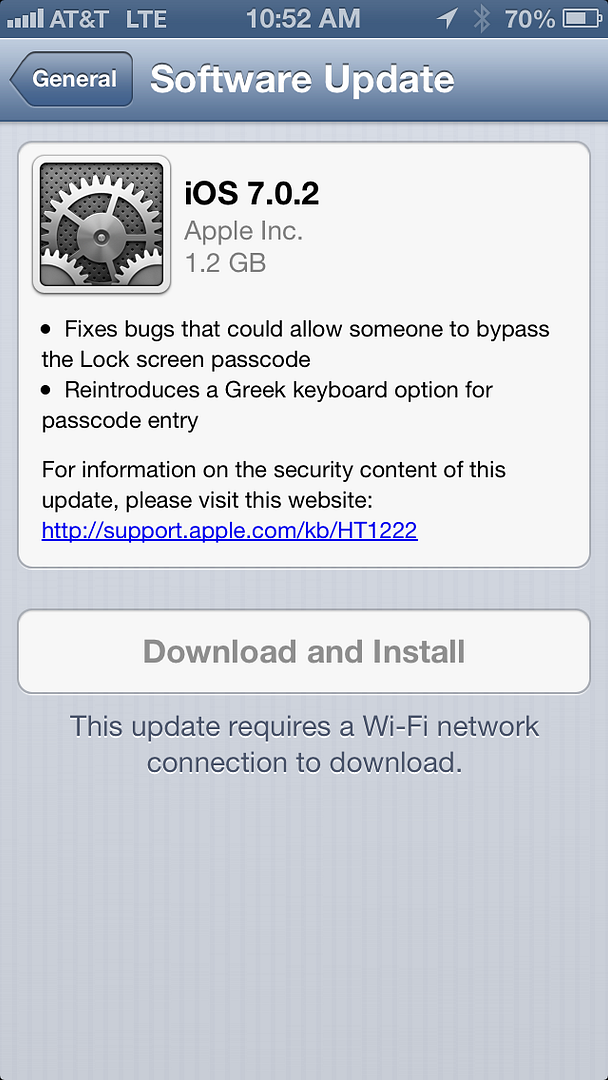
Yes....I have an iPhone 4s and "checking for software update" doesn't come up with that.
I'm also still having issues with the lock screen controls not working.
edit:
Just checked again and wouldn't you know it....got it.
I'm also still having issues with the lock screen controls not working.
edit:
Just checked again and wouldn't you know it....got it.
Last edited by cmschmie; Sep 26, 2013 at 01:58 PM.