


Android: Tablet News and Discussion Thread


Safety Car
Joined: May 2004
Posts: 3,539
Likes: 295
From: LA, CA
Picked up a Nexus 7 today at Macmall!  Got the last one they had in stock. The guy said they got 40 this morning and sold out again. Crazy stuff. Gonna root and play with it some more tomorrow. Its a pretty solid device and doesnt feel cheap at all.
Got the last one they had in stock. The guy said they got 40 this morning and sold out again. Crazy stuff. Gonna root and play with it some more tomorrow. Its a pretty solid device and doesnt feel cheap at all.
Safety Car
Joined: May 2004
Posts: 3,539
Likes: 295
From: LA, CA
Its so smooth. Jelly Bean + Tegra 3 is awesome. I had an issue this morning turning it on. It got stuck at the Google logo just trying to boot it the second time without any modifications. I turned it on last night to test it out and turned it off to charge over night. Tried turning it this morning and it got stuck and wouldn't get past the Google logo.
Not entirely sure what happened or what would cause it to happen but I was able to reflash the stock images from Google and start over but this shouldn't be the experience that people get on first boot. I was going to do the fastboot oem unlock any way so it was going to wipe everything but I thought it bricked itself for a second there. I can't remember if I was on the latest update prior to shutting down. Maybe there was a bug in the previous update that caused it to not boot but I'm now currently on the latest stock build. Gonna root, flash TWRP (instead of CWM) and keep it stock for now. Trying to find an OC kernel but I may not need it with the smoothness of this device.
Not entirely sure what happened or what would cause it to happen but I was able to reflash the stock images from Google and start over but this shouldn't be the experience that people get on first boot. I was going to do the fastboot oem unlock any way so it was going to wipe everything but I thought it bricked itself for a second there. I can't remember if I was on the latest update prior to shutting down. Maybe there was a bug in the previous update that caused it to not boot but I'm now currently on the latest stock build. Gonna root, flash TWRP (instead of CWM) and keep it stock for now. Trying to find an OC kernel but I may not need it with the smoothness of this device.
Safety Car
Joined: May 2004
Posts: 3,539
Likes: 295
From: LA, CA
Awesome got another free $10 on Google Wallet. I guess Google Wallet is dependent on the device and not on your account.
Having issues booting into recovery through the hardware combination and bootloader. I have to manually boot into it using ADB via a terminal which kinda sucks. Then again, I'm gonna be running stock for a bit so hopefully they figure it out. The easiest way to root this device is to flash Modaco's superboot via fastboot which roots the device on boot and creates an unsecure boot img so you can do a system remount, etc.
http://www.modaco.com/topic/355552-s...g-the-nexus-7/
Having issues booting into recovery through the hardware combination and bootloader. I have to manually boot into it using ADB via a terminal which kinda sucks. Then again, I'm gonna be running stock for a bit so hopefully they figure it out. The easiest way to root this device is to flash Modaco's superboot via fastboot which roots the device on boot and creates an unsecure boot img so you can do a system remount, etc.
http://www.modaco.com/topic/355552-s...g-the-nexus-7/


Safety Car
Joined: May 2004
Posts: 3,539
Likes: 295
From: LA, CA
So Flash is working as expected. Decided to sideload the AOSP browser for Flash purposes instead of installing Dolphin, Firefox or any of the other 3rd party browsers. You will need to rename the BrowserProviderProxy.apk and BrowserProviderProxy.odex into something else (just add a .bak) then reboot. You will need root to push the AOSP Browser to the /system/app/ folder and rename the 2 files above. Also don't forget to change the permissions to rw-r--r--
Download and more info for AOSP Browser:
http://forum.xda-developers.com/show....php?t=1780746
Adobe Flash Player:
http://helpx.adobe.com/flash-player/...-versions.html
Really liking this tablet so far. Speakers sound good. Now I'm just trying to figure out how to organize my homescreen without making it look so messy.
Download and more info for AOSP Browser:
http://forum.xda-developers.com/show....php?t=1780746
Adobe Flash Player:
http://helpx.adobe.com/flash-player/...-versions.html
Really liking this tablet so far. Speakers sound good. Now I'm just trying to figure out how to organize my homescreen without making it look so messy.
Safety Car
Joined: May 2004
Posts: 3,539
Likes: 295
From: LA, CA
Tablet Talk works awesome on Jelly Bean. Have it connected to my phone so I can send/receive texts/phone calls using the Tablet instead of relying just on Google Voice.
https://play.google.com/store/apps/d...LnRhYnRhbGsiXQ..
Thinking of installing GrooveIP so I can make phone calls using Google Voice but I don't I'd use it enough.
https://play.google.com/store/apps/d...NvbS5ndm9pcCJd
https://play.google.com/store/apps/d...LnRhYnRhbGsiXQ..
Thinking of installing GrooveIP so I can make phone calls using Google Voice but I don't I'd use it enough.
https://play.google.com/store/apps/d...NvbS5ndm9pcCJd

Moderator
Regional Coordinator (Southeast)
Regional Coordinator (Southeast)


Joined: Dec 2003
Posts: 44,130
Likes: 4,436
From: Mooresville, NC
Tablet Talk is great. I use it on my TouchPad with JellyBean and my GN. When at home watching tv I always just leave my phone plugged in and then use my tablet for everything right now. One of the main reasons I want to upgrade but can't decide right now.
Safety Car
Joined: May 2004
Posts: 3,539
Likes: 295
From: LA, CA


I Shoot with a Camera
Joined: Oct 2001
Posts: 23,083
Likes: 3,687
From: Vancouver BC
very impressed with the battery life of the N7, I played Angry Birds for an hour straight and the battery life went down to 90% (from 100%) if I did that with my Galaxy Nexus, it'd probably be in the 50-60% range.
Safety Car
Joined: May 2004
Posts: 3,539
Likes: 295
From: LA, CA
Yeah battery life has been pretty good so far. Its about as good if not better than my TF101. Question to the people who got the Nexus 7, did you guys pick up a case for it yet? I looked at the reviews of the ones being sold at the Play Store but they look like crap especially since the cover doesn't latch into place. I've been looking at these two with the smart cover magnet trick but need to see if they made a cut out for the speaker grill on the rear which a few of the early case seem to have forgotten about:
The case I have on my TF101 is similar to the two above without the magnet portion and its been pretty good and doesn't make it bulky. Gonna pass on a screen protector though since my TF101 screen is still in great condition after all this time without one.

The case I have on my TF101 is similar to the two above without the magnet portion and its been pretty good and doesn't make it bulky. Gonna pass on a screen protector though since my TF101 screen is still in great condition after all this time without one.
Safety Car
Joined: May 2004
Posts: 3,539
Likes: 295
From: LA, CA
Which case did you get? I believe the Nexus 7 has a Gorilla Glass so I think it should be fine as long as I use a case that covers the front.
Came across a battery bar similar to MIUI's battery indicator at the Play Store:
https://play.google.com/store/apps/d...dHRlcnliYXIiXQ..
Pretty customizable and its free.
Came across a battery bar similar to MIUI's battery indicator at the Play Store:
https://play.google.com/store/apps/d...dHRlcnliYXIiXQ..
Pretty customizable and its free.
I Shoot with a Camera
Joined: Oct 2001
Posts: 23,083
Likes: 3,687
From: Vancouver BC
As for cases go, I ordered something from eBay like the ones you posted above, NOT from overseas, from California, but I think it's still going to take a long time to get here (still quicker than anything coming from China). See link
http://www.ebay.com/itm/300739402557...ht_3276wt_1185
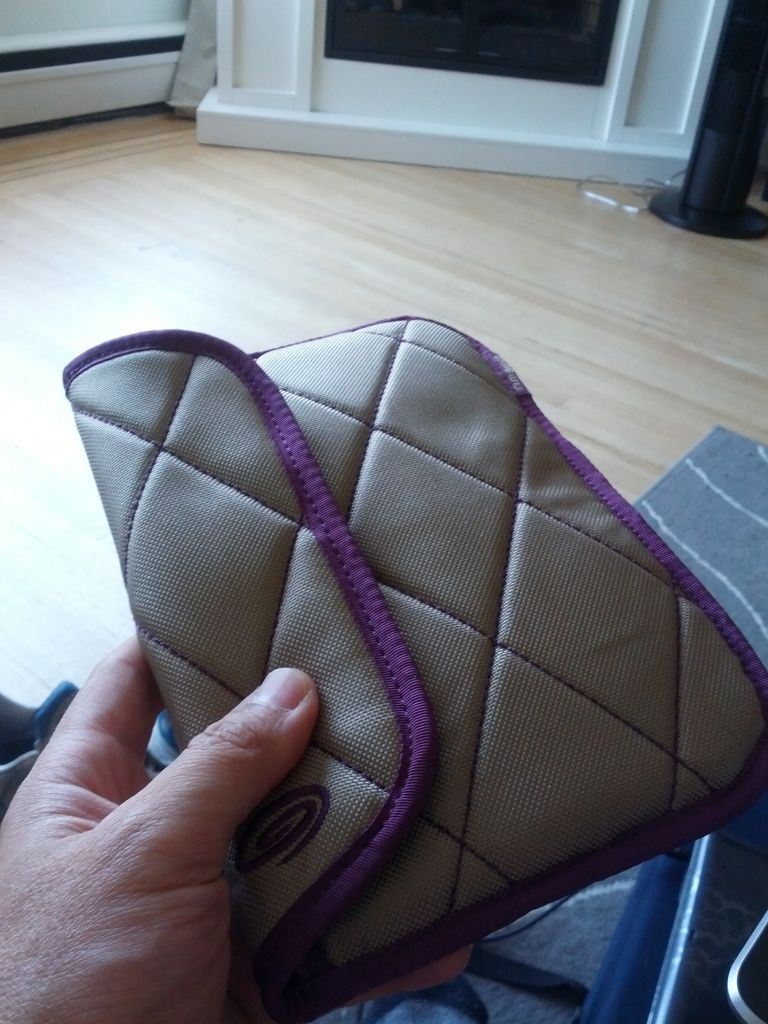
So for now, I'm using something I found at Winners (Canadian version of TJ Maxx/Marshalls) for $3 in the clearance aisle... it's a pouch that's a perfect fit and VERY padded, I think it was made for the Kindle or something... Not too keen on the colors, but it works great for now, because the only thing close to it was $50 @ Best Buy, I think it was something made for the Playbook or Kindle...
$3 pouch from Winners
Last edited by is300eater; Jul 26, 2012 at 05:53 AM.
Safety Car
Joined: May 2004
Posts: 3,539
Likes: 295
From: LA, CA
NVIDIA planning to support Miracast with the Tegra 3 Devices:
http://www.androidpolice.com/2012/07...ay-technology/
http://www.androidpolice.com/2012/07...ay-technology/
Safety Car
Joined: May 2004
Posts: 3,539
Likes: 295
From: LA, CA
http://www.androidpolice.com/2012/07...rs-on-the-way/
Pricing doesn't look too bad either for both. Still using mine naked.





I Shoot with a Camera
Joined: Oct 2001
Posts: 23,083
Likes: 3,687
From: Vancouver BC
Have you guys notice the N7 is rather picky with charging cables? I have cheap ones 3rd party cases all over my condo and a couple at my gf's place and the ONLY cable that works is the one supplied. It would suck if I lost it. Apparently others have this issue too.
http://forum.xda-developers.com/show....php?t=1791717
http://forum.xda-developers.com/show....php?t=1791717
Safety Car
Joined: May 2004
Posts: 3,539
Likes: 295
From: LA, CA
Have you guys notice the N7 is rather picky with charging cables? I have cheap ones 3rd party cases all over my condo and a couple at my gf's place and the ONLY cable that works is the one supplied. It would suck if I lost it. Apparently others have this issue too.
http://forum.xda-developers.com/show....php?t=1791717
http://forum.xda-developers.com/show....php?t=1791717
Looks like ASUS will be coming out with an OEM keyboard/case combo and a rotating case for the Nexus 7

http://www.androidpolice.com/2012/08...case-and-more/
http://www.androidpolice.com/2012/08...case-and-more/
Last edited by AMGala; Aug 1, 2012 at 01:45 PM.
I Shoot with a Camera
Joined: Oct 2001
Posts: 23,083
Likes: 3,687
From: Vancouver BC
But just so you know, the ones that don't (really) work will still have the little lighting bolt indicator, as if it's charging, but the percentage doesn't change, so it's probably charging just at a VERY slow rate.
Safety Car
Joined: May 2004
Posts: 3,539
Likes: 295
From: LA, CA
I'm using a different charger than the ones that came with the phones...I'm using a USB adapter I bought from Monoprice that is rated at 1A at 5V but I switch between the USB cables without thinking about it. So maybe that's the difference? It charges while I use it fine but definitely not at the same rate as the stock charger because the stock charger is rated at 2A at 5V. Thinking of picking a 2.1A charger from Monoprice for this reason and for my other devices.
Safety Car
Joined: May 2004
Posts: 3,539
Likes: 295
From: LA, CA
http://www.monoprice.com/products/pr...seq=1&format=2
Its a 4 port USB Adapter but you can only use the 2A line when there aren't any other devices plugged in at the same time.
Bonus tip: You can buy a USB extender to extend your USB cables since the ones they include in the phones are pretty short. I use a USB 3.0 extender mainly because of my TF101 which requires the extra pin to activate the 12V to reach full charging power:
http://www.monoprice.com/products/pr...seq=1&format=2
Last edited by CGFebTSX04; Aug 1, 2012 at 02:05 PM.
I Shoot with a Camera
Joined: Oct 2001
Posts: 23,083
Likes: 3,687
From: Vancouver BC
..so mine finally arrived and looks pretty darn close to yours but the stitching isn't as pronounced. It's NOT a "smart cover", in other words, it doesn't power up/down when you open and close the cover. Does yours do that? I was really hoping it would like my gf's smart case that she has for her ipad 2
..so mine finally arrived and looks pretty darn close to yours but the stitching isn't as pronounced. It's NOT a "smart cover", in other words, it doesn't power up/down when you open and close the cover. Does yours do that? I was really hoping it would like my gf's smart case that she has for her ipad 2
At this price or even double the price, this case cannot be beat. The stand works well and the Handstrap is great to have.
I even received an e mail from the seller telling me that I was going to be receiving a replacement because their first batch did not support the Nexus 7's "open the case cover and it will auto wake up" feature.
That is great customer service. I would have been happy using the case I orginally got but they took their service to another level to support this feature.
The ONLY somewhat negative thing I can say about this case is that the leather isnt very soft, but in my opinion thats ok because of the price point.
You will be happy with this case on your Nexus 7 tablet.
I even received an e mail from the seller telling me that I was going to be receiving a replacement because their first batch did not support the Nexus 7's "open the case cover and it will auto wake up" feature.
That is great customer service. I would have been happy using the case I orginally got but they took their service to another level to support this feature.
The ONLY somewhat negative thing I can say about this case is that the leather isnt very soft, but in my opinion thats ok because of the price point.
You will be happy with this case on your Nexus 7 tablet.
Ordered this case not to long ago, knowing well it didnt have the auto wake feature, even before it arrived I get an email from the seller saying that they will send me another one with the auto wake feature free of cost, while It still hasn't arrived, I was pretty impressed by their service. regarding the original case it is what you see in the pictures, can't find any faults out of the ordinary and it looks like it will last a long while, looks pretty cool too, so that's a plus.
I Shoot with a Camera
Joined: Oct 2001
Posts: 23,083
Likes: 3,687
From: Vancouver BC
