


Android: Tablet News and Discussion Thread


Safety Car
Joined: May 2004
Posts: 3,539
Likes: 295
From: LA, CA
Adobe flash still works on Jelly Bean luckily. It just won't be updated from here on. Just side load the apk like every other apk out there no root needed. You can get it directly from Adobe if you don't have a backup:
http://helpx.adobe.com/flash-player/...-versions.html
Forgot to add: No it won't work in Chrome. However, it will work with any of the alternative browsers out there that currently support Flash now like the new Firefox.
http://helpx.adobe.com/flash-player/...-versions.html
Forgot to add: No it won't work in Chrome. However, it will work with any of the alternative browsers out there that currently support Flash now like the new Firefox.
Last edited by CGFebTSX04; Jul 13, 2012 at 10:04 PM.


Sanest Florida Man


Joined: Aug 2007
Posts: 45,981
Likes: 11,768
From: Florida
Adobe flash still works on Jelly Bean luckily. It just won't be updated from here on. Just side load the apk like every other apk out there no root needed. You can get it directly from Adobe if you don't have a backup:
http://helpx.adobe.com/flash-player/...-versions.html
Forgot to add: No it won't work in Chrome. However, it will work with any of the alternative browsers out there that currently support Flash now like the new Firefox.
http://helpx.adobe.com/flash-player/...-versions.html
Forgot to add: No it won't work in Chrome. However, it will work with any of the alternative browsers out there that currently support Flash now like the new Firefox.


I Shoot with a Camera


Joined: Oct 2001
Posts: 23,069
Likes: 3,663
From: Vancouver BC
...so, I'm can't seem to play any movies I drop into my Nexus 7... I've tried several different movie player apps (including the ones that work on my Galaxy Nexus)... any advice?
Safety Car
Joined: May 2004
Posts: 3,539
Likes: 295
From: LA, CA
What media player are you using? Also did you download the correct codecs? I like to use MX Player but you will need to download the appropriate codec for Tegra 3. It usually tells you which one to get.


I Shoot with a Camera
Joined: Oct 2001
Posts: 23,069
Likes: 3,663
From: Vancouver BC


Safety Car
Joined: May 2004
Posts: 3,539
Likes: 295
From: LA, CA
Trying to find one in store but they're sold out all around here. Staples briefly had some in stock in the morning but they're all gone. Gonna give it til the end of the week before I pull the trigger and ordering online. In other news, Jelly Bean builds are coming up on the TF101.

Just received my and my wife's Nexus 7s today. "Her's" has a perfect screen, mine has horrible ghosting and when I turn my screen on after sleep it is washed out white. I'm gonna have to RMA it 

Suzuka Master
Joined: Jan 2009
Posts: 9,012
Likes: 439
From: SoCal
Not to belabor the point, but here is an image of my device turned OFF:
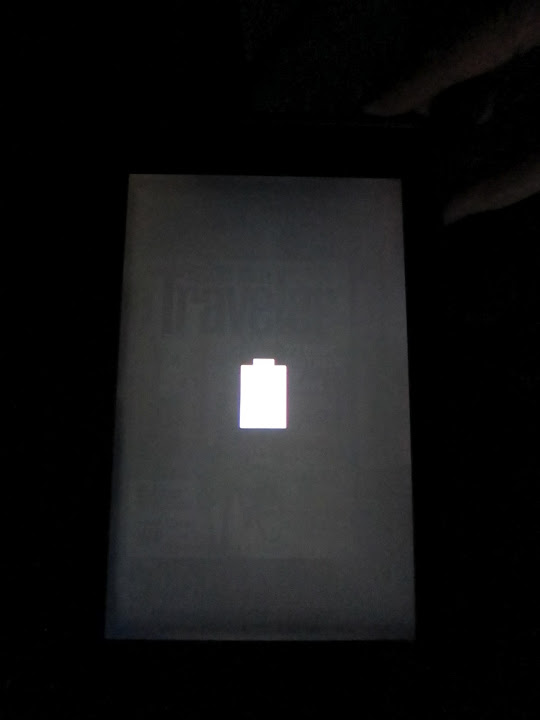
As you can see, I had the Magazines app open before powering off the device and you can see the Traveler magazine cover still on the display.
More people with my issues: http://rootzwiki.com/news/_/articles...-lift-fix-r975
Anyways, I finally got through to Customer Service late last night and they are coordinating an exchange.
As you can see, I had the Magazines app open before powering off the device and you can see the Traveler magazine cover still on the display.
More people with my issues: http://rootzwiki.com/news/_/articles...-lift-fix-r975
Anyways, I finally got through to Customer Service late last night and they are coordinating an exchange.




Safety Car
Joined: May 2004
Posts: 3,539
Likes: 295
From: LA, CA
If you're rooted you can hide the Status Bar with the following app:
http://forum.xda-developers.com/show....php?t=1769761
Its made by the same developer which allows you to do gestures for shortcuts or whatever you like:
http://forum.xda-developers.com/show....php?t=1535740
Might want to try out the Lite version before going for the full version to see if it works on your device.
http://forum.xda-developers.com/show....php?t=1769761
Its made by the same developer which allows you to do gestures for shortcuts or whatever you like:
http://forum.xda-developers.com/show....php?t=1535740
Might want to try out the Lite version before going for the full version to see if it works on your device.