


Modify your navigation system


9th Gear
Joined: Apr 2006
Posts: 9
Likes: 0
I still can’t figure out this thing http://guicide.com/cars/2006civic/nav/hacks/
I opened command prompt
Drag bysin.exe into and hit enter
Then it told me what the three Valid commands were and asked me (or at least thats what I thought it meant ) to type <06avn2> <extract [Opening1]> and I hit enter
Of course this didn’t work so I enter all sorts of combinations and nada. I even tried >bysin 06AVN2.bin extract Opening1.bmp but didn’t work either! can some1 please advise me what to type in at this point also if you can translate everything between steps "Use bysin.exe to extract Opening1.bmp from 06avn2.bin" thru step "Which will result in the following files" on http://guicide.com/cars/2006civic/nav/hacks/ I would greatly appreciate it! just tell me what to type or do but in english. This thing is driving me nuts.
As always please pardon my ignorance
I opened command prompt
Drag bysin.exe into and hit enter
Then it told me what the three Valid commands were and asked me (or at least thats what I thought it meant ) to type <06avn2> <extract [Opening1]> and I hit enter
Of course this didn’t work so I enter all sorts of combinations and nada. I even tried >bysin 06AVN2.bin extract Opening1.bmp but didn’t work either! can some1 please advise me what to type in at this point also if you can translate everything between steps "Use bysin.exe to extract Opening1.bmp from 06avn2.bin" thru step "Which will result in the following files" on http://guicide.com/cars/2006civic/nav/hacks/ I would greatly appreciate it! just tell me what to type or do but in english. This thing is driving me nuts.
As always please pardon my ignorance

Banned
Joined: Nov 2005
Posts: 3,716
Likes: 0
double, pls don't take offense to what i'm about to say...
Can you find/pay someone, anyone - friends, families, neighbors,....anyone that's a bit more computer-literate than you to help you out with this ?
Have you got the replacement image ready ? are you sure it is the correct dimension & size ?
Because it's really tedious and hard to guide someone like you thru all these steps in this forum-messaging fashion.
Can you find/pay someone, anyone - friends, families, neighbors,....anyone that's a bit more computer-literate than you to help you out with this ?
Have you got the replacement image ready ? are you sure it is the correct dimension & size ?
Because it's really tedious and hard to guide someone like you thru all these steps in this forum-messaging fashion.

Intermediate
Joined: Apr 2006
Posts: 44
Likes: 0
hey whatsup, im new to the forums,i bought my tsx about a month and a half ago, its an 06. i read through this thread, and tried to modify my nav. system, however, none of the bin files matched up with bysins. i was wondering if anyone could give me a "noob" step by step guide. thanks


4th Gear
Joined: Aug 2005
Posts: 4
Likes: 1
new gen nav disc
Hey, I have an '04 TSX with an '04 disc. I was wondering if the new (i.e. '06) navi is different. What I mean is, the 04 navi has buttons, icons, etc. and I was wondering if the new 06 navi has changed icons, buttons, etc. Or are the discs and menu icons the same except that it includes updated addresses and locations? Anyway, i'm just wondering if anyone has compared them.

Advanced
Joined: Jun 2005
Posts: 98
Likes: 0
From: Guilford, CT
Can anyone talk me through removing the "nag" screen? I successfully used bysin's "dumpnavi gui" program to change my start-up screen, but I get errors when selecting the "modify nag screen" box.
Advanced
Joined: Jun 2005
Posts: 98
Likes: 0
From: Guilford, CT
Can anyone tell me if bysin's "dumpnavi (gui version)" will work with an 05 TL? I just showed a friend my 05 TSX's new startup screen and he really wants to put a picture of himself flipping the bird on his navi screen for the next time his wife uses his car...
Pro
Joined: Apr 2006
Posts: 631
Likes: 3
From: Austin, TX
I also got guicide's method (http://guicide.com/cars/2006civic/nav/hacks) to work on my 2006 TSX. Looks great! Here's the instructions I used, since it's slightly different then the one's on his site.
****Image Creation*****
1. Create a 480x234 16 bit bmp image. The easist way to do that is to find
an image (a UF Gator in my case), scale it so that it is 480x234, then open
it in Microsoft Paint and do a "Save As" in 256 Color BMP format. So mine was gator.bmp
2. Then download the 8to16 program guicide made that converts an 8 bit image to a 16 bit image. It is here:
http://guicide.com/cars/2006civic/nav/hacks/8to16.zip. Look for the 8to16.exe file when you unzip it, copy that file and the bitmap file you want to change into the same directory, and then type "8to16 gator.bmp gator16.bmp" from the command line in that directory.
3. https://acurazine.com/forums/showthread.php?p=1370271 also has a ton of images to use, but I believe they will need to be converted in the same manner as above. Try it and see I guess.
****Nav Hack*****
1. Download the program for the 2006 hack here:
http://guicide.com/cars/2006civic/nav/hacks/Bysin.zip
2. Unzip it into a folder of your choice. The two important files you want
(bysin.exe and CECompressv4.dll) are in the "Release" folder when you unzip
it. Put the .bmp file you created ealier in that folder as well.
4. Remove the Navigation DVD from the trunk, and copy the 06Touch2.bin file from the Navigation DVD to that folder also.
3. Open up a command prompt (Start->Run and type 'command') and navigate to
the folder. Type "D:" to get to the D drive for example, and then "cd
nav\guicide\work" to get to the specific folder, which in my case I put
it in D:\nav\guicide\work
4. Now type "bysin 06Touch2.bin update Opening3.bmp gator16.bmp"
5. Burn the following 6 files to a CDR:

Note that 06Touch2.bin is the modified version from above. The rest are directly copied from the Navigation DVD.
6. Turn on the car, run back to insert the CDR into the DVD drive, then go back to the nav screen and hold down Map, Menu, and Cancel until the Diagnosis menu come up.
7. Hit Version, and then hit Download
8. Wait ~2-3 minutes while it loads.
9. It should reboot with your new splash logo. Remove the CDR from the drive, and put in the original DVD. And then you're set. Enjoy!
Note that this does nothing to the nag screen. Only changes the splash screen.
I just put all the files I needed in the same directory to make it easier:
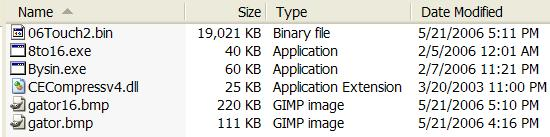
Commands on the command prompt:

Specs:
2006 TSX Automatic w/ Nav
Ver 4.31C
Image file used (no modification needed):

****Image Creation*****
1. Create a 480x234 16 bit bmp image. The easist way to do that is to find
an image (a UF Gator in my case), scale it so that it is 480x234, then open
it in Microsoft Paint and do a "Save As" in 256 Color BMP format. So mine was gator.bmp
2. Then download the 8to16 program guicide made that converts an 8 bit image to a 16 bit image. It is here:
http://guicide.com/cars/2006civic/nav/hacks/8to16.zip. Look for the 8to16.exe file when you unzip it, copy that file and the bitmap file you want to change into the same directory, and then type "8to16 gator.bmp gator16.bmp" from the command line in that directory.
3. https://acurazine.com/forums/showthread.php?p=1370271 also has a ton of images to use, but I believe they will need to be converted in the same manner as above. Try it and see I guess.
****Nav Hack*****
1. Download the program for the 2006 hack here:
http://guicide.com/cars/2006civic/nav/hacks/Bysin.zip
2. Unzip it into a folder of your choice. The two important files you want
(bysin.exe and CECompressv4.dll) are in the "Release" folder when you unzip
it. Put the .bmp file you created ealier in that folder as well.
4. Remove the Navigation DVD from the trunk, and copy the 06Touch2.bin file from the Navigation DVD to that folder also.
3. Open up a command prompt (Start->Run and type 'command') and navigate to
the folder. Type "D:" to get to the D drive for example, and then "cd
nav\guicide\work" to get to the specific folder, which in my case I put
it in D:\nav\guicide\work
4. Now type "bysin 06Touch2.bin update Opening3.bmp gator16.bmp"
5. Burn the following 6 files to a CDR:
Note that 06Touch2.bin is the modified version from above. The rest are directly copied from the Navigation DVD.
6. Turn on the car, run back to insert the CDR into the DVD drive, then go back to the nav screen and hold down Map, Menu, and Cancel until the Diagnosis menu come up.
7. Hit Version, and then hit Download
8. Wait ~2-3 minutes while it loads.
9. It should reboot with your new splash logo. Remove the CDR from the drive, and put in the original DVD. And then you're set. Enjoy!
Note that this does nothing to the nag screen. Only changes the splash screen.
I just put all the files I needed in the same directory to make it easier:
Commands on the command prompt:
Specs:
2006 TSX Automatic w/ Nav
Ver 4.31C
Image file used (no modification needed):
Pro
Joined: Apr 2006
Posts: 631
Likes: 3
From: Austin, TX
This method also works on 2006 Accord's using the exact same instructions, 2006 Civics using the instructions on guicide's page (the only difference is they modify Opening1.bmp and 06AVN2.bin), and 2006 Ridgeline using sjca2.bin and Splash1.bmp
(see https://acurazine.com/forums/showthr...5&page=5&pp=25)
(see https://acurazine.com/forums/showthr...5&page=5&pp=25)


10th Gear
Joined: Feb 2005
Posts: 13
Likes: 0
Photoshop Image Creation:
With your pic open and cropped do the following . . .
Image -> Mode -> Indexed Color -> Set to 256
Now when you save choose bitmap and it should already be set to 8bit. Make sure no compression boxes or anything else are checked.
The reason I would use Photoshop is that when you choose 256 you can do different modes of color elimination which affect the colors left in the image. Some look better than others and overall I think changing color modes, cropping, etc. are just better processed and result in overall better image quality than with Paint.
With your pic open and cropped do the following . . .
Image -> Mode -> Indexed Color -> Set to 256
Now when you save choose bitmap and it should already be set to 8bit. Make sure no compression boxes or anything else are checked.
The reason I would use Photoshop is that when you choose 256 you can do different modes of color elimination which affect the colors left in the image. Some look better than others and overall I think changing color modes, cropping, etc. are just better processed and result in overall better image quality than with Paint.

6th Gear
Joined: May 2006
Posts: 6
Likes: 0
i could not download the file
i tried to download the Zip file . but i could not. please send me that zip file which contain your program. my e-mail is asaood@yahoo.com. thanks

Intermediate
Joined: Apr 2006
Posts: 26
Likes: 1
From: Austin, TX
 Bn2hn18b.bin
So yeah - I know this thread is pretty old, but I was just curious if anyone has gotten the "nag screen removal" working on an '04 TSX using BN2HN18B.BIN. Some other info:
(from the main "Version" screen)
DISC Program: 1.0030
Map DataBase: 20020930
(from the "System" tab on the "Version" menu)
ProgramFileName: BN2HN18B.BIN
ModelCode: 22H
I used the gui version of dumpnavi from the linuxkiddies site and when I have "modify nag screen checked", I get the error that "my car isnt supported"... perhaps there's a newer version of the gui that supports this BIN/model?
I've already been able to successfully modify the startup screen with my own - just a few things that helped:
* Unlike bysin's original instructions, my DVD only contained a total of 8 .BIN files, all totalling 323MB (including a 280MB "ADD.BIN" file). Copied all these to my HD and later burnt to CD-R
* Console version of "dumpnavi" initially complained that it couldn't find the BIN file. Figured out that my BIN was marked as "read-only" (since it was copied directly from the DVD). Changed this and extracts worked fine. (The gui version of "dumpnavi" will also complain if the file is still "read-only")
It's not clear to me if anyone is still developing this software, but many thanks go to bysin for figuring all this out.
Thanks,
djpinoy
-----

(from the main "Version" screen)
DISC Program: 1.0030
Map DataBase: 20020930
(from the "System" tab on the "Version" menu)
ProgramFileName: BN2HN18B.BIN
ModelCode: 22H
I used the gui version of dumpnavi from the linuxkiddies site and when I have "modify nag screen checked", I get the error that "my car isnt supported"... perhaps there's a newer version of the gui that supports this BIN/model?
I've already been able to successfully modify the startup screen with my own - just a few things that helped:
* Unlike bysin's original instructions, my DVD only contained a total of 8 .BIN files, all totalling 323MB (including a 280MB "ADD.BIN" file). Copied all these to my HD and later burnt to CD-R
* Console version of "dumpnavi" initially complained that it couldn't find the BIN file. Figured out that my BIN was marked as "read-only" (since it was copied directly from the DVD). Changed this and extracts worked fine. (The gui version of "dumpnavi" will also complain if the file is still "read-only")
It's not clear to me if anyone is still developing this software, but many thanks go to bysin for figuring all this out.
Thanks,
djpinoy
-----
6th Gear
Joined: May 2006
Posts: 6
Likes: 0
navigation help
HI Bysin:
i got your file to change the navigation program. i have honda odyssey 2002.
i could not see the .Bin files. i copied all files from dvd. i saw only .mng,.ar0,ar1,ar2 and .apn files. please let me know how can i find .bin file. may be its hidden.
also i press the main guide and cancel key then i got the diagonastic screen but when i press again i could not get the next screen which shows the files. please help me.
i got your file to change the navigation program. i have honda odyssey 2002.
i could not see the .Bin files. i copied all files from dvd. i saw only .mng,.ar0,ar1,ar2 and .apn files. please let me know how can i find .bin file. may be its hidden.
also i press the main guide and cancel key then i got the diagonastic screen but when i press again i could not get the next screen which shows the files. please help me.

1st Gear
Joined: Jun 2006
Posts: 1
Likes: 0
Hi all,
I do have an '03 Accord with navi and the original DVD (that came with the car). I was wondering if its possible to use a copy of the new DVD. And if yes, there's anyone willing to share a copy?
Thanks guys.
PS- the hack for the background image works awesome.
I do have an '03 Accord with navi and the original DVD (that came with the car). I was wondering if its possible to use a copy of the new DVD. And if yes, there's anyone willing to share a copy?
Thanks guys.
PS- the hack for the background image works awesome.

8th Gear
Joined: Jun 2005
Posts: 8
Likes: 0
Originally Posted by nimsoc
Hi all,
I do have an '03 Accord with navi and the original DVD (that came with the car). I was wondering if its possible to use a copy of the new DVD. And if yes, there's anyone willing to share a copy?
Thanks guys.
PS- the hack for the background image works awesome.
I do have an '03 Accord with navi and the original DVD (that came with the car). I was wondering if its possible to use a copy of the new DVD. And if yes, there's anyone willing to share a copy?
Thanks guys.
PS- the hack for the background image works awesome.


Instructor
Joined: Jun 2006
Posts: 179
Likes: 0
From: ITALY, Venice
Hi everyone,
I'm italian and so I have a Honda Accord '03 that is equal to your Acura...
I've just bought it and I want to modify the navi but i can't download the bisyn program... can someone send it to me????
Sorry for my english but i'm not so proud in it....

I'm italian and so I have a Honda Accord '03 that is equal to your Acura...
I've just bought it and I want to modify the navi but i can't download the bisyn program... can someone send it to me????
Sorry for my english but i'm not so proud in it....

Pro
Joined: Sep 2004
Posts: 677
Likes: 2
From: Los Angeles, CA
Download here:
Console command version:
http://24.126.60.235/dumpnavi/navi-console.zip
GUI version:
http://24.126.60.235/dumpnavi/navi-gui.zip
Source code:
http://24.126.60.235/dumpnavi/navi-console-src.zip
Console command version:
http://24.126.60.235/dumpnavi/navi-console.zip
GUI version:
http://24.126.60.235/dumpnavi/navi-gui.zip
Source code:
http://24.126.60.235/dumpnavi/navi-console-src.zip
Let me help you!
Joined: Apr 2006
Posts: 1,987
Likes: 12
From: So. Cali
Originally Posted by Icemant23
I just updated my 06 TSX w/NAVI. This worked like a Charm!
I've been lazy to put my usc programming education to use lol. I was hoping someone else would do it, but I guess I might have to dig into it for myself =P

8th Gear
Joined: Apr 2005
Posts: 8
Likes: 0
From: Valencia (Spain)

Originally Posted by Codename47
Hi everyone,
I'm italian and so I have a Honda Accord '03 that is equal to your Acura...
I've just bought it and I want to modify the navi but i can't download the bisyn program... can someone send it to me????
Sorry for my english but i'm not so proud in it....
I'm italian and so I have a Honda Accord '03 that is equal to your Acura...
I've just bought it and I want to modify the navi but i can't download the bisyn program... can someone send it to me????
Sorry for my english but i'm not so proud in it....
The unit is different from usa Acura and Honda vehicles. You don´t have the same files and operating system as they have in american navys.
Regards
8th Gear
Joined: Apr 2005
Posts: 8
Likes: 0
From: Valencia (Spain)
Originally Posted by Codename47
How can we do??????

Advanced
Joined: May 2006
Posts: 53
Likes: 0
Originally Posted by JAM
This programs doesn´t work in our navy. You don´t have the same files and operating system as they have in american navys.
Regards
Regards


3rd Gear
Joined: Jun 2006
Posts: 3
Likes: 0
Navigation system with pin and pc slot
hi everyone, this is the first message i have ever posted and i hope someone out there can help me. I have just purchased a used 2005 tsx with navigation and the previous owner put a pin on the start-up of the navigation...does anyone know how i can get around this or do i have to get in contact with acura to resolve this problem? and secondly i was wondering if anyone knew what the pc slot integraded with the navigation system is used for?....thank you to anyone who can offer me some information

Advanced
Joined: Jan 2006
Posts: 58
Likes: 0
Great! All I wanted to do was download the dumpnavi, now his site has this.
www.linuxkiddies.com
" Bysin's Hacking Contest
Anyone who thinks they can hack my system, can go ahead and do so.
Deface this website and get $10,000 cash (Paypal, Western Union, or Epassporte).
(And yes, there is a way in.)"
www.linuxkiddies.com
" Bysin's Hacking Contest
Anyone who thinks they can hack my system, can go ahead and do so.
Deface this website and get $10,000 cash (Paypal, Western Union, or Epassporte).
(And yes, there is a way in.)"



1st Gear
Joined: Jul 2006
Posts: 1
Likes: 0
I'v bought Honda accord (for japan) it is absolutly like acura. But it was with out navigation disc. I realy need orange navigation disc, is anybody who has it and can tell me where i can download the image of this disc or prabaly somebody can send me the image of disc by email Vladimir@nvs.vtt.ru.
I'm from Russia and nobody can help me here !!!!

I hope You'll help me ... Thanks!!!!!!!
I'm from Russia and nobody can help me here !!!!
I hope You'll help me ... Thanks!!!!!!!

4th Gear
Joined: Feb 2006
Posts: 4
Likes: 0
Just in case this is lost in all the recent mayhem....
http://www.linuxkiddies.com/projects/navi/
http://www.linuxkiddies.com/projects/navi/


My Garage
Joined: Nov 2004
Posts: 13,386
Likes: 11
From: NY
Originally Posted by kfc469
ok. i have an '02 MDX. when I do the menu/map/cancel thing, all I get is a diagnostic screen which does not have a version button. does anyone know how to get around this?
Thanks
Thanks
 . any other ideas?


4th Gear
Joined: Jul 2006
Posts: 4
Likes: 0
From: Miami
I have an 06 TSX and am having same problem. I press MENU for 5 secs and it brings up a 3 pages of version info, but nowhere along the way does it say loading...bin.
Also, I have 9 bins on the cd, none of which are like the ones mentioned in the guide. They are as follows:
05Jog2.bin, 05Jog.bin, 05Touch2.bin, 05Touch.bin, 06Jog2.bin, 06Jog.bin, 06Touch2.bin, 06Touch.bin, and VRDB.BIN. Are these the right bin files?
Any help would be greatly appreciated.
Also, I have 9 bins on the cd, none of which are like the ones mentioned in the guide. They are as follows:
05Jog2.bin, 05Jog.bin, 05Touch2.bin, 05Touch.bin, 06Jog2.bin, 06Jog.bin, 06Touch2.bin, 06Touch.bin, and VRDB.BIN. Are these the right bin files?
Any help would be greatly appreciated.