


Apple: Hardware News and Discussion Thread


Sanest Florida Man


Joined: Aug 2007
Posts: 46,091
Likes: 11,836
From: Florida
If you're curious how Apple is handling the retina display Anandtech has a couple of article about it. Basically they're pixel doubling 1440x900 display so it uses 4 pixels for every one in the 1440x900. You can switch it to emulate 1650x1050 and 1920x1200 but those won't look as crisp as 1440x900 but they still look better than the older screens at those res's.
http://www.anandtech.com/show/5996/h...andles-scaling
http://www.anandtech.com/show/5998/m...splay-analysis
http://www.anandtech.com/show/5996/h...andles-scaling
http://www.anandtech.com/show/5998/m...splay-analysis

Suzuka Master
Joined: Jan 2009
Posts: 9,012
Likes: 439
From: SoCal
ran verify disk permissions and got these errors
Verifying permissions for “Macintosh HD”
User differs on “Applications/.DS_Store”; should be 0; user is 501.
Permissions differ on “Applications/.DS_Store”; should be -rw-rw-r-- ; they are -rw-r--r-- .
Group differs on “Library/Preferences/com.apple.alf.plist”; should be 80; group is 0.
anything bad??
running the fix permissions now
Verifying permissions for “Macintosh HD”
User differs on “Applications/.DS_Store”; should be 0; user is 501.
Permissions differ on “Applications/.DS_Store”; should be -rw-rw-r-- ; they are -rw-r--r-- .
Group differs on “Library/Preferences/com.apple.alf.plist”; should be 80; group is 0.
anything bad??
running the fix permissions now

Team Owner


Joined: Jan 2001
Posts: 25,967
Likes: 2,685
From: Jersey
Not a big deal, you are correct to repair them. I've read claims that bad installers cause it. But from what I gather this is a BSD issue that has always been around. I don't believe permissions on Linux need to be periodically checked/repaired.

Senior Moderator
Joined: May 2003
Posts: 45,641
Likes: 2,335
From: Better Neighborhood, Arizona



Moderator
Joined: Oct 2004
Posts: 64,139
Likes: 3,386
From: Not Las Vegas (SF Bay Area)

Retina MacBook Pro Can Run Three External Displays Simultaneously
Jun 20, 2012 10:12 am PDT by Jordan Golson
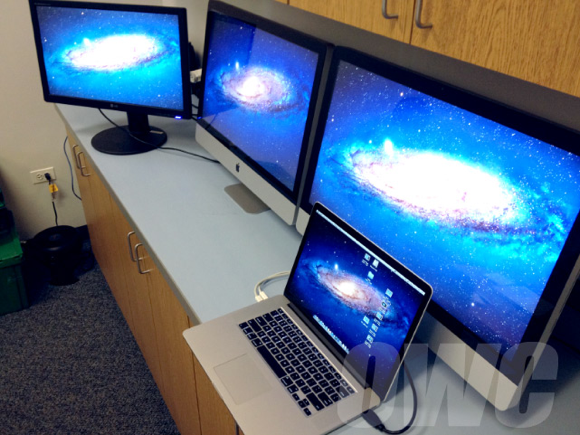
Other World Computing posted this picture on their blog showing a MacBook Pro with Retina Display hooked up to a pair of iMacs serving as Thunderbolt displays and a third monitor via HDMI. This setup powers four screens with a total of 15,680,000 pixels.
The writer of the post, OWC Mike, seemed impressed with the performance of the MacBook Pro:
Moving images and media didn’t create any lag and we were able to play video on all four displays simultaneously.
Apple officially supports hooking three monitors into the Retina MacBook Pro, noting in the Thunderbolt ports FAQ in its Support Knowledge Base:
MacBook Pro (Retina, Mid 2012) can support an HDMI-compatible device on its HDMI port while also using two Thunderbolt displays.
This makes the Retina MacBook Pro the first Mac -- other than a tower-based workstation like the Mac Pro -- to natively power four displays simultaneously.
Jun 20, 2012 10:12 am PDT by Jordan Golson
Other World Computing posted this picture on their blog showing a MacBook Pro with Retina Display hooked up to a pair of iMacs serving as Thunderbolt displays and a third monitor via HDMI. This setup powers four screens with a total of 15,680,000 pixels.
The writer of the post, OWC Mike, seemed impressed with the performance of the MacBook Pro:
Moving images and media didn’t create any lag and we were able to play video on all four displays simultaneously.
Apple officially supports hooking three monitors into the Retina MacBook Pro, noting in the Thunderbolt ports FAQ in its Support Knowledge Base:
MacBook Pro (Retina, Mid 2012) can support an HDMI-compatible device on its HDMI port while also using two Thunderbolt displays.
This makes the Retina MacBook Pro the first Mac -- other than a tower-based workstation like the Mac Pro -- to natively power four displays simultaneously.

The Third Ball
Joined: Sep 2002
Posts: 50,498
Likes: 5,874
From: Los Angeles, Ca
Well, my iMac is finally shitting the bed.
Got the folder with the ? in it this evening...I figured the HDD finally took a dump.
But on further reading it probably a hardware issue of some sort...potentially a stick of RAM went bad.
I can only hope its something so simple. I won't have a chance to open it up and start testing til this weekend.
Got the folder with the ? in it this evening...I figured the HDD finally took a dump.
But on further reading it probably a hardware issue of some sort...potentially a stick of RAM went bad.
I can only hope its something so simple. I won't have a chance to open it up and start testing til this weekend.

The Third Ball
Joined: Sep 2002
Posts: 50,498
Likes: 5,874
From: Los Angeles, Ca
BUT it still served as my main computer...Thankfully I have all my time machine back ups...but that means nothing because I don't have a drive large enough on my laptop to restore...nor am I in a position to just blow away my laptop at the moment.
I'm really hoping its something as simple as pulling out a bad stick of ram...that'll make life very easy.
Otherwise, with the exception that I've been waiting for this machine to have a problem...having my laptop drive take a dump in Nov...with my drobo (which I sold last week) bricking and failing miserably in Jan...and my Nikon D3 blowing a power board right in the middle of trying to sell it last month....me and electronics haven't been having a good relationship this year.
The Third Ball
Joined: Sep 2002
Posts: 50,498
Likes: 5,874
From: Los Angeles, Ca
If I was in a position where I could just afford a new machine I really wouldn't care, but I just invested in a bunch of new gear and my industry if VERY slow right now. So, I'm just going to have to stick it out.


Sanest Florida Man
Joined: Aug 2007
Posts: 46,091
Likes: 11,836
From: Florida
Well, my iMac is finally shitting the bed.
Got the folder with the ? in it this evening...I figured the HDD finally took a dump.
But on further reading it probably a hardware issue of some sort...potentially a stick of RAM went bad.
I can only hope its something so simple. I won't have a chance to open it up and start testing til this weekend.
Got the folder with the ? in it this evening...I figured the HDD finally took a dump.
But on further reading it probably a hardware issue of some sort...potentially a stick of RAM went bad.
I can only hope its something so simple. I won't have a chance to open it up and start testing til this weekend.

nnInn
Joined: Mar 2006
Posts: 37,670
Likes: 1,084


 I can't see shit on my new Toshiba. I felt like an old man telling Windows to please magnify the desktop.

the overexplainer
Joined: Feb 2011
Posts: 3,287
Likes: 385
From: OC, CA
been playing with a new 13" MBP and MBA and besides the new magsafe on the MBA i really dont see any difference. I want to see this retina 15 though. I should be ordering one by the end of the month but there's a 3-4 week lead time 
Anyone ever use Microsoft Deployment Toolkit with a Mac?
Anyone ever use Microsoft Deployment Toolkit with a Mac?
The Third Ball
Joined: Sep 2002
Posts: 50,498
Likes: 5,874
From: Los Angeles, Ca
I just tried removing and booting with each stick RAM and neither worked (and I can't believe that both sticks went bad)...so yes, its the hard drive. Which Ive suspected for a long time.
My hope is that replacing the hard drive will make this machine fast again...and that is been the slowly failing drive thats made it dog shit slow.
My hope is that replacing the hard drive will make this machine fast again...and that is been the slowly failing drive thats made it dog shit slow.

Administrator Alumnus
Joined: Oct 2001
Posts: 26,326
Likes: 131
From: Northwest IN
I just tried removing and booting with each stick RAM and neither worked (and I can't believe that both sticks went bad)...so yes, its the hard drive. Which Ive suspected for a long time.
My hope is that replacing the hard drive will make this machine fast again...and that is been the slowly failing drive thats made it dog shit slow.
My hope is that replacing the hard drive will make this machine fast again...and that is been the slowly failing drive thats made it dog shit slow.
The Third Ball
Joined: Sep 2002
Posts: 50,498
Likes: 5,874
From: Los Angeles, Ca
I debated about it...but I don't know how much longer Im going to have this machine performance wise.
Cheap SSD is relative. if I get SSD Im going with OWC...their 480GB SSD is $500. More than I want to spend.
Where as I have 4 1TB drives sitting in my drawer that I just popped out of the drobo I just sold. 3 of which are still good. And I'm not out any money.
Its just taking the iMac apart that Im not looking forward to, I read through ifixit's guide...and its a pain. Plus, any dust gets between the LCD and the glass....
Cheap SSD is relative. if I get SSD Im going with OWC...their 480GB SSD is $500. More than I want to spend.
Where as I have 4 1TB drives sitting in my drawer that I just popped out of the drobo I just sold. 3 of which are still good. And I'm not out any money.
Its just taking the iMac apart that Im not looking forward to, I read through ifixit's guide...and its a pain. Plus, any dust gets between the LCD and the glass....

Banned
Joined: Feb 2005
Posts: 13,252
Likes: 2,654
From: parts unknown
All those expensive iPhone accessories you own, all the stuff that plugs into the bottom of the device -- speakers, docks, chargers and so on -- may be about to become obsolete.
Tech blog TechCrunch reports that Apple plans to change the design and size of the connector for the iPhone 5. The old 30-pin connector, which has been the standard since the third generation iPod, is to be replaced by a 19-pin mini connector.
'It's clear Apple is more concerned with space savings inside each device.'
- TechCrunch
"TechCrunch has independently verified that Apple is working on adding a 19-pin port to the new iPhone. It is a move that will surely send shocks through the iPhone accessory ecosystem," the site wrote.
"The new port is similar in size to the Thunderbolt port available on many MacBook devices but [TechCrunch] has been told by three independent manufacturers that the pin-out will be different."
"It's clear Apple is more concerned with space savings inside each device."
Leaked video footage claiming to be of the iPhone 5 shows a smaller connector.
TechCrunch's prediction that the news will send shockwaves is spot on.
Tech blogger Robert Scoble said the change would give Apple a tighter control on iPhone accessories.
"It will be nearly impossible to make unlicensed devices," he wrote on his blog. "Unfortunately these design goals mean making obsolete the something like 10 power chargers in my home. Sigh."
Awesome Robo's Sirio Brozzi wrote, "People are stunned by this possibility, myself included. I mean, why fix something that's not broken?"
Writing on Forbes.com, Dave Thier said "Apple is great at getting us to buy new products, and this may be one its biggest coups yet. The environment will suffer, like usual, but expect accessory manufacturers to make a mint after an uncomfortable transition."
Mashable reports the iPhone's dock connector "is about to go on a diet."
Apple has yet to respond to questions about the new connector design.
Read more: http://www.foxnews.com/scitech/2012/...#ixzz1yX1zxHkm
Tech blog TechCrunch reports that Apple plans to change the design and size of the connector for the iPhone 5. The old 30-pin connector, which has been the standard since the third generation iPod, is to be replaced by a 19-pin mini connector.
'It's clear Apple is more concerned with space savings inside each device.'
- TechCrunch
"TechCrunch has independently verified that Apple is working on adding a 19-pin port to the new iPhone. It is a move that will surely send shocks through the iPhone accessory ecosystem," the site wrote.
"The new port is similar in size to the Thunderbolt port available on many MacBook devices but [TechCrunch] has been told by three independent manufacturers that the pin-out will be different."
"It's clear Apple is more concerned with space savings inside each device."
Leaked video footage claiming to be of the iPhone 5 shows a smaller connector.
TechCrunch's prediction that the news will send shockwaves is spot on.
Tech blogger Robert Scoble said the change would give Apple a tighter control on iPhone accessories.
"It will be nearly impossible to make unlicensed devices," he wrote on his blog. "Unfortunately these design goals mean making obsolete the something like 10 power chargers in my home. Sigh."
Awesome Robo's Sirio Brozzi wrote, "People are stunned by this possibility, myself included. I mean, why fix something that's not broken?"
Writing on Forbes.com, Dave Thier said "Apple is great at getting us to buy new products, and this may be one its biggest coups yet. The environment will suffer, like usual, but expect accessory manufacturers to make a mint after an uncomfortable transition."
Mashable reports the iPhone's dock connector "is about to go on a diet."
Apple has yet to respond to questions about the new connector design.
Read more: http://www.foxnews.com/scitech/2012/...#ixzz1yX1zxHkm


Sanest Florida Man
Joined: Aug 2007
Posts: 46,091
Likes: 11,836
From: Florida
I debated about it...but I don't know how much longer Im going to have this machine performance wise.
Cheap SSD is relative. if I get SSD Im going with OWC...their 480GB SSD is $500. More than I want to spend.
Where as I have 4 1TB drives sitting in my drawer that I just popped out of the drobo I just sold. 3 of which are still good. And I'm not out any money.
Its just taking the iMac apart that Im not looking forward to, I read through ifixit's guide...and its a pain. Plus, any dust gets between the LCD and the glass....
Cheap SSD is relative. if I get SSD Im going with OWC...their 480GB SSD is $500. More than I want to spend.
Where as I have 4 1TB drives sitting in my drawer that I just popped out of the drobo I just sold. 3 of which are still good. And I'm not out any money.
Its just taking the iMac apart that Im not looking forward to, I read through ifixit's guide...and its a pain. Plus, any dust gets between the LCD and the glass....


The Third Ball
Joined: Sep 2002
Posts: 50,498
Likes: 5,874
From: Los Angeles, Ca
Most of the 120gb SSD Ive seen on sale are the OCZ vertex's and that company doesn't have good enough reviews to make me consider them.
I put a 120gb in my MBP...and its enough for this computer because its a satellite machine...but not enough for what was my "main" machine.
And as I mentioned...Im sitting on 3 1TB drives from when I had the drobo...why spend more money when I already have the hardware?
Sanest Florida Man
Joined: Aug 2007
Posts: 46,091
Likes: 11,836
From: Florida
Senior Moderator
Joined: May 2003
Posts: 45,641
Likes: 2,335
From: Better Neighborhood, Arizona
Team Owner
Joined: Jan 2001
Posts: 25,967
Likes: 2,685
From: Jersey
We all know that he is just waiting so that he can buy one with the European power adapter when he moves out there. That should be a good reason to ditch the current one, "the plug doesn't fit." 
Last edited by doopstr; Jun 23, 2012 at 03:16 PM.

Thread Starter
Team Owner
iTrader: (1)
Joined: Sep 2002
Posts: 30,991
Likes: 582
From: Fontana, California

The Third Ball
Joined: Sep 2002
Posts: 50,498
Likes: 5,874
From: Los Angeles, Ca
Did a little surgery this evening....currently installing Lion off a usb stick...once thats confirmed a success I'll restore from my time machine.
Wasn't nearly as hard as I thought it would be...I just need a better set of torn drivers. I even managed to get it back together with no dust under the cover. I do have to say there is something to how and why Jobs wanted the innards just as beautiful as the outer...its just amazing to see how the designed and laid out the component to make it all work in the design.


Wasn't nearly as hard as I thought it would be...I just need a better set of torn drivers. I even managed to get it back together with no dust under the cover. I do have to say there is something to how and why Jobs wanted the innards just as beautiful as the outer...its just amazing to see how the designed and laid out the component to make it all work in the design.
Last edited by Sarlacc; Jun 23, 2012 at 10:28 PM.
The Third Ball
Joined: Sep 2002
Posts: 50,498
Likes: 5,874
From: Los Angeles, Ca
Lion installed with no issue 
And the system was so much more responsive. So, tomorrow I'll reboot off the usb and reinstall from my time machine (takes FOREVER) And after that...we'll have the real test for speed and responsiveness.
And the system was so much more responsive. So, tomorrow I'll reboot off the usb and reinstall from my time machine (takes FOREVER) And after that...we'll have the real test for speed and responsiveness.