


Android: Phone News and Discussion Thread


Safety Car
Joined: May 2004
Posts: 3,539
Likes: 295
From: LA, CA
I don't know what happened but all my music, pictures, videos are gone!! Well, when I go to the music player, it's says there are no songs, when I go to the movie player, it's say no videos, and no photos in my gallery, yet when I go to storage, there are usage in the every category 
Should I do a factory reset?
Should I do a factory reset?
Do the same for Gallery. Reboot.
If you have ROM Manager, there was a bug in the latest update that added a ".nomedia" file at the root of your sdcard. Delete it with a file explorer or mount your USB on your computer.
Safety Car
Joined: May 2004
Posts: 3,539
Likes: 295
From: LA, CA
Info about ROM Manager placing a .nomedia file in the SD Card which makes MediaScanner skip those files making them invisible to Android apps:
http://forum.xda-developers.com/show....php?t=1837185
Remember to reboot after deleting the .nomedia file.
http://forum.xda-developers.com/show....php?t=1837185
Remember to reboot after deleting the .nomedia file.
Safety Car
Joined: May 2004
Posts: 3,539
Likes: 295
From: LA, CA
Smart Updates
Google finally turned on the Smart Updates in the Play Store:
What it does is every time you have an update, it compares your current APK to the new APK and only downloads the necessary changes. Pretty cool stuff. Data use will drop significantly for this purpose and so will updating apps.
Also, there's a new Play Store update that just rolled out the other day 3.8.15. Sideload it from here:
http://www.androidpolice.com/2012/08...store-v3-8-15/
Just download and install like a normal APK if you don't already have it. They're saying a Wishlist feature and Gift Cards will be coming to Google Play around Fall. That should entice more people to purchase things for gifting.
What it does is every time you have an update, it compares your current APK to the new APK and only downloads the necessary changes. Pretty cool stuff. Data use will drop significantly for this purpose and so will updating apps.
Also, there's a new Play Store update that just rolled out the other day 3.8.15. Sideload it from here:
http://www.androidpolice.com/2012/08...store-v3-8-15/
Just download and install like a normal APK if you don't already have it. They're saying a Wishlist feature and Gift Cards will be coming to Google Play around Fall. That should entice more people to purchase things for gifting.

I Shoot with a Camera


Joined: Oct 2001
Posts: 23,086
Likes: 3,701
From: Vancouver BC
No. Not yet. Go to Settings --> Apps --> All Tab --> Media Storage --> Clear Data.
Do the same for Gallery. Reboot.
If you have ROM Manager, there was a bug in the latest update that added a ".nomedia" file at the root of your sdcard. Delete it with a file explorer or mount your USB on your computer.
Do the same for Gallery. Reboot.
If you have ROM Manager, there was a bug in the latest update that added a ".nomedia" file at the root of your sdcard. Delete it with a file explorer or mount your USB on your computer.

Safety Car
Joined: May 2004
Posts: 3,539
Likes: 295
From: LA, CA
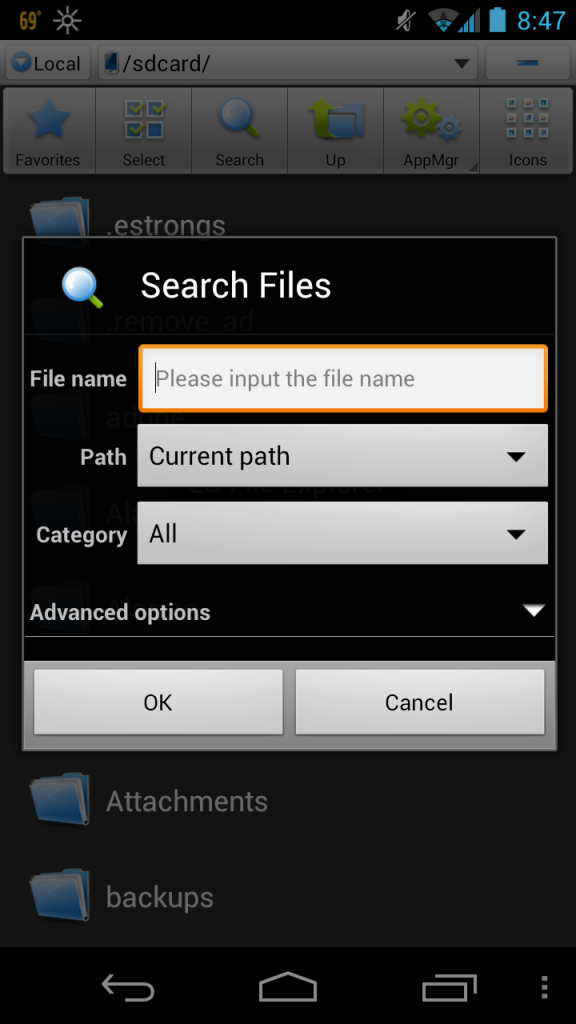
Try to see if there's a ".nomedia" file any way. Maybe one of the apps you updated mistakenly placed it on the root of your SD Card. A factory reset won't fix that. You would have to delete that ".nomedia" file if you want your files to show up if its there. Most file explorers have a search function that will allow you to search for files. ".nomedia" files in other folder are okay as long as its not in the folders you want to see your files in like the DCIM for camera/gallery, music folder, etc.
I Shoot with a Camera
Joined: Oct 2001
Posts: 23,086
Likes: 3,701
From: Vancouver BC
Try to see if there's a ".nomedia" file any way. Maybe one of the apps you updated mistakenly placed it on the root of your SD Card. A factory reset won't fix that. You would have to delete that ".nomedia" file if you want your files to show up if its there. Most file explorers have a search function that will allow you to search for files. ".nomedia" files in other folder are okay as long as its not in the folders you want to see your files in like the DCIM for camera/gallery, music folder, etc.


Adventurist.
Joined: Jan 2004
Posts: 6,661
Likes: 58
From: Orange County, CA
Well, I had to return my Nexus 7 today. It was fairly new at 5 days old. I loved the damn thing but there are some serious quality issues going on.
I had upper left screen flickering with dead pixels and really bad screen lift on the left.
I'm going to wait for Asus/Google to hammer their issues out and buy it again.
I had upper left screen flickering with dead pixels and really bad screen lift on the left.
I'm going to wait for Asus/Google to hammer their issues out and buy it again.

Safety Car
Joined: May 2004
Posts: 3,539
Likes: 295
From: LA, CA
I know for sure Root Explorer will find those ".nomedia" files because I use it as my File Explorer. So if ES doesn't find it, its probably a setting for hidden files. Most apps will insert their own ".nomedia" file so their data don't show up in the Gallery and Video players so its almost impossible to not have any ".nomedia" files if you have apps installed.
Last edited by CGFebTSX04; Aug 17, 2012 at 09:32 AM.
Safety Car
Joined: May 2004
Posts: 3,539
Likes: 295
From: LA, CA
MIUI 4.1.1 for certain devices are being released today such as the Galaxy Nexus, Nexus 7 and Nexus S. Waiting for MIUI.us or MIUIAndroid.com to post their links which should be any time now. Might flash it just to see how it is. I almost forgot how customizable MIUI was after flashing it again on my i9000. Wish it was Jelly Bean though and the themes were updated.
I Shoot with a Camera
Joined: Oct 2001
Posts: 23,086
Likes: 3,701
From: Vancouver BC
Make sure you enable "Hidden files" in the settings if there is one for ES File Explorer. The only other option is to do a full wipe and format of your SD Card. Of course, backup all your files from your internal to somewhere safe then transfer them back.
I know for sure Root Explorer will find those ".nomedia" files because I use it as my File Explorer. So if ES doesn't find it, its probably a setting for hidden files. Most apps will insert their own ".nomedia" file so their data don't show up in the Gallery and Video players so its almost impossible to not have any ".nomedia" files if you have apps installed.
I know for sure Root Explorer will find those ".nomedia" files because I use it as my File Explorer. So if ES doesn't find it, its probably a setting for hidden files. Most apps will insert their own ".nomedia" file so their data don't show up in the Gallery and Video players so its almost impossible to not have any ".nomedia" files if you have apps installed.
in the middle tab, what should it be?
Safety Car
Joined: May 2004
Posts: 3,539
Likes: 295
From: LA, CA
For EStrongs:
Turn on Hidden Files under Settings --> File Settings --> Show Hidden Files:
DcPao.png
Search:
OykJf.png
Result:
fwesv.png
Compare it to Root Explorer:
Pu4Tx.png
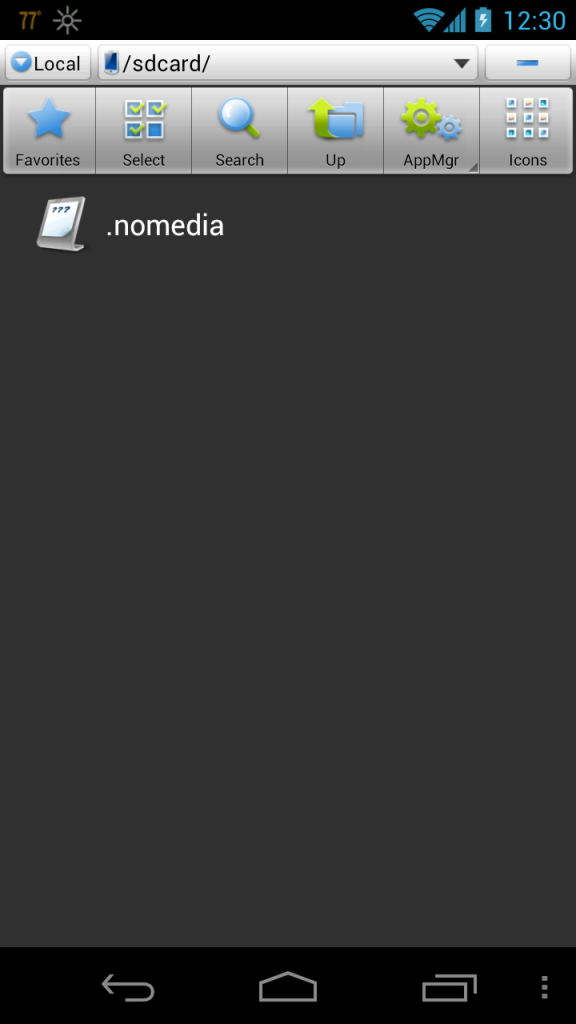
As you can see, ES Explorer does a crappy job in searching for the .nomedia file on the same device. Use a different File Manager that can search for the file properly. ES Explorer isn't cutting it for some reason. Root Explorer may look primitive in terms of UI Design but its been the most functional File Explorer I've used in Android.
Turn on Hidden Files under Settings --> File Settings --> Show Hidden Files:
DcPao.png
Search:
OykJf.png
Result:
fwesv.png
Compare it to Root Explorer:
Pu4Tx.png
As you can see, ES Explorer does a crappy job in searching for the .nomedia file on the same device. Use a different File Manager that can search for the file properly. ES Explorer isn't cutting it for some reason. Root Explorer may look primitive in terms of UI Design but its been the most functional File Explorer I've used in Android.
Safety Car
Joined: May 2004
Posts: 3,539
Likes: 295
From: LA, CA
CM10 Official Nightlies begin tonight.

CM10 Nightlies
Today we kick off the nightly builds of the CM10 JellyBean code branch, builds will show up later this evening.
CM9 nightly builds for devices that don't receive a CM10 nightly will continue (for the meantime) but we are changing the timing on them to be once a week instead (aka weeklies). This will allow a means for us to test bug fixes and the like as they get merged into the ICS branch - as stated before, the CM9 branch is in an otherwise perpetual code-freeze.
The devices receiving CM10 nightlies this evening include (but aren't limited to):
# The US SGS3 variants
# The Galaxy Nexus variants
# The Nexus S varaints
# The Nexus 7
# The Transformer and Transformer Prime
# The SGS1 variants (Vibrant, Captivate, International, and i9000b)
# The SGS2 i9100g
# P3 and P5 tablets
Other devices will join the roster as they become ready and gain their maintainers blessing for nightlies.
Today we kick off the nightly builds of the CM10 JellyBean code branch, builds will show up later this evening.
CM9 nightly builds for devices that don't receive a CM10 nightly will continue (for the meantime) but we are changing the timing on them to be once a week instead (aka weeklies). This will allow a means for us to test bug fixes and the like as they get merged into the ICS branch - as stated before, the CM9 branch is in an otherwise perpetual code-freeze.
The devices receiving CM10 nightlies this evening include (but aren't limited to):
# The US SGS3 variants
# The Galaxy Nexus variants
# The Nexus S varaints
# The Nexus 7
# The Transformer and Transformer Prime
# The SGS1 variants (Vibrant, Captivate, International, and i9000b)
# The SGS2 i9100g
# P3 and P5 tablets
Other devices will join the roster as they become ready and gain their maintainers blessing for nightlies.
Looks like its time to make some nandroids and prepare my devices for the nightlies.

Safety Car
Joined: May 2004
Posts: 3,539
Likes: 295
From: LA, CA
Use a different File Explorer. ES Explorer is failing you in terms of searching for that file. Or navigate to the root of your SD Card with ES Explorer and see if there is a .nomedia file. If there is, delete it. Reboot. Last thing you can do is manually grab your Pictures, Music, and other files you want to keep then format the internal SD Card, factory reset, and put them all back in.
Safety Car
Joined: May 2004
Posts: 3,539
Likes: 295
From: LA, CA
Finally got around to installing CM 10 official Nightlies on one of my devices after running into some issues. My i9000M is on CM 10 Nightlies now after losing my IMEI number. The Nexus 7 build fails to boot as it seems to be a few megabytes short of what it should be. Maybe the buildbots didn't compile the build properly. I was forced to do a full restore on my Nexus 7 which wiped my whole SD Card. Good thing I backed up all my crap before hand.
Before, you flash CM 10, make sure to back up your IMEI folder at the root of your device under the EFS folder. Back it all up to a computer just in case you lose your IMEI. If you lose your IMEI without a backup, you'll have a hard time getting it back.
Guide to recover your IMEI if you lose it:
http://forum.xda-developers.com/show....php?t=1264021
^Its a guide for the S II, but it pretty much applies to all Android devices.
Also, don't forget to reset your Google Wallet inside the app so you don't break your Secure Element. I'm not sure how they partitioned CM10 on the i9000 but it must be using a variation of datadata because its back to speed before the unofficial nightlies.
Before, you flash CM 10, make sure to back up your IMEI folder at the root of your device under the EFS folder. Back it all up to a computer just in case you lose your IMEI. If you lose your IMEI without a backup, you'll have a hard time getting it back.
Guide to recover your IMEI if you lose it:
http://forum.xda-developers.com/show....php?t=1264021
^Its a guide for the S II, but it pretty much applies to all Android devices.
Also, don't forget to reset your Google Wallet inside the app so you don't break your Secure Element. I'm not sure how they partitioned CM10 on the i9000 but it must be using a variation of datadata because its back to speed before the unofficial nightlies.


Does anyone have any experience with Groove IP and Google Voice? Im running it at a data center that I have no service in, but every now and then it will drop the connection, even though WiFi is still up and Groove IP is green.

Senior Moderator


Joined: Dec 2001
Posts: 169,125
Likes: 23,886
Okay...need some help from the gurus here: I've been getting a constant problem the last 2 days...
My Home screen keeps getting frozen and I get the same problem:
TouchWix Home is not responding. Would you like to close it? Wait/OK.
Any ideas? The only way out of it and getting a responsive Home screen is power-cycling or doing a soft reset.
My Home screen keeps getting frozen and I get the same problem:
TouchWix Home is not responding. Would you like to close it? Wait/OK.
Any ideas? The only way out of it and getting a responsive Home screen is power-cycling or doing a soft reset.

Safety Car
Joined: May 2004
Posts: 3,539
Likes: 295
From: LA, CA
Okay...need some help from the gurus here: I've been getting a constant problem the last 2 days...
My Home screen keeps getting frozen and I get the same problem:
TouchWix Home is not responding. Would you like to close it? Wait/OK.
Any ideas? The only way out of it and getting a responsive Home screen is power-cycling or doing a soft reset.
My Home screen keeps getting frozen and I get the same problem:
TouchWix Home is not responding. Would you like to close it? Wait/OK.
Any ideas? The only way out of it and getting a responsive Home screen is power-cycling or doing a soft reset.
Settings --> Apps --> All Tab --> TouchWiz Launcher --> Clear Data
If it still doesn't work after that, then I suggest doing a factory reset. It sounds like one of your widgets is causing it to hang though.
Senior Moderator
Joined: Dec 2001
Posts: 169,125
Likes: 23,886
That doesn't sound good. You could try clearing the cache and data of the launcher but you will have to reposition all of your widgets and icons so take a screenshot of your placements or keep them in mind.
Settings --> Apps --> All Tab --> TouchWiz Launcher --> Clear Data
If it still doesn't work after that, then I suggest doing a factory reset. It sounds like one of your widgets is causing it to hang though.
Settings --> Apps --> All Tab --> TouchWiz Launcher --> Clear Data
If it still doesn't work after that, then I suggest doing a factory reset. It sounds like one of your widgets is causing it to hang though.

Safety Car
Joined: May 2004
Posts: 3,539
Likes: 295
From: LA, CA
Just use one of the many other Weather Widget apps out there. They're a lot better looking and Beautiful Widgets has a lot of different themes available for download.
https://play.google.com/store/apps/d...bHdpZGdldHMiXQ..
http://market.beautiful-widgets.com/
Personally, I use Beweather Pro (Mainly because of the weather animations when opening the app. Its similar to the HTC Sense animations.) using Beautiful Widget skins:
https://play.google.com/store/apps/d...mV3ZWF0aGVyIl0.
https://play.google.com/store/apps/d...bHdpZGdldHMiXQ..
http://market.beautiful-widgets.com/
Personally, I use Beweather Pro (Mainly because of the weather animations when opening the app. Its similar to the HTC Sense animations.) using Beautiful Widget skins:
https://play.google.com/store/apps/d...mV3ZWF0aGVyIl0.
I Shoot with a Camera
Joined: Oct 2001
Posts: 23,086
Likes: 3,701
From: Vancouver BC
I wanted to give a quick update on my situation I posted (from last week). So anyway, even though you advised against doing a factory reset (earlier), I went ahead and tried it... and like you said... it didn't do anything different. So, I actually called around (Craigslist) for people that can help... was planning on meeting up with someone this week. But on Friday, I wanted to go workout and had no music to workout to... so I figure I can just download a song with one of those music apps (I sometimes will workout to just one song on repeat anyway because certain songs get me really pumped)... I got one of the apps from the Store and downloaded one song... I went to the music player to see if the song was there... and lo and behold ALL my music is back, and all my pictures too  and
and
and
Safety Car
Joined: May 2004
Posts: 3,539
Likes: 295
From: LA, CA
Any one else's Play Store market show a Redeem button?
vMiq0.png
Looks like Gift Cards for the Play Store are going live now. Hopefully, promotion codes will be coming out to devs to give away their apps or special promotions like they do on iTunes.
http://phandroid.com/2012/08/22/rede...ay-gift-cards/
vMiq0.png
Looks like Gift Cards for the Play Store are going live now. Hopefully, promotion codes will be coming out to devs to give away their apps or special promotions like they do on iTunes.
http://phandroid.com/2012/08/22/rede...ay-gift-cards/

Any one else's Play Store market show a Redeem button?
Looks like Gift Cards for the Play Store are going live now. Hopefully, promotion codes will be coming out to devs to give away their apps or special promotions like they do on iTunes.
http://phandroid.com/2012/08/22/rede...ay-gift-cards/
Looks like Gift Cards for the Play Store are going live now. Hopefully, promotion codes will be coming out to devs to give away their apps or special promotions like they do on iTunes.
http://phandroid.com/2012/08/22/rede...ay-gift-cards/
Senior Moderator
Joined: Dec 2001
Posts: 169,125
Likes: 23,886
So, I gave up trying to troubleshoot the TouchWiz freezing issue and so, did a master reset via the *2767*3855# code.
The phone was fine all yesterday afternoon, evening, and through the night. This morning, while on the train, I started to customize the Home screen with all my shortcuts, widgets...
And after I did a webmail sync (of all things) because it was finally set up, the Home screen froze. But, no TouchWiz has stopped working warning. So, I did a reset and punted away a few widgets (i.e. Google+). I hope that freezing was just more to do with the webmail setup and the phone having a brainfreeze versus the TouchWiz problem coming back.
Again, I look to the gurus' thoughts here! Thanks!
The phone was fine all yesterday afternoon, evening, and through the night. This morning, while on the train, I started to customize the Home screen with all my shortcuts, widgets...
And after I did a webmail sync (of all things) because it was finally set up, the Home screen froze. But, no TouchWiz has stopped working warning. So, I did a reset and punted away a few widgets (i.e. Google+). I hope that freezing was just more to do with the webmail setup and the phone having a brainfreeze versus the TouchWiz problem coming back.
Again, I look to the gurus' thoughts here! Thanks!
Safety Car
Joined: May 2004
Posts: 3,539
Likes: 295
From: LA, CA
So, I gave up trying to troubleshoot the TouchWiz freezing issue and so, did a master reset via the *2767*3855# code.
The phone was fine all yesterday afternoon, evening, and through the night. This morning, while on the train, I started to customize the Home screen with all my shortcuts, widgets...
And after I did a webmail sync (of all things) because it was finally set up, the Home screen froze. But, no TouchWiz has stopped working warning. So, I did a reset and punted away a few widgets (i.e. Google+). I hope that freezing was just more to do with the webmail setup and the phone having a brainfreeze versus the TouchWiz problem coming back.
Again, I look to the gurus' thoughts here! Thanks!
The phone was fine all yesterday afternoon, evening, and through the night. This morning, while on the train, I started to customize the Home screen with all my shortcuts, widgets...
And after I did a webmail sync (of all things) because it was finally set up, the Home screen froze. But, no TouchWiz has stopped working warning. So, I did a reset and punted away a few widgets (i.e. Google+). I hope that freezing was just more to do with the webmail setup and the phone having a brainfreeze versus the TouchWiz problem coming back.
Again, I look to the gurus' thoughts here! Thanks!



Safety Car
Joined: May 2004
Posts: 3,539
Likes: 295
From: LA, CA



Moderator Alumnus
Joined: Aug 2004
Posts: 10,823
Likes: 52
From: SW Connecticut
Safety Car
Joined: May 2004
Posts: 3,539
Likes: 295
From: LA, CA
http://forum.xda-developers.com/show....php?t=1740367
More specifically:
{ROOTING OFFICIAL ICS 4.0.4 I717UCLF6}
[Recovery] ClockworkMod Based Touch Recovery - 04/14/12
[ROOT] Superuser 3.0.7 for ICS 4.0.3 Leak
USB Driver for ATT I717 Galaxy Note
[Recovery] ClockworkMod Based Touch Recovery - 04/14/12
[ROOT] Superuser 3.0.7 for ICS 4.0.3 Leak
USB Driver for ATT I717 Galaxy Note
Steps:
1. Install USB Drivers
2. Boot into Download Mode. Open up ODIN and flash PDA --> ClockworkMod Based Touch Recovery
3. Place the SuperUser 3.0.7 on your SD Card and boot into Recovery Mode
4. Install SuperUser 3.0.7 and reboot. Done
If you're going to install a custom ROM:
5. Backup your crap either using Nandroid in Recovery Mode or using Titanium Backup now that you have root.
6. Pull off all the important stuff form your SD Card such as pictures, documents to somewhere safe just in case.
7. Pick a ROM and place it on your internal SD Card.
8. Boot into Recovery Mode. Wipe/Factory reset.
9. Install zip --> Your ROM
10. Reboot. Done.

takin care of Business in
iTrader: (5)
Joined: Jan 2008
Posts: 30,994
Likes: 4,733
From: Kansas City, MO
Samsung Galaxy Note....sorry should have mentioned that before...
should I install a custom rom? how does it work? what are the benefit?
Take a look at this thread:
http://forum.xda-developers.com/show....php?t=1740367
More specifically:
Its what I used to root my friend's AT&T Note the other day. The longest part will be installing the drivers.
Steps:
1. Install USB Drivers
2. Boot into Download Mode. Open up ODIN and flash PDA --> ClockworkMod Based Touch Recovery
3. Place the SuperUser 3.0.7 on your SD Card and boot into Recovery Mode
4. Install SuperUser 3.0.7 and reboot. Done
If you're going to install a custom ROM:
5. Backup your crap either using Nandroid in Recovery Mode or using Titanium Backup now that you have root.
6. Pull off all the important stuff form your SD Card such as pictures, documents to somewhere safe just in case.
7. Pick a ROM and place it on your internal SD Card.
8. Boot into Recovery Mode. Wipe/Factory reset.
9. Install zip --> Your ROM
10. Reboot. Done.
http://forum.xda-developers.com/show....php?t=1740367
More specifically:
Its what I used to root my friend's AT&T Note the other day. The longest part will be installing the drivers.
Steps:
1. Install USB Drivers
2. Boot into Download Mode. Open up ODIN and flash PDA --> ClockworkMod Based Touch Recovery
3. Place the SuperUser 3.0.7 on your SD Card and boot into Recovery Mode
4. Install SuperUser 3.0.7 and reboot. Done
If you're going to install a custom ROM:
5. Backup your crap either using Nandroid in Recovery Mode or using Titanium Backup now that you have root.
6. Pull off all the important stuff form your SD Card such as pictures, documents to somewhere safe just in case.
7. Pick a ROM and place it on your internal SD Card.
8. Boot into Recovery Mode. Wipe/Factory reset.
9. Install zip --> Your ROM
10. Reboot. Done.
Moderator Alumnus
Joined: Aug 2004
Posts: 10,823
Likes: 52
From: SW Connecticut
Safety Car
Joined: May 2004
Posts: 3,539
Likes: 295
From: LA, CA
1. Custom ROMs based on TouchWiz/Stock OEM ROMs.
2. Custom ROMs based on AOSP such as CyanogenMod, AOKP, etc.
Now you have to choose. Do you want all of the TouchWiz features such as the launcher, icons, theme, widgets, memo app, etc? Or are you okay with Vanilla Android, without the bloatware that TouchWiz added at the price of some loss functionality of the widgets, memo app, etc. It comes down to TouchWiz features vs. Speed, slightly less TouchWiz features (I say less because there are alternative apps in the Play Store to cover most everything.)
Why custom ROMs vs. waiting for AT&T/Samsung to update your phone? Simply, if you choose an AOSP ROM such as CyanogenMod, AOKP or the many others, you will always be running the latest Google Code. Think about all the bugfixes, new features that Google is inserting without having to wait. You also have to remember that most of the devs on XDA are modding their daily driver phones. So if there is a bug in the ROM, it'll most likely be fixed because it will bother them instead of having to wait on Samsung to push out an update. The same applies somewhat to TouchWiz based ROMs, however, they're limited to what Samsung pushes out there so its not the most up to date compared to AOSP. However, it'll be the most up to date that Samsung will have pushed out.
So it comes down to preference of you tinkering with your phone or playing the waiting game for your updates. I like to change every aspect of my phone which is why I've been using Android for a while. (You won't get the same freedom on any other device out there at the moment.) Also, once you learn how to flash a custom ROM on one Android device, its pretty much the same on all other devices. When you settle down on a ROM, then you should start playing with kernels. These add tweaks/performance boosts to your ROM. For now, I suggest you stick to finding a ROM first then worry about kernels/themes afterwards. Although, CyanogenMod's Theme engine has made changing themes a lot easier nowadays.