


Android: Phone News and Discussion Thread


Safety Car
Joined: May 2004
Posts: 3,539
Likes: 295
From: LA, CA
Instructions:
http://www.androidcentral.com/how-ma...medium=twitter
Safety Car
Joined: May 2004
Posts: 3,539
Likes: 295
From: LA, CA
Looks like Android 4.0.3 will be the main code that devs should be using:
https://groups.google.com/forum/#!ms...k/uwePxLFEONcJ
I'm pushing the source code for Android 4.0.3 to AOSP. This matches
build IML74K. Kernel sources will follow as soon as practical.
Over the years, I've released 50 different versions of Android in
AOSP, not counting the SDK and CTS, and I think that this is the best
release ever.
Some noteworthy items:
-This version of Android is optimized for a wide range of devices. It
works on phones. It works on tablets. It works on devices that don't
quite have the horsepower of a Galaxy Nexus.
-From a straight AOSP, it works on Galaxy Nexus (the ones sold with
mysid and yakju builds), on Motorola Xoom (US variants), and on Nexus
S (all variants). Proprietary binaries will soon be available for
those devices at the usual location.
-Out of the box, this is the first time that AOSP works on 3 different
device families, the first time that it works on tablets, the first
time that it works directly on a device that's neither an ADP nor a
Nexus, and the first time that it works on Verizon devices.
JBQ
--
Jean-Baptiste M. "JBQ" Queru
Software Engineer, Android Open-Source Project, Google.
Questions sent directly to me that have no reason for being private
will likely get ignored or forwarded to a public forum with no further
warning.
build IML74K. Kernel sources will follow as soon as practical.
Over the years, I've released 50 different versions of Android in
AOSP, not counting the SDK and CTS, and I think that this is the best
release ever.
Some noteworthy items:
-This version of Android is optimized for a wide range of devices. It
works on phones. It works on tablets. It works on devices that don't
quite have the horsepower of a Galaxy Nexus.
-From a straight AOSP, it works on Galaxy Nexus (the ones sold with
mysid and yakju builds), on Motorola Xoom (US variants), and on Nexus
S (all variants). Proprietary binaries will soon be available for
those devices at the usual location.
-Out of the box, this is the first time that AOSP works on 3 different
device families, the first time that it works on tablets, the first
time that it works directly on a device that's neither an ADP nor a
Nexus, and the first time that it works on Verizon devices.
JBQ
--
Jean-Baptiste M. "JBQ" Queru
Software Engineer, Android Open-Source Project, Google.
Questions sent directly to me that have no reason for being private
will likely get ignored or forwarded to a public forum with no further
warning.


That link seems to be coming from the official Google servers. You shouldn't root to install that. Just put it on your SD Card and flash with recovery.
Instructions:
http://www.androidcentral.com/how-ma...medium=twitter
Instructions:
http://www.androidcentral.com/how-ma...medium=twitter

Also - Koush already loaded it to Rom Manager.
Last edited by civicdrivr; Dec 16, 2011 at 04:46 PM.

Suzuka Master
Joined: Jan 2009
Posts: 9,012
Likes: 439
From: SoCal
 keeps saying no update!! Goolge needs to realize who their real fans are!! Give me the update!!
You can still flash it:
This, of course, is assuming you have a 9020T, the TMo version. The 9020A wont work properly.
How to install:
Grab the OTA package here http://android.clients.google.com/pa...o/VQ8PQk_V.zip
TMO version
Update 4.0.3 from the google servers (128mb download)
Rename it to update.zip.
This isn't needed for the Nexus S bootloader, but it makes things easy, if that's how you prefer them.
Copy it over to the internal storage on your Nexus S.
Power off, then hold volume up and power to reboot to the bootloader.
Using the volume key to navigate, select recovery, then use the power button to confirm
When you see the warning triangle and arrow, hold the power button and tap volume up. You'll see a menu.
From the menu, select "apply update from /sdcard", and choose update.zip from the list.
Let it do its thing and update your system, radio, and other partitions. When finished, choose "reboot system now"
Enjoy!
Grab the OTA package here http://android.clients.google.com/pa...o/VQ8PQk_V.zip
TMO version
Update 4.0.3 from the google servers (128mb download)
Rename it to update.zip.
This isn't needed for the Nexus S bootloader, but it makes things easy, if that's how you prefer them.
Copy it over to the internal storage on your Nexus S.
Power off, then hold volume up and power to reboot to the bootloader.
Using the volume key to navigate, select recovery, then use the power button to confirm
When you see the warning triangle and arrow, hold the power button and tap volume up. You'll see a menu.
From the menu, select "apply update from /sdcard", and choose update.zip from the list.
Let it do its thing and update your system, radio, and other partitions. When finished, choose "reboot system now"
Enjoy!
Suzuka Master
Joined: Jan 2009
Posts: 9,012
Likes: 439
From: SoCal
Safety Car
Joined: May 2004
Posts: 3,539
Likes: 295
From: LA, CA
You have to manually download it or wait. Google sends out updates by IMEI number so they don't overload the servers sending out corrupted update files. Would end up in a lot of bricked phones. You can keep pressing check update but it won't do anything until they send a green light on their end.
Suzuka Master
Joined: Jan 2009
Posts: 9,012
Likes: 439
From: SoCal
Safety Car
Joined: May 2004
Posts: 3,539
Likes: 295
From: LA, CA
Suzuka Master
Joined: Jan 2009
Posts: 9,012
Likes: 439
From: SoCal
haha yea, I may root my phone again when stable builds come out which should be soon now that the official ICS is released.
Its updating!!!!! I didnt know we had a way to install zips from sdcard without having Clockwork recovery, cool!
Its updating!!!!! I didnt know we had a way to install zips from sdcard without having Clockwork recovery, cool!

For those on here with a rooted Nexus S - Flash back to stock 2.3.6, flash the new ICS package, then you can root just as you would with Gingerbread.
Whats killing me right now is Im waiting for someone to call me, so I need my phone for the next hour or two. But I have everything downloaded and ready to go once I get that phone call

There are ICS kernels out there already, Im just not sure if they will work with the official ICS rom. Im sure there will be an answer to that tonight. Ill also post up later if I have success with root.
Safety Car
Joined: May 2004
Posts: 3,539
Likes: 295
From: LA, CA
According to some on the NS side, it didnt, at least on Alpha 11. I had Alpha 13 up and running the other day but didnt try face unlock, so Im not sure.
For those on here with a rooted Nexus S - Flash back to stock 2.3.6, flash the new ICS package, then you can root just as you would with Gingerbread.
Whats killing me right now is Im waiting for someone to call me, so I need my phone for the next hour or two. But I have everything downloaded and ready to go once I get that phone call
Safety Car
Joined: May 2004
Posts: 3,539
Likes: 295
From: LA, CA
Verdict? lol.
In other news, win a "Dude, you're a barista" shirt from Samsung:
https://twitter.com/#!/SamsungMobile...221696/photo/1

In other news, win a "Dude, you're a barista" shirt from Samsung:
https://twitter.com/#!/SamsungMobile...221696/photo/1
Suzuka Master
Joined: Jan 2009
Posts: 9,012
Likes: 439
From: SoCal
I'm like half playing with it half eating, but I love it right now! It lagged when it first turned on but thats it. So far all i've been in is settings and messaging app, but its soooo much cleaner. And no I didnt see a face unlock, unless its hidden somewhere.
Ohh yea i tried panorama mode! Thats really neat!!!
Will dive further into the phone as the day goes on
Ohh yea i tried panorama mode! Thats really neat!!!
Will dive further into the phone as the day goes on
Safety Car
Joined: May 2004
Posts: 3,539
Likes: 295
From: LA, CA
Nice. Supercurio said that his OTA Root Keeper works for this ROM.
https://market.android.com/details?i....otarootkeeper
Might want to check it out for the people upgrading with root.
https://market.android.com/details?i....otarootkeeper
Might want to check it out for the people upgrading with root.

Moderator
Regional Coordinator (Southeast)
Regional Coordinator (Southeast)


Joined: Dec 2003
Posts: 44,135
Likes: 4,445
From: Mooresville, NC
So my replacement phone showed up today and I got exactly what I was hoping for by not waiting to make my claim. I received an entirely new and unopened Galaxy Nexus and all the accessories. Best part is that the way Asurion work it only gave me a padded envelope big enough to send the phone back so I get to keep all the accessories and extra battery.
Nice. Supercurio said that his OTA Root Keeper works for this ROM.
https://market.android.com/details?i....otarootkeeper
Might want to check it out for the people upgrading with root.
https://market.android.com/details?i....otarootkeeper
Might want to check it out for the people upgrading with root.
I flashed back to 2.3.6 and then up to 4.0.3 without a problem. I wanted root, but ADB/Fastboot refused to talk to the phone in the bootloader (its worked all other times). USB debugging was selected too.
It kept giving me "error: unable to flash recovery" or something like that. Finally I found a site - www.nexusshacks.com - and downloaded their zip with all needed files. Finally that worked, I was able to flash the recovery. I flashed the SU binary that some people mentioned worked for them. The SuperUser app installed, I could still use SU through terminal, but the app wasnt talking to other apps that were requesting root access.

Come to find out, the people who swore up and down two hours ago that they retained root never actually tested that theory. They just saw the app and assumed they had root. So Im in the process of flashing back to my rooted 2.3.7 backup, downloading root keeper, and hoping that works. One person so far has said it does.
There was a rooted version of the rom floating around, but it was hosted on Dropbox and too many people downloaded it subsequently killing it. At some point throughout this, my sd got wiped. Good thing I did a backup, but its taking forever to copy back to the phone. It says there is an hour left and its been going for about 25 minutes so far. Its about 1.25gb of data

/rant

Just grab any File Explorer that access the system folders (I prefer Root Explorer) and copy and paste the whole "Factory" folder to somewhere safe. Pull it from the phone to your computer to keep it safe. Most updates shouldn't touch this but there have been instances where ODIN updates have deleted IMEI numbers and the only way to get them back is through a backup.
Ok, Im using this as a blog of sorts and I dont give a shit.
So my phone is trying to screw with me any which way it can.
I finally got all my stuff transferred back to my sd card. Tried restoring my old rom, status 7 error. Tried flashing the stock 2.3.6, status 7 error. No matter what I tried to flash, I got a status 7 error. I did some reading up on it and couldnt find anything regarding my specific situation, but I did decide to try a different recovery. The recovery that I was using was 5.0.2.0. I flashed down to 3.0.0.5, wiped, and flashed stock 2.3.6. Success! Its back up and running - albeit without root and all my apps.
Weird thing - thats the standard OTA update that I flashed, and yet when I boot my phone into recovery CWM sticks. I don't get the stock recovery at all
Anyway, Im going to leave it for tonight, reroot it in the morning and try root keeper and ICS, unless there is a rooted ICS rom out there already.
So my phone is trying to screw with me any which way it can.
I finally got all my stuff transferred back to my sd card. Tried restoring my old rom, status 7 error. Tried flashing the stock 2.3.6, status 7 error. No matter what I tried to flash, I got a status 7 error. I did some reading up on it and couldnt find anything regarding my specific situation, but I did decide to try a different recovery. The recovery that I was using was 5.0.2.0. I flashed down to 3.0.0.5, wiped, and flashed stock 2.3.6. Success! Its back up and running - albeit without root and all my apps.
Weird thing - thats the standard OTA update that I flashed, and yet when I boot my phone into recovery CWM sticks. I don't get the stock recovery at all
Anyway, Im going to leave it for tonight, reroot it in the morning and try root keeper and ICS, unless there is a rooted ICS rom out there already.
Safety Car
Joined: May 2004
Posts: 3,539
Likes: 295
From: LA, CA
Error 7 is usually related to Recovery not being compatible with the ROM you're trying to flash. That's probably why it worked when you flashed a different CWM. Here's the instructions on how to update with root which is pretty much what I think you're trying to do:
http://forum.xda-developers.com/show...&postcount=770
Ok. I got everything working.
Here are steps. (for I9020T)
1. Download 2.3.6 from here. Else you can use any stock rooted 2.3.6 rom.
2. Download su-2.3.6.1-ef-signed
3. Download 4.0.3 OTA
4. Copy all of the above file to you phone.
5. Flash 2.3.6 stock rom and super user using ClockworkMod (flash both in once, without restart.)
6. Update Superuser and other su binaries with super user app.
7. Install Voodoo root keeper
8. Use rootkeeper to backup root and restart to recovery.
9. Flash ICS OTA and its done!!
NB. I had little problem after above steps, that Titanium not detecting root. What I did is I restored all my apps and other datas from 2.3.6 installation itself.
Here are steps. (for I9020T)
1. Download 2.3.6 from here. Else you can use any stock rooted 2.3.6 rom.
2. Download su-2.3.6.1-ef-signed
3. Download 4.0.3 OTA
4. Copy all of the above file to you phone.
5. Flash 2.3.6 stock rom and super user using ClockworkMod (flash both in once, without restart.)
6. Update Superuser and other su binaries with super user app.
7. Install Voodoo root keeper
8. Use rootkeeper to backup root and restart to recovery.
9. Flash ICS OTA and its done!!
NB. I had little problem after above steps, that Titanium not detecting root. What I did is I restored all my apps and other datas from 2.3.6 installation itself.

Thread Starter
Be Strong AND Courageous!
iTrader: (1)
Joined: Nov 2003
Posts: 9,305
Likes: 43
From: Joshua 1:1-9

so sorry to hear this!
Thread Starter
Be Strong AND Courageous!
iTrader: (1)
Joined: Nov 2003
Posts: 9,305
Likes: 43
From: Joshua 1:1-9
So my replacement phone showed up today and I got exactly what I was hoping for by not waiting to make my claim. I received an entirely new and unopened Galaxy Nexus and all the accessories. Best part is that the way Asurion work it only gave me a padded envelope big enough to send the phone back so I get to keep all the accessories and extra battery.


Instructor
Joined: Feb 2008
Posts: 151
Likes: 0
From: Dallas
Do it. You know you want to. lol. Negri Elictronics has it for $685 with the code "VZSUCKS". lol.
I'm on AT&T. I will let you know about speeds once I choose a proper ROM. lol. My speeds might not be representative of actual speeds because I'm using a non-smartphone plan and AT&T has since started capping speeds on it. I might be forced to get a regular data plan but I'll wait for them to force it on me. It is HSPA+ pentaband so it should work on T-Mobile as well. I've seen people reporting around 6-10 Mbps on AT&T on XDA.
I'm on AT&T. I will let you know about speeds once I choose a proper ROM. lol. My speeds might not be representative of actual speeds because I'm using a non-smartphone plan and AT&T has since started capping speeds on it. I might be forced to get a regular data plan but I'll wait for them to force it on me. It is HSPA+ pentaband so it should work on T-Mobile as well. I've seen people reporting around 6-10 Mbps on AT&T on XDA.
Thanks for posting the discount code, I went ahead and ordered it. Got it last night and so far no complaints.
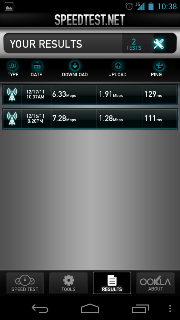
I'm on Tmobile
These are my speeds so far, even if not 10mbps it is enough for me.
Safety Car
Joined: May 2004
Posts: 3,539
Likes: 295
From: LA, CA
http://forum.xda-developers.com/show...05&postcount=5
T-Mobile needs to do something on their end to recognize the Nexus phone as a smartphone instead of a dumbphone so that MMS are sent and received at the correct sizes.
Oh also, which baseband are you using? You can check in your Settings --> About Phone. The latest one for North America is KL1:
http://forum.xda-developers.com/show...&postcount=230
Flash the above using fastboot. Supposedly it improves speeds on data, wifi and call quality.
Last edited by CGFebTSX04; Dec 17, 2011 at 12:48 PM.
Safety Car
Joined: May 2004
Posts: 3,539
Likes: 295
From: LA, CA
One more tip for the people who are new to Android phones with a notification light. You can control the colors and the apps that can use the LED with some apps from the Market. The one I'm currently using is Light Flow and its pretty cusotmizable. Modaco's comes with Trackball Alert. For some reason, it worked for a few days and then stopped once it nagged me to upgrade to the full version.
https://market.android.com/details?i...Zmxvd2xpdGUiXQ..
https://market.android.com/details?i...mFsbEFsZXJ0Il0.
Both will need root and Trackball alert needs to patch the framework. Again, Modaco's ROMs come with Trackball Alert by default. If you don't feel like patching frameworks go with Light Flow. Still testing battery drain on Light Flow but so far so good. My battery also finally stabilized. I guess it helps not flashing kernels every day. lol. Its looking good now.
https://market.android.com/details?i...Zmxvd2xpdGUiXQ..
https://market.android.com/details?i...mFsbEFsZXJ0Il0.
Both will need root and Trackball alert needs to patch the framework. Again, Modaco's ROMs come with Trackball Alert by default. If you don't feel like patching frameworks go with Light Flow. Still testing battery drain on Light Flow but so far so good. My battery also finally stabilized. I guess it helps not flashing kernels every day. lol. Its looking good now.
Instructor
Joined: Feb 2008
Posts: 151
Likes: 0
From: Dallas
If you're having MMS issues, the fix can be found here:
http://forum.xda-developers.com/show...05&postcount=5
T-Mobile needs to do something on their end to recognize the Nexus phone as a smartphone instead of a dumbphone so that MMS are sent and received at the correct sizes.
Oh also, which baseband are you using? You can check in your Settings --> About Phone. The latest one for North America is KL1:
http://forum.xda-developers.com/show...&postcount=230
Flash the above using fastboot. Supposedly it improves speeds on data, wifi and call quality.
http://forum.xda-developers.com/show...05&postcount=5
T-Mobile needs to do something on their end to recognize the Nexus phone as a smartphone instead of a dumbphone so that MMS are sent and received at the correct sizes.
Oh also, which baseband are you using? You can check in your Settings --> About Phone. The latest one for North America is KL1:
http://forum.xda-developers.com/show...&postcount=230
Flash the above using fastboot. Supposedly it improves speeds on data, wifi and call quality.
Baseband reads I9250XXKK1
Safety Car
Joined: May 2004
Posts: 3,539
Likes: 295
From: LA, CA
Yeah I rarely use MMS. Not sure why people still do actually since e-mail and other stuff is so prevalent and at a higher quality. Try the KL1 baseband. Some people are reporting faster data speeds with it.
Safety Car
Joined: May 2004
Posts: 3,539
Likes: 295
From: LA, CA
Verizon is selling the extended battery for $25 online. Not sure why the phone didn't come with this battery as it doesn't need a new back cover:
http://www.droid-life.com/2011/12/16...nwireless-com/
This won't work on the GSM version btw.
http://www.droid-life.com/2011/12/16...nwireless-com/
This won't work on the GSM version btw.
And Root Keeper actually didnt work. Someone did post a new SU bin this morning that works with ICS, the shitty part is that it auto-allows. But for now I have rooted ICS
 I have all my apps back, and after about 20-30 minutes of ICS running its smoothed out tremendously. Its just as fast on the stock kernel as my oc'd CM7 rom.
I did turn the window and transmission animation scale down to .5x, having it set to defaults just seemed a bit sluggish. There is already one kernel available for the OTA ICS build, but Im waiting for francisco.franco to release his. I cant wait to get my Voodoo colors and sound back.
The browser does take a bit of getting used to. In one of the alpha builds I was running, a swipe up opened the address bar. Now I have to swipe from the right or left edge of the screen and use the thumb menu to get it.
The stock keyboard is very precise too. I also like the speech to text, it works well. I really wish they gave us T9 support in the dialer though, that way I didnt have to go into contacts. One of the alpha builds had it, so I kind of assumed it was a Google implementation, not a dev thing.
Last edited by civicdrivr; Dec 17, 2011 at 02:21 PM. Reason: spelling