


C&P Random Thread -


Moderator


Joined: Oct 2004
Posts: 64,122
Likes: 3,372
From: Not Las Vegas (SF Bay Area)
http://craigpulsifer.wordpress.com/2...stuck-filter/#


My first Avatar....

Joined: May 2006
Posts: 33,029
Likes: 9,137
From: NJ
Just got a 15-85 lens and I'm noticing vignetting especially in the upper right corner. Is there anything that can be done to correct this?
example:
http://www.flickr.com/photos/petshots/8355762992/http://www.flickr.com/photos/petshots/8355762992/ by http://www.flickr.com/people/petshots/, on Flickr
example:
http://www.flickr.com/photos/petshots/8355762992/http://www.flickr.com/photos/petshots/8355762992/ by http://www.flickr.com/people/petshots/, on Flickr
Moderator
Joined: Oct 2004
Posts: 64,122
Likes: 3,372
From: Not Las Vegas (SF Bay Area)
I believe with LR4 and CS5+ they have lens profiles that you can correct the photo with.
it'll adjust for known distortion and vignetting and i think chromatic aberration.
it'll adjust for known distortion and vignetting and i think chromatic aberration.

I Shoot with a Camera
Joined: Oct 2001
Posts: 23,082
Likes: 3,683
From: Vancouver BC

nnInn
Joined: Mar 2006
Posts: 37,670
Likes: 1,084
At least you'll be able to narrow it down more.

all work and no play
Joined: Sep 2006
Posts: 13,916
Likes: 134
From: Wakefield, Ma
you should try the Technique that Canon CPS recommends....
http://craigpulsifer.wordpress.com/2...stuck-filter/#
http://craigpulsifer.wordpress.com/2...stuck-filter/#
 I think I'll try getting these first, worst case scenario I'll just throw em away, theyre stuck together, not stuck on the lens.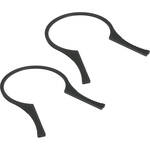
Lifetime warranty you say Kingston? Nice, stick these things up your ass for me. I should have never went away from San Disk, only issue I ever had with them was when I dropped one of my 4 gig cards, and it was corrupted after that.
nnInn
Joined: Mar 2006
Posts: 37,670
Likes: 1,084
I stepped away from SanDisk because they were getting to $$$$, I have used many Transcend cards, SD and CF, in the last four years, without problems, and they are very good on the wallet as well. I think they are a reason for SanDisk to come down some on price.

My first Avatar....
Joined: May 2006
Posts: 33,029
Likes: 9,137
From: NJ
Any of you folks use digital picture frames for displaying your images? What sizes do you use? Or do you just do prints etc?
It just seems digital images look so much better when they are backlit as on a computer screen.

It just seems digital images look so much better when they are backlit as on a computer screen.
depends. the older folks and some others still prefer having a printed copy of their photos. But for a more modern look, then definitely having a digital picture viewer is more updated.

Earth-bound misfit
Joined: Mar 2006
Posts: 31,704
Likes: 608
So far, I have yet to see one that looks good enough that I'd want to use it. All I've seen are very low-res and pixelated. I prefer canvas or metal, though I have found that brightening the image before printing can give me better results.
nnInn
Joined: Mar 2006
Posts: 37,670
Likes: 1,084


Living the Dream
Joined: May 2006
Posts: 4,924
Likes: 130
From: near Charlotte
I have a quick question regarding post-processing software. I found the old PP thread, but that was more for tips about how to do various enhancements to photos than what I am going to ask.
I am running on a late 2010 15" MBP and currently have Aperture 2 installed. This version does not convert RAW files from my GX1, but Aperture 3 and up does.
Upgrading to Aperture 3 is about the same cost as starting with Photshop Elements.
Would you recommend upgrading to Aperture 3 or going with Elements? I'm extremely hesitant to spend the $$ on CS6 when my post processing skills are minimal at best. I am looking for mostly RAW conversion, but some post processing to get the shot to where (or as close as) I want it would be great.
I am leaning towards Elements because should there come a time where photography becomes a more serious hobby, I would at least know the how to start with the big boy Photoshop.
I am running on a late 2010 15" MBP and currently have Aperture 2 installed. This version does not convert RAW files from my GX1, but Aperture 3 and up does.
Upgrading to Aperture 3 is about the same cost as starting with Photshop Elements.
Would you recommend upgrading to Aperture 3 or going with Elements? I'm extremely hesitant to spend the $$ on CS6 when my post processing skills are minimal at best. I am looking for mostly RAW conversion, but some post processing to get the shot to where (or as close as) I want it would be great.
I am leaning towards Elements because should there come a time where photography becomes a more serious hobby, I would at least know the how to start with the big boy Photoshop.
Living the Dream
Joined: May 2006
Posts: 4,924
Likes: 130
From: near Charlotte
I've been reading more and more on Lightroom, and was thinking the same thing.
I always read reviews for LR as it being more for organization than processing, but it seems that it has the same (maybe more) processing power as Elements, but supreme organization.
Need to read up on it some more.
I always read reviews for LR as it being more for organization than processing, but it seems that it has the same (maybe more) processing power as Elements, but supreme organization.
Need to read up on it some more.
Moderator
Joined: Oct 2004
Posts: 64,122
Likes: 3,372
From: Not Las Vegas (SF Bay Area)
Adobe Photoshop Lightroom basically combines Adobe bridge for photo organization with Photoshop.
You can pretty much do like 90% of what you would need to edit photos with.
If you need to add remove stuff from an image or use layers and masking then you'll need PS.
You can pretty much do like 90% of what you would need to edit photos with.
If you need to add remove stuff from an image or use layers and masking then you'll need PS.
Moderator
Joined: Oct 2004
Posts: 64,122
Likes: 3,372
From: Not Las Vegas (SF Bay Area)


I Shoot with a Camera
Joined: Oct 2001
Posts: 23,082
Likes: 3,683
From: Vancouver BC

all work and no play
Joined: Sep 2006
Posts: 13,916
Likes: 134
From: Wakefield, Ma
a few months back I was going through my menu while shooting and saw it was set to JPEG, I probably looked as confused as PDiddy in that pic of him trying to figure out how a $1 got in his stack of hundreds
Moderator
Joined: Oct 2004
Posts: 64,122
Likes: 3,372
From: Not Las Vegas (SF Bay Area)


I Shoot with a Camera
Joined: Oct 2001
Posts: 23,082
Likes: 3,683
From: Vancouver BC
I think I started using Lightroom until 2010, prior to that it was just JPEG straight from the SD/CF. That said, I DO know someone that is quite talented and shoots JPEG, he feels that it's enough, can still make adjustments but usually minor

nnInn
Joined: Mar 2006
Posts: 37,670
Likes: 1,084
all work and no play
Joined: Sep 2006
Posts: 13,916
Likes: 134
From: Wakefield, Ma
I have tried to access the card through DPP, as well as directly through the card as a drive.
Any other card will be labeled as "EOS" while this card is just "removable memory"
Any other card will be labeled as "EOS" while this card is just "removable memory"
My first Avatar....
Joined: May 2006
Posts: 33,029
Likes: 9,137
From: NJ
This is the one we bought for my FIL, not sure what it looks like when displayed, but it's the one he wanted and it does have good feedback on amazon.com
http://www.amazon.com/Sony-DPF-D810-...al+photo+frame
http://www.amazon.com/Sony-DPF-D810-...al+photo+frame
wndrlst...you like Canvas and metal (never saw this)...how, or with whom, do you get your prints done?
Jup...do you prefer just standard prints in frames?
I'm wondering because of the visaul difference between a backlit image and a printed one.
Thanks.


Moderator
Joined: Oct 2007
Posts: 3,578
Likes: 322
From: Orange County, CA
What's great is that Picasa is also a desktop app that lets you manage your photos on you computer and sync it with the web app.