When you click on links to various merchants on this site and make a purchase, this can result in this site earning a commission. Affiliate programs and affiliations include, but are not limited to, the eBay Partner Network.
Adding another data point here. My 2008 Type S has been having clock issues as well. I first noticed the problem with the most recent time change. It went back an hour about 1 week before the actual time change event in November. Now, after the new year, it just
moved forward an hour on its own. On the clock adjustment screen, the manual adjustment buttons work, but only for a brief second before reverting back to 12:00. The other on/off selections for daylight savings and auto time zone have no effect on displayed time when turned on or off. The entire clock adjustment page is basically useless.
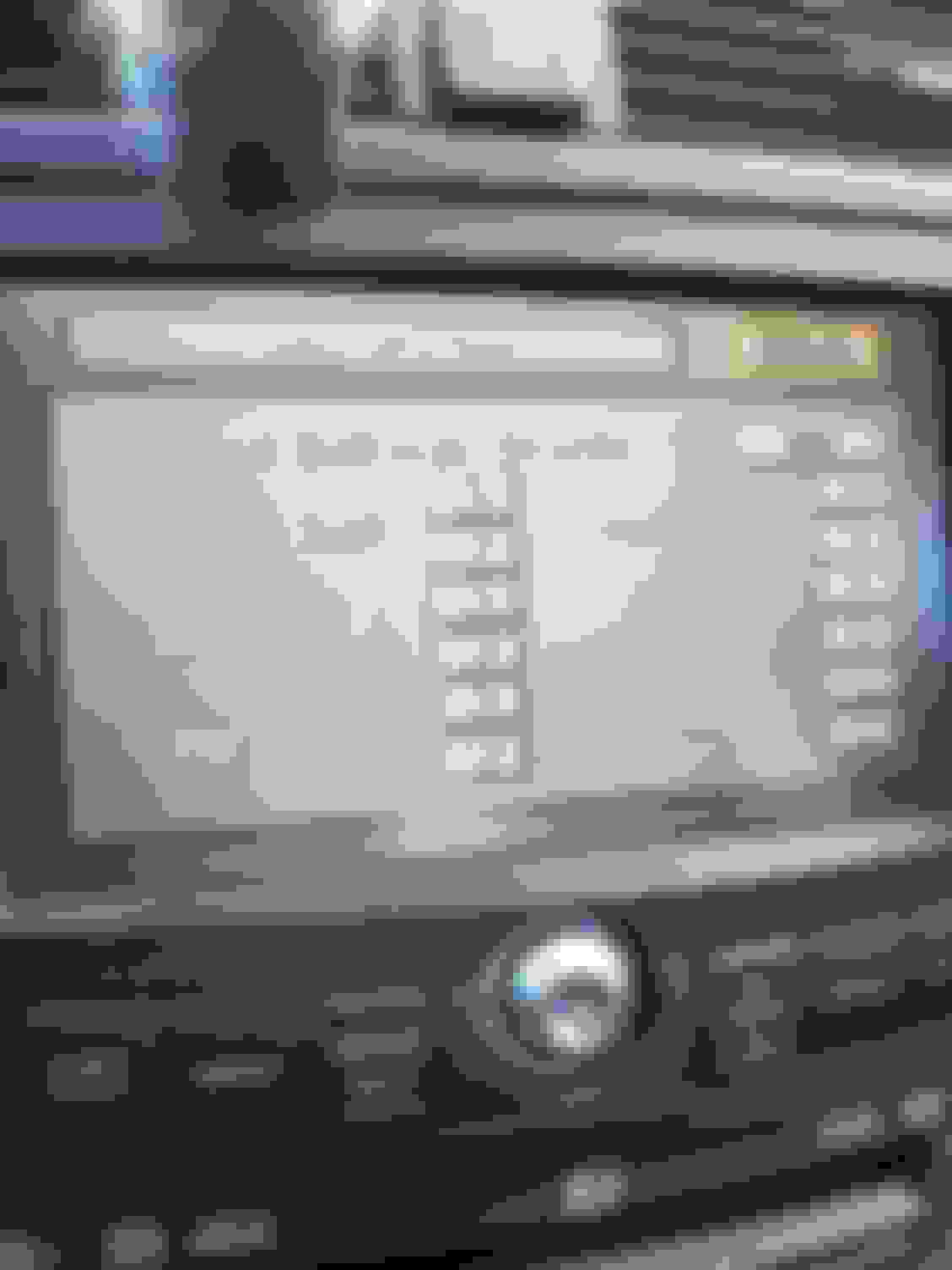
I believe the displayed time is supposed to auto synchronize with GPS time. I believe it is still doing so, just off by an hour. The time on my phone showed 9:13 when this picture was taken. Note the time of 10:14 shown on the car upper display.
Last edited by TW Type S; Jan 6, 2022 at 09:34 AM.
Adding another data point here. My 2008 Type S has been having clock issues as well. I first noticed the problem with the most recent time change. It went back an hour about 1 week before the actual time change event in November. Now, after the new year, it just moved forward an hour on its own. On the clock adjustment screen, the manual adjustment buttons work, but only for a brief second before reverting back to 12:00. The other on/off selections for daylight savings and auto time zone have no effect on displayed time when turned on or off. The entire clock adjustment page is basically useless.
I believe the displayed time is supposed to auto synchronize with GPS time. I believe it is still doing so, just off by an hour. The time on my phone showed 9:13 when this picture was taken. Note the time of 10:14 shown on the car upper display.
lol I was about the post the exact thing. I have a 2006 TSX w/ Nav and am having the same issue. I just contacted an Acura chat agent about it and they said the same thing:
"We are so sorry for the issue you are experiencing with your vehicle. We have escalated the NAVI Clock Issue to our Engineering Team and they have informed us that you will experience issue from Jan 2022 thru August 2022 and then it will auto-correct. Please be assured that we will continue to monitor this and will advise you if a fix is available before that time. Thank you for being a loyal Acura customer."
I replied "Strange," to which she replied: "Yeah, if a fix becomes available you will be notified."
I don't really expect Acura do anything regarding a 14-17 years old electronic system, and no the new disk fix is not possible since the orange disk has been discontinued in 2014.
You have two options, either deal with it or retrofit a 07-08 unit (who knows how long that gonna last) or do a tablet mod.
Hey my 08 just started doing the same thing ironically a month or so after I had Alpine rebuild my Navi DVD for $385.
That I don't know sorry...anyone wanna be the guinea pig? Resetting the display - hmph does that mean just the upper display?
I tried the steps to set the dash clock at 1:00. It worked great without wiping out any data. However, the internal navigation clock is stick at 00:00. Have to wait on that fix.
Adding another data point here. My 2008 Type S has been having clock issues as well. I first noticed the problem with the most recent time change. It went back an hour about 1 week before the actual time change event in November. Now, after the new year, it just
moved forward an hour on its own. On the clock adjustment screen, the manual adjustment buttons work, but only for a brief second before reverting back to 12:00. The other on/off selections for daylight savings and auto time zone have no effect on displayed time when turned on or off. The entire clock adjustment page is basically useless.
I believe the displayed time is supposed to auto synchronize with GPS time. I believe it is still doing so, just off by an hour. The time on my phone showed 9:13 when this picture was taken. Note the time of 10:14 shown on the car upper display.
I have an 08 w/Navi, same exact problem and it just started a week ago while I was visiting Florida. I pulled the battery to see if it would get fixed, but now it shows 1pm in the model of the night. I guess the only temporary fix is to take off the battery and reconnect it at exactly 1pm to get the time right for our cars. Lol
also, the diagnostic menu under Functional setup-> GPS send time, says year 2002. Changing the time works, but when you select set, it does nothing and getting out and going back in shows the 2002 time/date again. Hopefully they fix this one day soon.
I guess the only temporary fix is to take off the battery and reconnect it at exactly 1pm to get the time right for our cars. Lol
This is no longer a cure my 08 is having the same issue now too.. so much for that
Yes, but I still have map updates for 2021 rather than 2014, and a better screen that's also my backup camera screen.
I'd still do it all over again. Hey, the clock worked throughout 2021!
Only now its more than likely Honda is addressing the clock issue given the # of vehicles out there with failing clocks, unlike when '04/5/6 TL's were then the only cars affected.
.
Acura already said there is no fix for it yet, just wait until august and it should be back normal. The real question would be August of what year? 2035 or 2050? Meanwhile are you interested on purchase the new Integra? LOL
If this is happening to your car you need to report it! So sick of all the issues with Honda/Acura now… my 07 type s TL got the issue as of January 1st…
my 07 TLS has the same issue since 01/01/2022, clock showed 1 hour ahead.. thought i could fix this like other owners by resetting the battery and it made it worse.. its now like 8hours and some change off
as a temporary fix, i went out to the car yesterday at 12:58PM and pulled the battery, waited til it hit 1PM and reconnected the battery
now my clock is in sync.. just need to remember if i ever pull the battery or if it drains ill need to manually resync it at 1PM.. kinda dumb but it satisfies my OCD for now
my 07 TLS has the same issue since 01/01/2022, clock showed 1 hour ahead.. thought i could fix this like other owners by resetting the battery and it made it worse.. its now like 8hours and some change off
as a temporary fix, i went out to the car yesterday at 12:58PM and pulled the battery, waited til it hit 1PM and reconnected the battery
now my clock is in sync.. just need to remember if i ever pull the battery or if it drains ill need to manually resync it at 1PM.. kinda dumb but it satisfies my OCD for now
I don’t know why you guys are complaining, I had to go to my car to pickup something at around 4pm. Clock said 5pm, so I went home.
kidding aside, I also just noticed this feature .
Did they seem to imply we would need to pay for a new Navi disk, or free because their faulty program has caused us harm and distress and we or a loved one may be entitled to compensation.
I just changed my 2004 TL Nav to a 2007 Nav drive and screen. The clock is still wrong and also I can't manually adjust it. When I try it changes back to 12:00. Does the DVD version make any difference? I have database 4.63 software 1.66.00.
Last edited by anthony415; Jan 8, 2022 at 11:01 PM.
Yeah, this definitely looks like a GPS week rollover issue. I looked at my diagnostic menu this AM and it said it was 5/22/2002, which is 1024 weeks ago.
I posted about this problem on an investment board because I know several members own Acuras - here's a series of thoughts posted by someone who works on computers and programming for a living:
[Honda] 1024 week span programming error... so they are storing some calculation in a 10 bit field and it overflows every 1024 weeks or so, meaning that the calculation needs more than 10 bits to handle the edge case. But then the edge case resolves because something turns over and the error seemingly goes away.
These sorts of bugs are extremely common in the industry. There are literally an uncountable ways to mess up the date and time if you are trying to store your timestamps in a 32-bit field, for example. Microsoft tripped over one just a few days ago that took down microsoft exchange globally because they were trying to parse a date into a signed 32 bit field in the following decimal format: yymmddhhmm. The biggest positive signed 32 bit integer is 2147483647. So what happened when 2022 rolled around? 2201010000, which is actually the value -2093957296 when stored as a 32-bit signed intger. Oops.
2nd post:
I dug into the [Honda] 1024 week error a bit more. It turns out to be a relic of GPS. Part of the data encoded in GPS signals is a 'week from epoch', which in this case is week number since January 6th 1980. It is encoded in a 10-bit field (can have values 0-1023).
What happened was that this legacy field was being used by various cars, such as Honda and Acura's, to synchronize their clocks. They were synchronizing their clocks using the time information encoded in GPS signals.
This field rolls over regularly. It rolled over in August 1999, again in April 2019, and the next rollover happens in 2038. The reason the clocks suddenly stopped reporting time properly now is that the vehicle software had its own baseline date programmed to a particularly week# (probably somewhere around the date the software was first expeced to go live). And relative to this starting point the field just now rolled over and the vehicle software couldn't deal with it.
Extra tidbit of info - wait until 2038 rolls around - all hell will break loose with damn near every server on earth unless the software is rewritten and the CPUs replaced before then:
There will be plenty more of these sorts of screwups. Another common time format is the UNIX timestamp, which is seconds since midnight January 1st 1970. For most of its life this has been a 32 bit timestamp, so there are a minimum of two problems.
(1) The signed 32 bit representation will roll-over to negative on January 19th 2038 at 03:14:07 a.m. (gmt).
(2) The unsigned 32 bit representation will roll-over on February 7th 2106 at 06:28:15 a.m. (gmt).
The signed roll-over is gonna cause problems. Even if 32-bit software (using the 32-bit representation) uses unsigned 32 bits, almost all software calculates time deltas using signed 32 bits which means that, often, intermediate values are cast to signed first and can cause problems before the delta is taken.
In modern day, 64-bit systems use 64-bit time representations which basically won't run out. But there are still billions of 32-bit systems.. including modern-day 32-bit systems which are often microcomputers... single chip microcomputers used in all sorts of things.
I just changed my 2004 TL Nav to a 2007 Nav drive and screen. The clock is still wrong and also I can't manually adjust it. When I try it changes back to 12:00. Does the DVD version make any difference? I have database 4.63 software 1.66.00.
The time/date problem arrived for the 2007 TLs when the year rolled over. That means it wasn't just your 2004 head unit. It's a much bigger problem affecting every Nav equipped Honda and Acura on the planet built before 2012.
posted by someone who works on computers and programming for a living
Heh, I do this for a living... I'm an electrical engineer (working mostly with embedded RF systems), and regularly build and work with high accuracy GPS time and frequency references. So yeah... I'm VERY familiar with GPS week number rollovers, and have dealt with it, and worked around it, many times. And yes... the 2038 UNIX time rollover is really gonna be a mess!
Anyway, I went "back in time" to watch the rollover... at around 23:59:52 on 2022/01/01 (just before midnight UTC), it jumped back to 2002/05/18.
I also tested going into the future, to 2022/08/17, when it should roll over to 2003. At 01:00:00 UTC, the clock automatically updated, started showing a real time in the setup menu, and allowed manual adjustments.
So yes... this confirms that when August gets here, our clocks will automatically begin working (somewhat) normally again. Obviously the date will be wrong, and a side effect of that will be that automatic daylight savings time adjustments won't work, since it'll think it's January 2003 when it's actually August 2022. But it's better than having to reconnect the battery at 1:00 to set our clock!
It looks like it should be NMEA at 4800 8N1... by default probably outputting GPDTM, GPGGA, GPZDA, GPGSV, and GPVTG sentences once per second. Interestingly, it says the default is 2002, Jan. 1 0h.0m.12s... which I guess is probably why the software simply ignores 2002. Additionally, it does say the range is 2002 Jan. 1 through 2079 Dec. 31, though I don't see a way to specify a GPS week offset, so I'm not sure how it would get past the 1024 week rollover.
The manual says: 48502450XX for Flash ROM version, 48502600XX for Masked ROM version... I don't see either of those numbers, but assuming 37286 is the Honda/Acura/Alpine OEM number, then the 600 following that could mean it's the Masked ROM version... which means even if Furuno had a newer firmware version to fix this, we couldn't actually flash upgrade the GPS unit anyway.
Maybe I'll pull the GPS receiver itself from the navigation unit, and see what I can do about installing a different GPS unit. In general, u-blox receivers are good, and have a lot of configuration options, etc... so it'd probably be possible to make it look just like the Furuno. Most new u-blox receivers output GN*** (GNSS) messages instead of GP*** (GPS), so that'll need to be changed... and most likely baud rate. I guess another option would be adding a tiny MCU between the GPS and navigation units to intercept the NMEA, and just change the reported date.
Yeah, this definitely looks like a GPS week rollover issue. I looked at my diagnostic menu this AM and it said it was 5/22/2002, which is 1024 weeks ago......If they're saying a fix is coming in August, maybe that means when the year is reported as 2003 (which will happen on August 17th 2022), the unit will be happy again... and we're just stuck in limbo for this last half of (what it thinks is) 2002. If I get some time, I'll test this theory with the GPS simulator.
What about those of us who have calendars that rolled back to 1/1/2002, not 5/22/2002? Why didn't yours go back to 1/2/2002 since that's the 1024 month rollover? From what Honda has said about a "fix" coming in Aug, sounds to me like they're not going to do anything, just going to wait for the epoch date to turn to 2003 and the problem disappears w/o them lifting a finger. They're sure as hell not going to replace the GPS systems in millions of cars just because the date and time are off every 20 yrs, which is beyond the time when most vehicles are still on the road anyway - most are scrapped between 13-17 yrs, typically for expensive engine, transmission, or body damage, although Hondas and Acuras are famous for lasting forever if properly maintained - the paint and interior on my 2005 RL still looks brand new (I get it detailed every two years).. OTOH, a friend of mine has a 2008 TL, never spent a second taking care of the interior - all the leather on the passenger seat is shredded like grizzly bear attacked it, and the dash pad is broken into 3 pieces - I don't think the inside ever saw a bottle of Armour All or leather conditioner, and he admitted to never using a windshield sunscreen either.
I did end up pulling the GPS module... I'll be installing some wires and a connector tonight so I can reassemble the unit, but keep the GPS module external (and hopefully swap in my own).
Also, I noticed Furuno put out a GPS rollover note: https://furuno.box.com/s/fva29wqbcio...n5rt976dkaxudj ... the GN-80 is shown, but doesn't have a method of adjustment, so I think that pretty much confirms that it's stuck as-is.
What about those of us who have calendars that rolled back to 1/1/2002, not 5/22/2002? Why didn't yours go back to 1/2/2002 since that's the 1024 month rollover?
I'm not familiar with the 2004-2006 units, but 1024 weeks is roughly 19.6 years, not 20 years... which means January 2022 goes back to May 2002.
I'm guessing the earlier units had a different GPS unit... maybe the "GN-79N5A-N/GN-79L5A-N", which it shows rolled over to 2001/05/06 on 2020/12/20? Maybe someone with an old unit can pop it open and look at the model #.
My car started doing it at the beginning of the year as well - 2007 Acura TL-S.
Not certain which day exactly but right after first of the year clock reset back to 1:00.
I've gone in to try and reset GPS and mine displays 05-26-2002. Seems to be the same problem but different date as others.
Great job @DogP ! If you find an easy to get GPS unit that we could put instead of GN-80, please post it here.
On the other hand, it should be possible for Acura to compensate for the incorrect date coming from the GPS unit in the navigator software, even if GPS unit firmware itself cannot be upgraded.
If you find an easy to get GPS unit that we could put instead of GN-80, please post it here.
I suspect the u-blox NEO-M9N ( https://www.u-blox.com/en/product/neo-m9n-module ) or NEO-M8N/NEO-M8J ( https://www.u-blox.com/en/product/neo-m8-series) can be configured to be a replacement (correct NMEA messages @ 4800 8N1)... both of those can store their configuration in flash, so they can be pre-configured to "emulate" a GN-80, and then installed. Of course it's not "drop-in", as it'll need a custom carrier PCB/adapter to physically connect in place. I've got an older LEA-6H module laying around that can similarly permanently store its config, which I plan to try before pursuing a newer NEO module.
Originally Posted by IL222
it should be possible for Acura to compensate for the incorrect date coming from the GPS unit in the navigator software, even if GPS unit firmware itself cannot be upgraded.
I agree... this may be an option for the newest vehicles showing this problem, which presumably are still getting navigation updates. Unfortunately, it looks like the 2004-2006 TLs stopped getting updates in 2014, and the 2007-2008 TLs stopped getting updates in 2021. So I suspect it's VERY unlikely that Acura will go out of their way to make a special 2022/2023 "bugfix" version for either of those.
A few years ago I messed around with reverse engineering the navigation disc (looking to get rid of the nag screen at startup, and allow it to run a backup DVD-R instead of worrying about ruining my original disc). It was kinda tedious to work with... and I don't feel like going through the learning curve again, and of course figuring out where to add in this UTC offset. So I'm going with the "simple" replacement hardware... but yeah, if anyone's up for the challenge of the disc hack, I'd love to see it!
08 MDX w/ Navi - Same issue. I noticed it after my battery died and tried to set the clock manually. It would not let me. Also, the time is not updating automatically.
Interesting note... I wired this up last night and took a quick look, and it seems that they're running a custom firmware. It looks like the data is a binary protocol at 9600 instead of NMEA at 4800. I'm going to look more closely later tonight, but if that's the case, swapping to a u-blox or similar won't likely be possible.
I took a closer look at this last night, and yes... it looks to be running the Furuno binary protocol, which isn't well documented (at least without contacting Furuno), and obviously not supported by other receivers. So, it's probably not worth the effort to go down that path, as it'd require adding an MCU in between to modify data, etc.
If I get some time, maybe I'll look into the Navi disc hack.













 my 08 is having the same issue now too.. so much for that







 .
.