


I-169 DIY- Install 6" Headrest Monitors


Thread Starter
...
Joined: Dec 2009
Posts: 1,494
Likes: 10
From: Tampa
I-169 DIY- Install 6" Headrest Monitors
Well sorry for the long wait from my previous thread but here is the write up. If you all have any questions, feel free to ask!~ I pm'ed "mmade22" a few times with a few questions before I started. Thanks in advance "mmade22", the install came out great!! Below is his DIY thread also which is a MUST READ!
https://acurazine.com/forums/3g-tl-audio-bluetooth-electronics-navigation-94/diy-install-two-5-6-inch-monitors-headrest-631884/
Inventory:
*New 07-08 Type-S Headrests off Ebay...$115 shipped
*6" monitors off Ebay...$45 shipped
*Clarion Video Amp off Ebay....$30 shipped
*Video RCA cables (yellow) off Ebay...$10 shipped
*Soldering Iron and Solder off Ebay....$3 (OPTIONAL)
*Heat shrink tubing off Ebay.....$3....(OPTIONAL)
*4 front seat back clips from Acura.....$10.49
Tools needed:
*Dremel tool
*10mm socket/wrench
*Exacto knife
*Masking Tape
*Scotch Tape
*Styrofoam
*Pen/marker (Red, blue, black ink)
I traced a piece of styrofoam with a red ink pen and cut it to the size of the monitor.....VERY EASY.....

NEXT 2 photos show the scotch tape used to stick onto the syrofoam. I flipped the scotch tape so it would be sticky on both sides....TOO EASY.....


Place "tape side down" onto the back of the first headrest....CAKE EASY.....

Preparing for the operation!~....scary but believe me...IT IS EASY...Take your time....

Cut an "X" into the center of the headrest. Leave AT LEAST 1/4" from the corners of the masking tape. I made a small "X" and slowly worked slowly to the corners of the masking tape....

Carefully cut the "triangle edges" off the "X" you cut and slowly work towards the edges....takes a little patience but still....EASY AS PIE....

These metal bars are located about an 1" into cutting into the headrests....I dont know what they are for, but I cut them out with my dremel. THIS DOES NOT AFFECT THE TILTING FEATURE IN OUR HEADRESTS!!

This is the metal piece I cut out with my dremel....

This is how you run the wires down the factory headrests.....

**THIS IS OPTIONAL (NEXT 2 PHOTOS)** My monitors were not make to go down a factory headrest pole so I had to cut the connectors and extend them out. This is where I used my soldering iron and heat shrink. If you but monitors that have small connectors, they will fit down our factory headrests....


Make sure you purchase 4 front seat back clips from an Acura or Honda dealership. They are located at the bottom of the seat back and few inches inward. Pull the bottom of the seat back SLOWLY towards you and it will pop off. SLIDE the seat back UP and to remove. As stated in "mmade22" thread these are made to break. I took a flat tip screwdriver and hammer to break mine. Checkout his thread for a more in depth picture.

I unbolted the front seats to get to the factory ground to ground the monitor.

Factory ground located under the front seat.

I placed my Clarion Video Amplifier in the trunk. I have a Navtool also so I used the "Video out" from the Video amp to go into my Navtool's "Video in" and each video out into the video in on the headrest monitors.

I used fuse #32 to this mini-power block to get power for my headrest monitors.

THAT'S IT!!! I was trying to be in depth as possible without being to confusing. This is my first time installing monitors in the factory headrests. I talked to Msala524 awhile back and he made a great point on how "thick" our headrests are and that "cheap" replacement headrests are not thick enough to "use" as headrests. I tried a set of aftermarket 9" headrest monitors and they were far too thin and uncomfortable. I hope this helps anyone that have thought of doing this!~~
AFTER PICS.....


Picture from outside with my "Type-S" 3rd brake light...courtesy of Acktl05)

My Red LED interior....

I pm'ed "mmade22" a few times with a few questions before I started. Thanks in advance "mmade22", the install came out great!! Below is his DIY thread also which is a MUST READ!https://acurazine.com/forums/3g-tl-audio-bluetooth-electronics-navigation-94/diy-install-two-5-6-inch-monitors-headrest-631884/
Inventory:
*New 07-08 Type-S Headrests off Ebay...$115 shipped
*6" monitors off Ebay...$45 shipped
*Clarion Video Amp off Ebay....$30 shipped
*Video RCA cables (yellow) off Ebay...$10 shipped
*Soldering Iron and Solder off Ebay....$3 (OPTIONAL)
*Heat shrink tubing off Ebay.....$3....(OPTIONAL)
*4 front seat back clips from Acura.....$10.49
Tools needed:
*Dremel tool
*10mm socket/wrench
*Exacto knife
*Masking Tape
*Scotch Tape
*Styrofoam
*Pen/marker (Red, blue, black ink)
I traced a piece of styrofoam with a red ink pen and cut it to the size of the monitor.....VERY EASY.....
NEXT 2 photos show the scotch tape used to stick onto the syrofoam. I flipped the scotch tape so it would be sticky on both sides....TOO EASY.....
Place "tape side down" onto the back of the first headrest....CAKE EASY.....
Preparing for the operation!~....scary but believe me...IT IS EASY...Take your time....
Cut an "X" into the center of the headrest. Leave AT LEAST 1/4" from the corners of the masking tape. I made a small "X" and slowly worked slowly to the corners of the masking tape....
Carefully cut the "triangle edges" off the "X" you cut and slowly work towards the edges....takes a little patience but still....EASY AS PIE....
These metal bars are located about an 1" into cutting into the headrests....I dont know what they are for, but I cut them out with my dremel. THIS DOES NOT AFFECT THE TILTING FEATURE IN OUR HEADRESTS!!
This is the metal piece I cut out with my dremel....
This is how you run the wires down the factory headrests.....
**THIS IS OPTIONAL (NEXT 2 PHOTOS)** My monitors were not make to go down a factory headrest pole so I had to cut the connectors and extend them out. This is where I used my soldering iron and heat shrink. If you but monitors that have small connectors, they will fit down our factory headrests....
Make sure you purchase 4 front seat back clips from an Acura or Honda dealership. They are located at the bottom of the seat back and few inches inward. Pull the bottom of the seat back SLOWLY towards you and it will pop off. SLIDE the seat back UP and to remove. As stated in "mmade22" thread these are made to break. I took a flat tip screwdriver and hammer to break mine. Checkout his thread for a more in depth picture.
I unbolted the front seats to get to the factory ground to ground the monitor.
Factory ground located under the front seat.
I placed my Clarion Video Amplifier in the trunk. I have a Navtool also so I used the "Video out" from the Video amp to go into my Navtool's "Video in" and each video out into the video in on the headrest monitors.
I used fuse #32 to this mini-power block to get power for my headrest monitors.
THAT'S IT!!! I was trying to be in depth as possible without being to confusing. This is my first time installing monitors in the factory headrests. I talked to Msala524 awhile back and he made a great point on how "thick" our headrests are and that "cheap" replacement headrests are not thick enough to "use" as headrests. I tried a set of aftermarket 9" headrest monitors and they were far too thin and uncomfortable. I hope this helps anyone that have thought of doing this!~~
AFTER PICS.....
Picture from outside with my "Type-S" 3rd brake light...courtesy of Acktl05
)My Red LED interior....
Last edited by 1islandparadise; Sep 25, 2010 at 11:36 PM.

great write-up!! everything looks good. I read here somewhere that 7" alpine monitors can fit too in the headrests. I think jptl04 has them. either way the is a perfect diy. I'm gonna be doing my audio/video hopefully next year and this is on my list.

Trending Topics
Nice install looks clean. Props
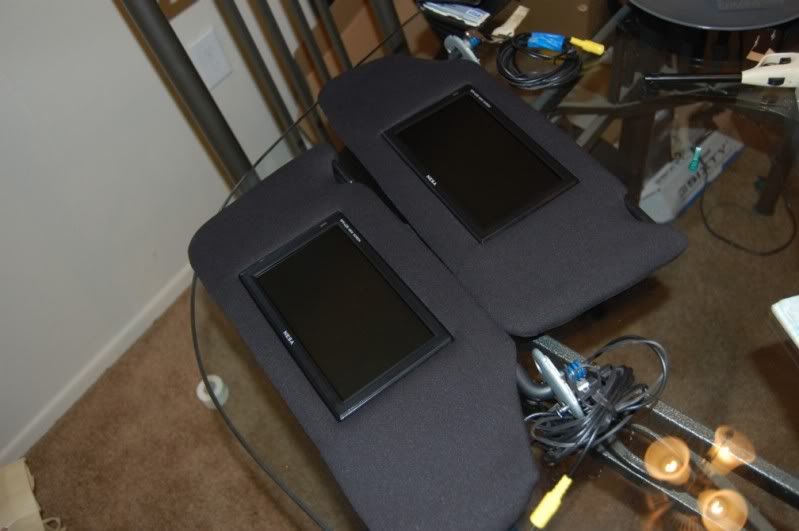
Cubanlynx84 is right I do have 7" monitors, they are ness wide screen. But I have them installed in my visors. Great picture and thin enough For the visors.
Cubanlynx84 is right I do have 7" monitors, they are ness wide screen. But I have them installed in my visors. Great picture and thin enough For the visors.
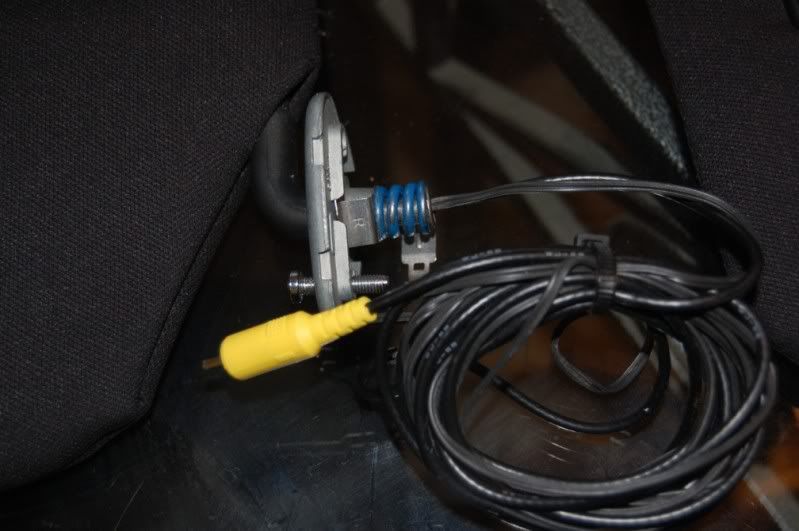
To run the wires for the visor monitors is kinda hard. Cuz I had to run video and power through the mounting bracket. And the hole is tiny. But it's the best way to do it. Very clean looking.
Thread Starter
...
Joined: Dec 2009
Posts: 1,494
Likes: 10
From: Tampa
Super easy, just pop off the small square pin that has the "airbag" writing. A small flat head screwdriver works, then just pull the pillar off. It won't set off anything I've done it plenty of times.
To run the wires for the visor monitors is kinda hard. Cuz I had to run video and power through the mounting bracket. And the hole is tiny. But it's the best way to do it. Very clean looking.
To run the wires for the visor monitors is kinda hard. Cuz I had to run video and power through the mounting bracket. And the hole is tiny. But it's the best way to do it. Very clean looking.
Thanks for the pics. Sounds easy enought and the install looks great, although trying to fit an RCA cable through that tight corner on the visor looks like it may need a special trick to get it to fit.....
Super easy, just pop off the small square pin that has the "airbag" writing. A small flat head screwdriver works, then just pull the pillar off. It won't set off anything I've done it plenty of times.
To run the wires for the visor monitors is kinda hard. Cuz I had to run video and power through the mounting bracket. And the hole is tiny. But it's the best way to do it. Very clean looking.
To run the wires for the visor monitors is kinda hard. Cuz I had to run video and power through the mounting bracket. And the hole is tiny. But it's the best way to do it. Very clean looking.
Thread Starter
...
Joined: Dec 2009
Posts: 1,494
Likes: 10
From: Tampa
Before you start this project I highly recommend researching throughout the forum because this is a pretty big task, but more than doable. I picked up my DVD player from Ebay for $78. You will also need a Navtool, Dom's unit, or something similar. I would checkout ebay or amazon. Just know that, not any DVD player will fit in the center compartment. Smaller the better. Here are a list of threads I saved before I started this project. If you need any assistance, feel free to shoot me a PM...
DVD/Navtool info
https://acurazine.com/forums/showthr...=784330&page=2
https://acurazine.com/forums/3g-tl-audio-bluetooth-electronics-navigation-94/08-tl-type-s-dvd-nav-conversion-776073/
https://acurazine.com/forums/3g-tl-audio-bluetooth-electronics-navigation-94/rockyfellers-dash-myron-davis-dvd-doms-unit-p-i-e-x3-wendys-camera-install-622410/
Headrest monitor Info
https://acurazine.com/forums/3g-tl-audio-bluetooth-electronics-navigation-94/2008-tl-type-s-headrest-monitors-715773/
https://acurazine.com/forums/showthread.php?t=631884
DVD/Navtool info
https://acurazine.com/forums/showthr...=784330&page=2
https://acurazine.com/forums/3g-tl-audio-bluetooth-electronics-navigation-94/08-tl-type-s-dvd-nav-conversion-776073/
https://acurazine.com/forums/3g-tl-audio-bluetooth-electronics-navigation-94/rockyfellers-dash-myron-davis-dvd-doms-unit-p-i-e-x3-wendys-camera-install-622410/
Headrest monitor Info
https://acurazine.com/forums/3g-tl-audio-bluetooth-electronics-navigation-94/2008-tl-type-s-headrest-monitors-715773/
https://acurazine.com/forums/showthread.php?t=631884


Thread
Thread Starter
Forum
Replies
Last Post
