CarPC with Navi Integration


CarPC with Navi Integration
I'm currently working on replacing my lcd with a vga unit but keeping the factory navigation in parallel on the same screen.
If I look at the two boards in the factory display it looks like they separated the boards one for the lcd and the other for inputs for the buttons and touchscreen.
Just wondering if anyone has tried to use just the board with all the connectors on it without the bottom board for the factory lcd?
I'm going to just try it once I get everything put together but thought I'd ask beforehand.
Thanks.
If I look at the two boards in the factory display it looks like they separated the boards one for the lcd and the other for inputs for the buttons and touchscreen.
Just wondering if anyone has tried to use just the board with all the connectors on it without the bottom board for the factory lcd?
I'm going to just try it once I get everything put together but thought I'd ask beforehand.
Thanks.
There's a way, if I can remember, to connect the original screen but you'll have a bad resolution.
The best option would be to find a way to send the video/touch screen signal to an aftermarket screen. I guess that requires some good electronics knowledge !
The best option would be to find a way to send the video/touch screen signal to an aftermarket screen. I guess that requires some good electronics knowledge !
oh! and about using the OEM touchscreen part with an aftermarket screen...Im not sure if you will find an aftermarket with the exact same size...so you'll have some issue there.
The aftermarket touchscreen also works the same....there's a glass in front of the screen and this calculates the X-Y position of the short created by your finger...
The aftermarket touchscreen also works the same....there's a glass in front of the screen and this calculates the X-Y position of the short created by your finger...
I am using a 7" aftermarket high brightness touch screen. I already have a RGBs to VGA converter and have figured out how to mount all of the boards, but I can't do what I want if I have to keep the stock lower board.
If I still had the board, it would be easier......but I think it will be needed for sending info to the SubDisplay :S
Can you take picture of what exactly you want to achieve ?
Can you take picture of what exactly you want to achieve ?
I'm hoping not. The board with all of the connectors to the outside of the navi display are retained. Internally, the touch panel and joystick connections are also on this board.
I'll have some pictures of all the parts soon but I think I am just going to have to connect everything up. I've already confirmed that my relay circuit is working for the PC side of things so I just need to wire up the switching circuit and test out the navi side of things.
I'll have some pictures of all the parts soon but I think I am just going to have to connect everything up. I've already confirmed that my relay circuit is working for the PC side of things so I just need to wire up the switching circuit and test out the navi side of things.

Trending Topics
Keep us posted, as this as been a question I've been getting from NAVI users that want carPC/Mac integration 
So, besides that, have you choose your FrontEnd and hardware for CarPC yet?
So, besides that, have you choose your FrontEnd and hardware for CarPC yet?
Will do.
I've got a mac mini with Leopard (soon to be Lion which is what I am typing on now), vmware fusion w/Win7 and a Win 7 bootcamp partition. It's got 2GB of RAM and a 60GB SSD drive.
I'm currently just playing with the Windows side right now because I was going to use a WiSnap wifi to serial interface on my J&R ECU, but it's going to take some time to work through. So I am going the direct connect route so I can move on.
Tunerstudio which is the software the Megasquirt ECU uses has a MAC version so I am going to switch back. But I needed Windows because the flash software only comes in Windows form.
Anyway, I'm going to take some pictures possibly tonight. Also trying to finish up a bathroom so I may not get to it.
I've got a mac mini with Leopard (soon to be Lion which is what I am typing on now), vmware fusion w/Win7 and a Win 7 bootcamp partition. It's got 2GB of RAM and a 60GB SSD drive.
I'm currently just playing with the Windows side right now because I was going to use a WiSnap wifi to serial interface on my J&R ECU, but it's going to take some time to work through. So I am going the direct connect route so I can move on.
Tunerstudio which is the software the Megasquirt ECU uses has a MAC version so I am going to switch back. But I needed Windows because the flash software only comes in Windows form.
Anyway, I'm going to take some pictures possibly tonight. Also trying to finish up a bathroom so I may not get to it.
^^turbo with CarPC/Mac integration  thats awesome
We have a Honda Drag competition here in 2 weeks and we're gonna install some shots in my TL for the show, I'm currently looking for a way to control it via my Mac, do you know any options?
Keep us posted bro!
thats awesomeWe have a Honda Drag competition here in 2 weeks and we're gonna install some shots in my TL for the show, I'm currently looking for a way to control it via my Mac, do you know any options?
Keep us posted bro!
Here's what I have:
The original boards in their cage:

These are the boards out of the cage. The left one is the one to remove which is sandwiched between the right board and the lcd itself. The board on the right has all of the external connectors, joystick and 4 wire touch screen connections

Here is the new display boards, larger one is the main board, the one to the left is the backlight driver and the bottom one is the external controls and IR detector.

The RGBs to VGA converter wired up and ready to go.

The touchscreen relay setup

The back and front of the 7" install (the keystone is an optical illusion, It's parallel ). I chopped up the original case and filled in to make it look as factory as possible. It's hard to match the hammered look and flat at the same time.


And the mini. I put antenna connections outside the case and have single and dual band antennas to connect. Also drilled and tapped the case that will be mounted in the trunk. Using a Carnetix PS and a Belkin Flip to switch between the two monitors. The flip has a audio jack and I am hoping it's just a relay so I can send the 12v to my relays to switch the touch connections at the same time. The plexi on the left is to hold the relay board and the USB touch controller.

More to come.
The original boards in their cage:
These are the boards out of the cage. The left one is the one to remove which is sandwiched between the right board and the lcd itself. The board on the right has all of the external connectors, joystick and 4 wire touch screen connections
Here is the new display boards, larger one is the main board, the one to the left is the backlight driver and the bottom one is the external controls and IR detector.
The RGBs to VGA converter wired up and ready to go.
The touchscreen relay setup
The back and front of the 7" install (the keystone is an optical illusion, It's parallel
). I chopped up the original case and filled in to make it look as factory as possible. It's hard to match the hammered look and flat at the same time.And the mini. I put antenna connections outside the case and have single and dual band antennas to connect. Also drilled and tapped the case that will be mounted in the trunk. Using a Carnetix PS and a Belkin Flip to switch between the two monitors. The flip has a audio jack and I am hoping it's just a relay so I can send the 12v to my relays to switch the touch connections at the same time. The plexi on the left is to hold the relay board and the USB touch controller.
More to come.


Centrafuse is just a frontend. I'm going to be running tunerstudio full screen so it won't be used while that is up anyway.
Still trying to figure out if I want to stay with Windows or MacOs (Lion).
I got everything assembled on the navi unit and the Belkin Flip works great. I wired a 12v supply to the PC end and plug in my relay circuit into the monitor end. When I switch to the PC, I hear it click and my touch screen works.
Next step is to connect it to my navi system and see what I lose.
Still trying to figure out if I want to stay with Windows or MacOs (Lion).
I got everything assembled on the navi unit and the Belkin Flip works great. I wired a 12v supply to the PC end and plug in my relay circuit into the monitor end. When I switch to the PC, I hear it click and my touch screen works.
Next step is to connect it to my navi system and see what I lose.
Looks good so far!
I think a bootcamp job could be a good way to go according to your setup. The other option would be to run OSX with a virtual XP, just like I do for my Navi software. I never had any trouble since first install.
Since you have the Belkin flip to launch commands, I could give you my script for switching spaces Life is so much easier on osx (2cents)
I think a bootcamp job could be a good way to go according to your setup. The other option would be to run OSX with a virtual XP, just like I do for my Navi software. I never had any trouble since first install.
Since you have the Belkin flip to launch commands, I could give you my script for switching spaces
Life is so much easier on osx (2cents)
The Flip is just a USB KVM switch that I am using to swap the display and to power up the relay for the touchscreen switch.
I've got VMWARE Fusion installed with a Win7 VM. It works pretty well but for things like firmware flashing, I would prefer to use Windows natively.
Started installing, pulled the video signal wires and finishing up the remainder of the wiring. Stopping for tonight but will finish tomorrow.
I've got VMWARE Fusion installed with a Win7 VM. It works pretty well but for things like firmware flashing, I would prefer to use Windows natively.
Started installing, pulled the video signal wires and finishing up the remainder of the wiring. Stopping for tonight but will finish tomorrow.
Last edited by KN_TL; Jul 24, 2011 at 09:28 PM.
I know what centrafuse is. Back in the day I was part of their 'in use' dev team. I was just curious if any of that tuning software could easily be ported. But if they run full screen it doesn't matter much.
What would running osx give you at this point? I mean I'm a mac guy 100% but for this purpose, I can't imagine what osx would give you that windows wouldn't.
What would running osx give you at this point? I mean I'm a mac guy 100% but for this purpose, I can't imagine what osx would give you that windows wouldn't.
Back to the drawing board. Hooked everything up and the HVAC goes to fan high and no sub display so there is circuitry on that board that I still need.
I'm going to shelve this project and just put the mini in the trunk and just use my laptop, iPhone or iPad to remotely control it for now.
Need to get the interior back together and drive this thing. Before I know it, the snow will be flying again.
I'm going to shelve this project and just put the mini in the trunk and just use my laptop, iPhone or iPad to remotely control it for now.
Need to get the interior back together and drive this thing. Before I know it, the snow will be flying again.

Senior Moderator


Joined: Feb 2006
Posts: 21,416
Likes: 2,187
From: Space Coast, FL
Back to the drawing board. Hooked everything up and the HVAC goes to fan high and no sub display so there is circuitry on that board that I still need.
I'm going to shelve this project and just put the mini in the trunk and just use my laptop, iPhone or iPad to remotely control it for now.
Need to get the interior back together and drive this thing. Before I know it, the snow will be flying again.
I'm going to shelve this project and just put the mini in the trunk and just use my laptop, iPhone or iPad to remotely control it for now.
Need to get the interior back together and drive this thing. Before I know it, the snow will be flying again.
Aaaah! freaking subdisplay.... I have the factory repair manual if you want, it has all the Navi circuit inside, I could send you the scan if you want 2...
Anyway, keep us posted bro...
Anyway, keep us posted bro...
Thanks man.
It's more than just the sub display, there is HVAC control circuitry that is being left out as well.
I have the ETM too but it doesn't go to component level and just shows pin and harness connections.
It's more than just the sub display, there is HVAC control circuitry that is being left out as well.
I have the ETM too but it doesn't go to component level and just shows pin and harness connections.
I decided to keep going with this project. I was able to squeeze the backlight circuit board and the video control circuit board inside the case with the factory pair of boards. The pair of wires to the backlight and touch screen just make it and the FFC cable from the display to the control board was plenty long enough. Connecting it all up is a challenge but it does go together.
I had issues with the wiring of the factory navigation touch display. It doesn't learn like the PC interface so I had to breadboard it and play until I got the combination right.
With all the dismantling, I broke the FFC cable to the external control board so I ordered some replacement. It's a 9 pin that really isn't available so I ordered a 10pin and will just trim it to fit.
Here are some pics of my progress:
The assembled unit with the relay circuit for the touchscreen and USB touchscreen controller for the PC mounted to the outside.

The LCD circuits mounted inside the case:

Getting ready to sandwich it all together:

This is how I mounted everything in the trunk. Wiring not dressed yet. I'm using a Carnetix 2140. Ran the constant power directly to the battery which is where the navi controller used to be. Then tapped the acc power from the back of the navi unit. The rest is just plug and go. Mounts are all just bent, painted and drilled 16ga steel. I used rubber grommets and aluminum spacer inside the grommets for vibration isolation for both units. I also replaced the stock HDD with a SSD unit.

Will hopefully have pictures of it all together by the end of this week. But I do know that the factory navigation is displaying and touchscreen is operating.
I had issues with the wiring of the factory navigation touch display. It doesn't learn like the PC interface so I had to breadboard it and play until I got the combination right.
With all the dismantling, I broke the FFC cable to the external control board so I ordered some replacement. It's a 9 pin that really isn't available so I ordered a 10pin and will just trim it to fit.
Here are some pics of my progress:
The assembled unit with the relay circuit for the touchscreen and USB touchscreen controller for the PC mounted to the outside.
The LCD circuits mounted inside the case:
Getting ready to sandwich it all together:
This is how I mounted everything in the trunk. Wiring not dressed yet. I'm using a Carnetix 2140. Ran the constant power directly to the battery which is where the navi controller used to be. Then tapped the acc power from the back of the navi unit. The rest is just plug and go. Mounts are all just bent, painted and drilled 16ga steel. I used rubber grommets and aluminum spacer inside the grommets for vibration isolation for both units. I also replaced the stock HDD with a SSD unit.
Will hopefully have pictures of it all together by the end of this week. But I do know that the factory navigation is displaying and touchscreen is operating.

I'm officially calling this one dead. There isn't enough adjustments on the navi side of things to get the image to fit.
I've got an iPad 2 in a box waiting to replace this project. I'm just going to run a RDP program and control the mini with that.
I've got an iPad 2 in a box waiting to replace this project. I'm just going to run a RDP program and control the mini with that.
I couldn't get the scaling right going from rgbs to vga. I ordered a vga to rgbs card and I am waiting for it to come in. Might also try ordering a different rgbs to vga card if the video is too crappy on the stock lcd.
I remember that thread Are you still trying to display the carPC on the NaviDisplay? or you're now trying to swap the Navi with an Aftermarket screen?
As for the the NaviDisplay, it has a crappy resolution if I remember....
Are you still trying to display the carPC on the NaviDisplay? or you're now trying to swap the Navi with an Aftermarket screen?As for the the NaviDisplay, it has a crappy resolution if I remember....
I have an aftermarket vga screen all set up but the converter I had for the stock navi display wouldn't display correctly.
I tried building a circuit to combine the H/V sync signals but I couldn't get a stable image, so I am trying one of those Chinese adapters. I can have everything in the trunk if this works out. Resolution might not be an issue. You have to make everything so large anyway so maybe it'll be ok. We'll see once I get the card.
Plan B is to get opposite conversion from the same company and try the VGA screen again.
Right now I am back to building my exhaust.
I tried building a circuit to combine the H/V sync signals but I couldn't get a stable image, so I am trying one of those Chinese adapters. I can have everything in the trunk if this works out. Resolution might not be an issue. You have to make everything so large anyway so maybe it'll be ok. We'll see once I get the card.
Plan B is to get opposite conversion from the same company and try the VGA screen again.
Right now I am back to building my exhaust.

Like to mess with all that stuff!
The video card from China must have been shipped on a junk with oars. It took 2 weeks and it's in IL. So I should get it in a couple days.
We'll see what I get first, a bottle of tri-mix to weld up the exhaust, the clutch pilot bearing to get the twin disc in or this card.
The video card from China must have been shipped on a junk with oars. It took 2 weeks and it's in IL. So I should get it in a couple days.
We'll see what I get first, a bottle of tri-mix to weld up the exhaust, the clutch pilot bearing to get the twin disc in or this card.
OK so I might have missed something but the initial goal was to use your aftermarket screen and get the factory NAV video input to display correctly right? That hasent worked out that well so your trying a new card but here you say "
Plan B is to get opposite conversion from the same company and try the VGA screen again." What screen are you using now if its not the VGA?
This is pretty much what I wanted to do, but I just want to the retain the factory video outout for the radio/xm display. Once I have a carpc I plan to never use the factor nav again! God I hate that thing.
Anyways it seems like the easiest way to get going on the carpc would be to do what met152 did and just integrate the PC to the factory screen. The quality seems pretty good and thats even with the 2006 screen. I cant seem to find the converter he used anywhere "Scan DO 800 scan converter. This unit outputs an RBG sync signal" Any idea where I could get a similar converter?
Plan B is to get opposite conversion from the same company and try the VGA screen again." What screen are you using now if its not the VGA?
This is pretty much what I wanted to do, but I just want to the retain the factory video outout for the radio/xm display. Once I have a carpc I plan to never use the factor nav again! God I hate that thing.
Anyways it seems like the easiest way to get going on the carpc would be to do what met152 did and just integrate the PC to the factory screen. The quality seems pretty good and thats even with the 2006 screen. I cant seem to find the converter he used anywhere "Scan DO 800 scan converter. This unit outputs an RBG sync signal" Any idea where I could get a similar converter?
^ I first tried replacing the factory screen with a VGA screen and converting the signal from the navi unit. I wanted to retain the factory signal for the HU and just to be able to use the factory navigation if needed since I don't have a gps unit in my mini. The main reason for the PC is to log and make changes to my ECU without having a laptop.
Now I am trying to take the vga signal and convert it to RGBs from the mini and display it on the factory screen.
I just checked and the package is in NH so I may have it tomorrow.
Doing the VGA monitor was a nightmare trying to get everything squeezed behind the dash.
With the factory display, the card and switching can stay in the trunk and just the touchscreen relay goes in the dash.
I'll post up pictures when I get some stuff hooked up.
Now I am trying to take the vga signal and convert it to RGBs from the mini and display it on the factory screen.
I just checked and the package is in NH so I may have it tomorrow.
Doing the VGA monitor was a nightmare trying to get everything squeezed behind the dash.
With the factory display, the card and switching can stay in the trunk and just the touchscreen relay goes in the dash.
I'll post up pictures when I get some stuff hooked up.
Cool so right now you are basically going to do exactly what Met152 did then here https://acurazine.com/forums/3g-tl-audio-bluetooth-electronics-navigation-94/carpc-installed-into-3g-tl-navigation-610655/.
What about the touch screen part? Will you use the factory touch screen and one of these controllers?
http://www.tvielectronics.com/Produc...ontroller.html
What about the touch screen part? Will you use the factory touch screen and one of these controllers?
http://www.tvielectronics.com/Produc...ontroller.html

I am definitely going to watch this thread. I too have all of the stuff to integrate the factory touchscreen with the CarPC. I tried to hook it up but it went straight to hell. Right now, I control it with a Logitech Bluetooth mini keyboard. I want to use the TVI unit with the relay system to give touchscreen control from the OEM screen. I just haven't ripped everything apart to try for V2 of my build.
Keep us posted.
Roger, I have a Scan-Do unit that I do not think I will use. I just do not feel it is worth the effort to convert to RGB. I read in Met's thread that there is another unit under a different brand name that is basically the same thing as Scan Do, too. PM me if you're interested.
Keep us posted.
Roger, I have a Scan-Do unit that I do not think I will use. I just do not feel it is worth the effort to convert to RGB. I read in Met's thread that there is another unit under a different brand name that is basically the same thing as Scan Do, too. PM me if you're interested.
If the factory monitor is suitable, that is definitely the easier route. I have a vga monitor all ready to install and that was a chore. You have to keep all the factory circuits along with the new monitor's and also pack the converter and switching all in the same place.
Doable but much more difficult.
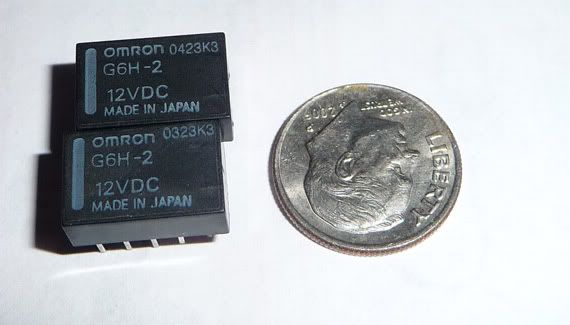
My current plan is to split the RGB and Cs signal at the NAVI unit, use the KVM to do the switching of those 4 lines and then use the audio jack on the KVM to send 12V to the touchscreen relay circuit that will switch the touchscreen wires. I had used two DPDT which worked but I found a QPDT relay that will be more compact.
Doable but much more difficult.
My current plan is to split the RGB and Cs signal at the NAVI unit, use the KVM to do the switching of those 4 lines and then use the audio jack on the KVM to send 12V to the touchscreen relay circuit that will switch the touchscreen wires. I had used two DPDT which worked but I found a QPDT relay that will be more compact.
If the factory monitor is suitable, that is definitely the easier route. I have a vga monitor all ready to install and that was a chore. You have to keep all the factory circuits along with the new monitor's and also pack the converter and switching all in the same place.
Doable but much more difficult.
My current plan is to split the RGB and Cs signal at the NAVI unit, use the KVM to do the switching of those 4 lines and then use the audio jack on the KVM to send 12V to the touchscreen relay circuit that will switch the touchscreen wires. I had used two DPDT which worked but I found a QPDT relay that will be more compact.
Doable but much more difficult.
My current plan is to split the RGB and Cs signal at the NAVI unit, use the KVM to do the switching of those 4 lines and then use the audio jack on the KVM to send 12V to the touchscreen relay circuit that will switch the touchscreen wires. I had used two DPDT which worked but I found a QPDT relay that will be more compact.