


Big problems... need help (Sub + Noise Cancellation)


Instructor
Joined: May 2005
Posts: 135
Likes: 0
G/L


Intermediate
Joined: Jun 2010
Posts: 40
Likes: 2
From: Arkansas

Was wondering if you guys could tell me where exactly the front mic is here that I need to disconnect? Also, which line converter did you guys use to hook into your rear subwoofer signal? I'm using this one: Scosche Speaker Level Converter, FAI-3
-John

-John
Instructor
Joined: May 2005
Posts: 135
Likes: 0
On mine this is what i did (note you may want to search for ANC cancel)....
From an old post... :"actually there is a separate ANC for the front and back as well as a separate HFL mic. ive done two tl's so far (both were type s's) one was an 07' (mine) and an 08'. In both i just disconnected the front and rear ANC mic's. in the rear it is a green plug off to the right side if you are looking out the rear deck (just follow the wire from the ANC to the plug), in the front you have to pull off the whole center piece which is very easily removed. In the front it is a plug located directly to the lower left hand part closest to the windshield just unplug it and go!!! If you need directions on how to remove the front piece just let me know."
https://acurazine.com/forums/showthr...t=tl+front+mic
Now as far as the input, we disconnected my factory 8" sub, and used those inputs to feed into the speaker level inputs of my basslink. (I believe any amp with speakerlever inputs would work) Set the sublevel on the radio to 50%... tune the sub to your liking.. your tastes without overdriving it. now you can control the sublevel with the radio.
There were some "pics of the plugs out here" just can't find em. Perhaps if some can find the links to the ANC mic pics it would help this guy out.
G/L
From an old post... :"actually there is a separate ANC for the front and back as well as a separate HFL mic. ive done two tl's so far (both were type s's) one was an 07' (mine) and an 08'. In both i just disconnected the front and rear ANC mic's. in the rear it is a green plug off to the right side if you are looking out the rear deck (just follow the wire from the ANC to the plug), in the front you have to pull off the whole center piece which is very easily removed. In the front it is a plug located directly to the lower left hand part closest to the windshield just unplug it and go!!! If you need directions on how to remove the front piece just let me know."
https://acurazine.com/forums/showthr...t=tl+front+mic
Now as far as the input, we disconnected my factory 8" sub, and used those inputs to feed into the speaker level inputs of my basslink. (I believe any amp with speakerlever inputs would work) Set the sublevel on the radio to 50%... tune the sub to your liking.. your tastes without overdriving it. now you can control the sublevel with the radio.
There were some "pics of the plugs out here" just can't find em. Perhaps if some can find the links to the ANC mic pics it would help this guy out.
G/L
Last edited by cmt1; Aug 9, 2010 at 09:56 AM.

Racer
Joined: Nov 2009
Posts: 417
Likes: 0
I fixed my issues by setting the after market amps (Input Sensitivity Level Settings) as detailed on page 18 of my owners manual.
http://mobile.jlaudio.com/pdfs/16816.pdf
http://mobile.jlaudio.com/pdfs/16816.pdf
Intermediate
Joined: Jun 2010
Posts: 40
Likes: 2
From: Arkansas
Something is still stumping me, we are still getting the low frequency bass noise from the aftermarket subwoofer at idle/rev... I'm 100% sure it doesn't have anything to do with the ANC system because it's been completely removed. I've also tried relocating the ground already once and it hasn't solved.. Tried making any an
Also relocated the speaker wires (and this line converter box) and moved them as far away as possible from the power and gain wires.
The big thing, is that when I rev the engine the bass increases on the subwoofer.
Any ideas?
Also relocated the speaker wires (and this line converter box) and moved them as far away as possible from the power and gain wires.
The big thing, is that when I rev the engine the bass increases on the subwoofer.
Any ideas?

Intermediate
Joined: Jul 2010
Posts: 38
Likes: 1
i'm having the same f'ing problem as John098tl-s. Humming when car is started.
I've soldered the connection to preamp outs, removed the stock amp, and disconnected the front and rear mic.
this is getting annoying. It's more of a buzz than sub.. and it's all speakers.. not just the sub.
I've soldered the connection to preamp outs, removed the stock amp, and disconnected the front and rear mic.
this is getting annoying. It's more of a buzz than sub.. and it's all speakers.. not just the sub.
thank you whoever for bumping this thread! i have had my jl 10w7 disconnected for months because of this problem. i was recently going to pay someone to look at it for me also. i just finished disconnecting the rear mic i will check back in a couple of days! thank you acurazine!
Intermediate
Joined: Jul 2010
Posts: 38
Likes: 1
I'm starting to think what me and John has is an alternator whine. Because I get the sound even when the radio is turned off. and only exists when engine is running.
I'm going to swap out the amp and see if the amp is bad, then change the location of the ground, then ground the RCA grounds
I'm going to swap out the amp and see if the amp is bad, then change the location of the ground, then ground the RCA grounds

Instructor
Joined: May 2002
Posts: 154
Likes: 3
From: Socal - Westside
I just got my Basslink installed this weekend and have this issue. Going to do the fix tonight..hopefully I'll only have to do the rear and not the front mic too.

Cruisin'
Joined: Aug 2009
Posts: 18
Likes: 1
Just remove the Active Noise control unit!!!!
Here's some info that may help a few fellow TL-S members.
Disconnect this module, and it should solve ALL your drone noises associated with aftermarket amps.
I disconnected both mics in my '08 TLS, and still had this freakin' noise.
I called my buddy at the Dealership, and here's what he sent me.
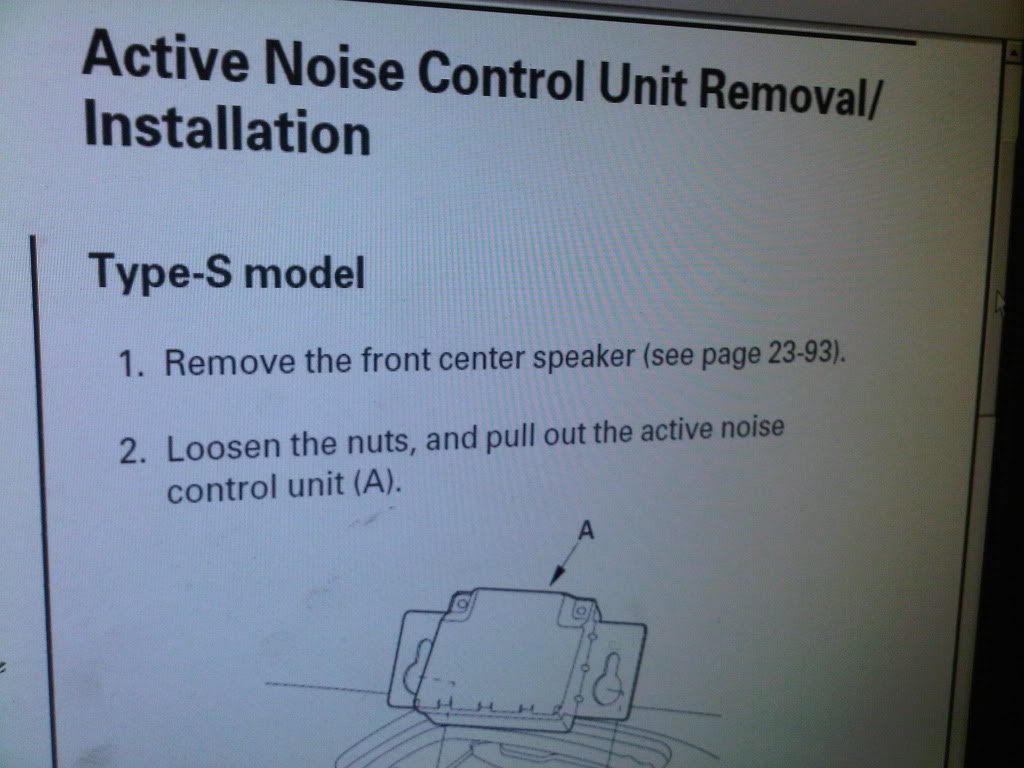
So I removed it, and voila! My nightmares were over!!
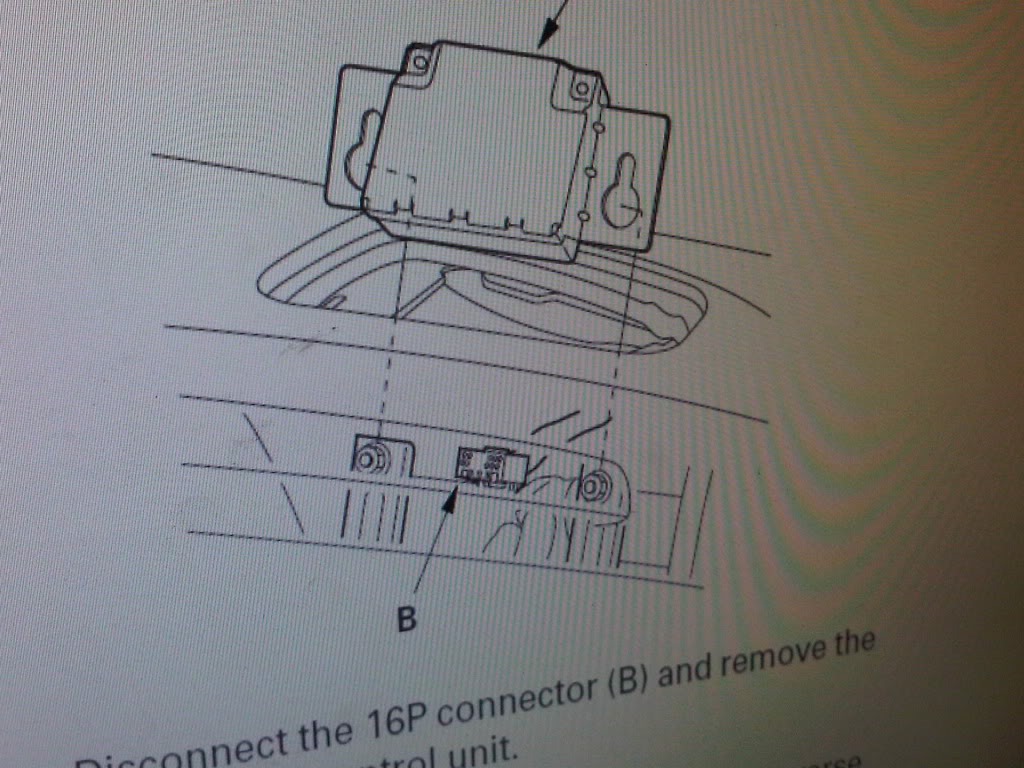
Hope this helps some of you guys!!
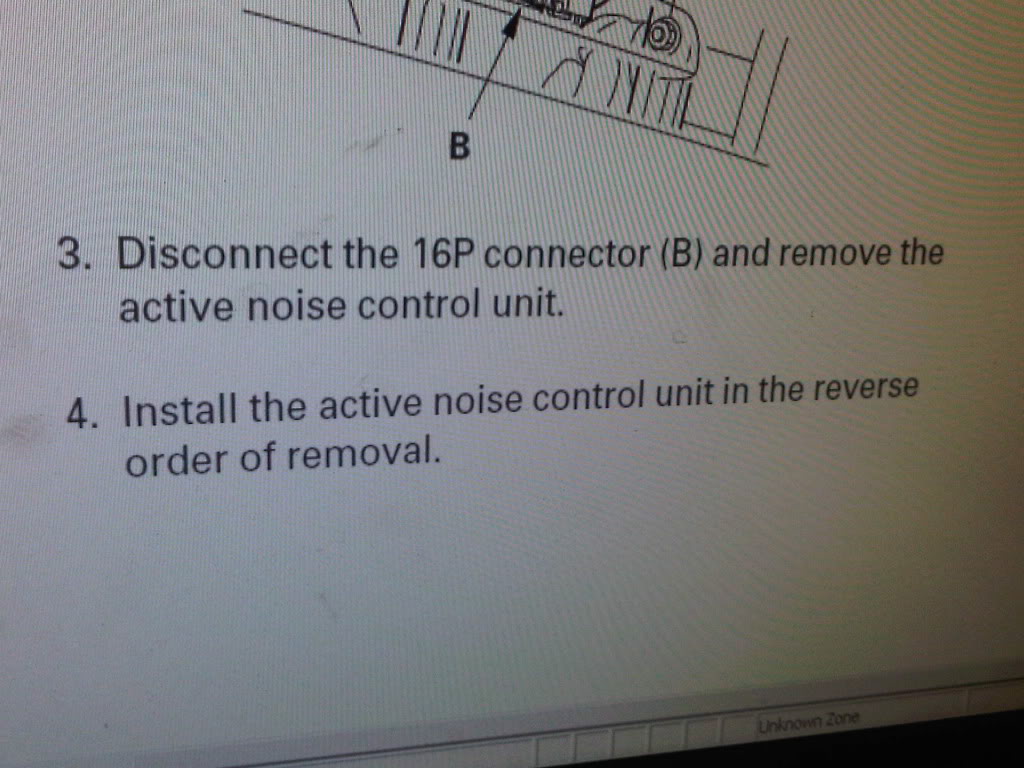
Disconnect this module, and it should solve ALL your drone noises associated with aftermarket amps.
I disconnected both mics in my '08 TLS, and still had this freakin' noise.
I called my buddy at the Dealership, and here's what he sent me.
So I removed it, and voila! My nightmares were over!!
Hope this helps some of you guys!!

Cruisin'
Joined: Sep 2008
Posts: 24
Likes: 0
I disconnected the microphone from the rear light which solved the feedback problem in my Type S. For some reason it wasn't a problem right away, over time it progressively got worse.
However, I have a problem with the Sub not turning on in Radio mode...I have a powered tube in the trunk and power line runs to battery, remote to the fuse box, and rather than using RCAs to the head unit I tapped the high level inputs to the stock sub speaker wires, so I could control the volume of the sub. The sub is on under CD and Auxiliary, but when I am in radio mode the sub is not getting any power. Could my remote line be connected to a fuse which does not have power in radio mode only?
Thanks!
However, I have a problem with the Sub not turning on in Radio mode...I have a powered tube in the trunk and power line runs to battery, remote to the fuse box, and rather than using RCAs to the head unit I tapped the high level inputs to the stock sub speaker wires, so I could control the volume of the sub. The sub is on under CD and Auxiliary, but when I am in radio mode the sub is not getting any power. Could my remote line be connected to a fuse which does not have power in radio mode only?
Thanks!
Cruisin'
Joined: Sep 2008
Posts: 24
Likes: 0

Wow I had same problem last night my friend was installing amp woofer and cap and I was looking at him like he didnt know what he was doing now I see I wasnt the only one with this problem im gonna try this today ill get back to ya and let u know the results

Drifting
Joined: Dec 2002
Posts: 2,619
Likes: 15
From: Lehigh Valley, PA
A big THANK YOU to all who contributed on here, I installed my sub sat and was getting the hum for the last two days, intermittently. I just disconnected the rear mic and it is gone for now. Hopefully it stays that way!!



1st Gear
Joined: Nov 2015
Posts: 1
Likes: 0
From: Los Angeles
Issues with sub noise on '07 TL Type S
Instructions on unplugging the rear mic.
1. Use a small tip straight screw driver to pop out the plastic coverings for the lights.
Try prying each out from the center of the whole lighting fixture.
2. Unscrew two scews that hold the lighting fixture in place.
Use a wrench , it's easier.
3. Remove the fixture from its place and leave dangling.
4. Above the light fixture you will find a wire with a green clip.
5. Detach this clip.
If you pinch the clip from the top it slides out easily.
6. Reattach light fixture - Enjoy your new clean bass.
Instructions on unplugging the rear mic.
1. Use a small tip straight screw driver to pop out the plastic coverings for the lights.
Try prying each out from the center of the whole lighting fixture.
2. Unscrew two scews that hold the lighting fixture in place.
Use a wrench , it's easier.
3. Remove the fixture from its place and leave dangling.
4. Above the light fixture you will find a wire with a green clip.
5. Detach this clip.
If you pinch the clip from the top it slides out easily.
6. Reattach light fixture - Enjoy your new clean bass.


Advanced
Joined: Mar 2017
Posts: 65
Likes: 1
From: Boston
I disconnected both front and rear mics and still has the humming sound. I then unplugged the factory subwoofer and the humming bass went even crazy louder and my car was vibrating like crazy from all the bass on my alpine type r subs so I reconnected the factory subwoofer. I'll try to disconnect the anc module tomorrow and see how that goes.

Thread
Thread Starter
Forum
Replies
Last Post
MrHeeltoe
1G TSX Tires, Wheels, & Suspension
20
Feb 23, 2023 01:54 PM
MrHeeltoe
2G TSX Tires, Wheels & Suspension
3
Sep 29, 2015 10:43 PM
MrHeeltoe
3G TL Tires, Wheels & Suspension
0
Sep 28, 2015 05:43 PM
