


Is my desktop computer dying? :D


Thread Starter
I drive a Subata.
iTrader: (1)
Joined: Apr 2005
Posts: 20,301
Likes: 2,603
From: Socal
Is my desktop computer dying? :D
I think my desktop computer is slowly dying.
Whenever I play Diablo3, the screen freezes in about 10 minutes and I have to manual press and hold power button to restart.
Ctrl+Alt+Delete function doesn't even work.
Sometimes, it gives me a blue screen and restarts itself.
What is a little odd is that it doesn't give me any problems for other uses at all.
The desktop is about 3-4 yrs old.
It's probably time to get a new one, right?
Whenever I play Diablo3, the screen freezes in about 10 minutes and I have to manual press and hold power button to restart.
Ctrl+Alt+Delete function doesn't even work.
Sometimes, it gives me a blue screen and restarts itself.
What is a little odd is that it doesn't give me any problems for other uses at all.
The desktop is about 3-4 yrs old.
It's probably time to get a new one, right?

_


Joined: Nov 2006
Posts: 19,344
Likes: 3,440
GPU going bad? Power supply going bad? Overheating? Is it clean inside (i.e. no dust bunnies clogging up fans?)?
If you don't have problems with normal non-gaming use, then no, it's not dying. Need to do some diagnostics to see what's wrong.
If you don't have problems with normal non-gaming use, then no, it's not dying. Need to do some diagnostics to see what's wrong.


Thread Starter
I drive a Subata.
iTrader: (1)
Joined: Apr 2005
Posts: 20,301
Likes: 2,603
From: Socal
It's like something is spinning very fast when it freezes.
_
Joined: Nov 2006
Posts: 19,344
Likes: 3,440
Since you have dogs, one or more of the cooling fans (case fan, CPU fan, GPU fan, power supply fan) could be clogged up. Might need a can or two of compressed air to blow all the crap out.
I do a cleaning 2x a year: once right before summer to reduce the likelihood of it overheating and again about 6 months later.
I do a cleaning 2x a year: once right before summer to reduce the likelihood of it overheating and again about 6 months later.
Trending Topics
Thread Starter
I drive a Subata.
iTrader: (1)
Joined: Apr 2005
Posts: 20,301
Likes: 2,603
From: Socal
Since you have dogs, one or more of the cooling fans (case fan, CPU fan, GPU fan, power supply fan) could be clogged up. Might need a can or two of compressed air to blow all the crap out.
I do a cleaning 2x a year: once right before summer to reduce the likelihood of it overheating and again about 6 months later.
I do a cleaning 2x a year: once right before summer to reduce the likelihood of it overheating and again about 6 months later.
Thank you! I'll report back after.





Sanest Florida Man


Joined: Aug 2007
Posts: 46,059
Likes: 11,815
From: Florida
Download bluescreenview by clicking this link
http://www.nirsoft.net/utils/bluescreenview-x64.zip
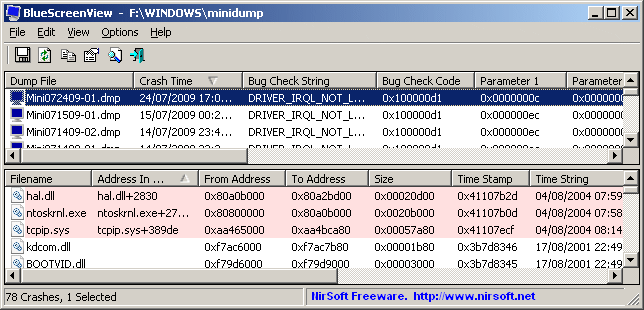
extract it and run that program. it will usually tell you the cause of your BSOD whether it's a gpu or something else. Run that and tell use what the error code is and which file was involved. Then we can be of more help
http://www.nirsoft.net/utils/bluescreenview-x64.zip
extract it and run that program. it will usually tell you the cause of your BSOD whether it's a gpu or something else. Run that and tell use what the error code is and which file was involved. Then we can be of more help

Moderator Alumnus

Joined: May 2001
Posts: 4,295
Likes: 121
From: Ronkonkoma, NY
It's most likely your video card's fan is dead/unseated/covered with dust, causing it to overheat.
This causes strange things, crashes the OS, and can often lead to the 'loud buzz'.
This has happened to me many, many times. I had to underclock my previous video card or it would do this every single time I played a game.
- Frank
This causes strange things, crashes the OS, and can often lead to the 'loud buzz'.
This has happened to me many, many times. I had to underclock my previous video card or it would do this every single time I played a game.
- Frank
Thread Starter
I drive a Subata.
iTrader: (1)
Joined: Apr 2005
Posts: 20,301
Likes: 2,603
From: Socal
Forgot to update...
So, I had opened up the desktop a week ago.
There were some very large dust ball looking shits everywhere.
I vacuumed all up and now the comp is not giving me any error.
Guess it was the dust!
So, I had opened up the desktop a week ago.
There were some very large dust ball looking shits everywhere.
I vacuumed all up and now the comp is not giving me any error.
Guess it was the dust!



Thread Starter
I drive a Subata.
iTrader: (1)
Joined: Apr 2005
Posts: 20,301
Likes: 2,603
From: Socal
It started doing it again.. Freezing up.. Occasional blue screen..
I downloaded that blue screen reader and got this..
V1nmMdQ.jpg
I downloaded that blue screen reader and got this..
V1nmMdQ.jpg


Thread
Thread Starter
Forum
Replies
Last Post
MetalGearTypeS
3G TL Audio, Bluetooth, Electronics & Navigation
6
Aug 29, 2016 08:28 PM
AcuraKidd
Non-Automotive & Motorcycle Sales
0
Sep 25, 2015 11:18 PM


