When you click on links to various merchants on this site and make a purchase, this can result in this site earning a commission. Affiliate programs and affiliations include, but are not limited to, the eBay Partner Network.
Price increase coming to some markets. Sorry @Yumcha
August 25, 2022
PS5 price to increase in select markets due to global economic environment, including high inflation rates
New recommended retail price coming to select markets in the EMEA, APAC, and LATAM regions, plus Canada. The global economic environment is a challenge that many of you around the world are no doubt experiencing. We’re seeing high global inflation rates, as well as adverse currency trends, impacting consumers and creating pressure on many industries. Based on these challenging economic conditions, SIE has made the difficult decision to increase the recommended retail price (RRP) of PlayStation 5 in select markets across Europe, Middle East, and Africa (EMEA), Asia-Pacific (APAC), Latin America (LATAM), as well as Canada. There will be no price increase in the United States.
The new RRPs below are effective immediately unless otherwise noted.*
Europe
PS5 with Ultra HD Blu-ray disc drive – €549.99
PS5 Digital Edition – €449.99
UK
PS5 with Ultra HD Blu-ray disc drive – £479.99
PS5 Digital Edition – £389.99
Japan (effective Sept. 15, 2022)
PS5 with Ultra HD Blu-ray disc drive – ¥60,478 yen (including tax)
PS5 Digital Edition – ¥49,478 yen (including tax)
China
PS5 with Ultra HD Blu-ray disc drive – ¥4,299 yuan
PS5 Digital Edition – ¥3,499 yuan
Australia
PS5 with Ultra HD Blu-ray disc drive – AUD $799.95
PS5 Digital Edition – AUD $649.95
Mexico
PS5 with Ultra HD Blu-ray disc drive – MXN $14,999
PS5 Digital Edition – MXN $12,499
Canada
PS5 with Ultra HD Blu-ray disc drive – CAD $649.99
PS5 Digital Edition – CAD $519.99
While this price increase is a necessity given the current global economic environment and its impact on SIE’s business, our top priority continues to be improving the PS5 supply situation so that as many players as possible can experience everything that PS5 offers and what’s still to come.
Thank you for your continued support.
*Select markets in EMEA, APAC, and LATAM not listed above may also receive price increases. Please check with your local retailer.
September 7, 2022
New PS5 system software update is out globally today
1440p support, Gamelists and new social features roll out to all PS5 players.
Thanks to the support and feedback from our PS5 beta participants, today we’re rolling out a new system software update to PS5 players globally. The update includes several highly-requested features like 1440p HDMI video output* and gamelists, as well as social features like the ability to request a Share Screen from a fellow party member, easily view new friends’ profiles, and receive a notification to help you join a friend’s game more quickly from a party chat.Additionally, you can now compare 3D audio and stereo audio on the same screen and more easily access in-progress Activities from game hubs. Check out our beta blog post to get the full scoop on these features, and read on for details about some new and forthcoming updates for PS5 and PS App.
YouTube Search through Voice Command (Preview)
Another feature we’re excited to bring to more PS5 players is the ability to search for content on YouTube through Voice Command (Preview). From anywhere on PS5, including during gameplay, you can say “Hey PlayStation, find [keyword] on YouTube.” The YouTube app will open and relevant search results will be shown.
Note: Voice Command (Preview) is currently available in English for PS5 players with accounts registered to the U.S. and U.K.
New PS App features
In addition to these PS5 console updates, we’re gradually rolling out some new features for PS App globally later this month, on iOS and Android:
Launch a PS Remote Play session through PS App
PS App users will be able to launch a PS Remote Play session directly from PS App on iOS and Android devices. To start, make sure PS App is linked to your PS5 console and your console is in Rest Mode. Then, select the “Play Using PS Remote Play” icon on a PS App game hub, and the PS Remote Play app will automatically launch the game. To enjoy this feature, make sure PS App and the PS Remote Play app are both installed on your mobile or tablet device.
Request Share Screen
Similar to the PS5 feature, PS App users will be able to request another party member playing on PS5 to start a Share Screen session, and then watch their friend’s gameplay from the app. This makes it even easier for you to stay connected with friends while you’re on the go.
Thanks to all our fans for continuing to share your suggestions and ideas. We’re constantly listening to your feedback and committed to making your gaming and social experiences better with each update. See you online!
*1440p video output on PS5 requires a TV or PC monitor that supports 1440p/60Hz, or 1440p/60Hz and 120Hz. Results may vary depending on the game being played.
VRR on PS5 supports 1080p and 4K video output but not 1440p.
Pre-orders begin next Tuesday, October 25.
… The DualSense Edge wireless controller will be available for a recommended retail price (RRP) of $199.99 USD
Over the past several months, we’ve introduced PlayStation VR2 and provided glimpses into the next generation of virtual reality gaming, which will allow you to escape into new worlds while feeling a groundbreaking sense of immersion. Today, I’m very pleased to announce that PlayStation VR2 is officially launching on February 22, 2023. PlayStation VR2 Sense controller charging station, designed specifically for the PS VR2 Sense controller, will also launch the same day.
Here is the PS VR2 lineup and recommended retail pricing for each product. Availability in each country is subject to local import regulations.
Yeah, you need PS5 to use the PSVR set. By comparison, the Oculus / 2 is stand-alone / does not require any computer or gaming system to connect.
i have both the Quest 2 is a great stand alone product, but to play the really good pc only games, you still need a decent PC and a oculus link cable. Especially if you want to sim race.
PS5 system software update rolls out globally today
1930621 Discord Voice Chat, VRR support for 1440p, and additional UX and social features give you more ways to play and connect with friends. Hideaki NishinoSenior Vice President, Platform Experience, SIEUpdate: Our new PS5 system software update is rolling out globally today! This blog post has been updated to reflect the global release.
As the PlayStation 5 console continues to evolve, we’re excited to deliver new features to our community. Today, we’re rolling out the next PS5 system software update with a number of fan-requested features, including Discord voice chat and Variable Refresh Rate support for 1440p resolution. We’re also introducing a variety of UX, accessibility and social feature enhancements that make playing with your friends or enjoying your gaming experiences on the PS5 console easier than ever.
Here’s a look at some of the new features:
New Social Features
Join a Discord Voice Chat on Your PS5 Console. You can now join Discord voice chats on your PS5 console and easily chat with friends on most other gaming platforms. To start, link your Discord and PlayStation Network accounts from your PS5 console, PlayStation.com, or the Discord app on Windows, Mac or mobile device following these steps. Then, use the Discord app on your mobile device or computer to get a Discord voice chat going on your PS5 console (make sure your Discord app is updated to the latest version). You can also let your Discord friends see when you’re online and what you’re playing.
Note: if you’ve linked your PlayStation Network and Discord accounts in the past to display what game you’re playing, you’ll need to link your accounts again to grant the new permissions needed for Discord voice chat. If you participated in the system software beta and have already linked your accounts during the beta period, you don’t need to link them again.
Play Video
Start or Request a Share Screen from Your Friend’s Profile. You can now send a Share Screen request or start sharing your screen with a friend, directly from their profile. Simply select the Share Screen icon on your friend’s profile to start a new session.
View and download image "PlayStation 5 UI screenshot showing how to start a Share Screen from your friend’s profile"
New “Join Game” Icon in Party Chats.On the voice chat card, a joinable icon will be displayed for party members playing a game you can join. You can join the game directly by selecting the player, and then selecting [Join Game] from the menu.
New “Friends Who Play” Tile. In game hubs, you can now see which of your friends have the game, who is currently online, and who is currently playing the game. By selecting the tile, you can see what your friends are doing now, and you can also access your friends’ profiles, where you’ll be given more interaction options.
View and download image "PlayStation 5 UI screenshot showing new “Friends Who Play” tile in the God of War Ragnarok game hub"
Manually Upload Game Captures to PlayStation App. You can now manually select and upload individual screenshots or game clips to PS App from your PS5 console, then easily share them on social media or with your friends.* This feature complements the auto-upload functionality that currently exists on PS App.
View and download image "PlayStation 5 UI screenshot showing the option to manually upload game captures to PlayStation App"
New Gameplay and Personalization Options
Variable Refresh Rate support for 1440p. You can now enjoy smoother visual performance when using a VRR-compatible HDMI 2.1 display at 1440p resolution, when playing a game that supports VRR.**
We’ve also made some updates to the parameters of the PS5 console’s 1440p output test, enabling 1440p support for a wider range of HDMI displays.
To check if your HDMI device is compatible, go to [Settings] > [Screen and Video] > [Video Output] > [Test 1440p Output].
View and download image "PlayStation 5 UI screenshot showing the Variable Refresh Rate setting"
Game Library Enhancements.
You can now also sort and filter games when adding games to a gamelist.
You can use filters in your library to easily find PS VR games, as well as PS VR2 titles when PS VR2 launches later this month.
View and download image "PlayStation 5 UI screenshot showing the option to filter games by PS5 or PS4 in a gamelist"
Game Presets for Multiplayer Session Preferences. You can set your preferences to manage who can join and who can invite other players to multiplayer sessions you’ve created for supported games.
Go to [Settings] > [Saved Data and Game/App Settings] > [Game Presets] > [Online Multiplayer Sessions], and select your preferences in [Who Can Join] and [Who Can Invite].
New Accessibility and Ease-of-use Features
PS4 to PS5 Saved Data Migration. We’re making it easier for you to access your PS4 saved data on your PS5 console through two ways:
When you download or install a PS4 game on your PS5 console, a notification that PS4 saved data is available in your PlayStation Network cloud storage will appear (if your PS5 console doesn’t already have saved data for the game). Simply select the notification to download your saved data.
When you download or install a PS5 game that can load PS4 saved data, such as the PS5 version of a game that was also released on PS4, the same notification will appear (if the game supports this feature).
(Note: online storage for saved data requires a PlayStation Plus subscription)
View and download image "PlayStation 5 UI screenshot showing the notification that PS4 saved data for Ghost of Tsushima is available to download"
PS5 to PS5 Data Transfer. You can now easily transfer the data on your PS5 console, including games, saved data, user profiles, settings, screenshots, and videos, to another PS5 console using a local Wi-Fi network or a LAN cable. You can either transfer the data during the initial PS5 console setup or later from the settings menu. This process doesn’t remove or modify the data on your original PS5 console.
View and download image "PlayStation 5 UI screenshot showing the option to save a video clip through Voice Command"
Screen Reader Improvements. The screen reader now gives more detailed guidance when navigating the console. It will now tell you which direction you can move from the currently selected component, as well as your current position in a component with multiple items. Additionally, when using the screen reader to view web pages, you’ll now see borders around the section that’s being read aloud.
Wireless Device Update for DualSense Wireless Controller. You can now update the DualSense wireless controller device software with a wireless connection. If you have trouble updating the device software wirelessly, connect your controller to your PS5 console using the USB cable to update it. You’ll be able to update wirelessly for the next update.
Game Capture Using Voice Command (Preview): U.S. and U.K. limited release
Voice Command now supports using your voice to save video clips of your gameplay.
Say “Hey PlayStation, capture that!” to save a video clip of your recent gameplay. The default duration saved is based on your settings.
You can also save a specific duration of your gameplay, from 15 seconds to 60 minutes. For example, to save 5 minutes, say “Hey PlayStation, capture the last 5 minutes”.
Say “Hey PlayStation, start recording” to manually start a new gameplay recording. You can then say “Hey PlayStation, stop recording” to end the recording and save the video clip.
Voice Command (Preview) is currently available in English for beta participants with accounts registered to the U.S. and U.K.
View and download imageWe’re eager to hear your feedback on these new features so let us know your thoughts in the comments!
I got the VR2 and just bought a Fanatec driving rig. It's so much fun!! I went from not really playing video games for the last decade to it being the first thing I want to do when I get home from work everyday.
Man, these are pricey. I'd rather get the full headset vs the buds for $50 less. It's not like you're out on the subway or park playing. I understand the need for no lag (Sekiro would be impossible with a lag) though which is why we can't use just any buds. $200 to play PS5 in the pool (hopefully with no glare) is a tough pill
As nice as the wireless headset would be, I don’t want to have another device to charge.
also I’ve been perfectly fine with my $50 (now $38) PDP LVL50 cans I got back in 2020 for my PS4 Pro. Plugs in to the PS5 controller and has a shorter cable.
We want to let you know about an upcoming price change to your PlayStation®Plus subscription.
The price for your current PlayStation Plus Essential 12 month subscription will be increased to USD 79.99. This price adjustment will enable us to continue bringing high-quality games and benefits to your PlayStation Plus subscription service.
This price increase will not take effect until your next renewal date that occurs on or after November 6th. However, any membership changes you make prior to your next renewal, such as upgrades, downgrades or buying additional time, will update your plan based on the new prices. You can change or cancel your subscription at any time, details here . Please find the PlayStation Plus Usage Terms here.
I'm honestly only using + for cloud storage even though I have a HDD I'm so lazy when it comes to changing discs and unplugging dongles. Mind you, I used to play Rock Band religiously and that's a whole ass setup. I don't even touch the free monthly games because I don't feel like clogging the HDD, but I do put them in the library "just in case".













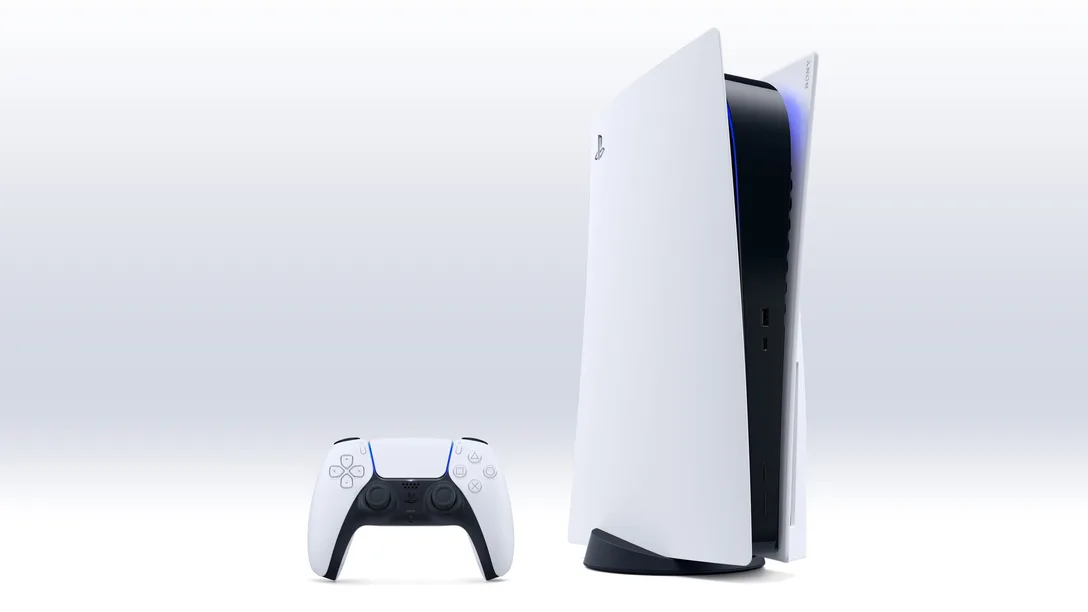 Discord Voice Chat, VRR support for 1440p, and additional UX and social features give you more ways to play and connect with friends.
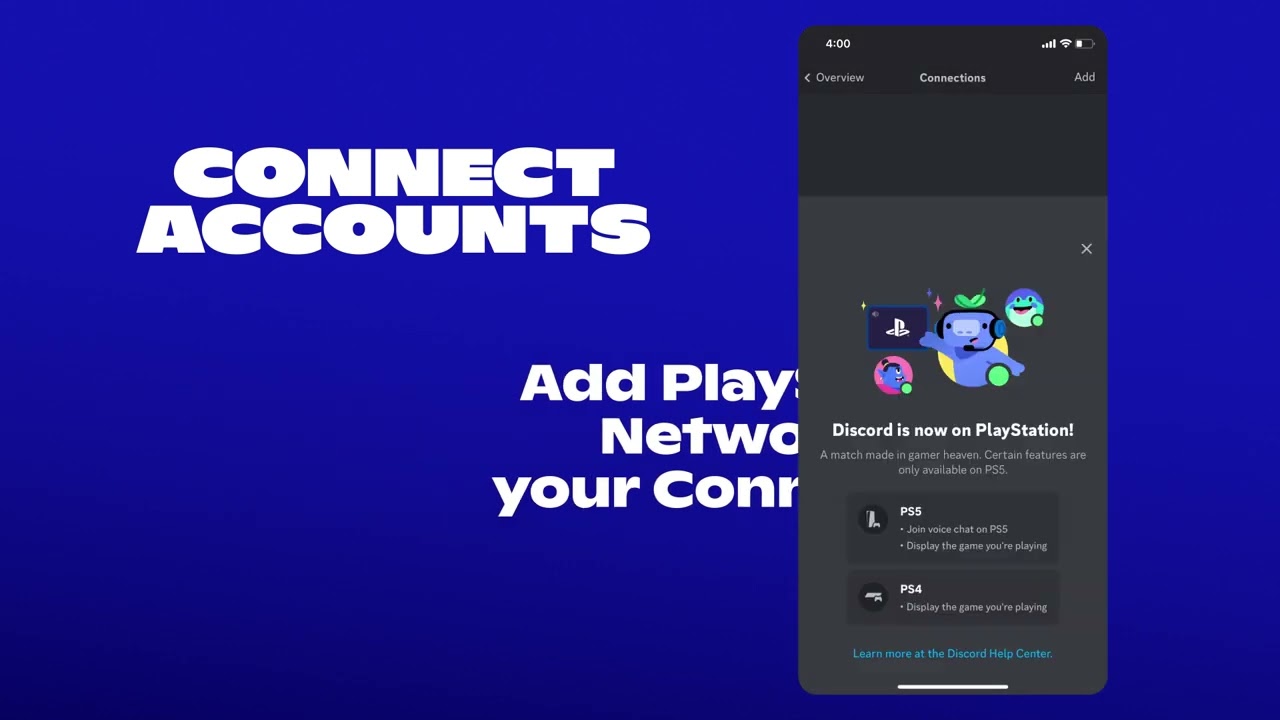
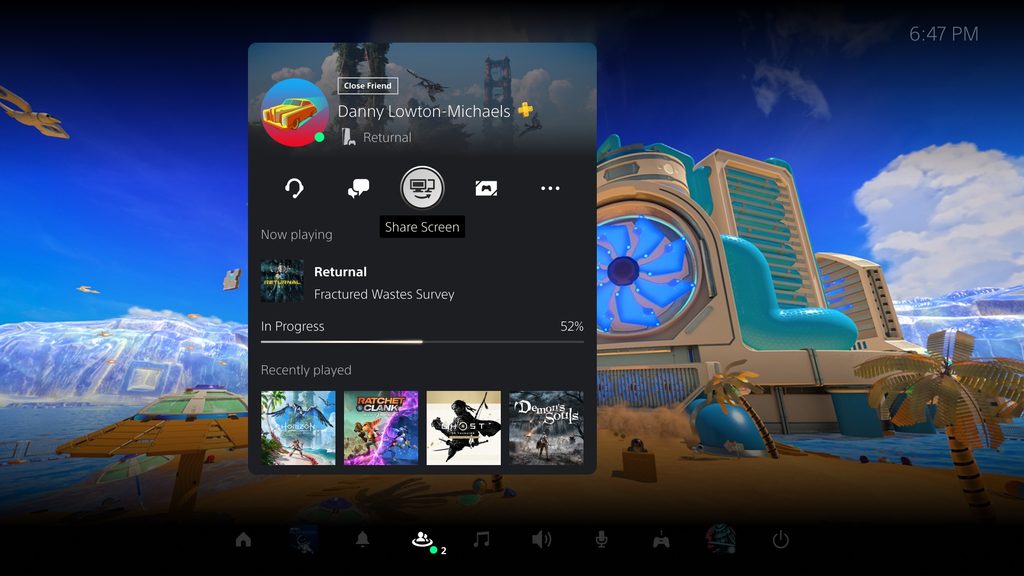 View and download image "PlayStation 5 UI screenshot showing how to start a Share Screen from your friend’s profile"
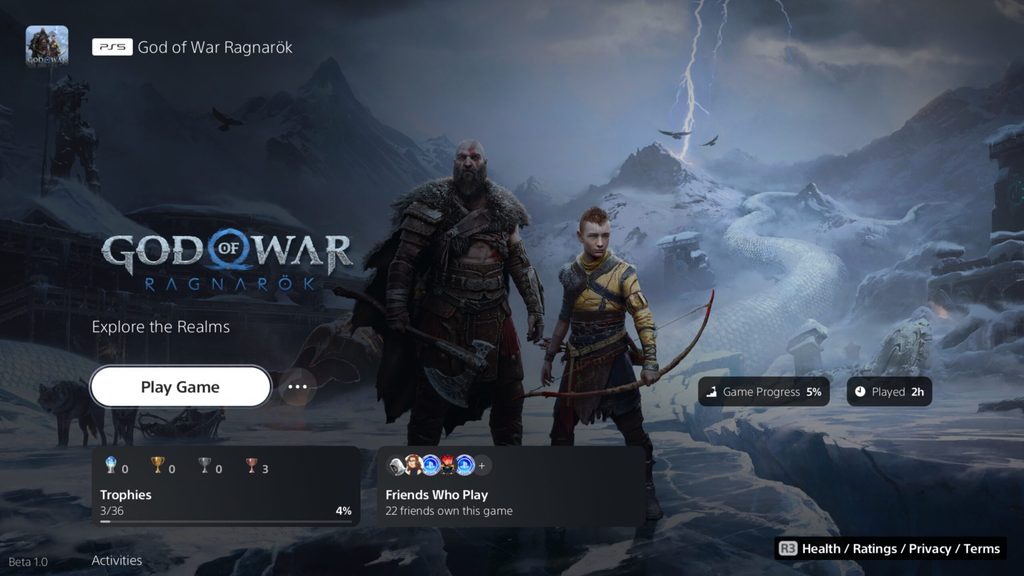 View and download image "PlayStation 5 UI screenshot showing new “Friends Who Play” tile in the God of War Ragnarok game hub"
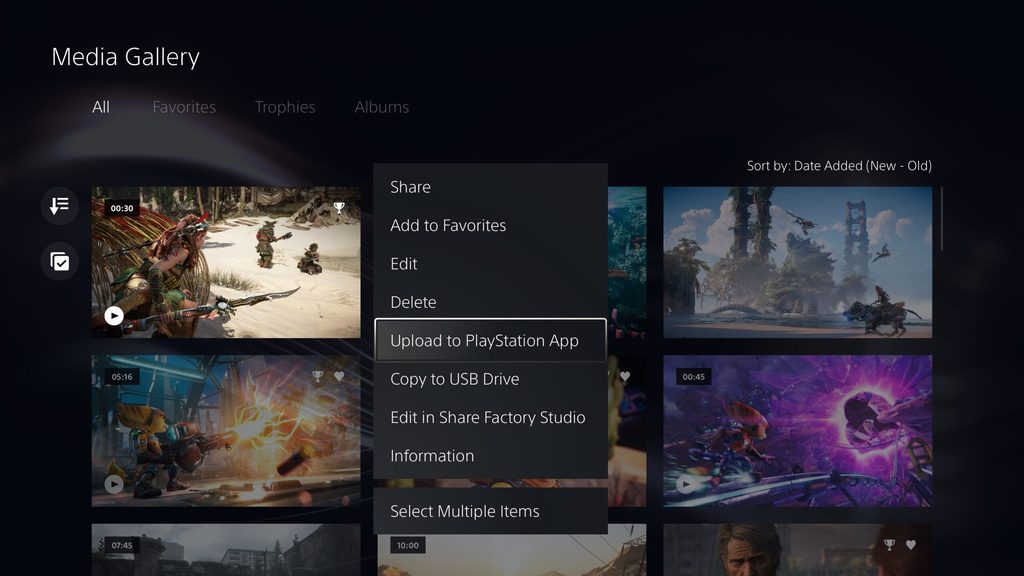 View and download image "PlayStation 5 UI screenshot showing the option to manually upload game captures to PlayStation App"
 View and download image "PlayStation 5 UI screenshot showing the Variable Refresh Rate setting"
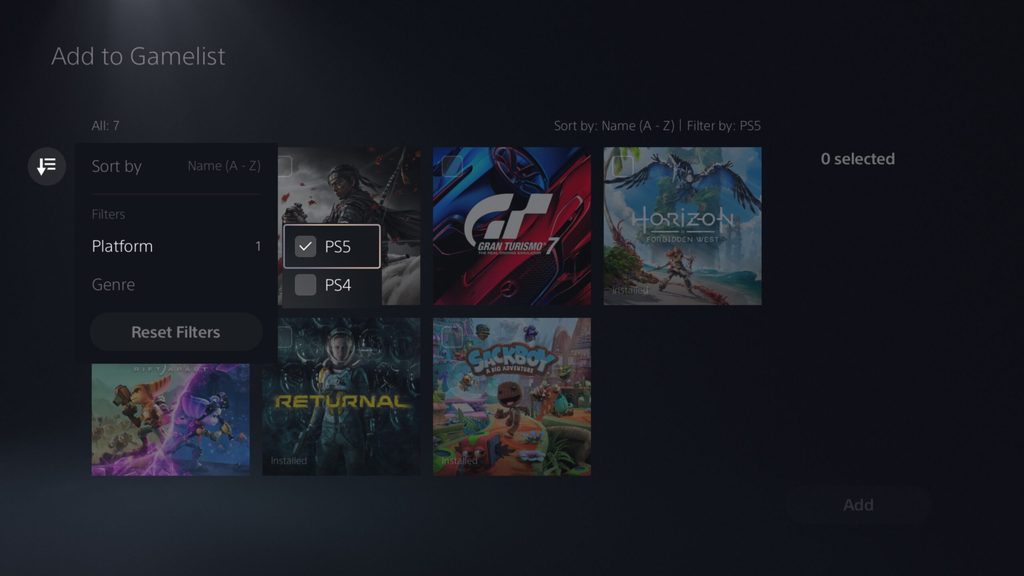 View and download image "PlayStation 5 UI screenshot showing the option to filter games by PS5 or PS4 in a gamelist"
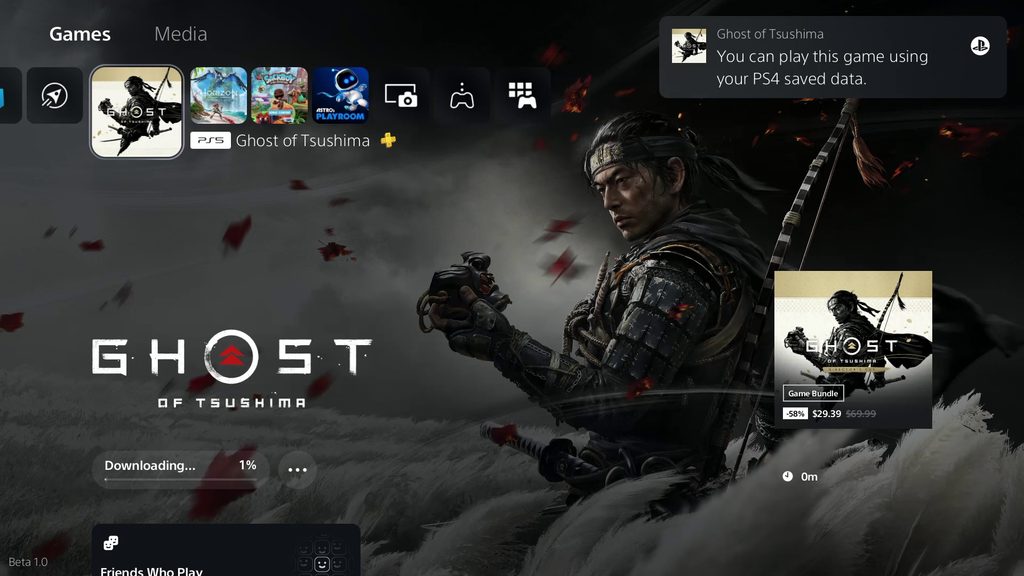 View and download image "PlayStation 5 UI screenshot showing the notification that PS4 saved data for Ghost of Tsushima is available to download"
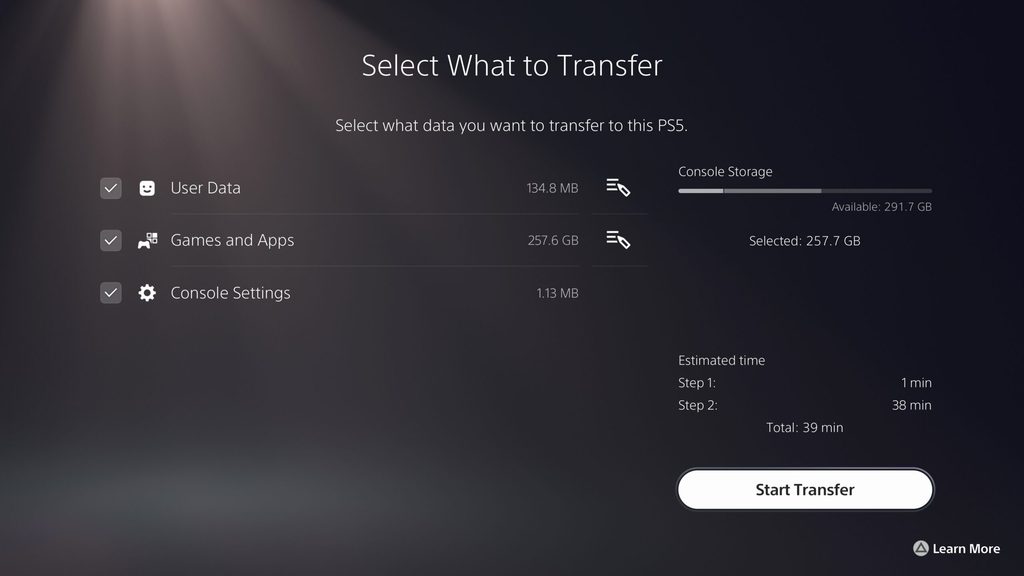 View and download image "PlayStation 5 UI screenshot showing the option to save a video clip through Voice Command"
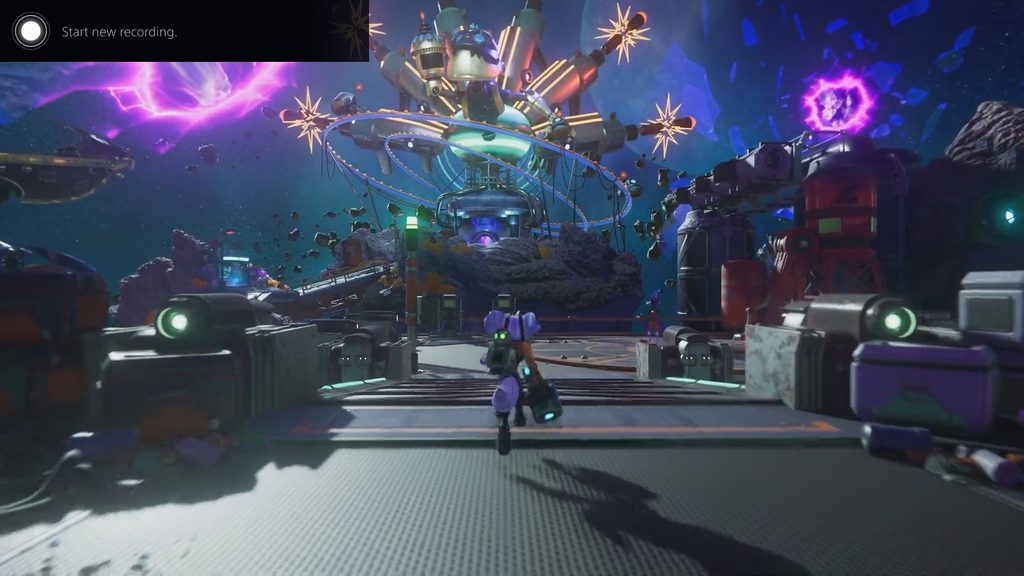 View and download imageWe’re eager to hear your feedback on these new features so let us know your thoughts in the comments!