


HD video cameras?


HD video cameras?
does anyone know if canon have as good of HD video cameras as their dslrs?
i want something without disc,and something with high quality color,and works well inside the house,especially in the room..u know..
maybe somethin with a mountable light?
since i like my XSI so much,i think id like to stick wih canon..
my budget is $1,000
i want something without disc,and something with high quality color,and works well inside the house,especially in the room..u know..
maybe somethin with a mountable light?
since i like my XSI so much,i think id like to stick wih canon..
my budget is $1,000
this camera is what im really lookin at i think..but i dont know bout the mountable light?
http://www.amazon.com/Canon-VIXIA-AV...1150207&sr=1-7
http://www.amazon.com/Canon-VIXIA-AV...1150207&sr=1-7

Big Block go VROOOM!
Joined: Oct 2003
Posts: 8,578
Likes: 1
From: Chicago Burbs
You said you wanted a camera without a disc and then the link you posted is for a hard drive based camcorder. Since you said disc and not disk, I assume you mean that you do not want a camera that records directly to optical media?
Big Block go VROOOM!
Joined: Oct 2003
Posts: 8,578
Likes: 1
From: Chicago Burbs
Setting video formats (HDV vs. AVCHD) aside for the moment, is there any particular reason you don't want a flash based camera? Relatively speaking, hard drives are fragile and make the cameras larger.
Trending Topics



Senior Moderator
Joined: Apr 2003
Posts: 47,710
Likes: 801
From: Toronto, Canada
Links to reviews speaking unfavorably of Canon HD camcorders? Because every review I read seem to like them. In some cases more than the others.
Not saying they're the best just getting tired of you saying the same thing in every camcorder thread without backing it up.

EDIT: And 10 new Camcorders from Canon announced today.
http://www.usa.canon.com/templatedat...amcorders.html

The Third Ball


Joined: Sep 2002
Posts: 50,494
Likes: 5,869
From: Los Angeles, Ca
When was the last time you used a Canon HD camcorder?
Links to reviews speaking unfavorably of Canon HD camcorders? Because every review I read seem to like them. In some cases more than the others.
Not saying they're the best ust getting tired of you saying the same thing in every camcorder thread without backing it up.
Links to reviews speaking unfavorably of Canon HD camcorders? Because every review I read seem to like them. In some cases more than the others.
Not saying they're the best ust getting tired of you saying the same thing in every camcorder thread without backing it up.
I just have personally never been a huge fan of canon video....though they are better than they were a few years ago.
When was the time you used a Nikon to shoot stills?

Senior Moderator
Joined: Apr 2003
Posts: 47,710
Likes: 801
From: Toronto, Canada
Show me one post where I disparaged a Nikon, Olympus, Sony etc product?

I'll be the first to tell you that my Canon Standard def camcorder is the meh. But from the reviews I've read, they seem to be right up there with everyone else when it comes to HD.

Big Block go VROOOM!
Joined: Oct 2003
Posts: 8,578
Likes: 1
From: Chicago Burbs
EDIT: And 10 new Camcorders from Canon announced today.
http://www.usa.canon.com/templatedat...amcorders.html
http://www.usa.canon.com/templatedat...amcorders.html
BTW, I found it somewhat interesting that Canon stuck with HDV for their flagship HV40 model. I guess they got the message that they pissed off a lot of people when they left the HV20 in the dust while updating everything else.

Suzuka Master
Joined: May 2004
Posts: 6,558
Likes: 7
From: Queens, NY
Delta, my in-laws have the Canon you posted, though I'm not sure if its the same model, but it is a Vixia HD. I can't comment on it since I never used it, but they seem to love it. As always, try before you buy to be sure.

Senior Moderator
Joined: Apr 2003
Posts: 47,710
Likes: 801
From: Toronto, Canada
You guys have no idea (or maybe you do) how much more reliable flash is than everything else.
 i guess i asked for it...but u guys make everything so complicated.
the reason i like the canon i showed was cause it has an external SD slot which is nice..its not tiny...because i have banana hands..it has an hdmi port and its full 1080 with a large internal HD
Big Block go VROOOM!
Joined: Oct 2003
Posts: 8,578
Likes: 1
From: Chicago Burbs
I have the Canon HF100 which is the same camera as the HF10 w/o the built-in internal flash memory. I can get about one hour's worth of video on an 8GB SDHC card. The image quality in moderate to bright light is very good. Things get pretty noisy pretty quick though in dim to low light. As for cost, 6ave currently has this camera for $530. On the size front, the HF10 is very small but not too small. Here it is next to my Canon 24-70 f/2.8 lens.
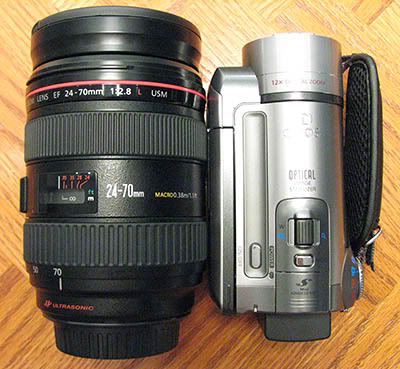
Note: before deciding anything you should really make a commitment to how important editing is to you. AVCHD video requires significantly more in the way of computer resources for editing than HDV video does.
Note: before deciding anything you should really make a commitment to how important editing is to you. AVCHD video requires significantly more in the way of computer resources for editing than HDV video does.
i dont care about editing video...its only gonna be for home videos nothing special...but if im going to buy one im going to get something with good resolution u kno..
i know nothing about editing video and i really dont have any interest like i do with still photo.
^that cam is a decent size...its not like old vhs over the shoulder lol.
i think im more than likely gonna get this canon after reading more on it.
also the only other thing ill use this cam for is doing rolling vids of the car meets and whatnot...
i know nothing about editing video and i really dont have any interest like i do with still photo.
^that cam is a decent size...its not like old vhs over the shoulder lol.
i think im more than likely gonna get this canon after reading more on it.
also the only other thing ill use this cam for is doing rolling vids of the car meets and whatnot...

Senior Moderator
Joined: Jul 2002
Posts: 12,005
Likes: 10
From: Bay Area, CA
i dont care about editing video...its only gonna be for home videos nothing special...but if im going to buy one im going to get something with good resolution u kno..
i know nothing about editing video and i really dont have any interest like i do with still photo.
^that cam is a decent size...its not like old vhs over the shoulder lol.
i think im more than likely gonna get this canon after reading more on it.
also the only other thing ill use this cam for is doing rolling vids of the car meets and whatnot...
i know nothing about editing video and i really dont have any interest like i do with still photo.
^that cam is a decent size...its not like old vhs over the shoulder lol.
i think im more than likely gonna get this canon after reading more on it.
also the only other thing ill use this cam for is doing rolling vids of the car meets and whatnot...

i like that u can get still frames from the video n shit..thats all..ill figure it out when it comes in the mail.
i ended up buying the cam i posted above with a 32BG SDHC card.
im sure no matter what ill be happy with it.
ill keep u guys posted for sure. i should get it by monday (my bday)
Big Block go VROOOM!
Joined: Oct 2003
Posts: 8,578
Likes: 1
From: Chicago Burbs
Word of advice. Consider shooting with multiple 4 GB cards. You know how you can stick a data CDROM with JPGs in a regular DVD player and most of them will read the disc and show you the pictures? Well many Blu-Ray players will do the same thing with AVCHD files right out of the camcorder.
If you shoot your video on a 4GB card, you can take what's on your card, burn that to a regular 4 GB data DVD, stick that regular DVD-R disc in your Blu-Ray player and watch your footage in all it's hi-def glory.
You obviously need a Blu-Ray player that supports AVCHD but many do. You may also need to do a little tweaking of the folder structure when you make the data DVD but it takes like two minutes and literally involves nothing more than just creating or (re)moving some folders in the correct place.
If you shoot your video on a 4GB card, you can take what's on your card, burn that to a regular 4 GB data DVD, stick that regular DVD-R disc in your Blu-Ray player and watch your footage in all it's hi-def glory.
You obviously need a Blu-Ray player that supports AVCHD but many do. You may also need to do a little tweaking of the folder structure when you make the data DVD but it takes like two minutes and literally involves nothing more than just creating or (re)moving some folders in the correct place.
^that makes alot of sense...but its a little late for u to tell me since i bought the 32GB lol
but i have 3 4GB sdhc's anyway...
i have a ps3,i dont know if that supports AVCHD,so this is another new ave for me.
also,i have to get some DVD software cause my laptop dosent have any software for burning since i had to re install all the new drivers and XP
but i have 3 4GB sdhc's anyway...
i have a ps3,i dont know if that supports AVCHD,so this is another new ave for me.
also,i have to get some DVD software cause my laptop dosent have any software for burning since i had to re install all the new drivers and XP
i dont know if its common or not for these camcorders but this one has a HDMI output so i can plug and play directly to the tv from the cam...so that was one of the things i liked about it.
Big Block go VROOOM!
Joined: Oct 2003
Posts: 8,578
Likes: 1
From: Chicago Burbs
You're probably going to need a mini-HDMI to HDMI cable. Fortunately monoprice has these at a reasonable cost.
http://www.monoprice.com/products/su...02&cp_id=10242
http://www.monoprice.com/products/su...02&cp_id=10242
 i had no idea they made these lol
Mini Advanced Accessory Terminal
The Advanced Accessory Shoe allows the use of additional accessories such as Canon's video light and directional microphone. Compared with Canon’s original Advanced Accessory Shoe, the new version is 50% smaller in size.

The Advanced Accessory Shoe allows the use of additional accessories such as Canon's video light and directional microphone. Compared with Canon’s original Advanced Accessory Shoe, the new version is 50% smaller in size.
Big Block go VROOOM!
Joined: Oct 2003
Posts: 8,578
Likes: 1
From: Chicago Burbs
The only things you can put in that shoe are Canon's own proprietary accessories. If you want to use any other accessories that are made by the rest of the world, then you have to purchase a third party adapter or try to make one yourself.
well they have the canon video light,which im cool with,but the 100$ price tag is a little rediculous for such a low output light with no external battery source.
this might sound a little stuck up i guess but,i prefer to stick with canon products and accessories even if its a little more money...i guess im the kind of person to find a brand i like and be faithful to it and not venture off.
this might sound a little stuck up i guess but,i prefer to stick with canon products and accessories even if its a little more money...i guess im the kind of person to find a brand i like and be faithful to it and not venture off.
Last edited by deltaboxxx; Jan 6, 2009 at 04:24 PM.
billiam..
is there a way to burn my footage to blue ray disc? (if its larger than 4gb)
and also,if i do the data burn on a reg cd-r,will it be 1080 still or only 720?
i thought reg dvd's only supported 480.
also,i was checking out the canon dvd/camcorder burner,plug in and burn,seemed pretty cool to me. but i just like gadgets lol
is there a way to burn my footage to blue ray disc? (if its larger than 4gb)
and also,if i do the data burn on a reg cd-r,will it be 1080 still or only 720?
i thought reg dvd's only supported 480.
also,i was checking out the canon dvd/camcorder burner,plug in and burn,seemed pretty cool to me. but i just like gadgets lol
i decided to get this cam instead of a 24-105 lens,so im hopping i wont regret it lol...
it just postponed my purchase of the lens,since it was a bday gift from my parents,i had the choice of either or,so whichever i didnt buy id have to buy with my own money eventually.
it just postponed my purchase of the lens,since it was a bday gift from my parents,i had the choice of either or,so whichever i didnt buy id have to buy with my own money eventually.

well i have a navy wife and a 2 year old son.
theres alot to be captured on video over stills,especialy for my wife.
now she wont miss my sons first real sentance,and anything else that changes..like counting or reading or anything like that...
she missed his first steps,and his first word,and the first time he counted with his fingers.
so,this is def going to be good,now i can make dvds and send them to her over seas.
theres alot to be captured on video over stills,especialy for my wife.
now she wont miss my sons first real sentance,and anything else that changes..like counting or reading or anything like that...
she missed his first steps,and his first word,and the first time he counted with his fingers.
so,this is def going to be good,now i can make dvds and send them to her over seas.
Big Block go VROOOM!
Joined: Oct 2003
Posts: 8,578
Likes: 1
From: Chicago Burbs
billiam..
is there a way to burn my footage to blue ray disc? (if its larger than 4gb)
and also,if i do the data burn on a reg cd-r,will it be 1080 still or only 720?
i thought reg dvd's only supported 480.
also,i was checking out the canon dvd/camcorder burner,plug in and burn,seemed pretty cool to me. but i just like gadgets lol
is there a way to burn my footage to blue ray disc? (if its larger than 4gb)
and also,if i do the data burn on a reg cd-r,will it be 1080 still or only 720?
i thought reg dvd's only supported 480.
also,i was checking out the canon dvd/camcorder burner,plug in and burn,seemed pretty cool to me. but i just like gadgets lol
The article below is probably somewhat dated by now but it really made things click form me when I read it. Give it a shot and you'll realize that AVCHD is essentially just a watered down version of Blu-Ray.
http://www.elurauser.com/articles/avchd_to_bluray.jsp
BTW - The camcorder forum over at AVS is what turned me on to all this stuff.
Senior Moderator
Joined: Jul 2002
Posts: 12,005
Likes: 10
From: Bay Area, CA
billiam..
is there a way to burn my footage to blue ray disc? (if its larger than 4gb)
and also,if i do the data burn on a reg cd-r,will it be 1080 still or only 720?
i thought reg dvd's only supported 480.
also,i was checking out the canon dvd/camcorder burner,plug in and burn,seemed pretty cool to me. but i just like gadgets lol
is there a way to burn my footage to blue ray disc? (if its larger than 4gb)
and also,if i do the data burn on a reg cd-r,will it be 1080 still or only 720?
i thought reg dvd's only supported 480.
also,i was checking out the canon dvd/camcorder burner,plug in and burn,seemed pretty cool to me. but i just like gadgets lol
if you burn a cd as data, then whatever the video resolution will be whatever the file is. Although I'd imagine you cant fit that long of a 1080 video onto a CD-R.
DVD movies only support 480, but thats entirely different. You're using CDR/DVDR's as a data storage device so as long as the file is under 700mb/4.7GB, then you're ok to store the file onto that disc.
Senior Moderator
Joined: Jul 2002
Posts: 12,005
Likes: 10
From: Bay Area, CA
if you have a PS3 cant you just encode the HD video and then stream it to the ps3 via tversity or something?
I know with my 360 I can stream HD via tversity but it has to be WMVHD, not sure what format it is for the PS3.
I know with my 360 I can stream HD via tversity but it has to be WMVHD, not sure what format it is for the PS3.
Big Block go VROOOM!
Joined: Oct 2003
Posts: 8,578
Likes: 1
From: Chicago Burbs
It requires a lot more horsepower to decompress AVC encoded video than it does for the "computer formats" such as Windows Media or DivX. Even setting that aside, you have to take into acount the bitrate of the video. The Canon camera we're talking about uses ~17 Mb/s so you'd need at least that much bandwidth for streaming (I think).

CL9 ABP
iTrader: (1)
Joined: Feb 2005
Posts: 4,528
Likes: 245
From: Commack, Long Island -> Queens NY
Wow i just took in alot of info here... even though i was just lurking seems like you guys know your stuff.
Problem i ran into with the ps3 is it can't read nfts and only fat32 so problem there with fat32 is the file can't be bigger than 4gbs.
Thats the reason why you need go thru some tedious steps before getting bluray files to work off a zip drive or external.
Problem i ran into with the ps3 is it can't read nfts and only fat32 so problem there with fat32 is the file can't be bigger than 4gbs.
Thats the reason why you need go thru some tedious steps before getting bluray files to work off a zip drive or external.
thats why im thinking of just buying the burner,might save time and headache,its only like $160
its still not my bday and my sis said shes gonna buy me cam stuff for my bday so well see.
its still not my bday and my sis said shes gonna buy me cam stuff for my bday so well see.