Navi Hack BMP's (Images)


Thread Starter
How may I help you.....?

Joined: Aug 2005
Posts: 1,932
Likes: 10
From: Northern VA
Navi Hack BMP's (Images)
Sticky?
OK guys, this thread is because others have asked for it. Lets post pictures that we have used in hacking our Navi's
Edit mod vp911:
Thank you to jmbnova and datmrman!
Since this thread is going to turn into the thread with images for the navi hack please follow these basic ground rules:
1. Post ONLY the images that can be used for the navi hack here.
2. Do not post any questions or comments in this thread. Please use PMs if necessary.
3. Requests will be permitted. Any other posts will be deleted.
4. Post any questions about the hack in the thread located here.
Edit by datmrman [Aug 8, 2006]:
I performed some maintenance on this thread by deleting comments and posts of expired images. Some members will notice that their post count decreased. Sorry! If you find your uploaded image missing, please re-upload them since your image server has deleted them. Imageshack.us seems to keep images longer than photobucket and others.
Instructions on how to post pictures are here.
To use the images found in this thread, you must perform the navi hack outlined in this thread:
Hack Your Navi Summarized! (Change pics and remove nag screen).
Please post any questions regarding the hack in the above thread. I will try to maintain this thread on a regular basis so please follow the rules.
Here is a list of members that have volunteered (at one time or another) for photo editing help:Please PM me if you want to be added/removed from the list. Thank you.
OK guys, this thread is because others have asked for it. Lets post pictures that we have used in hacking our Navi's
Edit mod vp911:
Thank you to jmbnova and datmrman!
Since this thread is going to turn into the thread with images for the navi hack please follow these basic ground rules:
1. Post ONLY the images that can be used for the navi hack here.
2. Do not post any questions or comments in this thread. Please use PMs if necessary.
3. Requests will be permitted. Any other posts will be deleted.
4. Post any questions about the hack in the thread located here.
Edit by datmrman [Aug 8, 2006]:
I performed some maintenance on this thread by deleting comments and posts of expired images. Some members will notice that their post count decreased. Sorry! If you find your uploaded image missing, please re-upload them since your image server has deleted them. Imageshack.us seems to keep images longer than photobucket and others.
Instructions on how to post pictures are here.
To use the images found in this thread, you must perform the navi hack outlined in this thread:
Hack Your Navi Summarized! (Change pics and remove nag screen).
Please post any questions regarding the hack in the above thread. I will try to maintain this thread on a regular basis so please follow the rules.
Here is a list of members that have volunteered (at one time or another) for photo editing help:Please PM me if you want to be added/removed from the list. Thank you.







Trending Topics






Here's a few I've been playing around with...
Just started messin' around with photoshop and a few pics I had handy. Also working on removing/changing the text of the nag screen to something a bit more interesting. No luck as of yet...

From the BEST car show on TV, if you've seen it, you know what I mean!

Pikes Peak at sunset

Mt Rushmore
My friend at work is a Photoshop GOD and I'm trying to get him to come with some really cool abstract designs. He's way better than I am artistically.
From the BEST car show on TV, if you've seen it, you know what I mean!
Pikes Peak at sunset
Mt Rushmore
My friend at work is a Photoshop GOD and I'm trying to get him to come with some really cool abstract designs. He's way better than I am artistically.




Safety Car
Joined: Jan 2006
Posts: 4,171
Likes: 39
From: San Diego, CA
As promised...
Some new navi screens! Special thanks goes out to RJANACONDA for sending me the original images and vp911 for providing the webspace. I couldn't decide where to crop the images so there are a few versions of a single image. I went Photochop crazy. 
Enjoy!


Enjoy!


5th Gear
Joined: Apr 2006
Posts: 5
Likes: 0
 Civic Si GPS (clean)



Advanced
Joined: Jul 2005
Posts: 59
Likes: 0
From: Florida
Originally Posted by Kennedy
Could someone shave a few pixels (resize 2 478 x 232) off this image. It works, but is just slightly too large, it takes forever to load...
Perhaps you could add a nice "Hello Christopher" as well. That would be awesome!
I can hex edit, but have no photoshop...
"stolen from the 20 navi page thread"....

Perhaps you could add a nice "Hello Christopher" as well. That would be awesome!
I can hex edit, but have no photoshop...
"stolen from the 20 navi page thread"....

Or


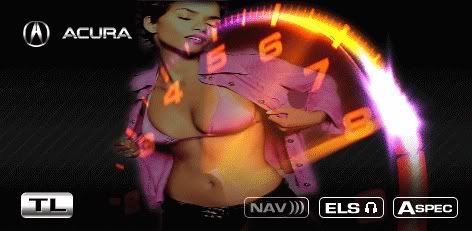

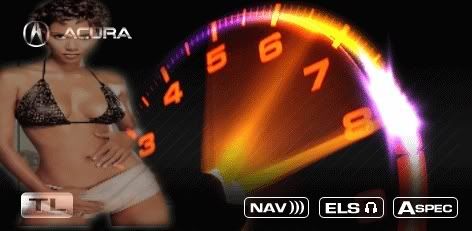



Thanks Peterbanks... That was the trick!
For reference, if your modded splash screens are taking a long time to load (3-5 seconds), reduce the picture to 475x232 pixels (also ensure your in 8 bit color of course), and your picture will load within 1 second of the key being turned...
For reference, if your modded splash screens are taking a long time to load (3-5 seconds), reduce the picture to 475x232 pixels (also ensure your in 8 bit color of course), and your picture will load within 1 second of the key being turned...



Intermediate
Joined: Apr 2006
Posts: 34
Likes: 0
Originally Posted by KishaB211
Brand new to the forum however not new to the Acura line. I have a 06 Tl. Can I change me welcome screen? If so, how?
Thank you for your help!
Thank you for your help!
https://acurazine.com/forums/showthread.php?t=129765

Instructor
Joined: May 2006
Posts: 116
Likes: 0
From: Mansfield, Tx
Originally Posted by xtin
I took this pic. Can someone come up with something nice for a startup image using this?
Here ya go there really isn't much you can do with this give me some ideas and I can do it. Anything you want.


Originally Posted by blkdiamondTL
Just did this hack to my navi and although a little hectic running from the trunk to the front seat this was well worth the time and effort . After the hack is done and the image is loaded I have noticed that the new background only stays on for a short period versus' the stock navigation warning.
Boot process stock:
- turn on car and stock warning screen appears
- 15 seconds later, 'ok' appears to proceed to the main screen
Boot process now:
- turn on car and navi stays black for about 5 seconds
- then the new image appears for about 3 to 5 seconds
- navigation the goes black again for 5 to 10 seconds
- finally the ok button appears to move to the main screen
Does anyone know how to extend the timing on the image to eliminate the black screens?
Thanks!
. After the hack is done and the image is loaded I have noticed that the new background only stays on for a short period versus' the stock navigation warning. Boot process stock:
- turn on car and stock warning screen appears
- 15 seconds later, 'ok' appears to proceed to the main screen
Boot process now:
- turn on car and navi stays black for about 5 seconds
- then the new image appears for about 3 to 5 seconds
- navigation the goes black again for 5 to 10 seconds
- finally the ok button appears to move to the main screen
Does anyone know how to extend the timing on the image to eliminate the black screens?
Thanks!
Thread Starter
How may I help you.....?
Joined: Aug 2005
Posts: 1,932
Likes: 10
From: Northern VA
Originally Posted by Aznpersuasion
how do you install that? would it mess up anything? or would it be fine?
~Jason
~Jason
https://acurazine.com/forums/showthread.php?t=129765


Advanced
Joined: Sep 2005
Posts: 63
Likes: 0
From: IN
Originally Posted by rahulkumar
I can't get the size down, I edited the text layer to put my name in but the size is too big  Help please?
Help please?
# If using Photoshop, one way to meet the pictures specs is to convert the picture from RGB to Indexed (Image > Mode > Indexed Color). Once inside the indexed color dialog box, chose Local (Perceptual) from the Palette drop down menu. Then input 173 in the Colors field. This will alter your colors in your image because you are limiting the palette, so you might have to make some sacrifices or changes to the image. Then save as bitmap, 8 bit. Another way is to crop the image on the sides a bit.
# DO NOT use Bitmap compression (RLE)
# DO NOT use Bitmap compression (RLE)
After that, you should be set.