


Navi Hack BMP's (Images)


 My Offering...




Safety Car
Joined: Jan 2006
Posts: 4,171
Likes: 39
From: San Diego, CA





Intermediate
Joined: Nov 2005
Posts: 38
Likes: 0
For those that wanted JustinZ's awesome pic w/o the ASpec...

LINK GIF: http://img204.imageshack.us/my.php?i...noaspecec3.gif
LINK BMP/PNG: http://img215.imageshack.us/img215/5...noaspeclj5.png
LINK GIF: http://img204.imageshack.us/my.php?i...noaspecec3.gif
LINK BMP/PNG: http://img215.imageshack.us/img215/5...noaspeclj5.png

Cruisin'
Joined: Aug 2006
Posts: 17
Likes: 1
From: Central NJ
Originally Posted by magsru99
Would someone be so kind as to run the picture below in Photoshop to drop the Pallette and adjust it as needed? The size is OK I think.
Thanks in advance.

Thanks in advance.
Bump, could someone adjust for me? Thanks.

Intermediate
Joined: Nov 2005
Posts: 38
Likes: 0
There you go Jrbn2g04AcuraTL! Enjoy! Thanks to special-ed for the original picture. 

BMP Version: http://img223.imageshack.us/img223/4...acuratlnw4.png
BMP Version: http://img223.imageshack.us/img223/4...acuratlnw4.png
Racer
Joined: Oct 2004
Posts: 453
Likes: 2
From: Houston, TX
Originally Posted by mcafee_jones
There you go Jrbn2g04AcuraTL! Enjoy! Thanks to special-ed for the original picture.
BMP Version: http://img223.imageshack.us/img223/4...acuratlnw4.png
BMP Version: http://img223.imageshack.us/img223/4...acuratlnw4.png
I REALLY REALLY REALLY APPRECIATE IT BRO, Ive been askin this for the longest time... THANK YOU VERY MUCH!!

06 Antracite/Ebony 6MT
Joined: Mar 2006
Posts: 89
Likes: 1

Originally Posted by silverbulletZ
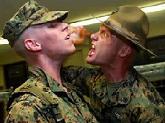
I combined one of the earlier pictures with one of my own.....i like the classy look of black and white, but maybe ill do it in color just so there's something nice to look at.







Thread Starter
How may I help you.....?

Joined: Aug 2005
Posts: 1,932
Likes: 10
From: Northern VA
Photoshop Help
Got a PM from ViNhXoNxAcuraTL about Navi Hack image help....
Can someone help this guy out? Please?
Can someone help this guy out? Please?
Originally Posted by ViNhXoNxAcuraTL
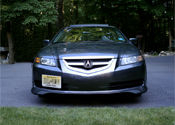
can somebody make the Acura logo from the picture in the animation picture?\
i want the girl picture to be same as is[no color lost/no brightnes]
and the logo take places of the old one..can you also make the word SATELLITE NAVIGATION SYSTEM all capertal letters?can you also resize it to 478 x 232
Thanks in advance!
http://members.aol.com/caibarien/girl1.bmp
http://www.autopedia.com/Graphics/Acura_logo.jpg
i want the girl picture to be same as is[no color lost/no brightnes]
and the logo take places of the old one..can you also make the word SATELLITE NAVIGATION SYSTEM all capertal letters?can you also resize it to 478 x 232
Thanks in advance!
http://members.aol.com/caibarien/girl1.bmp
http://www.autopedia.com/Graphics/Acura_logo.jpg
Racer
Joined: Sep 2006
Posts: 362
Likes: 4
From: New Jersey
Originally Posted by mcafee_jones
For those that wanted JustinZ's awesome pic w/o the ASpec...
LINK GIF: http://img204.imageshack.us/my.php?i...noaspecec3.gif
LINK BMP/PNG: http://img215.imageshack.us/img215/5...noaspeclj5.png
LINK GIF: http://img204.imageshack.us/my.php?i...noaspecec3.gif
LINK BMP/PNG: http://img215.imageshack.us/img215/5...noaspeclj5.png

Advanced
Joined: Oct 2006
Posts: 59
Likes: 4
Originally Posted by tehloxely
Would you mind posting a png of the picture with just the tach please? Thank you.

Tri State ViP Crew
Joined: May 2006
Posts: 90
Likes: 0
From: Astoria, New York
 Can Some1 Hook It Up!!!!!
Can someone hook me up!!!!!!! - Id do it myself but i suck with computers and paint and photoshop, bigtime!!!!! =( it suxxx - but id really appreciate it if some can write - Welcome Lorenzo - somewhere on this italian flag navi pic!!!
Thanks guys!

Thanks guys!
Advanced
Joined: Oct 2006
Posts: 59
Likes: 4
If you want your pictures not to look taller in the car versus what you see on the screen, work on a 480x270 file, resize to 480x234 and save to get the right proportions in the car.
for instance, if you have a circle on the screen while working on the 480x270 file, it will show up as an ellipse when you resize it to 480x234, then it will show up as a circle again on the navi screen.
I think the pixels are not exactly square in the acura navigation system.
for instance, if you have a circle on the screen while working on the 480x270 file, it will show up as an ellipse when you resize it to 480x234, then it will show up as a circle again on the navi screen.
I think the pixels are not exactly square in the acura navigation system.
Advanced
Joined: Oct 2006
Posts: 59
Likes: 4
I see a lot of distortions in the images posted here. Just as a hint from years of working with images in case you want a more perfect look on your NAVI system. In case you have noticed your images getting stretched vertically or horizontally, keep reading.
If you want your image to look like the one below on the navi screen in the TL work on a 480x270 file in photoshop. Complete your editing on this file and keep it as a PSD image for future editing. Notice the perfect circle of earth and correct porportions of the ACURA logo.
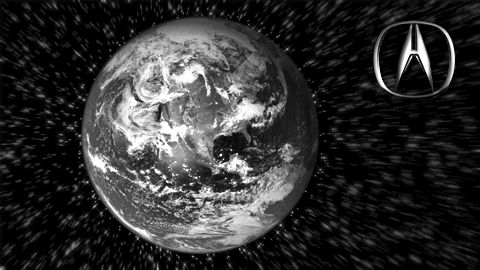
When you are done, resize it to 480x234 and then save it as a BMP called back.bmp. Then your picture will look something like the one below. This is the image you will see on the screen and put in your BIN and load up in the car. When the picture shows up on the navi it will have the correct porportions. Notice the squashed look of earth and the ACURA logo, dont worry, it will look good in the car, just not good on the screen:
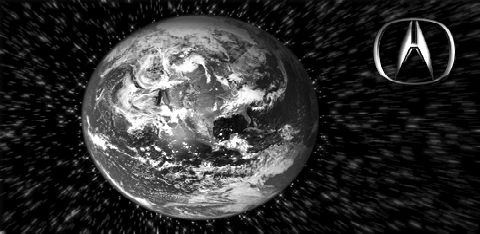
I noticed most images in this thread have not followed this routine, thats why the ACURA logo, the actors faces and everything else will look distorted in the ACURA, mainly I guess because the pixels in the ACURA navi are not perfect squares. People start to look taller in the car than on the screen! The trick is to work on a 480x270 file and resize to 480x234 to put it in the BIN.
Please correct me if I am wrong anywhere! Thanks and good luck!
(By the way, I changed my screen yesterday and now the voice command does not work while I am on the BT phone talking.)
One more thing, do all your work, specially the resizing in the RGB format. Once your image is 100% ready, resized to 480x234, THEN index it to limited colors.
DONT index then resize.
Resize then index.
If you need to modify the image, open the 480x270 RGB files, and continue working. When done, resize, index and upload in the BIN.
If you want your image to look like the one below on the navi screen in the TL work on a 480x270 file in photoshop. Complete your editing on this file and keep it as a PSD image for future editing. Notice the perfect circle of earth and correct porportions of the ACURA logo.
When you are done, resize it to 480x234 and then save it as a BMP called back.bmp. Then your picture will look something like the one below. This is the image you will see on the screen and put in your BIN and load up in the car. When the picture shows up on the navi it will have the correct porportions. Notice the squashed look of earth and the ACURA logo, dont worry, it will look good in the car, just not good on the screen:
I noticed most images in this thread have not followed this routine, thats why the ACURA logo, the actors faces and everything else will look distorted in the ACURA, mainly I guess because the pixels in the ACURA navi are not perfect squares. People start to look taller in the car than on the screen! The trick is to work on a 480x270 file and resize to 480x234 to put it in the BIN.
Please correct me if I am wrong anywhere! Thanks and good luck!
(By the way, I changed my screen yesterday and now the voice command does not work while I am on the BT phone talking.)
One more thing, do all your work, specially the resizing in the RGB format. Once your image is 100% ready, resized to 480x234, THEN index it to limited colors.
DONT index then resize.
Resize then index.
If you need to modify the image, open the 480x270 RGB files, and continue working. When done, resize, index and upload in the BIN.
Advanced
Joined: Oct 2006
Posts: 59
Likes: 4
One more thing, do all your work, specially the resizing in the RGB format. Once your image is 100% ready, resized to 480x234, THEN index it to limited colors.
DONT index then resize.
Resize then index.
If you need to modify the image, open the 480x270 RGB files, and continue working. When done, resize, index and upload in the BIN.
DONT index then resize.
Resize then index.
If you need to modify the image, open the 480x270 RGB files, and continue working. When done, resize, index and upload in the BIN.

Intermediate
Joined: Jul 2004
Posts: 45
Likes: 0
From: New Jersey
Originally Posted by LoReNzZz
Can someone hook me up!!!!!!! - Id do it myself but i suck with computers and paint and photoshop, bigtime!!!!! =( it suxxx - but id really appreciate it if some can write - Welcome Lorenzo - somewhere on this italian flag navi pic!!!
Thanks guys!
Thanks guys!

Those with DVD:


Scoobie Specialist
Joined: May 2005
Posts: 265
Likes: 0
From: Crystal Lake, IL 60014
I saw that there may be a possibility to keep the initial bmp showing until the navi starts up. Has anyone been working on making this happen? I would love to have that instead of the text screen...
Advanced
Joined: Oct 2006
Posts: 59
Likes: 4
Originally Posted by brooklynite
I.....
(By the way, I changed my screen yesterday and now the voice command does not work while I am on the BT phone talking.)
(By the way, I changed my screen yesterday and now the voice command does not work while I am on the BT phone talking.)

Intermediate
Joined: Oct 2005
Posts: 30
Likes: 0
Can someone format the picture of this hat for me.
http://shop.mlb.com/product/index.jsp?productId=1869690&cp=1452353.1452770.116 1631&parentPage=family
http://shop.mlb.com/product/index.jsp?productId=1869690&cp=1452353.1452770.116 1631&parentPage=family
Intermediate
Joined: Oct 2005
Posts: 30
Likes: 0
Image Help
Can someone modify the image of the hat on this website
http://shop.mlb.com/product/index.js...entPage=family
http://shop.mlb.com/product/index.js...entPage=family
Intermediate
Joined: Nov 2005
Posts: 38
Likes: 0
Here you go!

LINK JPEG: http://img213.imageshack.us/img213/2866/05anthrauo7.jpg
LINK BMP/PNG: http://img82.imageshack.us/img82/7687/05anthraos7.png
LINK JPEG: http://img213.imageshack.us/img213/2866/05anthrauo7.jpg
LINK BMP/PNG: http://img82.imageshack.us/img82/7687/05anthraos7.png
Intermediate
Joined: Nov 2005
Posts: 38
Likes: 0
Here you go Svp50! Sorry it's the best I could do...

LINK BMP/PNG: http://img85.imageshack.us/img85/621/svp5001cf1.png
--or--

LINK BMP/PNG: http://img183.imageshack.us/img183/7158/svp5002pq2.png
LINK BMP/PNG: http://img85.imageshack.us/img85/621/svp5001cf1.png
--or--
LINK BMP/PNG: http://img183.imageshack.us/img183/7158/svp5002pq2.png
Intermediate
Joined: Jul 2004
Posts: 45
Likes: 0
From: New Jersey
Originally Posted by mcafee_jones
Here you go Svp50! Sorry it's the best I could do...
LINK BMP/PNG: http://img85.imageshack.us/img85/621/svp5001cf1.png
--or--
LINK BMP/PNG: http://img183.imageshack.us/img183/7158/svp5002pq2.png
LINK BMP/PNG: http://img85.imageshack.us/img85/621/svp5001cf1.png
--or--
LINK BMP/PNG: http://img183.imageshack.us/img183/7158/svp5002pq2.png


