


Sirius Conversion using the new HONSC1


Thread Starter
Instructor
Joined: Sep 2005
Posts: 117
Likes: 9
Sirius Conversion using the new HONSC1
I first heard about this on Howard Stern and then checked it out online. It looks like the answer for all those who wanted to convert to Sirius, but didnt want to add a in-vehicle mount and mess up the dashboard. Also, with the the past issues with the PIE / Directed / USA-Spec AUX solutions it also solves that problems. Anyway, I checked it out online and was surprised to only see a couple of threads about it. I would like to see if anyone else had experiences with the install, pics, tips of what else is needed, etc... I saw in another thread that Bwitz0 was nice enough to share his experience and post a few pics. Here is his post below (thanks Bwitz0)
So can anyone else tell us about their experiences?
Year of your TL it was installed in?
Navi/non-Navi?
Any other accessories needed?
Plus, what is involved with the SCC-1? Does it need another antenna to be mounted to the car? Can we use the XM antenna already on the roof? If not, why? Doesn't the GM converted use the XM factory installed antenna?
Thanks in advance!
Originally Posted by bwitz0
Received the HON-SC1 and SCC-1 on Friday and was able to install over the weekend in the trunk in place of the original pioneer XM radio. Thus far it's working wonderfully using the factory XM antenna and a self-made connector. During a weekend of driving not a single signal drop-out. Nice to have a Sirius option for a TL without additional wiring or display controls.
Look no wires!


Look no wires!
Year of your TL it was installed in?
Navi/non-Navi?
Any other accessories needed?
Plus, what is involved with the SCC-1? Does it need another antenna to be mounted to the car? Can we use the XM antenna already on the roof? If not, why? Doesn't the GM converted use the XM factory installed antenna?
Thanks in advance!
Thread Starter
Instructor
Joined: Sep 2005
Posts: 117
Likes: 9
Also, I found non TSS Radio an install instruction for an Accord.
http://www.tss-radio.com/images/honsc1installeg.pdf
Does the text display on the TL look a little screwy also, or it is as it should be in the TL?
In addition, there are two SCC1 adaptors, one for single input and one for dual. Here is the compatibility chart for your specific vehicle:
http://www.tss-radio.com/images/Hond...%20UPDATED.pdf
Basically, for TL's here is the breakdown:
2004 Double
2005 Double
2006+ Single
By the way, TSS Radio has a combo package for the Honda and Acura SIRIUS Connect HON-SC1 & SCC1 for $169 plus free shipping.
Part number: HONSCC1
http://www.tss-radio.com/images/honsc1installeg.pdf
Does the text display on the TL look a little screwy also, or it is as it should be in the TL?
In addition, there are two SCC1 adaptors, one for single input and one for dual. Here is the compatibility chart for your specific vehicle:
http://www.tss-radio.com/images/Hond...%20UPDATED.pdf
Basically, for TL's here is the breakdown:
2004 Double
2005 Double
2006+ Single
By the way, TSS Radio has a combo package for the Honda and Acura SIRIUS Connect HON-SC1 & SCC1 for $169 plus free shipping.
Part number: HONSCC1

5th Gear
Joined: Aug 2006
Posts: 5
Likes: 0
Vector, here's the complete compatibility chart with picture illustrations in PDF format:
http://www.keepandshare.com/doc/view...id=446070&da=y
http://www.keepandshare.com/doc/view...id=446070&da=y

1st Gear
Joined: Jan 2008
Posts: 1
Likes: 0
I ordered the HON-SC1 & SCC1 from TSS-Radio last week and installed it over the weekend in my wife's 2005 non-navigation TL. The text looks fine and its nice being able to control it through the steering wheel.
Installing it was pretty straightforward. First, I loosened and pulled back the trunk liner on the passenger side. The factory xm unit is held in place by three bolts. I loosened the 3 bolts, removed the xm unit and unplugged the antenna and the OEM plug. The HON-SC1 comes with an adapter that the OEM harness plugs into on one side and into the HON-SC1 on the other. The holes on the included mounting bracket don't really match up with the factory holes in the trunk so I secured it using a couple of heavy duty zip ties. It's nice and snug and I didn't have to drill any holes.
I opted to use the included Sirius antenna and mounted it on the bottom of the rear window using 3M mounting tape. I ran the wire underneath the rubber molding on the trunk lip and over to the passenger side where the radio is mounted. The whole install took about 1-1/2 hours.
Installing it was pretty straightforward. First, I loosened and pulled back the trunk liner on the passenger side. The factory xm unit is held in place by three bolts. I loosened the 3 bolts, removed the xm unit and unplugged the antenna and the OEM plug. The HON-SC1 comes with an adapter that the OEM harness plugs into on one side and into the HON-SC1 on the other. The holes on the included mounting bracket don't really match up with the factory holes in the trunk so I secured it using a couple of heavy duty zip ties. It's nice and snug and I didn't have to drill any holes.
I opted to use the included Sirius antenna and mounted it on the bottom of the rear window using 3M mounting tape. I ran the wire underneath the rubber molding on the trunk lip and over to the passenger side where the radio is mounted. The whole install took about 1-1/2 hours.

Intermediate
Joined: Aug 2007
Posts: 34
Likes: 0
From: NY
The install for my 08 w/nav required me to connect the HONSC1 behind the radio in the dash. The connectors to the factory XM tuner are not compatible with the cable that comes with the HONSC1, it is compatible with the cable that goes into the radio.
I used these instructions to remove the dash trim to gain access to the area behind the radio.
http://home.usadatanet.net/bclaps/TLAuxcableinstall.pdf
I disconnected the connector on the back of the radio and attached one end of the Y cable that came with the HONSC1 to the back of the radio with the other end to the cable that I disconnected. I also disconnected the factory XM tuner in the trunk so that it wouldn't interfere with the HONSC1. I installed the HONSC1 and the SCC1 in the bottom bucket of my console. I chose this location because a) it gave me easy access in case I had problems, and b) it was the easiest. I could have installed behind the dash but didn't think it was worth the added effort and headaches. I also purchased the antenna converter from TSS to convert my OEM XM antenna to SIRIUS. I ran the SIRIUS antenna lead under my backseat, under my carpet to the center console. Connected all of the wires, called SIRIUS, and the job was done. Very happy with the install. Everything works exactly as it worked for the factory XM including the controls on the steering wheel which switches the channels, it goes from preset to preset.
Let me know if you have further questions that I can help you with.
I used these instructions to remove the dash trim to gain access to the area behind the radio.
http://home.usadatanet.net/bclaps/TLAuxcableinstall.pdf
I disconnected the connector on the back of the radio and attached one end of the Y cable that came with the HONSC1 to the back of the radio with the other end to the cable that I disconnected. I also disconnected the factory XM tuner in the trunk so that it wouldn't interfere with the HONSC1. I installed the HONSC1 and the SCC1 in the bottom bucket of my console. I chose this location because a) it gave me easy access in case I had problems, and b) it was the easiest. I could have installed behind the dash but didn't think it was worth the added effort and headaches. I also purchased the antenna converter from TSS to convert my OEM XM antenna to SIRIUS. I ran the SIRIUS antenna lead under my backseat, under my carpet to the center console. Connected all of the wires, called SIRIUS, and the job was done. Very happy with the install. Everything works exactly as it worked for the factory XM including the controls on the steering wheel which switches the channels, it goes from preset to preset.
Let me know if you have further questions that I can help you with.

Cruisin'
Joined: Mar 2006
Posts: 24
Likes: 0
Does anyone know if you have to access the back of the radio for a navi 06? I think I can handle the trunk, but I'd probably take it to someone if I have to get to the back of the radio.
Also, can you use XM and Sirius together, or do you have to choose one or the other? I already paid for my XM, but I'd still get rid of it if I had to!
Has anyone hooked this up to the XM antenna, and if so, was it easy?
Also, can you use XM and Sirius together, or do you have to choose one or the other? I already paid for my XM, but I'd still get rid of it if I had to!
Has anyone hooked this up to the XM antenna, and if so, was it easy?


Trending Topics
5th Gear
Joined: Aug 2006
Posts: 5
Likes: 0
as kasendorf will attest to, his 08 Acura TL has the Technology Package, correct?
so the standard XM Tuner that everyone else will have, differs drastically than what is offered in the Tech Packaged vehicles, because the Delphi unit does more than just act as an XM Tuner.
while everyone with the Standard XM Tuner will adapt their HONSC1 interface and SCC1 tuner @ the current location of the OEM XM Tuner, those with compatible Tech Packaged vehicles will adapt @ the OEM Headunit.
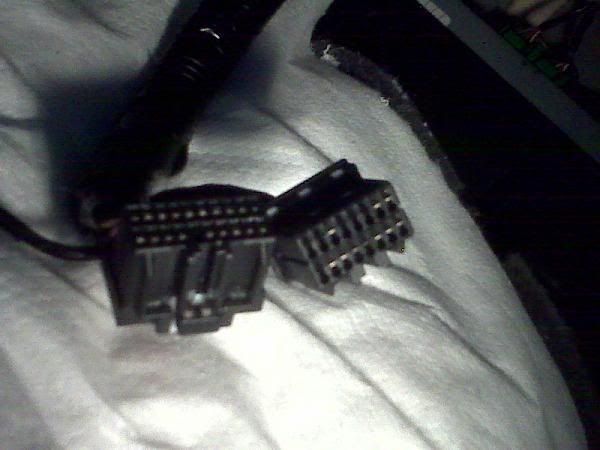
Standard OEM XM Tuner with 14Pin Communication/Power harness and Antenna:
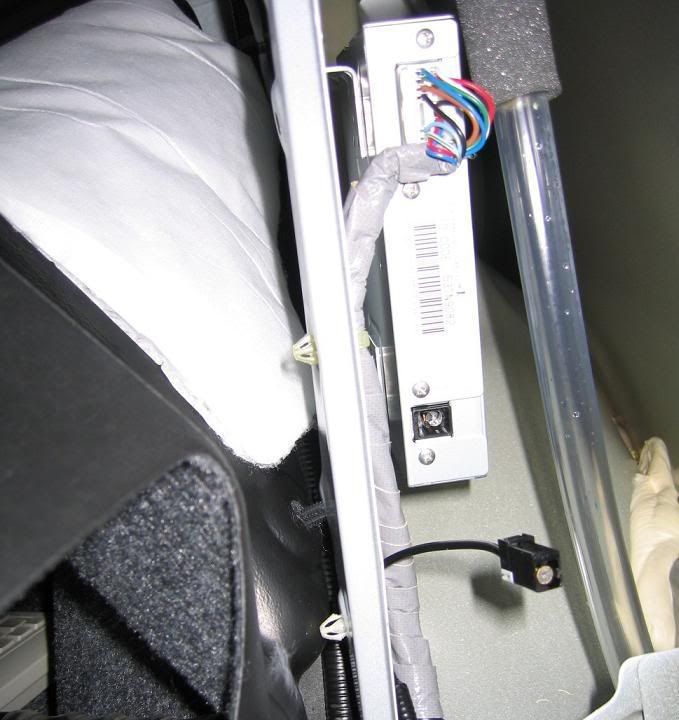
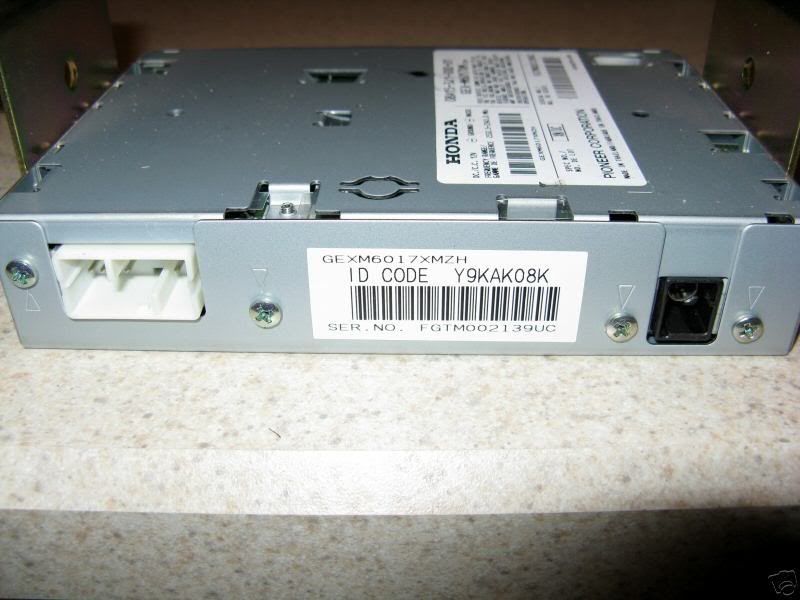
and Tech Package XM Tuner, found in his Acura (thanks for the pics kasendorf):
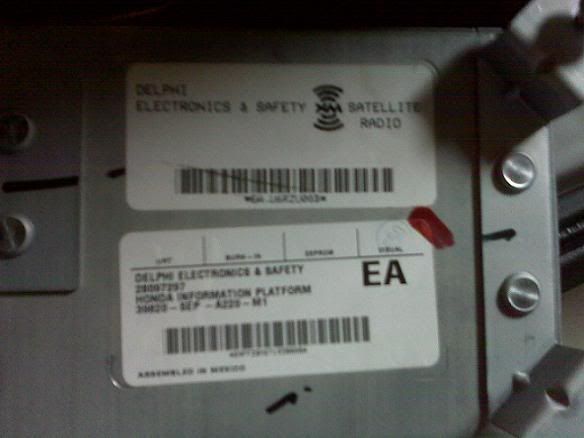
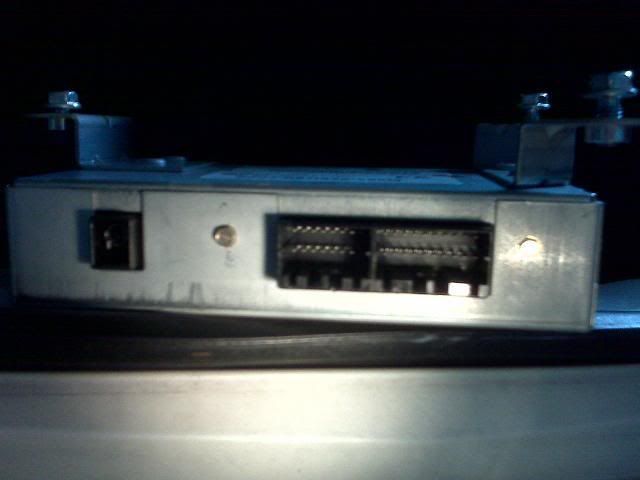

so the standard XM Tuner that everyone else will have, differs drastically than what is offered in the Tech Packaged vehicles, because the Delphi unit does more than just act as an XM Tuner.
while everyone with the Standard XM Tuner will adapt their HONSC1 interface and SCC1 tuner @ the current location of the OEM XM Tuner, those with compatible Tech Packaged vehicles will adapt @ the OEM Headunit.
Standard OEM XM Tuner with 14Pin Communication/Power harness and Antenna:
and Tech Package XM Tuner, found in his Acura (thanks for the pics kasendorf):
Advanced
Joined: Jun 2006
Posts: 57
Likes: 0
From: Ormond Beach Florida
Originally Posted by screaminz28
If the 06 is the same as the 05, then all connections would be in the trunk. It's very odd that the 08 requires connecting behind the dash, unless it has something to do with the traffic nav.
Advanced
Joined: Jun 2006
Posts: 57
Likes: 0
From: Ormond Beach Florida
Good price for conversion
http://cgi.ebay.com/ws/eBayISAPI.dll...MEWA:IT&ih=013
$129.99 for complete kit

http://cgi.ebay.com/ws/eBayISAPI.dll...MEWA:IT&ih=013
$129.99 for complete kit
Cruisin'
Joined: Mar 2006
Posts: 24
Likes: 0
I posed this question in another thread, but I ask again... Do you buy this with the Sirius/ XM merger seeming like a sure thing at this point? Everything I have read says that all existing radios will be compatible with the new lineup. Anyone know anything I don't???
Thread Starter
Instructor
Joined: Sep 2005
Posts: 117
Likes: 9
Originally Posted by kali-k
I posed this question in another thread, but I ask again... Do you buy this with the Sirius/ XM merger seeming like a sure thing at this point? Everything I have read says that all existing radios will be compatible with the new lineup. Anyone know anything I don't???
I am going to hold for a few months before I pay for the conversion. With the pending merger, I already have Sirius so I want to see if Howard is going to have an XM channel... It depends on the details on the merger/pricing structure, and what channels would be available on XM. If it turns out to be a pain in te ass, then I will just cancel the XM and just convert. Too early to call....

4th Gear
Joined: Oct 2007
Posts: 4
Likes: 0
Hey guys, just got done with my XM to Sirius conversion on my 07 Navi and wanted to pose a couple questions to anyone else that has done it.
1. Is your audio quality bad? I'm not talking signal strength, it never cuts out, but it has absolutely no bass.
2. When I change the channel it gets loud and sounds like it should but then goes back down after a second or so. I checked all the wiring and connections, is this the price I pay for not buying a car with Sirus built in instead?
If anyone wants advice or has questions about the install, hit me up. It took me the better part of 4 hours to get done and you have to be careful and patient prying off some of the trim so it doesn't break.
1. Is your audio quality bad? I'm not talking signal strength, it never cuts out, but it has absolutely no bass.
2. When I change the channel it gets loud and sounds like it should but then goes back down after a second or so. I checked all the wiring and connections, is this the price I pay for not buying a car with Sirus built in instead?
If anyone wants advice or has questions about the install, hit me up. It took me the better part of 4 hours to get done and you have to be careful and patient prying off some of the trim so it doesn't break.
Advanced
Joined: Jun 2006
Posts: 57
Likes: 0
From: Ormond Beach Florida
Originally Posted by ATL06
Good price for conversion
http://cgi.ebay.com/ws/eBayISAPI.dll...MEWA:IT&ih=013
$129.99 for complete kit
http://cgi.ebay.com/ws/eBayISAPI.dll...MEWA:IT&ih=013
$129.99 for complete kit
http://cgi.ebay.com/Sirius-Radio-Tun...QQcmdZViewItem

Cruisin'
Joined: Apr 2008
Posts: 20
Likes: 0
Originally Posted by brianrwebb
as kasendorf will attest to, his 08 Acura TL has the Technology Package, correct?
so the standard XM Tuner that everyone else will have, differs drastically than what is offered in the Tech Packaged vehicles, because the Delphi unit does more than just act as an XM Tuner.
while everyone with the Standard XM Tuner will adapt their HONSC1 interface and SCC1 tuner @ the current location of the OEM XM Tuner, those with compatible Tech Packaged vehicles will adapt @ the OEM Headunit.
Standard OEM XM Tuner with 14Pin Communication/Power harness and Antenna:
so the standard XM Tuner that everyone else will have, differs drastically than what is offered in the Tech Packaged vehicles, because the Delphi unit does more than just act as an XM Tuner.
while everyone with the Standard XM Tuner will adapt their HONSC1 interface and SCC1 tuner @ the current location of the OEM XM Tuner, those with compatible Tech Packaged vehicles will adapt @ the OEM Headunit.
Standard OEM XM Tuner with 14Pin Communication/Power harness and Antenna:
How do I know if I have the Technology Pkg or do all 08s have it? One concern I have is losing XM Traffic and Acura Link though the 2nd may not be much.
thanks for any info
Intermediate
Joined: Aug 2007
Posts: 34
Likes: 0
From: NY
I installed in my 08 w/Nav. As I have said in other posts, the install is done at the back of the radio in the dash and not at the XM tuner in the trunk. Since you are emulating the XM tuner you will lose XM including traffic. Everything else works and is integrated perfectly.
4th Gear
Joined: Oct 2007
Posts: 4
Likes: 0
[IMG]<a href="http://img233.imageshack.us/my.php?image=dsc00753po7.jpg" target="_blank"><img src="http://img233.imageshack.us/img233/4915/dsc00753po7.th.jpg" border="0" alt="Free Image Hosting at www.ImageShack.us" /></a><br /><br /><a href="http://img604.imageshack.us/content.php?page=blogpost&files=img233/4915/dsc00753po7.jpg" title="QuickPost"><img src="http://imageshack.us/img/butansn.png" alt="QuickPost" border="0"></a> Quickpost this image to Myspace, Digg, Facebook, and others![/IMG] thought I would post a pic of my 07 w/ Navi install.


Cruisin'
Joined: Apr 2008
Posts: 20
Likes: 0
Originally Posted by kasendorf
I installed in my 08 w/Nav. As I have said in other posts, the install is done at the back of the radio in the dash and not at the XM tuner in the trunk. Since you are emulating the XM tuner you will lose XM including traffic. Everything else works and is integrated perfectly.
I read your post but 08 didn't register... thanks for the heads up.
I saw on Orbitcast that an analyst was predicting FCC approval in 2-4 weeks.
Yeah I know whats the chance but I'm gonna dally a little longer before doing this.


Thanks for the great info and pics guys!
Good thing I ran across this thread, I'm picking up my new TL Tech this Saturday and was just about to order the Sirius conversion kit.
...losing the NavTraffic might be a deal breaker. I think I'll just wait until the freebie XM subscription runs out to readdress. Maybe the merger will have been approved by then.
Anyways, I was looking at the OEM antenna adapter that TSS shows, it's just an 20' extension with an adapter and very pricey. You can pick up a Terk XMicro2 antenna for half that which comes with a single-lead right-angle adapter that'll do the same thing. (Just toss out the antenna when done.)
Good thing I ran across this thread, I'm picking up my new TL Tech this Saturday and was just about to order the Sirius conversion kit.
...losing the NavTraffic might be a deal breaker. I think I'll just wait until the freebie XM subscription runs out to readdress. Maybe the merger will have been approved by then.
Anyways, I was looking at the OEM antenna adapter that TSS shows, it's just an 20' extension with an adapter and very pricey. You can pick up a Terk XMicro2 antenna for half that which comes with a single-lead right-angle adapter that'll do the same thing. (Just toss out the antenna when done.)

Cruisin'
Joined: Apr 2008
Posts: 15
Likes: 0
I just bought a new 08 TL type S and I have a lifetime subscription to Sirius, so merger or no merger I still need to buy the kit.
My question does anybody know if any local shops in New England would install it......rather not deal with.
If not, my best option would be to use kasendorf instructions
If I'll do it myself whats the average time to install it from removing panels, install and getting panels back in place?
My question does anybody know if any local shops in New England would install it......rather not deal with.
If not, my best option would be to use kasendorf instructions
If I'll do it myself whats the average time to install it from removing panels, install and getting panels back in place?
Advanced
Joined: Jun 2006
Posts: 57
Likes: 0
From: Ormond Beach Florida
Unit installed on my 07 Type_S. First try I had to disconnect both cables to the XM box in the trunk, was still getting XM signal and Sirus, fixed the problem, now sirus only, but lost phone book and messages on the Nav info screen. I cancelled XM service and then learned that the cables to XM box must be installed for Phone book to work. Reconnected both cables, I now have the phonebook (works great with Sony cell) and NavTraffic and all nav functions. Guess the secret is to cancel XM subscription and reconnect. I also bought the antenna cable (over priced) but no extra outside antenna. Sirus was worth the money to me.
Hope this helps
Hope this helps
Cruisin'
Joined: Apr 2008
Posts: 15
Likes: 0
So basically this is what I need to buy for my 08 TL type S
http://www.tss-radio.com/honda-and-a...ge-p-5608.html
and also the stupid expensive
http://www.tss-radio.com/honda-and-a...er-p-5705.html
from kasendorf
I also purchased the antenna converter from TSS to convert my OEM XM antenna to SIRIUS. I ran the SIRIUS antenna lead under my backseat, under my carpet to the center console. Connected all of the wires, called SIRIUS, and the job was done.
Are there any pictures on how to bring the antenna from console all the way back in the trunk? or it easy as Kasendorf explained
http://www.tss-radio.com/honda-and-a...ge-p-5608.html
and also the stupid expensive
http://www.tss-radio.com/honda-and-a...er-p-5705.html
from kasendorf
I also purchased the antenna converter from TSS to convert my OEM XM antenna to SIRIUS. I ran the SIRIUS antenna lead under my backseat, under my carpet to the center console. Connected all of the wires, called SIRIUS, and the job was done.
Are there any pictures on how to bring the antenna from console all the way back in the trunk? or it easy as Kasendorf explained

Safety Car
Joined: Oct 2001
Posts: 4,563
Likes: 2
From: USA
mr they have a whole kit for the car its one package.
http://www.tss-radio.com/honda-and-a...619711c1e987f8
http://www.tss-radio.com/honda-and-a...619711c1e987f8
Cruisin'
Joined: Apr 2008
Posts: 15
Likes: 0
Originally Posted by Tripnbeats
mr they have a whole kit for the car its one package.
http://www.tss-radio.com/honda-and-a...619711c1e987f8
http://www.tss-radio.com/honda-and-a...619711c1e987f8
 same link
Advanced
Joined: Jun 2006
Posts: 57
Likes: 0
From: Ormond Beach Florida
Got mine on here on Ebay and the antenna from TSS.
http://cgi.ebay.com/Sirius-Connect-T...QQcmdZViewItem
http://cgi.ebay.com/Sirius-Connect-T...QQcmdZViewItem
Cruisin'
Joined: Apr 2008
Posts: 15
Likes: 0
mmmm....now that I think about I bought the same 20ft extension for my office when Sirius was still not available through the internet. needed to reach the stupid window to get signal.
http://www.siriusspecials.com/produc...tension-cable/
Seems the same extension for a fraction of the price instead of spending $89
at TSS
enjoy my
http://www.siriusspecials.com/produc...tension-cable/
Seems the same extension for a fraction of the price instead of spending $89
at TSS
enjoy my

Intermediate
Joined: Aug 2007
Posts: 32
Likes: 0
From: Los Angeles
Originally Posted by Mr_TL_typeS
You'll lose the traffic mode with Sirius. XM is the provider for traffic mode.
Cruisin'
Joined: Apr 2008
Posts: 15
Likes: 0
Originally Posted by Tripnbeats
i just bought out the lifetime subscription for sirius its well worth it. traffic is traffic.....its there i dont need announcements...lol
Favorite Stations :
Lithium 90's
Classical Vinyl
Buzzsaw
80's
and of course the "King of all Media" Howard Stern
Cruisin'
Joined: Apr 2008
Posts: 20
Likes: 0
Kasendorf or Brian my upgrade kit is on the way, I think I understand completely what needs to be done for an 08 w/nav but have a question.
Do we disconnect BOTH of those connectors on the xm radio? And I know Kas said nothing was lost but I gotta think something's in that new dual connected bundle thats gonna be missed. Have you missed anything yet Kas?
I don't care about XM traffic and I gather voice control is lost but I can handle that.
I'll post pictures when I get done.
thx
Do we disconnect BOTH of those connectors on the xm radio? And I know Kas said nothing was lost but I gotta think something's in that new dual connected bundle thats gonna be missed. Have you missed anything yet Kas?
I don't care about XM traffic and I gather voice control is lost but I can handle that.
I'll post pictures when I get done.
thx
Intermediate
Joined: Aug 2007
Posts: 34
Likes: 0
From: NY
I have heard that you lose the phonebook download capability. Since I am a Verizon cell phone user I never had this capability so did not notice that it was missing. ATL06 (see above in this thread) has informed me that if you leave the old XM receiver connected and cancel the XM service than you don't lose anything. I haven't done this so cannot confirm it, perhaps ATL06 can comment.
Advanced
Joined: Jun 2006
Posts: 57
Likes: 0
From: Ormond Beach Florida
Just upgraded my phone to Sony Ericsson so I could download my phone book to my 07 TL-S, workes great. Hooked up both connectors in front, installed the antenna kit (used XM antenna), disconnected both connectors in the trunk and cancelled XM service, now have Sirius and no problem. Once in awhile will lose song info but the music plays on, guess the antenna, but wanted to use the factory antenna and keep a clean install. Love my SIRIUS.

Master Tasker
Joined: May 2008
Posts: 66
Likes: 1
From: South by Southeast
Glad I found this thread. I much prefer Sirius to XM and my trial sub to XM has not yet run out. Plenty of time to get this installed in my '05 TL. If it works as indicated in the TL, my XM enabled Honda will be next. Bye, bye XM, welcome home to Siruis!!