


Secrets of the Navi software


Registered User
Joined: Jan 2002
Posts: 2,298
Likes: 2
From: NY
Originally Posted by rescueswimmer
hit the auto button and see what it says then. Mine said off untill i hit the auto button.
I dont know how accurate the instanatious meter is. The other info is right on with the MID. The instantanious when I was cruising on the highway said i was getting 35-45mpg. but the actual number on the MID was about 32 but its something neat to distract you and make you crash.
I dont know how accurate the instanatious meter is. The other info is right on with the MID. The instantanious when I was cruising on the highway said i was getting 35-45mpg. but the actual number on the MID was about 32 but its something neat to distract you and make you crash.


www.teamultraspeed.com
Joined: May 2004
Posts: 149
Likes: 0
From: va beach, va
Originally Posted by underdog_RENAMED2
Did anyone who tried the TSX bin file try the bysin's no-nag hack, yet? I'm wondering if we can bypass the OK button press this way.
Originally Posted by tizo
I was hoping that since I changed over to the TSX.BIN, the DUMPNAVI would allow me to modify the nag screen, but no such luck...
...i quote myself often

Thread Starter
TL hacker
Joined: Feb 2004
Posts: 381
Likes: 1
From: Toronto, Canada
Ok... been away for a while.
Some more notes:
All the .DLL files are identical for every .BIN (compiled). It seems the secret to activating certain features is in the .exe files themselves. For example, the TL (xx12C.BIN) navigation .DLL (IPI_Navigation.DLL) is the same as the TSX's (xx18B.BIN)
Besides a different BACK.BMP, which everyone has by now, I've also got modified .PCM (sound) files. And I also have custom texts on my buttons and the nag screen.
I'm still waiting for the HPC/SH-4 SDK for eVC++ so I can really reverse engineer this thing properly.
Some more notes:
All the .DLL files are identical for every .BIN (compiled). It seems the secret to activating certain features is in the .exe files themselves. For example, the TL (xx12C.BIN) navigation .DLL (IPI_Navigation.DLL) is the same as the TSX's (xx18B.BIN)
Besides a different BACK.BMP, which everyone has by now, I've also got modified .PCM (sound) files. And I also have custom texts on my buttons and the nag screen.
I'm still waiting for the HPC/SH-4 SDK for eVC++ so I can really reverse engineer this thing properly.

Thread Starter
TL hacker
Joined: Feb 2004
Posts: 381
Likes: 1
From: Toronto, Canada
SHIT!
Can.dll seems to be the file that enables/disables certain features. It's slightly different on the TL than it is on the TSX.
Problem is.... bysin's dumpnavi won't allow you to import can.dll , sra.dll, srd.dll and a few more. I now know why. He's reading a certain area in the .BIN files that has a list of files he can import.
Man... this is when you find reverse-engineering hackers vs. game console hackers. Bysin is a game console hacker. I'm afraid bysin's tool just won't cut it in the long run. It's ok for now, like swapping back.bmp, .pcm files and a few more but in the long run, it won't give us the power to really hack this thing; such as adding new HPC SH-4 apps to the .BIN files.
I knew something was up when I saw that the files have to be the same length. A real program that will decompress and recompress an archive won't have these types of restrictions. Bysin's app is a good start but it's far from being a proper hacking tool for the navi software.
Can.dll seems to be the file that enables/disables certain features. It's slightly different on the TL than it is on the TSX.
Problem is.... bysin's dumpnavi won't allow you to import can.dll , sra.dll, srd.dll and a few more. I now know why. He's reading a certain area in the .BIN files that has a list of files he can import.
Man... this is when you find reverse-engineering hackers vs. game console hackers. Bysin is a game console hacker. I'm afraid bysin's tool just won't cut it in the long run. It's ok for now, like swapping back.bmp, .pcm files and a few more but in the long run, it won't give us the power to really hack this thing; such as adding new HPC SH-4 apps to the .BIN files.
I knew something was up when I saw that the files have to be the same length. A real program that will decompress and recompress an archive won't have these types of restrictions. Bysin's app is a good start but it's far from being a proper hacking tool for the navi software.
Thread Starter
TL hacker
Joined: Feb 2004
Posts: 381
Likes: 1
From: Toronto, Canada
Here's something interesting: The TL .BIN file has a HFT.DLL file whereas the TSX one doesn't.
However, I can't tell what HFT.DLL does at this time. I wonder what it is that we have and they don't ?
However, I can't tell what HFT.DLL does at this time. I wonder what it is that we have and they don't ?
Thread Starter
TL hacker
Joined: Feb 2004
Posts: 381
Likes: 1
From: Toronto, Canada
A few screenies:
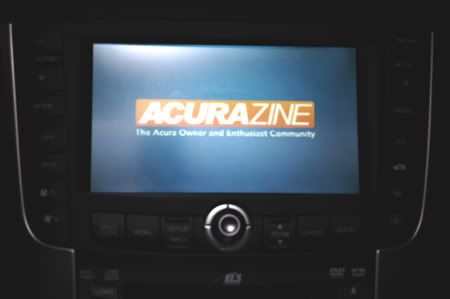
Ok, so far... nothing special.
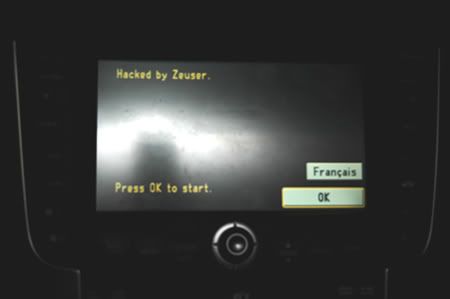
Oh... what's this?
This is the nag screen with the text hacked out. This is the 2004 TL Canadian model version. We have an extra button that allows us to switch to French text (our official second language).
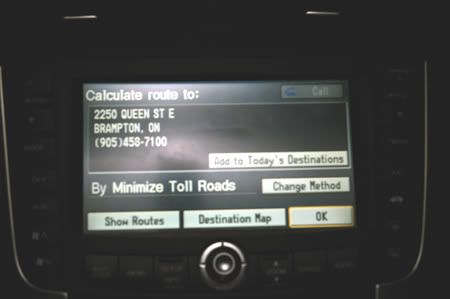
That's Acura 2000 in Brampton, where I bought mine. Notice anything special on this screen? I'll let you guess.
Ok, so far... nothing special.
Oh... what's this?
This is the nag screen with the text hacked out. This is the 2004 TL Canadian model version. We have an extra button that allows us to switch to French text (our official second language).
That's Acura 2000 in Brampton, where I bought mine. Notice anything special on this screen? I'll let you guess.

Intermediate
Joined: May 2005
Posts: 40
Likes: 0
Originally Posted by Zeuser
Here's something interesting: The TL .BIN file has a HFT.DLL file whereas the TSX one doesn't.
However, I can't tell what HFT.DLL does at this time. I wonder what it is that we have and they don't ?
However, I can't tell what HFT.DLL does at this time. I wonder what it is that we have and they don't ?
That's interesting about can.dll; it may just simply have aliases to the other programs in there.. !
I'd like to know if anyone's gotten the whole system to work in the Windows CE.Net emulator yet.. that would give some room to play safely.. Also, have you looked at it with PE Explorer? Not sure if there's anything in plain sight in there or not.. (My TL is only 3 days old.. not quite brave enough to swap out the navi s/w yet!)

Advanced
Joined: Aug 2004
Posts: 80
Likes: 0
From: Washington, DC
[QUOTE=Nodoze2004]Look at Lexus, they are a company who understands that the 'luxury' buyer expects more and wants all the options made available to them.
Is that why the Avalon has more amenities and features than the ES330
No car manufacturer is perfect in any way, shape or form.
Is that why the Avalon has more amenities and features than the ES330
No car manufacturer is perfect in any way, shape or form.
Advanced
Joined: Aug 2004
Posts: 80
Likes: 0
From: Washington, DC
Originally Posted by Nodoze2004
Look at Lexus, they are a company who understands that the 'luxury' buyer expects more and wants all the options made available to them.
---END OF THREAD HIJACK---
---END OF THREAD HIJACK---
No car manufacturer is perfect in any way, shape, or form.


Thread Starter
TL hacker
Joined: Feb 2004
Posts: 381
Likes: 1
From: Toronto, Canada
Still trying to get some things working here. I just noticed nk.exe (navigation kernal) is the same file size in the TSX and in the TL but they have many differences. It may be possible to swap the nk.exe files and see what happens.
PS: I'm still looking for the HPC SH-4 SDK. Be patient, once I do get it, the "secrets" are going to flow like crazy!
PS: I'm still looking for the HPC SH-4 SDK. Be patient, once I do get it, the "secrets" are going to flow like crazy!
Love my TL
Joined: Jun 2004
Posts: 246
Likes: 0
From: Florida
Originally Posted by Zeuser
Still trying to get some things working here. I just noticed nk.exe (navigation kernal) is the same file size in the TSX and in the TL but they have many differences. It may be possible to swap the nk.exe files and see what happens.
PS: I'm still looking for the HPC SH-4 SDK. Be patient, once I do get it, the "secrets" are going to flow like crazy!
PS: I'm still looking for the HPC SH-4 SDK. Be patient, once I do get it, the "secrets" are going to flow like crazy!
I have a 2004 TL and I cannot use the "No Nag" option in bysin’s program. I get a message that states "The No Nag option is not available for my car". Do you know of any 2004 TLs that have successfully changed the nag text?
I wonder if I can rename the 2005 TLs bin file to match the 2004?
I successfully changed the background but I’m stuck on the nag message! Any help would be greatly appreciated.
Thanks

2005 TL Owner
Joined: Dec 2004
Posts: 109
Likes: 0
From: The OC
Originally Posted by Zeuser
A few screenies:
Ok, so far... nothing special.
Oh... what's this?
This is the nag screen with the text hacked out. This is the 2004 TL Canadian model version. We have an extra button that allows us to switch to French text (our official second language).
That's Acura 2000 in Brampton, where I bought mine. Notice anything special on this screen? I'll let you guess.
Ok, so far... nothing special.
Oh... what's this?
This is the nag screen with the text hacked out. This is the 2004 TL Canadian model version. We have an extra button that allows us to switch to French text (our official second language).
That's Acura 2000 in Brampton, where I bought mine. Notice anything special on this screen? I'll let you guess.
How did you change the text on the Nag screen? Did I miss something? BySin's website still only has v 1.5 GUI. Did you use the console version or did you modify his source to change the nag screen and button text?

Banned
Joined: Nov 2004
Posts: 3,846
Likes: 0
From: Bushwhacked Land
damn ! some real people actually worked on coding all this stuff (and I dont think it's the Japanese)....If only just one of them knew about this forum and would pop in and show us the way...
Team Anthracite Member
Joined: Nov 2004
Posts: 334
Likes: 2
From: The OC
Have you tried this?: http://download.microsoft.com/msdown...k/mplatsdk.exe
Originally Posted by Zeuser
Still trying to get some things working here. I just noticed nk.exe (navigation kernal) is the same file size in the TSX and in the TL but they have many differences. It may be possible to swap the nk.exe files and see what happens.
PS: I'm still looking for the HPC SH-4 SDK. Be patient, once I do get it, the "secrets" are going to flow like crazy!
PS: I'm still looking for the HPC SH-4 SDK. Be patient, once I do get it, the "secrets" are going to flow like crazy!

Pro
Joined: Mar 2004
Posts: 574
Likes: 5
From: Southern MN
Prg_info.mng
Has anyone looked at what's in the PRG_INFO.MNG file?
I looked at it, because I interpret the name to mean Program Information. MaNaGe and I see all the .BIN files listed in it.
The reason I'm wondering is because based on the comments here saying the tripcomputer.exe is referenced inside the TL's .BIN, and that inside Diagnositics there is a Trip Information menu item, but it's disabled.
According to the service manual that menu would lead to two more settings, but requires the PC card to be installed.
I'm sure the reason the trip computer is disabled on the TL is because of the MID, that none of the other vehicles have, which displays all but the instantanious MPG data. It would seem to me that the easiest way to disable this would be a parameter with 2 or 3 values: 0 = off, 1 = on and maybe 2 = both (ie both MID and NAVI displays). It would be something like a registry entry in Windows.
Did anyone who hacked over to the TSX bin notice how the Trip Computer display on the MID behaved with the trip computer running on the screen? Did it still work?
I'm wondering if it's a parameter passed on startup from the file that decides which of the various .BIN files to boot for the particular vehicle.
I looked at it, because I interpret the name to mean Program Information. MaNaGe and I see all the .BIN files listed in it.
The reason I'm wondering is because based on the comments here saying the tripcomputer.exe is referenced inside the TL's .BIN, and that inside Diagnositics there is a Trip Information menu item, but it's disabled.
According to the service manual that menu would lead to two more settings, but requires the PC card to be installed.
I'm sure the reason the trip computer is disabled on the TL is because of the MID, that none of the other vehicles have, which displays all but the instantanious MPG data. It would seem to me that the easiest way to disable this would be a parameter with 2 or 3 values: 0 = off, 1 = on and maybe 2 = both (ie both MID and NAVI displays). It would be something like a registry entry in Windows.
Did anyone who hacked over to the TSX bin notice how the Trip Computer display on the MID behaved with the trip computer running on the screen? Did it still work?
I'm wondering if it's a parameter passed on startup from the file that decides which of the various .BIN files to boot for the particular vehicle.
Pro
Joined: Mar 2004
Posts: 574
Likes: 5
From: Southern MN
PRG_INFO.MNG has something to do with it...
I inspected the file with a hex editor and there appears to be hex values in the file proceeding the various BIN names that conform to the various model values 20, 22, 26 that have been listed.
Also, there appears (I'm not entirely sure I can take what I'm seeing literally or not) to be a parameter value that follows the BN2HH12C entry, a %0, which I'd interpret to mean off - turning what off, I have no idea.
Also, there appears (I'm not entirely sure I can take what I'm seeing literally or not) to be a parameter value that follows the BN2HH12C entry, a %0, which I'd interpret to mean off - turning what off, I have no idea.

8th Gear
Joined: May 2005
Posts: 8
Likes: 0
I think the OS might be based on more recent technologies, due to the presence of Bluetooth support take a look at this site from Msft, and notice the inclusion of Honda and Acura in the list.
http://www.microsoft.com/windows/emb...e/default.mspx
http://www.microsoft.com/windows/emb...e/default.mspx

Thread Starter
TL hacker
Joined: Feb 2004
Posts: 381
Likes: 1
From: Toronto, Canada
Originally Posted by jlh8733
I think the OS might be based on more recent technologies, due to the presence of Bluetooth support take a look at this site from Msft, and notice the inclusion of Honda and Acura in the list.
http://www.microsoft.com/windows/emb...e/default.mspx
http://www.microsoft.com/windows/emb...e/default.mspx
You have to understand that software technology takes a while to mature and it's always built on existing technology and is rarely scrapped entirely when the nxt generation comes along.
For example: Windows CE, which is the O/S used in our navi systems, was first rolled out about 10 years ago. It has gone through many changes since then but the core design is still about the same as what was envisioned 10 years ago.
Thread Starter
TL hacker
Joined: Feb 2004
Posts: 381
Likes: 1
From: Toronto, Canada
I simply used a hex editor and changed the text inside the .exe files.
Quite the simple hack.
The goal of course is to reverse engineer the whole thing so we can go beyond simply hacking graphics, sounds and text and actually add new apps to the menus.
Quite the simple hack.
The goal of course is to reverse engineer the whole thing so we can go beyond simply hacking graphics, sounds and text and actually add new apps to the menus.

Instructor
Joined: Apr 2005
Posts: 110
Likes: 0
Originally Posted by Zeuser
I simply used a hex editor and changed the text inside the .exe files.
Quite the simple hack.
The goal of course is to reverse engineer the whole thing so we can go beyond simply hacking graphics, sounds and text and actually add new apps to the menus.
Quite the simple hack.
The goal of course is to reverse engineer the whole thing so we can go beyond simply hacking graphics, sounds and text and actually add new apps to the menus.
1) How do I extract the BIN to the other files?
2) Which file do I edit to modify the Text ... I figure ... that if it has to be there ... might as well say something I want it to say.
3) How do I re-combine the files into a BIN?
I understand technical stuff ... I am a programmer myself ... just not familiar with this type of stuff ... I do mostly .NET Programming.
Thanks
Thread Starter
TL hacker
Joined: Feb 2004
Posts: 381
Likes: 1
From: Toronto, Canada
Get the console version of the navidump
This will allow you to extract the .BIN files into a folder. You'll have a load of files, lik .DLLs and .EXEs
Edit Navi.exe and go looking for the typical text shown on the nag screen. Then simply change that text to whatever you want.
Same can be done for buttons an other various text displays on the navi.
This will allow you to extract the .BIN files into a folder. You'll have a load of files, lik .DLLs and .EXEs
Edit Navi.exe and go looking for the typical text shown on the nag screen. Then simply change that text to whatever you want.
Same can be done for buttons an other various text displays on the navi.
Instructor
Joined: Apr 2005
Posts: 110
Likes: 0
Originally Posted by Zeuser
Get the console version of the navidump
This will allow you to extract the .BIN files into a folder. You'll have a load of files, lik .DLLs and .EXEs
Edit Navi.exe and go looking for the typical text shown on the nag screen. Then simply change that text to whatever you want.
Same can be done for buttons an other various text displays on the navi.
This will allow you to extract the .BIN files into a folder. You'll have a load of files, lik .DLLs and .EXEs
Edit Navi.exe and go looking for the typical text shown on the nag screen. Then simply change that text to whatever you want.
Same can be done for buttons an other various text displays on the navi.

Instructor
Joined: May 2005
Posts: 107
Likes: 3
From: New York
Damn, if anyone can figure out how to do some sort of MP3 player with the navi that would be sweet......
For you knowledgable people on the forums, any ideas?
I am a programmer, but mainly worked with regular Windows (NT, 2K, XP). Don't have much experience working with CE or any embedded stuff....
If anyone needs quick windows based (GUI or console) apps to help out with any of this post away......
For you knowledgable people on the forums, any ideas?
I am a programmer, but mainly worked with regular Windows (NT, 2K, XP). Don't have much experience working with CE or any embedded stuff....
If anyone needs quick windows based (GUI or console) apps to help out with any of this post away......
Thread Starter
TL hacker
Joined: Feb 2004
Posts: 381
Likes: 1
From: Toronto, Canada
Anyone else besides me make any progress with this yet?
I've been too busy lately but I'll be getting back to hacking this thing soon enough.
My goal of course is to unleash more power from the navi and eventually write new apps for it.
Hopefully I'm not the only one working on this. I see plenty of other IT people in here and I hope some of you will step up and try to help discover more "secrets of the navi software".
I've been too busy lately but I'll be getting back to hacking this thing soon enough.
My goal of course is to unleash more power from the navi and eventually write new apps for it.
Hopefully I'm not the only one working on this. I see plenty of other IT people in here and I hope some of you will step up and try to help discover more "secrets of the navi software".
Instructor
Joined: Apr 2005
Posts: 110
Likes: 0
Originally Posted by Zeuser
Anyone else besides me make any progress with this yet?
I've been too busy lately but I'll be getting back to hacking this thing soon enough.
My goal of course is to unleash more power from the navi and eventually write new apps for it.
Hopefully I'm not the only one working on this. I see plenty of other IT people in here and I hope some of you will step up and try to help discover more "secrets of the navi software".
I've been too busy lately but I'll be getting back to hacking this thing soon enough.
My goal of course is to unleash more power from the navi and eventually write new apps for it.
Hopefully I'm not the only one working on this. I see plenty of other IT people in here and I hope some of you will step up and try to help discover more "secrets of the navi software".
8th Gear
Joined: May 2005
Posts: 8
Likes: 0
I'm pointing everyone I know towards this thread to pool as much knowledge as possible. With a little push, it won't take much for the rest of us will all the SDK's and tools to help carry the load.
I've just never done any embedded development, much less OS development. I've pretty much been a 'script kiddy' up to this point.
I've just never done any embedded development, much less OS development. I've pretty much been a 'script kiddy' up to this point.
8th Gear
Joined: May 2005
Posts: 8
Likes: 0

Russians are coming
Joined: Mar 2004
Posts: 98
Likes: 1
From: Brookline, MA
I see that some of you are programmers.
Then you have to see the following thread, especially my post on the last page (04-23-2005, 11:39 PM):
https://acurazine.com/forums/showthr...3&page=8&pp=25
I have an utility CEBIN that extracts files among with modules (the executables that are preloaded in kernel).
Then you have to see the following thread, especially my post on the last page (04-23-2005, 11:39 PM):
https://acurazine.com/forums/showthr...3&page=8&pp=25
I have an utility CEBIN that extracts files among with modules (the executables that are preloaded in kernel).

4th Gear
Joined: Apr 2005
Posts: 4
Likes: 0
I have an idea that would be helpful and possibly easier than defeating the "OK" button on the nag screen.
All of my Windows CE devices have had sleep mode that leaves them running but in a battery save mode (they don't really turn off). Can this be done with our Navi system? I'm thinking this would be a hardware pin on the mainboard and perhaps jumping a wire. If this would work the way I envision it then when the car is shutdown the Navi sleeps at it's current point, when you restart the car it would just resume - No nag screen.
Is my thinking flawed?
It would put an additional draw on our battery's but I can't think unless you leave your car sitting for months at a time it would be a serious problem. After all a handheld with less than a cell phone battery can sleep for a week or more.
Opinions?
All of my Windows CE devices have had sleep mode that leaves them running but in a battery save mode (they don't really turn off). Can this be done with our Navi system? I'm thinking this would be a hardware pin on the mainboard and perhaps jumping a wire. If this would work the way I envision it then when the car is shutdown the Navi sleeps at it's current point, when you restart the car it would just resume - No nag screen.
Is my thinking flawed?
It would put an additional draw on our battery's but I can't think unless you leave your car sitting for months at a time it would be a serious problem. After all a handheld with less than a cell phone battery can sleep for a week or more.
Opinions?