


Navigation Hack Guide: Welcome Screen Mod, Trip Computer, OK Button Nag Removal


Fightin' Texas Aggie
Joined: May 2005
Posts: 1,109
Likes: 4
From: The ATX
Originally Posted by apnar
That's true, so don't mess with the last line. Although if someone wanted to spend some time with a disassembler one of my previous posts outlines a general approach that could be effective in getting around that requirement.
Also as I mentioned previously you can still customize the second to last line. AD clears that by placing a hex 00 as the first character, but he doesn't check that section of the text so you can change it if you like.
-apnar
Also as I mentioned previously you can still customize the second to last line. AD clears that by placing a hex 00 as the first character, but he doesn't check that section of the text so you can change it if you like.
-apnar

Intermediate
Joined: Oct 2005
Posts: 48
Likes: 0
Originally Posted by AMIC
I've spend some time with the disassembler, but maybe I'm not doing something right. After it finishes processing, when I go to the lines that he changes with his patch, I don't see anything. It classifies the lines as data and doesn't translate it into code. How do you get IDA to show the code?
-apnar
Fightin' Texas Aggie
Joined: May 2005
Posts: 1,109
Likes: 4
From: The ATX
Originally Posted by apnar
You can highlight a section of the code then go up to Edit -> Code, it will then try to treat that section as code instead of data.
-apnar
-apnar
Intermediate
Joined: Oct 2005
Posts: 48
Likes: 0
Originally Posted by AMIC
Doesn't that just take some random bytes and translate it into the code that is represented by those bytes? It may not be the actual intended code of the program.
One thing to note though is the actual offset in the file isn't the hex value that is displayed in the disassembler. If you want to jump to a file offset goto Jump -> Jump To File Offset....
-apnar
Fightin' Texas Aggie
Joined: May 2005
Posts: 1,109
Likes: 4
From: The ATX
Originally Posted by apnar
The entire file is just a bunch of 1s and 0s, when you load it into the disassembler it tries to guess what is code and what is data. Some times it guesses wrong, which is why it lets you switch back and forth. It's just two different ways of showing you the same information.
One thing to note though is the actual offset in the file isn't the hex value that is displayed in the disassembler. If you want to jump to a file offset goto Jump -> Jump To File Offset....
-apnar
One thing to note though is the actual offset in the file isn't the hex value that is displayed in the disassembler. If you want to jump to a file offset goto Jump -> Jump To File Offset....
-apnar

Safety Car
Joined: Jan 2006
Posts: 4,171
Likes: 39
From: San Diego, CA
Make sure your BIN files and the dumpnavi program are in the same folder.
If that doesn't work, reread the first post carefully and try it again. Let us know the exact error message you are getting if you still encounter problems.
If that doesn't work, reread the first post carefully and try it again. Let us know the exact error message you are getting if you still encounter problems.

Instructor
Joined: Oct 2006
Posts: 139
Likes: 0
Originally Posted by datmrman
Make sure your BIN files and the dumpnavi program are in the same folder.
If that doesn't work, reread the first post carefully and try it again. Let us know the exact error message you are getting if you still encounter problems.
If that doesn't work, reread the first post carefully and try it again. Let us know the exact error message you are getting if you still encounter problems.

AcurAdmirer
Joined: Jul 2004
Posts: 3,004
Likes: 352
From: Dallas/Ft. Worth, TX
Originally Posted by jackasswhy
hey they are in the same folder what happens when i run command prompt and put "extract..." that it starts the dumpnavi program wiht nothing happening. just like if i clicked it without command prompt. no errors
Also, be sure you are using the exact file names, as it is case-sensitive.
.
.

Team Anth. Audio Engineer
Joined: Mar 2004
Posts: 109
Likes: 0
From: Louisiana
 For the millionth time...
It doesn't void your warranty bc you can simply reload the original files from your nav disc. No permanent changes are being made. There are many entries here on how to reload orignial files if you mess up.

Advanced
Joined: Jan 2006
Posts: 66
Likes: 33
Success!
This is great stuff. I did the splash screen last month but just tried the OK button and the Trip computer. With a little trial and error it works great. Like someone said earlier, it's all there just read carefully. Thanks Bysin, Kennyc, and Angry Dad.
Tip:
Which dumpnavi to use was confusing. For the Ok Button/Trip Computer I used Dumpnavi - Console. For my 3.5 disk I had to use the 3.40c executable.
Tip:
Which dumpnavi to use was confusing. For the Ok Button/Trip Computer I used Dumpnavi - Console. For my 3.5 disk I had to use the 3.40c executable.
Instructor
Joined: Oct 2006
Posts: 139
Likes: 0
Originally Posted by cnst
This is great stuff. I did the splash screen last month but just tried the OK button and the Trip computer. With a little trial and error it works great. Like someone said earlier, it's all there just read carefully. Thanks Bysin, Kennyc, and Angry Dad.
Tip:
Which dumpnavi to use was confusing. For the Ok Button/Trip Computer I used Dumpnavi - Console. For my 3.5 disk I had to use the 3.40c executable.
Tip:
Which dumpnavi to use was confusing. For the Ok Button/Trip Computer I used Dumpnavi - Console. For my 3.5 disk I had to use the 3.40c executable.
ah thanks for the tip thats why i was having problems. on a side note is the ok button thing stupid becuase i still need to click go?


Banned
Joined: Aug 2004
Posts: 49
Likes: 0
From: DC Area
Banned
Joined: Aug 2004
Posts: 49
Likes: 0
From: DC Area
Originally Posted by MINTCENT
Thanks

Instructor
Joined: Aug 2003
Posts: 203
Likes: 0
From: Ft. Lauderdale
Originally Posted by zeezz
yes! worked!

confirmed working with 3.30f version, 3.40 trip computer and navi hack provided by kennyc, and custom boot image.
i'm happy.
easiest way to do it with CEBin if you don't have 3.4 or 3.5:
put CEBin, the bin file to patch, and the three files you want replaced (back.bmp, navi.exe, hmimanager.exe).
make a text file with the following (replace BN2HH12C if needed, this is for 3.30 fversion)
image BN2HH12C.BIN
replaceFile navi.exe C:\navihack\navi.exe
replaceFile Back.bmp C:\navihack\Back.bmp
replaceFile HMIManager.exe C:\navihack\HMIManager.exe
you have to replace the filenames (C:\ whatever) with your own. Then run CEBin from the command prompt:
cebin yourfile.txt -s tempfile.bin
then rename this file to the original image name, put it with the loader on a disc, and burn away as detailed in the other posts.
confirmed working with 3.30f version, 3.40 trip computer and navi hack provided by kennyc, and custom boot image.
i'm happy.
easiest way to do it with CEBin if you don't have 3.4 or 3.5:
put CEBin, the bin file to patch, and the three files you want replaced (back.bmp, navi.exe, hmimanager.exe).
make a text file with the following (replace BN2HH12C if needed, this is for 3.30 fversion)
image BN2HH12C.BIN
replaceFile navi.exe C:\navihack\navi.exe
replaceFile Back.bmp C:\navihack\Back.bmp
replaceFile HMIManager.exe C:\navihack\HMIManager.exe
you have to replace the filenames (C:\ whatever) with your own. Then run CEBin from the command prompt:
cebin yourfile.txt -s tempfile.bin
then rename this file to the original image name, put it with the loader on a disc, and burn away as detailed in the other posts.
found this out by:
1. At the main screen of the navigation system, hold down the Map/Guide, Menu, and Cancel buttons for 5 seconds.
2. Hit the "Version" button on the touch screen.
3. Hold down the Menu button for 5 seconds.
4. Write down the filename next to the words "Loading Filename" (ex. BNHN404A.BIN).
followed the steps above using the correct file name an VIOLA! worked like a charm!
Fightin' Texas Aggie
Joined: May 2005
Posts: 1,109
Likes: 4
From: The ATX
I just got the 3.60 disc and tried to manually apply the OK button patch and the values don't match up at all to the addresses listed in the crk file. So I guess the 3.60 navi.exe is much different than the previous ones. I guess I'll be abandoning this project for good now.

Originally Posted by AMIC
I just got the 3.60 disc and tried to manually apply the OK button patch and the values don't match up at all to the addresses listed in the crk file. So I guess the 3.60 navi.exe is much different than the previous ones. I guess I'll be abandoning this project for good now.
Yea I got my disk too... Oh well, I need the updates, guess I just sell my 3.50 disk and either spend more time to fix 3.60 or wait for someone else...

Cesspool of Knowledge
Joined: Dec 2003
Posts: 969
Likes: 3
From: South. West.
So, let me get this straight -
I just received the 3.60 disc from Acura / Alpine. I checked what image was being loaded at bootup, and saw that BN2HH12C.BIN is the loaded image.
I want to get the Trip Computer functionality for my Version 3.60 system. Getting rid of the "OK" confirmation would be nice, but not necessary.
If I replace the Version 3.60 HMIManager.exe in BN2HH12C.BIN with kennyc's Version 3.40c HMIManager.exe (found on the first post of this thread), will everything work OK? What functionality will I lose, if anything?
I just received the 3.60 disc from Acura / Alpine. I checked what image was being loaded at bootup, and saw that BN2HH12C.BIN is the loaded image.
I want to get the Trip Computer functionality for my Version 3.60 system. Getting rid of the "OK" confirmation would be nice, but not necessary.
If I replace the Version 3.60 HMIManager.exe in BN2HH12C.BIN with kennyc's Version 3.40c HMIManager.exe (found on the first post of this thread), will everything work OK? What functionality will I lose, if anything?
Fightin' Texas Aggie
Joined: May 2005
Posts: 1,109
Likes: 4
From: The ATX
Originally Posted by ¿GotJazz?
So, let me get this straight -
I just received the 3.60 disc from Acura / Alpine. I checked what image was being loaded at bootup, and saw that BN2HH12C.BIN is the loaded image.
I want to get the Trip Computer functionality for my Version 3.60 system. Getting rid of the "OK" confirmation would be nice, but not necessary.
If I replace the Version 3.60 HMIManager.exe in BN2HH12C.BIN with kennyc's Version 3.40c HMIManager.exe (found on the first post of this thread), will everything work OK? What functionality will I lose, if anything?
I just received the 3.60 disc from Acura / Alpine. I checked what image was being loaded at bootup, and saw that BN2HH12C.BIN is the loaded image.
I want to get the Trip Computer functionality for my Version 3.60 system. Getting rid of the "OK" confirmation would be nice, but not necessary.
If I replace the Version 3.60 HMIManager.exe in BN2HH12C.BIN with kennyc's Version 3.40c HMIManager.exe (found on the first post of this thread), will everything work OK? What functionality will I lose, if anything?
I LOVE MY TL
Joined: Aug 2006
Posts: 158
Likes: 0
From: Salem,New Hampshire
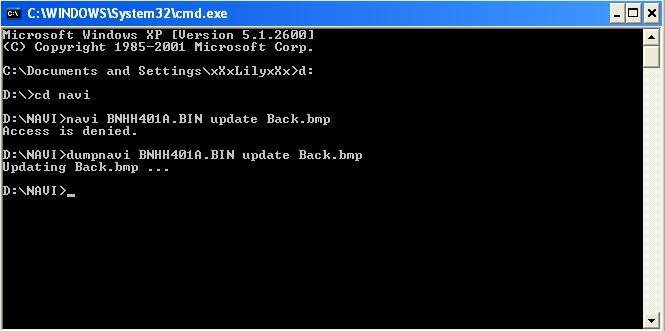
it been 5 mins already.what am i suppose to do..it didnt prompt me saying it done..am i suppose to burn it to a blank CD or what?any body got picture of step by step because i think im lost already tryin the 1st mod...
i try kenny navi file ..It say ACCESS DENIED <<i think i spell it wrong..anybody can help me?

^^^
usually it takes about 24 hours to see the prompt.
I am not sure why it didn't prompt. I was prompted when I made the first CD, but not the second CD I made though. I just checked the "Date Modified" in Windows Explorer for that file to see if the date/time has passed and is newer than its previous date/time.
yes, you need to burn a CD with two files (BN2HHMLD.BIN and updated BNHH401A.BIN).
use the password provided in the very first post for kennyc's files.
it doesn't matter since you are making changes to the copy on your hard drive. the files on the original DVD are read only.
usually it takes about 24 hours to see the prompt.
I am not sure why it didn't prompt. I was prompted when I made the first CD, but not the second CD I made though. I just checked the "Date Modified" in Windows Explorer for that file to see if the date/time has passed and is newer than its previous date/time.
yes, you need to burn a CD with two files (BN2HHMLD.BIN and updated BNHH401A.BIN).
use the password provided in the very first post for kennyc's files.
it doesn't matter since you are making changes to the copy on your hard drive. the files on the original DVD are read only.
Originally Posted by PSW
after loading a custom startup image, how would one convert back to the default image in the future?
 as pointed out before, I think you just need to reload the original navi disk to return to stock.
Cesspool of Knowledge
Joined: Dec 2003
Posts: 969
Likes: 3
From: South. West.
Originally Posted by ViNhXoNxAcuraTL
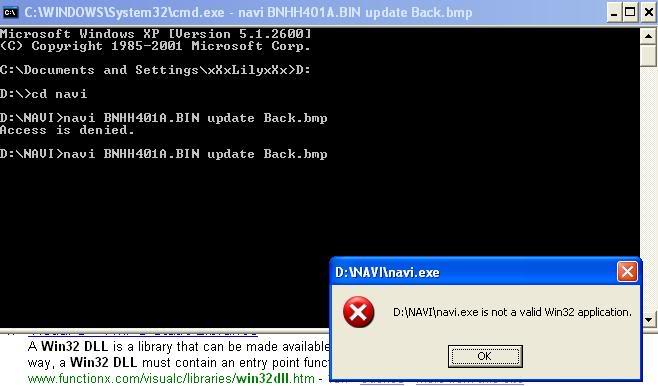
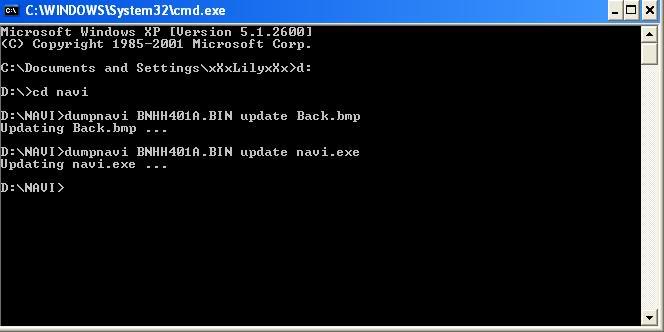
this is what i got after trying kennyc files..wat can i do now?can u make me a copy and send it to me?Lmao
ViNhXoNxAcuraTL, you need to be running dumpnavi.exe, not navi.exe! Whoops!

BTW, I've tested using kennyc's 3.40c HMIManager.exe with 3.60, and it works sweet!

I LOVE MY TL
Joined: Aug 2006
Posts: 158
Likes: 0
From: Salem,New Hampshire
i did this and i burnt a data disk with the 2 files in it..(BN2HHMLD.BIN and updated BNHH401A.BIN)...i then put it in the navi player in the back trunk and it say DVD DISK ERROR.. oh btw thenks for helping me out guys and putting up with my newbie..
this is the image i want to be Back.bmo
http://members.aol.com/caibarien/girl1.bmp
this is the image i want to be Back.bmo
http://members.aol.com/caibarien/girl1.bmp
I LOVE MY TL
Joined: Aug 2006
Posts: 158
Likes: 0
From: Salem,New Hampshire
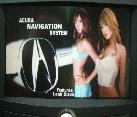
ok nevermind ^^ ..my wife took over and did it herself..while i was watching spongebob with my kids...she got it to work..as for me im soo excited..i dont know how she did it but it work and im happy..she got the back.bmp to change and also got the skip ok botton..THANKS for the nice hack..here is how it look like when i turn on the navi.
Link to see how it turn out to be
Link to see how it turn out to be
Instructor
Joined: Jul 2006
Posts: 213
Likes: 0
From: San Diego, CA
BTW, I've tested using kennyc's 3.40c HMIManager.exe with 3.60, and it works sweet!
We have another confirmation that this works with the 3.60 DVD! Just did the hacks and it worked like a charm!
We have another confirmation that this works with the 3.60 DVD! Just did the hacks and it worked like a charm!
I LOVE MY TL
Joined: Aug 2006
Posts: 158
Likes: 0
From: Salem,New Hampshire
lifespan?isnt that what warrenty all about?nothing seems to last long anymore soo use it while you can before you think of trading it in for another beauty..Lmao.sunnyside acura thinks its a cool hack and one of the work ask me to instal it in his car for him[i was theere for a oil change]...Lmao..

Unregistered User
Joined: Oct 2006
Posts: 77
Likes: 0
From: Philly - In a van, down by the river!
Anyone have a copy of ADs TLPatch401a.com? I have 3.5 and since we really don't know if there's any functionality difference between 3.4 and 3.5, I'd prefer to work on my 3.5 files. Looks like the original link is dead.

Instructor
Joined: Nov 2005
Posts: 164
Likes: 0

Unregistered User
Joined: Oct 2006
Posts: 77
Likes: 0
From: Philly - In a van, down by the river!
Originally Posted by Masterpoolcat
Appreciated, thanks.
Three Wheelin'
Joined: Sep 2006
Posts: 1,855
Likes: 5
From: Virginia
FYI-
For anyone trying these on the version 4.55 disc, the background file is Opening1.bmp inside of the 07Touch2.bin file for the TL with touch screen, or in the 07Jog2.bin file for the MDX/RDX with jog wheel. I haven't figured out the OK Button hack yet.....
thank to all you TL folks and TSX foks too for that matter for laying the ground work for all these hacks. I wouldn't have known where to start on the RDX nav without all this great stuff.
For anyone trying these on the version 4.55 disc, the background file is Opening1.bmp inside of the 07Touch2.bin file for the TL with touch screen, or in the 07Jog2.bin file for the MDX/RDX with jog wheel. I haven't figured out the OK Button hack yet.....
thank to all you TL folks and TSX foks too for that matter for laying the ground work for all these hacks. I wouldn't have known where to start on the RDX nav without all this great stuff.

Russians are coming
Joined: Mar 2004
Posts: 98
Likes: 1
From: Brookline, MA
Originally Posted by pkim05
i have a mac. can i still hack the navi screen w/out using windows prompt?
I have never dealt with macs. Is there a way to run Windows x86 executable on mac?
The problem is that CEBin (as well as bysin's tools) uses a some library from WinCE for compress/uncopress data.
I think it theoretically can be done on mac with Intel processors but I am definitely not going to do it.