When you click on links to various merchants on this site and make a purchase, this can result in this site earning a commission. Affiliate programs and affiliations include, but are not limited to, the eBay Partner Network.
Saw an update come through at the end of lunch, said it included android auto? OMG finally!!!! Havent gotten a chance to download and test, but wanted to get the word out.
Curious that the delay in implementing Android Auto in the RDX was blamed on problems integrating the True Touchpad. The "solution" is that the pad now just acts as a standard touch pad instead of the way the True Touchpad was designed to work. Whatever, Android Auto is here now.
One issue so far, can't seem to play any music files from the phone using a few different Android Auto approved media players.
Not working with my att Galaxy s10e. Under connections says no supported devices connected. When I try to start the app manually from the list, says device not supported.
Not working with my att Galaxy s10e. Under connections says no supported devices connected. When I try to start the app manually from the list, says device not supported.
Hi, did you try a different cable? Android auto can be finicky with cables, the shorter the better.
Not working with my att Galaxy s10e. Under connections says no supported devices connected. When I try to start the app manually from the list, says device not supported.
I installed it and had two hours of frustrations trying to get it to work. I tried everything that others had suggested including different cables, different ports in the car, and so on. I did finally get it to work after making some setting change on my phone which didn't really seem to have anything to do with this app. Anyway, once I got it working I was struck with one thing.....People actually think this is some great programs??? Perhaps I have never used it, as I had no vehicle it would work with in the past, but so far I have to say that AA is one of the most over rated programs I have seen. Also, it does this thing where once you put a destination in it stays in! I put one place in as a test and now every time I open up the program that place is stuck in front of my face trying to navigate me there .I can find no way to actually delete this place from my phone or car. What a POS!
What would be a good brand of cable, our phones have the type C connector if that makes a difference?
The cable that came with your device is pretty solid. Any name brand cable like from Anker will work as well. You want something that transfers data and doesn't only charge. If you search the reviews for data transfer you'll understand. You can even use your old micro-usb cables and just get a micro-usb to c adapter.
I personally use these cables as I wanted a 90 degree angle on the device so my phone fits snugly in the center console as I don't touch my phone when I drive. Again note the Data Sync:
I installed it and had two hours of frustrations trying to get it to work. I tried everything that others had suggested including different cables, different ports in the car, and so on. I did finally get it to work after making some setting change on my phone which didn't really seem to have anything to do with this app. Anyway, once I got it working I was struck with one thing.....People actually think this is some great programs??? Perhaps I have never used it, as I had no vehicle it would work with in the past, but so far I have to say that AA is one of the most over rated programs I have seen. Also, it does this thing where once you put a destination in it stays in! I put one place in as a test and now every time I open up the program that place is stuck in front of my face trying to navigate me there .I can find no way to actually delete this place from my phone or car. What a POS!
Sorry you are having issues with it!
I will be out and about this afternoon and will try to test many capabilities of AA and let you know what I find.
Initial testing in my garage yesterday didn't give me what you see to have experienced.
Did you select "Update Android Auto" from the in dash display? I did that , and a new version and different interface for AA appeared. Another thing I saw was to unplug teh phone and plug it in again. Not sure what this does, other than perhaps reset some things?
I used AA in my previous '18 CRV Touring with out issue. I find Google Maps to be far superior to most in dash GPS systems, in most areas.
Google Maps is very good, but I like Acura Navigation. It never loses GPS signal, doesn't need time to lock into satellites and doesn't have to be moved/driven in order to show parked car orientation on startup. Temporary lack of GPS signal is replaced by position estimation from car speed and direction (accelerometer data). It works perfectly in downtown Chicago (tall buildings) where Garmin often failed, but also works in underground and multilevel garage.
What would be a good brand of cable, our phones have the type C connector if that makes a difference?
I'd avoid any cable that doesn't provide a certified speed. If not, it's just a phone charging cable. It need to at least say 5 Mbps (USB 3.0). I learned this the hard way on portable SSDs and Thunderbolt, where you need 10 Mbps or greater. The color of the USB-A connector will be blue or black for any speed rated connector; white usually mean USB 2.0. No idea what the Acura plug is rated for, but the connector is white, so probably USB 2.0. USB 3.0 rate cables insure the cable isn't the problem.
I'd avoid any cable that doesn't provide a certified speed. If not, it's just a phone charging cable. It need to at least say 5 Mbps (USB 3.0). I learned this the hard way on portable SSDs and Thunderbolt, where you need 10 Mbps or greater. The color of the USB-A connector will be blue or black for any speed rated connector; white usually mean USB 2.0. No idea what the Acura plug is rated for, but the connector is white, so probably USB 2.0. USB 3.0 rate cables insure the cable isn't the problem.
Not sure what I'm doing wrong, but there is no Android Auto icon on my home page (also moved it to the right side page, nothing there either). I have my Android phone plugged into the USB jack next to the cup holders (the one underneath is a charge only).
I can't figure out how to add the Android Auto icon back onto the main Home page, I've gone through the settings and even tried the "Apps" button on the left side of the steering wheel, where I found an "Android Auto" listing, does nothing.
Additionally, I found an "Android Auto" app that I installed on my phone.
I've tried all of the "C" USB cables that I have.
What am I missing?
Where can I go to find instructions on how to get it to work?
Mike
Last edited by Michael Foerster; Nov 7, 2019 at 08:42 PM.
Not sure what I'm doing wrong, but there is no Android Auto icon on my home page (also moved it to the right side page, nothing there either). I have my Android phone plugged into the USB jack next to the cup holders (the one underneath is a charge only).
I can't figure out how to add the Android Auto icon back onto the main Home page, I've gone through the settings and even tried the "Apps" button on the left side of the steering wheel, where I found an "Android Auto" listing, does nothing.
Additionally, I found an "Android Auto" app that I installed on my phone.
I've tried all of the "C" USB cables that I have.
What am I missing?
Where can I go to find instructions on how to get it to work?
Thanks for the link! That helped (somewhat). At least I now have the "Android Auto" back on my Home screen.
When I went into the settings, it appeared as though "Android Auto" was ALREADY on my home screen (and HUD). I had to REMOVE and then ADD it back in.
That got so that I could click on the Android Auto on the home screen, HOWEVER I still can't get it to work.
I did find a cable that gives me an indication (dots around the round Home button on the phone) that it is connected.
I'll have to do some more digging as to how to get it to work.
Someone commented about the poor resolution and washed out look of the screen on Google Maps. If you go into settings and turn on the satellite view it makes it much easier to see. Plus the added benefit of buildings, etc.
I got AA downloaded but it took me some time to really get it all worked out as I am not a former user of AA. I am now learning more about it. I find it has both good and bad to it, just like any software. The touch pad doesn't seem to work as well as I would like, its less sensitive than when using the Acura Nav Screen on my car. I am slowly warming up to it but to be honest, I had gotten use to the Acura phone and maps. I do like that I can switch over to Google maps, especially the satellite view, that really helps.
One strange problem I have and just can't find a fix for is "Starred Places" (as in places on the maps with * next to them. Every time I start up the car the map comes up with this motorcycle shop on the screen as its a "starred place". I have spent a few hours of research and trial and error fixes but nothing will take it off. Its annoying as heck, its not like some place I ever go to. I have found references on forums and such that give directions for removing things from lists but none of them match the options I can find on this version.
Meanwhile I am using it more and getting use to it and so far, mostly so good.
One strange problem I have and just can't find a fix for is "Starred Places" (as in places on the maps with * next to them. Every time I start up the car the map comes up with this motorcycle shop on the screen as its a "starred place". I have spent a few hours of research and trial and error fixes but nothing will take it off. Its annoying as heck, its not like some place I ever go to. I have found references on forums and such that give directions for removing things from lists but none of them match the options I can find on this version.
I solved my own problem! Seems that me having not used AA before some of the features of it were unknown to me. The "Starred place" I wanted to get rid of I had somehow added by accident. Being ignorant I kept trying to use the car's screen to get rid of this place when in fact I should have been using the map on my phone. I know, all you long time AA users already knew this and were laughing at the "newb" for now realizing this. I am on a fast, but steep, learning curve on this. Only time will tell how it pans out.
I got AA downloaded but it took me some time to really get it all worked out as I am not a former user of AA. I am now learning more about it. I find it has both good and bad to it, just like any software. The touch pad doesn't seem to work as well as I would like, its less sensitive than when using the Acura Nav Screen on my car. I am slowly warming up to it but to be honest, I had gotten use to the Acura phone and maps. I do like that I can switch over to Google maps, especially the satellite view, that really helps.
One strange problem I have and just can't find a fix for is "Starred Places" (as in places on the maps with * next to them. Every time I start up the car the map comes up with this motorcycle shop on the screen as its a "starred place". I have spent a few hours of research and trial and error fixes but nothing will take it off. Its annoying as heck, its not like some place I ever go to. I have found references on forums and such that give directions for removing things from lists but none of them match the options I can find on this version.
Meanwhile I am using it more and getting use to it and so far, mostly so good.
Going on one week of use:
PROS:
Sound quality (USB makes all the difference, now I can see that the BT sound stinks) Spotify & Audibles definitely sound better.
Google Maps
Step by Step directions on the HUD.... seems to work really well, eyes on the road, can mute the maps voice assistant.
Pressing and holding the voice command button on the steering wheel opens Google Assistant (vs. Acura voice commands). I think I'll use GA more often since I don't have to say OK Google anymore.
CONS:
Touchpad! No absolute positioning like the Acura interface. [Setting sensitivity to High helps] No two finger gestures.
Zoom and pan in MAPS is Awful No two finger pinch and zoom. Same issues as Acura Maps, no option to change the default zoom level or freeze the map at a given position. Panning around to see traffic is much harder than simply using the phone directly. Easier to use a traffic app on phone.
No Waze, have to run it separately, directly on the phone (not the worst since I use Waze in Harmony with MAPS)
No options to open AA apps via HUD, have to use the touchpad
Pro's outweigh the Con's, but requires several workarounds, so it's not a slam dunk. I'd be interested to hear how others solve these issues... Voice commands?
Going on one week of use:
No Waze, have to run it separately, directly on the phone (not the worst since I use Waze in Harmony with MAPS)
No options to open AA apps via HUD, have to use the touchpad
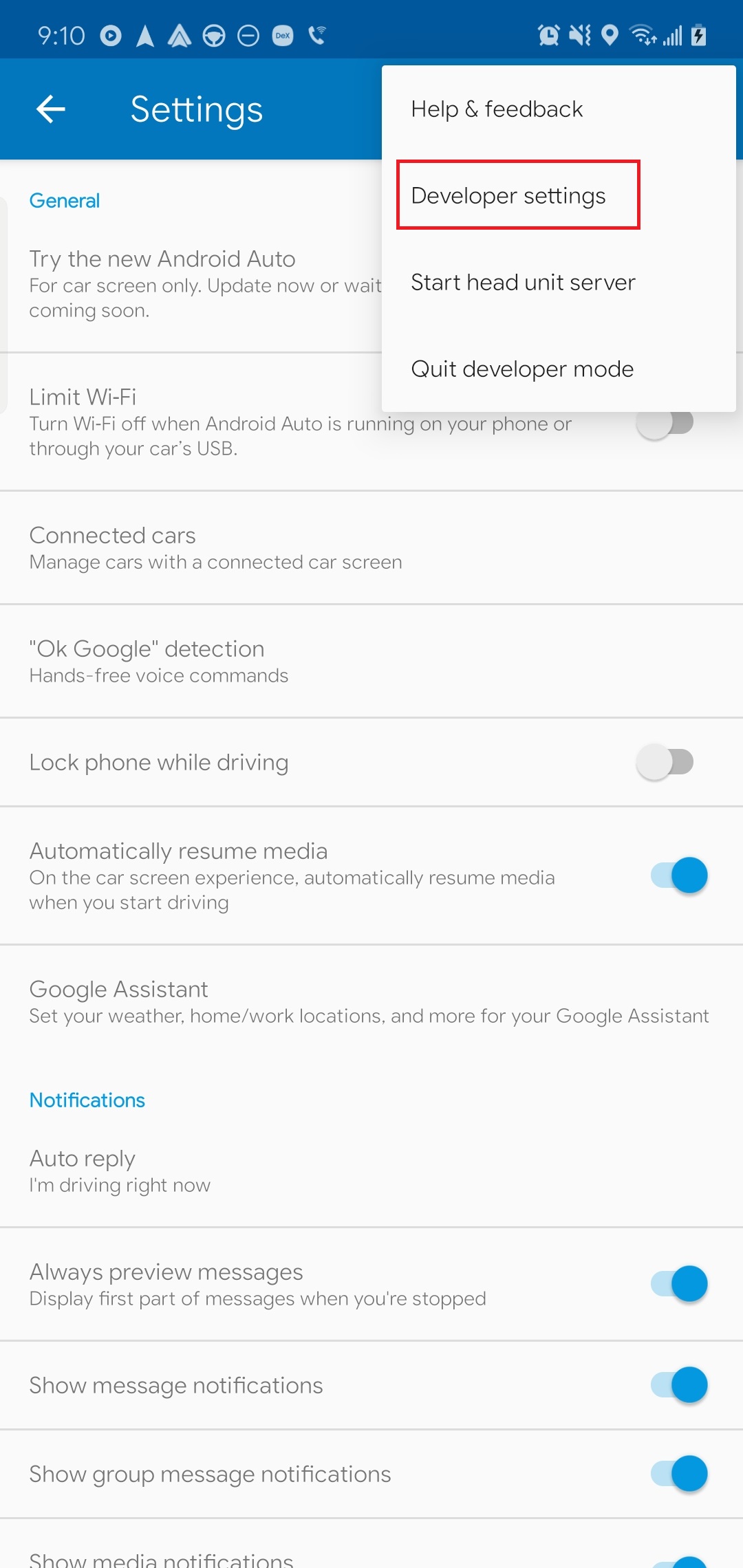
To answer these 2 questions, you will need to enable developer settings inside the Android Auto app on the phone. This will allow you to run Waze off the headunit and also autolaunch AA when you plug in.
To enable developer settings, launch Android Auto --> Settings --> Tap on the version number a few times.
Developer settings will now show up in the overflow menu in the top right:
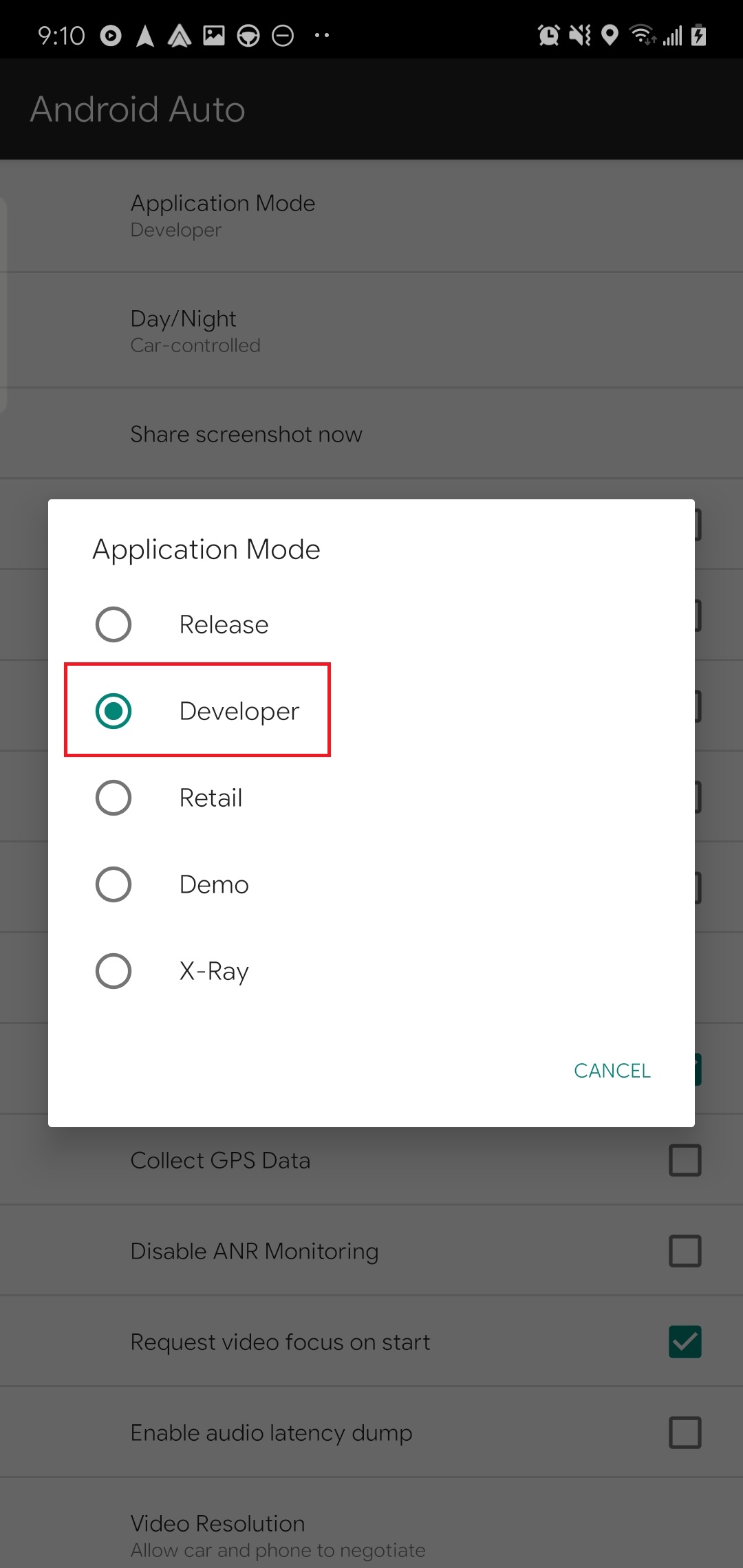
Change Application Mode to Developer:
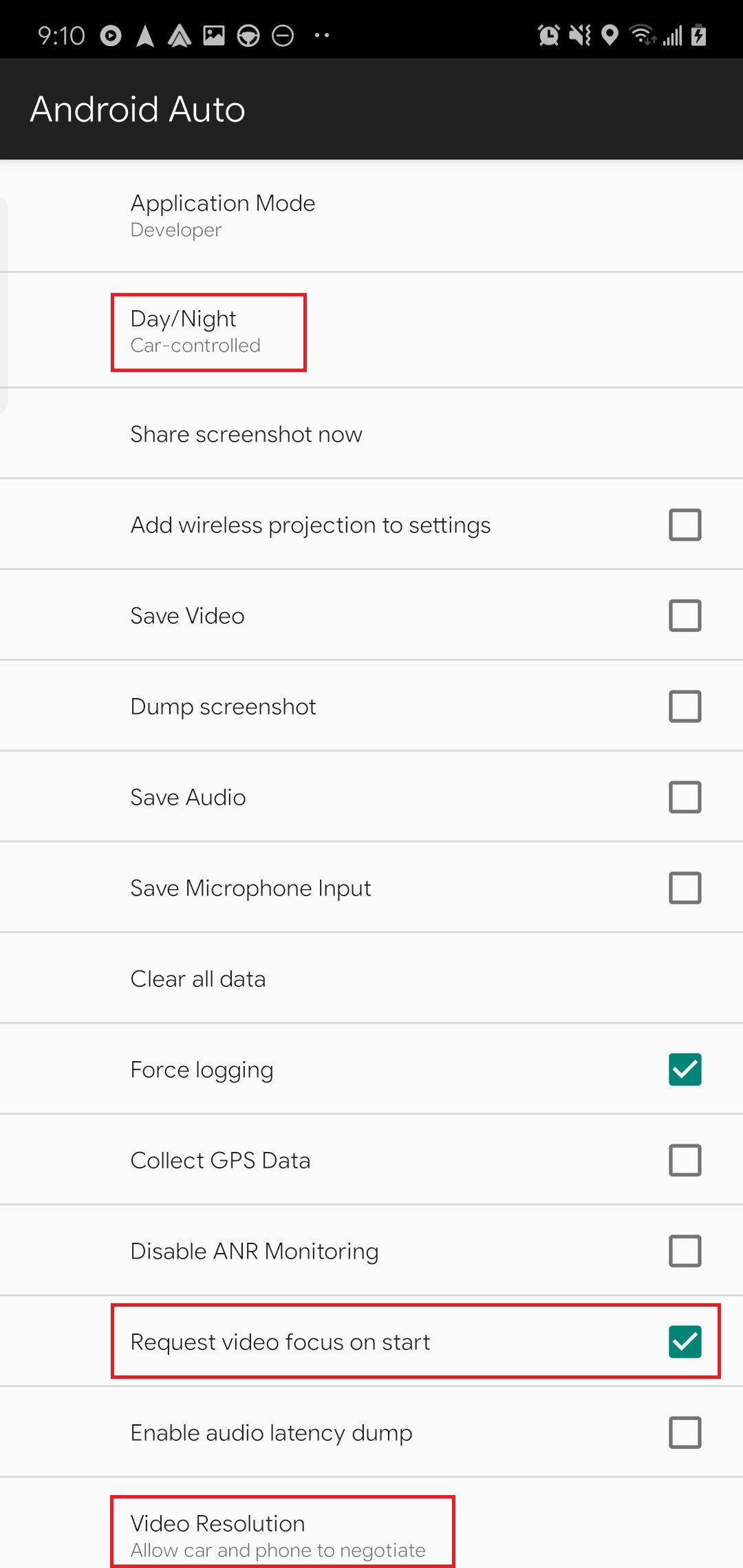
To have Android Auto launch once the cable is plugged in, check the box that says "Request video focus on start":
^I also change the way day/night mode is controlled via the car's headlights and I also have the app negotiate the video resolution. (This may fix the fuzzy problems people are complaining about? To me it doesn't look fuzzy at all so I'm actually curious what their maps look like). I used HeadUnit Reloaded prior to the official AA and if anything the official AA looks much sharper than when I was running it on HeadUnit Reloaded.
I found that the USB port on my phone doesn't work.
I can't get it to connect up to my computer, where my wife's phone (identical model) will connect up to the computer just fine.
I haven't gotten a chance to try the AA.
I have a new phone on order.
I just noticed the wireless projection option in AA app's settings on the phone. Doesn't look like this is supported on the RDX according to Android Auto site. Has anyone gotten this to work?
Car has the latest update. I removed AA from home page and reinstalled AA to home page.
I downloaded AA app to S7 Edge, plug in phone to USB port next to cupholders. AA starts up on phone, but when I press AA app on car screen it says AA is not available.
Could this be cable related or should it at least come up on screen, but not work right if I need a different cable?
Car has the latest update. I removed AA from home page and reinstalled AA to home page.
I downloaded AA app to S7 Edge, plug in phone to USB port next to cupholders. AA starts up on phone, but when I press AA app on car screen it says AA is not available.
Could this be cable related or should it at least come up on screen, but not work right if I need a different cable?
I have experienced similar issue with AA not connected/started up occasionally. Here's what I've done to reduce the chance of failed connection/start up. Follow the instructions a few pages up in this thread to turn on Developer Options in the phone app, and set up as instructed. Also, before plug in the phone, wait a few minutes after the infotainment starts up for AA to initialize. Another thing, try a different USB cable. These work for mine:
I have experienced similar issue with AA not connected/started up occasionally. Here's what I've done to reduce the chance of failed connection/start up. Follow the instructions a few pages up in this thread to turn on Developer Options in the phone app, and set up as instructed. Also, before plug in the phone, wait a few minutes after the infotainment starts up for AA to initialize. Another thing, try a different USB cable. These work for mine: amazon
First time connecting, you will need to go through setup on the phone and in the infotainment. There are YouTube vids that show how.
Looks like changing the cable worked. So far everything seems to work. Album art shows up on Apple Music and I can see what's playing next and there appears to be a search option although I have not tried it yet.
Only problem so far is every once in a while I'll hear a little skip in the music, which I never got over bluetooth, that I can recall.
I'll probably stick to the Acura nav as mine has been working fine and I don't use Waze. Overall, although it's only been a day, I'm impressed! For me it's a nice feature, but not a deal breaker or maker, lol.
Additional info discovered today when AA doesn't start up / connect to the car when plugged in: Communication Error 16. Google's explanation is useless. Anyone runs into this on their phone?
To see this error when it fails to connect, bring up multi-task / recent apps, select Android Auto in the list, it will show this error.
Anyway, workaround is reboot the Infotainment, wait a couple minutes, then plug in. If it still doesn't connect, rinse and repeat. One of the trials will work. It did work on second try (after forcing Infotainment reboot) as I left the office after work today.
Just bought a 2018 RDX, and have the same problem. Did you ever figure it out?
Won't work with my 2018 RDX. Did you ever have any luck?
Originally Posted by Farcus
Not working with my att Galaxy s10e. Under connections says no supported devices connected. When I try to start the app manually from the list, says device not supported.







 (USB makes all the difference, now I can see that the BT sound stinks) Spotify & Audibles definitely sound better.
 No two finger pinch and zoom. Same issues as Acura Maps, no option to change the default zoom level or freeze the map at a given position. Panning around to see traffic is much harder than simply using the phone directly. Easier to use a traffic app on phone.