When you click on links to various merchants on this site and make a purchase, this can result in this site earning a commission. Affiliate programs and affiliations include, but are not limited to, the eBay Partner Network.
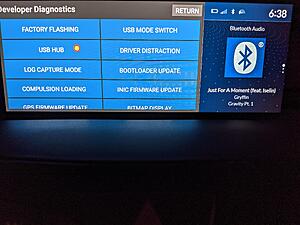
Someone on facebook found out about this. It allows you to re-enable developer mode in android, and you can switch the USB port to ADB mode instead of car play. There are also tons of options for flashing the entertainment unit, doing speaker tests, AC conditioner tests, and many other options.
This works on the the newest update, seems this is where they moved the once easily available developer menu. When in the Developer option mode there are a ton of new settings in there I have never seen. Even options to disable speakers for testing, testing for rattles at certain frequency HZ. The options that are new are after the step where you hold down the cards button for several seconds, that’s the new menu that I don’t think anyone was aware of. Once Honda sees we can access this I’m sure they will change it in the next update
Would someone be kind enough to post a video on the steps to make the animation screen faster? Want to speed up the initial load time to get to the main screen after starting the car and want to make sure I dont mess anything up. Thanks!
I dont think you can change the duration of the startup splash animation. What he's describing above are the other animations; for example speeding up the fade out time when switching from navigation to radio and vice versa, or scrolling through the right hand menu screens (clock/radio/nav).
I dont think you can change the duration of the startup splash animation. What he's describing above are the other animations; for example speeding up the fade out time when switching from navigation to radio and vice versa, or scrolling through the right hand menu screens (clock/radio/nav).
Yea no way to boot it up faster but you can enable development mode and speed up the animations between switching apps, this developer mode gives lots of other options as well
Which Facebook group is this? I hope they can figure out the Host mode so we can start sideloading APKs although I wonder how the touchpad would work on those apps. It probably wouldn't be a 1 to 1 touch like it is now and revert to being a mousepad.
In the meantime, I plan on mounting a Nexus 7 and running AA on that using Headunit Reloaded. The app works on any Android device via USB, WiFi Tethering, or WiFi Direct and makes them act like an AA receiver. It works pretty well once its up and running. Here's a demo on a random Android headunit:
Which Facebook group is this? I hope they can figure out the Host mode so we can start sideloading APKs although I wonder how the touchpad would work on those apps. It probably wouldn't be a 1 to 1 touch like it is now and revert to being a mousepad.
In the meantime, I plan on mounting a Nexus 7 and running AA on that using Headunit Reloaded. The app works on any Android device via USB, WiFi Tethering, or WiFi Direct and makes them act like an AA receiver. It works pretty well once its up and running. Here's a demo on a random Android headunit:
Dumb me is not sure what this Headunit Reloaded program will do for you. Does it take android auto from a remote device and display it on the RDX screen?
If not, what does it actually do?
Dumb me is not sure what this Headunit Reloaded program will do for you. Does it take android auto from a remote device and display it on the RDX screen?
If not, what does it actually do?
It'll display Android Auto on any Android device and allow you to interact with AA on that secondary device. So think of your second device as an AA receiver. Your phone will run AA but it will use the second Android device as the display and you can interact with the second device like you would be interacting with your phone. You have the benefits of a bigger screen and all of AA goodness instead of looking at your tiny phone screen.
It can possibly run on the RDX unit (as it is running Android) but until we can sideload onto the unit, it won't happen. Also, there would be the issue about touchscreen and controlling it.
Updated to version 1.1.4 and did a Factory Reset of the headunit to fix the "Favorites" function on the stock navigation app. It looks like Acura may have disabled "Developer Settings" on the new update. At least I am unable to activate it by clicking on the Build Number 7 times. Also tried using an ADB command to enable it in the settings but it did not work. If anyone has any ideas to bring it back up please let me know. Not a big deal but it make enabling/disable touchpoints much easier this way.
The good news is that ADB is still there though so we are able to run ADB commands and still sideload HUR and do other ADB commands which brings me to my post.
I was able to sideload HUR using the usual method but I was having difficulty seeing where I was clicking as I wasn't able to show where my touch points were due to not enabling it in the Developer settings. So 2 solutions to this:
Easy way is to use a USB hub and plug in a regular mouse and your phone.
Make sure you enable USB Hub settings in the hidden menu:
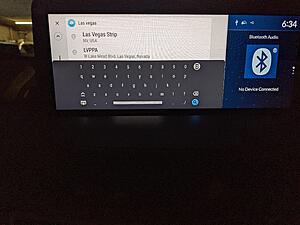
This will bring up a cursor on the screen as seen below:
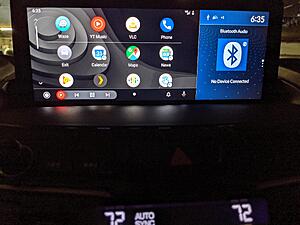
If having a USB hub is too messy, you can enable touch points using ADB (cursor is white as before):
Someone on facebook found out about this. It allows you to re-enable developer mode in android, and you can switch the USB port to ADB mode instead of car play. There are also tons of options for flashing the entertainment unit, doing speaker tests, AC conditioner tests, and many other options.
This works on the the newest update, seems this is where they moved the once easily available developer menu. When in the Developer option mode there are a ton of new settings in there I have never seen. Even options to disable speakers for testing, testing for rattles at certain frequency HZ. The options that are new are after the step where you hold down the cards button for several seconds, that’s the new menu that I don’t think anyone was aware of. Once Honda sees we can access this I’m sure they will change it in the next update
Yeah cool, I already turned off Android Auto since I will never use it as I am an Apple Fanboy and was hoping maybe it would make Apple CarPlay behave but no dice......
IIRC Acura released a memo to dealers that any evidence of tampering with the head unit software or developer settings is grounds to deny warranty claims on the infotainment system.
This is intended as an informational notice, with no implied judgement as to a prudent course of action or inaction.
IIRC Acura released a memo to dealers that any evidence of tampering with the head unit software or developer settings is grounds to deny warranty claims on the infotainment system.
This is intended as an informational notice, with no implied judgement as to a prudent course of action or inaction.
Yea I decided not to mess with anything myself, I’ll let Acura figure it out, the stock setup has been working fine for me honestly
Updated to version 1.1.4 and did a Factory Reset of the headunit to fix the "Favorites" function on the stock navigation app. It looks like Acura may have disabled "Developer Settings" on the new update. At least I am unable to activate it by clicking on the Build Number 7 times. Also tried using an ADB command to enable it in the settings but it did not work. If anyone has any ideas to bring it back up please let me know. Not a big deal but it make enabling/disable touchpoints much easier this way.
The good news is that ADB is still there though so we are able to run ADB commands and still sideload HUR and do other ADB commands which brings me to my post.
I was able to sideload HUR using the usual method but I was having difficulty seeing where I was clicking as I wasn't able to show where my touch points were due to not enabling it in the Developer settings. So 2 solutions to this:
Easy way is to use a USB hub and plug in a regular mouse and your phone.
Make sure you enable USB Hub settings in the hidden menu:
This will bring up a cursor on the screen as seen below:
If having a USB hub is too messy, you can enable touch points using ADB (cursor is white as before):
I didn't try but I don't see why it wouldn't work. The only issue with the setup is you would have to enable USB hub every time you restart the car.
I have tried using a small hub with a working thumbdrive and it did not work. Even after enabling the USB HUB option, no go.
I am looking for a USB 'switch' that will have both the thumbdrive and the phone plugged in, which is a good solution, as long as the hardware is not too big, and of course it works.
After finding a solution for this, I guess I can buy a bunch and resell them cuz many cars have the same issue....lol
and yes, thank you for showing us the Dev menu. I recently used it to ping my speakers to ensure my aftermarket sub was outputting the correct polarity.