


Portable Navi Hardwire


Thread Starter
AZ Community Team
Joined: May 2007
Posts: 32,488
Likes: 7,771
From: N35°03'16.75", W 080°51'0.9"
Portable Navi Hardwire
2002 TL-S, 5AT.
Got a cheap portable Navi unit (Magellan 3200) that's going to go in this car.
I searched but kept getting instructions for Factory Navi systems.
What's the best way to install and hardwire a portable Navi unit? Placement? Wire Routing? Cut in power where? etc.
(If there is a good thread, I'd appreciate a link).
TIA.
Got a cheap portable Navi unit (Magellan 3200) that's going to go in this car.
I searched but kept getting instructions for Factory Navi systems.
What's the best way to install and hardwire a portable Navi unit? Placement? Wire Routing? Cut in power where? etc.
(If there is a good thread, I'd appreciate a link).
TIA.
Thread Starter
AZ Community Team
Joined: May 2007
Posts: 32,488
Likes: 7,771
From: N35°03'16.75", W 080°51'0.9"
WOW!
Really surprised there are no suggestions. I did find a V1 Install that is similar.
Here's what I think wer'e going to do. If you've got thoughts/suggestions let me know.
- Using the included Suction Cup mount and bracket, mount on the left lower windsheild, so the navi screen will be about 2" or 3" above the dash and about 1/2" from the A-Pillar.
- Route the wire into the A-Pillar and then down and behind the left side of the dash. This will show about 2" or 3" of exposed wire between the Navi plug and the A-Pillar.
- Hook into the Radio Hot/Positive at/near the fuse box and a convenient ground.
To remove the unit, we'll just pull the power plug at the Navi end (right next to the A-pillar) and pop it out of the included bracket.
Sound about right???
Really surprised there are no suggestions. I did find a V1 Install that is similar.
Here's what I think wer'e going to do. If you've got thoughts/suggestions let me know.
- Using the included Suction Cup mount and bracket, mount on the left lower windsheild, so the navi screen will be about 2" or 3" above the dash and about 1/2" from the A-Pillar.
- Route the wire into the A-Pillar and then down and behind the left side of the dash. This will show about 2" or 3" of exposed wire between the Navi plug and the A-Pillar.
- Hook into the Radio Hot/Positive at/near the fuse box and a convenient ground.
To remove the unit, we'll just pull the power plug at the Navi end (right next to the A-pillar) and pop it out of the included bracket.
Sound about right???

TL-S driver
Joined: Apr 2003
Posts: 2,898
Likes: 0
From: Springfield, NJ
I'm surprised no one responded either. I was wondering if you can use the same wire you hardwire the V1 to. I have my V1 hardwired and tapped into the windshield wiper wire. I'm wondering if that wire can be used as well.
I think that sounds about right. I actually have a bracket installed next to the fan control. Kinda hard to explain but it sits between the plastic and my dashboard, I installed a metal bracket so my navi sits in there, no suction cup for me.
I think that sounds about right. I actually have a bracket installed next to the fan control. Kinda hard to explain but it sits between the plastic and my dashboard, I installed a metal bracket so my navi sits in there, no suction cup for me.
Thread Starter
AZ Community Team
Joined: May 2007
Posts: 32,488
Likes: 7,771
From: N35°03'16.75", W 080°51'0.9"
Well at least I'm not talking to myself. LOL.
Here's some pics of the provisional position.
Included Mounting Hardware:

Position with Navi Unit (power to Navi is the lower left side of the unit):

Easy Reach:

Approx Drivers Eye View Left Side:
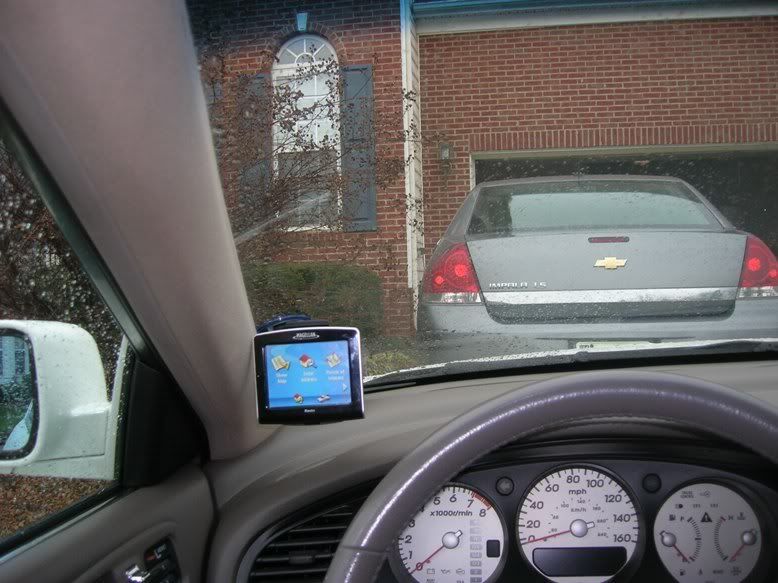
We tried this out on the road today, seemed OK as far as easy to see and use without blocking/distracting vison.
Up higher on the left limits sight lines too much. Right-Center/Mirror area might be OK, but more wire to run/hide and blocks some sight-lines. Also, having it on the left keeps the dominate hand on the wheel.
Here's some pics of the provisional position.
Included Mounting Hardware:
Position with Navi Unit (power to Navi is the lower left side of the unit):
Easy Reach:
Approx Drivers Eye View Left Side:
We tried this out on the road today, seemed OK as far as easy to see and use without blocking/distracting vison.
Up higher on the left limits sight lines too much. Right-Center/Mirror area might be OK, but more wire to run/hide and blocks some sight-lines. Also, having it on the left keeps the dominate hand on the wheel.

Instructor
Joined: Jan 2007
Posts: 194
Likes: 0
i got a tomtom about the same size as that for christmas. i dont have any stealthy wiring suggestions because i'm looking into that myself, BUT i personally found it best in the very top left corner of the windshield. as far up and left as possible. much easier to reach imo because out windshields are deep, and maybe i have short arms. it's much easier to reach up than out for me. I think i'm gonna run my power down the A-pillar, under the dash, and possibly into the cigarette lighter in the arm rest compartment. not SUPER stealthy, but easy enough and out of the way for me.
Thread Starter
AZ Community Team
Joined: May 2007
Posts: 32,488
Likes: 7,771
From: N35°03'16.75", W 080°51'0.9"
^^
That was my first thought. Our problem is my daughter drives this car most of the time. It's actually *her* Navi (X-mas gift).
She's sits with the seat so far forward, that the navi in the upper left makes her look almost straight up. It's really not a usable location for her.
One thing I've found is the 2G Fuses are split with some on the driver side and some on the passenger side. I need to find something on the driver side.
Several people in 3G have done a V1 Radar Detector with the Live/Hot wire for the device plugged right in with the fuse.
Thanks for the suggestion.
That was my first thought. Our problem is my daughter drives this car most of the time. It's actually *her* Navi (X-mas gift).
She's sits with the seat so far forward, that the navi in the upper left makes her look almost straight up. It's really not a usable location for her.
One thing I've found is the 2G Fuses are split with some on the driver side and some on the passenger side. I need to find something on the driver side.
Several people in 3G have done a V1 Radar Detector with the Live/Hot wire for the device plugged right in with the fuse.
Thanks for the suggestion.
Trending Topics


Suzuka Master
Joined: Sep 2007
Posts: 5,993
Likes: 8
Whats up guys. I got a Garmin and at first on had it on the left by the a pillar. Didn't like it there. i found it was much easier if it was in the center windshield, or on the dashboard, but i couldn't get it to stick whatever i did. So the center windshield it is, with the damn cord running right down it. 
Good luck with your install and post a DIY when your done.
Good luck with your install and post a DIY when your done.
Thread Starter
AZ Community Team
Joined: May 2007
Posts: 32,488
Likes: 7,771
From: N35°03'16.75", W 080°51'0.9"
Originally Posted by wasup1357
do u just charge the navi up everytime its outta batteries??
I have a garmin c340 and im sick of sitcking it on top of the dash board
I have a garmin c340 and im sick of sitcking it on top of the dash board
Once it's hard-wired, it will trickle charge when it's in the car. But yes, I have an AC-to-USB charger if I need to charge it in the house.

Racer
Joined: Mar 2007
Posts: 250
Likes: 0
From: NC
either get a female cig lighter socket, or just cut you a couple inches of wire.
if you you the female socket you should have a positive and a negative.
and if you use the wire.. attach the wires to the gps cig lighter adapter... we usually solder and tape it, but you can just tape if really good. youll need to attach one to the tip of the adapter and the other to one of the ground points.
youll need to attach the ground of your wires to a good ground point in the car...
if you pull off your fuse cover on the drivers side, you can attach it to metal there, if possible us a ring crimp to make sure the connection is good and use a factory screw that is attached to metal to secure you ground.
now you need to attach your power, i cant remember off the top of my head what fuses are switch but just look on your fuse panel you removed and try to find a cig lighter fuse or acc fuse.
attach it to that fuse by either.... semi-good way: wrapping the wire on the fuse and shoving it back into the fuse panel orrrr better way: using a fuse tap and a female crimp.
hide your wire from the fuse panel to the a pillar where your gps is mounted
check you power, zip tie your access wire and replace your fuse panel cover
and bam your done.... sorry i was really bored and do these all day long so thought id try to help.
if it feels like too much, take it to best buy.. 17 to 35 dollars and youll be set.
if you you the female socket you should have a positive and a negative.
and if you use the wire.. attach the wires to the gps cig lighter adapter... we usually solder and tape it, but you can just tape if really good. youll need to attach one to the tip of the adapter and the other to one of the ground points.
youll need to attach the ground of your wires to a good ground point in the car...
if you pull off your fuse cover on the drivers side, you can attach it to metal there, if possible us a ring crimp to make sure the connection is good and use a factory screw that is attached to metal to secure you ground.
now you need to attach your power, i cant remember off the top of my head what fuses are switch but just look on your fuse panel you removed and try to find a cig lighter fuse or acc fuse.
attach it to that fuse by either.... semi-good way: wrapping the wire on the fuse and shoving it back into the fuse panel orrrr better way: using a fuse tap and a female crimp.
hide your wire from the fuse panel to the a pillar where your gps is mounted
check you power, zip tie your access wire and replace your fuse panel cover
and bam your done.... sorry i was really bored and do these all day long so thought id try to help.
if it feels like too much, take it to best buy.. 17 to 35 dollars and youll be set.
Thread Starter
AZ Community Team
Joined: May 2007
Posts: 32,488
Likes: 7,771
From: N35°03'16.75", W 080°51'0.9"
Originally Posted by ice2fire11
either get a female cig lighter socket, or just cut you a couple inches of wire.
if you you the female socket you should have a positive and a negative.
and if you use the wire.. attach the wires to the gps cig lighter adapter... we usually solder and tape it, but you can just tape if really good. youll need to attach one to the tip of the adapter and the other to one of the ground points.
youll need to attach the ground of your wires to a good ground point in the car...
if you pull off your fuse cover on the drivers side, you can attach it to metal there, if possible us a ring crimp to make sure the connection is good and use a factory screw that is attached to metal to secure you ground.
now you need to attach your power, i cant remember off the top of my head what fuses are switch but just look on your fuse panel you removed and try to find a cig lighter fuse or acc fuse.
attach it to that fuse by either.... semi-good way: wrapping the wire on the fuse and shoving it back into the fuse panel orrrr better way: using a fuse tap and a female crimp.
hide your wire from the fuse panel to the a pillar where your gps is mounted
check you power, zip tie your access wire and replace your fuse panel cover
and bam your done.... sorry i was really bored and do these all day long so thought id try to help.
if it feels like too much, take it to best buy.. 17 to 35 dollars and youll be set.
if you you the female socket you should have a positive and a negative.
and if you use the wire.. attach the wires to the gps cig lighter adapter... we usually solder and tape it, but you can just tape if really good. youll need to attach one to the tip of the adapter and the other to one of the ground points.
youll need to attach the ground of your wires to a good ground point in the car...
if you pull off your fuse cover on the drivers side, you can attach it to metal there, if possible us a ring crimp to make sure the connection is good and use a factory screw that is attached to metal to secure you ground.
now you need to attach your power, i cant remember off the top of my head what fuses are switch but just look on your fuse panel you removed and try to find a cig lighter fuse or acc fuse.
attach it to that fuse by either.... semi-good way: wrapping the wire on the fuse and shoving it back into the fuse panel orrrr better way: using a fuse tap and a female crimp.
hide your wire from the fuse panel to the a pillar where your gps is mounted
check you power, zip tie your access wire and replace your fuse panel cover
and bam your done.... sorry i was really bored and do these all day long so thought id try to help.
if it feels like too much, take it to best buy.. 17 to 35 dollars and youll be set.
Thanks man, that's great. Best Buy $35 install and we bought it with the Navi as part of the gift.
I've printed the fuse diagram for the driver's side, so I'll make sure we understand how they plan to connect and where.
Your post will be a huge help to make sure we get a good install. THANKS!!
(In retrospect, I probably could've DIY'd this, but at the time didn't realize that it was pretty straight-forward.)

Thread
Thread Starter
Forum
Replies
Last Post
08_UA7_Gr33k
Member Cars for Sale
13
Feb 11, 2016 02:17 PM
lanechanger
Member Cars for Sale
4
Oct 13, 2015 10:56 AM
us285126
3G TL Audio, Bluetooth, Electronics & Navigation
9
Oct 2, 2015 02:03 PM
