


Printer troubleshooting: I need a new printer (?)


S E L L


Joined: May 2007
Posts: 12,768
Likes: 51
From: Modesto, CA
 Hmm....maybe Batman can help!

Seriously though, maybe a fresh install of Windows will clear up your problem.

You could experiment with the fresh install on another machine or the same one with a different drive.


damn, dead end after dead end 
ok, so right now, if you try to install the software, what happens? does it appear to go through or does it fail? I was thinking it may be worth a shot to try installing the software from the admin profile.
ok, so right now, if you try to install the software, what happens? does it appear to go through or does it fail? I was thinking it may be worth a shot to try installing the software from the admin profile.

Thread Starter
Senior Moderator
Joined: May 2000
Posts: 17,085
Likes: 740
From: Brooklyn, NY USA
I didn't try installing the software off the disc in the admin profile of safe mode. I did download the software in admin/safe mode and when trying to run it, that's what I got the error message saying, "The system administrator has set policies to prevent this installation".
Also, how confident are you that your computer is spyware/adware/virus free? The error about shutting down is something you typically don't see. In my experience, I've seen stuff like that when its either a virus/adware or a bad memory chip. HOWEVER, i haven't asked earlier because computers never cease to amaze with their idiosyncrasy. Do you have malwarebytes? a quick scan wouldn't hurt.
if youre good on that, yet another effort would be to install the latest windows installer to see if that helps.
Version 4.5 for Windows XP SP3
http://download.microsoft.com/downlo...288-v3-x86.exe
if youre good on that, yet another effort would be to install the latest windows installer to see if that helps.
Version 4.5 for Windows XP SP3
http://download.microsoft.com/downlo...288-v3-x86.exe
Last edited by rza49311; Jul 17, 2009 at 10:08 AM.
Thread Starter
Senior Moderator
Joined: May 2000
Posts: 17,085
Likes: 740
From: Brooklyn, NY USA
Also, how confident are you that your computer is spyware/adware/virus free? The error about shutting down is something you typically don't see. In my experience, I've seen stuff like that when its either a virus/adware or a bad memory chip. HOWEVER, i haven't asked earlier because computers never cease to amaze with their idiosyncrasy. Do you have malwarebytes? a quick scan wouldn't hurt.
if youre good on that, yet another effort would be to install the latest windows installer to see if that helps.
Version 4.5 for Windows XP SP3
http://download.microsoft.com/downlo...288-v3-x86.exe
if youre good on that, yet another effort would be to install the latest windows installer to see if that helps.
Version 4.5 for Windows XP SP3
http://download.microsoft.com/downlo...288-v3-x86.exe
FYI, The second HP I bought, the same one, 1319f operates the same as the first one, and i'm still having the problems with faxing. I'm noticing the problem more in receiving than sending. I don't know if it's the machine or the connection (VOIP), but my old HP 3015 had very little problems with faxing other than the random error, and both the older 3015 and newer 1319f can fax at the same max speed (33.6). Might be other technology differences in the machines that are making the difference, who knows..
Either I try really hard to get my old machine working, get a new machine altogether (Different upgraded HP model), or another brand altogether. My electrical wiring at work sucks, the electrical box needs to be replaced because it's so antiquated (according to my electrician friend) but the landlord is too cheap to replace it and would rather see her building burn down first (along with my stuff in it), so I am choosing to stay away from the Brother brand. I used to have a Brother laser printer, when turning on it used to dim the lights in the room and even tripped the breakers a few times, it draws so much power in my part of the office, it's crazy! I just don't know what to do.....Sucks.
S E L L
Joined: May 2007
Posts: 12,768
Likes: 51
From: Modesto, CA
You might look into something like the Brother MFC-7420. It can scan, copy, and fax. It really works quite well at our store and it's used for copies and faxes every morning and periodically throughout the day. The toner is a bit expensive at $70 each for the genuine Brother toner but I've seen reman. toner cartridges on Monoprice.com for a little over $20.

Thread Starter
Senior Moderator
Joined: May 2000
Posts: 17,085
Likes: 740
From: Brooklyn, NY USA
You might look into something like the Brother MFC-7420. It can scan, copy, and fax. It really works quite well at our store and it's used for copies and faxes every morning and periodically throughout the day. The toner is a bit expensive at $70 each for the genuine Brother toner but I've seen reman. toner cartridges on Monoprice.com for a little over $20.
My electrical wiring at work sucks, the electrical box needs to be replaced because it's so antiquated (according to my electrician friend) but the landlord is too cheap to replace it and would rather see her building burn down first (along with my stuff in it), so I am choosing to stay away from the Brother brand. I used to have a Brother laser printer, when turning on it used to dim the lights in the room and even tripped the breakers a few times, it draws so much power in my part of the office, it's crazy! I just don't know what to do.....Sucks.


Thread Starter
Senior Moderator
Joined: May 2000
Posts: 17,085
Likes: 740
From: Brooklyn, NY USA
I might give Brother another shot. I just hope it's not going to overload the electrical issue in my office. I have a Brother 4100e Fax/Printer in another part of the office (on a different breaker) and it's a very good machine. I looked into the MFC you're showing me up top, but I really don't want/need a flatbed scanner. Sheetfed is good for me (also saves space).
I may go out and pick this up:
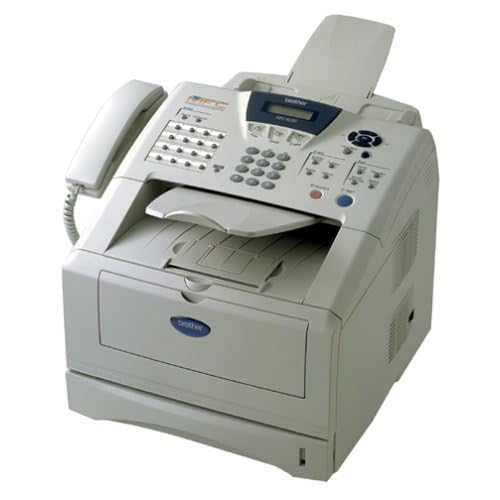
Click for Specs: Brother MFC-8220 Laser Multifunction Center
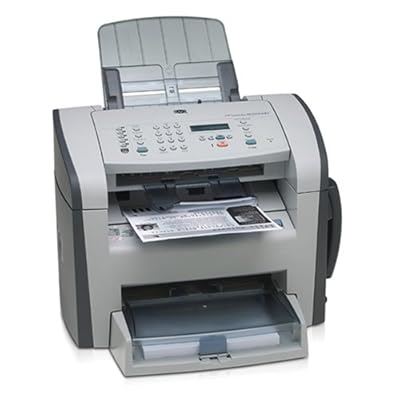
For comparison, this is what I have now, and you'll see why I'm trying to stay with this kind of design:
The HP 1319f
The 3015:
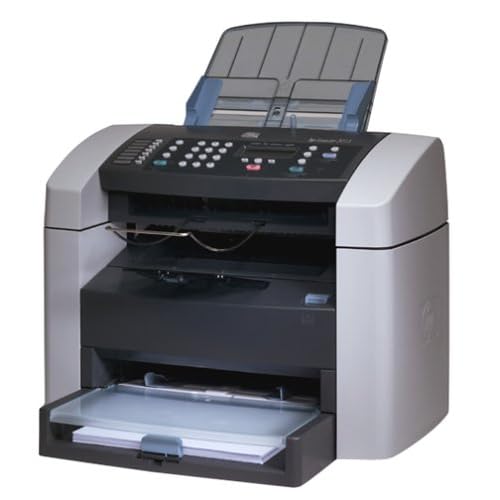
Looks like C-Net is comparing the 8220 very closely to the 3015 that I had. Some points it excelled, and some it wasn't as favorable as the 3015. CLICK to see the review.
I may go out and pick this up:
Click for Specs: Brother MFC-8220 Laser Multifunction Center
For comparison, this is what I have now, and you'll see why I'm trying to stay with this kind of design:
The HP 1319f
The 3015:
Looks like C-Net is comparing the 8220 very closely to the 3015 that I had. Some points it excelled, and some it wasn't as favorable as the 3015. CLICK to see the review.
Last edited by Shoofin; Jul 19, 2009 at 08:14 PM.
Thread Starter
Senior Moderator
Joined: May 2000
Posts: 17,085
Likes: 740
From: Brooklyn, NY USA
Looking for Laser, not Inkjet. I'll go through the ink waaay too fast with the amount of printing I do at work. BUT they do make good machines, I have one at home (MP620), it's an excellent machine!
Last edited by Shoofin; Jul 19, 2009 at 08:44 PM.
Thread Starter
Senior Moderator
Joined: May 2000
Posts: 17,085
Likes: 740
From: Brooklyn, NY USA
It was a Laser printer, I think the HL-1440 or something, it was so long ago. I moved it to another computer in a different part of the office and it worked fine, until a transformer exploded outside my office on the electrical lines and fried the computer and printer that got zapped. I think there's too much on a circuit, PLUS as I mentioned, the electrical box in the office is VERY OLD. Landlord is too cheap to change it. I've seen reviews posted by random people about Brother products and their complaints about the machine drawing too much power as well. I think i'll give it a shot to see how it works out, worst case I can always return it.
Last edited by Shoofin; Jul 19, 2009 at 11:06 PM.

Thread
Thread Starter
Forum
Replies
Last Post
mada51589
3G TL Problems & Fixes
80
Jan 9, 2025 04:40 PM
Amoeba
Technology
5
Feb 10, 2004 12:17 PM
