When you click on links to various merchants on this site and make a purchase, this can result in this site earning a commission. Affiliate programs and affiliations include, but are not limited to, the eBay Partner Network.
I'm surprised it costs more than the old one. $320 for 11 inch and $400 for 13 inch.
They are shipping it with bloatware, wtf?
Wunderlist - a collaborative to-do list
AirDroid Premium - a tool for managing your Android phone over a Wi-Fi network;
LittleBridge.com - a tool for learning the English language
If you haven't picked up a Chromebook just yet, you might want to wait a little longer. Intel has just announced plans to roll out as many as 20 new Chromebooks by the latter half of this year. This new set will be thinner, lighter, more powerful and generally more diverse in terms of design. It's clear that Google is making a play for the mainstream.
Most of the new class of Chromebooks will be based on Intel's more powerful and efficient Bay Trail-M system on a chip.
"Bay Trail is optimized for power, performance and cost," Intel's VP and general manager, Navin Shenoy, said. "They're the first Chromebooks that are also now available with over 11 hours of battery life, which is up from about 10 hours on Haswell."
The Bay Trail models will also be the first Intel Chromebooks to be fanless, he said, and will be 15 percent lighter. In terms of design, we can expect to see more diverse form factors. Some models will offer touchscreens, and some, like Lenovo's offerings, will have a folding display. In addition to those Chromebooks, Intel also introduced a tiny HP Chromebox desktop and announced the availability of LG's all-in-one Chromebase computer. Last but not least, Shenoy also announced that all of the Chrome devices released today will be made with the world's first "conflict-free" microprocessors -- meaning the minerals of which they're made were not mined by slave regimes in the Republic of Congo.
At least a couple of those conflict-free laptops will utilize chips based on the company's Core i3 processor, including an Acer version, available for $349 this summer. An updated version of Dell's 11-inch model should ship later in 2014, as well. As we mentioned, Intel is partnering with at least four major manufacturers -- Acer, ASUS, Lenovo and Toshiba -- to produce Bay Trail-powered devices. Lenovo announced two of these last night: the N20 and N20p. Not to be left out, ASUS also rolled out a couple of new offerings. There's an 11.6-inch C200 and a 13.3-inch C300, both of which will begin shipping this summer.
Just prior to announcing the latest in the Chrome OS family, Caesar Sengupta, VP of product management at Google, took to the stage to say that their predecessors have been well received.
"Chromebox is the number one selling desktop," he said, "And the top six rated laptops on Amazon are all Chromebooks. They're both the highest rated and the most affordable."
He and Shenoy pointed out that eight of the top computer manufacturers offer Chromebooks, and that Chrome devices are available in over 20 countries and nearly 10,000 schools. And you can expect more markets and institutions set to get Chrome OS machines in the future. In fact, Shenoy showed off an education-focused Chromebook reference design that he hopes will inform the next generation of Chromebooks for schools.
As a cherry on top, Sengupta told us that not only are Google Now and voice commands coming to Chromebooks, but that Play movies will be available to view offline as well.
According to Sengupta, "the momentum is solid and gathering pace." So folks, at least according to Google, we'll be seeing a lot more of you buying (and using) Chromebooks in 2014.
I downloaded and installed Canary. It's buggy for me. My gmail shows up with a blank page and I can't access my emails even though I can see the different email options on the right side.
Canary is the buggiest version of the Chrome builds, the Dev build is supposed to be more stable. But not as cutting edge. I just installed dev x64, I forget can I run that along side the regular build like canary?
ZOMG!!! Beta 37 adds DirectWrite support for Windows!
OMG my eyes! so much better! GDI Fonts looked horrible on my rMBP in Windows. Now fonts are rendered by the GPU like IE and FF have done for years
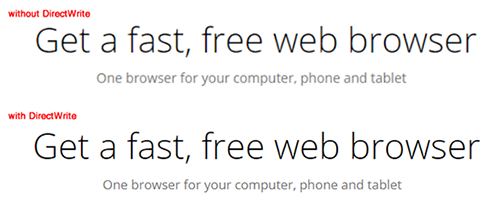
Chrome 37 adds support for DirectWrite, an API on Windows for clear, high-quality text rendering even on high DPI displays. Before DirectWrite, Chrome used the Graphics Device Interface (GDI) to render text. GDI dates back to the mid-80's and reflects the engineering tradeoffs of that time, particularly for slower, lower-resolution machines. The switch to DirectWrite has been a top user request for years, and required extensive re-architecting and streamlining of Chrome's font rendering engine.
Some users should begin seeing better-looking fonts and increased rendering performance as we roll out DirectWrite, with no changes required by web developers. Assuming everything goes smoothly, all users will experience the improvements by the Chrome 37 stable release.
Compare the below screenshots, taken with and without DirectWrite enabled.
Update 7:40PM: We've updated the article's headline to be more accurate. A Google spokesperson has confirmed to The Verge that both Chrome OS and Android will continue to exist; Chrome OS is not being "killed."
OK, so here is a solution to a pretty specific problem, but if you have it, it will bug you...
I am using Chrome as a browser mainly, and also use a google voice number as a voicemail line. As a result, I use the Google Voice extension for Chrome that puts a little voice icon in my toolbar that let's me access, via the extension, a quick access version of the Google Voice inbox. I can see and play messages without leaving my current page to go to the "inbox" page of the Voice account.
Once you open the extension, you can click on "play" for each message to hear the audio, since Google speech to text is often comically wrong (although you usually still get the gist of it).
Unfortunately, the play button uses an embedded Flash player to play the audio.
For obvious security reasons (and also because I hate the damn auto play videos on web sites) I have Chrome set to request my permission to run Flash each time.
THE ISSUE: when I click on the play button in the Voice extension, I see part of the "disabled Flash" icon but am not able to "allow" it, nor do I really want to allow it on a case by case basis...
Here's the real problem, though. Chrome only allows you to whitelist web addresses for Flash to be allowed to autorun of you disable Flash in general as I did and there is no specific web address for the extension (even using wildcards and 'google').
Here is the fix (works for ANY extension, I will show for Voice):
Open Settings>Extensions and put a check mark in the "Developer Mode" box:
Once you do, you will see some additional info about each extension, including an ID#:
Just copy the ID number. Then go back to the whitelist for plugin activation (Settings>Show Advanced>Content Settings) and under "plugins" choose "manage exceptions." Paste the ID you copied into a new whitelist entry and apply. Close Chrome and reopen and now the particular extension you whitelisted will be fully functional even if you have plugins set to "let me choose each time".
Last edited by stogie1020; Dec 9, 2015 at 01:13 PM.
OK, (maybe this was already dicussed) but if you, like me, are getting pissed at Chrome using too many resources (RAM, CPU), here is a good way to find the culprit.











 I was starting to think I needed glasses. The fonts always looked blurry