


Computer Hard-drive problem


Thread Starter
Littering and.....
Joined: May 2004
Posts: 650
Likes: 0
From: Albany, NY
Computer Hard-drive problem
So I've scoured the internet looking for some information and need your guys help.
A while back my buddy told me that his desktop computer's hard-drive made a clicking noise and wouldn't let him boot his computer. Needless to say, he never backed up all of the pictures of his daughter (my god-daughter) and lost almost every picture he had of her since she was born (she's six now). I figured that the hard drive is shot, but told him I'd see what I could do.
Here are the symptoms:
Start computer -> Dell Boot Screen -> Some Dell screen with a blue line across the top searching for something-> Hard Drive starts clicking -> Hard Disk Error - Press Ctrl + Alt + Delete to restart computer.
What I've tried:
-Changed position of hard-drive (doubted it would work, but figured I'd exhaust that option)
-Put hard drive in freezer (I may have put it in too long, figured I'd try this too)
-I borrowed a spinrite boot disk and started a level 2 restore, but the hard drive just kept clicking and it didn't appear to be doing anything. After a while I gave up since I had all of my other components hooked up to the broken computer.
Now, should I just give up on this little venture or should I go back and pick up my buddies monitor and keyboard and let spin rite run for a while?
Thanks for all the help guys!!
A while back my buddy told me that his desktop computer's hard-drive made a clicking noise and wouldn't let him boot his computer. Needless to say, he never backed up all of the pictures of his daughter (my god-daughter) and lost almost every picture he had of her since she was born (she's six now). I figured that the hard drive is shot, but told him I'd see what I could do.
Here are the symptoms:
Start computer -> Dell Boot Screen -> Some Dell screen with a blue line across the top searching for something-> Hard Drive starts clicking -> Hard Disk Error - Press Ctrl + Alt + Delete to restart computer.
What I've tried:
-Changed position of hard-drive (doubted it would work, but figured I'd exhaust that option)
-Put hard drive in freezer (I may have put it in too long, figured I'd try this too)
-I borrowed a spinrite boot disk and started a level 2 restore, but the hard drive just kept clicking and it didn't appear to be doing anything. After a while I gave up since I had all of my other components hooked up to the broken computer.
Now, should I just give up on this little venture or should I go back and pick up my buddies monitor and keyboard and let spin rite run for a while?
Thanks for all the help guys!!


All About Trance
Joined: May 2005
Posts: 4,561
Likes: 124
From: Atlanta
Sounds like the hard drive is shot if it's making that clicking sound. Do you have access to a 3.5" IDE enclosure that you can take the hard drive out and hook it up to it? If you don't know what I'm talking about, it looks like this
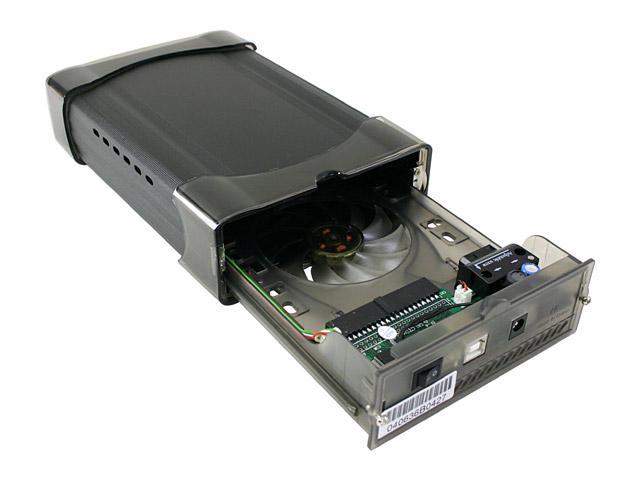
You'd basically hook up the problem hard drive in there and hook up the other end to a laptop or desktop via a USB cable. If Windows detects the hard drive, you can transfer the files over.
You'd basically hook up the problem hard drive in there and hook up the other end to a laptop or desktop via a USB cable. If Windows detects the hard drive, you can transfer the files over.

have you tried hooking it up as a secondary drive in a known working computer? You might still be able to rescue some files off the drive that way. or at least run it through chkdsk in winxp and see if it can fix it enough to save some files.

The hard drive is shot. The clicking sound is the drive not being able to properly go through it's own initialization process. You are pretty much SOL unless you've got bucks to pay a data recovery company to pull data from it.
If you had an identical (same model, revision, capacity, etc.) drive, you could try swapping drive logic boards (the circuit board you see when you flip the drive over) and see if the mechanisms inside the enclosure still function.
Another trick is to freeze the drive (that's right, stick it in the freezer). This causes the materials the drive is made from to contract. IF the problem is due to a crashed read/write head, this may give you a few minutes of run time to get stuff from it. However, I'd highly recommend using an external drive enclosure for this so you don't build heat and waste time waiting for the OS on the failed drive to boot....if this even works.
As a last resort, you could try giving the drive a wack with the back of a screw driver. The good ol' American fix-it. No joke, it could possibly buy time just like the method above.
Otherwise, this is a great lesson in backing important data up. I've lost stuff (as well as others) and know the pain.
If you had an identical (same model, revision, capacity, etc.) drive, you could try swapping drive logic boards (the circuit board you see when you flip the drive over) and see if the mechanisms inside the enclosure still function.
Another trick is to freeze the drive (that's right, stick it in the freezer). This causes the materials the drive is made from to contract. IF the problem is due to a crashed read/write head, this may give you a few minutes of run time to get stuff from it. However, I'd highly recommend using an external drive enclosure for this so you don't build heat and waste time waiting for the OS on the failed drive to boot....if this even works.
As a last resort, you could try giving the drive a wack with the back of a screw driver. The good ol' American fix-it. No joke, it could possibly buy time just like the method above.
Otherwise, this is a great lesson in backing important data up. I've lost stuff (as well as others) and know the pain.


Thread Starter
Littering and.....
Joined: May 2004
Posts: 650
Likes: 0
From: Albany, NY
Thanks for all of the replies so far!
I forgot to add that I hooked the drive up to my computer as a slave and my computer would start to boot then get caught when it looked at the second drive. I could hear the clicking in my computer.
It's a samsung drive btw.
I figured it was pretty much shot, but thought I may as well try.
Sad thing is that I told him his computer was acting funny when I installed a wireless card and that he should back up his stuff.
I forgot to add that I hooked the drive up to my computer as a slave and my computer would start to boot then get caught when it looked at the second drive. I could hear the clicking in my computer.
It's a samsung drive btw.
I figured it was pretty much shot, but thought I may as well try.
Sad thing is that I told him his computer was acting funny when I installed a wireless card and that he should back up his stuff.

Thread
Thread Starter
Forum
Replies
Last Post
Mike Pilipenko
3G TL Problems & Fixes
5
Mar 26, 2024 09:21 PM
SidhuSaaB
3G TL Problems & Fixes
18
May 30, 2020 12:40 AM