


Need help setting up a capture card


Thread Starter
Moderator


Joined: Jun 2006
Posts: 29,869
Likes: 3,489
Need help setting up a capture card
So I just wanna set a few things straight since I've never set one of these things up before. I have a Dazzle Video Creator Plus to be exact, it has regular RCA connectors for input, through to USB. The damn thing doesn't come with any RCA cables (my fault for not checking, ordered online) and my TV doesn't have video out soooo....
Please let me know if this is right:
I didn't get much sleep so I feel like I'm stupid or thinking wrong here not sure if I have everything laying around or not, just wanna make sure before I go out and buy something else.
Please let me know if this is right:
- VCR with video+audio out
two sets of RCA cables.... - one from VCR-in to TV
- another from VCR-out to Dazzle
I didn't get much sleep so I feel like I'm stupid or thinking wrong here
not sure if I have everything laying around or not, just wanna make sure before I go out and buy something else.


Thread Starter
Moderator
Joined: Jun 2006
Posts: 29,869
Likes: 3,489
So I found a video tutorial and while it helped a bit, I'm still unsure:
http://www.youtube.com/watch?v=UWoPenAR7Vo
I haven't touched a VCR in years. Again, my VCR has a set of RCA inputs and outputs, plus a single coaxial out to TV. That coaxial cable is video and audio, right? skip to about 1:00 in the video, I'm talking about that single white cable on the left that goes to "OUT TO TV"
God I feel technologically illiterate like my parents, except when it comes to old stuff
http://www.youtube.com/watch?v=UWoPenAR7Vo
I haven't touched a VCR in years. Again, my VCR has a set of RCA inputs and outputs, plus a single coaxial out to TV. That coaxial cable is video and audio, right? skip to about 1:00 in the video, I'm talking about that single white cable on the left that goes to "OUT TO TV"
God I feel technologically illiterate like my parents, except when it comes to old stuff

Oliver!!!
Joined: May 2008
Posts: 3,962
Likes: 38
From: Orlando, FL
Either I didn't read that right, or its not going to work. The Video-in on the back of the VCR is an input, not an output. Hooking it up to the inputs on the back of the tv will yield a blank picture. The Video-out from the VCR to the Dazzle is correct though.
What are you trying to record? That would help out a lot.
What are you trying to record? That would help out a lot.

you don't need to worry about the coax.
just hook it up like you see in the video. Plug 360 RCA plugs to the input on the back of the VCR. Take a separate set of RCA plugs from the output on the back of the VCR and plug them in to the input on the TV. Plug capture card to USB port on computer.
Set TV to input 1, or whatever input corresponds to where you plugged the RCA cables. Same w/ the VCR.
Also, I would think that this can be done w/out a VCR by using a receiver.
just hook it up like you see in the video. Plug 360 RCA plugs to the input on the back of the VCR. Take a separate set of RCA plugs from the output on the back of the VCR and plug them in to the input on the TV. Plug capture card to USB port on computer.
Set TV to input 1, or whatever input corresponds to where you plugged the RCA cables. Same w/ the VCR.
Also, I would think that this can be done w/out a VCR by using a receiver.
Trending Topics
Thread Starter
Moderator
Joined: Jun 2006
Posts: 29,869
Likes: 3,489
Either I didn't read that right, or its not going to work. The Video-in on the back of the VCR is an input, not an output. Hooking it up to the inputs on the back of the tv will yield a blank picture. The Video-out from the VCR to the Dazzle is correct though.
What are you trying to record? That would help out a lot.
What are you trying to record? That would help out a lot.
you don't need to worry about the coax.
just hook it up like you see in the video. Plug 360 RCA plugs to the input on the back of the VCR. Take a separate set of RCA plugs from the output on the back of the VCR and plug them in to the input on the TV. Plug capture card to USB port on computer.
Set TV to input 1, or whatever input corresponds to where you plugged the RCA cables. Same w/ the VCR.
Also, I would think that this can be done w/out a VCR by using a receiver.
just hook it up like you see in the video. Plug 360 RCA plugs to the input on the back of the VCR. Take a separate set of RCA plugs from the output on the back of the VCR and plug them in to the input on the TV. Plug capture card to USB port on computer.
Set TV to input 1, or whatever input corresponds to where you plugged the RCA cables. Same w/ the VCR.
Also, I would think that this can be done w/out a VCR by using a receiver.

The way I'm hooking it up to my VCR is going to be like in the video, except I'm just missing some cables, so I'm pretty sure I need to coax cable? Just wanna make sure it does audio and video, haven't used this stuff in ages. I don't have an A/V receiver hooked up in my room, and the DVD player we have laying around only has one set of outputs, only for going to the TV.
god damn it why do they have to make this crap so complicated

Sorry,  I thought I wrote: "You don't need to worry about the coax, IF you have one of these:"
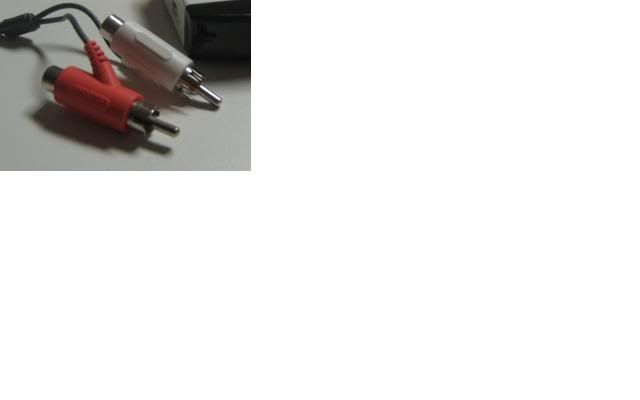
Otherwise, you need the coax to go from the out on the VCR to the in on the TV.
Yes, coax does audio and video.
I thought I wrote: "You don't need to worry about the coax, IF you have one of these:" Otherwise, you need the coax to go from the out on the VCR to the in on the TV.
Yes, coax does audio and video.
Oliver!!!
Joined: May 2008
Posts: 3,962
Likes: 38
From: Orlando, FL
Okay, here goes. Hook the 360 up to the Video-in on the back of the VCR. Hook up the video capture device to the Video-out on the VCR. Now, take a piece of coax and hook that up from the Antenna-out on the VCR to the Coax jack on the TV. Voila! You're all set! Tune the TV to channel 3, set the VCR to the input and you should be golden.
Thread Starter
Moderator
Joined: Jun 2006
Posts: 29,869
Likes: 3,489
FFS I hooked everything up exactly as in the video and like we all went over and all I see when I go to channel 3 is a blue screen. When I press buttons on the VCR, it doesn't do jack. There's a few selections, and the one currently selected is Cable Box/DSS > VCR > TV and one of the other ones is VCR > TV and I assume that's the one I need, but I can't select it.
I'm too tired to deal with this crap at the moment so I'll figure it out later, if I can find the damn remote. If not I'm going to the store to get a sledgehammer to annihilate this damn VCR. Seriously, I get more frustrated trying to hook this damn thing up than when I get my ass kicked in MW2.
I'm too tired to deal with this crap at the moment so I'll figure it out later, if I can find the damn remote. If not I'm going to the store to get a sledgehammer to annihilate this damn VCR. Seriously, I get more frustrated trying to hook this damn thing up than when I get my ass kicked in MW2.


Thread
Thread Starter
Forum
Replies
Last Post
DementiaPhuro
3G TL Problems & Fixes
1
Sep 29, 2015 05:31 PM
kixo
2G TSX (2009-2014)
43
Sep 25, 2015 03:07 PM
