


Post Processing Thread


Ex-OEM King


Joined: Dec 2013
Posts: 17,922
Likes: 7,040
From: Minnesnowta
Need some suggestions or (even better) a good write up on using layer masks in Photoshop.
Tools available: Lightroom 1.4 ( ), Photoshop CS3, Photomatix
I have a photo and there are several distinct areas that I would like to treat differently.
In the picture, there is an area I wanted to be more vibrant, so I created a single exposure HDR of the image. The HDR is toned so that the distinct area appears as desired, but the remainder of the HDR image is too "hot" for my taste.
I opened both the original image and the HDR image in CS3 and placed each one on its own layer.
Then, I added a layer mask to the HDR layer and revealed only the distinct area I wanted to show as more saturated.
Problem is, I have another area that I need to treat differently (hue, saturation, levels) and I don't know if I need to create a separate layer with a mask for EACH different manipulation (hue, saturation, levels), or if I can do them all in one, or if I can do them all in the same layer as the HDR mask.
Ideas?
Tools available: Lightroom 1.4 (
), Photoshop CS3, PhotomatixI have a photo and there are several distinct areas that I would like to treat differently.
In the picture, there is an area I wanted to be more vibrant, so I created a single exposure HDR of the image. The HDR is toned so that the distinct area appears as desired, but the remainder of the HDR image is too "hot" for my taste.
I opened both the original image and the HDR image in CS3 and placed each one on its own layer.
Then, I added a layer mask to the HDR layer and revealed only the distinct area I wanted to show as more saturated.
Problem is, I have another area that I need to treat differently (hue, saturation, levels) and I don't know if I need to create a separate layer with a mask for EACH different manipulation (hue, saturation, levels), or if I can do them all in one, or if I can do them all in the same layer as the HDR mask.
Ideas?
Method 1:
1.) Go to Amazon.com
2.) Place order for Lightroom 5
3.) Install software
4.) Do everything you just described and much more with total ease.
Method 2:
Use a layer mask in PS. You need to duplicate the base layer, insert a layer mask into duplicated layer, make the adjustments you want for the areas you want and erase back the layer mask where you don't want those adjustments on.
Of the two options, getting LR5 will do a much better job and $77 isn't much for what you get out of it. After using the newer versions of LR, I haven't even touched PS at all. Doesn't help that I only have CS2 but whatever. I only hope and wish LR6 finally comes with the ability to do merge to HDR and generate panoramas without PS intervention.

Needs more Lemon Pledge
Joined: Mar 2005
Posts: 52,768
Likes: 2,000
From: Phoenix, AZ
OK, so thus far I have basically done SamDoe1's method #2. I created a duplicate layer of the original for each adjustment I wanted to make, created a layer mask on each of those duplicate layers, and then made the adjustment needed to each layer.
I think I have it where I want it.
Thanks guys! I have a giant book about photoshop, just never got past the first chapter...
Now, I need to figure out how to crop Italiano's kids into the shot and it will be perfect!
I think I have it where I want it.
Thanks guys! I have a giant book about photoshop, just never got past the first chapter...
Now, I need to figure out how to crop Italiano's kids into the shot and it will be perfect!

Ex-OEM King
Joined: Dec 2013
Posts: 17,922
Likes: 7,040
From: Minnesnowta
OK, so thus far I have basically done SamDoe1's method #2. I created a duplicate layer of the original for each adjustment I wanted to make, created a layer mask on each of those duplicate layers, and then made the adjustment needed to each layer.
I think I have it where I want it.
Thanks guys! I have a giant book about photoshop, just never got past the first chapter...
Now, I need to figure out how to crop Italiano's kids into the shot and it will be perfect!
I think I have it where I want it.
Thanks guys! I have a giant book about photoshop, just never got past the first chapter...
Now, I need to figure out how to crop Italiano's kids into the shot and it will be perfect!

'08 MX5 GT 6spd.
Joined: Apr 2004
Posts: 6,234
Likes: 1,192
From: The Lone Star State
Couple of some recent lengthy edits.
Orig.
308_zpsa7fb4c2b.jpg
Final
 IMG_1387 by JordanColePhotos.com, on Flickr
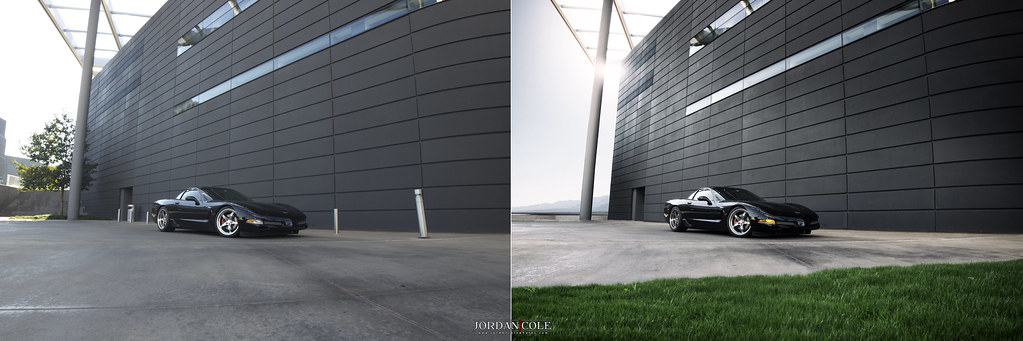 C5 Post-Final Edit by JordanColePhotos.com, on Flickr
Orig.
308_zpsa7fb4c2b.jpg
Final
IMG_1387 by JordanColePhotos.com, on FlickrC5 Post-Final Edit by JordanColePhotos.com, on Flickr
Last edited by MarbleGT; Dec 5, 2014 at 01:04 PM.

Moderator


Joined: Oct 2004
Posts: 64,160
Likes: 3,404
From: Not Las Vegas (SF Bay Area)
OK, so thus far I have basically done SamDoe1's method #2. I created a duplicate layer of the original for each adjustment I wanted to make, created a layer mask on each of those duplicate layers, and then made the adjustment needed to each layer.
I think I have it where I want it.
Thanks guys! I have a giant book about photoshop, just never got past the first chapter...
Now, I need to figure out how to crop Italiano's kids into the shot and it will be perfect!
I think I have it where I want it.
Thanks guys! I have a giant book about photoshop, just never got past the first chapter...
Now, I need to figure out how to crop Italiano's kids into the shot and it will be perfect!

nnInn
Joined: Mar 2006
Posts: 37,670
Likes: 1,084
OK, so thus far I have basically done SamDoe1's method #2. I created a duplicate layer of the original for each adjustment I wanted to make, created a layer mask on each of those duplicate layers, and then made the adjustment needed to each layer.
I think I have it where I want it.
Thanks guys! I have a giant book about photoshop, just never got past the first chapter...
Now, I need to figure out how to crop Italiano's kids into the shot and it will be perfect!
I think I have it where I want it.
Thanks guys! I have a giant book about photoshop, just never got past the first chapter...
Now, I need to figure out how to crop Italiano's kids into the shot and it will be perfect!
:wink:
Needs more Lemon Pledge
Joined: Mar 2005
Posts: 52,768
Likes: 2,000
From: Phoenix, AZ



I Shoot with a Camera
Joined: Oct 2001
Posts: 23,095
Likes: 3,723
From: Vancouver BC
so... this was taken back in Jan of 2012, and there were these damn power lines have always bothered me... I've since learned how to remove them in Photoshop 
<a data-flickr-embed="true" href="https://www.flickr.com/photos/63271580@N00/23139900859/" title="Gastown, Downtown Vancouver BC"><img src="https://farm1.staticflickr.com/768/23139900859_0f3ab4f85f_b.jpg" width="1024" height="488" alt="Gastown, Downtown Vancouver BC"></a>
<a data-flickr-embed="true" href="https://www.flickr.com/photos/63271580@N00/23139900859/" title="Gastown, Downtown Vancouver BC"><img src="https://farm1.staticflickr.com/768/23139900859_0f3ab4f85f_b.jpg" width="1024" height="488" alt="Gastown, Downtown Vancouver BC"></a>
So I've been trying to find a higher-end dog clothing brand website to see how they demonstrate their product images.
http://www.rubyrufus.com/
Any suggestion on how to shoot a product to get this result?

t99DCaj.jpg
And for this image with the dog, how do you get that high-key, washed out look? Seems like this style is used by a lot of brand names goods. I would love to get something close to this.
IWL7DD7.jpg
http://www.rubyrufus.com/
Any suggestion on how to shoot a product to get this result?
t99DCaj.jpg
And for this image with the dog, how do you get that high-key, washed out look? Seems like this style is used by a lot of brand names goods. I would love to get something close to this.
IWL7DD7.jpg

The Third Ball
Joined: Sep 2002
Posts: 50,499
Likes: 5,875
From: Los Angeles, Ca
You need to create a white seamless back drop to shoot. Needs to be bright and lit with a flash to get deep depth of field and very little shadow. The rest of the shadows can easily be photoshopped out.

For the clothing, I would need to lay it on the ground, so do I open up the top and block all four sides and put the lamps?
Last edited by JS + XES; Jan 21, 2016 at 10:54 PM.
The Third Ball
Joined: Sep 2002
Posts: 50,499
Likes: 5,875
From: Los Angeles, Ca
Guess I need something like this..


Needs more Lemon Pledge
Joined: Mar 2005
Posts: 52,768
Likes: 2,000
From: Phoenix, AZ
No need to get all fancy if you don't want to. I have made a light box out of foam core, tissue paper, and push pins. Two halogen shop lamps and a speedlight for lighting.
Might have cost me $20 total...
Setup:
<a data-flickr-embed="true" href="https://www.flickr.com/photos/jefford_e/3280194961/in/album-72157622260196922/" title="IMG_0604 -jpeg"><img src="https://farm4.staticflickr.com/3312/3280194961_1b59f6a532_z.jpg?zz=1" width="640" height="480" alt="IMG_0604 -jpeg"></a>
Results:
<a data-flickr-embed="true" href="https://www.flickr.com/photos/jefford_e/3280195017/in/album-72157603778324312/" title="IMG_6698 -jpeg"><img src="https://farm4.staticflickr.com/3496/3280195017_f829b6470f_z.jpg?zz=1" width="640" height="427" alt="IMG_6698 -jpeg"></a>
<a data-flickr-embed="true" href="https://www.flickr.com/photos/jefford_e/3280195207/in/album-72157603778324312/" title="IMG_6706 -jpeg"><img src="https://farm4.staticflickr.com/3473/3280195207_535667e011_z.jpg?zz=1" width="427" height="640" alt="IMG_6706 -jpeg"></a>
The reflective glass bottle was tough, and frankly I lost interest and time before I perfected it, but this bottle was my least successful attempt...
<a data-flickr-embed="true" href="https://www.flickr.com/photos/jefford_e/3281015482/in/album-72157603778324312/" title="IMG_6725 -jpeg"><img src="https://farm4.staticflickr.com/3424/3281015482_119d2c67ca_z.jpg?zz=1" width="375" height="640" alt="IMG_6725 -jpeg"></a>
Might have cost me $20 total...
Setup:
<a data-flickr-embed="true" href="https://www.flickr.com/photos/jefford_e/3280194961/in/album-72157622260196922/" title="IMG_0604 -jpeg"><img src="https://farm4.staticflickr.com/3312/3280194961_1b59f6a532_z.jpg?zz=1" width="640" height="480" alt="IMG_0604 -jpeg"></a>
Results:
<a data-flickr-embed="true" href="https://www.flickr.com/photos/jefford_e/3280195017/in/album-72157603778324312/" title="IMG_6698 -jpeg"><img src="https://farm4.staticflickr.com/3496/3280195017_f829b6470f_z.jpg?zz=1" width="640" height="427" alt="IMG_6698 -jpeg"></a>
<a data-flickr-embed="true" href="https://www.flickr.com/photos/jefford_e/3280195207/in/album-72157603778324312/" title="IMG_6706 -jpeg"><img src="https://farm4.staticflickr.com/3473/3280195207_535667e011_z.jpg?zz=1" width="427" height="640" alt="IMG_6706 -jpeg"></a>
The reflective glass bottle was tough, and frankly I lost interest and time before I perfected it, but this bottle was my least successful attempt...
<a data-flickr-embed="true" href="https://www.flickr.com/photos/jefford_e/3281015482/in/album-72157603778324312/" title="IMG_6725 -jpeg"><img src="https://farm4.staticflickr.com/3424/3281015482_119d2c67ca_z.jpg?zz=1" width="375" height="640" alt="IMG_6725 -jpeg"></a>
Needs more Lemon Pledge
Joined: Mar 2005
Posts: 52,768
Likes: 2,000
From: Phoenix, AZ
Hell, for shots of your dog wearing the items, you could even tape a white sheet or white roll paper to the top edge of your dining room table and let it drape down to the floor and then towards you (away from the table) to create a seamless background.
Put the dog on the paper/cloth and fire away. No distracting backgrounds (unless you want them), if you keep it taught you wont have too much shadow in the background (you can light it separately like Sarlacc said to prevent this even more) and then fire away at the product shots.
Put the dog on the paper/cloth and fire away. No distracting backgrounds (unless you want them), if you keep it taught you wont have too much shadow in the background (you can light it separately like Sarlacc said to prevent this even more) and then fire away at the product shots.
Ex-OEM King
Joined: Dec 2013
Posts: 17,922
Likes: 7,040
From: Minnesnowta
While having those lights is cool for preview, you'll want strobes for actual lighting. Especially if you're shooting moving targets.
If you want to stay on the cheap with constant light, then you'll need a tripod and a remote release and forget about moving targets.
If you want to stay on the cheap with constant light, then you'll need a tripod and a remote release and forget about moving targets.
Needs more Lemon Pledge
Joined: Mar 2005
Posts: 52,768
Likes: 2,000
From: Phoenix, AZ
Agreed (the gin bottle only moved when I took a sip), but it seems like he can get the dog to sit still for a brief period.
Thank you guys!
Just went to Michaels and picked up a bunch of stuff for the set up. Just need to pick up some lamps and bulbs from Home Depot tomorrow. Will make them this weekend.
Trying to find some decent tripod as well.
Just went to Michaels and picked up a bunch of stuff for the set up. Just need to pick up some lamps and bulbs from Home Depot tomorrow. Will make them this weekend.
Trying to find some decent tripod as well.


Thread
Thread Starter
Forum
Replies
Last Post
urbtsx
1G TSX Performance Parts & Modifications
9
Mar 4, 2017 06:53 PM