


Keeping factory sub when adding aftermarket headunit (99' - 03' TL)


4th Gear
Joined: Aug 2007
Posts: 4
Likes: 0
I tried wiring the subwofer by connected the remote wire blue with white strip to the orange wire on the facotry wire harness and I connected the rca inner wire (+) to the blue/green wire and the outer rca wire (-) to the orange/ blue wire but all I hear from the subwoofer is a humming sound. Am I connecting something wrong.
Originally Posted by rtraceski
Surfing the internet can be infuriating. I just found this which some may find interesting...
It means I still have a problem.
http://www.bcae1.com/
Select item # 22 from the right side slide bar Entitled - Head Unit.
Connecting to Remote or Power Antenna Outputs.
It means I still have a problem.
http://www.bcae1.com/
Select item # 22 from the right side slide bar Entitled - Head Unit.
Connecting to Remote or Power Antenna Outputs.
Last edited by Jonesi; Nov 21, 2009 at 09:05 PM.

Cruisin'
Joined: Mar 2007
Posts: 15
Likes: 0
Go to this link. I found it somewhere on this forum.
http://users.adelphia.net/~krisnlore...o/spkframe.htm
Click the Schematics tab on the left side of page. Print out all four images.
Check your connections against the labeled pinouts for the AMP, EQ, HU connectors.
Did you splice the preamp wires at the HU or at the AMP behind the back seat?
If you are using the existing preamp wiring to the AMP, be sure to ground the grey wire on pin 8 on EQ connector. Pin 8 is identified on the wiring diagram as the noise shield for the existing wiring.
Be sure the orange wire, pin 1 of "A" connector for HU ( check wiring diagram ) is connected to the remote turn-on wire from the HU. (Check HU installation instructions for correct connection.)
Double check that you spliced the correct preamp wires at EQ connector pins:
( pin 3 BLU/GRN to HU preamp output +) ( pin 10 ORN/BLU to HU preamp output - )
These diagrams were a really big help to me.
Good Luck,
RJay
http://users.adelphia.net/~krisnlore...o/spkframe.htm
Click the Schematics tab on the left side of page. Print out all four images.
Check your connections against the labeled pinouts for the AMP, EQ, HU connectors.
Did you splice the preamp wires at the HU or at the AMP behind the back seat?
If you are using the existing preamp wiring to the AMP, be sure to ground the grey wire on pin 8 on EQ connector. Pin 8 is identified on the wiring diagram as the noise shield for the existing wiring.
Be sure the orange wire, pin 1 of "A" connector for HU ( check wiring diagram ) is connected to the remote turn-on wire from the HU. (Check HU installation instructions for correct connection.)
Double check that you spliced the correct preamp wires at EQ connector pins:
( pin 3 BLU/GRN to HU preamp output +) ( pin 10 ORN/BLU to HU preamp output - )
These diagrams were a really big help to me.
Good Luck,
RJay
Last edited by rtraceski; Aug 29, 2007 at 09:12 AM.
Cruisin'
Joined: Mar 2007
Posts: 15
Likes: 0
Opps, Let me clear up the confusing line in my prior post.
Be sure the orange wire, pin 1 of "A" connector for OEM HU ( check wiring diagram ) is connected to the remote turn-on wire from the NEW HU. (Check New HU installation instructions for correct connection.)
Sorry about that,
RJay
Be sure the orange wire, pin 1 of "A" connector for OEM HU ( check wiring diagram ) is connected to the remote turn-on wire from the NEW HU. (Check New HU installation instructions for correct connection.)
Sorry about that,
RJay
4th Gear
Joined: Aug 2007
Posts: 4
Likes: 0
Originally Posted by rtraceski
Go to this link. I found it somewhere on this forum.
http://users.adelphia.net/~krisnlore...o/spkframe.htm
Click the Schematics tab on the left side of page. Print out all four images.
Check your connections against the labeled pinouts for the AMP, EQ, HU connectors.
Did you splice the preamp wires at the HU or at the AMP behind the back seat?
If you are using the existing preamp wiring to the AMP, be sure to ground the grey wire on pin 8 on EQ connector. Pin 8 is identified on the wiring diagram as the noise shield for the existing wiring.
Be sure the orange wire, pin 1 of "A" connector for HU ( check wiring diagram ) is connected to the remote turn-on wire from the HU. (Check HU installation instructions for correct connection.)
Double check that you spliced the correct preamp wires at EQ connector pins:
( pin 3 BLU/GRN to HU preamp output +) ( pin 10 ORN/BLU to HU preamp output - )
These diagrams were a really big help to me.
Good Luck,
RJay
http://users.adelphia.net/~krisnlore...o/spkframe.htm
Click the Schematics tab on the left side of page. Print out all four images.
Check your connections against the labeled pinouts for the AMP, EQ, HU connectors.
Did you splice the preamp wires at the HU or at the AMP behind the back seat?
If you are using the existing preamp wiring to the AMP, be sure to ground the grey wire on pin 8 on EQ connector. Pin 8 is identified on the wiring diagram as the noise shield for the existing wiring.
Be sure the orange wire, pin 1 of "A" connector for HU ( check wiring diagram ) is connected to the remote turn-on wire from the HU. (Check HU installation instructions for correct connection.)
Double check that you spliced the correct preamp wires at EQ connector pins:
( pin 3 BLU/GRN to HU preamp output +) ( pin 10 ORN/BLU to HU preamp output - )
These diagrams were a really big help to me.
Good Luck,
RJay

Instructor
Joined: Aug 2006
Posts: 236
Likes: 4
Originally Posted by economys
Just went thru this procedure yesterday. Metra harness just provides signal to front and rear speakers. The stock HU sends a line-level signal to the Bose EQ box (up behind the climate controls). The EQ box then returns signal to HU for door speakers, but also is responsible for sending audio to the subwoofer amp. When you replace the stock HU, you don't use the Bose EQ box and therefore you lose the audio signal to the sub amp.
To get access to the Bose EQ wiring harness, you need to disconnect the radio bracket (four screws, two behind climate controls) and rotate the Bose EQ box down and out. Use the pinout diagram (here, under schematics) to find the proper wires to splice into (pins 3+ and 10- IIRC). You also need to remember to hook up the "power antenna/amp remote" lead on the Metra harness in order to signal the sub amp to turn on.
To get access to the Bose EQ wiring harness, you need to disconnect the radio bracket (four screws, two behind climate controls) and rotate the Bose EQ box down and out. Use the pinout diagram (here, under schematics) to find the proper wires to splice into (pins 3+ and 10- IIRC). You also need to remember to hook up the "power antenna/amp remote" lead on the Metra harness in order to signal the sub amp to turn on.
I just followed the above insturtions, I think it's from post #6.
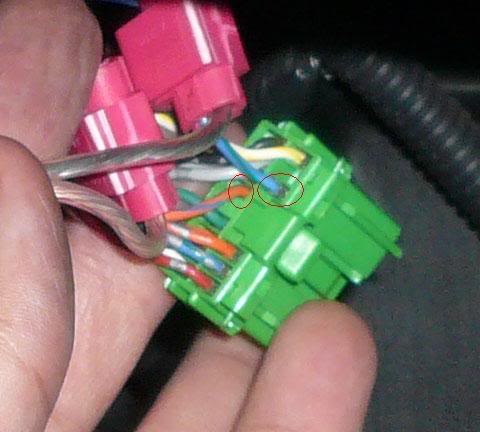
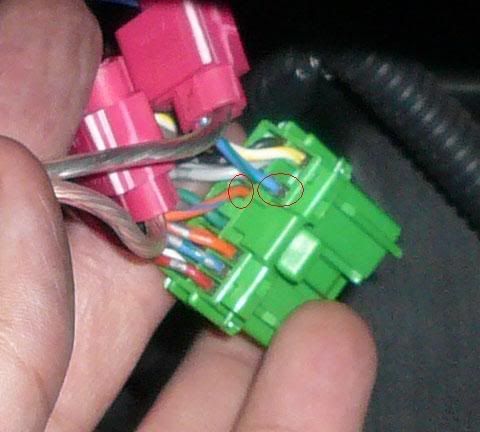
This is the Green harness off the EQ.
The Orange/Blue wire goes to the unshielded portion of the RCA cable.
The Blue/Green goes to the shielded portion of the RCA cable.
This is the aftermarket HU (left) and the Metra wire harness (right). Just connect the Remote wire on the HU wire harness to the Antenna wire on the metra harness. Those are the 2 blue wires not connected yet. They could be blue or Blue/White.
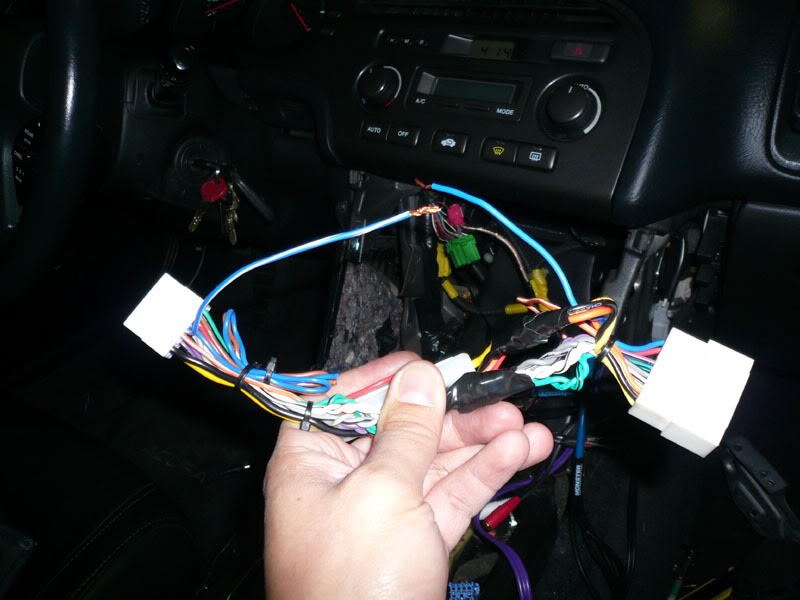
That's just 3 wires you need to mess with if you already have an aftermarket HU installed.
I hope this makes it a little easier to understand.


Instructor
Joined: Jul 2001
Posts: 181
Likes: 2
From reading and re-reading the post for installing an aftermarket headunit and keeping the factory sub, the following are needed?:
Green EQ harness behind radio:
1. connect shield RCA lead to B4 (orange with blue)
2. connect signal RCA lead to B9 (blue with green)
3. connect ground wire to B11 (black)
4. connect remote on (from metra) to B12 (white with yellow)
metra kit
1. connect to corresponding signals to aftermarket headunit
2. connect remote/antenna power on to green eq harness power
blue factory harness
1. connect to metra kit
are these correct for those who already have and aftermarket headunit?
Green EQ harness behind radio:
1. connect shield RCA lead to B4 (orange with blue)
2. connect signal RCA lead to B9 (blue with green)
3. connect ground wire to B11 (black)
4. connect remote on (from metra) to B12 (white with yellow)
metra kit
1. connect to corresponding signals to aftermarket headunit
2. connect remote/antenna power on to green eq harness power
blue factory harness
1. connect to metra kit
are these correct for those who already have and aftermarket headunit?

Originally Posted by illmat1k
I still don't get how you guys got the factory speakers to run with the aftermarket HU built in amp. I have an Alpine CDA9835 and I got the sub and all running, but no sound out my door speakers. I've been on this all day since 3pm and I'm super frustrated. Can someone please please please help me??

Cruisin'
Joined: Sep 2007
Posts: 24
Likes: 0
How exactly do you connect the subwoofer jack to the aftermarket HU after splicing it? Say if my HU has a preout for a subwoofer that supposed to go to the amplifier, how do you connect it? Also do you need an RCA jack that it is 1 to 2 R&L jacks?

10th Gear
Joined: Mar 2008
Posts: 11
Likes: 0
Originally Posted by illmat1k
I still can't figure out whats wrong with my setup. The harness is properly built and everything. Still no sound out of my mains. 
disconnect (unsplice or uncrimp) 2 matching color leads from your alpine harness and touch them directly to a speaker. if you still have no sound, then your HUs amp is fried. if you HAVE sound, then recnnect the speaker in the door, and take the two leads from the mmetra harness (factory side) and touch them to a AA battery. you should hear a pop and the cone should visibly move in or out. if it don't, then you probably have broken wires.... theres also the possiblity of a short. in most amps (external) if theres a short the amps will go into circuit protect mode and stop functioning until the problem is corrected. i'm not sure HUs have that feature but its possible, and the next most likely possibilty, provided you aint mess up the crimp portion of matching the alpine harness to the metra. i assume your radio powers up fine? mute is off? volume is up? everything worked normal while your factory radio was sitll connected?

Racer
Joined: Jan 2009
Posts: 376
Likes: 0
ok i attached the rca to thier wires off the green eq plug, and i did the remote on (from the new hu) to the blue power antenna off the metra harness. didnt work. do i need to connect something to turn the amp on to the green eq connector?

I don't think these directions are as easy for those of you with factory nav's, as far as splicing into the factory eq harness. I cannot get that radio bracket out, and removing the nav is not an option. Sux cuz I am taking a road trip in less than an hour with the kids and I want the DVD to give them something to focus on and allow me to retain my sanity!
=[
=[

For those of you with nav's, there will be a total of 8 (eight) screws to remove to get to this EQ. I just spent a half pulling and yanking until I figured out why after 6 screws the thing wouldnt separate. After that, all the directions are exactly the same. I used a Y connector because I have two sub outs. I guess I just got lucky, because there were no two colors of sheathing inside my RCA cables.
Good Luck
Good Luck

10th Gear
Joined: Jul 2007
Posts: 10
Likes: 0
Success! Can't say it was VERY easy, but after 15+ years of not playing with car stereos, it's done.
Here's the scoop : It's a 2002 TL Type-S without Navi (Canadian Car - It's my winter car). I've leased a 99 TL and an 03 TL in the past, which is why I wanted this as my winter car. I put in a Clarion VX409. After being told that there's no way to retain the factory sub, fine. I was planning on putting a small amp and box later (only had the car for a month).
After reading here, the project began. I didn't think the car would ever go back together...but it did. After some fussing around and figuring out how to get the various panels, console apart, I tapped into the green harness off of the Bose EQ as posted here, and connect the sub out on the HU. Then, used the power antenna trigger to connect to the orange wire on the factory harness. Viola, it worked. Polarity is key....tried it both ways...while it does work, you'll hear more bass following the first post on here.
Anyway, it's done. Next is to hardwire in my nav unit....small enough to fit right over the stock clock and hide all wires........
Thanks guys! The power of the forums!!
Vijay
Markham, Ontario
Canada
Here's the scoop : It's a 2002 TL Type-S without Navi (Canadian Car - It's my winter car). I've leased a 99 TL and an 03 TL in the past, which is why I wanted this as my winter car. I put in a Clarion VX409. After being told that there's no way to retain the factory sub, fine. I was planning on putting a small amp and box later (only had the car for a month).
After reading here, the project began. I didn't think the car would ever go back together...but it did. After some fussing around and figuring out how to get the various panels, console apart, I tapped into the green harness off of the Bose EQ as posted here, and connect the sub out on the HU. Then, used the power antenna trigger to connect to the orange wire on the factory harness. Viola, it worked. Polarity is key....tried it both ways...while it does work, you'll hear more bass following the first post on here.
Anyway, it's done. Next is to hardwire in my nav unit....small enough to fit right over the stock clock and hide all wires........
Thanks guys! The power of the forums!!
Vijay
Markham, Ontario
Canada
Instructor
Joined: Dec 2008
Posts: 194
Likes: 0
From: Toronto, On, Canada
me and my buddy were changing his deck from stock to some alpine one, and we were following the instructions from the very first post of this thread, and what happen was we get a trick everytime he puts the deck on just some of the people, but there is no movement or anything its like its not connected, after reading this i realized there is a way to this with the "EQ" harness, or the 2nd harness which at the moment is not used or anything, what do we do with the rca cable and this harness and how many rca do we need just one? male to plug into deck? and what bout the remote turn on ? thx guys im trying to understand from pictures but they are bit confusing.
Instructor
Joined: Dec 2008
Posts: 194
Likes: 0
From: Toronto, On, Canada
I got a little confused when going through this whole thread but it's not hard at all. Here are some pics I took today when I did it.
I just followed the above insturtions, I think it's from post #6.
This is the Green harness off the EQ.
The Orange/Blue wire goes to the unshielded portion of the RCA cable.
The Blue/Green goes to the shielded portion of the RCA cable.
This is the aftermarket HU (left) and the Metra wire harness (right). Just connect the Remote wire on the HU wire harness to the Antenna wire on the metra harness. Those are the 2 blue wires not connected yet. They could be blue or Blue/White.
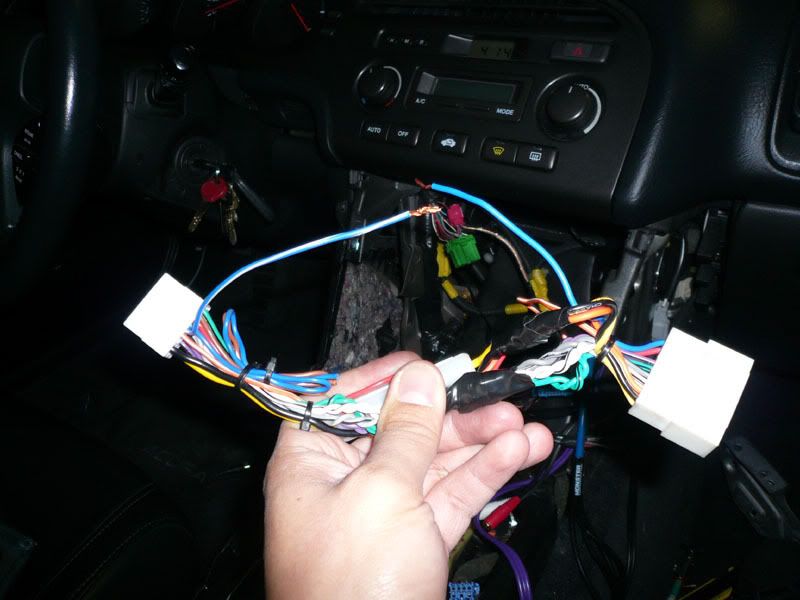
That's just 3 wires you need to mess with if you already have an aftermarket HU installed.
I hope this makes it a little easier to understand.
I just followed the above insturtions, I think it's from post #6.
This is the Green harness off the EQ.
The Orange/Blue wire goes to the unshielded portion of the RCA cable.
The Blue/Green goes to the shielded portion of the RCA cable.
This is the aftermarket HU (left) and the Metra wire harness (right). Just connect the Remote wire on the HU wire harness to the Antenna wire on the metra harness. Those are the 2 blue wires not connected yet. They could be blue or Blue/White.
That's just 3 wires you need to mess with if you already have an aftermarket HU installed.
I hope this makes it a little easier to understand.
Cruisin'
Joined: Sep 2007
Posts: 24
Likes: 0
I have a few questions regarding this. I successfully managed to install an aftermarket HU in my TL and got the Sub and Amp to work. But now I got this humming sound that I can hear when there's no sound being played. You can also hear the humming sound match the way I press the gas pedal. I read somewhere that this may be cause by the Gray wire on the metra harness. Was I supposed to connect the Gray wire to the ground? Or does anyone know have a solution to this?
Though I was expecting a somewhat drastic change in SQ after changing my HU, what would happen if I were to connect the Bose EQ box back into the connector?
Also for some reason, my backlight for the digital timer (the LCD display of the time), stop working. It doesn't light up with the accessory light turned on. I'm sure I plugged everything in correctly. Any solutions?
Though I was expecting a somewhat drastic change in SQ after changing my HU, what would happen if I were to connect the Bose EQ box back into the connector?
Also for some reason, my backlight for the digital timer (the LCD display of the time), stop working. It doesn't light up with the accessory light turned on. I'm sure I plugged everything in correctly. Any solutions?

2013 sh-awd adv
Joined: Sep 2005
Posts: 101
Likes: 12
From: houston, tx
I have a few questions regarding this. I successfully managed to install an aftermarket HU in my TL and got the Sub and Amp to work. But now I got this humming sound that I can hear when there's no sound being played. You can also hear the humming sound match the way I press the gas pedal. I read somewhere that this may be cause by the Gray wire on the metra harness. Was I supposed to connect the Gray wire to the ground? Or does anyone know have a solution to this?
Though I was expecting a somewhat drastic change in SQ after changing my HU, what would happen if I were to connect the Bose EQ box back into the connector?
Also for some reason, my backlight for the digital timer (the LCD display of the time), stop working. It doesn't light up with the accessory light turned on. I'm sure I plugged everything in correctly. Any solutions?
Though I was expecting a somewhat drastic change in SQ after changing my HU, what would happen if I were to connect the Bose EQ box back into the connector?
Also for some reason, my backlight for the digital timer (the LCD display of the time), stop working. It doesn't light up with the accessory light turned on. I'm sure I plugged everything in correctly. Any solutions?
That humming noise comes from one of two things. 1, you have your RCA cables near your power cable running down the side of the car to your amp. you need to separate them. Run one down each side of the car.
2. your ground wire (on your amp) needs to be re-grounded. Check where it is grounded and make sure you sand away any paint between the wire and the surface. Make sure you ground it tightly to the 'ground' also. That usually fixed my engine noise problems.




Intermediate
Joined: Jun 2006
Posts: 46
Likes: 0
From: Chicago, IL

 A lot of this thread has been deleted, so for all the future installers...I recommend following Garrote's DIY on the first page. I posted some helpful info as well...You'll need the cables pictured to connect your new HU to the sub connection on the factory EQ, which is located behind the clock. I used the RCA with the spliced end to make the connection the the EQ. I'm pretty sure that's all you'll need if your HU only has one sub output. Mine had two so I had to get an RCA Y-adapter -
http://www.radioshack.com/product/in...odsInSession=1
http://www.radioshack.com/product/in...odsInSession=1
Good luck with your installations, everybody!
 Let's keep this thread alive.
Last edited by dlersch; Jan 4, 2010 at 02:41 PM.
Intermediate
Joined: Jun 2006
Posts: 46
Likes: 0
From: Chicago, IL


2nd Gear
Joined: Feb 2010
Posts: 2
Likes: 0
metra wiring with pioneer avic z1
please somebody help me with getting the factory sub working on my application!! so far I have taken an rca y splitter and connected my 2 sub outputs from the avic z1 to the recomended wires located at the connector where the factory equalizer is. Assuming that I succesfully made contact with the 2 wires going to the factory sub, what wire on the metra harness needs to go where on the avic harness. Again I've been looking everwhere on the site and I can not find a clear answer for my application,again I have an 02 tl-s with no navi,pioneer avic z1 with metra wiring harness. Everything on the harness is connected except the dimmer wire off of the metra harness,orange/white, and coming off of the avic harness I have what says Auto Antenna connected to the metra wire that says power antenna. Please somebody help me get this sub working.
2nd Gear
Joined: Feb 2010
Posts: 2
Likes: 0
in addition to my previous post, with everything hooked up the way as described in my post, the most I get out of the sub is a humming/buzzing on radio only with the rca's hooked up,as soon as i disconnect one or the other,the noise goes away.But the sub is not responding at all,to make sure it wasn't my HU settings,I adjusted everything to make sure the sub would be heard,still nothing

1st Gear
Joined: Apr 2010
Posts: 1
Likes: 0
i was very disappointed after spending hours on wiring up the factory sub. Everything working as it suppose to, i can see the sub cone moving up and down laying inside the trunk but there hardly any sound coming out of the sub. is there any way to fix this? i also tried adjusting the setting in the HU, but no luck, still the same.


Racer
Joined: Sep 2009
Posts: 363
Likes: 1
You need to take an RCA cable cut it and see it. I didn't understand at first either. In the cable (under the rubber shield) there is a foil shield, under that another skinny rubber shield with the copper wires in the middle of it all.
So the shielded part is the foil.
So the shielded part is the foil.
I finally have the DEFINITIVE answer on how to connect the BOSE sub to an aftermarket headunit (I actually found it out by accident):
- Connect new head-unit to car's factory harness using Metra harness
- Connect Remote wire from harness to factory "orange" (or appropriate color) remote turn-on wire
- Connect RCA sub-out from head-unit to Bose amp's signal wires (at Bose EQ or at Amp) using wiring diagram
- NEW: Connect Remote wire from your headunit to the "Antenna Turn-On" from the Metra harness.
do i connect the orange wire on the green plug to the remote wire on my deck?
and secondly
my antenna turn on is blue its connected to a blue wire on the wiring harness so do i remove that and connect that blue wire to the remote turn which is blue/white on aswell then what do i connect the blue wire on the harness to? let me know im a bit confused lol
Last edited by dc2kid; Apr 13, 2010 at 02:21 PM.
10th Gear
Joined: Sep 2006
Posts: 14
Likes: 0
From: Raleigh NC
I did it. Replaced factory head unit and works perfectly with the factory sub. Everything works great, replaced all four door speakers too. Stressed out for days anticipating this change out. Took my time. Happy as hell with it now.

Advanced

Joined: Aug 2003
Posts: 88
Likes: 22
From: LA, CA


Cruisin'
Joined: May 2010
Posts: 15
Likes: 0
 Subwoofer!
so I got a kenwood x994 for my birthday and it works awesome for the most part but after around 19 on the kenwood, the sound kinda starts dying out. I believe this is due to the mids being overpowered and the sub not reproducing the low frequencies I need it to do. Can anyone help? With the stock headunit it worked perfectly fine and I could be blasting A Milli (listen to it, it tests your subs quite well) loud and have the sub working in the back.

Intermediate
Joined: Mar 2010
Posts: 26
Likes: 0
Ugh, I've read through this thread 5 times and I think I have everything connected correctly but my sub still isn't powering on. Yes, I did ensure that the sub output is turned on on my head unit.
I decided to run wires straight to the amp because there just wasn't enough room for me to work in the cramped space in the center console. So, I took an RCA cable, stripped down and separated the center conductor and shielding, and attached the center conductor to the blue/green and the shielding to the orange/blue wires coming out of the amp.
Then, I took my head unit's remote turn on wire, and connected that to the orange wire at the amp (the thin one on the back row, not one of the two thicker ones. Same connector as my RCA cable.)
I still can't get my sub to work. Any suggestions?
Thanks
I decided to run wires straight to the amp because there just wasn't enough room for me to work in the cramped space in the center console. So, I took an RCA cable, stripped down and separated the center conductor and shielding, and attached the center conductor to the blue/green and the shielding to the orange/blue wires coming out of the amp.
Then, I took my head unit's remote turn on wire, and connected that to the orange wire at the amp (the thin one on the back row, not one of the two thicker ones. Same connector as my RCA cable.)
I still can't get my sub to work. Any suggestions?
Thanks