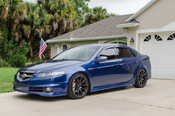
Successfully swapped out the NAV for a tablet.

Thread Starter
Instructor
Joined: Feb 2012
Posts: 100
Likes: 16
From: Ponte Vedra Beach, FL
Successfully swapped out the NAV for a tablet.
I made a post a few days ago inquiring about using a video interface and installing a Raspberry Pi. But, was told that that idea sucked. lol. So, I read through threads where people used Acer tablets, iPads, galaxy tabs, etc. But, I didnt like the look of them. Don't get me wrong. You guys did a great job. But, I didn't like the physical home buttons, the visible camera lenses, the big SAMSUNG logo on the glass, etc.
So, I decided to go with a Nexus 7. The front is solid black. No physical buttons. No brand badging. The only physical buttons are on the side (home, vol +, vol -).
So, I rerouted them to the stock nav controls.
Here's a video of the (almost) final product. (The screen isn't fully mounted yet. And, I'm waiting on my USB OTG Y adapter from Amazon.)
If anybody wants more info on this, I can give more details and/or post pictures.
http://www.youtube.com/watch?v=vqM96...ature=youtu.be
So, I decided to go with a Nexus 7. The front is solid black. No physical buttons. No brand badging. The only physical buttons are on the side (home, vol +, vol -).
So, I rerouted them to the stock nav controls.
Here's a video of the (almost) final product. (The screen isn't fully mounted yet. And, I'm waiting on my USB OTG Y adapter from Amazon.)
If anybody wants more info on this, I can give more details and/or post pictures.
http://www.youtube.com/watch?v=vqM96...ature=youtu.be
Last edited by 00g; Jun 11, 2013 at 12:21 PM. Reason: For some reason the video was imbedded twice. So, I just put a link instead.
Thread Starter
Instructor
Joined: Feb 2012
Posts: 100
Likes: 16
From: Ponte Vedra Beach, FL
I saw a video where I guy put this same tablet into his....I don't remember...Mazda? And he detailed what he did. I copied most of what he did. But, he hit a wall when it came to rerouting the volume buttons due to the way his car was wired. Our cars are wired the same way. But, I fixed the issue.
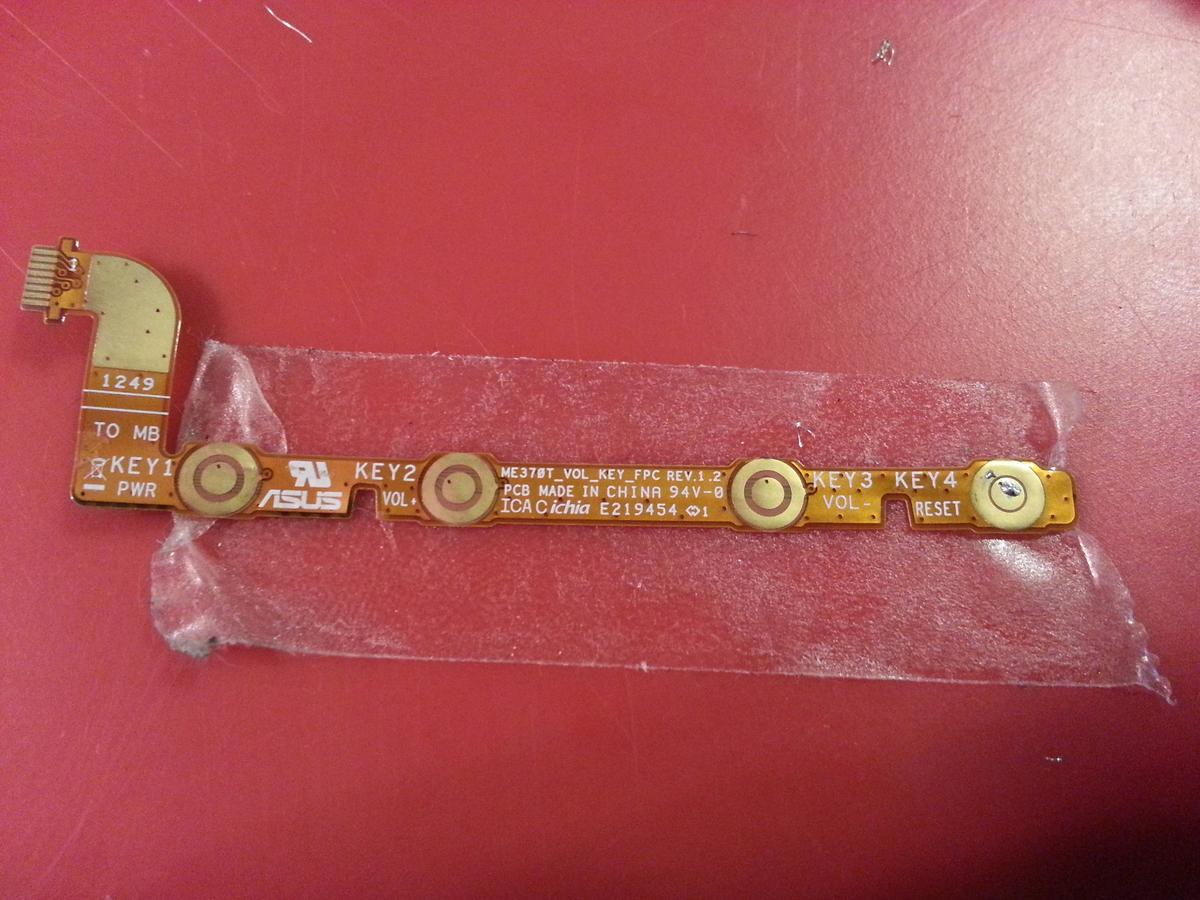
When you pull open up the nexus the three buttons are on 1 ribbon cable. I pulled the ribbon out of the tablet, peeled back the top layer, and then soldered wires to the contacts.
I taped it down with double stick tape, so it didn't move around when I was soldering it.
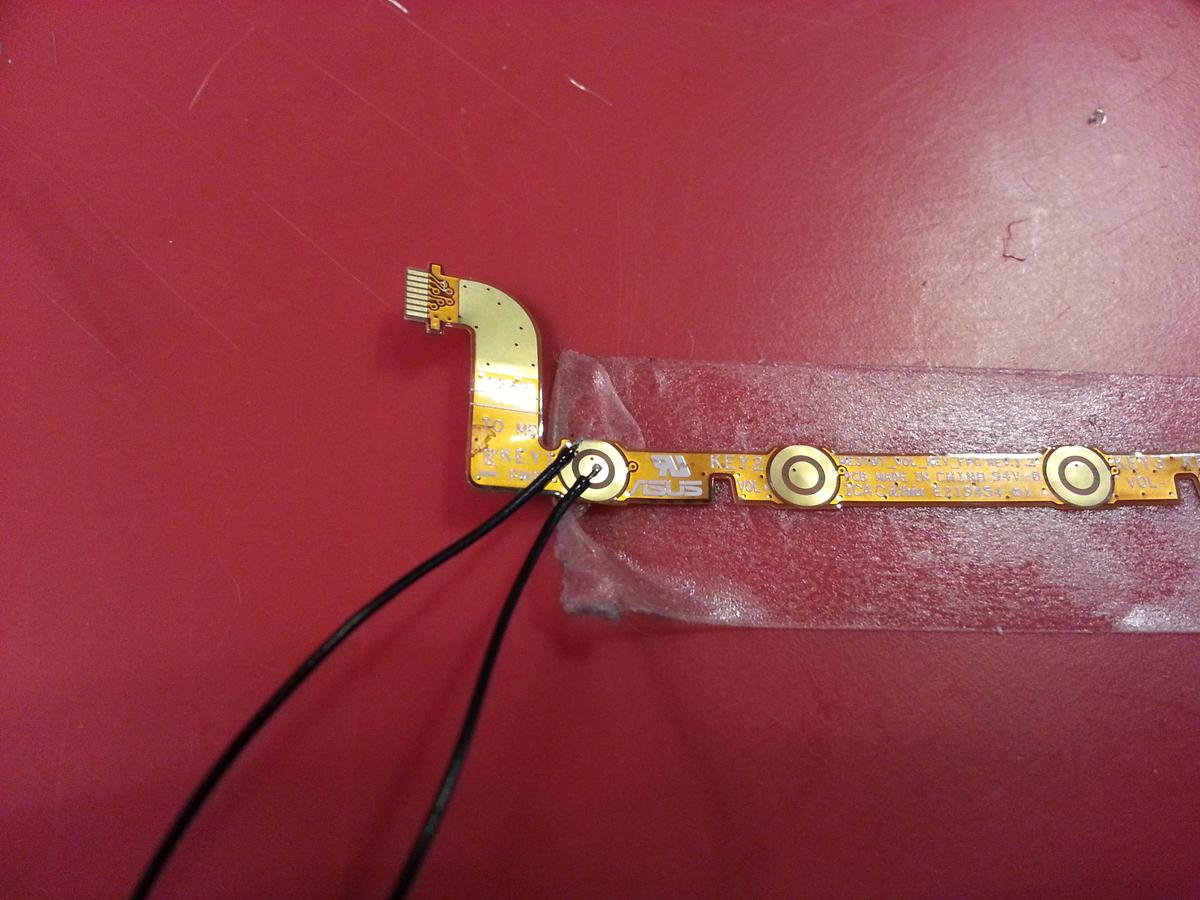
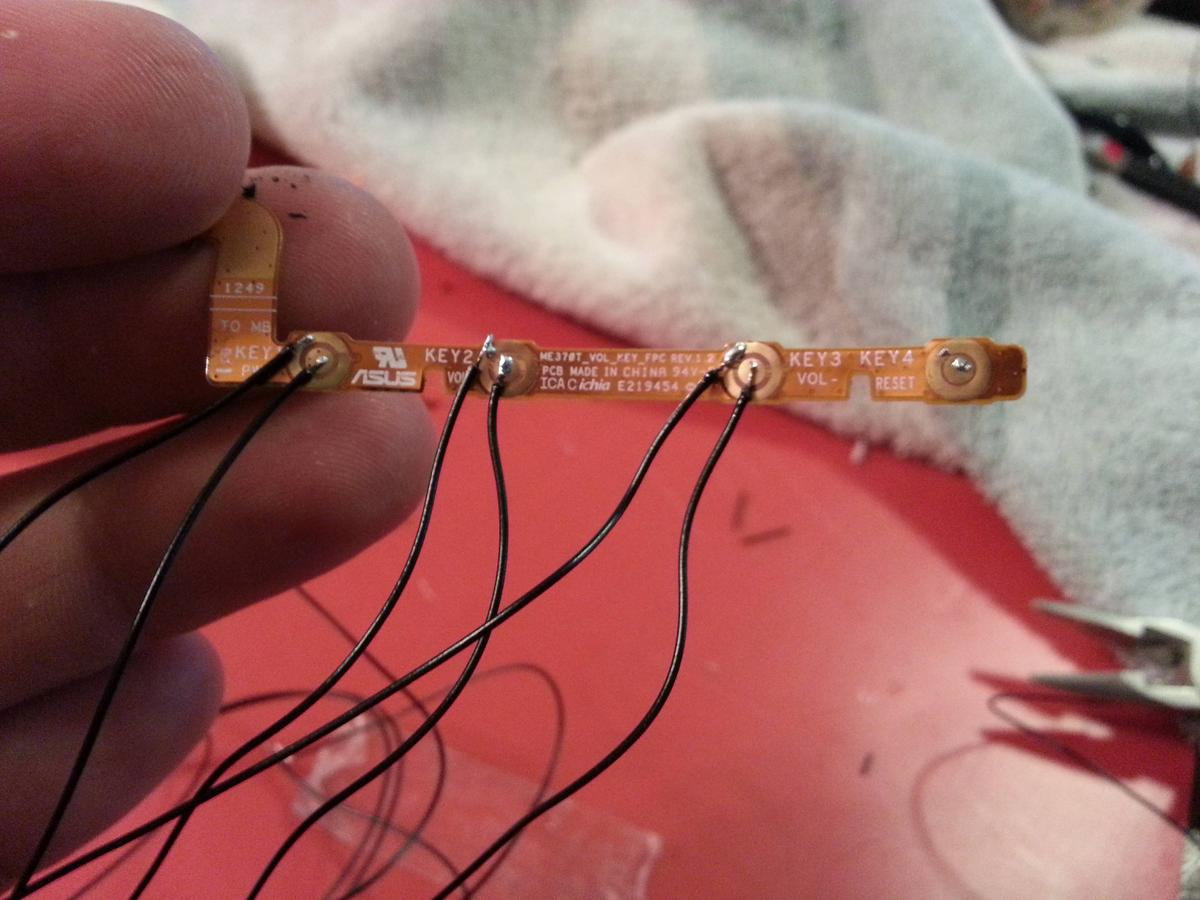
Then, I took apart the Acura NAV buttons, and soldered directly to the back of the button board.
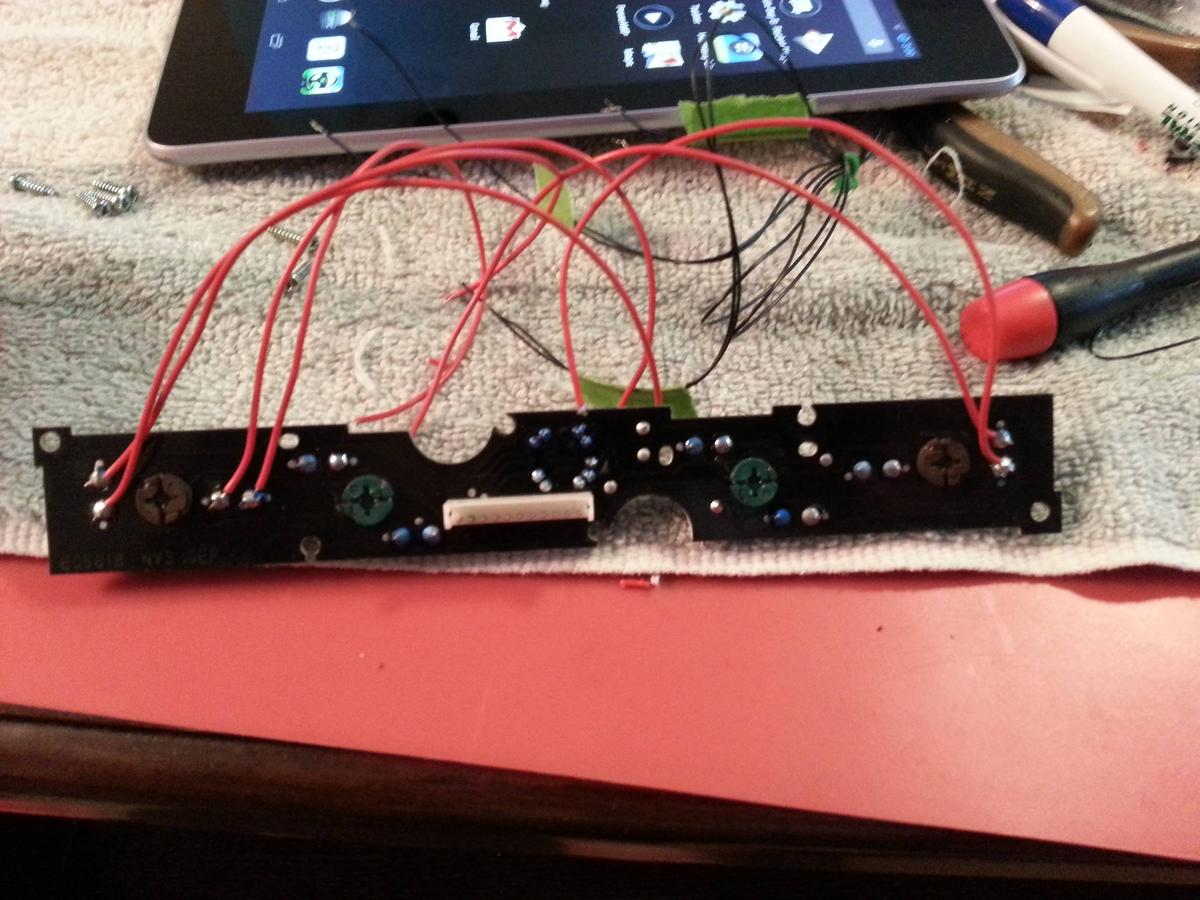
The problem with doing this, is apparently our cars are wired to "share" a common ground(?) amongst many buttons. All the buttons to the left of the directional joystick share one. And the joystick and the buttons to the right all share one as well. So, that meant if I didn't alter any of the Acura wiring, I could only wire up 2 buttons. One on the left side, and one on the right side.
So, to overcome this , I took my exacto knife, and simply cut the trace on the front of the Nav button circuit board that connected the two buttons.
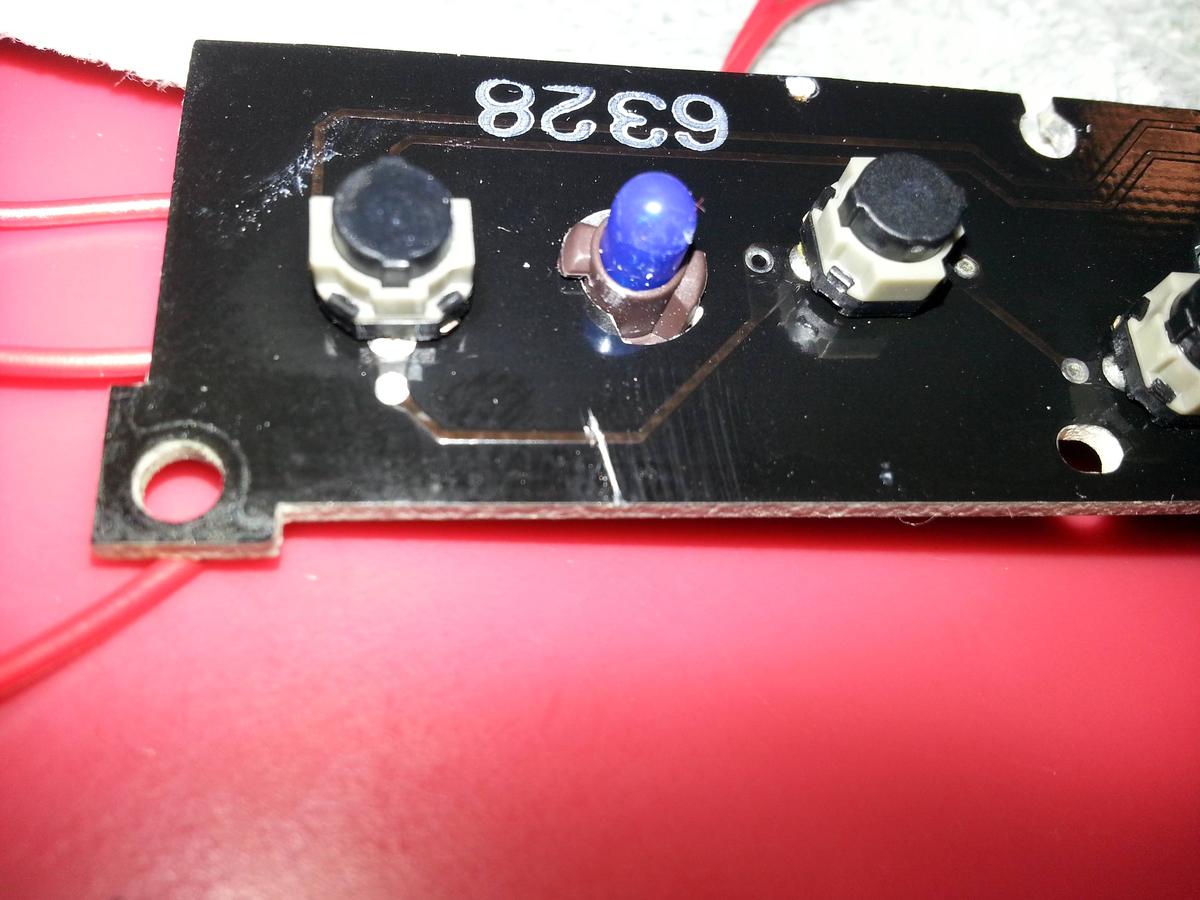
The, I ran them out of the back piece, and soldered them together accordingly.
I did have to cut a small out amount of plastic out behind both holes that I used so that the wires would fit through.
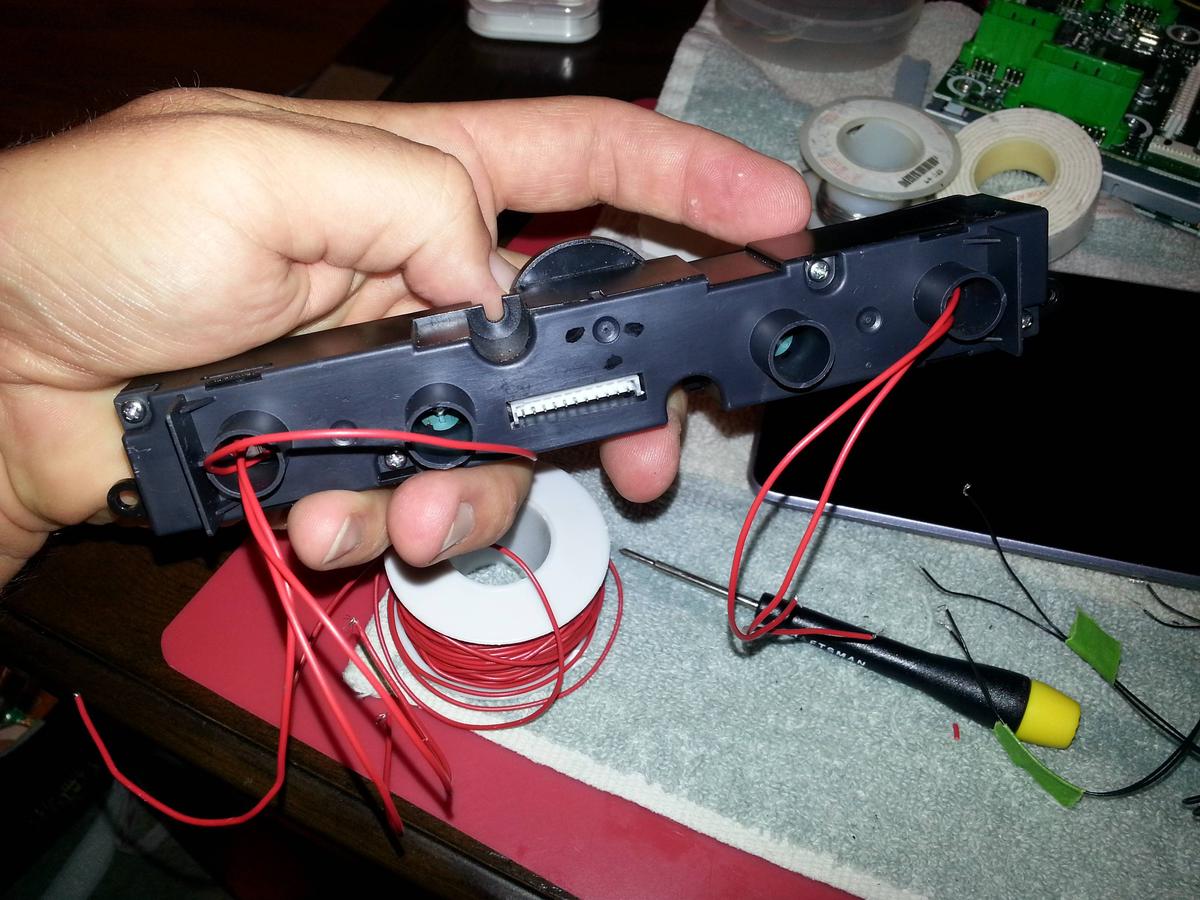
Oh. I also routed the USB and headphone jacks out of the tablet as well.
They're not still taped here. They were just like that to keep them out of the way and still accessible. I'm not entirely certain where exactly I'm gonna mount them. And, I haven't put my car back together yet. So, I'll let you know if I run into any snags. But, so far so good.
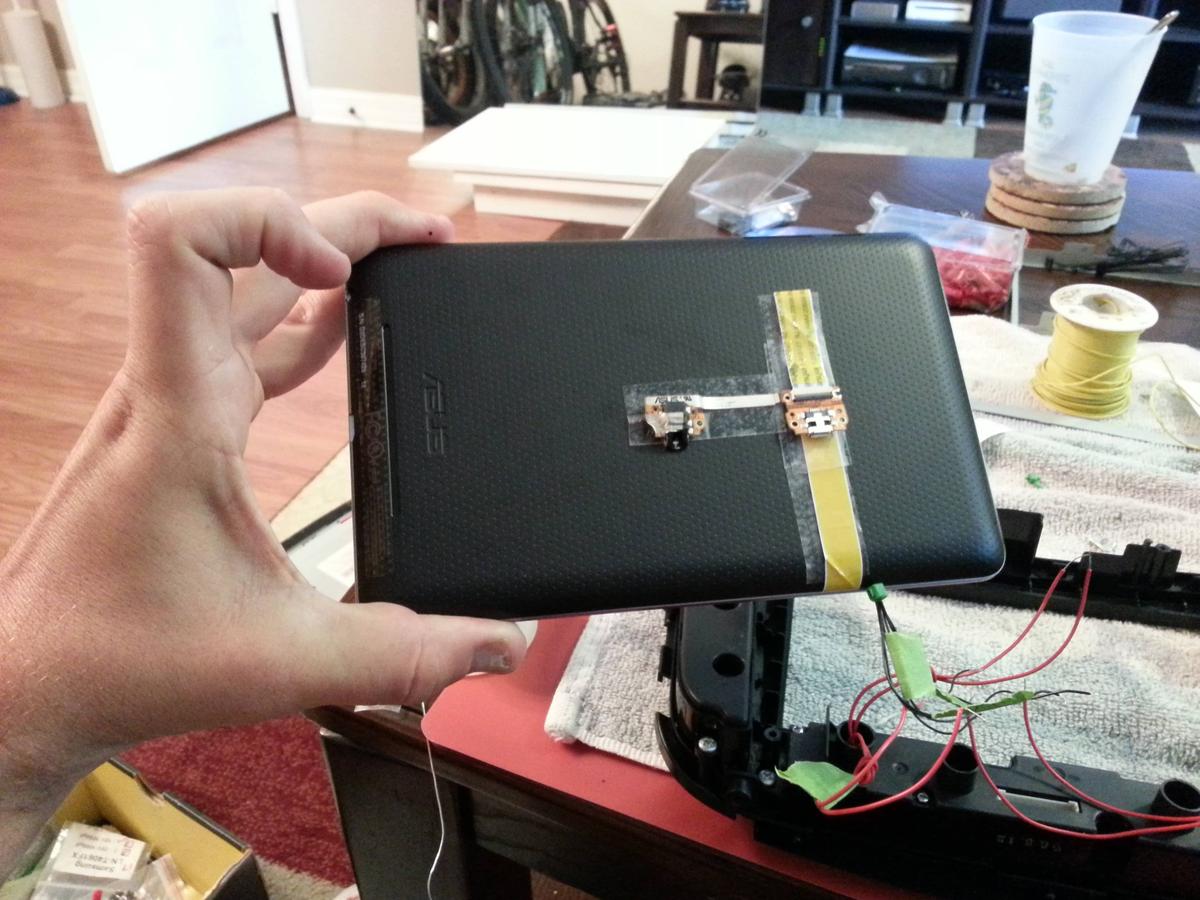
When you pull open up the nexus the three buttons are on 1 ribbon cable. I pulled the ribbon out of the tablet, peeled back the top layer, and then soldered wires to the contacts.
I taped it down with double stick tape, so it didn't move around when I was soldering it.

Then, I took apart the Acura NAV buttons, and soldered directly to the back of the button board.
The problem with doing this, is apparently our cars are wired to "share" a common ground(?) amongst many buttons. All the buttons to the left of the directional joystick share one. And the joystick and the buttons to the right all share one as well. So, that meant if I didn't alter any of the Acura wiring, I could only wire up 2 buttons. One on the left side, and one on the right side.
So, to overcome this , I took my exacto knife, and simply cut the trace on the front of the Nav button circuit board that connected the two buttons.
The, I ran them out of the back piece, and soldered them together accordingly.
I did have to cut a small out amount of plastic out behind both holes that I used so that the wires would fit through.
Oh. I also routed the USB and headphone jacks out of the tablet as well.
They're not still taped here. They were just like that to keep them out of the way and still accessible. I'm not entirely certain where exactly I'm gonna mount them. And, I haven't put my car back together yet. So, I'll let you know if I run into any snags. But, so far so good.
Last edited by Steven Bell; Jun 11, 2013 at 09:06 PM. Reason: Merged Posts





Trending Topics

Thread Starter
Instructor
Joined: Feb 2012
Posts: 100
Likes: 16
From: Ponte Vedra Beach, FL
Stay tuned.
I finished mounting the tablet and put set it all in the car for a test run and I was having issues with the Volume - button. But, gotta put it away for the day and head to the GF's house. I figure that out tomorrow.
I finished mounting the tablet and put set it all in the car for a test run and I was having issues with the Volume - button. But, gotta put it away for the day and head to the GF's house. I figure that out tomorrow.


Thread Starter
Instructor
Joined: Feb 2012
Posts: 100
Likes: 16
From: Ponte Vedra Beach, FL
So, I can't speak for the bluetooth. However, there's no reason why it wouldn't. I've only removed the LCD screen. Think of it like your computer. If you turned off your monitor, it wouldn't effect the rest of the computer. It's just "headless" now.
Thread Starter
Instructor
Joined: Feb 2012
Posts: 100
Likes: 16
From: Ponte Vedra Beach, FL
I've had some hiccups.
Most notably, the tablet acting as if I were tapping the vol down button. But, only when everything was installed, and the car was running.
I'm still not certain what was causing that. But, to fix it, I desoldered the factory momentary switch buttons that are behind the nav controls, and I installed my own, and wired them completely independent of the vehicle. Long story short, it works, and it was a bitch, and I wanted to kill someone many times today.
So, here it is all installed and up and running.
After shooting this, I had more issues. But, I think I just resolved them. We'll see in the morning when I put it back in. I'm currently trying to download all of Florida in the Google Maps offline support.
Most notably, the tablet acting as if I were tapping the vol down button. But, only when everything was installed, and the car was running.
I'm still not certain what was causing that. But, to fix it, I desoldered the factory momentary switch buttons that are behind the nav controls, and I installed my own, and wired them completely independent of the vehicle. Long story short, it works, and it was a bitch, and I wanted to kill someone many times today.
So, here it is all installed and up and running.
After shooting this, I had more issues. But, I think I just resolved them. We'll see in the morning when I put it back in. I'm currently trying to download all of Florida in the Google Maps offline support.


I don't have stock nav, which sucks obviously, but I want to do this because I hate the look of the dash without it. I am going to have to figure out a way to turn the power on and off and stuff without access to the tablet buttons. I am also putting a 7in touch screen deck, the stock stereo with the cassette makes the car seem out of date.
I love your install and will be using it to help me with ideas please post more install pics if you have them.
I love your install and will be using it to help me with ideas
please post more install pics if you have them.
Thread Starter
Instructor
Joined: Feb 2012
Posts: 100
Likes: 16
From: Ponte Vedra Beach, FL
If you do the Nexus 7, you can root it and install a custom ROM that will do that for you.
http://mehrvarz.github.io/nexus-7-usbrom/
I was using Tasker to do it and was getting really frustrated with it.....then I realized the ROM already did that by default. Just have to set it to "fixed installation" mode.
http://mehrvarz.github.io/nexus-7-usbrom/
I was using Tasker to do it and was getting really frustrated with it.....then I realized the ROM already did that by default. Just have to set it to "fixed installation" mode.

Intermediate
Joined: Jun 2010
Posts: 34
Likes: 1
Impressive. Extremely Impressive.
Are you considering a full write up? I'd definitely be interested in doing the same thing considering nexus 7 are damn cheap used.
I take it everything else still works on the radio albeit with out the screen info?
Are you considering a full write up? I'd definitely be interested in doing the same thing considering nexus 7 are damn cheap used.
I take it everything else still works on the radio albeit with out the screen info?

Instructor
Joined: Jun 2011
Posts: 105
Likes: 2
From: LA
any way to have that inputted into the nexus?


Racer
Joined: Mar 2009
Posts: 271
Likes: 23
From: Alexandria, VA
If you do the Nexus 7, you can root it and install a custom ROM that will do that for you.
http://mehrvarz.github.io/nexus-7-usbrom/
I was using Tasker to do it and was getting really frustrated with it.....then I realized the ROM already did that by default. Just have to set it to "fixed installation" mode.
http://mehrvarz.github.io/nexus-7-usbrom/
I was using Tasker to do it and was getting really frustrated with it.....then I realized the ROM already did that by default. Just have to set it to "fixed installation" mode.
 I was debating about doing a swap to begin with, but once my Navi decides to burn out, this is definitely the way to go.
Can you post a pic of the rear with the tablet installed in between the button plugs? I was thinking about going with a different tablet because the nexus 7 does not have an sd card slot for expandable storage. I guess I could use USB storage tho.
Id like to find a tablet that will fit but do not have to remove the tablets case. Its not a huge issue just ease of install.
Id like to find a tablet that will fit but do not have to remove the tablets case. Its not a huge issue just ease of install.
Thread Starter
Instructor
Joined: Feb 2012
Posts: 100
Likes: 16
From: Ponte Vedra Beach, FL
The only things I didn't cover are the mounting of the tablet, the audio input to the deck, and maybe power.
I have an iSimple which I used the AUX input for audio.
I hooked up an OTG Y adapter (male micro USB, female micro USB, female USB) to the tablet's USB port. Then ran both a standard USB and a micro USB from the Y adapter, under the cupholders, and into my center console. The micro for power of course (I wanted to be able to unplug it if necessary). The standard USB for an external HDD or thumb drive.
And yeah, the Nexus is super cheap. I got the 32gb one brand new at a flea market for $175.
XM....I've never had XM in this car. But, my iPod song titles still come up on the AC temp screen above the tablet (don't know what it's called). So, I would assume your XM would too.
Can you route that info to the tablet? I seriously doubt that. But, if you have a good enough internet connection, can't you listen to XM from the web (on the tablet?)
One thing I thought I was gonna lose by ditching the screen was my sub controls. But, I found out a few days ago, that the right knob can control bass/treble/balance/fader/center/sub. That seriously made my day. I was contemplating getting a new amp and a wired gain knob.
Can you post a pic of the rear with the tablet installed in between the button plugs? I was thinking about going with a different tablet because the nexus 7 does not have an sd card slot for expandable storage. I guess I could use USB storage tho.
Id like to find a tablet that will fit but do not have to remove the tablets case. Its not a huge issue just ease of install.
Id like to find a tablet that will fit but do not have to remove the tablets case. Its not a huge issue just ease of install.
I don't have any pictures of my own. But, I found this picture online somewhere (may have been here). I had it saved to my desktop since before I even bought the tablet.
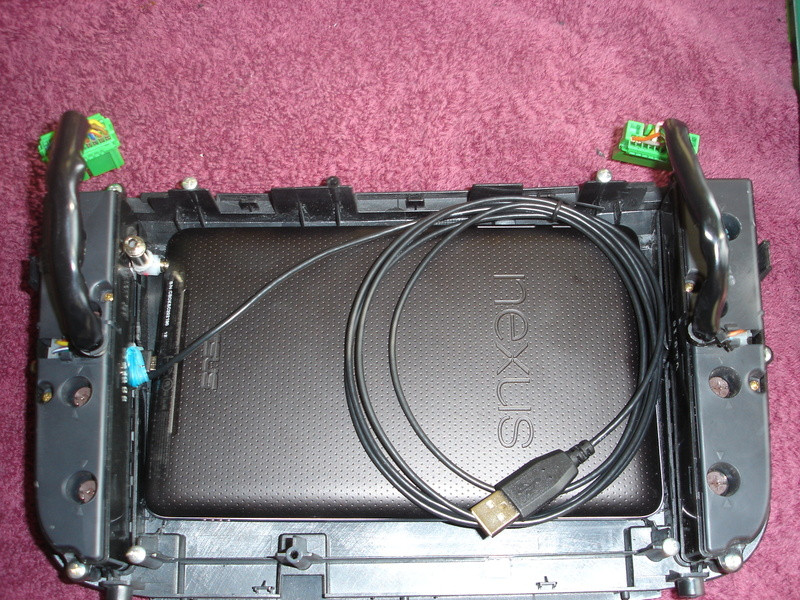
When it comes to mounting, the Nexus actually fits almost perfectly into where the factory LCD was mounted. There was a small amount of forward/backwards play, and a little bit of side to side play.
Instead of building some kind of bracket or strapping it down as some others have done, I decided to make a gasket that would hold it in place, not scuff up the tablet, be removable, and also act as a shock absorber when I hit bumps.
To do this I bought this stuff.
Amazing Mold Putty

I wrapped the tablet in saran wrap, sprayed a little WD-40 around the inside of the bezel (where the putty was going to touch) so I'd be able to pull the gasket back out once it dried (May not be necessary. But, I didn't want to have to go spend another $20 on more putty if I ruined the first batch). Put the tablet where I wanted it, mixed the putty up, pressed it all around the tablet to make sure it filled all the nooks and crannies, double checked how the tablet was aligned, then just let it dry for ~25 minutes. After then I could pull it out and put it back in place as many times as I needed. It was like rubber. And the box said it can withstand temperatures of up to 400 something degrees.
It isn't pretty. But, it works REALLY REALLY well. I was/am very impressed with this product.
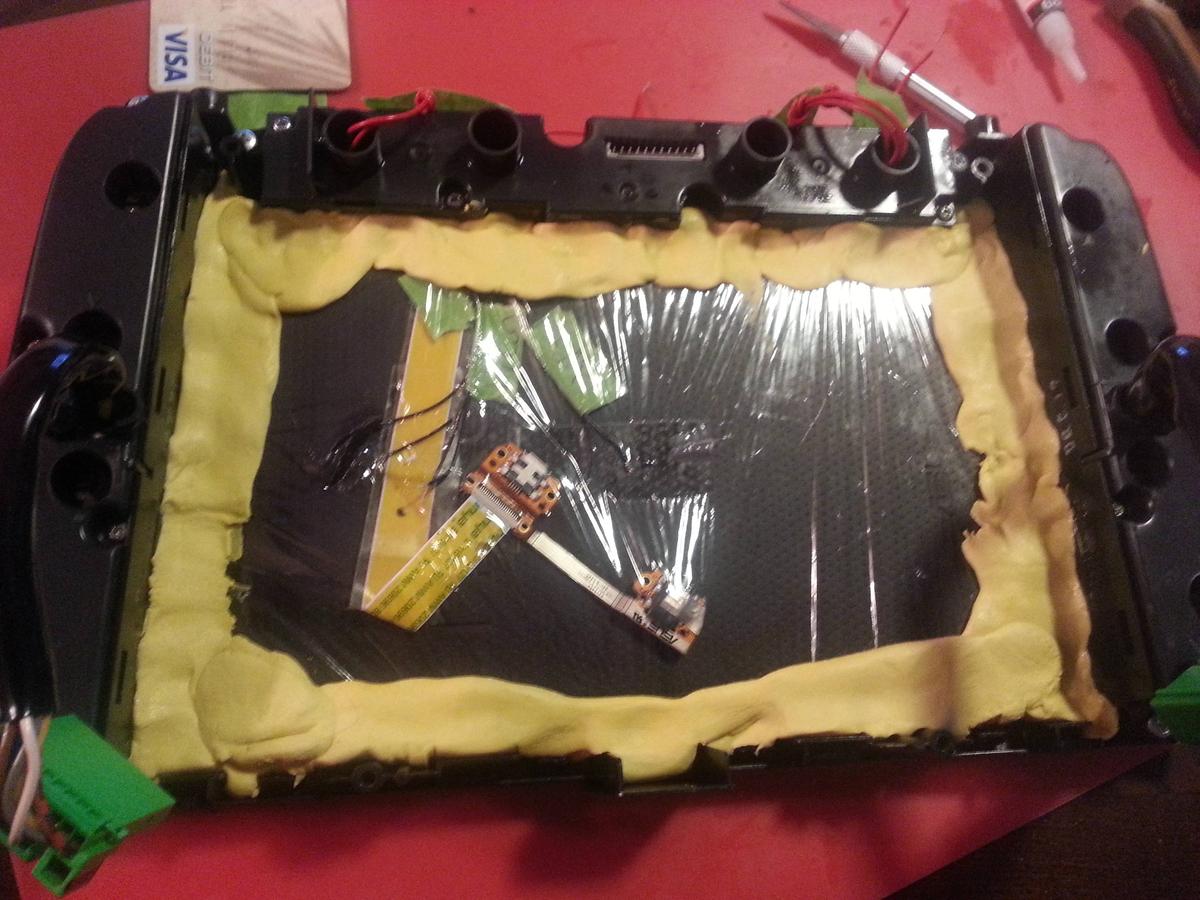
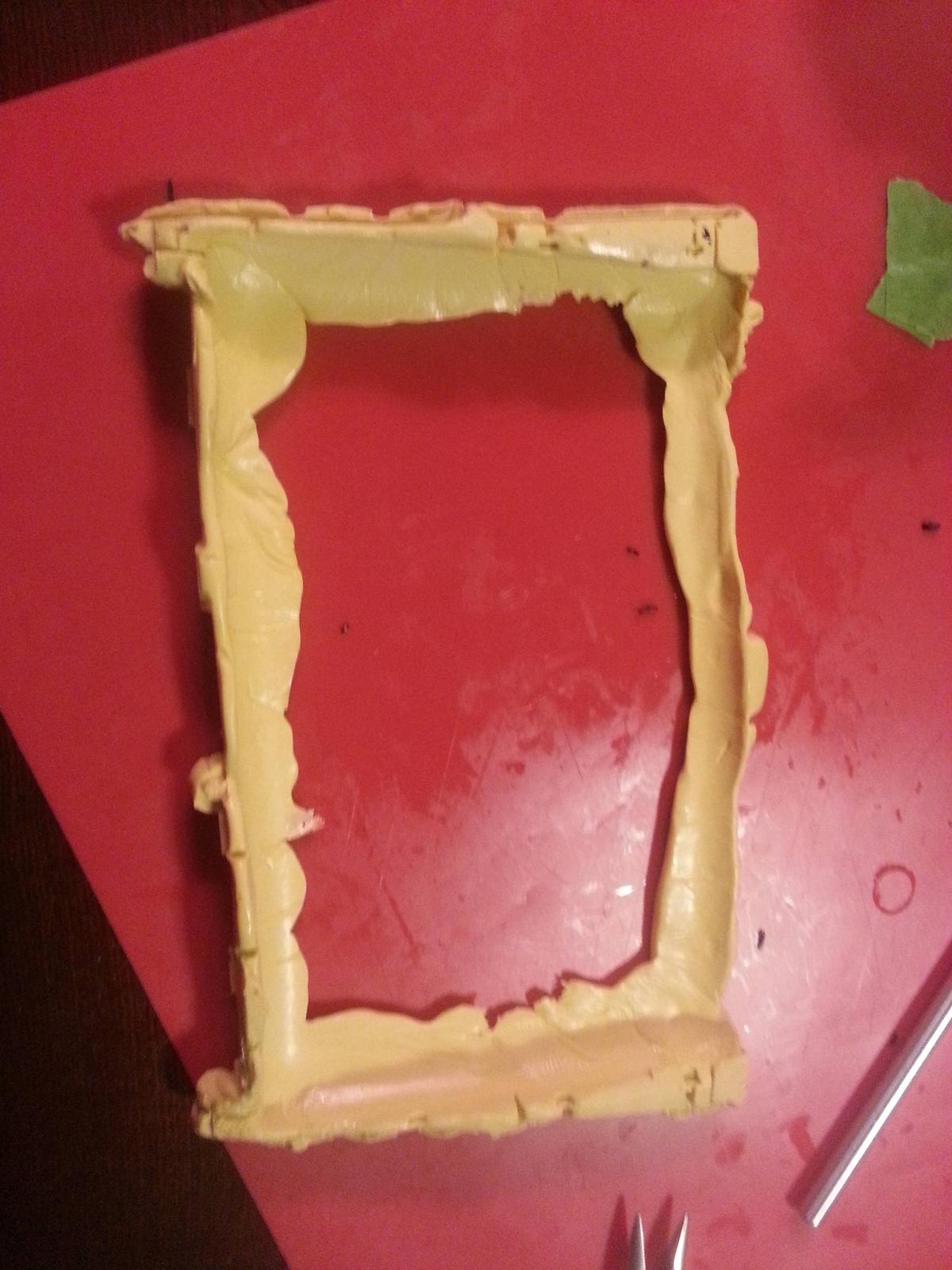
This one shows how rubbery it is.
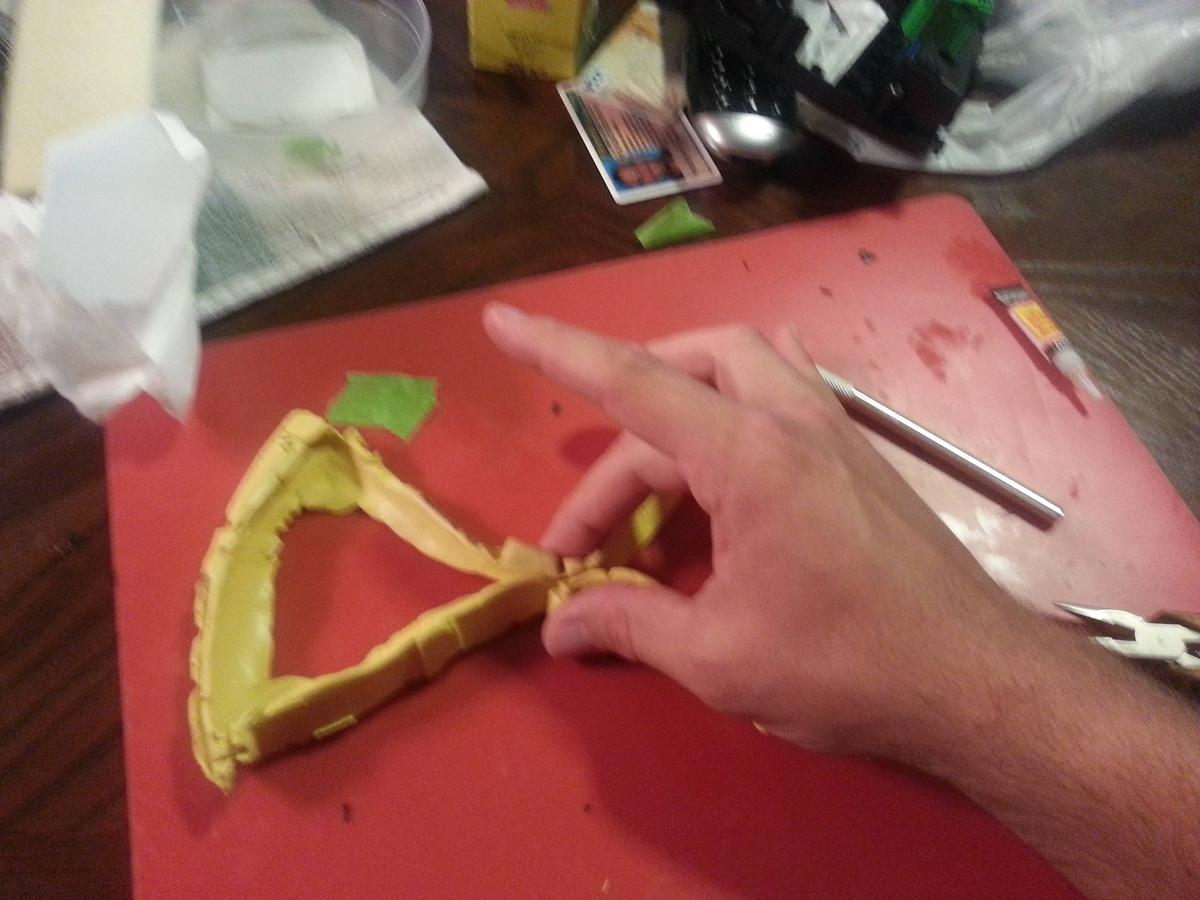

I was just curious how much space was around the tablet. That way I can decide on which to buy. Like you said I should look at the Nexus specs. The thing that gets me tho is not all tablets screens are directly in the center, like off center for the power button.

8th Gear
Joined: Nov 2012
Posts: 8
Likes: 2
hi, i really like the way it look. I being thinking of doing the same thing in my tl but i've being wondering if it is possible to install a tablet that is a little bigger. I Have a Toshiba Excite 7.7 that is around 1/4" larger and 1/2" wider than the nexus. Do you think it will fit??

Thread Starter
Instructor
Joined: Feb 2012
Posts: 100
Likes: 16
From: Ponte Vedra Beach, FL
hi, i really like the way it look. I being thinking of doing the same thing in my tl but i've being wondering if it is possible to install a tablet that is a little bigger. I Have a Toshiba Excite 7.7 that is around 1/4" larger and 1/2" wider than the nexus. Do you think it will fit??
Seeing as how you already have the tablet, I recommend taking the shroud off and seeing for yourself if it'll fit. I mean, you'll have to do that anyway to get started on the project.
Thread Starter
Instructor
Joined: Feb 2012
Posts: 100
Likes: 16
From: Ponte Vedra Beach, FL
I got an acer a100 off ebay for $65, But you said you got frustrated with Tasker? I haven't tried it so I have no idea. I know the rom you sent the link for has fixed install mode. I think im just going to buy this 16gb Nexus 7 of a guy from craigslist for $120. Unless you think tasker will work? Im not going to re route any off the buttons. I wont be running it thru my radio, so Im just going to turn it up all the way and leave it.
Let me know what you think.
Let me know what you think.
Good install, I love the mold putty idea- I was trying to think of something like that for when I installed mine but I never heard of that stuff so I just epoxied it. I didnt bother with the volume buttons because when its plugged into the USAspec adapter you can just use the stock VOL knob, and you can adjust the volume on the screen in the menu. I did however have to hook up an external power button for it. I used "automateit" and it didnt work very well, but that was due to my charging issues that I need to get fixed when I get back to the states... Im also gonna buy the OBD2 adapter for my tourque app so I can have the gauges on screen.
Thread Starter
Instructor
Joined: Feb 2012
Posts: 100
Likes: 16
From: Ponte Vedra Beach, FL
I got an acer a100 off ebay for $65, But you said you got frustrated with Tasker? I haven't tried it so I have no idea. I know the rom you sent the link for has fixed install mode. I think im just going to buy this 16gb Nexus 7 of a guy from craigslist for $120. Unless you think tasker will work? Im not going to re route any off the buttons. I wont be running it thru my radio, so Im just going to turn it up all the way and leave it.
Let me know what you think.
Let me know what you think.
I think the Nexus is a better bet though.
Good install, I love the mold putty idea- I was trying to think of something like that for when I installed mine but I never heard of that stuff so I just epoxied it. I didnt bother with the volume buttons because when its plugged into the USAspec adapter you can just use the stock VOL knob, and you can adjust the volume on the screen in the menu. I did however have to hook up an external power button for it. I used "automateit" and it didnt work very well, but that was due to my charging issues that I need to get fixed when I get back to the states... Im also gonna buy the OBD2 adapter for my tourque app so I can have the gauges on screen.
As for the mold, I'd never heard of it either. Somehow I just got the idea for using a "gasket" instead of actually securing it in place permanently. I'm really happy with the way the mold turned out though.
Thanks for the kind words too!

Advanced
Joined: Apr 2011
Posts: 76
Likes: 5
Wow, amazing install, if I had the time/patience, I'd be all over it.
You could probably make the backup camera work on a tablet that has a built in camera. Just change the input to the car's camera, it's probably a lot soldering, but possible I'm sure.
Would be harder to make it come one when the car is reverse, but you could get a widget or have it on your home screen for easy access.
You could probably make the backup camera work on a tablet that has a built in camera. Just change the input to the car's camera, it's probably a lot soldering, but possible I'm sure.
Would be harder to make it come one when the car is reverse, but you could get a widget or have it on your home screen for easy access.


Thread Starter
Instructor
Joined: Feb 2012
Posts: 100
Likes: 16
From: Ponte Vedra Beach, FL