


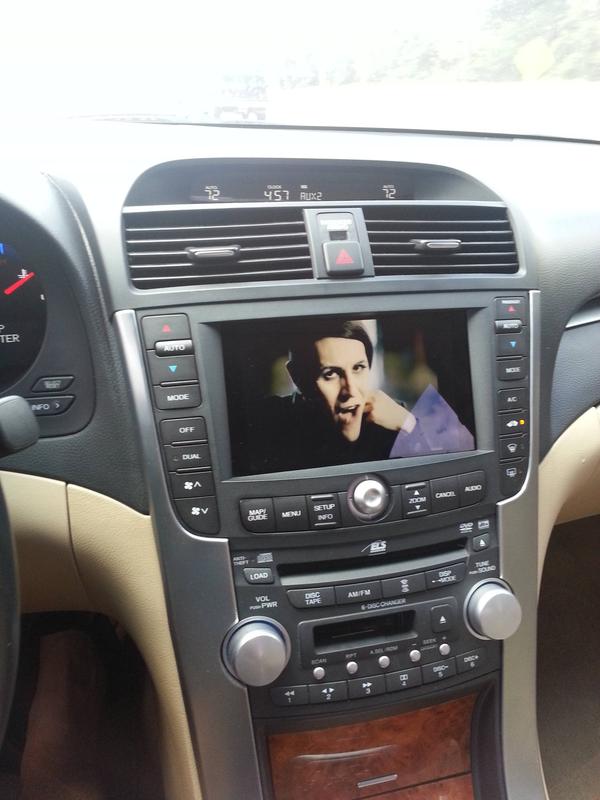
Successfully swapped out the NAV for a tablet.


Advanced
Joined: Dec 2012
Posts: 61
Likes: 8
From: N/A
Thread Starter
Instructor
Joined: Feb 2012
Posts: 100
Likes: 16
From: Ponte Vedra Beach, FL
Now that I've had the tablet in the car for a month, here's some updates, and more info for anyone else wanting to tackle this project.
Button re-routing:
Just in case anyone comes to this thread in the future, and tries to do what I did with the re-routing of the stock buttons. The way I originally did it (like in the pictures) didn't work once everything was installed back in the car. (it worked beautifully on my coffee table though).
I'm not certain what the problem was. Originally I thought it was because of the shared ground. But, even with every single trace cut on the board, I was still getting continuity between leads on separate buttons.
Anyways, I ended up desoldering the stock buttons (momentary switches) from the board, and gluing my own in their place. Worked like a charm.
Interference:
I had some noise interference that only presented itself when the tablet was plugged in, and I started a video. And would then persist until I rebooted it. It sounded sort of like a hard drive spinning up. And touching the screen worsened it. To fix it, I purchased a ground loop isolator for the audio cable.
Power:
So far, I haven't had any power issues with the device. I think I lose somewhere around 5% battery life over a 24hr period of my car not being driven. So, charging while driving is sufficient for keeping the tablet charged.
The ROM has an option for "fast charging". But, I haven't even attempted to turn that on yet.
Currently, I have the tablet plugged into a 2 port 4.2a USB car charger in the center console, using a stock Samsung USB cable for a Note 2. The tablet is currently reporting it's charging via USB and not A/C (which should be the case since it's getting 2.1a). I've read online that that happens with lower end cables. So, whenever I feel motivated, I'm gonna try and use a different USB cable. And, i'll post whatever I figure out.
UPDATES AND THOUGHTS:
Screen brightness:
I wish the screen were brighter. It's good. But, during the day, it's not very easy to watch a video on it. And, mind you I have 50% tint on the entire windshield, and 5% on the rest of them.
The reflectiveness of the tablet certainly doesn't help. But, I hate anti-reflective screen protectors.
Sunglasses:
If you've ever worn polarized sunglasses, and turned your head sideways while looking at an LCD display, you'd know it blacks out image completely. With this said, the tablet is sideways....most of my sunglasses are polarized....It's just a black rectangle when I'm wearing them.
External HDD's, USB thumb drives, etc.:
In short, they work.
But, not like I wanted them to work.
I loaded up a 250gb 2.5" HDD with 150gb of music, movies, tv shows, etc. I basically wasn't going to use the internal space on the tablet much at all. But, I've found that playing music/video from the external device doesn't resume when I get back in the car because in an effort to save power when the car is off, the ROM I'm using stops powering all USB slave devices. And they don't become instantly available once the car is restarted. There may be a fix for this. It just hasn't been on the top of my to-do list.
Button re-routing:
Just in case anyone comes to this thread in the future, and tries to do what I did with the re-routing of the stock buttons. The way I originally did it (like in the pictures) didn't work once everything was installed back in the car. (it worked beautifully on my coffee table though).
I'm not certain what the problem was. Originally I thought it was because of the shared ground. But, even with every single trace cut on the board, I was still getting continuity between leads on separate buttons.
Anyways, I ended up desoldering the stock buttons (momentary switches) from the board, and gluing my own in their place. Worked like a charm.
Interference:
I had some noise interference that only presented itself when the tablet was plugged in, and I started a video. And would then persist until I rebooted it. It sounded sort of like a hard drive spinning up. And touching the screen worsened it. To fix it, I purchased a ground loop isolator for the audio cable.

Power:
So far, I haven't had any power issues with the device. I think I lose somewhere around 5% battery life over a 24hr period of my car not being driven. So, charging while driving is sufficient for keeping the tablet charged.
The ROM has an option for "fast charging". But, I haven't even attempted to turn that on yet.
Currently, I have the tablet plugged into a 2 port 4.2a USB car charger in the center console, using a stock Samsung USB cable for a Note 2. The tablet is currently reporting it's charging via USB and not A/C (which should be the case since it's getting 2.1a). I've read online that that happens with lower end cables. So, whenever I feel motivated, I'm gonna try and use a different USB cable. And, i'll post whatever I figure out.
UPDATES AND THOUGHTS:
Screen brightness:
I wish the screen were brighter. It's good. But, during the day, it's not very easy to watch a video on it. And, mind you I have 50% tint on the entire windshield, and 5% on the rest of them.
The reflectiveness of the tablet certainly doesn't help. But, I hate anti-reflective screen protectors.
Sunglasses:
If you've ever worn polarized sunglasses, and turned your head sideways while looking at an LCD display, you'd know it blacks out image completely. With this said, the tablet is sideways....most of my sunglasses are polarized....It's just a black rectangle when I'm wearing them.
External HDD's, USB thumb drives, etc.:
In short, they work.
But, not like I wanted them to work.
I loaded up a 250gb 2.5" HDD with 150gb of music, movies, tv shows, etc. I basically wasn't going to use the internal space on the tablet much at all. But, I've found that playing music/video from the external device doesn't resume when I get back in the car because in an effort to save power when the car is off, the ROM I'm using stops powering all USB slave devices. And they don't become instantly available once the car is restarted. There may be a fix for this. It just hasn't been on the top of my to-do list.



What I did was lock the screen and install the tablet upside down in my car. It works perfect I can see it even if the sun was beating on it.

Thats weird that you cant see it with polarized glasses- I never thought of that being a problem and with my acer mounted sideways (landscape) I can still see it fine with polarized glasses. I found a little linear voltage regulator IC that Im gonna hook up to see if I can fix my charging issue- it stays at a constant 11.77V output for anything over 12.5V so it should fix my problem of the tablet not charging all the time with the engine on. If not, I guess Ill try a USB charger last resort. I have a USB cable extension hooked up to the mini-USB port but Ive never actually used it, I might hook up an external HDD to put movies and shit on- thanks for the idea.
Advanced
Joined: Dec 2012
Posts: 61
Likes: 8
From: N/A
1 month update!!!
Its been awesome. I mapped the power button to my NAV controls with no issues.
Had issues with whinning noise, this fixed all of it
I have pretty good tint here in AZ, so screen brightness isnt an issue. I'm actually using Tasker to turn down the brightness at night because it gets so bright.
Its been awesome. I mapped the power button to my NAV controls with no issues.
Had issues with whinning noise, this fixed all of it
I have pretty good tint here in AZ, so screen brightness isnt an issue. I'm actually using Tasker to turn down the brightness at night because it gets so bright.
Thread Starter
Instructor
Joined: Feb 2012
Posts: 100
Likes: 16
From: Ponte Vedra Beach, FL
1 month update!!!
Its been awesome. I mapped the power button to my NAV controls with no issues.
Had issues with whinning noise, this fixed all of it
Amazon.com: PAC Ground Loop Isolator for 3.5 MM Applications: Automotive
I have pretty good tint here in AZ, so screen brightness isnt an issue. I'm actually using Tasker to turn down the brightness at night because it gets so bright.
Its been awesome. I mapped the power button to my NAV controls with no issues.
Had issues with whinning noise, this fixed all of it
Amazon.com: PAC Ground Loop Isolator for 3.5 MM Applications: Automotive
I have pretty good tint here in AZ, so screen brightness isnt an issue. I'm actually using Tasker to turn down the brightness at night because it gets so bright.
Thread Starter
Instructor
Joined: Feb 2012
Posts: 100
Likes: 16
From: Ponte Vedra Beach, FL

Advanced
Joined: Jul 2009
Posts: 51
Likes: 7
Have you had any issues charging your tablet? I was just planning on using an adapter like you did for the cigarette plug but is seems like my battery is draining even when it says it is charging. Finished installing yesterday but think I may have to come up with something else to power the thing.
Advanced
Joined: Dec 2012
Posts: 61
Likes: 8
From: N/A
Have you had any issues charging your tablet? I was just planning on using an adapter like you did for the cigarette plug but is seems like my battery is draining even when it says it is charging. Finished installing yesterday but think I may have to come up with something else to power the thing.
Biggest Issue with Nexus, I use Copilot for GPS. The charging rate will not keep up with the usage rate
Under normal usage, this charger works for me. Its also the most recommended by android forums.
Thread Starter
Instructor
Joined: Feb 2012
Posts: 100
Likes: 16
From: Ponte Vedra Beach, FL
Biggest Issue with Nexus, I use Copilot for GPS. The charging rate will not keep up with the usage rate
Under normal usage, this charger works for me. Its also the most recommended by android forums.
Amazon.com: PowerGen Dual USB 3.1A 15w High Output Car Charger - BLACK: Cell Phones & Accessories
Under normal usage, this charger works for me. Its also the most recommended by android forums.
Amazon.com: PowerGen Dual USB 3.1A 15w High Output Car Charger - BLACK: Cell Phones & Accessories
The one I'm using now is 4.2a shared by both ports...
P.s. i STILL haven't routed the new cable yet. I haven't needed to. The thing was actually at 100% a couple days ago. I don't even drive the car every day.
Advanced
Joined: Jul 2009
Posts: 51
Likes: 7
Ok. I bought this one and it doesn't seem to be working. But I bought a micro usb extension cable and am also wondering if that piece of crap is limiting how much current I can draw. The tablet says it is AC charging but I am not so sure. Think I am gonna pull that cable out tonight and see if that fixs my issues. If not guess I'll invest in a nicer adapter.
Advanced
Joined: Jul 2009
Posts: 51
Likes: 7
Believe my problem was the micro usb extension. Took that out last night and just ran the Nexus 7 stock cable to the near Cig lighter with the same adapter. I had been using the extension and running it to the cig adapter in the elbow rest compartment. Using Battery Monitor Widget it says I am now charging at +14% an hour. Before I was at like -2% an hour.

Intermediate
Joined: Oct 2009
Posts: 36
Likes: 59
From: Bay Area
Reversible?
It's hard to tell from the pictures- did you have to modify the stock bezel at all to get the Nexus 7 in there? Obviously you modified the button electronics, but I'm just concerned about the plastic and metal. Would I be able to put the original nav screen back in if I were to, say, sell the car and wanted to keep the tablet?
I might be willing to help with this project if I can gather the funds to buy a Nexus 7. I have particular interest in integrating the bezel buttons more completely with Android. Did you (or anyone else reading this) happen to try using a bluetooth keyboard controller so more buttons could be mapped? I've also read that the buttons are broadcast on the B-CAN bus.. if that's true I might be able to help integrate them. I have access to CAN bus analyzers, etc. and could potentially build a circuit that listens on the CAN bus and rebroadcasts button presses over bluetooth as a keyboard emulator. If anyone here has any experience with this, I'd love to hear about it.
I might be willing to help with this project if I can gather the funds to buy a Nexus 7. I have particular interest in integrating the bezel buttons more completely with Android. Did you (or anyone else reading this) happen to try using a bluetooth keyboard controller so more buttons could be mapped? I've also read that the buttons are broadcast on the B-CAN bus.. if that's true I might be able to help integrate them. I have access to CAN bus analyzers, etc. and could potentially build a circuit that listens on the CAN bus and rebroadcasts button presses over bluetooth as a keyboard emulator. If anyone here has any experience with this, I'd love to hear about it.
Thread Starter
Instructor
Joined: Feb 2012
Posts: 100
Likes: 16
From: Ponte Vedra Beach, FL
It's hard to tell from the pictures- did you have to modify the stock bezel at all to get the Nexus 7 in there? Obviously you modified the button electronics, but I'm just concerned about the plastic and metal. Would I be able to put the original nav screen back in if I were to, say, sell the car and wanted to keep the tablet?
I might be willing to help with this project if I can gather the funds to buy a Nexus 7. I have particular interest in integrating the bezel buttons more completely with Android. Did you (or anyone else reading this) happen to try using a bluetooth keyboard controller so more buttons could be mapped? I've also read that the buttons are broadcast on the B-CAN bus.. if that's true I might be able to help integrate them. I have access to CAN bus analyzers, etc. and could potentially build a circuit that listens on the CAN bus and rebroadcasts button presses over bluetooth as a keyboard emulator. If anyone here has any experience with this, I'd love to hear about it.
I might be willing to help with this project if I can gather the funds to buy a Nexus 7. I have particular interest in integrating the bezel buttons more completely with Android. Did you (or anyone else reading this) happen to try using a bluetooth keyboard controller so more buttons could be mapped? I've also read that the buttons are broadcast on the B-CAN bus.. if that's true I might be able to help integrate them. I have access to CAN bus analyzers, etc. and could potentially build a circuit that listens on the CAN bus and rebroadcasts button presses over bluetooth as a keyboard emulator. If anyone here has any experience with this, I'd love to hear about it.
Yes, you can absolutely put the stock NAV screen back in at will.
As for the button mapping, the kernel and ROM I'm using supports USB hubs. So, you wouldn't have to go Bluetooth. I found some products online, and have entertained the idea of mapping other buttons/controls (brightness, back, home, menu, etc). But, I haven't had the motivation to do so.
Something like this.
Seems like it would be really easy to integrate.

Racer
Joined: May 2007
Posts: 300
Likes: 0
Clean setup. does your tablet require data(LTE) inorder to use the GPS? i am thinking about getting an ipad mini, but inorder to get turn by turn nav. i have to get the LTE version because the basic one doesn't have GPS chip in them. ipad mini isn't cheap with the LTE. almost $600. If basic N7 can do voice turn by turn with out data, i'll go with N7


The basic N7 can do voice turn by turn. I have a similar setup, I'm using NAVIGON as my nav application though, I had to install navigon using a titanium backup onto the n7 though since it won't let you D/L it from the play store on a tablet.
Once it's loaded onto the N7 off a titanium backup you can use titanium backup to re-link navigon to the play store so it can be updated from the play store when the tablet is tethered.
The tablet also does GPS with the base WiFi model, LTE or a cellular plan is not required..
USB-ROM does not work with the N7 V2, however, so if you want to use USB-ROM to get USB-OTG charging to work and have a USB hub in the car you'll need to find the older version of the N7.
There are some bugs with the backup cams on the N7 installs, I think there's a patch for the easycap camera to get it to work on rootzwiki for the N7, but it's a bit of a work in progress and you'd have to do some reading up on it.
I'm also in progress of updating the USB-OTG cable that I'm using so the N7 can charge properly, I've ordered a few things..
One of which is this cable:
It has 20AWG wires for the power connectors, which is needed with the length of the cable to get the N7 to charge properly otherwise you have too much voltage drop on a 28AWG or 26AWG wire over the length of the cable for it to be able to properly charge. I actually only need about 4-5 feet of the cable, but it's really difficult to find another one with 20AWG wires that isn't as long.
I have some micro USB connectors that are solderable and I'll be re-building my USB-OTG Y-cable soon. I'll have to cut and solder on new connectors and do my own splices but not a problem really.
I'm also changing my charger, to this one:
Provides more amperage than the 3.1A powergen one I was using before and read about some overheating issues with the 4.2A powergen charger so I went with the anker.
Once it's loaded onto the N7 off a titanium backup you can use titanium backup to re-link navigon to the play store so it can be updated from the play store when the tablet is tethered.
The tablet also does GPS with the base WiFi model, LTE or a cellular plan is not required..
USB-ROM does not work with the N7 V2, however, so if you want to use USB-ROM to get USB-OTG charging to work and have a USB hub in the car you'll need to find the older version of the N7.
There are some bugs with the backup cams on the N7 installs, I think there's a patch for the easycap camera to get it to work on rootzwiki for the N7, but it's a bit of a work in progress and you'd have to do some reading up on it.
I'm also in progress of updating the USB-OTG cable that I'm using so the N7 can charge properly, I've ordered a few things..
One of which is this cable:
It has 20AWG wires for the power connectors, which is needed with the length of the cable to get the N7 to charge properly otherwise you have too much voltage drop on a 28AWG or 26AWG wire over the length of the cable for it to be able to properly charge. I actually only need about 4-5 feet of the cable, but it's really difficult to find another one with 20AWG wires that isn't as long.
I have some micro USB connectors that are solderable and I'll be re-building my USB-OTG Y-cable soon. I'll have to cut and solder on new connectors and do my own splices but not a problem really.
I'm also changing my charger, to this one:
Provides more amperage than the 3.1A powergen one I was using before and read about some overheating issues with the 4.2A powergen charger so I went with the anker.
Last edited by mzilvar; Dec 10, 2013 at 07:43 PM.

takin care of Business in
iTrader: (5)
Joined: Jan 2008
Posts: 30,994
Likes: 4,733
From: Kansas City, MO
that is great integration brother...
I have a Non navi version and have done the same....got a nexus in the dash which is my nav/radio/torque display....I run music off the nexus to a processor to OEM setup...
since my car is gutted out, it was easier to integrate it....you did a fantastic job making it look like OEM
my only suggestion would be (not sure if you have done it already) will be a matte screen protector...this will reduce finger prints and glare
I have a Non navi version and have done the same....got a nexus in the dash which is my nav/radio/torque display....I run music off the nexus to a processor to OEM setup...
since my car is gutted out, it was easier to integrate it....you did a fantastic job making it look like OEM
my only suggestion would be (not sure if you have done it already) will be a matte screen protector...this will reduce finger prints and glare
how does that nexus do on cold mornings? With my acer I have to wait til the car heats up for the touchscreen to work. I was wondering if that was just a problem with the cheap tablets like acer, if so I will switch to a nexus or a galaxy 7" because they are getting cheap these days.
Thread Starter
Instructor
Joined: Feb 2012
Posts: 100
Likes: 16
From: Ponte Vedra Beach, FL
how does that nexus do on cold mornings? With my acer I have to wait til the car heats up for the touchscreen to work. I was wondering if that was just a problem with the cheap tablets like acer, if so I will switch to a nexus or a galaxy 7" because they are getting cheap these days.
However, this morning it was high 30's when I left for work. And there was no issue.
Currently, my only issues are:
When watching videos on the tablet, the battery drains slowly. Even though it's charging via 2.1a charger. I've read that using a different cable will fix this. I haven't had the time or motivation to do this.
Sometimes when I turn on my headlights, the tablet freaks out, freezes, makes a lough hum through my speakers, and eventually reboots.
and.....my clock in the secondary display is off because of daylight savings time change. I'm thinking I should be able to disconnect/reconnect the battery at exactly noon and it should default to 12:00, and then be correct. Again, haven't had the time nor motivation to attempt it.
Currently, my only issues are:
When watching videos on the tablet, the battery drains slowly. Even though it's charging via 2.1a charger. I've read that using a different cable will fix this. I haven't had the time or motivation to do this.
Sometimes when I turn on my headlights, the tablet freaks out, freezes, makes a lough hum through my speakers, and eventually reboots.
When watching videos on the tablet, the battery drains slowly. Even though it's charging via 2.1a charger. I've read that using a different cable will fix this. I haven't had the time or motivation to do this.
Sometimes when I turn on my headlights, the tablet freaks out, freezes, makes a lough hum through my speakers, and eventually reboots.
Are you using a USB hub?
I had a similar problem with the battery slowly draining and some rebooting issues prior to powering my USB hub with it's own 5V supply and making a USB-OTG Y cable.
Mine slowly drains if I'm using bluetooth and wifi at the same time, e.g. tethered to my phone and running torque (connected to my bluetooth OBD II link). Which is why I'm about to re-do the cable and upping the ante on my power supply, the one I'll be using is 2A max though if I have the tablet plugged in by itself. If two devices are charging it'll provide less amperage to the tablet, max of 3.6A between the two ports.
Last edited by mzilvar; Dec 16, 2013 at 08:15 PM.
Thread Starter
Instructor
Joined: Feb 2012
Posts: 100
Likes: 16
From: Ponte Vedra Beach, FL
Headlight problem is weird, which version of Timur's USB-ROM are you running?
Are you using a USB hub?
I had a similar problem with the battery slowly draining and some rebooting issues prior to powering my USB hub with it's own 5V supply and making a USB-OTG Y cable.
Mine slowly drains if I'm using bluetooth and wifi at the same time, e.g. tethered to my phone and running torque (connected to my bluetooth OBD II link). Which is why I'm about to re-do the cable and upping the ante on my power supply, the one I'll be using is 2A max though if I have the tablet plugged in by itself. If two devices are charging it'll provide less amperage to the tablet, max of 3.6A between the two ports.
Are you using a USB hub?
I had a similar problem with the battery slowly draining and some rebooting issues prior to powering my USB hub with it's own 5V supply and making a USB-OTG Y cable.
Mine slowly drains if I'm using bluetooth and wifi at the same time, e.g. tethered to my phone and running torque (connected to my bluetooth OBD II link). Which is why I'm about to re-do the cable and upping the ante on my power supply, the one I'll be using is 2A max though if I have the tablet plugged in by itself. If two devices are charging it'll provide less amperage to the tablet, max of 3.6A between the two ports.
I had originally figured the problem was that when I turn on the headlights, and the buttons under the tablet light up, it was somehow sending a ground signal through one of my rerouted buttons. But, I disconnected that little wiring harness (making the buttons no longer light up), and the problem still occurred.
No. No USB hub. But, I don't always have anything plugged into the USB.
I didnt even think about BT. My OBD thing is ALWAYS plugged in and I assume connected to the tablet. I don't use Torque all that often. But, I like when it's readily available.
I'm not sure what version of USB ROM I'm using. I've upgraded once or twice since installing it. And, I was under the impression he ended support of it due to lack of funding. So, I stopped looking for updates.
As for the draining battery, What I've been doing is when it gets low, I plug it into my TYLT battery pack "powerplant" overnight. I'll probably try the higher quality USB cable before I go the USB hub route.
takin care of Business in
iTrader: (5)
Joined: Jan 2008
Posts: 30,994
Likes: 4,733
From: Kansas City, MO
how does that nexus do on cold mornings? With my acer I have to wait til the car heats up for the touchscreen to work. I was wondering if that was just a problem with the cheap tablets like acer, if so I will switch to a nexus or a galaxy 7" because they are getting cheap these days.




Just wanted to update in case someone else tries to use the 20AWG cable I posted in their console, I couldn't fit it without having to cut the bezel more so I decided not to and the micro USB solderable connectors aren't going to be a reliable source for the micro side of the connection the wires are simply too big.
I found these though:
http://www.karlssonrobotics.com/cart...FQuUfgodb3gANQ
And ordered a few of them, that should do the trick and hopefully will fit I won't know until I receive them though I ordered a couple but this should help us sort out power issues with the charging on the tablet installs.
I found these though:
http://www.karlssonrobotics.com/cart...FQuUfgodb3gANQ
And ordered a few of them, that should do the trick and hopefully will fit I won't know until I receive them though I ordered a couple but this should help us sort out power issues with the charging on the tablet installs.
Thread Starter
Instructor
Joined: Feb 2012
Posts: 100
Likes: 16
From: Ponte Vedra Beach, FL
Just wanted to update in case someone else tries to use the 20AWG cable I posted in their console, I couldn't fit it without having to cut the bezel more so I decided not to and the micro USB solderable connectors aren't going to be a reliable source for the micro side of the connection the wires are simply too big.
I found these though:
http://www.karlssonrobotics.com/cart...FQuUfgodb3gANQ
And ordered a few of them, that should do the trick and hopefully will fit I won't know until I receive them though I ordered a couple but this should help us sort out power issues with the charging on the tablet installs.
I found these though:
http://www.karlssonrobotics.com/cart...FQuUfgodb3gANQ
And ordered a few of them, that should do the trick and hopefully will fit I won't know until I receive them though I ordered a couple but this should help us sort out power issues with the charging on the tablet installs.
It's crazy simple to route it and the 3.5mm jack outside the body of the tablet. At that point, you won't have to cut anything....