


Rearview Mirror

Thread Starter
Advanced
Joined: Dec 2011
Posts: 66
Likes: 7
From: Howard County, MD
Rearview Mirror
I made a DIY stealthcord for my V1. I was wondering if someone can tell me which two wires I should stick the pins to before I try all combinations?
From the back of the mirror:
Y-B-Y. Black is the ground I assume. Which one should I go for the hot one.
Thanks in advance.
From the back of the mirror:
Y-B-Y. Black is the ground I assume. Which one should I go for the hot one.
Thanks in advance.

Autofahrer
Joined: Jan 2011
Posts: 304
Likes: 43
From: Chicagoland
Haha... Just did that yesterday! 
If you look back of the mirror: the far left one is +, the middle one is -.
If you use the far right one, your V1 might turn off in reverse.
I literally just did that yesterday for my 9500ix.
The one with the tape is Ground!

If you look back of the mirror: the far left one is +, the middle one is -.
If you use the far right one, your V1 might turn off in reverse.
I literally just did that yesterday for my 9500ix.
The one with the tape is Ground!
Last edited by TinyRK; Jan 4, 2012 at 09:25 AM.
Thread Starter
Advanced
Joined: Dec 2011
Posts: 66
Likes: 7
From: Howard County, MD
It is very tight clearance in there as I have to nudge the cable up to stick the PINs in, in the process I broke the d-sub connector. Luckily it was a DIY so I get to do it again

Autofahrer
Joined: Jan 2011
Posts: 304
Likes: 43
From: Chicagoland
How were you able to break those pins? They're pretty sturdy
The DB9-pins fit right in the holes below the actual cable-pins.
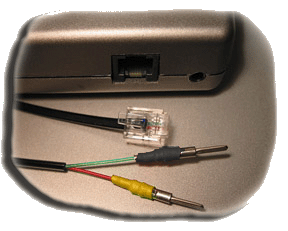
I used pins like this one:

And on this RJ11-cable, green is -, red is +12V. Just for future reference
The DB9-pins fit right in the holes below the actual cable-pins.
I used pins like this one:
And on this RJ11-cable, green is -, red is +12V. Just for future reference
Last edited by TinyRK; Jan 4, 2012 at 10:29 AM.

Thread Starter
Advanced
Joined: Dec 2011
Posts: 66
Likes: 7
From: Howard County, MD
Thanks. I got the polarity correct since I tested it with a volt meter against the power adapter from the unit.
I think I accidentally hit the insualted end with my soldering iron so it was prone to snap. Plus I didn't strip enough of the black casing to allow more maneuver room. These should be corrected tonight.
Oh, I just used some crimp type connectors from RS. They re probably not as sturdy as the ones you used.
Wait, are you sticking the pin in the holes below the one where the cables are going in? I thought those were blanks for other pins. How do you get power from there?
I think I accidentally hit the insualted end with my soldering iron so it was prone to snap. Plus I didn't strip enough of the black casing to allow more maneuver room. These should be corrected tonight.
Thanks. I got the polarity correct since I tested it with a volt meter against the power adapter from the unit.
I think I accidentally hit the insualted end with my soldering iron so it was prone to snap. Plus I didn't strip enough of the black casing to allow more maneuver room. These should be corrected tonight.
I think I accidentally hit the insualted end with my soldering iron so it was prone to snap. Plus I didn't strip enough of the black casing to allow more maneuver room. These should be corrected tonight.
Wait, are you sticking the pin in the holes below the one where the cables are going in? I thought those were blanks for other pins. How do you get power from there?
Last edited by Steven Bell; Jan 5, 2012 at 09:36 PM. Reason: Merged Posts.
Autofahrer
Joined: Jan 2011
Posts: 304
Likes: 43
From: Chicagoland
Trending Topics
Thread Starter
Advanced
Joined: Dec 2011
Posts: 66
Likes: 7
From: Howard County, MD
This is driving me nuts. I made a nice wire and measure that there is no resistance. I plug the cord into the mirror and i measure the voltage across and there is like 13+ volts. Yet it would not power my radar detector (V1). I check the detector with the V1 cigarette lighter power adapter and it works with the factory cord. I plug the wire I made into the same power adapter and I still measure the same voltage. So wire is okay, detector is ok, power coming out of the rear view mirror ok... why wouldn't my detector get power?
To add insult to injury, in the last try where I decided to give up and have a shop do it, I forgot to turn off the engine and shorted the circuit. Car wouldn't start. I spent like 2 hours with my coworker hunting for the burned fuse and finally found that the Meter fuse is burned. In the process, I dropped a spare 7.5 AMP fuse in the engine compartment, landed in the undercarriage tray, lost the fuse puller in the passenger side fuse box where it shall remain and I have to borrow one from my coworker. It took 2 rounds because I missed the fuse break the first time around.
Turned out the meter fuse is 7.5 AMP as well and I don't have a spare one anymore. Luckily, there are 7.5 AMP fuses in the slots for BSI and SH-AWD. Since I have neither I pulled the BSI and used it for the meter. I need to buy a bunch of fuse and a puller now.
I think I will have a stereo shop do the hard wiring for me...
To add insult to injury, in the last try where I decided to give up and have a shop do it, I forgot to turn off the engine and shorted the circuit. Car wouldn't start. I spent like 2 hours with my coworker hunting for the burned fuse and finally found that the Meter fuse is burned. In the process, I dropped a spare 7.5 AMP fuse in the engine compartment, landed in the undercarriage tray, lost the fuse puller in the passenger side fuse box where it shall remain and I have to borrow one from my coworker. It took 2 rounds because I missed the fuse break the first time around.
Turned out the meter fuse is 7.5 AMP as well and I don't have a spare one anymore. Luckily, there are 7.5 AMP fuses in the slots for BSI and SH-AWD. Since I have neither I pulled the BSI and used it for the meter. I need to buy a bunch of fuse and a puller now.
I think I will have a stereo shop do the hard wiring for me...
Thread Starter
Advanced
Joined: Dec 2011
Posts: 66
Likes: 7
From: Howard County, MD
Happy ending. The green wire is the hot one for V1.
I found the answer in YouTube of all places. I think I made the mistake since most DIY guide refer the red wire as the hot wire and the green one as ground. I guess for the Passport that is the case.
I found the answer in YouTube of all places. I think I made the mistake since most DIY guide refer the red wire as the hot wire and the green one as ground. I guess for the Passport that is the case.




Joined: Jan 2008
Posts: 36,545
Likes: 6,470
From: Kansas City, MO (Overland Park, KS)
Tux, in the lower right hand corner of each post, the middle icon is a Multi-Quote button. This allows you to respond to multiple people in one response/posting.
Give it a try!
Give it a try!
Thread Starter
Advanced
Joined: Dec 2011
Posts: 66
Likes: 7
From: Howard County, MD
Thanks Steven. I will keep that in mind next time. BTW, can I edit my post afterward to correct mistakes?

Thread
Thread Starter
Forum
Replies
Last Post
ITSJESTER
4G TL Audio, Bluetooth, Electronics & Navigation
17
Dec 6, 2018 02:29 AM
rp_guy
Member Cars for Sale
9
Jul 16, 2017 07:33 AM
soupi
2G TSX Audio, Bluetooth, Electronics & Navigation
14
Nov 15, 2015 11:15 AM
blacktsxwagon
5G TLX (2015-2020)
42
Oct 27, 2015 10:12 PM
