


Navigation not finding my location?


Thread Starter
10th Gear
Joined: Apr 2011
Posts: 13
Likes: 0
Navigation not finding my location?
Hey all,
I'm new to the forums. I purchased an '04 Red TL w/ Navi. Well the problem with the navi when purchased was it wouldn't find my location. It would move with me but never where I was traveling. In example, It would always start in some other city/state and follow whatever turns I would be going from there.
So I called the dealer and he's never heard of the problem. He recommended I disconnect the battery and reset the memory and have the navigation just find my current location. Well, I've done this and now It won't find anything. I've spent over 2 hours moving to different open areas and waiting for it to find itself. Each time disconnecting the battery for 10-30 minutes so make sure it resets and then turning the vehicle on and just waiting.
Now i'm stuck with a screen that tells me I have to reset the navi and its just annoying. Any ideas? I know there are issues with sending them off to alpine since its cheaper but I couldn't find anyone with my problem.
Also, my nav disk is the orange 3.8 version. =/
Thanks for any advice in advance.
-Leo
I'm new to the forums. I purchased an '04 Red TL w/ Navi. Well the problem with the navi when purchased was it wouldn't find my location. It would move with me but never where I was traveling. In example, It would always start in some other city/state and follow whatever turns I would be going from there.
So I called the dealer and he's never heard of the problem. He recommended I disconnect the battery and reset the memory and have the navigation just find my current location. Well, I've done this and now It won't find anything. I've spent over 2 hours moving to different open areas and waiting for it to find itself. Each time disconnecting the battery for 10-30 minutes so make sure it resets and then turning the vehicle on and just waiting.
Now i'm stuck with a screen that tells me I have to reset the navi and its just annoying. Any ideas? I know there are issues with sending them off to alpine since its cheaper but I couldn't find anyone with my problem.
Also, my nav disk is the orange 3.8 version. =/
Thanks for any advice in advance.
-Leo

Senior Moderator


Joined: Feb 2006
Posts: 21,415
Likes: 2,187
From: Space Coast, FL
are you on a grey screen right now with red lettering? If not, go to the "hidden menu" and reset the navigation system's memory from there via this process:
1. Go to your car.
2. Turn your car's ignition to ON
3. Open the trunk and pop out the NAVI disk (if it's in there)
4. Put the disk back in.
5. Go back to the driver seat, now press and hold "GUIDE" "MENU" and "CANCEL" for approx 5 seconds to bring up the diagnostic menu.
6. Wait another 5 seconds to let it load up completely. Press "version" button on the screen
7. Press "LOAD DISC"
Also are the windows tinted in your car? If yes they may have metallic tint which screws up the GPS anntenna's signal...
1. Go to your car.
2. Turn your car's ignition to ON
3. Open the trunk and pop out the NAVI disk (if it's in there)
4. Put the disk back in.
5. Go back to the driver seat, now press and hold "GUIDE" "MENU" and "CANCEL" for approx 5 seconds to bring up the diagnostic menu.
6. Wait another 5 seconds to let it load up completely. Press "version" button on the screen
7. Press "LOAD DISC"
Also are the windows tinted in your car? If yes they may have metallic tint which screws up the GPS anntenna's signal...

Registered but harmless
Joined: Aug 2005
Posts: 14,889
Likes: 1,164
From: Los Angeles, CA
1) Pop the navi disc, inspect it, then re-install it (outdoors, in an open parking area) if there are no visible issues with the disc
2) Don't move the car when it's installing and setting up the location. That means you'll have to stay in place for ten minutes or more.
G/L.
2) Don't move the car when it's installing and setting up the location. That means you'll have to stay in place for ten minutes or more.
G/L.
Trending Topics
Thread Starter
10th Gear
Joined: Apr 2011
Posts: 13
Likes: 0
Here is a picture of what I'm talking about. My actual location is where I put the target and the arrow is where it says I'm "located."
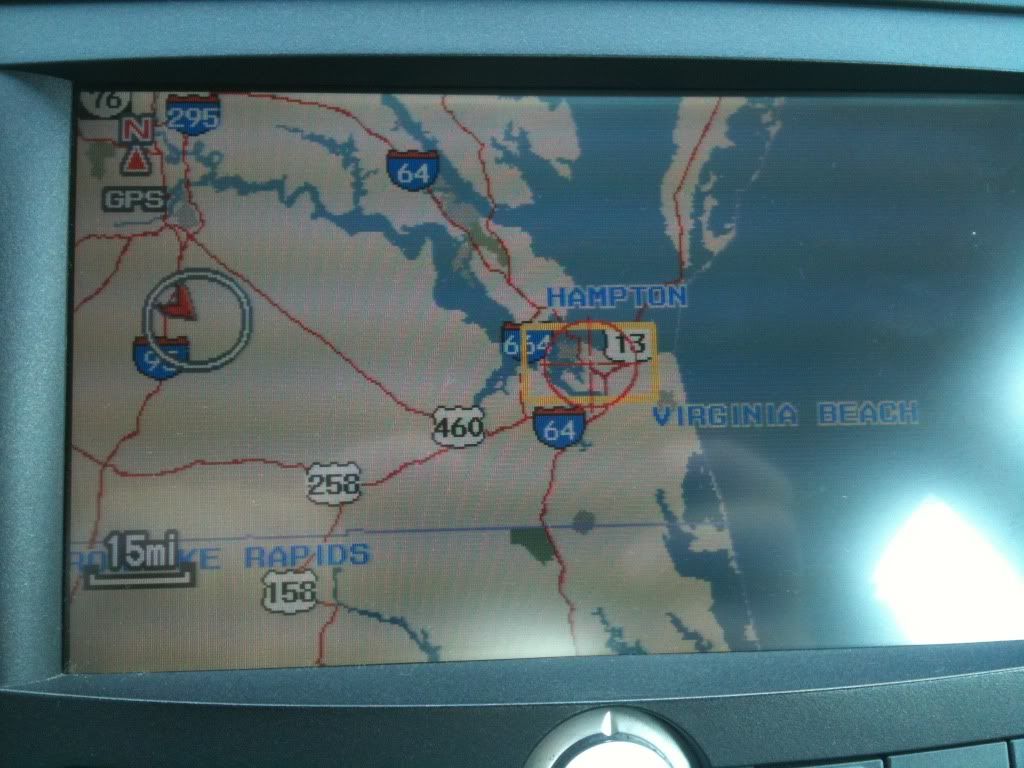
Also, I also tried this method now that i'm not at the gray/red screen:
1. Go to your car.
2. Turn your car's ignition to ON
3. Open the trunk and pop out the NAVI disk (if it's in there)
4. Put the disk back in.
5. Go back to the driver seat, now press and hold "GUIDE" "MENU" and "CANCEL" for approx 5 seconds to bring up the diagnostic menu.
6. Wait another 5 seconds to let it load up completely. Press "version" button on the screen
7. Press "LOAD DISC"
However, same thing.
Also, I also tried this method now that i'm not at the gray/red screen:
1. Go to your car.
2. Turn your car's ignition to ON
3. Open the trunk and pop out the NAVI disk (if it's in there)
4. Put the disk back in.
5. Go back to the driver seat, now press and hold "GUIDE" "MENU" and "CANCEL" for approx 5 seconds to bring up the diagnostic menu.
6. Wait another 5 seconds to let it load up completely. Press "version" button on the screen
7. Press "LOAD DISC"
However, same thing.
Registered but harmless
Joined: Aug 2005
Posts: 14,889
Likes: 1,164
From: Los Angeles, CA
 OK, now try using the "zoom": zoom all the way in on the arrow, then push "menu," then "map/guide" to see if that locates your vehicle properly.
 Otherwise, drive around with the navi activated for a few miles to see if that completes the GPS initialization.
G/L.
Thread Starter
10th Gear
Joined: Apr 2011
Posts: 13
Likes: 0
Got it, after taking it to the dealer and them telling me there is no way for me to set my own location. I play with all the functions and notice that you can move your current location.
stupid dealers =/
stupid dealers =/

Thread
Thread Starter
Forum
Replies
Last Post
krenaue
3G TL Audio, Bluetooth, Electronics & Navigation
2
Sep 15, 2015 07:54 PM
Gianni Formica
3G TL Audio, Bluetooth, Electronics & Navigation
1
Sep 7, 2015 08:28 PM
travr6
2G RL Audio, Bluetooth, Electronics & Navigation
1
Sep 6, 2015 02:11 PM
