Navigation Hack Guide: Welcome Screen Mod, Trip Computer, OK Button Nag Removal

Morbid
Joined: Oct 2007
Posts: 196
Likes: 0
From: Maryland
I confered with my buddy, the search button, but even with his help I still not get any clarification on weather or not you can edit version 4.56A disclaimer text.
Anyone here know?
Also. P.R.E.A.M, what character and movie is your splash screen from? Looks familiar, but cant place the face.
Anyone here know?
Also. P.R.E.A.M, what character and movie is your splash screen from? Looks familiar, but cant place the face.

10th Gear
Joined: Feb 2008
Posts: 14
Likes: 0
Originally Posted by ncinirator
I confered with my buddy, the search button, but even with his help I still not get any clarification on weather or not you can edit version 4.56A disclaimer text.
Anyone here know?
Anyone here know?
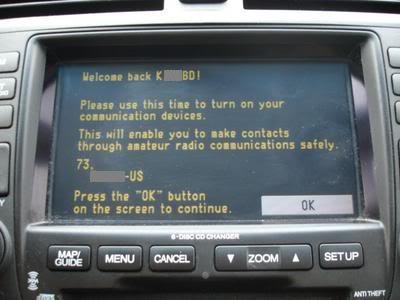
You can extend the amout of charactors per line. Make sure to add "00 20 00 20 00" after the text you entered in each line to close out the english from french. I'm not sure how many charactors per line max you can have but, I have 44 charactors on 1 line.
Hope this helps out some.
I will edit this post to display my edited Disclaimer once I take a pic of that...
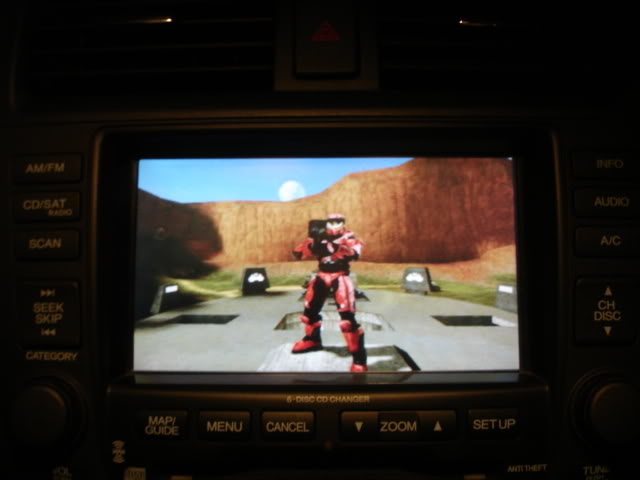
Since a few of my buddies and I started a Halo_PC Clan (http://itgclan.com), I got in game using a fly cam and took a pic of myself. Sure wish I could play it on there tho

10th Gear
Joined: Feb 2008
Posts: 14
Likes: 0
Originally Posted by ncinirator
I confered with my buddy, the search button, but even with his help I still not get any clarification on weather or not you can edit version 4.56A disclaimer text.
Anyone here know?
Anyone here know?
You can extend the amout of charactors per line. Make sure to add "00 20 00 20 00" after the text you entered in each line to close out the english from french. I'm not sure how many charactors per line max you can have but, I have 44 charactors on 1 line.
Hope this helps out some.
My Disclaimer... I later edited it and took out the word "communications" since I thought it was too repetitive.
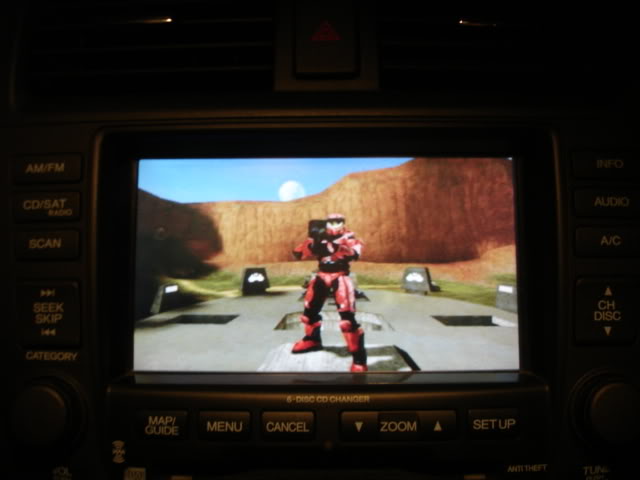
Since a few of my buddies and I started a Halo_PC Clan (http://itgclan.com), I got in game using a fly cam and took a pic of myself.

2K8 CBP TL-S 6MT
Joined: Nov 2007
Posts: 281
Likes: 0
From: Dirty Jerzey(908)
Originally Posted by MysticElf
What the heck!? I can't edit or delete old posts?? Mod please remove this post along w/ my previous post that has only the replaced boot pic.
Thanks in Advance!
Thanks in Advance!
Morbid
Joined: Oct 2007
Posts: 196
Likes: 0
From: Maryland
Originally Posted by P.R.E.A.M.
it's from an anime called hellsing character is a Vamipre called Arucard
Thanks for the info MysticElf, I'm already in a clan (www.f-s-f.org)..I mostly play JointOps & CS:S. Anyway, Should I come up with some snanzy words for the TL I'll post.

Morbid
Joined: Oct 2007
Posts: 196
Likes: 0
From: Maryland
Yeah, thanks. Some posts say it 'should work' on the 4.xx, but I havent seen anyone trying or doing it. I'm not savy enought to try.
Guess it's just a waiting game until one of us with the time, knowledge and equipment can do it.
Guess it's just a waiting game until one of us with the time, knowledge and equipment can do it.
10th Gear
Joined: Feb 2008
Posts: 14
Likes: 0
Editing the disclaimer is easy... you just need to look around in the files to find where the original text resides. The white DVD may be different but the procedure for editing the disclaimer should be the same. 1st place to look for the text should be navi.exe... if it's not in there check the other files. The chances of someone coming out w/ a patch for the disclaimer are slim. It's easy.... just look around and try editing it.
I'd be happy to take a look at the exe if ya want.
I'd be happy to take a look at the exe if ya want.

Cruisin'
Joined: Feb 2008
Posts: 15
Likes: 0
Originally Posted by MysticElf
Editing the disclaimer is easy... you just need to look around in the files to find where the original text resides. The white DVD may be different but the procedure for editing the disclaimer should be the same. 1st place to look for the text should be navi.exe... if it's not in there check the other files. The chances of someone coming out w/ a patch for the disclaimer are slim. It's easy.... just look around and try editing it.
I'd be happy to take a look at the exe if ya want.
I'd be happy to take a look at the exe if ya want.

Instructor
Joined: Apr 2006
Posts: 186
Likes: 0
Originally Posted by General Zod
On the white DVD (4.62) it is in the HMIManager.dll file. Modifying it does no good because when you re-create the .bin it creates a different CRC and it fails upon load. It looks like they added extra security in these newer versions. I've heard of someone who has recently been able to change some text but I'm not sure exactly how they pulled it off. Either way.. that's just changing some text - bypassing the OK button is a totally different matter. Still a long way to go.. but it's being worked on.
I was having the same problem, I got to edit the text, but could not rebuild HMImanager. would get an error every time. I just gave up on it and now I can't even change my moddified splash screen. nothing works anymore.

Instructor
Joined: Mar 2008
Posts: 113
Likes: 0
Originally Posted by redburgundy
I slightly messed up the nav system on my Honda Accord by putting the DVD from a newer Acura into the DVD player. It uploaded new software. Then when I put the original DVD back in, I had to upload the software from the original DVD. Now when I start the car I get this screen:
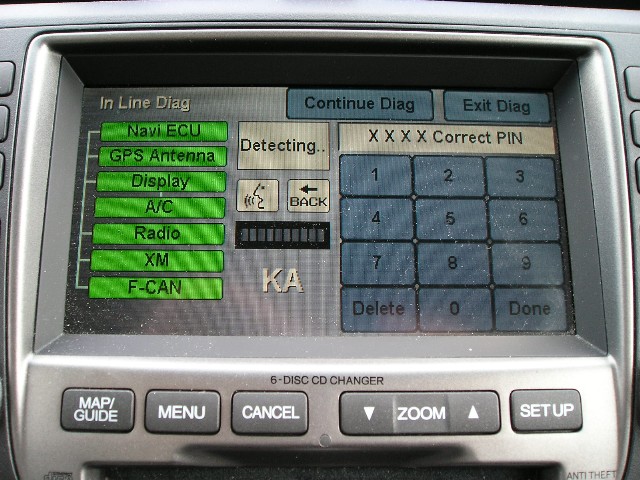
When I press Map-Menu-Cancel this screen comes up:
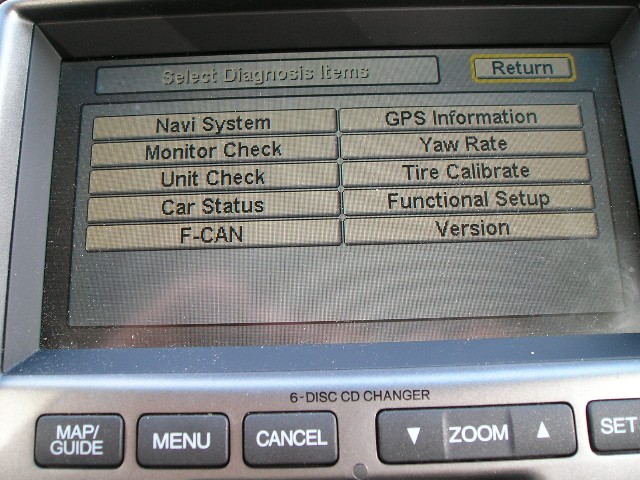
Then when I press Return the regular nag screen comes up:
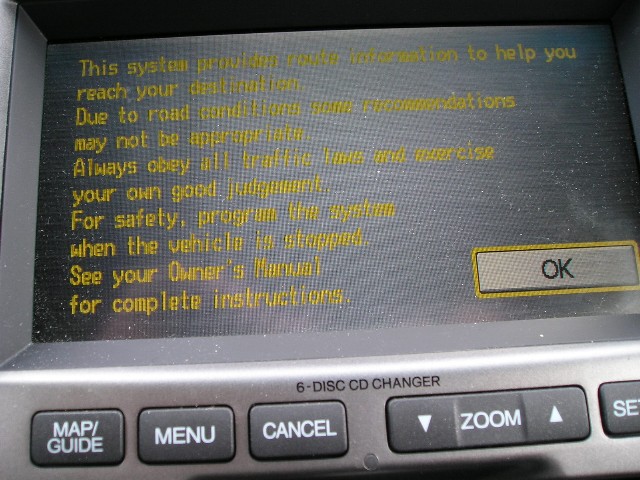
Any advice on how to get it back to just the nag screen?
When I press Map-Menu-Cancel this screen comes up:
Then when I press Return the regular nag screen comes up:
Any advice on how to get it back to just the nag screen?
What a pain in the
 Plus now my go home directions is now on the opposite side of the street
Please help for a solution.... I even tried to re-install the original DVD and the same thing happens.

10th Gear
Joined: Feb 2008
Posts: 14
Likes: 0
Originally Posted by General Zod
On the white DVD (4.62) it is in the HMIManager.dll file. Modifying it does no good because when you re-create the .bin it creates a different CRC and it fails upon load. It looks like they added extra security in these newer versions. I've heard of someone who has recently been able to change some text but I'm not sure exactly how they pulled it off. Either way.. that's just changing some text - bypassing the OK button is a totally different matter. Still a long way to go.. but it's being worked on.
Hmm... well... were you ever able to edit the text keeping the file the same size? if not... see if spacing thru the french text helps minimize the file size. If you cant quite get it... PM me and I'll see if i can get it to the right size. Then we can see if its a CRC prob for sure.
Instructor
Joined: Mar 2006
Posts: 216
Likes: 1
From: Folsom, CA
I just bought an 08 Pilot (to go with our 06 TL) which has the same nav as the 07+ TL's, but lacks a few of its features, namely nav traffic and spoken street names. It would be great if some of this could be enabled via a hack. Seems like spoken street names is totally possible, because when I say "display current location", it does speak the street names in a very clear voice (much clearer than my 06 TL does). So I'm pretty sure Honda just toggled off spoken street names in this model, another one of those "product differentiation" moves to sell more MDX's.
As for nav traffic, enabling that through a simple hack is probably a pipe dream. In that case I bet the XM receiver in my Pilot is lacking something in hardware for that.
My Pilot also lacks hands-free bluetooth but I don't think for a second that the necessary hardware is there for that. I'm going to get an audio shop to install something aftermarket for that feature.
As for nav traffic, enabling that through a simple hack is probably a pipe dream. In that case I bet the XM receiver in my Pilot is lacking something in hardware for that.
My Pilot also lacks hands-free bluetooth but I don't think for a second that the necessary hardware is there for that. I'm going to get an audio shop to install something aftermarket for that feature.
2K8 CBP TL-S 6MT
Joined: Nov 2007
Posts: 281
Likes: 0
From: Dirty Jerzey(908)
Originally Posted by redman042
As for nav traffic, enabling that through a simple hack is probably a pipe dream. In that case I bet the XM receiver in my Pilot is lacking something in hardware for that.

Acura Newbie
Joined: Dec 2007
Posts: 70
Likes: 0
From: Ohio
Originally Posted by MysticElf
Hmm... well... were you ever able to edit the text keeping the file the same size? if not... see if spacing thru the french text helps minimize the file size. If you cant quite get it... PM me and I'll see if i can get it to the right size. Then we can see if its a CRC prob for sure.
My guess is that any decent hacks will require a mod chip to bypass any file level checks and allow for the OK to be removed and Trip Computers, etc. to be added. Oh well. Its not the end of the world.


Aquarian 2006 TL 6M
Joined: Feb 2008
Posts: 4
Likes: 0
From: Houston, TX USA
Originally Posted by Hotboyzz69
Hi Guys,
The NaviOK401a.com - AD's OK button patch for Navi 3.50 link no longer works. I have Ver 3.50 and I'm trying to add the OK button patch. Is there another link I should use?
Thanks
The NaviOK401a.com - AD's OK button patch for Navi 3.50 link no longer works. I have Ver 3.50 and I'm trying to add the OK button patch. Is there another link I should use?
Thanks

Instructor
Joined: Aug 2004
Posts: 178
Likes: 4
NOob question I know, but if i have an 04 TL and get the latest nav update (havent updated yet), will the GUI be the exact same, and i just get updated information? Not sure if the updates have just been solely map data, or interface as well?
10th Gear
Joined: Feb 2008
Posts: 14
Likes: 0

---------------------------------=»> TRIP COMPUTER UPDATE <«----------------------------------
-----------=»> Acura Folk Pls Read, Your Honda Buddys Can Help Ya Out!<«--------------
After validating my Honda 3.70 DVD with another member's Acura 3.70 DVD...
We found out that even though both DVDs are the same version the HMImanager.exe is different and once the Honda 3.70 version is loaded on the Acura GPS the Trip Computer is enabled. Please note that the Color Scheme will also change.
However if you take the Honda 3.70 navi.exe and load it on the Acura GPS your map will NOT draw the streets or graphics.
Looking to get this enabled... PM me or get a hold of a friend that owns a Honda and get him to order the new DVD for his car.
Enjoy
-----------=»> Acura Folk Pls Read, Your Honda Buddys Can Help Ya Out!<«--------------
After validating my Honda 3.70 DVD with another member's Acura 3.70 DVD...
We found out that even though both DVDs are the same version the HMImanager.exe is different and once the Honda 3.70 version is loaded on the Acura GPS the Trip Computer is enabled. Please note that the Color Scheme will also change.
However if you take the Honda 3.70 navi.exe and load it on the Acura GPS your map will NOT draw the streets or graphics.
Looking to get this enabled... PM me or get a hold of a friend that owns a Honda and get him to order the new DVD for his car.
Enjoy

3G TL
Joined: Jul 2006
Posts: 192
Likes: 1
okay, i did the welcome screen mod as well as Angry Dad's trip/ac mod. However, I'm not sure if i did the Ok bypass mod correctly. I followed the instructions, received no error messages and proceeded to load the mod into car. Instead of the Okay button and warning message, i just get a black screen w/ a GO button instead. Is this what the mod is suppose to do? i'm under the assumption the mod would not require any input from user to enter Navigation?


4th Gear
Joined: Feb 2008
Posts: 4
Likes: 0
Originally Posted by TLS101
I have the same problem...I've just tried to install update 4.62 on my MDX and when I switch the vehicle on, up pops the diagnostic screen. I have to press 3 buttons to reset an then press return on the version screen, the nag screen returns and viola I can press OK for NAV.
Please help for a solution.... I even tried to re-install the original DVD and the same thing happens.
Please help for a solution.... I even tried to re-install the original DVD and the same thing happens.
So I went back to the dealer and they fixed it.
The technician said he pressed the Voice Recognition button.
I dunno, I don't understand what that would have done, and neither did the service manager.
But it now starts with the nag screen
Good luck.


Instructor
Joined: Jan 2006
Posts: 148
Likes: 3
From: Appleton, WI
Originally Posted by redburgundy
I bought the new 4.62 DVD and the diagnostic screen startup remained.
So I went back to the dealer and they fixed it.
The technician said he pressed the Voice Recognition button.
I dunno, I don't understand what that would have done, and neither did the service manager.
But it now starts with the nag screen
Good luck.
So I went back to the dealer and they fixed it.
The technician said he pressed the Voice Recognition button.
I dunno, I don't understand what that would have done, and neither did the service manager.
But it now starts with the nag screen
Good luck.
4th Gear
Joined: Feb 2008
Posts: 4
Likes: 0
Originally Posted by mavz44
So am I understanding you correctly?...You have an updated v4.62 nav DVD and don't have to press OK to get to the nav screen?
You have to go back in this thread to see the problem that I had.
Instead of the NAG screen coming up at startup, a diagnostic screen came up.
Now the NAG screen comes up at startup.


I'm having problems with the navi hack. I have the 3.30F version with Loading Bin: BN2HH12C on my 04 TL. I don't have the two bin files listed on the first page and I'm not sure if with my version navi if I can use the tools also listed on the first page.

Instructor
Joined: Mar 2006
Posts: 216
Likes: 1
From: Folsom, CA
Originally Posted by joeybabyluvsu
Can I hack my new 08 TL-S with the new 4.62 cd?
Burning Brakes


Joined: May 2006
Posts: 1,213
Likes: 91
From: Sugar Land, TX
I have an '06 TL (i believe version 3.6) and all I want is to have the trip computer. I don't really want to delete the OK button or change the wallpaper, but I am still so lost. I read every single post since yesterday and I don't even know where to start. It seems as if these instrcutions are not set to have just the trip screen displayed. I don't want to modify anything else except that. And I don't want to screw anything up. Any help please?