


DVD-A Discs


Thread Starter
Cruisin'
Joined: Oct 2013
Posts: 17
Likes: 0
DVD-A Discs
Hey guys, I want to fully utilize the dvd-a functions on my non-nav 07 TL base. Have any of you had any success burning FLAC audio files to dvd-a discs? If so, do you notice a difference in quality when compared to a normal .mp3 or wav cd?

Instructor
Joined: Aug 2013
Posts: 110
Likes: 7
From: Hanover Park, IL
Hi, in summary I haven't been able to get dvd-a discs to work.
The scripts and programs in the Audio and Electronics FAQ https://acurazine.com/forums/3g-tl-audio-bluetooth-electronics-navigation-94/3g-tl-audio-electronics-faq-605299/
burn wav, but not flac. The discs burn ok but tease me by playing a few seconds or minutes, then skipping one or dozens of tracks.
After a bit of research, you'll see Cirlinca DVD-Audio Solo mentioned, which creates dvd-a directly from flac, but I haven't been able to get its discs to play either.
If you can get something to play from flac, quality will be the same as wav and might be barely or a lot better than mp3, depending on the mp3's bit rate.
The scripts and programs in the Audio and Electronics FAQ https://acurazine.com/forums/3g-tl-audio-bluetooth-electronics-navigation-94/3g-tl-audio-electronics-faq-605299/
burn wav, but not flac. The discs burn ok but tease me by playing a few seconds or minutes, then skipping one or dozens of tracks.
After a bit of research, you'll see Cirlinca DVD-Audio Solo mentioned, which creates dvd-a directly from flac, but I haven't been able to get its discs to play either.
If you can get something to play from flac, quality will be the same as wav and might be barely or a lot better than mp3, depending on the mp3's bit rate.
KCCO
Joined: Jun 2013
Posts: 1,355
Likes: 192
From: Nova Scotia, Canada
Here, read the section on DVD-A discs. It should help you.
https://acurazine.com/forums/showthread.php?t=605299
https://acurazine.com/forums/showthread.php?t=605299


1st Gear
Joined: Oct 2013
Posts: 1
Likes: 0
Hey, I've read the threads and couldn't find a way to make them work. After burning about 7 dvd's nothing. It's a shame. I use OSX, If you find a way let me know. I've been using toast titanium and some other apps. I guess I'm gonna have to buy the iSimple adapter

Make MyTL Great Again
Joined: Nov 2004
Posts: 1,686
Likes: 5
From: Dunellen, NJ
The scripts and programs in the Audio and Electronics FAQ https://acurazine.com/forums/showthread.php?t=605299
burn wav, but not flac. The discs burn ok but tease me by playing a few seconds or minutes, then skipping one or dozens of tracks.
burn wav, but not flac. The discs burn ok but tease me by playing a few seconds or minutes, then skipping one or dozens of tracks.
Trending Topics

Keep Right Except to Pass

Joined: Aug 2004
Posts: 2,411
Likes: 45
From: Kingstowne, VA
I can't help a Mac user, but I'm one of the people who has burned a good number of DVD-Audio discs for the TL with good results.
First thing: I assume you know this, but I'll say it anyway—it is not simply a case of burning files to a DVD and then playing them in the car. You have to use particular software that will build the DVD-Audio structure for you. On my old PC I used Adobeman's software (found elsewhere on this forum) and I usually did OK, but when I replaced my PC two years ago I ran into some compatibility issues and I got the Cirlinca software instead. I've never had any problems with that one. It will burn directly from FLAC, and you can use high-rez FLACs if you want (recognizing that will reduce the amount of music you can fit on the disc). For example, I've purchased some high-rez downloads from HDTracks.com consisting of 24-bit/88.2-kHz FLACs. The Cirlinca software will burn directly from the FLACs without my having to convert them to .WAV first.
Most of the music I have on my PC is Apple Lossless. Cirlinca won't burn that, so I simply use iTunes to convert it to .WAV. I then delete the new .WAVs from the iTunes library but have it keep the files (do not move them to the Recycle Bin), and then I use Windows Explorer to move the new .WAVs to a different directory.
If you need to convert .MP3 files to .WAV, I'd suggest using iTunes or dbPoweramp or some such. Adobeman's software will do it for you, but I had problems several times where it would truncate files for no apparent reason.
I have always used DVD-R discs. I recall in the early years several people reported bad results using DVD+R, so I've always used DVD-R. My PC has a LightScribe drive, so I make a point of buying LightScribe discs to allow me to burn a disc label telling me what's on there. That's important if you use DVD-Audio as a means of storing large volumes of CD-quality music. You can fit enough stuff on there that without a label it's hard to keep track of what's on what disc (especially if you use groups, as I do). I've never liked the idea of using my wife's inkjet photo printer to print labels because I have this fear of the label coming off and jamming the in-dash player. LightScribe burns it directly to disc, so there's no issue in that respect. My last several batches of DVDs were Hewlett-Packard DVD-Rs purchased at Staples. Yesterday I wanted to burn a few discs for our upcoming Thanksgiving trip to Florida but I couldn't find any, so I went to Staples and they didn't have any LightScribe discs in stock. Neither did the Best Buy up the block from there. So I came home and ordered a spindle of discs online and the only LightScribe discs they had were Verbatim discs. So I'll try those when my order arrives. If anyone is interested, I'll report back on whether they work.
The key thing I've always followed is to avoid any activity on the PC when burning to disc. I disable the screen saver before I start the process and I close my web browser. I don't want anything running that will consume an inordinate amount of system resources.
If you use Adobeman's software, remember that it will create the DVD-Audio structure but will not burn it to the disc for you. You need to use some other software to do that. It doesn't have to be anything special because all you're doing is burning a single file (though a very big file) to a DVD. I used to use Roxio because it came with my old PC and it always worked fine. I told it I was burning an image to a disc.
I don't do that now because Cirlinca burns it to the disc as part of the process. You have to make sure it's set to burn a DVD-Audio disc. If the "Write" dialog isn't displayed on the right, click on "Export" and then on "Write." Make sure the "DVD-Audio" radio button is selected. I use the "Direct to DVD" option, which creates an .ISO image and then writes it to the disc. You can also have it just create the .ISO image and then burn it separately, but that seems like an unnecessary nuisance. On the "DVD Settings" tab I have the box checked to optimize for gapless inter-track.
Note that you must "finalize" the disc (some people call this "closing" the disc). It prevents you from burning further material to that disc.
I take the time to get everything arranged the way I want it before I start up the Cirlinca software. For example, I have a mixed DVD that contains 87 tracks. In order to get the tracks organized properly, I wound up going through and prefacing each filename with "01," "02," etc. (the leading zero is important to ensure correct sorting, as without the leading zero "10" comes before "2"). I set everything up in its own directory, and if I want to burn multiple albums to a single disc I put each album in its own directory simply to keep it all organized. If I take the time to organize it all first, it goes much more smoothly when I drag the relevant stuff into the Cirlinca window.
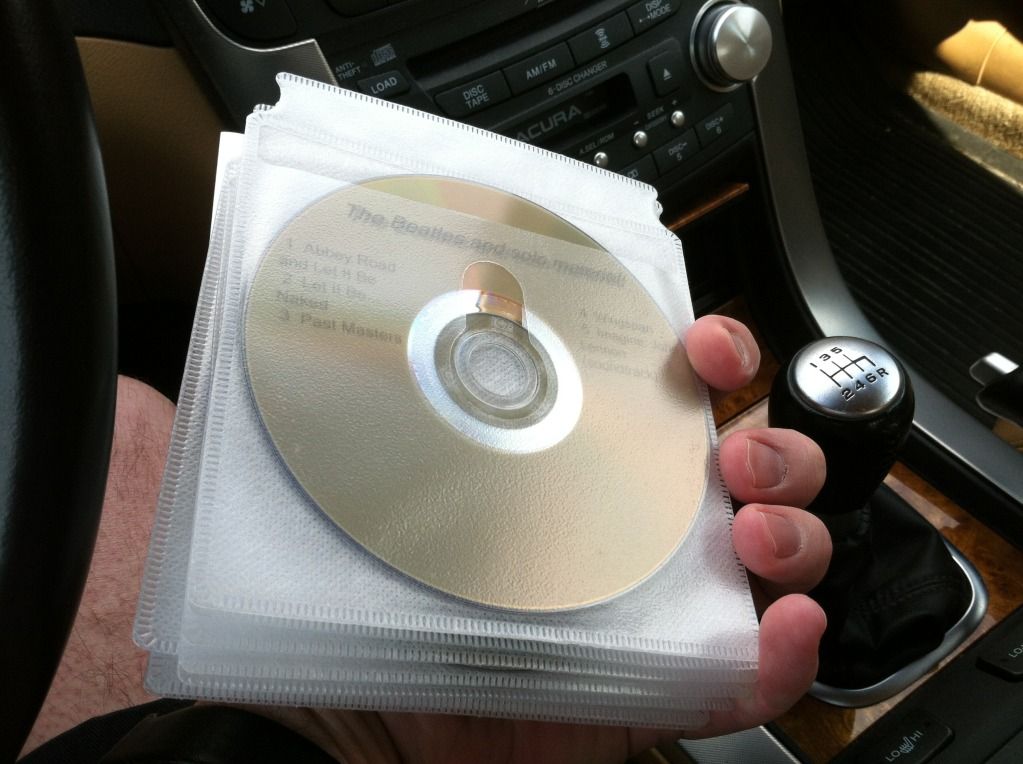
Here's an example of what a LightScribe-burned disc label looks like. You could do something more elaborate, but all I want is something that tells me what's on each disc when I pull them out at a red light or something. I buy these sleeves at Staples. Each of them can hold two discs. They're much more compact than jewel boxes, even the slim jewel boxes. They fit perfectly in the upper shelf beneath the stereo.
First thing: I assume you know this, but I'll say it anyway—it is not simply a case of burning files to a DVD and then playing them in the car. You have to use particular software that will build the DVD-Audio structure for you. On my old PC I used Adobeman's software (found elsewhere on this forum) and I usually did OK, but when I replaced my PC two years ago I ran into some compatibility issues and I got the Cirlinca software instead. I've never had any problems with that one. It will burn directly from FLAC, and you can use high-rez FLACs if you want (recognizing that will reduce the amount of music you can fit on the disc). For example, I've purchased some high-rez downloads from HDTracks.com consisting of 24-bit/88.2-kHz FLACs. The Cirlinca software will burn directly from the FLACs without my having to convert them to .WAV first.
Most of the music I have on my PC is Apple Lossless. Cirlinca won't burn that, so I simply use iTunes to convert it to .WAV. I then delete the new .WAVs from the iTunes library but have it keep the files (do not move them to the Recycle Bin), and then I use Windows Explorer to move the new .WAVs to a different directory.
If you need to convert .MP3 files to .WAV, I'd suggest using iTunes or dbPoweramp or some such. Adobeman's software will do it for you, but I had problems several times where it would truncate files for no apparent reason.
I have always used DVD-R discs. I recall in the early years several people reported bad results using DVD+R, so I've always used DVD-R. My PC has a LightScribe drive, so I make a point of buying LightScribe discs to allow me to burn a disc label telling me what's on there. That's important if you use DVD-Audio as a means of storing large volumes of CD-quality music. You can fit enough stuff on there that without a label it's hard to keep track of what's on what disc (especially if you use groups, as I do). I've never liked the idea of using my wife's inkjet photo printer to print labels because I have this fear of the label coming off and jamming the in-dash player. LightScribe burns it directly to disc, so there's no issue in that respect. My last several batches of DVDs were Hewlett-Packard DVD-Rs purchased at Staples. Yesterday I wanted to burn a few discs for our upcoming Thanksgiving trip to Florida but I couldn't find any, so I went to Staples and they didn't have any LightScribe discs in stock. Neither did the Best Buy up the block from there. So I came home and ordered a spindle of discs online and the only LightScribe discs they had were Verbatim discs. So I'll try those when my order arrives. If anyone is interested, I'll report back on whether they work.
The key thing I've always followed is to avoid any activity on the PC when burning to disc. I disable the screen saver before I start the process and I close my web browser. I don't want anything running that will consume an inordinate amount of system resources.
If you use Adobeman's software, remember that it will create the DVD-Audio structure but will not burn it to the disc for you. You need to use some other software to do that. It doesn't have to be anything special because all you're doing is burning a single file (though a very big file) to a DVD. I used to use Roxio because it came with my old PC and it always worked fine. I told it I was burning an image to a disc.
I don't do that now because Cirlinca burns it to the disc as part of the process. You have to make sure it's set to burn a DVD-Audio disc. If the "Write" dialog isn't displayed on the right, click on "Export" and then on "Write." Make sure the "DVD-Audio" radio button is selected. I use the "Direct to DVD" option, which creates an .ISO image and then writes it to the disc. You can also have it just create the .ISO image and then burn it separately, but that seems like an unnecessary nuisance. On the "DVD Settings" tab I have the box checked to optimize for gapless inter-track.
Note that you must "finalize" the disc (some people call this "closing" the disc). It prevents you from burning further material to that disc.
I take the time to get everything arranged the way I want it before I start up the Cirlinca software. For example, I have a mixed DVD that contains 87 tracks. In order to get the tracks organized properly, I wound up going through and prefacing each filename with "01," "02," etc. (the leading zero is important to ensure correct sorting, as without the leading zero "10" comes before "2"). I set everything up in its own directory, and if I want to burn multiple albums to a single disc I put each album in its own directory simply to keep it all organized. If I take the time to organize it all first, it goes much more smoothly when I drag the relevant stuff into the Cirlinca window.
Here's an example of what a LightScribe-burned disc label looks like. You could do something more elaborate, but all I want is something that tells me what's on each disc when I pull them out at a red light or something. I buy these sleeves at Staples. Each of them can hold two discs. They're much more compact than jewel boxes, even the slim jewel boxes. They fit perfectly in the upper shelf beneath the stereo.
Last edited by 1995hoo; Nov 14, 2013 at 03:13 PM.

The DVD-A Script Guy


Joined: Apr 2005
Posts: 2,012
Likes: 186
From: CT
Adobeman's software will do it for you, but I had problems several times where it would truncate files for no apparent reason.
You need to use some other software to do that. It doesn't have to be anything special because all you're doing is burning a single file (though a very big file) to a DVD. I used to use Roxio because it came with my old PC and it always worked fine. I told it I was burning an image to a disc.
http://www.simplehelp.net/2013/07/12...-in-windows-8/
And, if you are all really nice with me and patient I might have an updated version of my app that will work better on Win 7 and Win 8. It has some issues though.
Ref: https://acurazine.com/forums/showthread.php?p=14517809
Keep Right Except to Pass
Joined: Aug 2004
Posts: 2,411
Likes: 45
From: Kingstowne, VA
I don't have Windows 8, so I can't comment there. I used Roxio on my old PC because that machine ran Vista and I got better results using Roxio to burn the .ISO than I did using Vista itself. Vista could supposedly do it, but every time I tried it I got a shiny drink coaster. Hence why I said additional software was needed to burn the file. I should have been clearer, but frankly I had forgotten about the Vista issue.
Keep Right Except to Pass
Joined: Aug 2004
Posts: 2,411
Likes: 45
From: Kingstowne, VA
Following up on this, UPS delivered my blank Verbatim DVD-Rs today and I just burned one as a DVD-Audio. It played fine when I took it down to the car to test it. The item is simply a 30-pack spindle of LightScribe DVD-R discs.

Thread
Thread Starter
Forum
Replies
Last Post
SidhuSaaB
3G TL Problems & Fixes
18
May 30, 2020 12:40 AM
BoricuaTL
Car Parts for Sale
138
Apr 8, 2016 01:08 PM
detailersdomain
Wash & Wax
0
Sep 3, 2015 10:56 PM
nuldabz
3G TL Tires, Wheels & Suspension
3
Sep 3, 2015 05:49 PM

