


CD player took a walk...Alternatives?


Thread Starter
Banned
Joined: May 2016
Posts: 91
Likes: 16
CD player took a walk...Alternatives?
Hey guys
On my 2007 TL Base (non nav) my CD went south, and doesent play anything. Basically whenever I insert a CD, I hear a loud pop from the speakers and get a error on the unit. I was able to finally eject all the CDs from the unit and the good news is the rest of the Unit works fine...i.e XM works fine, HFL/Bluetooth calling works fine, Radio works fine, AUX works as well.
However, I hate not having control via my steering wheel so I barely use the AUX.
I dug around some threads here and dont think Ill bother repairing or replacing the unit as CDs are a pain to burn anyway.
Ideally, what Id like to do is get some kind of USB drive / IPOD integration kit which will allow me to keep my OEM HFL Bluetooth AND give me USB and IPOD capability WITH my factory steering wheel controls.
I know there are a few kits floating around - can anyone recommend the best one and Ill pull the trigger on it like yesterday ! Main goal is USB thumb drive/IPOD integration and continue using steering wheel controls and the factory HFL for phone calls...
On my 2007 TL Base (non nav) my CD went south, and doesent play anything. Basically whenever I insert a CD, I hear a loud pop from the speakers and get a error on the unit. I was able to finally eject all the CDs from the unit and the good news is the rest of the Unit works fine...i.e XM works fine, HFL/Bluetooth calling works fine, Radio works fine, AUX works as well.
However, I hate not having control via my steering wheel so I barely use the AUX.
I dug around some threads here and dont think Ill bother repairing or replacing the unit as CDs are a pain to burn anyway.
Ideally, what Id like to do is get some kind of USB drive / IPOD integration kit which will allow me to keep my OEM HFL Bluetooth AND give me USB and IPOD capability WITH my factory steering wheel controls.
I know there are a few kits floating around - can anyone recommend the best one and Ill pull the trigger on it like yesterday ! Main goal is USB thumb drive/IPOD integration and continue using steering wheel controls and the factory HFL for phone calls...
Last edited by TypeAcura; Apr 14, 2017 at 08:49 PM.


My CD player recently went out weeks after I installed the Nexus 7 tablet. Didn't won't to do and different head unit so I bought a radio from a member on the Black Market.
Thread Starter
Banned
Joined: May 2016
Posts: 91
Likes: 16
^^
Yeah in my case I don't really wanna buy another radio because I hate burning CDs! In a way it's a blessing in disguise the CD changer isent working!
I have multiple USB sticks with all my tubes....So if I can find some kind of integration to be able to hook up my UsB stick full of mp3s to the TL ... That would be perfect!
I know there are some Bluetooth integration kits available...But haven't found a usb one yet
Yeah in my case I don't really wanna buy another radio because I hate burning CDs! In a way it's a blessing in disguise the CD changer isent working!
I have multiple USB sticks with all my tubes....So if I can find some kind of integration to be able to hook up my UsB stick full of mp3s to the TL ... That would be perfect!
I know there are some Bluetooth integration kits available...But haven't found a usb one yet

Instructor
Joined: Dec 2016
Posts: 105
Likes: 11
I rececnty bought the Isimple ishd651 for my TL and it works well. You can play music by bluetooth, aux or usb. You can control it with the steering wheel controls or through the navigation screen. Sound is wonderful. I didnt hook up the phone part since our cars already have that.
Here is the link:
Pac-Audio.com Product Details | iPod Integration for your car and More by Pac-Audio - Connecting you to the future
Here is the link:
Pac-Audio.com Product Details | iPod Integration for your car and More by Pac-Audio - Connecting you to the future
Thread Starter
Banned
Joined: May 2016
Posts: 91
Likes: 16
I rececnty bought the Isimple ishd651 for my TL and it works well. You can play music by bluetooth, aux or usb. You can control it with the steering wheel controls or through the navigation screen. Sound is wonderful. I didnt hook up the phone part since our cars already have that.
Here is the link:
Pac-Audio.com Product Details iPod Integration for your car and More by Pac-Audio - Connecting you to the future
Here is the link:
Pac-Audio.com Product Details iPod Integration for your car and More by Pac-Audio - Connecting you to the future

Trending Topics
Three Wheelin'


Joined: Apr 2015
Posts: 1,298
Likes: 257
From: Grand Rapids, MI
I installed this about 2 years ago and mine is still going strong for what it's worth. It's a very easy install. Here is a link on the best way to install it cleanly IMO:
https://acurazine.com/forums/3g-tl-a...p-pics-895559/
https://acurazine.com/forums/3g-tl-a...p-pics-895559/

Thread Starter
Banned
Joined: May 2016
Posts: 91
Likes: 16

Two questions (hope someone can answer them!)
1. If I don't want to use the hand free calling option from isimple (I'd rather use the TLs HFL) ..Is it ok if I don't hook up the Mike from the module?
2. Looks like it has an older firmware .187 ...I can see from their site that a new version is out...Should I update the firmware or is it fine to use the current version(don't wanna mess up the module by screwing up the upgrade unless absolutely necessary)
Instructor
Joined: Dec 2016
Posts: 105
Likes: 11
just got this in the mail.
Two questions (hope someone can answer them!)
1. If I don't want to use the hand free calling option from isimple (I'd rather use the TLs HFL) ..Is it ok if I don't hook up the Mike from the module?
2. Looks like it has an older firmware .187 ...I can see from their site that a new version is out...Should I update the firmware or is it fine to use the current version(don't wanna mess up the module by screwing up the upgrade unless absolutely necessary)
I didn't hook up the phone part of the unit (didnt hook up the mic) since our cars already have it set up from the factory that way. Only bad thing is when someone calls your phone while your listening to music in the car, the music stops and you can hear the phone ring thru the car speakers. I just turn off the radio and answer the phone.
I would update the firmware before installing it if you can.
Last edited by Nytetime6; Apr 20, 2017 at 03:38 PM. Reason: edit

Racer
Joined: Oct 2016
Posts: 424
Likes: 60
From: Charlotte, NC
I replaced the factory radio with my Pioneer 80PRS headunit. Probably not want you want to do, it did require a ton of work. I filled the holes in the aluminum trim with ABS plastic and then body filler to get them flush. I then made a custom single DIN face plate out of ABS plastic. Wrapped the aluminum trim in a silver carbon fiber wrap and the single DIN in black carbon fiber wrap. The fake wood grain in the console is also wrapped in black carbon fiber. I'll try and get some pictures up sometime soon.
In order to install the HU, I used the factory radio mount and screws. I just had to dremel the radio's screw holes a tiny bit to get the factory mounting screws to thread. I got a wiring harness adapter from Crutchfield and only had to run 3 wires from it to the HU's wiring harness. All my speakers are running off of 3 amps in the trunk.
The beauty of all this is I have not hacked a single factory wire. I can return the car to 100% stock with little effort. I did cut the sheet metal in the doors to run a 6.5" speaker in the stock location. A-pillars are fiberglassed and I plan to do a little better job to adapt the factory tweeter locations to have my tweeters on axis to driver's seat. However, I would just need to buy parts to replaced the modded ones.
Main reason I installed the aftermarket HU was to avoid interfacing problems. The factory radio certainly isn't the worst, but it made more sense for my wants to scrap it. I didn't need to worry about hacking up the stock amps wiring harness or by-passing it and then cleaning up the signal. I now have BT capabilities to either stream music or take phone calls and I can just plug my phone in via USB to the HU to charge and play audio out of. Better quality than aux or BT and since my overall goal is sound quality, it just made the most sense.
My next plans are to re-integrate the steering wheel controls and install a Nexus 7 in the dash to really modernize the car.
In order to install the HU, I used the factory radio mount and screws. I just had to dremel the radio's screw holes a tiny bit to get the factory mounting screws to thread. I got a wiring harness adapter from Crutchfield and only had to run 3 wires from it to the HU's wiring harness. All my speakers are running off of 3 amps in the trunk.
The beauty of all this is I have not hacked a single factory wire. I can return the car to 100% stock with little effort. I did cut the sheet metal in the doors to run a 6.5" speaker in the stock location. A-pillars are fiberglassed and I plan to do a little better job to adapt the factory tweeter locations to have my tweeters on axis to driver's seat. However, I would just need to buy parts to replaced the modded ones.
Main reason I installed the aftermarket HU was to avoid interfacing problems. The factory radio certainly isn't the worst, but it made more sense for my wants to scrap it. I didn't need to worry about hacking up the stock amps wiring harness or by-passing it and then cleaning up the signal. I now have BT capabilities to either stream music or take phone calls and I can just plug my phone in via USB to the HU to charge and play audio out of. Better quality than aux or BT and since my overall goal is sound quality, it just made the most sense.
My next plans are to re-integrate the steering wheel controls and install a Nexus 7 in the dash to really modernize the car.
Thread Starter
Banned
Joined: May 2016
Posts: 91
Likes: 16
Congrats on the purchase.
I didn't hook up the phone part of the unit (didnt hook up the mic) since our cars already have it set up from the factory that way. Only bad thing is when someone calls your phone while your listening to music in the car, the music stops and you can hear the phone ring thru the car speakers. I just turn off the radio and answer the phone.
I would update the firmware before installing it if you can.
I didn't hook up the phone part of the unit (didnt hook up the mic) since our cars already have it set up from the factory that way. Only bad thing is when someone calls your phone while your listening to music in the car, the music stops and you can hear the phone ring thru the car speakers. I just turn off the radio and answer the phone.
I would update the firmware before installing it if you can.
Done and done! Here are the pix of my install..Had my brother in law hook it up...He's more electronically inclined than me! Hooked up the Mike too in case my Acura HFL ever fails...But for now will be using the factory HFL for phone calls.


Thread Starter
Banned
Joined: May 2016
Posts: 91
Likes: 16
I replaced the factory radio with my Pioneer 80PRS headunit. Probably not want you want to do, it did require a ton of work. I filled the holes in the aluminum trim with ABS plastic and then body filler to get them flush. I then made a custom single DIN face plate out of ABS plastic. Wrapped the aluminum trim in a silver carbon fiber wrap and the single DIN in black carbon fiber wrap. The fake wood grain in the console is also wrapped in black carbon fiber. I'll try and get some pictures up sometime soon.
In order to install the HU, I used the factory radio mount and screws. I just had to dremel the radio's screw holes a tiny bit to get the factory mounting screws to thread. I got a wiring harness adapter from Crutchfield and only had to run 3 wires from it to the HU's wiring harness. All my speakers are running off of 3 amps in the trunk.
The beauty of all this is I have not hacked a single factory wire. I can return the car to 100% stock with little effort. I did cut the sheet metal in the doors to run a 6.5" speaker in the stock location. A-pillars are fiberglassed and I plan to do a little better job to adapt the factory tweeter locations to have my tweeters on axis to driver's seat. However, I would just need to buy parts to replaced the modded ones.
Main reason I installed the aftermarket HU was to avoid interfacing problems. The factory radio certainly isn't the worst, but it made more sense for my wants to scrap it. I didn't need to worry about hacking up the stock amps wiring harness or by-passing it and then cleaning up the signal. I now have BT capabilities to either stream music or take phone calls and I can just plug my phone in via USB to the HU to charge and play audio out of. Better quality than aux or BT and since my overall goal is sound quality, it just made the most sense.
My next plans are to re-integrate the steering wheel controls and install a Nexus 7 in the dash to really modernize the car.
In order to install the HU, I used the factory radio mount and screws. I just had to dremel the radio's screw holes a tiny bit to get the factory mounting screws to thread. I got a wiring harness adapter from Crutchfield and only had to run 3 wires from it to the HU's wiring harness. All my speakers are running off of 3 amps in the trunk.
The beauty of all this is I have not hacked a single factory wire. I can return the car to 100% stock with little effort. I did cut the sheet metal in the doors to run a 6.5" speaker in the stock location. A-pillars are fiberglassed and I plan to do a little better job to adapt the factory tweeter locations to have my tweeters on axis to driver's seat. However, I would just need to buy parts to replaced the modded ones.
Main reason I installed the aftermarket HU was to avoid interfacing problems. The factory radio certainly isn't the worst, but it made more sense for my wants to scrap it. I didn't need to worry about hacking up the stock amps wiring harness or by-passing it and then cleaning up the signal. I now have BT capabilities to either stream music or take phone calls and I can just plug my phone in via USB to the HU to charge and play audio out of. Better quality than aux or BT and since my overall goal is sound quality, it just made the most sense.
My next plans are to re-integrate the steering wheel controls and install a Nexus 7 in the dash to really modernize the car.
https://acurazine.com/forums/3g-tl-a...camera-953237/
Instructor
Joined: Dec 2016
Posts: 105
Likes: 11
So how do you like it so far?
Thread Starter
Banned
Joined: May 2016
Posts: 91
Likes: 16
So far so good.....the USB music is clear and quality is excellent. Only annoying part is that when the USB plays all the songs and gets to the end of the folder, it doesent automatically move back to the first song...
Bluetooth music streaming works really well also. Doesent interfere with my Acura Hands free calling - as Im still using the car's built in HFL for my calls.
Very happy with the purchase.
Bluetooth music streaming works really well also. Doesent interfere with my Acura Hands free calling - as Im still using the car's built in HFL for my calls.
Very happy with the purchase.
Instructor
Joined: Dec 2016
Posts: 105
Likes: 11
So far so good.....the USB music is clear and quality is excellent. Only annoying part is that when the USB plays all the songs and gets to the end of the folder, it doesent automatically move back to the first song...
Bluetooth music streaming works really well also. Doesent interfere with my Acura Hands free calling - as Im still using the car's built in HFL for my calls.
Very happy with the purchase.
Bluetooth music streaming works really well also. Doesent interfere with my Acura Hands free calling - as Im still using the car's built in HFL for my calls.
Very happy with the purchase.
Thread Starter
Banned
Joined: May 2016
Posts: 91
Likes: 16
The steering wheel controls integration is awesome - I really would like to put in a new system and replace the OEM radio, but unfortunately there arent many cost effective options where you can replace the radio and still keep the factory hands free calling and steering wheels controls which is why the iSimple was the perfect option for me.
Ive already put in a 32GB USB filled with music - I doubt Ill need to listen to anything else for a while. Next step - cancel my Sirirus XM subscription...no use for it anymore - as I rarely use the XM anymore.

Three Wheelin'
Joined: May 2009
Posts: 1,773
Likes: 167
From: PA/ NY/ FL
I also just purchased an ISHD651 and have an iphone 7 w/ IOS10.3.1
There is a problem with IOS bluetooth which freezes up the connection to the iSimple module. When I first power it on with the bluetooth not connected, im able to switch sources without a problem and connect the phone.
The problem seems to be if I already have the phone connected, and toggle back to the iSimple sources. It would freeze and on the display show " XM Loading or XM updating "
If I turn off the car and disconnect the iSimple bluetooth from my phone. The unit works fine after I restart the car.
I'm able to toggle sources etc without encountering this problem.
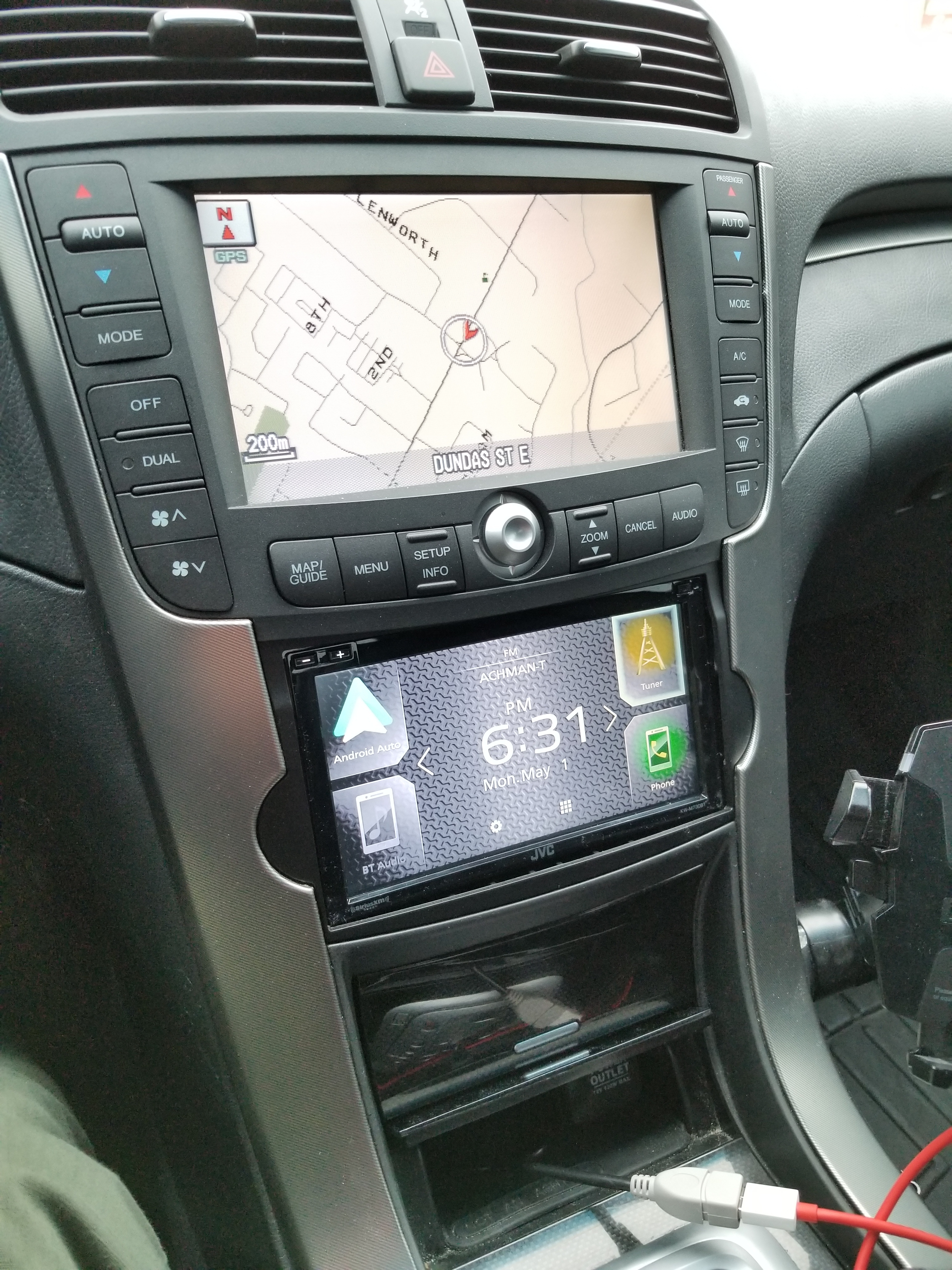
My next step is to just buy a double din radio. in my case, since i've upgraded my audio ( line driver, amps etc ) it would be an easy swap for me. I just dont want to encounter another bluetooth issue...
Cheaper than getting a new phone imo.
I spoke to tech support this morning and they mentioned the problem is with IOS 10+ bluetooth. Which is a known issue with apple. I'm going to test this again tonight with a Samsung Galaxy I have laying around somewhere.
My question is what phone are you using and are you experiencing any issues, like I am.
Last edited by flyromeo3; Apr 28, 2017 at 12:48 PM.
Three Wheelin'
Joined: May 2009
Posts: 1,773
Likes: 167
From: PA/ NY/ FL
So i continued to test this and determined the problem is with the iPhone.
I got another one and it seems to be working as intended.
Here's what I also found.
Its currently working using an iPhone 7 model A1660. Tested using three of these.
I grabbed 3 model A1784 and had the same problem with all three. Which is the one I originally had and encountered this issue with.
All 6 phones were factory restored with latest IOS.
puzzling but apparently all models share the same bluetooth hardware/specs.
Maybe an interruption between GSM and bluetooth radio signal???
I got another one and it seems to be working as intended.
Here's what I also found.
Its currently working using an iPhone 7 model A1660. Tested using three of these.
I grabbed 3 model A1784 and had the same problem with all three. Which is the one I originally had and encountered this issue with.
All 6 phones were factory restored with latest IOS.
puzzling but apparently all models share the same bluetooth hardware/specs.
Maybe an interruption between GSM and bluetooth radio signal???

Three Wheelin'
Joined: May 2009
Posts: 1,773
Likes: 167
From: PA/ NY/ FL
Just when I thought it was working........that is until I added another bluetooth device to my phone.
seems if I ONLY keep the iSimple as a bluetooth connected device in settings it will not freeze. The second I add any other type of bluetooth receiver ( headset, my home stereo, Handsfree in the pilot ) the issues begin.
seems if I ONLY keep the iSimple as a bluetooth connected device in settings it will not freeze. The second I add any other type of bluetooth receiver ( headset, my home stereo, Handsfree in the pilot ) the issues begin.
Instructor
Joined: Dec 2016
Posts: 105
Likes: 11
Just when I thought it was working........that is until I added another bluetooth device to my phone.
seems if I ONLY keep the iSimple as a bluetooth connected device in settings it will not freeze. The second I add any other type of bluetooth receiver ( headset, my home stereo, Handsfree in the pilot ) the issues begin.
seems if I ONLY keep the iSimple as a bluetooth connected device in settings it will not freeze. The second I add any other type of bluetooth receiver ( headset, my home stereo, Handsfree in the pilot ) the issues begin.
If your doing this from the iphone follow these steps:
Start car.
Go to the settings app on your phone.
Click on Bluetooth.
Under my devices, disconnect your cars hands free link.
Make sure that the Isimple device is connected.
Reconnect your cars hands free link.
This usually works for me. I only use the HFL if I plan on taking a long trip otherwise I dont connect it.
Last edited by Nytetime6; May 4, 2017 at 09:28 AM.
Three Wheelin'
Joined: May 2009
Posts: 1,773
Likes: 167
From: PA/ NY/ FL
I ran into the same issue. If I have the hands free link hooked up along with the isimple then i have skipping or freezing problems. My workaround was to let the isimple connect to bluetooth first and then active the hands free link (done from the phone settings) or just not have the HFL activated at all. If you let the HFL connect to bluetooth first and then the isimple then you will have freezing or skipping issues.
If your doing this from the iphone follow these steps:
Start car.
Go to the settings app on your phone.
Click on Bluetooth.
Under my devices, disconnect your cars hands free link.
Make sure that the Isimple device is connected.
Reconnect your cars hands free link.
This usually works for me. I only use the HFL if I plan on taking a long trip otherwise I dont connect it.
If your doing this from the iphone follow these steps:
Start car.
Go to the settings app on your phone.
Click on Bluetooth.
Under my devices, disconnect your cars hands free link.
Make sure that the Isimple device is connected.
Reconnect your cars hands free link.
This usually works for me. I only use the HFL if I plan on taking a long trip otherwise I dont connect it.
Thanks. I may have not been clear with my explanation. The HFL in my TL hasnt worked in years. So from time to time I use a bluetooth ear bud.
Despite the other bluetooth devices added to my phone. They are not connected to anything when the isimple module is connected via bluetooth.
It seems if I "forget" the other devices and solely leave the isimple connection. Everything works fine.
When other devices are added and are "not connected" this is when the problem begins.