


Timing belt replacement... not lining up correctly?


Thread Starter
2011 CR-Z EX 6spd Navi
iTrader: (2)
Joined: Dec 2010
Posts: 34
Likes: 0
From: Bethlehem, PA
Timing belt replacement... not lining up correctly?
Let me preface this post by first saying I've done several D-series Civic timing belt and water pump replacements. This is my first J-Series, but it shouldn't be much harder than what I'm used to. I'm using this DIY here -- https://acurazine.com/forums/3g-tl-2004-2008-93/122-diy-105k-service-timing-belt-water-pump-spark-plugs-thermostat-%2Apics%2A-784622/
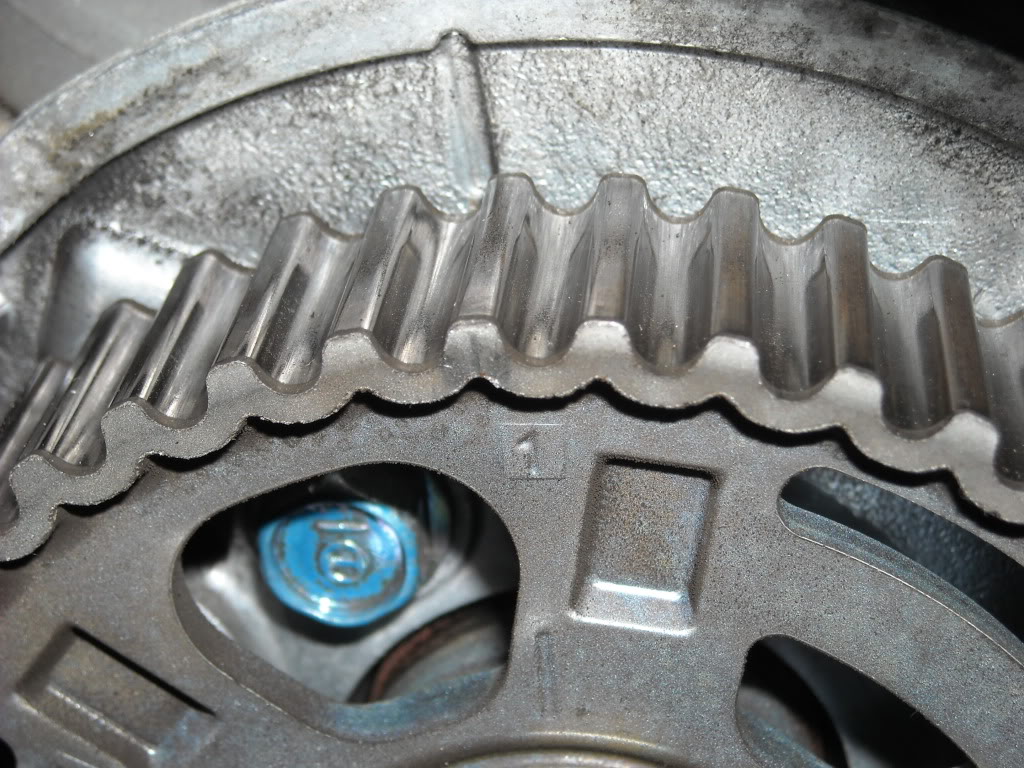
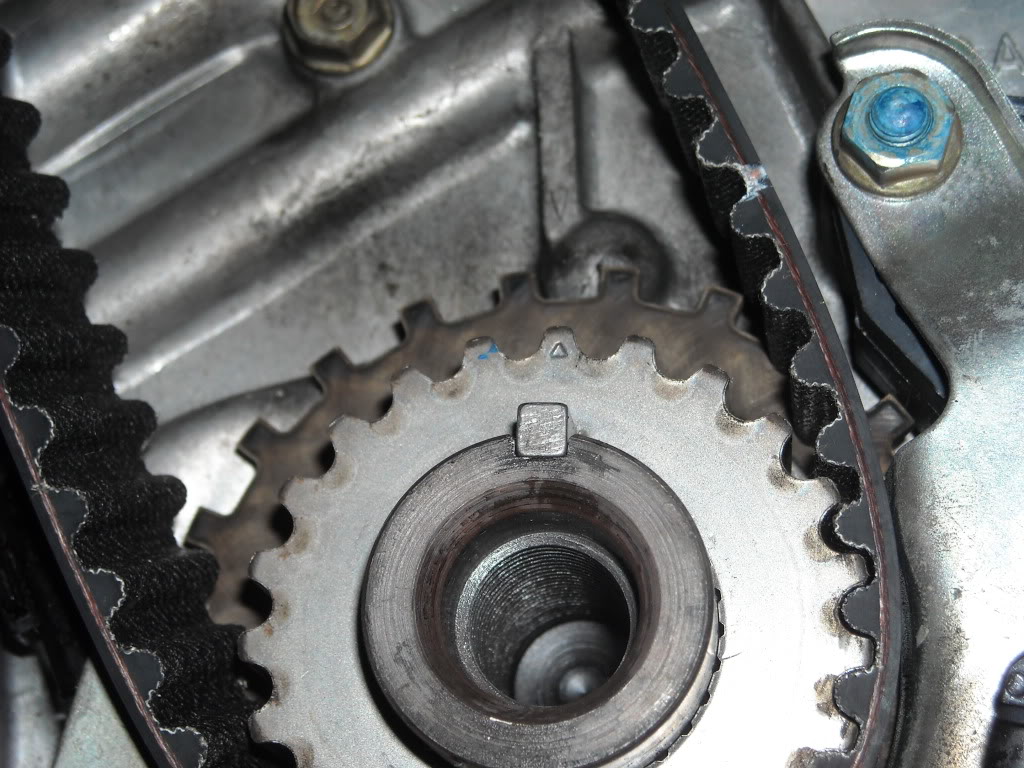
With that said, I went to line up the timing belt and it looks like the rear cam has rotated clockwise about 20-30 degrees when the front cam and crankshaft pulley are at Cyl 1 TDC. If I try to rotate the rear cam more than a few degrees in either direction, it's obviously met with resistance. I'm looking at the timing marks correctly, so I think, but there's no way the cam should've been able to rotate that much!
I can't figure out how the rear cam even rotated, I just need to figure out what's wrong and why it's not lining up. Any help would would EXTREMELY appreciated at this point
With that said, I went to line up the timing belt and it looks like the rear cam has rotated clockwise about 20-30 degrees when the front cam and crankshaft pulley are at Cyl 1 TDC. If I try to rotate the rear cam more than a few degrees in either direction, it's obviously met with resistance. I'm looking at the timing marks correctly, so I think, but there's no way the cam should've been able to rotate that much!
I can't figure out how the rear cam even rotated, I just need to figure out what's wrong and why it's not lining up. Any help would would EXTREMELY appreciated at this point

Which timing marks are you going by, surely not the covers at this point. I remember the rear being off a little but definitely not 20 or 30 degrees. Sounds like you're not TDC  Where was the cam when you pulled the belt? Maybe you bumped the crank removing or replacing something?
Where was the cam when you pulled the belt? Maybe you bumped the crank removing or replacing something?






Moderator
Joined: Aug 2004
Posts: 3,966
Likes: 13
From: Walnut Creek, CA
The camshaft must have spun when you had the timing belt off. I guess your only option at this point is to remove the valve covers and see if you can figure out what the status of that rear cam is.
Hopefully someone more experienced will chime in.
Hopefully someone more experienced will chime in.

Has that same issue a few weeks. You can pull it back into place with a ratchet and hold the pressure so it doesn't spring back to where it was. Yes there will be a lot of resistance but that's how I did it. It would be ideal if you had someone working you so either of you could hold the cam in position while the other put the belt on.
Trending Topics


Racer
Joined: Dec 2009
Posts: 266
Likes: 20
From: Oklahoma
The rear cam sometimes wants to "break over center" right near the line up marks because of cam lobe position & valve spring pressure.
Do what TLDude says in the above post. Rotate the camwheel back with a long ratchet & socket & hold it there while putting the belt on.
I have a couple of little spring clamps I put on the rear cam wheel & belt when I have it where it needs to be. Be sure & loosen up the smooth guide pulley in the center of the "V", gives you some extra slack to work with. Be sure & crank or rotate the engine through several times & make sure everything still lines up.
Do what TLDude says in the above post. Rotate the camwheel back with a long ratchet & socket & hold it there while putting the belt on.
I have a couple of little spring clamps I put on the rear cam wheel & belt when I have it where it needs to be. Be sure & loosen up the smooth guide pulley in the center of the "V", gives you some extra slack to work with. Be sure & crank or rotate the engine through several times & make sure everything still lines up.
Thread Starter
2011 CR-Z EX 6spd Navi
iTrader: (2)
Joined: Dec 2010
Posts: 34
Likes: 0
From: Bethlehem, PA
Looks like everything is lined up correctly now. I used a 17mm wrench to turn the rear cam counter-clockwise as I slipped the belt on. Thanks for the suggestion.
I actually didn't think the cam would spin that far without the valves hitting one of the piston. I also didn't think it'd be able to turn the cam counter-clockwise without loosening the cam gear bolt... but it took all of five mins to get everything lined up again. Must've just been the pressure from the valvetrain
I wouldn't hesitate to do it again, knowing now that it was a much easier fix than I anticipated
I actually didn't think the cam would spin that far without the valves hitting one of the piston. I also didn't think it'd be able to turn the cam counter-clockwise without loosening the cam gear bolt... but it took all of five mins to get everything lined up again. Must've just been the pressure from the valvetrain
I wouldn't hesitate to do it again, knowing now that it was a much easier fix than I anticipated
Glad to know it worked for you. I was a bit hesitant to turn the cam when I had the issue but it turned out fine. According to my buddy, his car now has 30 hp extra 

Race Director
Joined: Dec 2003
Posts: 12,521
Likes: 1,824
From: MAGA country
Let me preface this post by first saying I've done several D-series Civic timing belt and water pump replacements. This is my first J-Series, but it shouldn't be much harder than what I'm used to. I'm using this DIY here -- https://acurazine.com/forums/showthread.php?t=784622
With that said, I went to line up the timing belt and it looks like the rear cam has rotated clockwise about 20-30 degrees when the front cam and crankshaft pulley are at Cyl 1 TDC. If I try to rotate the rear cam more than a few degrees in either direction, it's obviously met with resistance. I'm looking at the timing marks correctly, so I think, but there's no way the cam should've been able to rotate that much!
I can't figure out how the rear cam even rotated, I just need to figure out what's wrong and why it's not lining up. Any help would would EXTREMELY appreciated at this point
With that said, I went to line up the timing belt and it looks like the rear cam has rotated clockwise about 20-30 degrees when the front cam and crankshaft pulley are at Cyl 1 TDC. If I try to rotate the rear cam more than a few degrees in either direction, it's obviously met with resistance. I'm looking at the timing marks correctly, so I think, but there's no way the cam should've been able to rotate that much!
I can't figure out how the rear cam even rotated, I just need to figure out what's wrong and why it's not lining up. Any help would would EXTREMELY appreciated at this point
Thread Starter
2011 CR-Z EX 6spd Navi
iTrader: (2)
Joined: Dec 2010
Posts: 34
Likes: 0
From: Bethlehem, PA
I thank you for your input but if it's that important the first few posts should be edited to included that. I think that's a bit unrealistic to expect someone to read up to post #200 when the majority of pertinent info is included in the first few posts

3rd Gear
Joined: Dec 2012
Posts: 3
Likes: 0
hi, here I am, I have done my Timing belt past weekend and I didn't have seen this DIY. Everything went great except one think that I want to ask to you.
This was the first timing belt job on this car so the timing before was the factory setting. I first put the front camshaft to #1 TDC and lign up mark and then look at the back camshafts. I've notice the marks on the TB covers and cams where not PERFECTLY align ( about 5-10 degree clockwise the TB covers marks maybe... hard to know exactly but the maximum it would be off is by one theeth... I will try to take picture ). So i continue the job and remove everything and I remove the old timing. I was aware that the camshafts can slip off but nothing move.
I put the new timing belt and I didn't move the rear cams to align marks on the blocks because everything was great before and this was the from the factory like this. The auto-tensioner is OK so i don't think the I lost tension in past so the cam jump one theeth. I start the car with the new belt and everything start great good Idle. Vtec works too but I don't know if I'm paranoiyak or I may have lost a "little" of power. That's really annoying me.
I need your advice. Should I restart the job and put the back cams to marks or it's a common issue to this car to be a little bit off the marks. Will I gain HP if move it. Is it possible to see a so little loss of power if I am one theeth off or the car would ran like shit. I know and I am 99.9 % sure nothing move and I put the belt corectly with the tension on the side of the tensionner.
I can't stop thinking at this. Need your advice quickly please. I now run the car for the past three days and no issue at all but this is annoying me.
This was the first timing belt job on this car so the timing before was the factory setting. I first put the front camshaft to #1 TDC and lign up mark and then look at the back camshafts. I've notice the marks on the TB covers and cams where not PERFECTLY align ( about 5-10 degree clockwise the TB covers marks maybe... hard to know exactly but the maximum it would be off is by one theeth... I will try to take picture ). So i continue the job and remove everything and I remove the old timing. I was aware that the camshafts can slip off but nothing move.
I put the new timing belt and I didn't move the rear cams to align marks on the blocks because everything was great before and this was the from the factory like this. The auto-tensioner is OK so i don't think the I lost tension in past so the cam jump one theeth. I start the car with the new belt and everything start great good Idle. Vtec works too but I don't know if I'm paranoiyak or I may have lost a "little" of power. That's really annoying me.
I need your advice. Should I restart the job and put the back cams to marks or it's a common issue to this car to be a little bit off the marks. Will I gain HP if move it. Is it possible to see a so little loss of power if I am one theeth off or the car would ran like shit. I know and I am 99.9 % sure nothing move and I put the belt corectly with the tension on the side of the tensionner.
I can't stop thinking at this. Need your advice quickly please. I now run the car for the past three days and no issue at all but this is annoying me.
Race Director
Joined: Dec 2003
Posts: 12,521
Likes: 1,824
From: MAGA country
^^^The marks might be off very slightly, usually on the rear cam sprocket. Look at the pictures in step 12 (rear cam is the right picture. Notice how the marks are off very slightly?):
https://acurazine.com/forums/showthread.php?t=784622
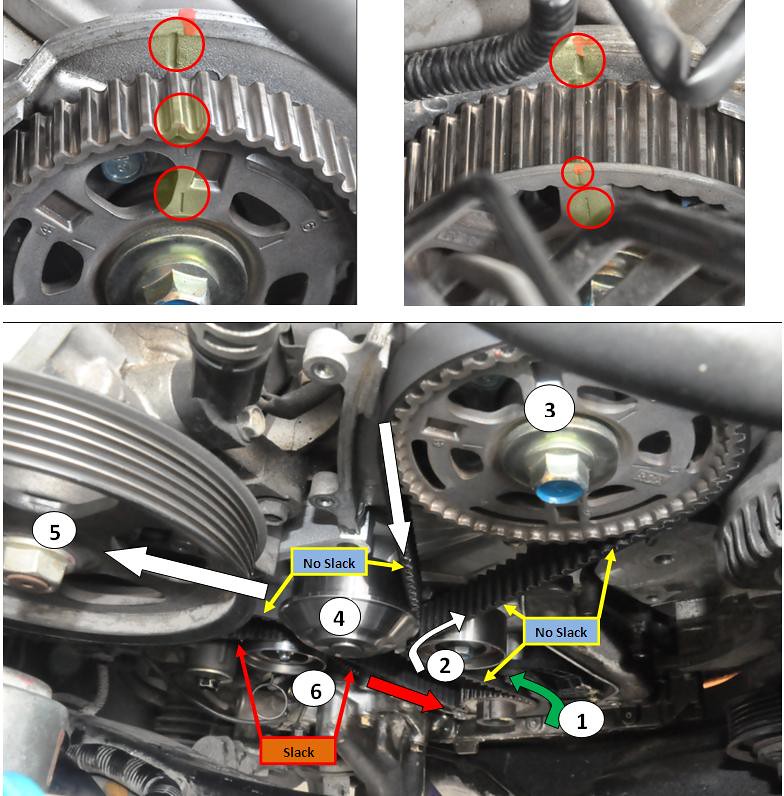
But if the engine is running normally, everything is probably set properly...
https://acurazine.com/forums/showthread.php?t=784622
But if the engine is running normally, everything is probably set properly...
Last edited by nfnsquared; Dec 18, 2012 at 12:46 AM.

the overexplainer
Joined: Feb 2011
Posts: 3,287
Likes: 385
From: OC, CA
a tip you might want to try next time is marking the belt to the tooth with a white pencil or painter's tape (you would remove this after ensuring everything is lined up).
It helped me ensure that all of my timing marks were lined up properly and took out any doubt of putting the belt on and skipping a tooth.
ditto, if your car is running ok i'm sure you have it in the right position. You would lose compression if you were a tooth off and the car would sound strange.
like so:

I guess you could actually use my picture to check your belt. Just count the teeth. Note the 3 marks for the crank pulley are in between teeth.
It helped me ensure that all of my timing marks were lined up properly and took out any doubt of putting the belt on and skipping a tooth.
ditto, if your car is running ok i'm sure you have it in the right position. You would lose compression if you were a tooth off and the car would sound strange.
like so:
I guess you could actually use my picture to check your belt. Just count the teeth. Note the 3 marks for the crank pulley are in between teeth.
Last edited by ez12a; Dec 18, 2012 at 11:19 AM.
3rd Gear
Joined: Dec 2012
Posts: 3
Likes: 0
Thanks everyone! I take a look at my car this morning and everything is line up now. I don't know why but im sure the rear was a little off but now it is on the marks. Nice idea for counting the tooth ! Didn't think to that

1st Gear
Joined: Dec 2022
Posts: 1
Likes: 0
I
Let me preface this post by first saying I've done several D-series Civic timing belt and water pump replacements. This is my first J-Series, but it shouldn't be much harder than what I'm used to. I'm using this DIY here -- https://acurazine.com/forums/showthread.php?t=784622
With that said, I went to line up the timing belt and it looks like the rear cam has rotated clockwise about 20-30 degrees when the front cam and crankshaft pulley are at Cyl 1 TDC. If I try to rotate the rear cam more than a few degrees in either direction, it's obviously met with resistance. I'm looking at the timing marks correctly, so I think, but there's no way the cam should've been able to rotate that much!
I can't figure out how the rear cam even rotated, I just need to figure out what's wrong and why it's not lining up. Any help would would EXTREMELY appreciated at this point
With that said, I went to line up the timing belt and it looks like the rear cam has rotated clockwise about 20-30 degrees when the front cam and crankshaft pulley are at Cyl 1 TDC. If I try to rotate the rear cam more than a few degrees in either direction, it's obviously met with resistance. I'm looking at the timing marks correctly, so I think, but there's no way the cam should've been able to rotate that much!
I can't figure out how the rear cam even rotated, I just need to figure out what's wrong and why it's not lining up. Any help would would EXTREMELY appreciated at this point

Thread
Thread Starter
Forum
Replies
Last Post
BlkTxAcuraTypeS
Member Cars for Sale
3
Oct 18, 2015 08:05 PM
asahrts
Member Cars for Sale
0
Sep 4, 2015 05:55 PM
