


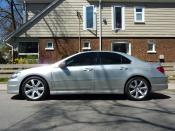
05 RL with A spec wheels


Thread Starter
Intermediate
Joined: May 2010
Posts: 41
Likes: 6
From: Vancouver,Canada
05 RL with A spec wheels
Hello All,
I bought a new (to me) 05 silver RL last friday and will pick it up this wednesday. I have some questions for the forum.
The RL comes with A-spec wheels and Michelin 245/45ZR18 tires. How do I check whether it has the A-spec suspension?
I notice some RL has a small spoiler and some don't. Is the spoiler part of a option package? How do I get one?
Anything else I should watch for?
Thank you all, in advance.
Plastics
I bought a new (to me) 05 silver RL last friday and will pick it up this wednesday. I have some questions for the forum.
The RL comes with A-spec wheels and Michelin 245/45ZR18 tires. How do I check whether it has the A-spec suspension?
I notice some RL has a small spoiler and some don't. Is the spoiler part of a option package? How do I get one?
Anything else I should watch for?
Thank you all, in advance.
Plastics

Safety Car
Joined: Nov 2006
Posts: 4,217
Likes: 39
From: Northern VA
Other than looking at the part numbers on the actual suspension pieces, I think it is pretty hard to tell whether you have the A-Spec suspension.
With regard to the decklid spoiler, this is an optional accessory, and runs about $300 from internet Acura dealers.
See the installation directions here
http://estore.honda.com/accesssory-i...L&modelname=RL
You can also find the A-Spec suspension directions which has a certificate of authenticity in it. I suppose you could look for that, and call the dealer that filled it out to see if they have record of the install.
With regard to the decklid spoiler, this is an optional accessory, and runs about $300 from internet Acura dealers.
See the installation directions here
http://estore.honda.com/accesssory-i...L&modelname=RL
You can also find the A-Spec suspension directions which has a certificate of authenticity in it. I suppose you could look for that, and call the dealer that filled it out to see if they have record of the install.


Thread Starter
Intermediate
Joined: May 2010
Posts: 41
Likes: 6
From: Vancouver,Canada
A spec chrome wheels peeling
Pick up my 2005 Silver RL a week ago and is enjoying every moment with it. It's taken mine quite a while to learn how to use the stereo, climate control etc...I still have not figure out how to use the nav.
It has been busy traffic all week around the roads and only today I get a chance to boot it up to about 90 mph, and it is errily quiet, next to no wind, tire,engine noise at all, just the stereo.
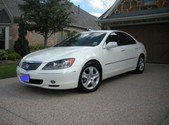
The A spec chrome wheels are peeling. I read on the forum this is not uncommon. I tried to use some chrome auto paint on it tonight, but it did not work out very well. The chrome paint was more like a silver and made the peeling area look even worse. Good thing I just tried a small spot.
If any of you have any suggestions on how to repair the peeled chrome spots, I would look forward to any ideas.
Plastics
2005 Acura RL
1999 BMW K1200RS silver -the faster one...
It has been busy traffic all week around the roads and only today I get a chance to boot it up to about 90 mph, and it is errily quiet, next to no wind, tire,engine noise at all, just the stereo.
The A spec chrome wheels are peeling. I read on the forum this is not uncommon. I tried to use some chrome auto paint on it tonight, but it did not work out very well. The chrome paint was more like a silver and made the peeling area look even worse. Good thing I just tried a small spot.
If any of you have any suggestions on how to repair the peeled chrome spots, I would look forward to any ideas.
Plastics
2005 Acura RL
1999 BMW K1200RS silver -the faster one...
Trending Topics
Thread Starter
Intermediate
Joined: May 2010
Posts: 41
Likes: 6
From: Vancouver,Canada
05 RL silver
I was going over the paperwork that came with the RL and learn that there is still 13 month of Comprehensive Acura Plus warrently left on it...BONUS!
On the peeling A Spec chrome wheels...took it to a wheel renew guy...he said the finish is not chrome, but some cheaper chrome like topping, peels real easy after a few year.. he suggest blasting it and repaint to a nice dark silver for $1000. Instead, I got some chrome paint and touch it up. The chrome paint is not really chrome in color but more silver...I am hoping that seals the peeling edges and stop it from peeling further.
I hardwired my Escort 8500 on the visor..took about 5 minutes to do that.
Great car, been trying to figure out how to do voice command.
On the forum, I keep on reading that the gas mileage in the city really bites...I am getting 23 miles per imperial gallon in the city, which is pretty good..in my opionion. all for now
Plastics
05 RL Silver
On the peeling A Spec chrome wheels...took it to a wheel renew guy...he said the finish is not chrome, but some cheaper chrome like topping, peels real easy after a few year.. he suggest blasting it and repaint to a nice dark silver for $1000. Instead, I got some chrome paint and touch it up. The chrome paint is not really chrome in color but more silver...I am hoping that seals the peeling edges and stop it from peeling further.
I hardwired my Escort 8500 on the visor..took about 5 minutes to do that.
Great car, been trying to figure out how to do voice command.
On the forum, I keep on reading that the gas mileage in the city really bites...I am getting 23 miles per imperial gallon in the city, which is pretty good..in my opionion. all for now
Plastics
05 RL Silver
Thread Starter
Intermediate
Joined: May 2010
Posts: 41
Likes: 6
From: Vancouver,Canada
05 RL Silver
Hello Chas2...I live at Vancouver, Canada.
It has taken me sometime to discover all the "toys" that comes with the RL...the other days, I discover the front headrest can be bend forward so it becomes a real headrest.
I have tried on some curvy roads to "discover" super handling and I can feel the torque going to the back wheel when the cornering gets hot
I will have an amp/subwoofer out my my other car soon, and would like to add it to the RL to give it more punch.
Otherwise..all is good..
It has taken me sometime to discover all the "toys" that comes with the RL...the other days, I discover the front headrest can be bend forward so it becomes a real headrest.
I have tried on some curvy roads to "discover" super handling and I can feel the torque going to the back wheel when the cornering gets hot
I will have an amp/subwoofer out my my other car soon, and would like to add it to the RL to give it more punch.
Otherwise..all is good..
Racer
Joined: Apr 2010
Posts: 361
Likes: 44
From: McKinney, TX
plastics, here is a list of voice commands:
Voice commands for the new owners
Global Commands
The system accepts these commands on any screen.
Help (reads list of the commands for the displayed screen)
Setup (displays Set-up screen 1)
Display map (displays the map screen)
Display menu (displays the Enter destination by screen)
Information (displays the Information screen)
Repeat voice (or just Voice)
Back (to previous screen, same as CANCEL or BACK button)
Cancel (cancels current activity)
The following voice commands are listed and grouped as you would see them from Voice Command Help on the Information screen.
The commands are accessible at any time and can be read to you so that you do not need to memorize all of them.
Navigation General Commands
The system accepts these commands on a map/guidance screen.
Display menu (if on route, displays the Change method screen)
Display navigation (if on route, displays the Change method screen)
Display map
Display map guide (when on route, shows the next maneuver)
Display setup (or just Setup)
Display information (or just Information)
Cancel
Backward (or just Back)
What time is it?
Repeat voice (or just Voice)
Help (reads list of Navigation General and Navigation Display Commands)
How long to the destination? (When on route, tells the time to destination)
How far to the destination? (When on route, tells the distance to destination)
Register the current location (Puts current location in previous destinations)
Navigation Display Commands
The system accepts these commands on a map/guidance screen.
Display current location
Display north up
Display heading up
Display zoom in
Display: (the selected scale)
1/20 mile (80 m) scale
1/8 mile (200 m) scale
1/2 mile (800 m) scale
2 mile (3 km) scale
5 mile (8 km) scale
15 mile (24 km) scale
50 mile (80 km) scale
150 mile (240 km) scale
350 mile (560 km) scale
Display: (display the selected icon on the screen)
ATM
gas station
restaurant (all restaurant types)
post office
hotel-motel
grocery store
Hide: (hide the selected icon from the screen)
ATM
gas station
restaurant (all restaurant types)
post office
grocery store
hotel-motel
Max zoom in
Max zoom out
Go home
Find Place Commands
The system accepts these commands on a map/guidance screen.
Find nearest: (find the nearest selection)
Acura dealer
Honda dealer
gas station
ATM
bank
post office
hospital
police station
hotel
tourist attraction
restaurant (all restaurant types)
American restaurant
Chinese restaurant
fast food
Italian restaurant
Japanese restaurant
Mexican restaurant
Seafood restaurant
shopping
parking garage
parking lot
Climate Control Commands
Climate control automatic
Climate control off
Air conditioner (switches between on and off)/Air conditioner off
Climate control defrost (switches between on and off)/Climate control defrost off
Rear defrost (switches between on and off)/Rear defrost off
Climate control fresh air
Climate control recirculate
Climate control floor and defrost
Climate control floor
Climate control vent
Climate control hi-level (floor and vent)
Fan speed # (#: 1-7) (for best voice control, keep fan at speed 1, or 2)
Passenger automatic
Passenger vent
Passenger dash and floor
Passenger floor
Temperature Voice Commands
The system accepts these commands on a map/guidance screen. A/C screen, and audio screens.
Temperature # degrees (#: 57 to 87 degrees F)
Temperature up
Temperature down
Temperature max hot
Temperature max cold
Temperature balance
Temperature dual mode (allow different temperatures for driver and passenger)
Passenger temperature # degrees (#: 57 to 87 degrees F)
CD Voice Commands
The system accepts these commands on a map/guidance screen. A/C screen, and audio screens.
CD play
CD play disc # (#: 1-6)
CD play track # (#: 1-30)
CD play disc #A track #B (A: 1-6 B: 1-30)
CD skip forward
CD skip back
CD play next disc
CD play previous disc
CD track random
CD track repeat
CD disc repeat
CD normal play
DVD Voice Commands
The system accepts these commands on a map/guidance screen. A/C screen, and audio screens.
DVD play
DVD play disc # (#: 1-6)
DVD play track # (#: 1-30)
DVD play disc #A track #B (A: 1-6 B: 1-30)
DVD skip forward
DVD skip back
DVD play next disc
DVD play previous disc
DVD track random
DVD track repeat
DVD disc repeat
DVD normal play
Radio Voice Commands
The system accepts these commands on a map/guidance screen. A/C screen, and audio screens.
Radio on (or Radio play)
Radio off
Radio select AM (select band before selecting frequency)
Radio select FM1
Radio select FM2
Radio # FM (#: frequency. Example Radio 95.5 FM)
Radio # AM (#:frequency. Example Radio 1020)
Radio seek
Radio seek down
Radio next station (same as Radio seek)
Radio preset 1-6 (selects preset 1-6)
Radio auto select
Radio Select XM1
Radio Select XM2
XM channel # (#: 1-255)
XM channel up
XM channel down
XM preset (1-6)
Tape Commands
The system accepts these commands in a map/guidance screen. A/C screen, and audio screens.
Tape play
Tape rewind
Tape fast forward
Tape change program
Tape Dolby noise reduction
Tape skip forward
Tape skip back
Tape repeat
Information Screen Voice Commands
These are additional commands not found on the Voice Command Help screen available when viewing the Information screen. Follow the voice prompts.
Trip computer
Voice command help (the system read and lists all of the commands, starting with Navigation General Commands)
Calendar
Calculator
Set-up Screen 1 Commands
The system accepts these commands on Set-up screen 1. (For Set-up screens 2-4, simply say what is written on the screen, and follow the voice prompts)
Brightness up
Brightness down
Brightness minimum/min.
Brightness maximum/max.
Volume up
Volume down
Volume minimum/min.
Volume maximum/max.
Volume Off
Display Off
Display Day
Display Night
Display Auto
Show Icon on Map
Guidance Mode
On-Screen Commands
The system accepts these commands on any screen. There are over 100 on- screen commands. Just say what is written on the screen (this excludes keyboard letters, and listed items)
Next
Previous
Return
OK (except at Disclaimer screen)
Delete
If you have a newer NAV disc, you can also add, "find nearest coffee shop". It might sound foolish, but I use this quite often and it REALLY impresses the passengers!
Voice commands for the new owners
Global Commands
The system accepts these commands on any screen.
Help (reads list of the commands for the displayed screen)
Setup (displays Set-up screen 1)
Display map (displays the map screen)
Display menu (displays the Enter destination by screen)
Information (displays the Information screen)
Repeat voice (or just Voice)
Back (to previous screen, same as CANCEL or BACK button)
Cancel (cancels current activity)
The following voice commands are listed and grouped as you would see them from Voice Command Help on the Information screen.
The commands are accessible at any time and can be read to you so that you do not need to memorize all of them.
Navigation General Commands
The system accepts these commands on a map/guidance screen.
Display menu (if on route, displays the Change method screen)
Display navigation (if on route, displays the Change method screen)
Display map
Display map guide (when on route, shows the next maneuver)
Display setup (or just Setup)
Display information (or just Information)
Cancel
Backward (or just Back)
What time is it?
Repeat voice (or just Voice)
Help (reads list of Navigation General and Navigation Display Commands)
How long to the destination? (When on route, tells the time to destination)
How far to the destination? (When on route, tells the distance to destination)
Register the current location (Puts current location in previous destinations)
Navigation Display Commands
The system accepts these commands on a map/guidance screen.
Display current location
Display north up
Display heading up
Display zoom in
Display: (the selected scale)
1/20 mile (80 m) scale
1/8 mile (200 m) scale
1/2 mile (800 m) scale
2 mile (3 km) scale
5 mile (8 km) scale
15 mile (24 km) scale
50 mile (80 km) scale
150 mile (240 km) scale
350 mile (560 km) scale
Display: (display the selected icon on the screen)
ATM
gas station
restaurant (all restaurant types)
post office
hotel-motel
grocery store
Hide: (hide the selected icon from the screen)
ATM
gas station
restaurant (all restaurant types)
post office
grocery store
hotel-motel
Max zoom in
Max zoom out
Go home
Find Place Commands
The system accepts these commands on a map/guidance screen.
Find nearest: (find the nearest selection)
Acura dealer
Honda dealer
gas station
ATM
bank
post office
hospital
police station
hotel
tourist attraction
restaurant (all restaurant types)
American restaurant
Chinese restaurant
fast food
Italian restaurant
Japanese restaurant
Mexican restaurant
Seafood restaurant
shopping
parking garage
parking lot
Climate Control Commands
Climate control automatic
Climate control off
Air conditioner (switches between on and off)/Air conditioner off
Climate control defrost (switches between on and off)/Climate control defrost off
Rear defrost (switches between on and off)/Rear defrost off
Climate control fresh air
Climate control recirculate
Climate control floor and defrost
Climate control floor
Climate control vent
Climate control hi-level (floor and vent)
Fan speed # (#: 1-7) (for best voice control, keep fan at speed 1, or 2)
Passenger automatic
Passenger vent
Passenger dash and floor
Passenger floor
Temperature Voice Commands
The system accepts these commands on a map/guidance screen. A/C screen, and audio screens.
Temperature # degrees (#: 57 to 87 degrees F)
Temperature up
Temperature down
Temperature max hot
Temperature max cold
Temperature balance
Temperature dual mode (allow different temperatures for driver and passenger)
Passenger temperature # degrees (#: 57 to 87 degrees F)
CD Voice Commands
The system accepts these commands on a map/guidance screen. A/C screen, and audio screens.
CD play
CD play disc # (#: 1-6)
CD play track # (#: 1-30)
CD play disc #A track #B (A: 1-6 B: 1-30)
CD skip forward
CD skip back
CD play next disc
CD play previous disc
CD track random
CD track repeat
CD disc repeat
CD normal play
DVD Voice Commands
The system accepts these commands on a map/guidance screen. A/C screen, and audio screens.
DVD play
DVD play disc # (#: 1-6)
DVD play track # (#: 1-30)
DVD play disc #A track #B (A: 1-6 B: 1-30)
DVD skip forward
DVD skip back
DVD play next disc
DVD play previous disc
DVD track random
DVD track repeat
DVD disc repeat
DVD normal play
Radio Voice Commands
The system accepts these commands on a map/guidance screen. A/C screen, and audio screens.
Radio on (or Radio play)
Radio off
Radio select AM (select band before selecting frequency)
Radio select FM1
Radio select FM2
Radio # FM (#: frequency. Example Radio 95.5 FM)
Radio # AM (#:frequency. Example Radio 1020)
Radio seek
Radio seek down
Radio next station (same as Radio seek)
Radio preset 1-6 (selects preset 1-6)
Radio auto select
Radio Select XM1
Radio Select XM2
XM channel # (#: 1-255)
XM channel up
XM channel down
XM preset (1-6)
Tape Commands
The system accepts these commands in a map/guidance screen. A/C screen, and audio screens.
Tape play
Tape rewind
Tape fast forward
Tape change program
Tape Dolby noise reduction
Tape skip forward
Tape skip back
Tape repeat
Information Screen Voice Commands
These are additional commands not found on the Voice Command Help screen available when viewing the Information screen. Follow the voice prompts.
Trip computer
Voice command help (the system read and lists all of the commands, starting with Navigation General Commands)
Calendar
Calculator
Set-up Screen 1 Commands
The system accepts these commands on Set-up screen 1. (For Set-up screens 2-4, simply say what is written on the screen, and follow the voice prompts)
Brightness up
Brightness down
Brightness minimum/min.
Brightness maximum/max.
Volume up
Volume down
Volume minimum/min.
Volume maximum/max.
Volume Off
Display Off
Display Day
Display Night
Display Auto
Show Icon on Map
Guidance Mode
On-Screen Commands
The system accepts these commands on any screen. There are over 100 on- screen commands. Just say what is written on the screen (this excludes keyboard letters, and listed items)
Next
Previous
Return
OK (except at Disclaimer screen)
Delete
If you have a newer NAV disc, you can also add, "find nearest coffee shop". It might sound foolish, but I use this quite often and it REALLY impresses the passengers!
Safety Car
Joined: Nov 2006
Posts: 4,217
Likes: 39
From: Northern VA
You have not looked very hard.
Check out various Acura dealers on the internet, check out our sponsors, Hansel Acura (Kaleb), Acura of Peoria (Tim), Acura of Lynwood (Rob), and various Acura stores on ebay.
Do make sure the wheels are for the RL. 4G TL, 2G MDX (SUV wheels are too heavy anyway) are known not to fit because of the RL brake caliper, even if the bolt circle is the same, and the offsets are similar.
And of course, there is eBay
http://cgi.ebay.com/ebaymotors/Acura...0#ht_510wt_939
Check out various Acura dealers on the internet, check out our sponsors, Hansel Acura (Kaleb), Acura of Peoria (Tim), Acura of Lynwood (Rob), and various Acura stores on ebay.
Do make sure the wheels are for the RL. 4G TL, 2G MDX (SUV wheels are too heavy anyway) are known not to fit because of the RL brake caliper, even if the bolt circle is the same, and the offsets are similar.
And of course, there is eBay
http://cgi.ebay.com/ebaymotors/Acura...0#ht_510wt_939

Burning Brakes
Joined: Apr 2010
Posts: 965
Likes: 77
Thread Starter
Intermediate
Joined: May 2010
Posts: 41
Likes: 6
From: Vancouver,Canada
05 RL Silver
rtr...I have not been to the night market for a few years. So it wasn't me.
I wouldn't mind someone to show me how some of the electronic gadget work. I am planning to add a amp/subwoofer but I read somewhere that the noise cancelation interfere with it.
Also, what parts to get and so on....so anything would help
Plastics
05 RL silver.
I wouldn't mind someone to show me how some of the electronic gadget work. I am planning to add a amp/subwoofer but I read somewhere that the noise cancelation interfere with it.
Also, what parts to get and so on....so anything would help
Plastics
05 RL silver.

Thread
Thread Starter
Forum
Replies
Last Post
EvilVirus
Car Parts for Sale
8
Dec 10, 2015 07:38 PM
DunesCreations
3G TL Tires, Wheels & Suspension
13
Sep 9, 2015 12:03 PM
nuldabz
3G TL Tires, Wheels & Suspension
3
Sep 3, 2015 05:49 PM
