


Acuralink Navigation is junk


Thread Starter
Advanced
Joined: Nov 2015
Posts: 87
Likes: 14
Acuralink Navigation is junk
Take a look at this screenshot from the Acuralink webpage:
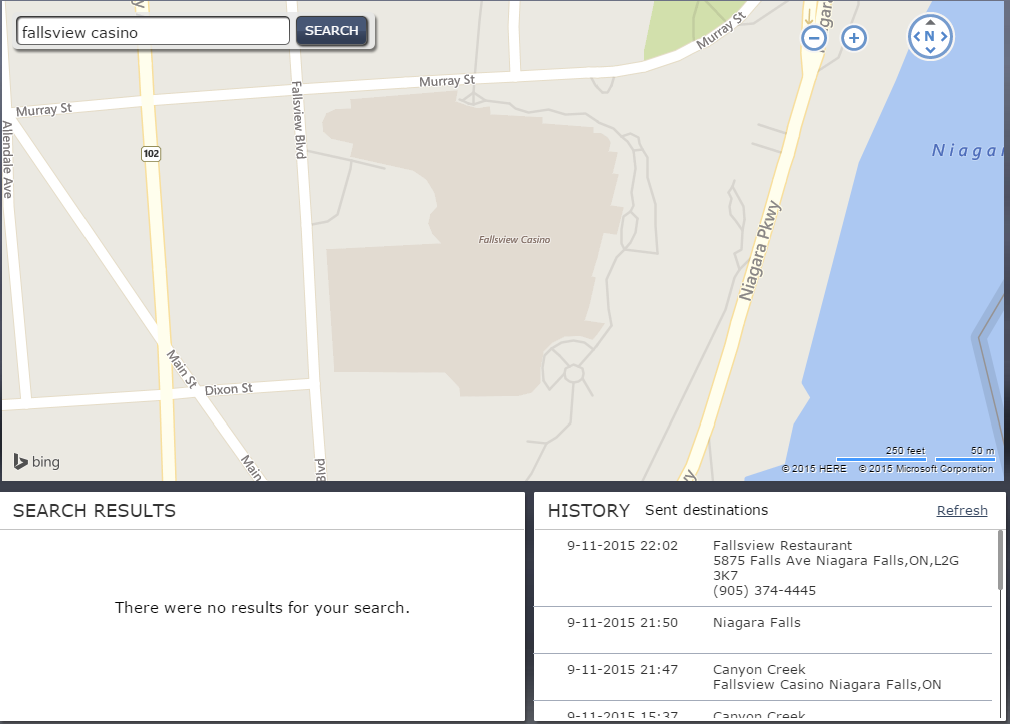
I'm looking at it right on the map. Search doesn't come up with anything.
So I'm going to have to go into the car and use the navigation to set the destination.
Yup... first world problems. But isn't that part of why I paid a premium for this vehicle?

I'm looking at it right on the map. Search doesn't come up with anything.
So I'm going to have to go into the car and use the navigation to set the destination.
Yup... first world problems. But isn't that part of why I paid a premium for this vehicle?

Burning Brakes


Joined: Aug 2015
Posts: 814
Likes: 265
From: Central Ontario Canada
As long as you were on a computer or smartphone with internet access, you could have looked up the address for the casino.
Then you could have searched for 6380 Fallsview Boulevard, Niagara Falls (simple cut and paste)
Then you could have searched for 6380 Fallsview Boulevard, Niagara Falls (simple cut and paste)
Suzuka Master
Joined: Mar 2004
Posts: 5,172
Likes: 740
From: Atlanta, GA
Take a look at this screenshot from the Acuralink webpage:
I'm looking at it right on the map. Search doesn't come up with anything.
So I'm going to have to go into the car and use the navigation to set the destination.
Yup... first world problems. But isn't that part of why I paid a premium for this vehicle?
I'm looking at it right on the map. Search doesn't come up with anything.
So I'm going to have to go into the car and use the navigation to set the destination.
Yup... first world problems. But isn't that part of why I paid a premium for this vehicle?
True, but in the end the tool/app should be decent and the AcuraLink app and technology is embarrassing for a company that keeps using the term "Advance" in its advertising and calls this implementation "AcuraLink Next Generation". Should be the "Forget it Generation"
Burning Brakes
Joined: Aug 2015
Posts: 814
Likes: 265
From: Central Ontario Canada
This story reminds me of a discussion on another automotive forum. In this case someone complained because he had traveled to and from the same job for 25 years and he had learned a route that took 15 minutes. He was criticizing his GPS because it took him on another route that took five minutes longer. He had totally forgotten that he had to use paper maps in the car he owned just the year before.
When I hear stories like this, it always reminds me of this video.
Thread Starter
Advanced
Joined: Nov 2015
Posts: 87
Likes: 14
I think the main point here is: It's just as bad as Apple maps!
Remember that scandal? Apple decided to stop using google maps and wrote their own and it ended up being garbage.
This wasn't so long ago, why didn't Acura learn from Apple's mistakes and NOT do their own map thing. Why couldn't they just integrate Google maps into their app. It's not that hard. Google has a well documented API.
Remember that scandal? Apple decided to stop using google maps and wrote their own and it ended up being garbage.
This wasn't so long ago, why didn't Acura learn from Apple's mistakes and NOT do their own map thing. Why couldn't they just integrate Google maps into their app. It's not that hard. Google has a well documented API.

Racer
Joined: Sep 2015
Posts: 352
Likes: 83
We have only used the nav on one trip. We went to a place we were somewhat familiar with and decided to use the nav to get to a particular restaurant we'd never been to before. I am glad it was daylight! On the way to and on the return from the restaurant, the nav wanted us to make a turn that would lead us directly (about 50 feet after the turn) into a large lake (Florideze for retention pond). My confidence and trust level for this system is now zero.
Thread Starter
Advanced
Joined: Nov 2015
Posts: 87
Likes: 14
Slightly off-topic snorf. This isn't about the in-car navigation. This is about the maps on the acuralink website and app.
You should be able to use the website or app to find something and send it to your car. Sending to the car works great, it's the searching that just doesn't work (see first post).
So what I do now is search on google maps, then copy-paste the address to Acuralink maps and then send it to the car. It works but I wasn't expecting to have to use googlemaps to overcome a bad map implementation from Acura.
You should be able to use the website or app to find something and send it to your car. Sending to the car works great, it's the searching that just doesn't work (see first post).
So what I do now is search on google maps, then copy-paste the address to Acuralink maps and then send it to the car. It works but I wasn't expecting to have to use googlemaps to overcome a bad map implementation from Acura.
Trending Topics
Racer
Joined: Sep 2015
Posts: 352
Likes: 83
Sorry. I don't use many of the electronics and misunderstood. I pretty much focus on the driving experience and listening to some music. I think that's why I am perhaps not as thrilled about the RDX as others - I don't care about all the electronic gizmos, but am more interested in the ride/drive.

6th Gear
Joined: Oct 2015
Posts: 6
Likes: 0
From: Reno-Tahoe region
Well, I agree with JACN regarding the Acuralink website on my PC.
I was testing it, entered several well known businesses in town, and Acuralink could not find them. Yes, it found an address, but not the business name.
If I don;t find an answer by browsing, I will be posting a question about creating routes using the Acuralink website at my PC. I am not very hopeful after reading this thread.
Cheers,
I was testing it, entered several well known businesses in town, and Acuralink could not find them. Yes, it found an address, but not the business name.
If I don;t find an answer by browsing, I will be posting a question about creating routes using the Acuralink website at my PC. I am not very hopeful after reading this thread.
Cheers,

Advanced
Joined: Nov 2015
Posts: 85
Likes: 8
From: Phoenix, AZ
You'll notice that the AcuraLink map says Bing in the lower left corner. This is actually a lack of capability on Bing's part. If you go to bing.com/maps and try the same search you will get the same result.
Last edited by dbarnhart; Dec 10, 2015 at 05:15 PM.

Instructor
Joined: Sep 2015
Posts: 110
Likes: 12
From: Groton CT
Great Catch!!! So using a Bing map to complain about Acura??!?!?! BTW, I am not an Acura Nav "cheerleader", not as good looking or capable as my Garmin was, but I like it, it's integrated, and there is no "bing" watermark on it!!!lol
Suzuka Master
Joined: Mar 2004
Posts: 5,172
Likes: 740
From: Atlanta, GA
Wow, tough crowd here. Up until I picked up my 2016 RDX three months ago, I didn't even know it was possible to communicate with a vehicle by cell phone or computer. I am already amazed at what AcuraLink does. I think it's great if I can send a destination to my RDX from the comfort of a hotel room, even if I have to look up the address of the place myself.
6th Gear
Joined: Oct 2015
Posts: 6
Likes: 0
From: Reno-Tahoe region
I'll chime in again.
The fact that it is a Bing map doesn't really answer the question. I am dealing with an Acura branded system. If they chose a bad solution (Bing) rather than a better one, that is no excuse. I still look to Acura for quality.
I just used AcuraLink. I found 2 addresses. Before I sent them to the car, I wanted to add a Label. Something like "Jason's house" or "Olive Garden" No can do. It will only send the address. Another failure, in my opinion!
The fact that it is a Bing map doesn't really answer the question. I am dealing with an Acura branded system. If they chose a bad solution (Bing) rather than a better one, that is no excuse. I still look to Acura for quality.
I just used AcuraLink. I found 2 addresses. Before I sent them to the car, I wanted to add a Label. Something like "Jason's house" or "Olive Garden" No can do. It will only send the address. Another failure, in my opinion!
Advanced
Joined: Nov 2015
Posts: 85
Likes: 8
From: Phoenix, AZ
I'm sure you have more experience than I do with contemporary navigation systems in vehicles comparable to the Acura RDX. My own navigation system experience is limited to:
- a 2-3 year old Garmin hand held.
- My 2006 Mercedes-Benz E350
- My iPhone
While the Benz is 10 years old, I updated the software and data every year. On paper, it has almost exactly the same functions as my Acura RDX (moving map, turn-by-turn directions, voice guidance, voice command) The RDX nav's execution of those features/functions however is head-and-shoulders above the 10-year-old Mercedes-Benz system (which was cutting-edge at the time).
A couple of days ago I was on my way to a meeting. I tapped the voice command button, spoke the address, and it understood me perfectly. I was a little amazed. Frankly, the RDX does a better job of understanding my voice commands than my iPhone.
Today I have yet another meeting to attend, Last night I received an email in my office containing the destination address. I was able to copy the address from the email, plunk it into the AcuraLink website, and lo and behold when I started up my RDX this morning it was there in the nav. Again, I was a little amazed.
I suppose I could ask for more. I could ask for the ability to enter multiple destination addresses and instruct the system to download them to the car at a later date, when it finds itself in a specified city for example.
But frankly, the current level of capability impresses me and suits my needs rather well.
- a 2-3 year old Garmin hand held.
- My 2006 Mercedes-Benz E350
- My iPhone
While the Benz is 10 years old, I updated the software and data every year. On paper, it has almost exactly the same functions as my Acura RDX (moving map, turn-by-turn directions, voice guidance, voice command) The RDX nav's execution of those features/functions however is head-and-shoulders above the 10-year-old Mercedes-Benz system (which was cutting-edge at the time).
A couple of days ago I was on my way to a meeting. I tapped the voice command button, spoke the address, and it understood me perfectly. I was a little amazed. Frankly, the RDX does a better job of understanding my voice commands than my iPhone.
Today I have yet another meeting to attend, Last night I received an email in my office containing the destination address. I was able to copy the address from the email, plunk it into the AcuraLink website, and lo and behold when I started up my RDX this morning it was there in the nav. Again, I was a little amazed.
I suppose I could ask for more. I could ask for the ability to enter multiple destination addresses and instruct the system to download them to the car at a later date, when it finds itself in a specified city for example.
But frankly, the current level of capability impresses me and suits my needs rather well.
6th Gear
Joined: Oct 2015
Posts: 6
Likes: 0
From: Reno-Tahoe region
Yes, we all have different experiences, and have different expectations of what it should do. And get different results when we try things.
My experience with the voice commands has been deplorable. I tried to have it find "pioneer" because I wanted to go to the Pioneer theatre in town. The system NEVER recognized what I said. Maybe if I spoke the address, it might find it. But I don't have the address....I have the name of the place I want to go.
I have never tried the email thing. I rarely have that situation.
I do agree that the actual navigation from point a to point b is as expected. Good map, good directions, clear turn instructions. But getting the system to "find" point b has always been a challenge for me. It likes addresses, but not place names like "Tamarack" or "Pioneer"
Still learning......
My experience with the voice commands has been deplorable. I tried to have it find "pioneer" because I wanted to go to the Pioneer theatre in town. The system NEVER recognized what I said. Maybe if I spoke the address, it might find it. But I don't have the address....I have the name of the place I want to go.
I have never tried the email thing. I rarely have that situation.
I do agree that the actual navigation from point a to point b is as expected. Good map, good directions, clear turn instructions. But getting the system to "find" point b has always been a challenge for me. It likes addresses, but not place names like "Tamarack" or "Pioneer"
Still learning......
Advanced
Joined: Nov 2015
Posts: 85
Likes: 8
From: Phoenix, AZ
My 2006 Mercedes E350 didn't understand place names either, but the MBRACE folks were happy to assist. Would even stay on the line giving me turn-by-turn directions sometimes.
Suzuka Master
Joined: Mar 2004
Posts: 5,172
Likes: 740
From: Atlanta, GA
The Concierge is only on the uplift plan, but my understanding is if it can't find it by voice it will transfer you to an attendant. I find the delays to connect and then even talking to a attendant very time consuming, even the attendants have had issues finding simple things for me as I guess they are using just a glorified version of the mobile app. Just a sad implementation all around. I recently received a very details survey via email from Acura covering all sorts of aspects of our RDX then my TLX. I put AcuraLink at the top of big negatives in the car.
Thread Starter
Advanced
Joined: Nov 2015
Posts: 87
Likes: 14

Bobz
Joined: Apr 2004
Posts: 188
Likes: 0
From: Palm Springs Ca
Voice commands are pretty shaky which is a serious problem since you can't use anything else while driving. Also I found out that the place names are not up-to-date. Could not find my local Five Guys Burger Joint in Palm Springs even though it has been there for ages. Kept wanting me to go to the location in Rancho Mirage, or worse yet Las Vegas.

2nd Gear
Joined: Apr 2016
Posts: 2
Likes: 0
2016 everything model. Map to home sends me 30 miles out of the way via parkway. When I change the Freeway choice to "min" it sends me to every exit off the parkway. Is there something in-between or program the route for the future?
Burning Brakes
Joined: Aug 2015
Posts: 814
Likes: 265
From: Central Ontario Canada
There are many things that may be causing this.
First when you say "30 miles out of your way", it sounds extreme, but that depends on how long the total trip is. For example, on a long trip, taking a highway may be quicker than taking a back road which is 30 miles shorter. However if the highway is extremely busy, that route may not work out to be the best for you. So out of curiosity, what is the total length of your trip?
Have you subscribed to the Acuralink service to obtain traffic information?. Have you set your NAV system to use "Traffic Rerouting" (see page 53 of the manual). Do you see the red and green lines along the roads?, that would be an indication you are receiving traffic data or do you see the "TRF" icon in the bottom left corner of the map indicating traffic information is on (page 14).
Have you turned on "Server Route" (see page 55)
Have you chosen your route from the "Optimal Route" selection (see page 55).
After choosing a destination, have you gone the extra step to "View Routes" (page 141), and then select the route that you would prefer, rather than accepting the default route.
As an FYI, I initially examined all the possible routes and selected the one I preferred, but I soon discovered that the default route was usually the best, and that is what I use now.
First when you say "30 miles out of your way", it sounds extreme, but that depends on how long the total trip is. For example, on a long trip, taking a highway may be quicker than taking a back road which is 30 miles shorter. However if the highway is extremely busy, that route may not work out to be the best for you. So out of curiosity, what is the total length of your trip?
Have you subscribed to the Acuralink service to obtain traffic information?. Have you set your NAV system to use "Traffic Rerouting" (see page 53 of the manual). Do you see the red and green lines along the roads?, that would be an indication you are receiving traffic data or do you see the "TRF" icon in the bottom left corner of the map indicating traffic information is on (page 14).
Have you turned on "Server Route" (see page 55)
Have you chosen your route from the "Optimal Route" selection (see page 55).
After choosing a destination, have you gone the extra step to "View Routes" (page 141), and then select the route that you would prefer, rather than accepting the default route.
As an FYI, I initially examined all the possible routes and selected the one I preferred, but I soon discovered that the default route was usually the best, and that is what I use now.
2nd Gear
Joined: Apr 2016
Posts: 2
Likes: 0
Thanks, RDX-Rick. I'll try them all. Actually when I got off the parkway at my usual place, the mileage changed from 32 to 14. Big difference. Only had the car for 2 months and still learning all of the bells and whistles.
Burning Brakes
Joined: Aug 2015
Posts: 814
Likes: 265
From: Central Ontario Canada
Of course the system will work even when you are not subscribed to a premium feature, but without the feature the system will choose a route based on the speed limits and not take into account the road may be extremely slow due to an accident.

Advanced
Joined: Aug 2015
Posts: 69
Likes: 3
From: Toronto, ON
The RDX map is far out of date. One time I was forced onto the road parallel to Hwy 401 due to an accident/detour. From the screen I was driving on a farmer's field. This road has been there for over 50 years. Another example is that the 404 extension was open in Sept 2014. It is not showing on the 2016 RDX.
The traffic function is not intuitive. I still don't know how to use it. One of these days I will read the Navigation Manual.
My wife's 2016 Civic Touring has the Garmin GPS. It is 100% up to date and easy to use. I wouldn't be surprised Acura switch over to using Garmin in the up coming model year.
The traffic function is not intuitive. I still don't know how to use it. One of these days I will read the Navigation Manual.
My wife's 2016 Civic Touring has the Garmin GPS. It is 100% up to date and easy to use. I wouldn't be surprised Acura switch over to using Garmin in the up coming model year.
Pro
Joined: Feb 2011
Posts: 580
Likes: 56
From: Las Vegas
I agree, I used for the first time today, couldn't find a place that's been there forever, had to use my phone to find it, then got there by zip code search (50 miles off Las vegas), since the street wasn't even listed, got to a main Street there on the map to get there so as to not drain the battery using gps on my phone, then when I got there used my phone. That beeping everytime you enter a letter or a number is annoyiing as hell. This Nav is no better than the one I had on my 2005 Dodge Magum, so much for Japs being ahead techwise.

Advanced
Joined: Apr 2017
Posts: 87
Likes: 8
From: New Brunswick, Canada
I have a 2016 RDX Tech. I had to call Acura (1-800 - ) last week and I indicated to them that I hoped that the next generation RDX has a better, preferably Garmin, GPS system to which I was told "Your 2016 RDX Navi is a Garmin."
Is this correct?
Is this correct?

Advanced
Joined: Jun 2014
Posts: 62
Likes: 4
If the 2016 is a Garmin, then the 2017 must be too? (They have identical Nav systems.)
I don't think they're Garmins... I've not found one feature that's remotely similar to Garmin, especially their POI data base.
Oh, maybe they're thinking about the Garmin's that a few of us mounted in their lower left windshield ? (sorry couldn't resist),
My dealer told me that the next generation of the RDX will have Apple Play... probably the 2019 model.
I don't think they're Garmins... I've not found one feature that's remotely similar to Garmin, especially their POI data base.
Oh, maybe they're thinking about the Garmin's that a few of us mounted in their lower left windshield ? (sorry couldn't resist),
My dealer told me that the next generation of the RDX will have Apple Play... probably the 2019 model.
Last edited by charlie65; Jun 21, 2017 at 01:15 AM. Reason: clarification
Advanced
Joined: Apr 2017
Posts: 87
Likes: 8
From: New Brunswick, Canada
I do agree with you, Charlie65. I do believe that the Garmins a few of us mounted in the lower left corner of the windshield were a better unit than what is in my '16 RDX Tech. In fact, one of the first things I did after buying my RDX was put my "windshield Garmin" in the centre console!

Intermediate
Joined: Jan 2017
Posts: 42
Likes: 7
From: East Coast
Piling on late, but my wife's 2007 Nissan Altima had a better navigation unit than my 2017 RDX. She also had a 2012 Nissan Maxima that would show the posted speed limits on Federal State and most county roads on her navigation. Her 2016 Nissan Maxima is slightly better still than the 2012, but beyond comparison when looking at the 2017 RDX. Most annoying for me is that you can't type in a destination on the GPS while moving. I understand there may be some who would try to do this from the driver seat, but eliminating that capability from a passenger who is trying to help navigate makes no sense and entering a destination "hands free" while moving is pretty painful, especially if you have to change states. This is actually my first car with navigation (the Nissan cars were mostly driven by my wife), and having seen what Nissan has been doing for the last 10 years and seeing what other manufacturers are doing when I rent cars in Europe (all rentals that I had in Europe since 2014 came with Nav) I can say Acura is a couple of generations behind what standard car manufacturers offer, much less premium or luxury cars (thinking Audi as an example). I'll certainly pay more attention to the navigation features or lack thereof on the next car I buy especially if it is an Acura. I will add that other than the navigation, the RDX is a relatively enjoyable and comfortable vehicle to drive. Why this area is so far off the mark (my opinion) is a mystery to me.

2nd Gear
Joined: Jan 2018
Posts: 2
Likes: 0
I have 2016 RDX. I paid for a map upgrade. It is total Cr*p. What a waste of $100.00. I think the problem is the manufacturers don't want to pay the license fees either to google, waze, or apple for a really good system that automatically updates and does a good job of navigation. The voice system does not work. There are tooo many steps to go through. It's really not a safe system as the distractions are numerous.

Touring

Joined: Mar 2016
Posts: 450
Likes: 78
From: Wichita, KS
I have 2016 RDX. I paid for a map upgrade. It is total Cr*p. What a waste of $100.00. I think the problem is the manufacturers don't want to pay the license fees either to google, waze, or apple for a really good system that automatically updates and does a good job of navigation. The voice system does not work. There are tooo many steps to go through. It's really not a safe system as the distractions are numerous.
Instructor
Joined: Jul 2016
Posts: 122
Likes: 6
From: Bay Area
The wife asked today if she should pay for a map upgrade and I responded ‘I’ll look up this situation on the RDX forum’
So what happens on Monday?
Is the consensus don’t waste the time and money?
I use the NAV to inform me of real time traffic and input an address onto the system after looking it up before I take off.
So what happens on Monday?
Is the consensus don’t waste the time and money?
I use the NAV to inform me of real time traffic and input an address onto the system after looking it up before I take off.
Last edited by Himecraig; Jan 16, 2018 at 09:31 AM.
Touring
Joined: Mar 2016
Posts: 450
Likes: 78
From: Wichita, KS
The 2019 RDX was announced on Monday. It has Android Auto and Apple Carplay.
I bought the map upgrade and wouldn't bother. It includes an update to the navigation software itself as well as the database, but it's still pretty much crap. I use my S8+ on a windshield mount to the left of the steering wheel. The only down side to that is you can't hear the navigation voice prompts for the phone if bluetooth is on unless you're listening to music from the phone.
I bought the map upgrade and wouldn't bother. It includes an update to the navigation software itself as well as the database, but it's still pretty much crap. I use my S8+ on a windshield mount to the left of the steering wheel. The only down side to that is you can't hear the navigation voice prompts for the phone if bluetooth is on unless you're listening to music from the phone.

Advanced
Joined: Jun 2006
Posts: 75
Likes: 3
From: Bay Area, CA
This is an old thread, but I'll just add (as a former 2011 MDX owner who is now considering the 2019 RDX) that I hope the horrible NAV and other infotainment systems that drove me crazy with the MDX will not be the case with the new RDX. I've been really happy with my 2015 BMW's systems and hoping I don't go in the wrong direction with the new RDX. The 2011 MDX was a huge step backward from my 2008 535i, so I've made that mistake before!

Thread
Thread Starter
Forum
Replies
Last Post
illistik
Car Parts for Sale
7
Dec 27, 2015 11:41 PM
KeithL
5G TLX Audio, Bluetooth, Electronics & Navigation
6
Nov 16, 2015 06:09 PM
bclizzle
3G TL Problems & Fixes
8
Nov 12, 2015 09:06 AM
05tllover
3G TL (2004-2008)
12
Nov 11, 2015 01:09 PM