


Just picked up a 2010 MDX Tech..couple of questions


Thread Starter
Advanced
Joined: Jun 2006
Posts: 75
Likes: 3
From: Bay Area, CA
Just picked up a 2010 MDX Tech..couple of questions
These questions are possibly better suited to the Audio forum, but I thought I might try here first.
First, is there a way to silence the "voice" that announces the station you are on, or the name of a song that you scroll through with your ipod? Mildly annoying, and I'm not driving with my eyes closed, so I'm not sure what the benefit of "her" telling me that the AM or FM station I just scrolled to. But it is impressive that she can announce the names of all the songs in my iPhone
Second, speaking of iPhones, a puzzling thing has happened the last few days. When I first connect my iPhone 3GS to the USB connection, everything works great...I can scroll through songlists and play in the usual way. But if I stop the car, like at the gas station and start going again, I can still scroll through songlists on the Nav screen, but I can't play anything. I choose a song and hit enter and nothing happens. I can only get audio by switching to Bluetooth (I was frustrated and started hitting the AUX button a few times and it took me from iPod to Bluetooth)...then it starts playing. The only way I've managed to get the iPhone working again through the USB and not Bluetooth is by disconnecting the USB and reconnecting it. Is there some quirk here I'm running into?
Thanks.
First, is there a way to silence the "voice" that announces the station you are on, or the name of a song that you scroll through with your ipod? Mildly annoying, and I'm not driving with my eyes closed, so I'm not sure what the benefit of "her" telling me that the AM or FM station I just scrolled to. But it is impressive that she can announce the names of all the songs in my iPhone
Second, speaking of iPhones, a puzzling thing has happened the last few days. When I first connect my iPhone 3GS to the USB connection, everything works great...I can scroll through songlists and play in the usual way. But if I stop the car, like at the gas station and start going again, I can still scroll through songlists on the Nav screen, but I can't play anything. I choose a song and hit enter and nothing happens. I can only get audio by switching to Bluetooth (I was frustrated and started hitting the AUX button a few times and it took me from iPod to Bluetooth)...then it starts playing. The only way I've managed to get the iPhone working again through the USB and not Bluetooth is by disconnecting the USB and reconnecting it. Is there some quirk here I'm running into?
Thanks.

Trolling Canuckistan
Joined: Oct 2005
Posts: 10,453
Likes: 811
From: 100 Legends Way, Boston, MA 02114
Not 100% on this but you may want to go into your settings (the button next to the interface dial) and turn off the interface dial feedback. That may take care of the nav lady constantly telling you things.



Thread Starter
Advanced
Joined: Jun 2006
Posts: 75
Likes: 3
From: Bay Area, CA
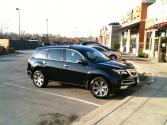
OK, I took some pics and will upload when I get a chance. I managed to kill the Nav lady through the Nav setup options, but still have the iphone problem. Maybe the 3GS is not fully compatible yet?
Thread Starter
Advanced
Joined: Jun 2006
Posts: 75
Likes: 3
From: Bay Area, CA
OK, I've got some pics. So on the iPhone problem, where I can't play songs from the iPhone through the "ipod" setting on the screen when it is connected to the USB setting, the dealer said it is because I am also using the iPhone as a Bluetooth device at the same time for phone. So for songs, it defaults to connecting to the audio system as a Bluetooth connection and not through the USB connection.
So I can scroll through the Nav screen to see song lists and other ipod info, but I can't play anything that way. In order to play music while I'm using the phone as a Bluetooth phone (like 100% of the time) I have to play the music through the Bluetooth connection. But through the Bluetooth connection, nothing is done on the Nav screen...so you can't choose songs through the Nav screen...you have to use the iPhone to do that.
Sucks.
But hey, enjoying the car otherwise!


So I can scroll through the Nav screen to see song lists and other ipod info, but I can't play anything that way. In order to play music while I'm using the phone as a Bluetooth phone (like 100% of the time) I have to play the music through the Bluetooth connection. But through the Bluetooth connection, nothing is done on the Nav screen...so you can't choose songs through the Nav screen...you have to use the iPhone to do that.
Sucks.
But hey, enjoying the car otherwise!
Trending Topics

Trolling Canuckistan
Joined: Oct 2005
Posts: 10,453
Likes: 811
From: 100 Legends Way, Boston, MA 02114
KevinMR, I wouldn't buy the dealers explanation quite yet (but it does seem very plausible). Just to test it out I would recommend turning off the bluetooth in the iPhone and go for a drive and see what happens. If you can play music via the USB at that point with no interuptions then it would appear the dealer is right. If you still have the issue, then you know that it's something else.
Thread Starter
Advanced
Joined: Jun 2006
Posts: 75
Likes: 3
From: Bay Area, CA
Thanks...BL, the idea you had is exactly what the dealer did to get to the cause of the problem. The iphone works for music through the USB connection only when its Bluetooth is turned off. But of course that defeats the purpose of having Bluetooth for the phone (handsfree required here in Calif). Oh well.
Maybe next I'll see if I have an old iPod in the house to see if I can connect it to the USB at the same time as I have the iphone (with Bluetooth enabled) in the car.
Maybe next I'll see if I have an old iPod in the house to see if I can connect it to the USB at the same time as I have the iphone (with Bluetooth enabled) in the car.

Trolling Canuckistan
Joined: Oct 2005
Posts: 10,453
Likes: 811
From: 100 Legends Way, Boston, MA 02114
Thanks...BL, the idea you had is exactly what the dealer did to get to the cause of the problem. The iphone works for music through the USB connection only when its Bluetooth is turned off. But of course that defeats the purpose of having Bluetooth for the phone (handsfree required here in Calif). Oh well.
Maybe next I'll see if I have an old iPod in the house to see if I can connect it to the USB at the same time as I have the iphone (with Bluetooth enabled) in the car.
Maybe next I'll see if I have an old iPod in the house to see if I can connect it to the USB at the same time as I have the iphone (with Bluetooth enabled) in the car.

BTW nice pics, I love the reflectivity of that paint.
Instructor
Joined: Nov 2009
Posts: 154
Likes: 1
From: Ct
Keven what is that "wad of gum" looking thing behind the shift boot?
On my 2009 there is no USB. Bluetooth does not play the music manually using the phone as it is not compatable. And I have to use an old fashioned left and right stereo phono plug to manually play music which stinks. It is much safer to not use it at all while driving. So they fixed a few things in your car over mine. But they have a ways to go to fully suit me. 2011 for me I guess unless I switch to a Lex or Infinity this summer after my 12 mths are up...
On my 2009 there is no USB. Bluetooth does not play the music manually using the phone as it is not compatable. And I have to use an old fashioned left and right stereo phono plug to manually play music which stinks. It is much safer to not use it at all while driving. So they fixed a few things in your car over mine. But they have a ways to go to fully suit me. 2011 for me I guess unless I switch to a Lex or Infinity this summer after my 12 mths are up...

Intermediate
Joined: Mar 2001
Posts: 34
Likes: 1
From: Irvine, CA
Thanks...BL, the idea you had is exactly what the dealer did to get to the cause of the problem. The iphone works for music through the USB connection only when its Bluetooth is turned off. But of course that defeats the purpose of having Bluetooth for the phone (handsfree required here in Calif). Oh well.
Maybe next I'll see if I have an old iPod in the house to see if I can connect it to the USB at the same time as I have the iphone (with Bluetooth enabled) in the car.
Maybe next I'll see if I have an old iPod in the house to see if I can connect it to the USB at the same time as I have the iphone (with Bluetooth enabled) in the car.
When you connect the iphone via USB initially it works because USB is set as audio out, later the bluetooth connects and then the iphone changes its audio out setting to bluetooth. There should be a little bluetooth icon next to the play and forward button on the ipod app on the iphone. Tap on that "B" icon and you'll see that the audio out device says bluetooth or hands free link or something like that...change that setting back to USB...experiment with that setting and you'll get it to work with the USB everytime...let us know if that works. And congrats on the purchase, the MDX looks beautiful including the new power plenum, which I have always been a fan of!
Last edited by kitt9000; Feb 7, 2010 at 10:48 PM.
Thread Starter
Advanced
Joined: Jun 2006
Posts: 75
Likes: 3
From: Bay Area, CA
The same thing used to/still does happen to me on my 09 tsx with the usb audio and the iphone...and there is a fix.
When you connect the iphone via USB initially it works because USB is set as audio out, later the bluetooth connects and then the iphone changes its audio out setting to bluetooth. There should be a little bluetooth icon next to the play and forward button on the ipod app on the iphone. Tap on that "B" icon and you'll see that the audio out device says bluetooth or hands free link or something like that...change that setting back to USB...experiment with that setting and you'll get it to work with the USB everytime...let us know if that works. And congrats on the purchase, the MDX looks beautiful including the new power plenum, which I have always been a fan of!
When you connect the iphone via USB initially it works because USB is set as audio out, later the bluetooth connects and then the iphone changes its audio out setting to bluetooth. There should be a little bluetooth icon next to the play and forward button on the ipod app on the iphone. Tap on that "B" icon and you'll see that the audio out device says bluetooth or hands free link or something like that...change that setting back to USB...experiment with that setting and you'll get it to work with the USB everytime...let us know if that works. And congrats on the purchase, the MDX looks beautiful including the new power plenum, which I have always been a fan of!
Thread Starter
Advanced
Joined: Jun 2006
Posts: 75
Likes: 3
From: Bay Area, CA
It works...many thanks! I never would have thought of that. It re-set to Bluetooth once...and I had to re-set it to direct connect...I forget what caused it to go to Bluetooth...just all of a sudden the audio stopped and I looked and my iPhone had re-set to Bluetooth. But it was an easy tap back to Direct and I was in good shape.
Intermediate
Joined: Mar 2001
Posts: 34
Likes: 1
From: Irvine, CA
Glad to be of help! I'm not sure why but looks like the bluetooth takes over the audio out regardless of weather the iphone is connected via USB. But yea, a simple tap returns it back to USB and it beats having to disconnect and reconnect the iphone.
I actually just ended up getting an ipod nano and leaving it connected to the USB all the time to serve as my in-car music player, that was my permanent solution to this problem...lol.
I actually just ended up getting an ipod nano and leaving it connected to the USB all the time to serve as my in-car music player, that was my permanent solution to this problem...lol.
It works...many thanks! I never would have thought of that. It re-set to Bluetooth once...and I had to re-set it to direct connect...I forget what caused it to go to Bluetooth...just all of a sudden the audio stopped and I looked and my iPhone had re-set to Bluetooth. But it was an easy tap back to Direct and I was in good shape.
Instructor
Joined: Nov 2009
Posts: 154
Likes: 1
From: Ct
That is an issue with iPhones. They can not do music at the same time as bluetooth. I don't think iPhone will be fixed anytime soon. They have known about it for a while. At least the '10 has a good connection for direct. Mine is old syle stereo plugs...


Thread
Thread Starter
Forum
Replies
Last Post
Barb Jackson
2G RDX Audio, Bluetooth, Electronics & Navigation
11
Sep 15, 2015 02:27 PM
