When you click on links to various merchants on this site and make a purchase, this can result in this site earning a commission. Affiliate programs and affiliations include, but are not limited to, the eBay Partner Network.
I am having issues with my dome lights and vanity mirror lights ( the mirrors or visors above the passenger and driver heads ). The front dome light turns on and stay dimmly lit when I manually turn them on. When I control them through the main switch to control all of the lights, none of the lights turn on regardless of the position it's in. I set it to door and the lights do not turn on. I set it to on and still nothing. The visor mirrors also do not light up. I checked the 14 fuse and 15 fuse inside. I also checked the fuse under the hood. The fuses all gave me 14.2v when I check both sides of the fuse. When I check the voltage at the dome light it reads 9v. I put a 12v tester and it also was dimmly lit at the dome light. Can it possibly be the switch giving issues or what can it be? This happened after I try to program the garage opener which is located on the same panel as the dome lights. The garage opener/homelink doesn't light up anymore either. It also stopped working.
I have the same issue, my alarm was set off 1 night, It went off several different times. The following day. i had dimmed lights on the front upper console n rear dome light. n slowly but surely they stopped working altogether. I believe the culprit is a relay, I have not been able to trace its location yet.
Maybe you should leave the info about that stuck relay in here for future reference.
Certainly, perhaps i spoke to soon. I have not yet found the location of the said relay, but i feel confident that to be the culprit. The schematic will aid to prove this theory.!! Yes i will share my findings. Merci bocu!
Certainly, perhaps i spoke to soon. I have not yet found the location of the said relay, but i feel confident that to be the culprit. The schematic will aid to prove this theory.!! Yes i will share my findings. Merci bocu!
@Kevin125 Have you found the relay?, If yes can you post the location to help @1rdxbandit
I am going to apologize in advance for this long reply but I'll be as detailed as possible. Sorry for any grammatical errors. I am typing all of this on my phone while at work.
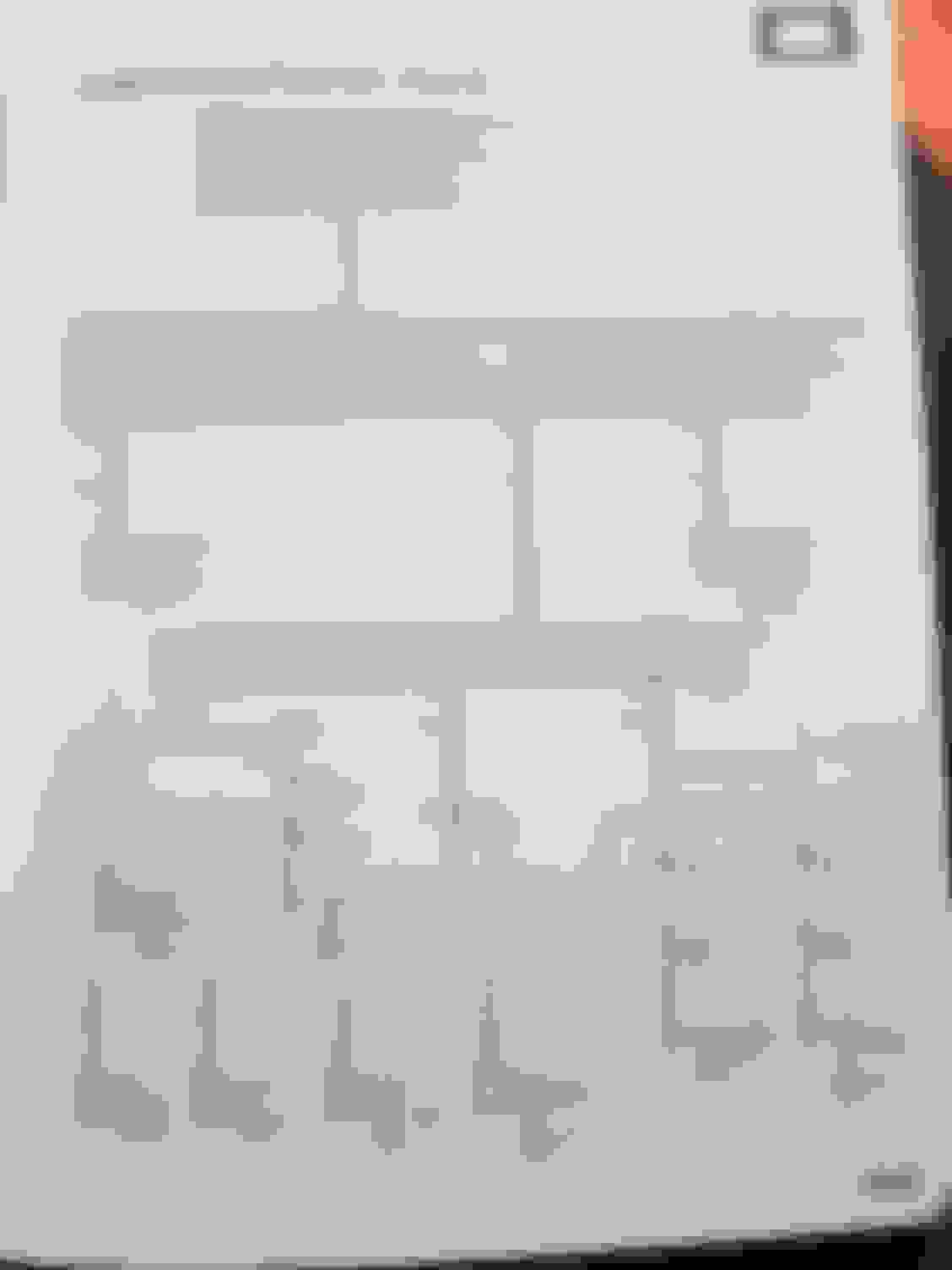
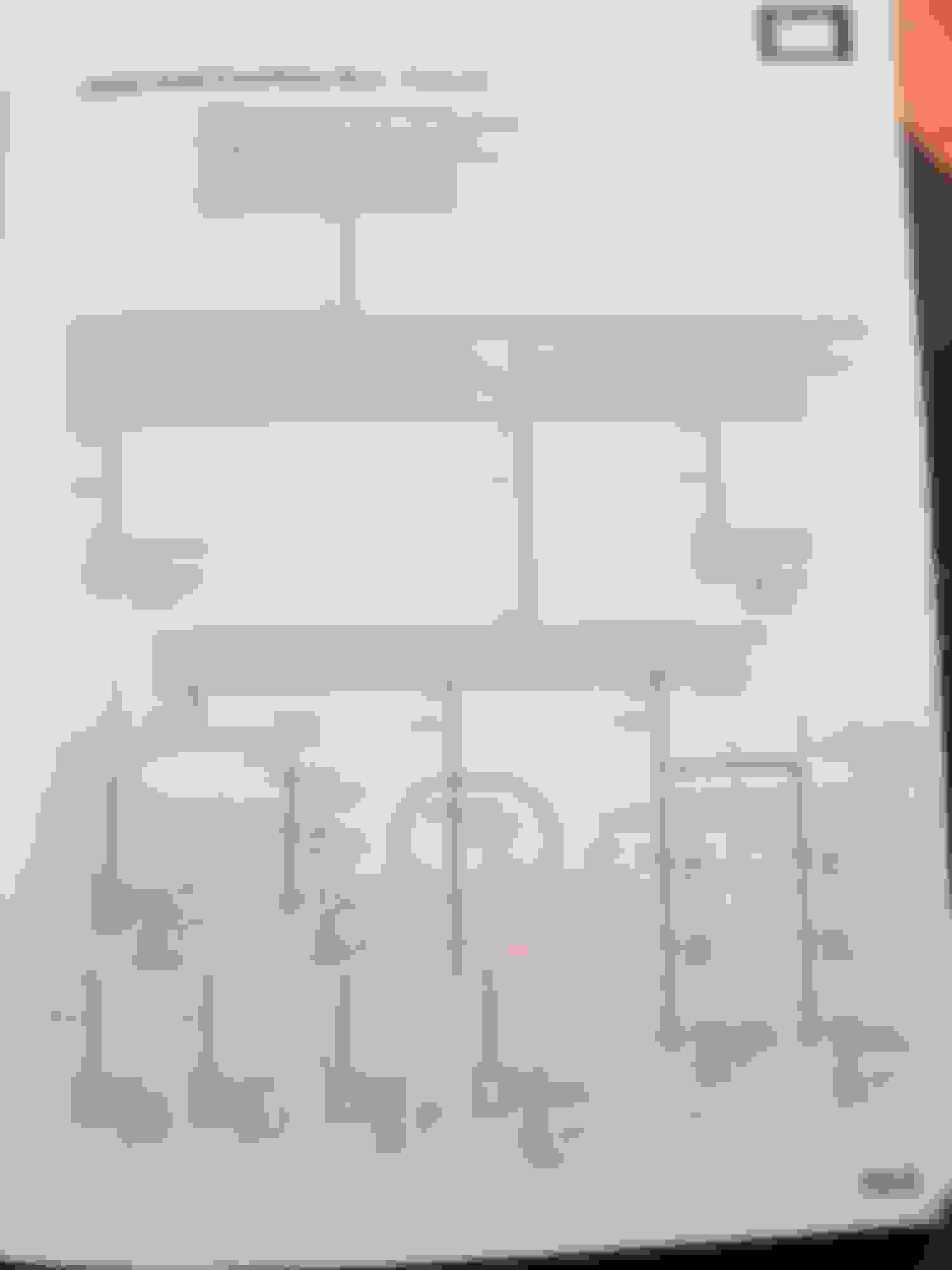
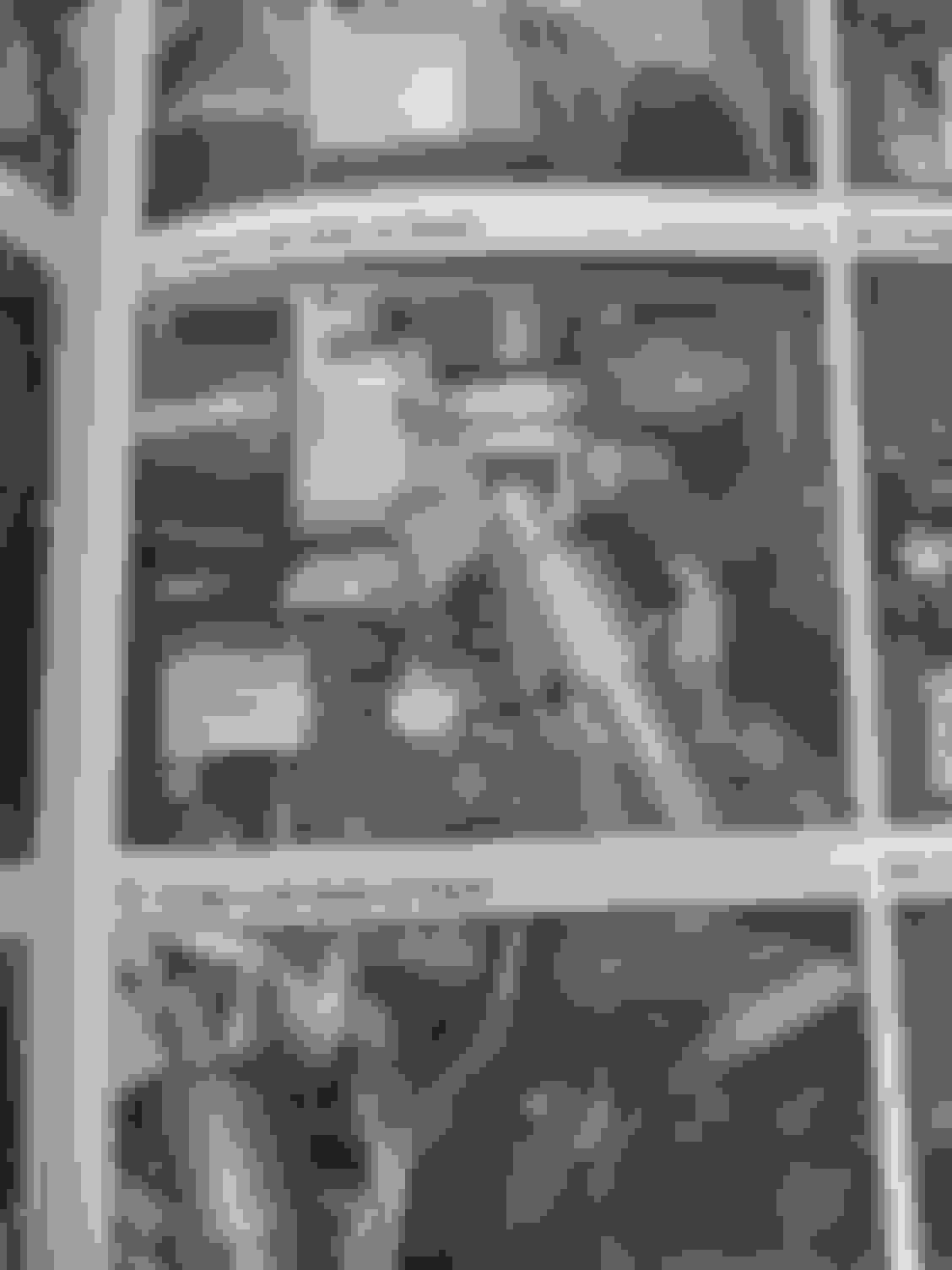
I finally found the culprit after purchasing the Electrical book. So if you look at the blueprint on page 10-5, there is no relay for the interior lights. But it is easy to figure out. So first open your two front doors and see if the courtesy lights are working at the bottom of the door. If they are not working then you must check fuse 22 under the hood. If that's good then move onto the fuse box under the dashboard on the driver side. I believe it is fuse 14. If the door courtesy lights do not work then you have a more difficult issue and you will have to check "under-dash junction box (Photo 56, View 294)" ill attach that picture below.
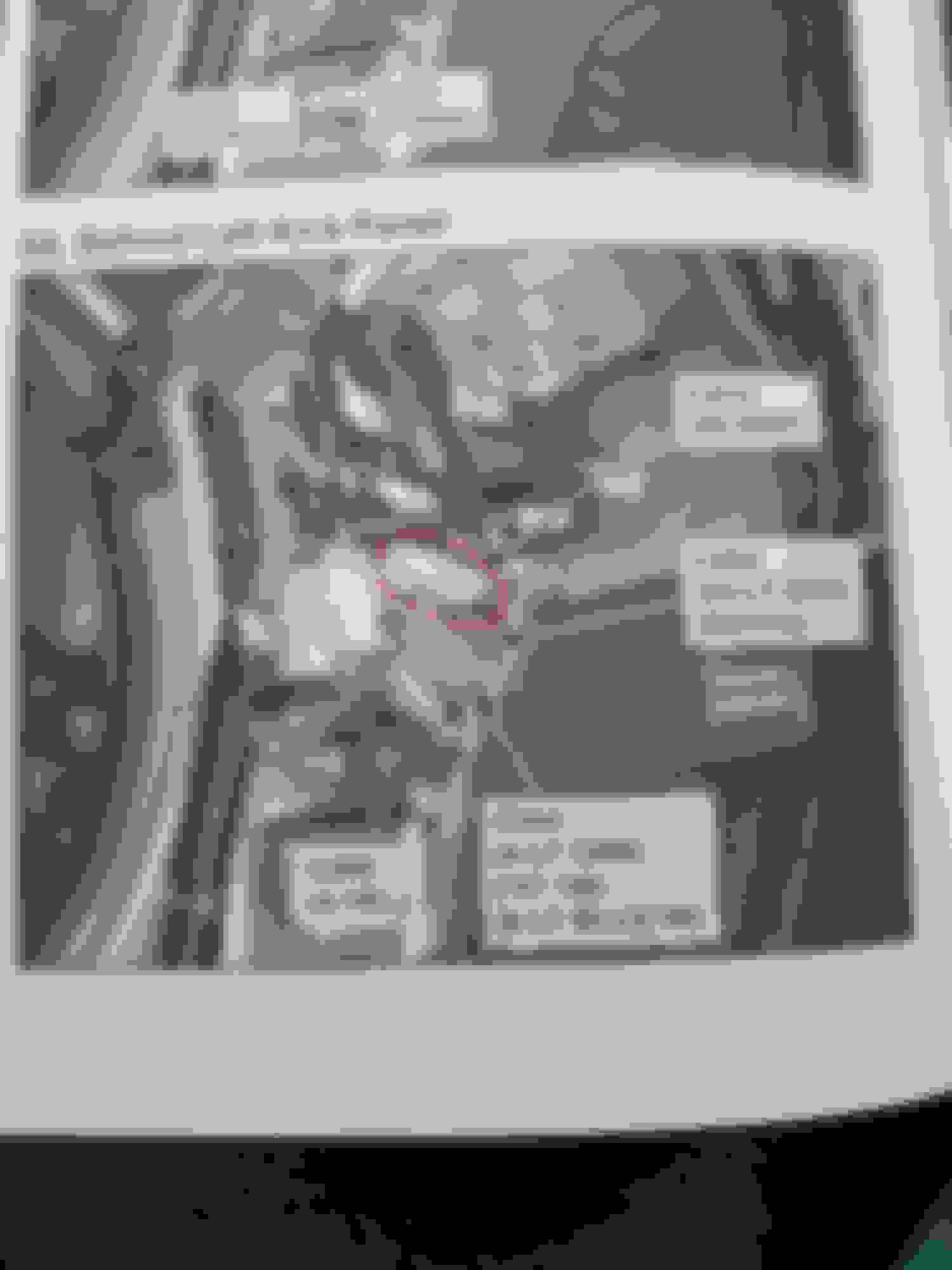
If both of the fuses are good and both courtest door lights are working then you can check the dome lights and vanity mirrors for low voltage with a mulitimeter. If you are receiving anything less than 11.5v then you have a short somewhere after the interior fuse box. If you are receiving 0v that means you have a burnt wire or a disconnected wire. So i was receiving power to the dome lights but around 9.5v. The vanity mirrors i was receiving 0v. So there is only one link between the junction box and the vanity mirrors and dome lights. That is the connector C210 (Photo 54, View 267). I'll attach a photo of this connector. This is where the main problem is. This is the highest connector which is close to your left foot. So if a bit of water splashes over on the connector, it will short out the connector. Which is very rare but can happen apparently. My connector was completely corroded and was a struggle to seperate it. I basically used t-taps and jumped all the wires until i can find the correct connector to replace the corroded one. But everything is working again 100%.
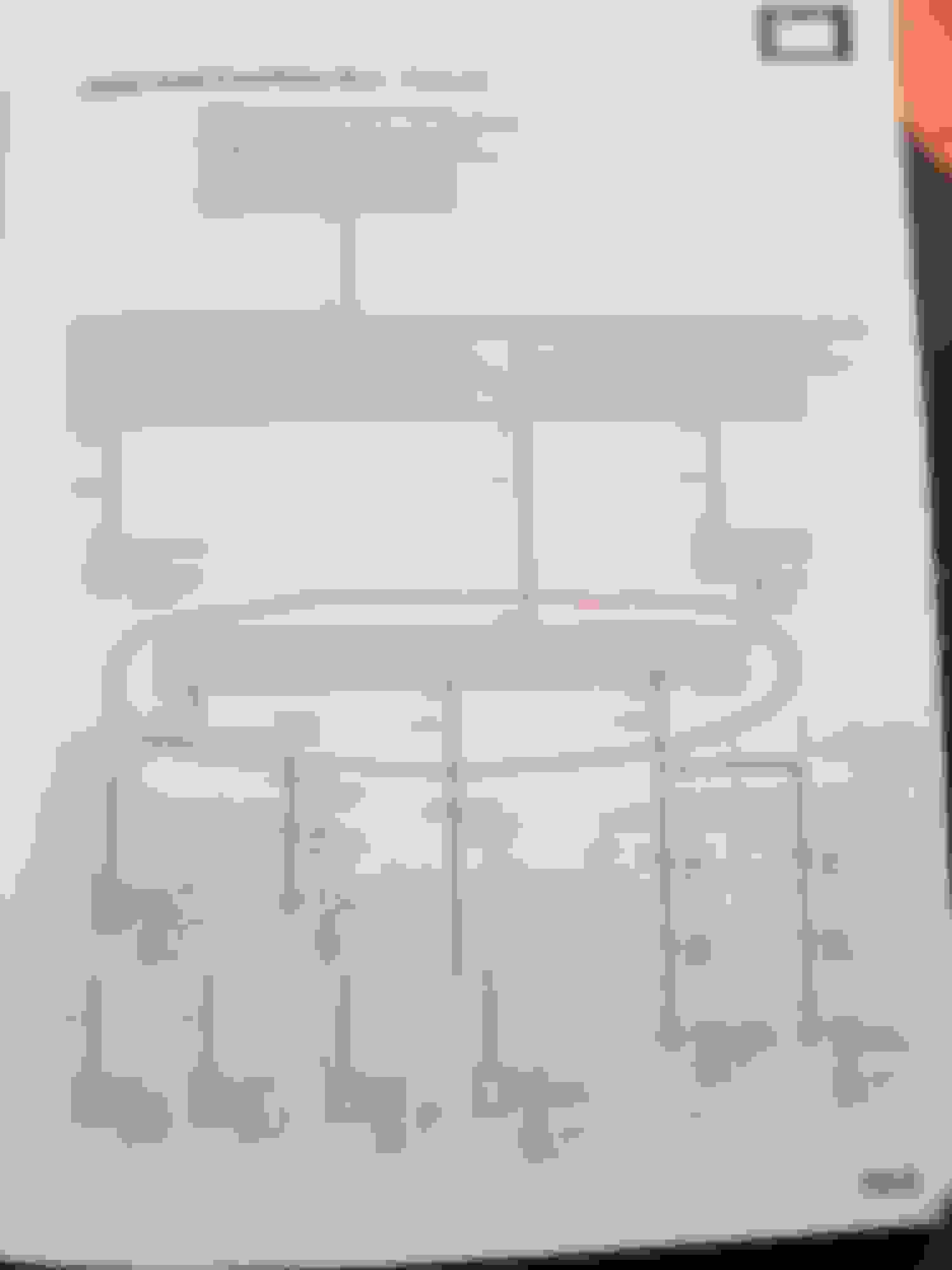
Page 10-5 the main power diagram for the interior lights. C210 (circled in red) is the culprit if your door courtesy lights are working but your dome lights are not working. C210 connector image in picture 54 IMAGE 54. C210 connector circled in red. This is located behind the kick panel below the fuse box. White connector. Most likely this is where the problem is. Check here (circled in red) if your door courtesy lights and interior light are not working after you checked both fuses. Picture of the junction box in picture 56. IMAGE 56. Under-dash juntion box
Thank you Kevin an Poveiro, given time contrains. I havent been able to dedicated much time into fixing this issue. However I just had a brief look now n i couldnt beileve how bad both connectors are. They are corroded to hell , in the process of disconnecting both ends two wires ripped off.
It's beyond me how they got that bad, corrosion ate away at the wire strands. Kevin what steps are u taking to pin point the culprit, is water getting in from a rubber gromet.?
Is this prone to occur in the near future.?
I venture this morning to clean both connectors with vinegar n baking soda, That didn't go well at all I barely touch the pins and 2 fell apart correded to hell. Soldering would be ideal no much cable lenght n perhaps overkill a block connector is preferable.
Thank you Kevin an Poveiro, given time contrains. I havent been able to dedicated much time into fixing this issue. However I just had a brief look now n i couldnt beileve how bad both connectors are. They are corroded to hell , in the process of disconnecting both ends two wires ripped off.
Your welcome. Same here. I was amazed with the amount of corrosion in the connector.
Originally Posted by 1rdxbandit
It's beyond me how they got that bad, corrosion ate away at the wire strands. Kevin what steps are u taking to pin point the culprit, is water getting in from a rubber gromet.?
Is this prone to occur in the near future.?
I honestly have been trying to figure out what corroded the connector but I have no clue. I looked for water marks. There has been reports of water leaking through the roof and behind the a-pillar panel .but I remove the a-pillar and no water marks. I checked the other connectors and no water marks or corrosion either. My only answer right now is, since it is one of the higher connectors, maybe water splashed over the cover thats suppose to protect the connectors and got in that one? What I will be doing later on is possibly wrapping those connectors with some sort of plastic to prevent it from happening again.
Originally Posted by Opposite
Very good write up! I just recently bought an 07 RDX and the dome lights and visor lights don't work. I will be looking into this.
Remember to check to see if your door courtesy lights work. If they work then more likely it's that connector.
Originally Posted by 1rdxbandit
I venture this morning to clean both connectors with vinegar n baking soda, That didn't go well at all I barely touch the pins and 2 fell apart correded to hell. Soldering would be ideal no much cable lenght n perhaps overkill a block connector is preferable.
I tried cleaning it out and that did not work well for me. I tried manual cleaning one by one. So I had a spare radio harness hanging around from my 2013 Civic. I literally cut the harness and t-tap the wires onto the connector wires temporarily until I can get a chance to permanently cut the connector out and solder each wire. Honestly the lights have been working better than before. I used to get flickering lights and never knew why. Also my lights were on the dim side. But I guessed it was the way they were designed even with the led swap. Now the LEDs are blinding me lol.
I've meticulously checked the rest of the connectors/hardnesses around same area, non exhibit same green corrosion, no water traces anywhere. If i didnt know any better hard to beileve but quite possible. Arcing has the same effect. Root cause loose connection, impossible I think not, Its a major pickle to work in that area. My right rib cage is in pieces.. btw: i use block connectors. I took pictures to use as reference but some how i got a wire or 2 wrong. Work in process i shall say. Front dome lights work, visors work. Rear dome light is not working. Interior instrument lights are not working. I know i have a 2 wires wrong because as soon as i turn on the instrument lights the fuse blows.
I had the same problem.
What I did was, spray some carburetor cleaner in the connectors and also use a small pipe cleaner to clean and remove the deposit.
Took 15 min. Everything now work.
Also to access c210 connector you must remove the cover by the fuse box left side.
Or does anyone have the wiring diagram for the 1st gen rdx for the dome lights? I'm trying to firgure out if there is a relay possibly
No relay. Connector left side emergency brake pedal. Remove cover highest white connector.
Disconnect and clean using carb cleaner. A small pipe cleaner also works great. Remove all deposit let dry about 30 min.
Reconnect.
Down the post there is a wiring divagations pictures as well.
This thread has been a HUGE help. Two years ago my overhead courtesy lights stopped working when any door was open. Just this past week no matter what I do, all the lights and Home Link won't work. I see that the wires for that harness/connector/whatever by the left kick panel are corroded. I want to try and clean them but for the life of me I can't disconnect it. Can anyone give me a clue how to do it? It's been driving me nuts.
To everyone who posted on this issue, thank you. I haven't pulled apart the area under the interior fuse box yet, but I can feel the carpet down there is damp under the plastic cover. I had gone as far as to buy a new/used overhead console because my mechanic found power to the plug in the ceiling, tho i dont think he checked every wire. But now I have a good direction to go thanks to all of you contributors. Thanks.
From: Born in Québec City. Currently live in Greater Toronto.
Originally Posted by Kevin125
I am having issues with my dome lights and vanity mirror lights ( the mirrors or visors above the passenger and driver heads ). The front dome light turns on and stay dimmly lit when I manually turn them on. When I control them through the main switch to control all of the lights, none of the lights turn on regardless of the position it's in. I set it to door and the lights do not turn on. I set it to on and still nothing. The visor mirrors also do not light up. I checked the 14 fuse and 15 fuse inside. I also checked the fuse under the hood. The fuses all gave me 14.2v when I check both sides of the fuse. When I check the voltage at the dome light it reads 9v. I put a 12v tester and it also was dimmly lit at the dome light. Can it possibly be the switch giving issues or what can it be? This happened after I try to program the garage opener which is located on the same panel as the dome lights. The garage opener/homelink doesn't light up anymore either. It also stopped working.
Originally Posted by Poveiro
Where should I send?
If still possible, could you email any schemes and comments to: paulmaurice55@yahoo.ca
Thanks!! P. Jacob
RDX 1st Gen. Still rolling in Toronto!
Hello people. I know this thread is over 3 years old now but since it still remains as BY FAR the best (and probably only) resource on the internet on this issue that 1st gen RDXes seem to have, I think it's appropriate to update it with my experience having the same problem and what I've done to fix it. It's safe to assume that not many people drive 1st gen RDXes anymore, so I think as someone who still does, my experience might be useful to those seeking information on this problem.
Thanks to the amazing advice above, I came to the conslusion that the source of my problem was the connector C210 in the left kick compartment. I came to this conclusion because, as pointed out, my courtesy lights on the front doors were functional, but my vanity lights, dome lights, HomeLink (garage door opener buttons) had suddenly stopped working. In addition, my moonroof controls were temperamental, they would sometimes work and sometimes would not.
Although losing all of these functionalities were a bit annoying, I though it a bit risky to attempt a fix, since they were purely "cosmetic" problems. However, last weekend my wife was away on a business trip, I had some time on my hands and didn't really need to drive anywhere so I though it would be a perfect time to try to get to the bottom of this issue.
As suggested by Ace1022 above, I first attempted the easy fix of disconnecting the connector C210, spraying some carb cleaner inside and attempting to clean it with a pipe cleaner. I sprayed and brushed vigorously on both the female and the male parts of the connector, let them both dry out for well over 2 hours, connected them back up again and prayed for the best. To my despair, this did not fix anything, and even worse, the moonroof controls which I said were "temperamental" were now permanently broken. What was EVEN worse was that I had left the moonroof open for better airflow, so that the carb cleaner on the connector would evaporate faster, and now the button was nonfunctional and I was left with a moonroof that was permanently open.
I was initially horrified by this development, but soon I realized that while vigorously brushing the connector, I had bent some pins inside. I attempted to straighten them back out using a small screwdriver, and as soon as I got them reasonably straight and connected the two sides, I managed to get the moonroof controls working again and closed the moonroof. None of the lights, however, regained their functionality.
It was now time to go the brute-force route. I cut out the cables from both sides of the connector, as 1rdxbandit did above. As soon as I did that, it was much easier to see the extent of the corrosion/whatever damage the connector had endured inside. I'm still not sure what the cause is, but to me it looks much more like arcing than water corrosion. The stains inside are completely black, some pins have horribly degraded to the point of completely becoming detached/melted away. It was no surprise at all to me that the connector was no longer working. It's also worth noting that when I cut off the connectors, the courtesy lights on the doors, which I previously pointed out as functional, also cut out.
Then it took me about four painstaking hours to meticulously connect each of the cables back together with terminal blocks. Needless to say, my back, my shoulders, my neck, my ribcage, and basically every part of my body is still recovering from this process. I used terminal blocks exactly like the ones 1rdxbandit posted above, I got them off Amazon. It was a relatively straightforward process in theory, however the zone you're working in is extremely cramped, not well-lit, and the cables you're working on are insanely close to each other so it gets harder and harder to work as you connect more and more cables. I think there were 16 (?) cables to connect in total. One problem that I did run into was that after connecting (again, I think?) 14 of them, the only ones left were 2 pairs of red cables which looked EXACTLY like one another, and there was no way to tell which one should connect with which one. All of the other cables had some distinguishing features like the color or the pattern of the insulation, or width of the cable etc., but these two pairs of red cables were identical and there was no way for me to tell which one should connect with which. So I just ended up praying and connecting them randomly.
After all of this was over, I was excited to see whether this painstaking 4-hour operation was worth it, so I rushed to turn on the lights. However, I was dismayed to see that none of the lights had regained functionality, including the door courtesy lights which were working just fine before I started. But soon I realized that while cutting off the connector, I had blown fuse number 22 (Interior Light) in the under-hood fuse box. I went ahead and replaced that with a new one, and voila, my courtesy lights were back on. I regained hope, hit the dome lights, the garage door openers etc. but alas, none of them still worked. I was very frustrated that I had wasted all those hours and put my body through extreme pain for nothing. At least I hadn't lost any of the functions that I had, though. I gave up, took a shower, and went to bed.
The next morning, I got in my car. Just for the kick of it, I tried turning on the dome lights and using the garage door opener button. Not surprisingly, they still did not work. I said "Oh, well" and put it into reverse gear to back out of my garage. AND BOOM! SUDDENLY ALL THE DOME LIGHTS THAT I HAD PRESSED TURNED ON! I was absolutely gobsmacked. I tried the HomeLink buttons to open and close my garage door. They worked as well! I checked the vanity lights in my overhead mirrors. They were also functional! It was like a dream. I was delighted. I backed out of my garage, but the second I put it into the forward gear, everything went out again. HomeLink button did not work. None of the lights turned on. I put it into reverse gear. Everything became functional again. WTF.
Right now, this is where I'm at. So I managed to fix everything, but for some reason they only work when I'm in reverse gear, and at no other time. I'm still not sure how I managed to do this, but I have this sneaking suspicion that this might have something to do with those two pairs of red cables that I connected without really knowing which one should go with which one. I'll try to reverse those connections tonight and see if that changes anything. BUT I'M REALLY CLOSE TO FIXING IT! I sincerely thank Kevin125 and 1rdxbandit for their amazing write-ups and guidance on how to get to the bottom of this problem. I hope soon to update this thread with confirmation that those two pairs of red cables were indeed the culprit, and everything now works as intended. Fingers crossed!
Hello people. I know this thread is over 3 years old now but since it still remains as BY FAR the best (and probably only) resource on the internet on this issue that 1st gen RDXes seem to have, I think it's appropriate to update it with my experience having the same problem and what I've done to fix it. It's safe to assume that not many people drive 1st gen RDXes anymore, so I think as someone who still does, my experience might be useful to those seeking information on this problem.
Thanks to the amazing advice above, I came to the conslusion that the source of my problem was the connector C210 in the left kick compartment. I came to this conclusion because, as pointed out, my courtesy lights on the front doors were functional, but my vanity lights, dome lights, HomeLink (garage door opener buttons) had suddenly stopped working. In addition, my moonroof controls were temperamental, they would sometimes work and sometimes would not.
Although losing all of these functionalities were a bit annoying, I though it a bit risky to attempt a fix, since they were purely "cosmetic" problems. However, last weekend my wife was away on a business trip, I had some time on my hands and didn't really need to drive anywhere so I though it would be a perfect time to try to get to the bottom of this issue.
As suggested by Ace1022 above, I first attempted the easy fix of disconnecting the connector C210, spraying some carb cleaner inside and attempting to clean it with a pipe cleaner. I sprayed and brushed vigorously on both the female and the male parts of the connector, let them both dry out for well over 2 hours, connected them back up again and prayed for the best. To my despair, this did not fix anything, and even worse, the moonroof controls which I said were "temperamental" were now permanently broken. What was EVEN worse was that I had left the moonroof open for better airflow, so that the carb cleaner on the connector would evaporate faster, and now the button was nonfunctional and I was left with a moonroof that was permanently open.
I was initially horrified by this development, but soon I realized that while vigorously brushing the connector, I had bent some pins inside. I attempted to straighten them back out using a small screwdriver, and as soon as I got them reasonably straight and connected the two sides, I managed to get the moonroof controls working again and closed the moonroof. None of the lights, however, regained their functionality.
It was now time to go the brute-force route. I cut out the cables from both sides of the connector, as 1rdxbandit did above. As soon as I did that, it was much easier to see the extent of the corrosion/whatever damage the connector had endured inside. I'm still not sure what the cause is, but to me it looks much more like arcing than water corrosion. The stains inside are completely black, some pins have horribly degraded to the point of completely becoming detached/melted away. It was no surprise at all to me that the connector was no longer working. It's also worth noting that when I cut off the connectors, the courtesy lights on the doors, which I previously pointed out as functional, also cut out.
Then it took me about four painstaking hours to meticulously connect each of the cables back together with terminal blocks. Needless to say, my back, my shoulders, my neck, my ribcage, and basically every part of my body is still recovering from this process. I used terminal blocks exactly like the ones 1rdxbandit posted above, I got them off Amazon. It was a relatively straightforward process in theory, however the zone you're working in is extremely cramped, not well-lit, and the cables you're working on are insanely close to each other so it gets harder and harder to work as you connect more and more cables. I think there were 16 (?) cables to connect in total. One problem that I did run into was that after connecting (again, I think?) 14 of them, the only ones left were 2 pairs of red cables which looked EXACTLY like one another, and there was no way to tell which one should connect with which one. All of the other cables had some distinguishing features like the color or the pattern of the insulation, or width of the cable etc., but these two pairs of red cables were identical and there was no way for me to tell which one should connect with which. So I just ended up praying and connecting them randomly.
After all of this was over, I was excited to see whether this painstaking 4-hour operation was worth it, so I rushed to turn on the lights. However, I was dismayed to see that none of the lights had regained functionality, including the door courtesy lights which were working just fine before I started. But soon I realized that while cutting off the connector, I had blown fuse number 22 (Interior Light) in the under-hood fuse box. I went ahead and replaced that with a new one, and voila, my courtesy lights were back on. I regained hope, hit the dome lights, the garage door openers etc. but alas, none of them still worked. I was very frustrated that I had wasted all those hours and put my body through extreme pain for nothing. At least I hadn't lost any of the functions that I had, though. I gave up, took a shower, and went to bed.
The next morning, I got in my car. Just for the kick of it, I tried turning on the dome lights and using the garage door opener button. Not surprisingly, they still did not work. I said "Oh, well" and put it into reverse gear to back out of my garage. AND BOOM! SUDDENLY ALL THE DOME LIGHTS THAT I HAD PRESSED TURNED ON! I was absolutely gobsmacked. I tried the HomeLink buttons to open and close my garage door. They worked as well! I checked the vanity lights in my overhead mirrors. They were also functional! It was like a dream. I was delighted. I backed out of my garage, but the second I put it into the forward gear, everything went out again. HomeLink button did not work. None of the lights turned on. I put it into reverse gear. Everything became functional again. WTF.
Right now, this is where I'm at. So I managed to fix everything, but for some reason they only work when I'm in reverse gear, and at no other time. I'm still not sure how I managed to do this, but I have this sneaking suspicion that this might have something to do with those two pairs of red cables that I connected without really knowing which one should go with which one. I'll try to reverse those connections tonight and see if that changes anything. BUT I'M REALLY CLOSE TO FIXING IT! I sincerely thank Kevin125 and 1rdxbandit for their amazing write-ups and guidance on how to get to the bottom of this problem. I hope soon to update this thread with confirmation that those two pairs of red cables were indeed the culprit, and everything now works as intended. Fingers crossed!
Quick update: The red cables were not the culprit. However, they were incorrectly connected. When I swapped them, the lights on the buttons for the overhead console regained functionality (the ones that turn on when you turn the headlights on). The culprit for the lights only working on reverse gear were two pairs of light blue cables which were connected incorrectly. When I swapped those, everything started working as it should. However, I'm now stuck with a moonroof that won't open. My guess for the cause of that problem were the green cables, of which there aren't two, but three pairs, and I have no idea which ones go with which. I think I tried every combination of them but couldn't get the moonroof button to work. Frankly, I got bored of working on this and left it as it is for now. Although I do have two guesses: 1) I might have blown the moonroof fuse (fuse 24 in the interior box) while cutting out the connector. 2) I might need to do a reset on the moonroof control unit (?).
Honestly, I can't be arsed to check these out anytime soon, since winter is around the corner anyway and I won't be needing to open the moonroof for quite a while. I might update again in a few months if I manage to get to the bottom of this. But as I said, right now everything is functional except for the moonroof controls.
But as I said, right now everything is functional except for the moonroof controls.
Congrats on solving the problem. Good job on your detective skills. I bet come spring, with a fresh look at the moonroof, you will get it resolved right away.
Congrats on solving the problem. Good job on your detective skills. I bet come spring, with a fresh look at the moonroof, you will get it resolved right away.
Hi Daryl. Thank you for the compliment and the schematics. I did not end up needing them, but someone else visiting this thread definitely might. I finally fixed the moonroof last Wednesday. I knew I said I did not want to put more time into this until spring, but it just kept bugging me. I told myself "Okay, I'll go and check the moonroof fuse. If it's blown, I'll replace it. If that fixes it, good. If not, I'll stop right there and not do anything else." I went ahead and checked the moonroof fuse and sure enough, it was blown. I'm pretty sure it blew while I was cutting the connector out in the first place because I visibly saw some sparks doing that. I took a spare 20A fuse from the under-hood box, replaced the old one and bam, the moonroof is fully functional. This means that everything is working as it should now. Thank you to everyone in this thread who sleuthed that the whole ordeal is due to a bad connector C210, and I hope my experiences logged down here end up being helpful to others.