


Software/Tip of the Week


Thread Starter
Sanest Florida Man


Joined: Aug 2007
Posts: 45,850
Likes: 11,669
From: Florida
 Software/Tip of the Week
So for a while I've thought of making a software or tip of the week thread for a while now. So here goes. This I just discovered a couple days ago and it's awesome! It's a preconfigured Windows HOSTS file which blocks all sorts of ads, spyware, hi-jackers, etc! Since it works in the OS level and not the browser it will work for every program you have, IE, Windows Media Center, even the Hulu app! No more ads in Hulu (just periods of akward silence)! It's a small download but contains over 16000 sites to block!! You will notice a faster load time also since you're no longer having to loads ads as well.
The software is a batch file, you just uncompress the folder and run the "mvps" batch file and it's done in a second, no need to restart, enjoy! FYI if you're using Windows Vista or 7 (works in 7 too) just be sure to right click on the batch file and choose "run as administrator" and say yes at the UAC prompt.
If you want to preview what the host file looks like before installing it you can see it here, it's massive:
http://www.mvps.org/winhelp2002/hosts.txt
download:
http://www.mvps.org/winhelp2002/hosts.zip
http://www.mvps.org/winhelp2002/hosts.htm
I'm not sure but you should be able to replace the HOSTS.txt file in OS X with this and it should work, but you'd have to do it manually as the batch file won't run in OS X. The OS X hosts.txt file is found at "/private/etc/hosts". I'm sure Billiam or someone can confirm this.
The software is a batch file, you just uncompress the folder and run the "mvps" batch file and it's done in a second, no need to restart, enjoy! FYI if you're using Windows Vista or 7 (works in 7 too) just be sure to right click on the batch file and choose "run as administrator" and say yes at the UAC prompt.
If you want to preview what the host file looks like before installing it you can see it here, it's massive:
http://www.mvps.org/winhelp2002/hosts.txt
download:
http://www.mvps.org/winhelp2002/hosts.zip
http://www.mvps.org/winhelp2002/hosts.htm
I'm not sure but you should be able to replace the HOSTS.txt file in OS X with this and it should work, but you'd have to do it manually as the batch file won't run in OS X. The OS X hosts.txt file is found at "/private/etc/hosts". I'm sure Billiam or someone can confirm this.





Yes, the same data could be inserted into the Linux/UNIX/OS X /etc/hosts file and work just like it does in the Windows hosts file. Basically, the hosts file is a text file that the OS looks to before doing a DNS lookup. So, when a web browser requests "fr.a2dfp.net", since there is a hosts file entry defining "fr.a2dfp.net" as 127.0.0.1, the web browser will attempt to request data from 127.0.0.1 (localhost) instead of the site's real IP.
Great way to filter things in home/small environments! In fact, I used this technique to filter out YouTube and some Disney Channel website on a couple computers at work (at request by the resource specialist).
 Stunna
Great way to filter things in home/small environments! In fact, I used this technique to filter out YouTube and some Disney Channel website on a couple computers at work (at request by the resource specialist).
Stunna
Last edited by thunder04; Aug 17, 2009 at 11:00 PM.
Trending Topics

Does this replace your hosts file or does it add the entries to your existing hosts file? For example, I already have some things blocked through the hosts file, and I'd just want to add these entries to the file also.

Administrator Alumnus
Joined: Oct 2001
Posts: 26,326
Likes: 131
From: Northwest IN
I'm not sure but you should be able to replace the HOSTS.txt file in OS X with this and it should work, but you'd have to do it manually as the batch file won't run in OS X. The OS X hosts.txt file is found at "/private/etc/hosts". I'm sure Billiam or someone can confirm this.
Good tip.
Thread Starter
Sanest Florida Man
Joined: Aug 2007
Posts: 45,850
Likes: 11,669
From: Florida
Actually I was messing with the hosts file in Leopard last night. It is located in /private/etc, to edit it you have to run "sudo nano private/etc/hosts". I was able to edit it and add a line that blocked google.com but when I tried to paste in the whole list it became non-responsive and my only option was to close it. Maybe it was too big? (that's what she said) IDK, I guess I could've tried replacing the hosts file with the one in the zip folder instead of editing the existing one but it was late and I didn't want to bother. If someone else wants to try it you're more than welcome too.
Thread Starter
Sanest Florida Man
Joined: Aug 2007
Posts: 45,850
Likes: 11,669
From: Florida
This will replace you hosts file but it does rename the original "hosts.mvp". So you could always open the original and paste what you've done into the new one or vis versa. If you're running Vista or 7 make sure when you try to edit the HOSTS file that you run notepad as administrator by right-clicking notepad and choosing "run as administrator".
Administrator Alumnus
Joined: Oct 2001
Posts: 26,326
Likes: 131
From: Northwest IN

Super Car Enthusiast
Joined: Feb 2006
Posts: 5,653
Likes: 190
From: Ohio
It creates a backup of your current hosts file and creates a new one. Working perfectly for me so far. Great tip Doucher!
I just copy-pasted the list from the link you gave above so I didn't have to even download the batch file
http://www.mvps.org/winhelp2002/hosts.txt
http://www.mvps.org/winhelp2002/hosts.txt
Thread Starter
Sanest Florida Man
Joined: Aug 2007
Posts: 45,850
Likes: 11,669
From: Florida
HA! Did you have the same entry in your HOSTS file already!?
That works too...
I just copy-pasted the list from the link you gave above so I didn't have to even download the batch file
http://www.mvps.org/winhelp2002/hosts.txt
http://www.mvps.org/winhelp2002/hosts.txt
 I don't see how this could have anything to do with that. more info?
 .
.
Thread Starter
Sanest Florida Man
Joined: Aug 2007
Posts: 45,850
Likes: 11,669
From: Florida
I couldn't get textedit to open via terminal (I'm nowhere near a terminal/CLI/CMD master)
but I used the terminal line from the neowin thread Scrib posted and that worked
but I used the terminal line from the neowin thread Scrib posted and that worked
Because then all you need to do is "sudo vi /etc/hosts", put in your password, press "a", paste in your addresses, press Escape, press Shift+:, enter "wq" and hit Return.

Thread Starter
Sanest Florida Man
Joined: Aug 2007
Posts: 45,850
Likes: 11,669
From: Florida
Software/Tip of the Week #2: Disk Usage Visualization Tools
This weeks recommended software is Windirstat! WinDirStat is a disk usage statistics viewer and cleanup tool for Microsoft Windows (all current variants). Basically it show all the files in your HDD as color coded squares. Each color represents a different files extension (.mp3, .exe, .msi, .dmp, .sys, etc). Also the sqaures vary in size which represent the size of the file in relation to all the data taken stored on the drive. So your pagefile.sys and hiberfile.sys will show up as big red squares. You can also sort by extension or directory.
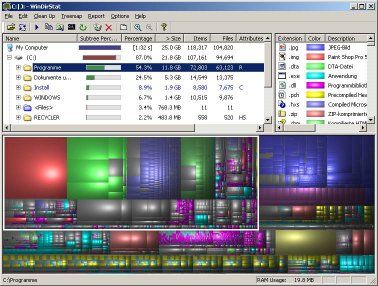
This tool is useful for when you want to clean up a drive especially when Ccleaner isn't doing enough. I had this guys PC that came with a 40gb HD and it only had about 2gb free on it (that's with using disk compression). I used Windirstat to find well over a gigabyte of memory dump files, a 1gb google index file and lost of old install files for outdated programs. All in all I deleted about 12-15gb of unnecessary files on this PC. All thanks to Windirstat!
www.windorstat.info
download here:
http://windirstat.info/wds_current_setup.exe
For you mac users there's a few programs to try like GrandPerspective which looks very similar. A cool looking one is DaisyDisk which uses a different graphical representation but does pretty much that same thing.
DaisyDisk

It says you can download DaisyDisk but then underneath it it says you can also buy it for $20 so IDK if the free version is a trial or what.
www.daisydiskapp.com
GrandPerspective can be had here
http://grandperspectiv.sourceforge.net/
This tool is useful for when you want to clean up a drive especially when Ccleaner isn't doing enough. I had this guys PC that came with a 40gb HD and it only had about 2gb free on it (that's with using disk compression). I used Windirstat to find well over a gigabyte of memory dump files, a 1gb google index file and lost of old install files for outdated programs. All in all I deleted about 12-15gb of unnecessary files on this PC. All thanks to Windirstat!
www.windorstat.info
download here:
http://windirstat.info/wds_current_setup.exe
For you mac users there's a few programs to try like GrandPerspective which looks very similar. A cool looking one is DaisyDisk which uses a different graphical representation but does pretty much that same thing.
DaisyDisk
It says you can download DaisyDisk but then underneath it it says you can also buy it for $20 so IDK if the free version is a trial or what.
www.daisydiskapp.com
GrandPerspective can be had here
http://grandperspectiv.sourceforge.net/
Last edited by #1 STUNNA; Aug 24, 2009 at 12:50 PM.

I am #76,361,211,935
Joined: Nov 2001
Posts: 1,285
Likes: 344
From: Ottawa,Ontario
JDiskReport is my favorite! The graphs are all "live". You double click on any
segment of interest and drill down for further detail.


segment of interest and drill down for further detail.
Last edited by underdog; Aug 24, 2009 at 04:03 PM. Reason: spelling ownz me


Moderator Alumnus


Joined: May 2001
Posts: 4,295
Likes: 121
From: Ronkonkoma, NY
Another thread as an 'index' thread that says:
Index for the Software / Tip of the week thread:
Tip #2: Post 1000
Tip #3: Post 2000
Ideally I would say, have post #1 be continually updated, but that's not possible unless you are a mod. Unless the mods don't mind being bugged every week for a while. (hopefully a long while - I like this thread idea)
- Frank
Thread Starter
Sanest Florida Man
Joined: Aug 2007
Posts: 45,850
Likes: 11,669
From: Florida
This week I bring some good flow charts for testing various PC problems, including networking, hard drive, power supply, video card, etc. Looks pretty handy to be sure you don't miss a step when troubleshooting hardware problems. We'll be able to refer a bunch of people to this post and have them go through these steps to troubleshoot their problems.
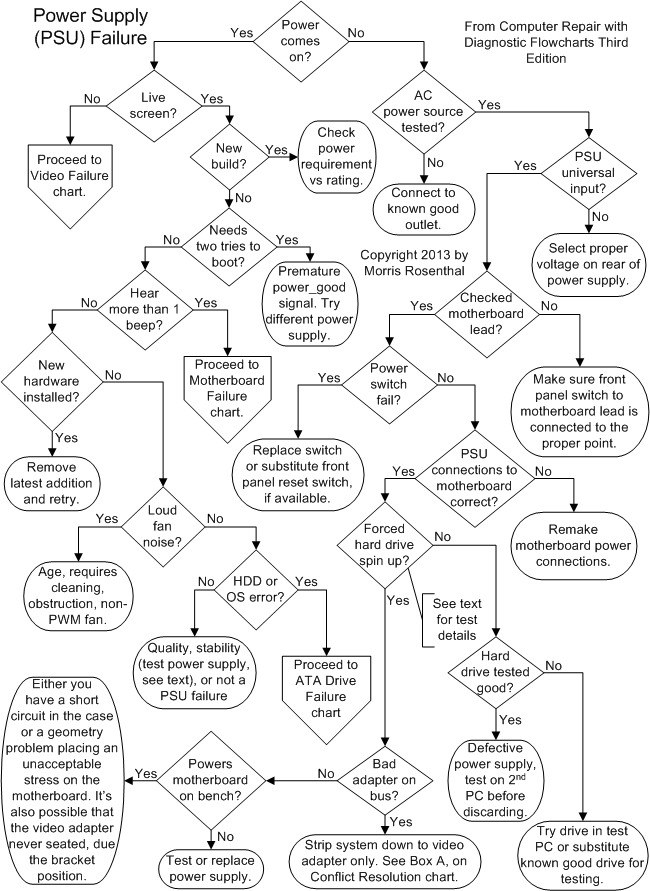
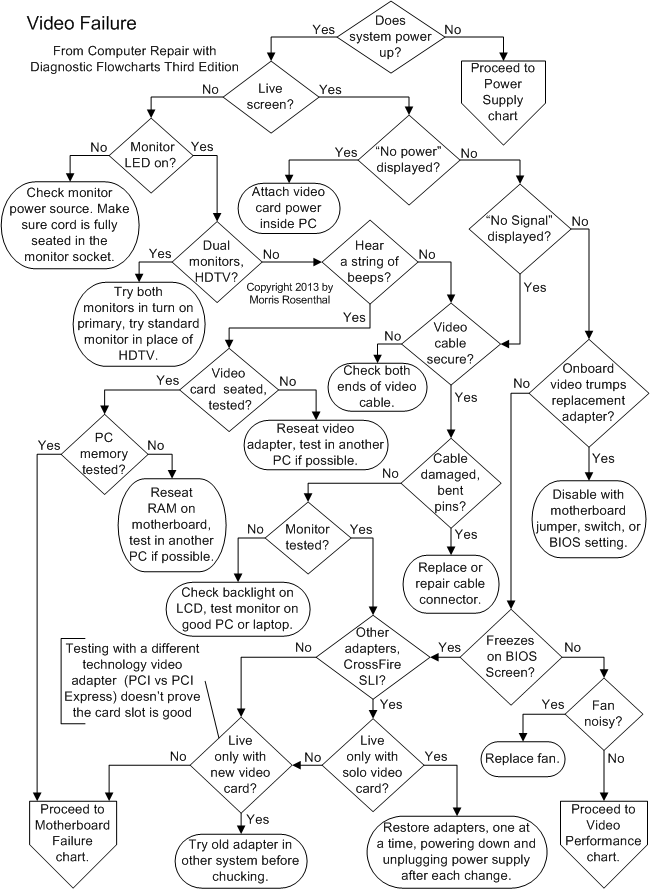
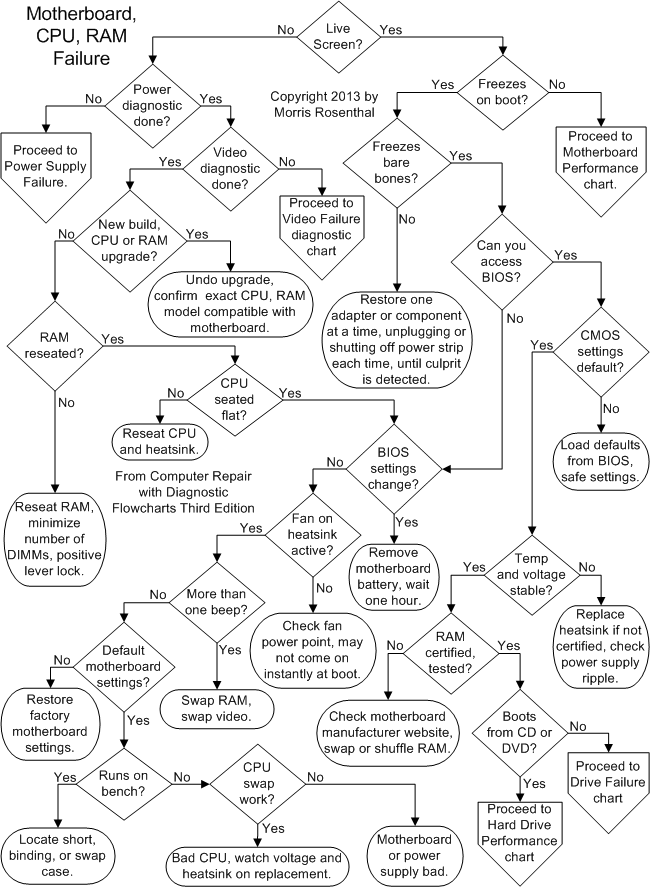
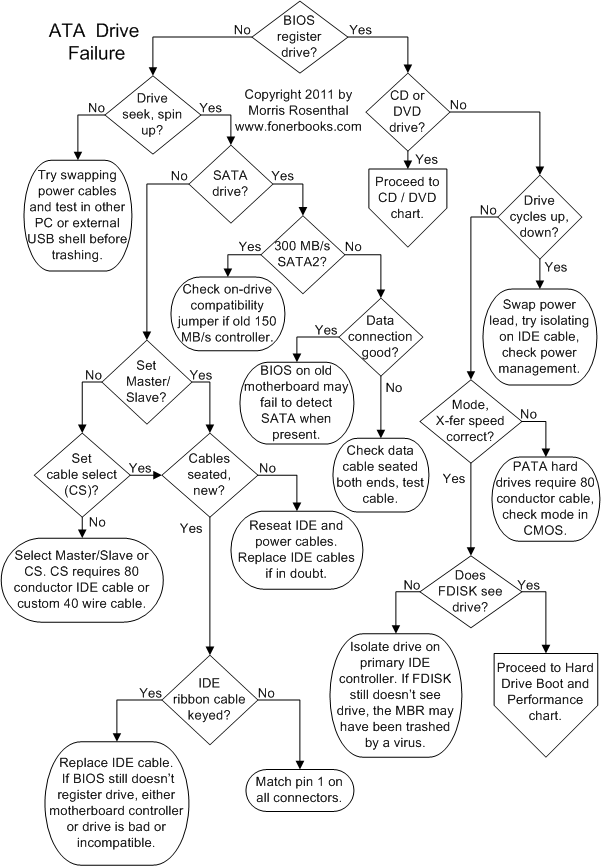
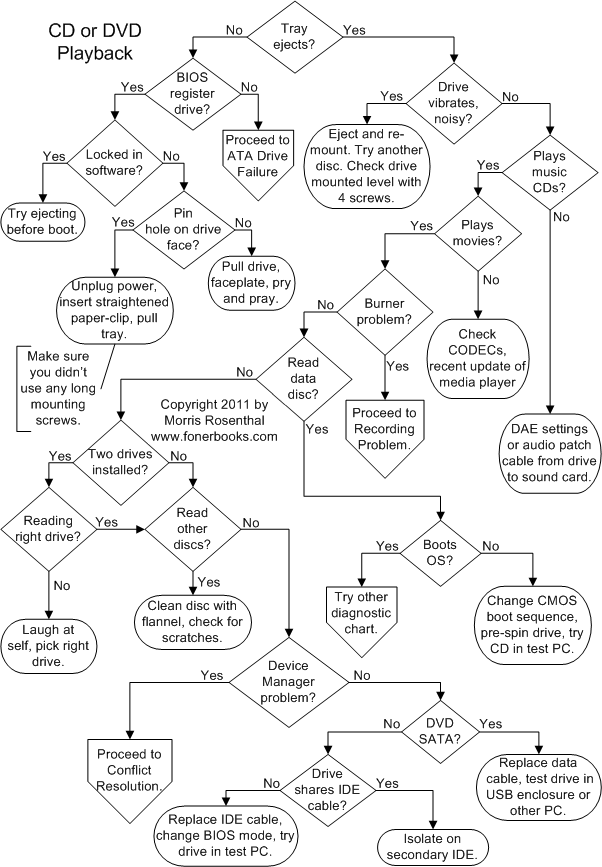
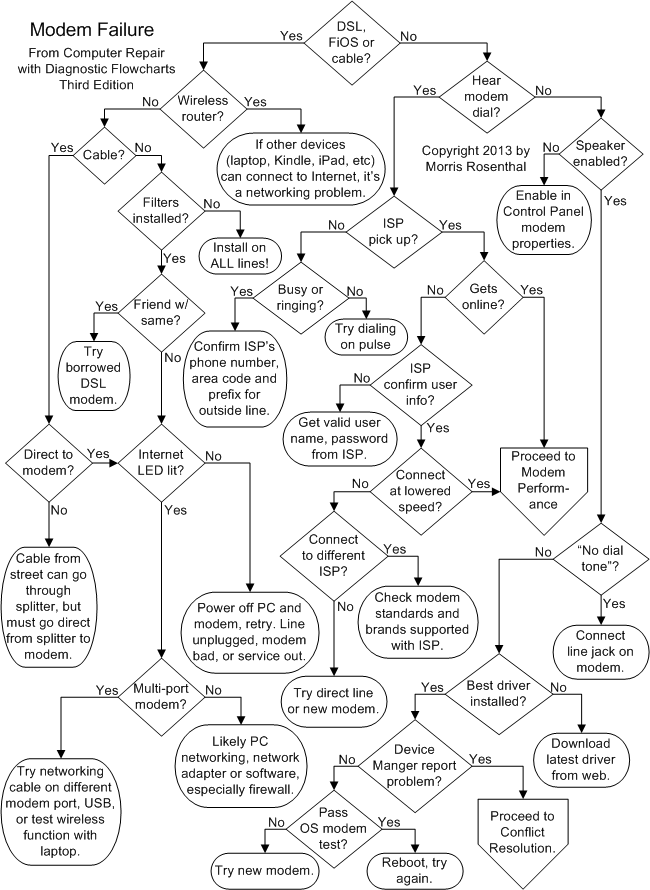
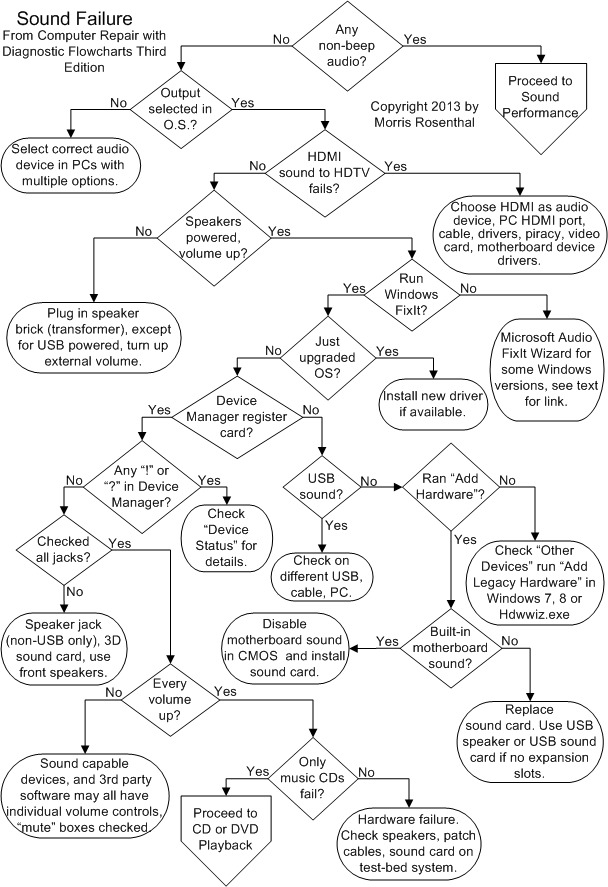
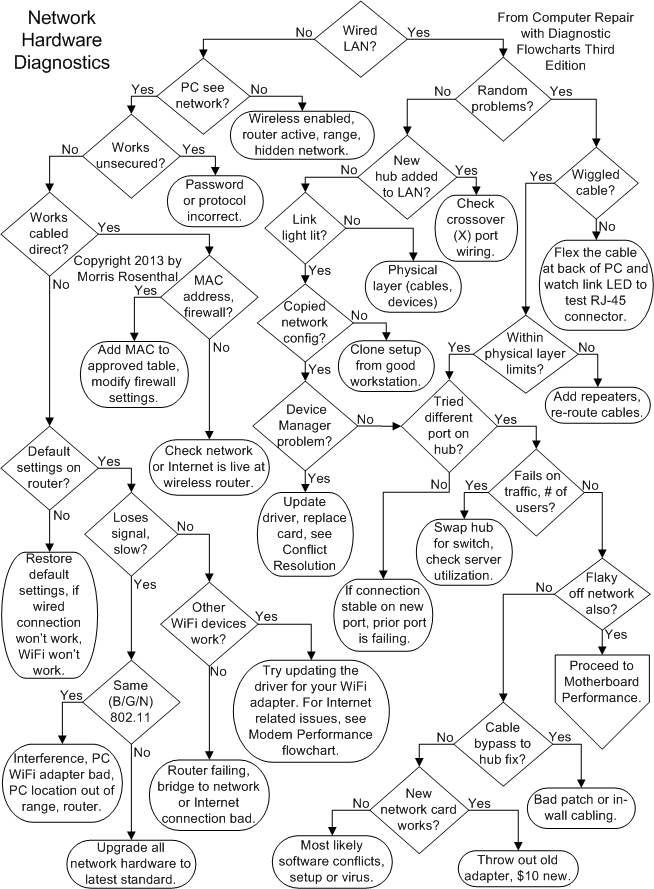
You can download all of them in one PDF right here
http://www.fonerbooks.com/computer_r...flowcharts.pdf
http://www.fonerbooks.com/pcrepair.htm
You can download all of them in one PDF right here
http://www.fonerbooks.com/computer_r...flowcharts.pdf
http://www.fonerbooks.com/pcrepair.htm




Needs more Lemon Pledge
Joined: Mar 2005
Posts: 52,768
Likes: 2,000
From: Phoenix, AZ