


Microsoft SkyDrive


Thread Starter
Sanest Florida Man


Joined: Aug 2007
Posts: 45,850
Likes: 11,669
From: Florida
 Microsoft SkyDrive
I've used SkyDrive for a while but very soon it's going to be get most all the features that Dropbox has and much more.
First it's already got iOS and Windows Phone apps to upload and access files from your phone. Soon there will be an app that will integrate it into Windows Explorer like a local drive and you can drag and drop files into it that will be uploaded to the cloud and synced with other devices (Mac or PC) and there will be a 2GB file limit. Skydrive comes with 25GB of free storage (compared to 2GB for Dropbox and 5GB for iCloud) and there's been a screenshot showing the ability to add more storage for ridiculously low prices and in the video below it demos skydrive with 75GB of storage.

Compare the above to something like iCloud, 15GB is $20/yr, 25GB is $40/yr and 55GB is $100/yr Or Dropbox Pro which is $120/yr ($10/mo.) for 50GB or $240/yr($20/mo.) for 100GB.
Another really cool feature called "remote fetching" has the ability to access files on your PC that aren't even synced to skydrive, you'll be able to login to your other PC from a trusted PC and browse for files and copy them over if you need to, see the demo below.
<iframe width="640" height="360" src="http://www.youtube.com/embed/Mf_Qd0OYyTs?feature=player_embedded" frameborder="0" allowfullscreen></iframe>
There's seems to be a pretty decent SkyDrive app on Android too
https://market.android.com/details?i...ebrowser&hl=en
There's rumored to be an updated OS X client coming too. Also Skydrive should sync BitLocker keys to the cloud like FileVault does on OS X Lion.
The Windows desktop sync and remote fetching capability are listed as coming soon and will run on Vista/7/8 machines.


First it's already got iOS and Windows Phone apps to upload and access files from your phone. Soon there will be an app that will integrate it into Windows Explorer like a local drive and you can drag and drop files into it that will be uploaded to the cloud and synced with other devices (Mac or PC) and there will be a 2GB file limit. Skydrive comes with 25GB of free storage (compared to 2GB for Dropbox and 5GB for iCloud) and there's been a screenshot showing the ability to add more storage for ridiculously low prices and in the video below it demos skydrive with 75GB of storage.
Compare the above to something like iCloud, 15GB is $20/yr, 25GB is $40/yr and 55GB is $100/yr Or Dropbox Pro which is $120/yr ($10/mo.) for 50GB or $240/yr($20/mo.) for 100GB.
Another really cool feature called "remote fetching" has the ability to access files on your PC that aren't even synced to skydrive, you'll be able to login to your other PC from a trusted PC and browse for files and copy them over if you need to, see the demo below.
<iframe width="640" height="360" src="http://www.youtube.com/embed/Mf_Qd0OYyTs?feature=player_embedded" frameborder="0" allowfullscreen></iframe>
There's seems to be a pretty decent SkyDrive app on Android too
https://market.android.com/details?i...ebrowser&hl=en
There's rumored to be an updated OS X client coming too. Also Skydrive should sync BitLocker keys to the cloud like FileVault does on OS X Lion.
The Windows desktop sync and remote fetching capability are listed as coming soon and will run on Vista/7/8 machines.
Last edited by #1 STUNNA; Feb 20, 2012 at 01:23 PM.

Thread Starter
Sanest Florida Man
Joined: Aug 2007
Posts: 45,850
Likes: 11,669
From: Florida
A couple new features announced today. SkyDrive now supports viewing ODF formatted files in the browser. ODF is the format that OpenOffice (now LibreOffice) uses. Also they bumped the file upload limit when using a browser from 50mb to 300mb and you can now share files via twitter in addition to direct links and email.
The big changes mentioned above should be coming soon. It will be much more useful then.
http://www.neowin.net/news/microsoft...e-new-features
The big changes mentioned above should be coming soon. It will be much more useful then.
http://www.neowin.net/news/microsoft...e-new-features
Thread Starter
Sanest Florida Man
Joined: Aug 2007
Posts: 45,850
Likes: 11,669
From: Florida
It's LIVE! Get the skydrive app that allows you to drag and drop files in windows and mac here
https://apps.live.com/skydrive
https://apps.live.com/skydrive
Thread Starter
Sanest Florida Man
Joined: Aug 2007
Posts: 45,850
Likes: 11,669
From: Florida
<div class="post-content user-defined-markup"><blockquote> <p><em>In February, we told you about our goals for <a href="http://blogs.msdn.com/b/b8/archive/2012/02/20/connecting-your-apps_2c00_-files_2c00_-pcs-and-devices-to-the-cloud-with-skydrive-and-windows-8.aspx">connecting your apps, files, PCs, and devices to the cloud with SkyDrive and Windows 8</a>. Since then, we have provided the App Preview of a Windows 8 app to access SkyDrive, and we’ve updated the SkyDrive web experience. Today, we are delivering new capabilities for SkyDrive across the Windows platform.</em></p> <p><strong><i>Mike Torres, and Omar Shahine, group program managers for SkyDrive, co-wrote this post.</i></strong><em> </em></p> <p><em>--Steven</em> </p> </blockquote> <hr> <p>Over the last year we’ve been hard at work building SkyDrive alongside Windows 8, setting out <a href="http://windowsteamblog.com/windows_live/b/windowslive/archive/2011/11/22/skydrive-designing-personal-cloud-storage-for-billions-of-people.aspx" target="_blank">a unique approach</a> to designing personal cloud storage for billions of people by bringing together the best aspects of file, app, and device clouds. Meanwhile, we’ve made our file cloud more accessible with <a href="http://windowsteamblog.com/windows_live/b/windowslive/archive/2011/11/29/skydrive-gets-simple-app-centric-sharing-for-office-powerful-file-management-html5-upload-other-updates.aspx" target="_blank">HTML5</a> and <a href="http://windowsteamblog.com/windows_live/b/windowslive/archive/2011/12/13/introducing-skydrive-for-iphone-and-windows-phone.aspx" target="_blank">mobile apps</a>, improved integration with <a href="http://windowsteamblog.com/windows_live/b/windowslive/archive/2012/01/16/skydrive-and-office-7-tips-for-full-powered-collaboration-in-the-cloud-across-pcs-and-macs.aspx" target="_blank">Office</a> and <a href="http://windowsteamblog.com/windows_live/b/windowslive/archive/2011/12/07/skydrive-apis-for-docs-and-photos-now-ready-to-cloud-enable-apps-on-windows-8-windows-phone-and-more.aspx" target="_blank">3rd party</a> apps, and built a device cloud for <a href="http://blogs.msdn.com/b/b8/archive/2012/02/20/connecting-your-apps_2c00_-files_2c00_-pcs-and-devices-to-the-cloud-with-skydrive-and-windows-8.aspx">Windows</a> and <a href="http://windowsteamblog.com/windows_live/b/windowslive/archive/2011/06/07/don-t-wait-for-your-cloud-use-hotmail-and-skydrive-today-on-your-pc-mac-or-phone.aspx" target="_blank">Windows Phone</a>. </p> <p>Today, we’re excited to take another big step towards our vision by making SkyDrive far more powerful. There are new storage options, apps that connect your devices to SkyDrive, and a more powerful device cloud that lets you “fetch” any file from a Windows PC. Taken together with access from popular mobile phones and a browser, you can now take your SkyDrive with you anywhere, connect it to any app that works with files and folders, and get all the storage you need—making SkyDrive the <a href="http://windows.microsoft.com/en-us/skydrive/compare" target="_blank">most powerful</a> personal cloud storage service available. </p> <p>Here’s what’s available for use, starting now:</p> <ul> <li><b>SkyDrive for the Windows desktop (preview available now)</b>. View and manage your personal SkyDrive directly from Windows Explorer on Windows 8, Windows 7, and Windows Vista with this new preview app available in 106 languages worldwide.<b> </b></li> <li><b>Fetching files through SkyDrive.com</b>. Easily access, browse, and stream files from a remote PC running the preview app to just about anywhere by simply fetching them via SkyDrive.com. </li> <li><b>SkyDrive storage updates</b>. A new, more flexible approach to personal cloud storage that allows power users to get additional paid storage as their needs grow. </li> <li><b>SkyDrive for other devices</b>. We’ve updated the SkyDrive apps on Windows Phone and iOS devices, bringing better management features and sharing options to those devices. We’re also releasing a new preview client for Mac OS X Lion, letting you manage your SkyDrive right from the Finder.</li> </ul> <p>You can <a href="http://apps.live.com/skydrive" target="_blank">download the new SkyDrive apps</a> now, but you might want to take a look at this video first, which gives you a glimpse of all the things you can do with the new SkyDrive.</p> <p align="center"><video poster="http://blogs.msdn.com/cfs-file.ashx/__key/communityserver-blogs-components-weblogfiles/00-00-01-29-43/8535.SkyDrive-_2D00_-creating-a-winning-presentation.jpg" controls="controls" width="480" height="270"><source src="http://ak.channel9.msdn.com/ch9/21e1/f6b769d8-f61b-4bf0-a156-5d85461621e1/SkyDriveVideo.mp4"><span style="color: rgb(38, 8, 89); font-size: 1.15em;"><strong>Your browser doesn't support HTML5 video. </strong></span></video> <br><span><em>Download this video to view it in your favorite media player: </em> <br><a href="http://ak.channel9.msdn.com/ch9/21e1/f6b769d8-f61b-4bf0-a156-5d85461621e1/SkyDriveVideo_high.mp4">High quality MP4</a> | <a href="http://ak.channel9.msdn.com/ch9/21e1/f6b769d8-f61b-4bf0-a156-5d85461621e1/SkyDriveVideo.mp4">Lower quality MP4</a></span></p> <h3>SkyDrive for Windows</h3> <p>In February, we <a href="http://blogs.msdn.com/b/b8/archive/2012/02/20/connecting-your-apps_2c00_-files_2c00_-pcs-and-devices-to-the-cloud-with-skydrive-and-windows-8.aspx" target="_blank">announced a SkyDrive Metro style app</a> for Windows 8, SkyDrive for the Windows desktop, and a feature called “fetch” that allows you to remotely access files or stream videos from a connected PC. When you combine all of these features, you can seamlessly access any file on your Windows 8 PC from anywhere. The SkyDrive Metro style app was first made available with the <a href="http://blogs.msdn.com/b/b8/archive/2012/02/29/welcome-to-windows-8-the-consumer-preview.aspx" target="_blank">Windows 8 Consumer Preview</a>, and today we’re releasing a preview of SkyDrive for the Windows desktop including ”fetch” support. But first, here’s a little background.</p> <p>Over the years, we’ve consistently heard from our most loyal customers that having SkyDrive accessible from Windows Explorer is important, and we’re happy to announce that, as of today, when you download the preview of SkyDrive for the Windows desktop, you’ll be able to<b> access your SkyDrive from Windows Explorer on Windows 8, Windows 7, and Windows Vista</b>. The benefits of SkyDrive integration with Windows are clear: you can now drag-and-drop to and from SkyDrive with files up to 2GB, access all of your files offline, and have the full power of Windows Explorer available to manage your SkyDrive files and folders. Files stored in your SkyDrive are in a plain folder on your PC, which means any app that works with local folders and files can now work with SkyDrive.</p> <p>As we set upon the path to bring SkyDrive closer to Windows, we had a few goals that drove our plan. First, we wanted you to be able to “<b>get up and running</b>” as quickly as possible, with very few steps. Secondly, we wanted to “<b>be quiet</b>” on the system and make sure that all processing was entirely in the background, with your needs and your apps as the first priority. And third, we really wanted it all to “<b>just work</b>” as you’d expect it to, staying up-to-date automatically, and humming along without confusing dialogs or pop-ups. Here’s a bit more about where we’re at for each of those.</p> <p>Downloading the preview of SkyDrive for Windows takes just <b>a few seconds</b> on most connections (the installer is under 5MB) and installs on most PCs in less than 10 seconds. There are just three simple setup screens and you’re finished.</p> <p align="center"><a href="http://blogs.msdn.com/cfs-file.ashx/__key/communityserver-blogs-components-weblogfiles/00-00-01-29-43-metablogapi/4572.1_2D00_Installer_5F00_5AF8BD05.png" target="_blank"><img style="margin: 0px auto; border: 0px currentcolor; float: none; display: block; background-image: none;" title="Installing SkyDrive" border="0" alt="Installing SkyDrive" src="http://blogs.msdn.com/cfs-file.ashx/__key/communityserver-blogs-components-weblogfiles/00-00-01-29-43-metablogapi/7801.1_2D00_Installer_5F00_thumb_5F00_6549E165.png " width="488" height="241"></a></p> <p>Once it’s running, it’s <b>out of the way</b> in the system tray. A folder is created automatically for you in a default location or one you choose during setup, and your SkyDrive files immediately start to appear.</p> <p align="center"><a href="http://blogs.msdn.com/cfs-file.ashx/__key/communityserver-blogs-components-weblogfiles/00-00-01-29-43-metablogapi/3603.2_2D00_System_2D00_Tray_5F00_64717B7B.png" target="_blank"><img style="margin: 0px auto; border: 0px currentcolor; float: none; display: block; background-image: none;" title="System Tray" border="0" alt="SkyDrive icon in System Tray" src="http://blogs.msdn.com/cfs-file.ashx/__key/communityserver-blogs-components-weblogfiles/00-00-01-29-43-metablogapi/8054.2_2D00_System_2D00_Tray_5F00_thumb_5F00_0B3F9 1BC.png" width="176" height="35"></a></p> <p>Once your SkyDrive is available on your PC, this <b>special folder stays in sync</b> with your SkyDrive. If you rename a file on your phone, it appears immediately in this folder on your PC. If you delete a file from SkyDrive.com, it is deleted immediately here as well. Or if you create a folder and move files from another PC, Mac, or iPad, those changes immediately sync, too.</p> <p align="center"><a href="http://blogs.msdn.com/cfs-file.ashx/__key/communityserver-blogs-components-weblogfiles/00-00-01-29-43-metablogapi/7416.3_2D00_Folder_5F00_4B097841.png" target="_blank"><img style="margin: 0px auto; border: 0px currentcolor; float: none; display: block; background-image: none;" title="Photos in a SkyDrive folder" border="0" alt="25 photos in Windows Explorer with filepath ...SkyDrive\Pictures\We Shred" src="http://blogs.msdn.com/cfs-file.ashx/__key/communityserver-blogs-components-weblogfiles/00-00-01-29-43-metablogapi/6254.3_2D00_Folder_5F00_thumb_5F00_1D3BAF7C.png" width="652" height="509"></a></p> <h3>Power users can have fun with the SkyDrive folder too</h3> <p>In Windows Live Mesh, which some of you have come to rely on, we allowed arbitrary folders to be synchronized. Our experience has been that this introduced too many unresolvable complexities across different PCs, with the path on one PC synchronizing to entirely different paths on other PCs and the cloud. In order to maintain our goal of “it just works,” we designed SkyDrive to be the same everywhere, and to work well with libraries in Windows. </p> <p>If you’d like your SkyDrive folders to feel less like separate folders, you can add your SkyDrive Documents and Pictures folders to your Documents and Pictures Libraries in Windows 8 and Windows 7. </p> <p>Alternatively, you could change the target location for special folders like Documents or Pictures (or others) to folders in your SkyDrive, basically treating your SkyDrive as your primary drive (right-click the Documents folder, click Properties, and then Location). You can also customize the default root of the synchronized folder (to use a different drive, for example), and this option is available during setup of the SkyDrive app.</p> <p>So, as you can see, the simple and straightforward model of having a single folder for your SkyDrive still leaves lots of creative options for personalization.</p> <h3>Fetching files through SkyDrive.com</h3> <p>As we <a href="http://blogs.msdn.com/b/b8/archive/2012/02/20/connecting-your-apps_2c00_-files_2c00_-pcs-and-devices-to-the-cloud-with-skydrive-and-windows-8.aspx" target="_blank">discussed and demonstrated</a> back in February, with SkyDrive running on a Windows PC, you can also turn that PC into your own private cloud to browse your files and stream videos from anywhere through SkyDrive.com. This feature is great if you forgot something on your home PC and need to fetch it or just copy it quickly to SkyDrive.</p> <p align="center"><a href="http://blogs.msdn.com/cfs-file.ashx/__key/communityserver-blogs-components-weblogfiles/00-00-01-29-43-metablogapi/8321.12_2D00_fetch_5F00_52F0F4D6.png" target="_blank"><img style="margin: 0px auto; border: 0px currentcolor; float: none; display: block; background-image: none;" title="Using fetch on SkyDrive.com" border="0" alt="Screenshot of SkyDrive website showing access to 2 computers: Graeme-desktop and Graeme-laptop. All libraries, folders, and drives are shown in the selected computer that user is fetching from." src="http://blogs.msdn.com/cfs-file.ashx/__key/communityserver-blogs-components-weblogfiles/00-00-01-29-43-metablogapi/7652.12_2D00_fetch_5F00_thumb_5F00_31914F3A.png" width="690" height="468"></a></p> <p>Note that, in order to access a remote PC you will have to provide a second factor of authentication beyond your account password. You’ll need to enter a code that we send to your mobile phone or alternate email address even if you’re already signed in to your SkyDrive account (if you’re already on a <a href="http://windows.microsoft.com/en-US/windows-live/essentials-what-is-trusted-pc-ui" target="_blank">trusted PC</a>, you won’t have to do this every time, and it is easy to do this one-time setup). This means that anyone wanting access to your remote PC would have to have access not only to your account, but also to either an alternate email or your phone (which they would need to physically possess).</p> <h3>New, more flexible approach to storage</h3> <p>One of the challenges in building personal cloud storage for billions of people is scaling capacity and managing costs, while also meeting the needs of both enthusiasts and mainstream users. Different cloud providers take different approaches. Many promise unlimited storage or big referral incentives to attract enthusiasts – but then have lots of strings attached, which can make the service more confusing and less accessible to mainstream users. Do I really have to <a href="http://support.google.com/docs/bin/answer.py?hl=en&answer=39567&ctx=cb&sr c=cb&cbid=176bjmxq6pitw&cbrank=4" target="_blank">read</a> <a href="http://support.google.com/docs/bin/answer.py?hl=en&answer=37603" target="_blank">multiple</a> <a href="http://support.google.com/picasa/bin/answer.py?hl=en&answer=1224181" target="_blank">pages</a> to understand my storage limits? Why do other people’s files <a href="https://www.dropbox.com/help/59" target="_blank">count against my storage limit</a>? Why does my upload speed <a href="http://carbonite.custhelp.com/app/answers/detail/a_id/1440/~/%5Bgeneral%5D-bandwidth-allocation" target="_blank">slow down</a>? Why do I get gobs of free storage but have to <a href="http://www.box.com/pricing/" target="_blank">pay to sync</a> my desktop files? </p> <p>Our model for SkyDrive is friendly and accessible to all, and just as importantly, provides a gimmick-free service that strikes the right balance of being free for the vast majority of customers, and low-priced for those who want more. </p> <p>Starting today, we are now offering:</p> <ul> <li><b>7GB free for all new SkyDrive users</b>. We chose 7GB as it provides enough space for over 99% of people to store their entire Office document library and share photos for several years, along with room for growth. To put things in perspective, 99.94% of SkyDrive customers today use 7GB or less – and 7GB is enough for over 20,000 Office documents or 7,000 photos. Since the current base of customers using SkyDrive tilts towards enthusiasts, we are confident that, as we expand the range of people using SkyDrive, this 7GB free limit will prove to be more than enough for even more people.</li> <p align="center"><a href="http://blogs.msdn.com/cfs-file.ashx/__key/communityserver-blogs-components-weblogfiles/00-00-01-29-43-metablogapi/3058.13_2D00_chart_5F00_1EACA5C3.png" target="_blank"><img style="margin: 0px auto; border: 0px currentcolor; float: none; display: block; background-image: none;" title="Chart showing consumption of SkyDrive quota per user" border="0" alt="94.94% of users use 7GB or less; only 0.06% use greater than 7GB." src="http://blogs.msdn.com/cfs-file.ashx/__key/communityserver-blogs-components-weblogfiles/00-00-01-29-43-metablogapi/2068.13_2D00_chart_5F00_thumb_5F00_373C4313.png" width="700" height="467"></a></p> <li><b>Ability to upload large files – up to 2GB – and folders</b> using SkyDrive for the Windows desktop or SkyDrive for OS X Lion.</li> <li><b>Paid storage plans (+20GB, +50GB, +100GB) </b>so that power users who need more storage can easily add more at competitive prices (US$10/year, US$25/year, US$50/year). Please note that paid-for storage requires the ability to pay by credit card (or via PayPal, in some markets) and a Windows Live ID that can be associated with that credit card or PayPal account. </li> </ul> <p>We know that many of you signed up for a service that offered 25GB, and some are already using more than 7GB of storage. So, starting today, for a limited time, <b>any registered SkyDrive user <b>*who has uploaded files to SkyDrive* </b>as of April 22nd can opt in to keep 25GB of free storage while still getting all of the benefits of the new service</b>. (For users who are already using more than 4GB as of April 1, we’ve automatically opted you in to 25GB of free storage to avoid any issues.) Just <a href="https://skydrive.live.com/ManageStorage" target="_blank">sign in here</a> or <a href="http://windows.microsoft.com/en-us/skydrive/loyalty" target="_blank">view our FAQ</a>. </p> <h3>SkyDrive for Windows Phone and other devices</h3> <p>SkyDrive has been available since 2007 from anywhere in the world through SkyDrive.com, but it wasn’t until the initial release of Windows Phone and our <a href="http://windowsteamblog.com/windows_live/b/windowslive/archive/2011/12/13/introducing-skydrive-for-iphone-and-windows-phone.aspx" target="_blank">dedicated Windows Phone and iPhone apps</a> in December 2011 that people had top-notch SkyDrive experiences from modern smartphones. These apps have been installed on over 2 million phones already by people taking SkyDrive with them wherever they go.</p> <p>As a Windows Phone or iPhone user, with today’s release, you can now delete, rename, and move files in your SkyDrive, and access a full set of sharing options for all files and folders. We’re also bringing SkyDrive to the iPad, with all the same capabilities you now have available through the iPhone, plus support for the new iPad retina display.</p> <div align="Center"> <table border="0" cellspacing="10" cellpadding="2" width="522"><tbody> <tr> <td valign="top" width="268"><a href="http://blogs.msdn.com/cfs-file.ashx/__key/communityserver-blogs-components-weblogfiles/00-00-01-29-43-metablogapi/5127.8_2D00_WP_5F00_2BA685D4.jpg" target="_blank"><img style="margin: 0px auto; border: 0px currentcolor; float: none; display: block; background-image: none;" title="SkyDrive app on Windows Phone" border="0" alt="Documents folder in SkyDrive app shows subfolders and documents" src="http://blogs.msdn.com/cfs-file.ashx/__key/communityserver-blogs-components-weblogfiles/00-00-01-29-43-metablogapi/3058.8_2D00_WP_5F00_thumb_5F00_5D31F369.jpg" width="240" height="400"></a></td> <td valign="top" width="242"><a href="http://blogs.msdn.com/cfs-file.ashx/__key/communityserver-blogs-components-weblogfiles/00-00-01-29-43-metablogapi/4048.6_2D00_iPhone_5F00_2ACE1FEA.jpg" target="_blank"><img style="margin: 0px auto; border: 0px currentcolor; float: none; display: block; background-image: none;" title="SkyDrive app for iPhone" border="0" alt="Documents folder in SkyDrive app contains 2 folders and several documents" src="http://blogs.msdn.com/cfs-file.ashx/__key/communityserver-blogs-components-weblogfiles/00-00-01-29-43-metablogapi/0830.6_2D00_iPhone_5F00_thumb_5F00_1504378D.jpg" width="267" height="400"></a></td> </tr> </tbody></table> </div> <p align="center"><a href="http://blogs.msdn.com/cfs-file.ashx/__key/communityserver-blogs-components-weblogfiles/00-00-01-29-43-metablogapi/0334.10_2D00_iPad_2D00_1_5F00_7B9C3452.png" target="_blank"><img style="margin: 0px auto; border: 0px currentcolor; float: none; display: block; background-image: none;" title="SkyDrive app on an iPad" border="0" alt="SkyDrive app shown containing 2 document folders, 4 photo folders, 3 Office docs and a PSD file." src="http://blogs.msdn.com/cfs-file.ashx/__key/communityserver-blogs-components-weblogfiles/00-00-01-29-43-metablogapi/5621.10_2D00_iPad_2D00_1_5F00_thumb_5F00_4F13046C. png" width="384" height="512"></a></p> <p>All of these apps also have dozens of small improvements, including the ability to see your remaining storage space, landscape support, and various performance enhancements and bug fixes.</p> <p>Almost 70% of Mac users also regularly use a Windows PC. Since we want every customer to be able to rely on SkyDrive to access files anywhere, it’s important for SkyDrive be wherever they are. Office for Mac 2011 already <a href="http://windowsteamblog.com/windows_live/b/windowslive/archive/2012/01/16/skydrive-and-office-7-tips-for-full-powered-collaboration-in-the-cloud-across-pcs-and-macs.aspx" target="_blank">supports SkyDrive</a> files, but starting today, you’ll also be able to manage your entire SkyDrive offline using Finder on the Mac. The integration with Finder means that any Mac app that opens from or saves to the file system will be able to take advantage of SkyDrive files as well.</p> <p align="center"><a href="http://blogs.msdn.com/cfs-file.ashx/__key/communityserver-blogs-components-weblogfiles/00-00-01-29-43-metablogapi/0830.4.1_2D00_Mac_5F00_67A2A1BC.png" target="_blank"><img style="margin: 0px auto; border: 0px currentcolor; float: none; display: block; background-image: none;" title="SkyDrive on the Mac" border="0" alt="A SkyDrive folder containing images on a Mac" src="http://blogs.msdn.com/cfs-file.ashx/__key/communityserver-blogs-components-weblogfiles/00-00-01-29-43-metablogapi/0830.4.1_2D00_Mac_5F00_thumb_5F00_4DCE6B8D.png" width="678" height="417"></a></p> <p>Here’s where you go to try SkyDrive today:</p> <ul> <li><a href="http://g.live.com/8seskydrive/windownload" target="_blank">Get SkyDrive for Windows (preview)</a></li> <li><a href="http://g.live.com/8seskydrive/wp7marketplace" target="_blank">Get SkyDrive for Windows Phone</a></li> <li><a href="http://g.live.com/8seskydrive/iosdownload" target="_blank">Get SkyDrive for iPhone and iPad</a></li> <li><a href="http://g.live.com/8seskydrive/macdownload" target="_blank">Get SkyDrive for OS X Lion (preview)</a></li> </ul> <p>If you currently use Mesh, we have a few tips for trying <a href="http://windows.microsoft.com/en-us/skydrive/mesh-users" target="_blank">SkyDrive for Windows or Mac (preview) side-by-side with Mesh</a>. We think you'll find SkyDrive to be increasingly useful over time.</p> <p>Thanks for supporting SkyDrive and we look forward to your feedback!</p> <p>Mike (SkyDrive apps) <br>and <br>Omar (SkyDrive.com)<i></i></p> <p><i>Note: Apps and the ability to purchase extra storage are rolling out now, and may take up to a few days to be available in all markets.</i></p> <p> </p> <p>*Correction 4/23/12, 11:15 AM PST: Revised wording to clarify that loyalty offer is only for existing users who have uploaded files to SkyDrive before April 22, 2012. </p><div style="clear:both;"></div></div>
http://blogs.msdn.com/b/b8/archive/2...-anywhere.aspx
http://blogs.msdn.com/b/b8/archive/2...-anywhere.aspx
Trending Topics
Thread Starter
Sanest Florida Man
Joined: Aug 2007
Posts: 45,850
Likes: 11,669
From: Florida
They lowered the storage to 7gb but if you've already used skydrive hurry up and go to this page and upgrade from 7GB back to 25GB of storage for free.
https://skydrive.live.com/ManageStorage
You must have uploaded a file to skydrive by 4/22/12 to qualify for the free upgrade.
Still 7GB is more than other and the upgrade prices is MUCH cheaper than the competition.
We'll see what Google Drive does.....
https://skydrive.live.com/ManageStorage
You must have uploaded a file to skydrive by 4/22/12 to qualify for the free upgrade.
Still 7GB is more than other and the upgrade prices is MUCH cheaper than the competition.
We'll see what Google Drive does.....
Thread Starter
Sanest Florida Man
Joined: Aug 2007
Posts: 45,850
Likes: 11,669
From: Florida
Google Drive is out. Pretty Interesting, it has a lot of features that SkyDrive has and a few more and a few less.
Good Breakdown
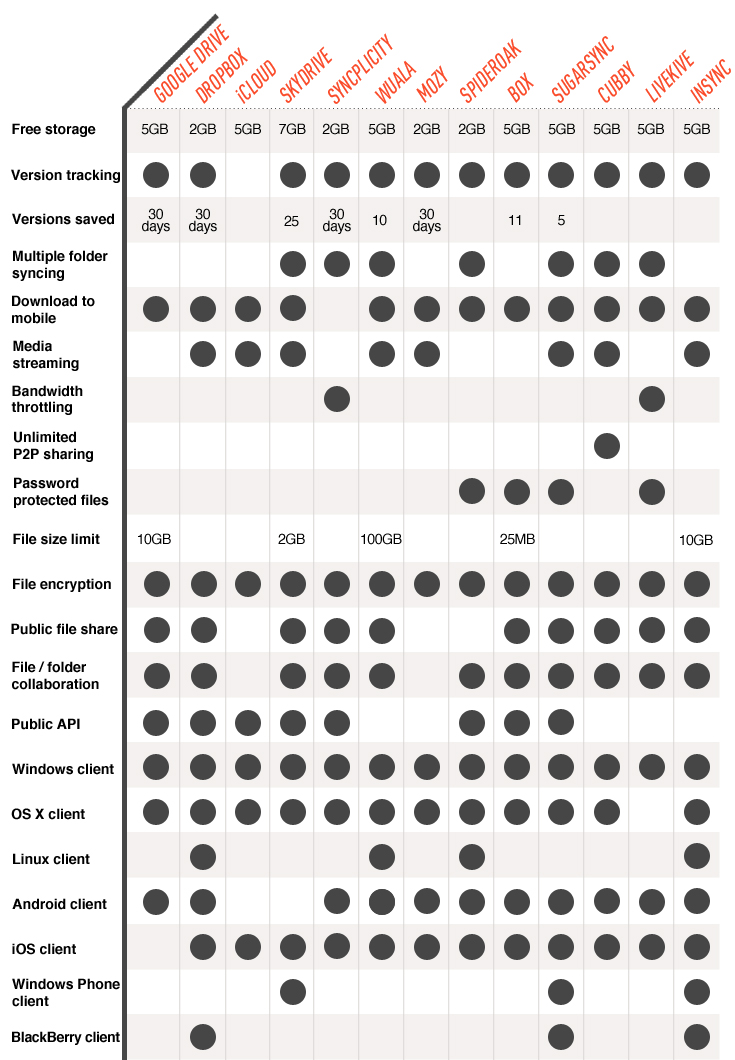
It offers less storage and additional storage is a little more expensive. I do like the 10GB file limit, OCR scanning, support for many formats and good integration with gdocs, gmail, etc. However Skydrive supports streaming media, you can sync multiple folders instead of just one, supports most the popular file formats, and allows you to connect to your remote PC and retrieve a file even if it wasn't synced with skydrive. Also there's 3 skydrive apps for android that you can get here
https://apps.live.com/skydrive/allapps
http://www.theverge.com/2012/4/24/29...ge-competition
While Google Drive isn't much more than a Docs rebranding that syncs to a folder on your computer, it has a few key features that make it worth checking out. First, Drive can open up to 30 kinds of files right inside your browser. Dropbox and a few others open files inside a "web gallery," but Drive opens Photoshop files — even if you don't have Photoshop on your computer. To this extent, Drive creates a QuickLook-esque experience inside your web browser that makes it much easier to thumb through files. Drive also includes an option to turn on OCR text scanning, which means that when you upload images to Drive, Google will scan the images for text and make them searchable (similar to Evernote Premium).
In terms of everyday use, Drive offers the same drag-and-drop syncing as Dropbox, and lets you pick which folders inside Drive you want to sync from within the desktop app. Also like Dropbox, you cannot pick other folders on your computer to sync to Drive. In this way, Drive's real strengths lie on the web and with the features we previously mentioned. It'll also tie right in to Google+, Gmail, Android, and other Google services that will let you drop-in or upload files (almost like you might with attachments inside Sparrow for Mac, which can instantly upload attachments to CloudApp). Additionally, Drive features a built-in document editor on par with Microsoft's online Office suite that's part of SkyDrive. You can't yet use Drive with multiple Google accounts, which is a pain, but we'd expect that feature in due time.
Drive launches on the web, for Mac, Windows, and Android devices today, with iOS support on the way "in the coming weeks." The Android app (which replaces Google Docs) won't stream your content, however, unlike some competitors like Dropbox and SugarSync. For a full hands-on of Google Drive, click here. Pricing: Drive comes with 5GB of storage free, with generous upgrade options like $2.49/month for 25GB of extra storage and $4.99/month for 100GB of storage. Pricing: 25GB for $2.49/month; 100GB for $4.99/month; 200GB for $9.99/month; more options from Google.
In terms of everyday use, Drive offers the same drag-and-drop syncing as Dropbox, and lets you pick which folders inside Drive you want to sync from within the desktop app. Also like Dropbox, you cannot pick other folders on your computer to sync to Drive. In this way, Drive's real strengths lie on the web and with the features we previously mentioned. It'll also tie right in to Google+, Gmail, Android, and other Google services that will let you drop-in or upload files (almost like you might with attachments inside Sparrow for Mac, which can instantly upload attachments to CloudApp). Additionally, Drive features a built-in document editor on par with Microsoft's online Office suite that's part of SkyDrive. You can't yet use Drive with multiple Google accounts, which is a pain, but we'd expect that feature in due time.
Drive launches on the web, for Mac, Windows, and Android devices today, with iOS support on the way "in the coming weeks." The Android app (which replaces Google Docs) won't stream your content, however, unlike some competitors like Dropbox and SugarSync. For a full hands-on of Google Drive, click here. Pricing: Drive comes with 5GB of storage free, with generous upgrade options like $2.49/month for 25GB of extra storage and $4.99/month for 100GB of storage. Pricing: 25GB for $2.49/month; 100GB for $4.99/month; 200GB for $9.99/month; more options from Google.
It offers less storage and additional storage is a little more expensive. I do like the 10GB file limit, OCR scanning, support for many formats and good integration with gdocs, gmail, etc. However Skydrive supports streaming media, you can sync multiple folders instead of just one, supports most the popular file formats, and allows you to connect to your remote PC and retrieve a file even if it wasn't synced with skydrive. Also there's 3 skydrive apps for android that you can get here
https://apps.live.com/skydrive/allapps
http://www.theverge.com/2012/4/24/29...ge-competition

I have used Microsoft's Windows Live Mesh program for a few years now to sync files between my desktop and laptop. No cloud storage, unlimited data transfer. Now they have fully switched Windows Live Mesh to SkyDrive. Full cloud storage, 7 GB limit for free. No way to sync folders from PC-to-PC without the cloud. 7 GB isn't enough for me and I'm already paying for more storage on Google Drive. I just need PC-to-PC sync. Does anyone have any suggestions for other syncing applications?

Thread Starter
Sanest Florida Man
Joined: Aug 2007
Posts: 45,850
Likes: 11,669
From: Florida
Just keep using Mesh, they haven't cancelled the service. Don't update to Windows Essentials 2012 and it will not uninstall Mesh.
You just can't use Mesh and skydrive. they may add the PC-to-PC features to skydrive in a future update, there's is demand for it. I'd like it.
Also as a mentioned earlier in this thread if you'd ever used skydrive before then you got a free upgrade to 25GB, you may still be able to get it if you log into skydrive and see.
https://skydrive.live.com/ManageStorage
You just can't use Mesh and skydrive. they may add the PC-to-PC features to skydrive in a future update, there's is demand for it. I'd like it.
Also as a mentioned earlier in this thread if you'd ever used skydrive before then you got a free upgrade to 25GB, you may still be able to get it if you log into skydrive and see.
https://skydrive.live.com/ManageStorage
Last edited by #1 STUNNA; Aug 14, 2012 at 05:06 PM.
So I found Windows Live Essentials 2011 still on Microsoft.com and uninstalled 2012 and reinstalled 2011. I now have Live Mesh and SkyDrive, so it's be best of both worlds!


Team Owner


Joined: Jan 2001
Posts: 25,967
Likes: 2,685
From: Jersey
 SkyDrive
Long live OneDrive
http://www.zdnet.com/microsoft-rechr...ve-7000025617/
https://preview.onedrive.com/

Thread Starter
Sanest Florida Man
Joined: Aug 2007
Posts: 45,850
Likes: 11,669
From: Florida
Yeah, not a bad name change, much better than I expected. I still like SkyDrive better but it could've been worse
Supposedly the verge held a contest months back to come up with the replacement name and OneDrive was the winner. I guess MS listened...
Supposedly the verge held a contest months back to come up with the replacement name and OneDrive was the winner. I guess MS listened...


Thread
Thread Starter
Forum
Replies
Last Post
AcuraKidd
Non-Automotive & Motorcycle Sales
0
Sep 25, 2015 11:18 PM
