


Just moved to a mac....external hard drive question


Thread Starter
teh Senior Instigator
Joined: Sep 2000
Posts: 44,094
Likes: 980
From: Huntington Beach, CA -> Ashburn, VA -> Raleigh, NC -> Walnut Creek, CA
Just moved to a mac....external hard drive question
So, moved to a Mac yesterday (i was going to wait for the new macbook in the next few weeks but needed it asap for work; so it was on the company dime).
Well, I've got two external hard drives at home and I want to pull the music and photos off of them and place them on the mac i'm 99% sure both are NTFS. Can I pull these from the externals and drop them on the Mac?
I tried using the migration assistant last night but after 16 hours it had moved barely nothing.
Also, i'm looking to add a new external hard drive that doesn't require me to use a power supply. But I would like this to be able to be used on both mac and PC, is this an option?
Well, I've got two external hard drives at home and I want to pull the music and photos off of them and place them on the mac i'm 99% sure both are NTFS. Can I pull these from the externals and drop them on the Mac?
I tried using the migration assistant last night but after 16 hours it had moved barely nothing.
Also, i'm looking to add a new external hard drive that doesn't require me to use a power supply. But I would like this to be able to be used on both mac and PC, is this an option?

Go Giants


Joined: Aug 2004
Posts: 70,003
Likes: 1,260
From: PA
NTFS permissions on the external drive for the Mac is not good. You will be able to read the data, but not make changes. Format the drives as ExFat if you want to use the drives in both a PC and Mac.

Sanest Florida Man


Joined: Aug 2007
Posts: 46,075
Likes: 11,828
From: Florida
yes.
you can format the external drive in the mac disk utility as exFAT or MS-DOS (FAT). exFAT is the newer better format but it doesn't work out of the box with XP. you can get drivers from the MS site.
http://support.microsoft.com/kb/955704
I'd also recommend exFAT. I have a 1 TB Western digital my Passport external drive that I have formatted as 500GB HFS+ Time Machine backup and 500GB exFAT.
you can format the external drive in the mac disk utility as exFAT or MS-DOS (FAT). exFAT is the newer better format but it doesn't work out of the box with XP. you can get drivers from the MS site.
http://support.microsoft.com/kb/955704
I'd also recommend exFAT. I have a 1 TB Western digital my Passport external drive that I have formatted as 500GB HFS+ Time Machine backup and 500GB exFAT.
Thread Starter
teh Senior Instigator
Joined: Sep 2000
Posts: 44,094
Likes: 980
From: Huntington Beach, CA -> Ashburn, VA -> Raleigh, NC -> Walnut Creek, CA
quick question, i have a 2 TB External (NTFS) with about 1TB of data on it. Do I have to reformat it in order to create a partition? I'm having a hard time figuring out how i'd pull everything off of it in order to reformat the whole thing
Go Giants
Joined: Aug 2004
Posts: 70,003
Likes: 1,260
From: PA
You have two options:
1- Copy everything to another drive (like your OS partition) and then format and copy back. Buy another 1TB drive if needed
2. Gamble with a few utils that claim to convert NTFS to Fat or EXFat without loosing data
3. Some utils to use NTFS on Mac with unknown results - http://ntfsonmac.com/
1- Copy everything to another drive (like your OS partition) and then format and copy back. Buy another 1TB drive if needed
2. Gamble with a few utils that claim to convert NTFS to Fat or EXFat without loosing data
3. Some utils to use NTFS on Mac with unknown results - http://ntfsonmac.com/
Trending Topics
Sanest Florida Man
Joined: Aug 2007
Posts: 46,075
Likes: 11,828
From: Florida
Actually there's a 4th. If you're on (or can find a) Vista/7 PC you might be able to shrink the volume in disk management. Open disk management right click on the partition and choose "shrink volume" depending on how your drive partitions are arranged on that disk it may work. If it works it will leave unallocated space behind that you can format on Mac or PC.

the overexplainer
Joined: Feb 2011
Posts: 3,287
Likes: 385
From: OC, CA
i've used ntfs-3g on OS X and it works pretty well for small files, no more than maybe a few hundred megabytes at most. Larger, sustained data transfers of several gigabytes often failed, and was slow. But, this was maybe a year or two ago.
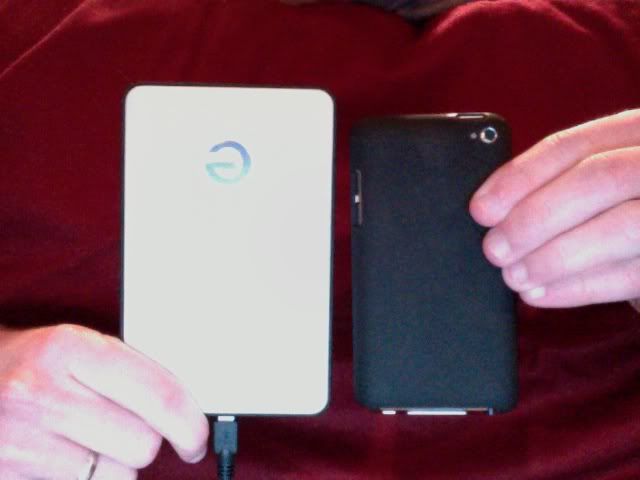
I have a G-Drive slim for my mac. It uses USB 2.0 (which also powers it), it's fairly slow at copying but it's seamless and as soon as you plug it in it starts, no pop ups or anything, just starts backing up. The G-Drive was for the Mac so I'm pretty happy with it.
All plug and play.
Size compared to my 4th Gen iPod Touch. (Hard drive is a 320 GB)
All plug and play.
Size compared to my 4th Gen iPod Touch. (Hard drive is a 320 GB)

Thread
Thread Starter
Forum
Replies
Last Post
rockyboy
2G RDX (2013-2018)
46
Jan 25, 2016 06:00 PM
ja17
Audio, Video, Electronics & Navigation
0
Sep 7, 2015 06:08 PM
