

View Poll Results: which universal remote should I get?
Logitech 890


11
73.33%
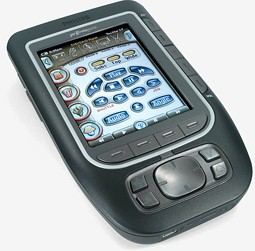
Philips Multimedia control panel


3
20.00%
other (please make suggestion)


1
6.67%
Voters: 15. You may not vote on this poll
which universal remote should I get?


Thread Starter
I Shoot with a Camera


Joined: Oct 2001
Posts: 23,066
Likes: 3,662
From: Vancouver BC
which universal remote should I get?
I kinda already know which is gonna win this poll... but I just wanted to make sure...
Logitech Harmony 890

here's a link to all the features:
http://www.logitech.com/index.cfm/pr...ONTENTID=10930
Philips Multimedia Control Panel Remote

click HERE for Philips' link
Logitech Harmony 890
here's a link to all the features:
http://www.logitech.com/index.cfm/pr...ONTENTID=10930
Philips Multimedia Control Panel Remote
click HERE for Philips' link

Thread Starter
I Shoot with a Camera
Joined: Oct 2001
Posts: 23,066
Likes: 3,662
From: Vancouver BC
I'm gonna look into that one... but the reason why I picked those two is because I have like... $75 credit for (who else?) Costco... and they are carrying those right now... but if this "Pronto" is better... it might just be worth it...
do you know off hand what it has that the other one's don't?
do you know off hand what it has that the other one's don't?

The Philips is nice, but between those two I'd go Logitech. I personally prefer to have the doors to the entertainment center shut even when watching TV, which means the RF signal is the only thing that can penetrate it... so Harmony wins by default....

Team Owner
Joined: Jan 2001
Posts: 25,967
Likes: 2,685
From: Jersey
If you only need line of sight control, consider the Logitech 880. You can get really good deals if you are a little patient and check sites like deals2buy.com daily. Dell was just selling it for about $140 last week.
I have an 880. Its okay. It takes experimentation to get everything setup and I'm not overly thrilled with the button placement. But it does work and I like that it has the LCD so that custom commands can be set. For instance I have one button access to "on demand" and "dvr"
I have an 880. Its okay. It takes experimentation to get everything setup and I'm not overly thrilled with the button placement. But it does work and I like that it has the LCD so that custom commands can be set. For instance I have one button access to "on demand" and "dvr"
Thread Starter
I Shoot with a Camera
Joined: Oct 2001
Posts: 23,066
Likes: 3,662
From: Vancouver BC
...thanks, but I'm kinda leaning towards the Philips cause it would look damn cool sitting on my ottoman or coffee table... I also like the touch screen feature... besides... all my components are out in the open... -no doors
Trending Topics

Intermediate
Joined: Apr 2006
Posts: 27
Likes: 0
Thread Starter
I Shoot with a Camera
Joined: Oct 2001
Posts: 23,066
Likes: 3,662
From: Vancouver BC
Originally Posted by ECPride
..pretty cool, wished Onkyo would do something like that... (I have their A/V receiver)
Thread Starter
I Shoot with a Camera
Joined: Oct 2001
Posts: 23,066
Likes: 3,662
From: Vancouver BC
Originally Posted by doopstr
If you only need line of sight control, consider the Logitech 880. You can get really good deals if you are a little patient and check sites like deals2buy.com daily. Dell was just selling it for about $140 last week.
I have an 880. Its okay. It takes experimentation to get everything setup and I'm not overly thrilled with the button placement. But it does work and I like that it has the LCD so that custom commands can be set. For instance I have one button access to "on demand" and "dvr"
I have an 880. Its okay. It takes experimentation to get everything setup and I'm not overly thrilled with the button placement. But it does work and I like that it has the LCD so that custom commands can be set. For instance I have one button access to "on demand" and "dvr"
..I read a review somewhere, where they said some of those same complaints that you have were fixed with the 890

Thread Starter
I Shoot with a Camera
Joined: Oct 2001
Posts: 23,066
Likes: 3,662
From: Vancouver BC
Originally Posted by Acuraluvr
wow.... what people will pay for a uni. remote.....
it took me 30 mintues for our comcast universal remote to work with our TV
it took me 30 mintues for our comcast universal remote to work with our TV
...so the way I look at it is... it's NOT just buying a uni. remote... but it's something that needs to be purchased to go with the rest of the living room... does that make any sense? It's functional, yet... it'll enhance the room aesthetically... (okay, now I sound really :theghey: LOL but you know what I mean)



is learning to moonwalk i
Joined: Feb 2004
Posts: 15,520
Likes: 3
From: SoCal
Other than adding RF, are there any other differences between the Harmony 880 and 890? You can get the 880 for about $110 shipped after rebate:
Link to site:
http://www.compuplus.com/i-Logitech-...abber.com.html
Link to $50 rebate
http://images.pricegrabber.com/rebates/44306.pdf
And since you said you have line of sight, what are you getting with the 890?
Link to site:
http://www.compuplus.com/i-Logitech-...abber.com.html
Link to $50 rebate
http://images.pricegrabber.com/rebates/44306.pdf
And since you said you have line of sight, what are you getting with the 890?

Thread Starter
I Shoot with a Camera
Joined: Oct 2001
Posts: 23,066
Likes: 3,662
From: Vancouver BC
Originally Posted by svtmike
Let us know how you like it. I'm thinking of getting one of those for the technology-challenged in the house.
...okay, I ordered it last with express delivery, hopefully I'll get it on monday

Thread Starter
I Shoot with a Camera
Joined: Oct 2001
Posts: 23,066
Likes: 3,662
From: Vancouver BC
Originally Posted by svtmike
Let us know how you like it. I'm thinking of getting one of those for the technology-challenged in the house.
..okay, so I got the 880 last week... sorry for the late post... but to be honest... I'm having problems setting it up... I'm pretty sure it's NOT the remote... but it's partially my computer AND ME because I'm NOT very good with computers... I think my computer's firewall is blocking it from Logitech's site for the set up... and YES, I've tried turning the firewall off... but still nothing... I've even called their help desk... and it's really gotten me nowhere... but yet, I don't wanna return it... I think I can (eventually) figure it out... I might have to have a friend that knows this shit (computer stuff) help...
Thread Starter
I Shoot with a Camera
Joined: Oct 2001
Posts: 23,066
Likes: 3,662
From: Vancouver BC
a follow up on the 880
okay, so I finally got it set up... and I LOVE IT! For most things... it's one button and you're all set to go... (be it watching cable, DVD, or XBox) When I was setting it up... I had my doubts on it turning on the Xbox 360, cause the 360 is relatively new... but Logitech's site is constantly updating on new products... (and you program and update through the site)
...anyway, there are some things that took me a little bit to figure out... like after watching a recorded program with the DVR... the screen normally ask you if you want to save or erase... ON the Cox Cable remote... you, normally, would press a yellow triangle button to erase, and a round blue button to save... anyway, that part got a little tricky, cause on the 880... there are no yellow triangle, or blue round button... so I thought at first... if I wanted to do such thing... I'd have to pull the ol' Cox Cable remote out again... but there is a way you just gotta play it and figure it out... but the buttom line is... all the other remotes are now stored away
...anyway, there are some things that took me a little bit to figure out... like after watching a recorded program with the DVR... the screen normally ask you if you want to save or erase... ON the Cox Cable remote... you, normally, would press a yellow triangle button to erase, and a round blue button to save... anyway, that part got a little tricky, cause on the 880... there are no yellow triangle, or blue round button... so I thought at first... if I wanted to do such thing... I'd have to pull the ol' Cox Cable remote out again... but there is a way you just gotta play it and figure it out... but the buttom line is... all the other remotes are now stored away

Thread
Thread Starter
Forum
Replies
Last Post
SinCityTLX
5G TLX (2015-2020)
20
Oct 7, 2015 01:24 PM